1~20 item / All 20 items
Displayed results
Filter by category

Added to bookmarks
Bookmarks listBookmark has been removed
Bookmarks listYou can't add any more bookmarks
By registering as a member, you can increase the number of bookmarks you can save and organize them with labels.
Free membership registrationContact this company
Inquiry FormBefore making an inquiry
Download Profile1~20 item / All 20 items
Filter by category

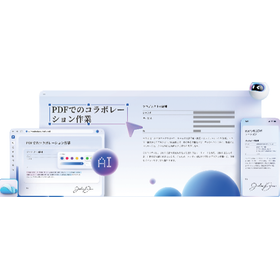
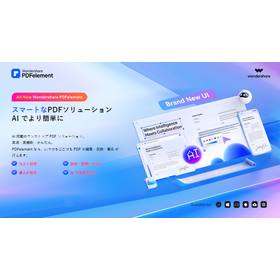
"PDFelement" is a PDF editing software that allows you to create, compress, merge, and convert PDF files all in one place. You can also convert to versatile formats such as Word, Excel, PNG, and JPG with just one click. With the OCR feature, you can quickly digitize paper documents. It is also recommended for promoting digital transformation (DX). Additionally, the AI assistant Lumi supports editing and reading PDF documents. 【Features】 ■ Freely add PDF writing, forms, images, and shapes ■ Convert PDF files to Office formats while maintaining high quality ■ Recognize text from images and scanned paper data ■ Add comments with notes or text ■ Extract, replace, or delete PDF pages *For more details, please download the PDF or feel free to contact us.
Added to bookmarks
Bookmarks listBookmark has been removed
Bookmarks listYou can't add any more bookmarks
By registering as a member, you can increase the number of bookmarks you can save and organize them with labels.
Free membership registration
We would like to introduce a case study where "PDFelement" was implemented at Seiko Corporation in the apparel industry. The company needed to print a large volume of sewing specification sheets annually to send to factories, resulting in increased costs for paper, ink, and leasing. After implementation, the need for paper output and scanning tasks was eliminated, allowing for direct PDF conversion from Excel and data, significantly reducing the production time of sewing specification sheets. [Case Overview] ■ Challenges - Inefficient creation flow of sewing specification sheets due to paper output and handwritten corrections - Insufficient storage space for paper documents, leading to time-consuming searches and sharing of necessary documents ■ Effects After Implementation - Reduction in paper costs, printing costs, and filing tasks due to going paperless - Transition to PDF data management improved the issue of storage space *For more details, please download the PDF or feel free to contact us.
Added to bookmarks
Bookmarks listBookmark has been removed
Bookmarks listYou can't add any more bookmarks
By registering as a member, you can increase the number of bookmarks you can save and organize them with labels.
Free membership registration
We would like to introduce a case where ARC Co., Ltd., a real estate company, implemented "PDFelement" for the creation, editing, and sharing of documents such as sales contracts and important matter explanation documents. The company faced challenges in wanting to manage and share data more smartly both internally and externally. After implementation, they were able to instantly check PDFs with QR codes from their smartphones while on the go, making information sharing much faster. 【Case Overview】 ■Challenges - It took a lot of time to review and revise contracts, resulting in a heavy workload. - Data such as photos and drawings were large, making transmission and management cumbersome. ■Effects After Implementation - Documents edited by multiple personnel could be smoothly reviewed through difference comparison. - The compression feature reduced the size of PDFs for email attachments, streamlining the sending process. *For more details, please download the PDF or feel free to contact us.
Added to bookmarks
Bookmarks listBookmark has been removed
Bookmarks listYou can't add any more bookmarks
By registering as a member, you can increase the number of bookmarks you can save and organize them with labels.
Free membership registration
This document is an introduction summarizing the features and implementation value of the AI-powered one-stop PDF solution "PDFelement." It explains the new features added in V12, such as the ability to switch between multiple AI models, specialized translation, smart redaction, and annotation summarization, as well as key features and differentiating functions. Additionally, it includes industry-specific use cases, implementation value, and rules for consuming AI credits, so please make use of it when selecting a product. [Contents (partial)] ■ About PDFelement ■ Newly added features ■ Key features ■ Differentiating features ■ Implementation value ■ Typical use cases *For more details, please download the PDF or feel free to contact us.
Added to bookmarks
Bookmarks listBookmark has been removed
Bookmarks listYou can't add any more bookmarks
By registering as a member, you can increase the number of bookmarks you can save and organize them with labels.
Free membership registration
We would like to introduce a case where "Filmora" was implemented for creating customer introduction videos for our company’s website at the Sharo-shi Kamimura Office. At this office, it was felt that relying solely on text information made it difficult to convey trust and limited the appeal to customers. However, outsourcing was costly and producing videos in-house was challenging, which posed a problem. After the implementation, cost reduction was achieved through in-house video production. The lightweight software is also appreciated for its low PC load and ease of use. 【Case Overview】 ■ Challenges - Relying only on text information made it difficult to convey trust and limited appeal to customers. - Outsourcing was costly, and in-house production was challenging. ■ Effects after Implementation - Increased consultations and requests from customers through office introduction videos. - Cost reduction achieved through in-house video production. *For more details, please download the PDF or feel free to contact us.
Added to bookmarks
Bookmarks listBookmark has been removed
Bookmarks listYou can't add any more bookmarks
By registering as a member, you can increase the number of bookmarks you can save and organize them with labels.
Free membership registration
At Tokyo University of Pharmacy and Life Sciences, we would like to introduce a case where "Filmora" was implemented for the creation of video teaching materials and classroom support. The school faced challenges as relying solely on paper manuals was insufficient for students' understanding. After the implementation, even students who were new to video editing could use it smoothly without questions, efficiently editing practical videos from 2 hours down to about 10 minutes. This achieved both visual understanding and efficiency. [Case Overview] ■ Challenges - Questions were concentrated among a few students, leading to uneven knowledge sharing. ■ Reasons for Implementation - Simple and intuitive usability made it easy to create video teaching materials. - The recording + narration feature allowed for content supplementation and visualization. - Compatible with both Windows and Mac environments. *For more details, please download the PDF or feel free to contact us.
Added to bookmarks
Bookmarks listBookmark has been removed
Bookmarks listYou can't add any more bookmarks
By registering as a member, you can increase the number of bookmarks you can save and organize them with labels.
Free membership registration
At Koriyama Women's University High School, part of the Koriyama Kaisei Gakuen school corporation, a special class (workshop) utilizing the video editing software "Wondershare Filmora" was conducted. In the special class, in addition to the basics of shooting using actual equipment, the concepts and processes of editing based on television commercials were explained. Students expressed that "the effects in Filmora are abundant, making editing enjoyable," indicating that this was a highly effective educational initiative. 【Case Overview】 ■ Implementation Location: Koriyama Women's University High School, Koriyama Kaisei Gakuen ■ Product Used: Video editing software "Wondershare Filmora" ■ Content: Implementation of a special class (workshop) utilizing Filmora ■ Student Feedback: "The effects in Filmora are abundant, making editing enjoyable." *For more details, please download the PDF or feel free to contact us.
Added to bookmarks
Bookmarks listBookmark has been removed
Bookmarks listYou can't add any more bookmarks
By registering as a member, you can increase the number of bookmarks you can save and organize them with labels.
Free membership registration
"Filmora" is an all-in-one, professional video production platform equipped with AI. As a benefit of its introduction in the video production industry, it allows for the efficient creation of vlogs, reviews, tutorials, and story videos using intuitive tools that simplify the editing process from start to finish. It can also export videos optimized for various platforms such as YouTube, TikTok, and Instagram, accommodating different formats and aspect ratios for distribution across multiple media. [Benefits of Introduction] ■ Streamlines content creation ■ Enhances creative expression ■ Supports distribution across multiple media *For more details, please download the PDF or feel free to contact us.
Added to bookmarks
Bookmarks listBookmark has been removed
Bookmarks listYou can't add any more bookmarks
By registering as a member, you can increase the number of bookmarks you can save and organize them with labels.
Free membership registration
"Filmora" is an all-in-one, professional-grade video production platform equipped with AI. As a benefit of implementation in the promotional and advertising fields, it enables the rapid and efficient production of short content and explanatory videos, achieving agile promotional responses on fast-changing platforms. It accelerates content creation. It generates videos optimized for various channels such as Instagram, TikTok, and YouTube, maximizing reach and brand awareness. [Benefits of Implementation] ■ Improve advertising effectiveness ■ Accelerate content creation ■ Strengthen promotion across multiple media *For more details, please download the PDF or feel free to contact us.
Added to bookmarks
Bookmarks listBookmark has been removed
Bookmarks listYou can't add any more bookmarks
By registering as a member, you can increase the number of bookmarks you can save and organize them with labels.
Free membership registration
"Filmora" is an all-in-one, professional video production platform equipped with AI. As a benefit of implementation in the education sector, it enhances "student engagement" by capturing students' attention with visually rich and dynamic videos, thereby increasing their motivation to learn. It allows for the recording, editing, and structuring of lesson videos, supporting flexible remote education and making learning easier anytime and anywhere. [Benefits of Implementation] ■ Increased student engagement ■ Improved educational efficiency ■ Promotion of remote classes *For more details, please download the PDF or feel free to contact us.
Added to bookmarks
Bookmarks listBookmark has been removed
Bookmarks listYou can't add any more bookmarks
By registering as a member, you can increase the number of bookmarks you can save and organize them with labels.
Free membership registration
"Filmora" is a video editing software supported by over 30 types of AI features. Advanced editing such as cropping, color adjustment, transcription, and audio separation is automatically processed by AI. From generation to finishing, it completes tasks smartly without hassle. In addition to basic video editing functions that are easy to operate even for beginners, it also includes professional-grade editing features that do not compromise on video quality and work efficiency. [Basic Video Editing Functions] ■ Video trimming and cutting ■ Adding text to videos ■ Adjusting audio and music in videos ■ Supporting various export formats *For more details, please download the PDF or feel free to contact us.
Added to bookmarks
Bookmarks listBookmark has been removed
Bookmarks listYou can't add any more bookmarks
By registering as a member, you can increase the number of bookmarks you can save and organize them with labels.
Free membership registration
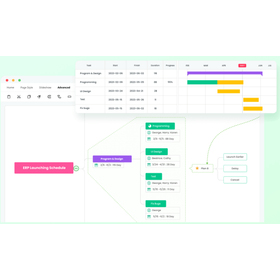
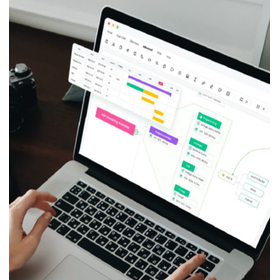
"EdrawMind" is a tool that makes it easy to create mind maps and accelerates your ideas. It analyzes various file formats in seconds, automatically organizes the structure, and instantly converts it into a mind map. AI supports brainstorming, quickly expanding free ideas and promoting flexible thinking. Additionally, it can convert mind maps into Gantt charts with one click, allowing for intuitive and smart project management. 【Features】 ■ Instant mind map creation through AI file analysis ■ AI-generated mind maps to accelerate ideas ■ Efficient task management with AI Gantt charts ■ Instant presentation preparation with AI slide generation *For more details, please download the PDF or feel free to contact us.
Added to bookmarks
Bookmarks listBookmark has been removed
Bookmarks listYou can't add any more bookmarks
By registering as a member, you can increase the number of bookmarks you can save and organize them with labels.
Free membership registration
"EdrawMind" is a thinking organization tool that structures and visualizes knowledge, ideas, and information to enhance understanding and learning efficiency. For HR, management departments, and related positions, it can be used for progress management, brainstorming, collaboration, logical organization, team management, and visualizing organizational structures. Equipped with team management features, it streamlines group creation, permission settings, and file sharing, enabling smooth collaboration among members. [Usage Scenarios] - Progress management, brainstorming, collaboration - Logical organization, team management, visualizing organizational structures *For more details, please download the PDF or feel free to contact us.
Added to bookmarks
Bookmarks listBookmark has been removed
Bookmarks listYou can't add any more bookmarks
By registering as a member, you can increase the number of bookmarks you can save and organize them with labels.
Free membership registration
"EdrawMind" is a thinking organization tool that structures and visualizes knowledge, ideas, and information, enhancing comprehension and learning efficiency. It is suitable for product marketing-related roles such as product managers, marketing, sales, operations, testing, and analysis, with use cases including needs analysis, accumulation of experiences, recording ideas, and learning and sharing. It also supports implementation in private environments, ensuring data security and service stability. This allows for more efficient collaboration within teams. [Use Cases] ■ Needs Analysis ■ Accumulation of Experiences, Recording Ideas, Learning and Sharing *For more details, please download the PDF or feel free to contact us.
Added to bookmarks
Bookmarks listBookmark has been removed
Bookmarks listYou can't add any more bookmarks
By registering as a member, you can increase the number of bookmarks you can save and organize them with labels.
Free membership registration
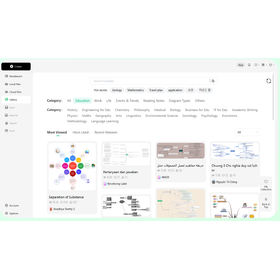
"EdrawMind" is a thinking organization tool that structures and visualizes knowledge, ideas, and information, enhancing comprehension and learning efficiency. It is designed for educational stakeholders such as students, teachers, and researchers, and is applicable in scenarios like knowledge management (exam preparation, knowledge sharing, lesson planning, course management) and creating study notes (reading organization, error analysis, book summaries, outline structuring). It comes equipped with numerous templates covering a wide range of fields, from study materials for exam preparation to best-selling books, classic humanities works, and practical guides. [Usage Scenarios] ■ Knowledge Management: Exam preparation, knowledge sharing, lesson planning, course management ■ Study Note Creation: Reading organization, error analysis, book summaries, outline structuring *For more details, please download the PDF or feel free to contact us.
Added to bookmarks
Bookmarks listBookmark has been removed
Bookmarks listYou can't add any more bookmarks
By registering as a member, you can increase the number of bookmarks you can save and organize them with labels.
Free membership registration
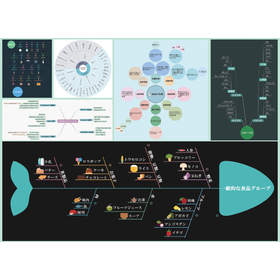
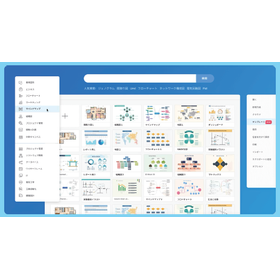
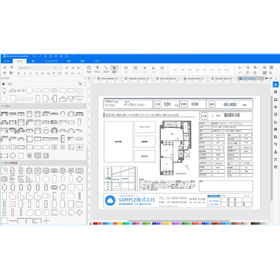
"EdrawMax" is an all-in-one drawing software specialized for diagramming and drafting tasks. You can easily create over 280 types of diagrams, including flowcharts, mind maps, organizational charts, circuit diagrams, and floor plans. It comes equipped with templates designed for various industries and over 50,000 shapes. You can export to various formats such as PDF, Office (Word, Excel, PPT), SVG, and images (JPG/PNG) with just one click. 【Features】 ■ Create over 280 types of multifunctional diagrams ■ Intuitive operation for easy diagram creation by anyone ■ Abundant templates and shape library ■ Support for export to multiple formats *For more details, please download the PDF or feel free to contact us.
Added to bookmarks
Bookmarks listBookmark has been removed
Bookmarks listYou can't add any more bookmarks
By registering as a member, you can increase the number of bookmarks you can save and organize them with labels.
Free membership registration
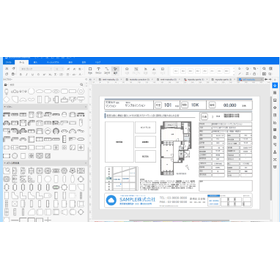
We would like to introduce a case study of the implementation of "EdrawMax" by Lives Inc., a condominium developer. The company faced challenges such as varying software usage and quality across departments, high outsourcing costs, and difficulties in maintaining ongoing support. After implementation, high-quality property brochures became possible regardless of individual staff skills. By bringing the process in-house instead of outsourcing, they significantly reduced costs and increased responses in their sales activities. 【Case Overview】 ■ Purpose: Standardization and efficiency of creating property brochures (sales drawings) for investment properties ■ Challenges: Lack of human resources for brochure production and variations in quality ■ Reason for Implementation: Intuitive operation that is easy for PC beginners to handle ■ Effects After Implementation: Significant cost reduction through in-house production and improved quality *For more details, please download the PDF or feel free to contact us.
Added to bookmarks
Bookmarks listBookmark has been removed
Bookmarks listYou can't add any more bookmarks
By registering as a member, you can increase the number of bookmarks you can save and organize them with labels.
Free membership registration
We would like to introduce a case where the real estate company Family Co., Ltd. has implemented "EdrawMax." The company faced challenges in creating complex shapes and curves, managing the input and output of materials, and experiencing slow PC performance during work. After implementation, they were able to easily create floor plans with drag-and-drop operations, and the use of templates, icons, and color schemes improved the design quality of their property brochures. Overall work efficiency in document creation has also improved. 【Case Overview】 ■ Purpose: Streamlining the production of property brochures (sales drawings) and improving quality ■ Challenges: Frequent operational errors and difficulty in creating complex shapes and detailed objects ■ Reason for Implementation: Significant improvement in work efficiency due to a wealth of templates and materials ■ Effects After Implementation: Improved design quality of brochures and increased efficiency in document creation *For more details, please download the PDF or feel free to contact us.
Added to bookmarks
Bookmarks listBookmark has been removed
Bookmarks listYou can't add any more bookmarks
By registering as a member, you can increase the number of bookmarks you can save and organize them with labels.
Free membership registration
This document is an introduction that summarizes the features and case studies of the chart creation tool "EdrawMax," which specializes in visualizing specialized information. As benefits for corporations, it explains high cost performance, support for various file formats, flexible cross-platform licensing, and security and compliance. It also includes usage scenarios by job type and industry, as well as pricing plans, which can be used as reference material when considering implementation. 【Contents (partial)】 ■About Wondershare ■Introduction to EdrawMax ■Reasons for choosing EdrawMax ■New features in V15 ■Product highlights *For more details, please download the PDF or feel free to contact us.
Added to bookmarks
Bookmarks listBookmark has been removed
Bookmarks listYou can't add any more bookmarks
By registering as a member, you can increase the number of bookmarks you can save and organize them with labels.
Free membership registration
Wondershare Software Co., Ltd. will hold a free online seminar to promote daily document operations and paperless initiatives while keeping costs down, utilizing the PDF editing software 'PDFelement'. This seminar will focus on the common challenge faced by many companies and organizations: "digitizing analog information." We will provide detailed guidance on specific steps to efficiently convert paper materials into digital data, as well as safe methods for implementing paperless operations with security ensured. We sincerely look forward to your participation. 【Event Overview】 ■ Date and Time: April 3, 2026 (Friday) 15:00 - 15:40 ■ Participation Fee: Free (pre-registration required) ■ Format: Online (Zoom) *For more details, please download the PDF or feel free to contact us.
Added to bookmarks
Bookmarks listBookmark has been removed
Bookmarks listYou can't add any more bookmarks
By registering as a member, you can increase the number of bookmarks you can save and organize them with labels.
Free membership registration