1~6 item / All 6 items
Displayed results

Added to bookmarks
Bookmarks listBookmark has been removed
Bookmarks listYou can't add any more bookmarks
By registering as a member, you can increase the number of bookmarks you can save and organize them with labels.
Free membership registration
Contact this company
Inquiry Form1~6 item / All 6 items
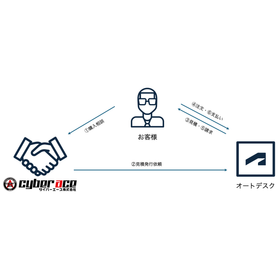
Starting from November 2024, the method for purchasing Autodesk subscriptions has changed. If you are having trouble with contract renewals or new contracts for Autodesk subscription products, please contact us. The process for purchasing Autodesk subscriptions starting from November 2024: 1. The customer consults Cyber Ace for a purchase inquiry (request for a quote). 2. Cyber Ace arranges proposals and quotes tailored to the customer's needs. 3. Autodesk sends the quote to the customer. 4. The customer reviews the quote and proceeds with the order. 5. Autodesk issues an invoice to the customer. 6. The customer makes the payment to Autodesk.
Added to bookmarks
Bookmarks listBookmark has been removed
Bookmarks listYou can't add any more bookmarks
By registering as a member, you can increase the number of bookmarks you can save and organize them with labels.
Free membership registration
At Cyber Ace, we offer a "CAD Data Conversion Service" to convert your existing data into your desired data format. You can trust us with high-precision conversion data and large volumes of data. We provide a free conversion test in advance, so you can request our services with confidence. We respond to inquiries and provide estimates on the same day. Additionally, we will responsibly delete the data we handle after conversion. 【For those struggling with CAD data issues】 ■ Unable to open CAD data received from a business partner ■ Can open the data, but the conversion accuracy is poor ■ Cannot use old CAD data after upgrading CAD software *For more details, please see the external link page or feel free to contact us.
Added to bookmarks
Bookmarks listBookmark has been removed
Bookmarks listYou can't add any more bookmarks
By registering as a member, you can increase the number of bookmarks you can save and organize them with labels.
Free membership registration
IRONCAD is a 3D CAD suitable for conceptual design. It allows for direct modeling through drag and drop, enabling you to edit parts and holes as you wish. Additionally, by utilizing the powerful movement tool called "TriBall," which is a characteristic feature of IRONCAD, you can easily perform designs that would be very difficult to replicate in other 3D CAD software. Since there is almost no distinction between assembly files and part files, top-down design is possible just like in 2D design. Please take advantage of the 30-day free trial to experience the power of IRONCAD.
Added to bookmarks
Bookmarks listBookmark has been removed
Bookmarks listYou can't add any more bookmarks
By registering as a member, you can increase the number of bookmarks you can save and organize them with labels.
Free membership registration
We provide support for the introduction of Autodesk Inventor. 【CAD Training】 Training using original texts 【CAD Support】 Assistance when you don't understand the operation or encounter errors 【Implementation Consulting】 Consultation on 3D design rules and environment setup 【3D Data Creation】 Creation of 3D models from 2D drawings Creation of assembly drawings (such as instruction manuals)
Added to bookmarks
Bookmarks listBookmark has been removed
Bookmarks listYou can't add any more bookmarks
By registering as a member, you can increase the number of bookmarks you can save and organize them with labels.
Free membership registration
It is characterized by ease of use that allows you to start designing immediately as long as you can use Windows, and high performance that enables smooth operation of large assemblies.
Added to bookmarks
Bookmarks listBookmark has been removed
Bookmarks listYou can't add any more bookmarks
By registering as a member, you can increase the number of bookmarks you can save and organize them with labels.
Free membership registration
We provide support for the introduction of SolidWorks. 【CAD Training】 Training using our original text 【CAD Support】 Assistance when you don't understand the operation or encounter errors 【Implementation Consulting】 Consultation on 3D design rules and environment setup 【3D Data Creation】 Creation of 3D models from 2D drawings and assembly diagrams (such as manuals).
Added to bookmarks
Bookmarks listBookmark has been removed
Bookmarks listYou can't add any more bookmarks
By registering as a member, you can increase the number of bookmarks you can save and organize them with labels.
Free membership registration
