Mirroring devices with complex settings are popular in both schools and companies.
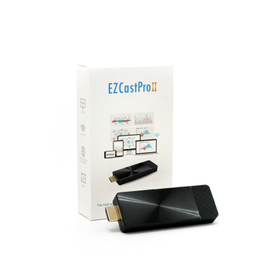
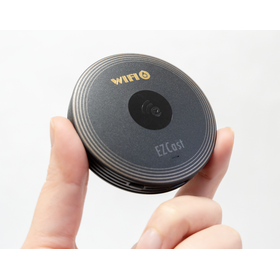
This is a multi-OS / 4K compatible mirroring and media streaming dongle. In addition to stable regular mirroring, the following features can also be configured: * Administrator Function You can select the projector. There are many settings menus that only administrators can access. * Quad-Split Screen In schools or companies, you can project four devices simultaneously, allowing for comparison of four participants on one screen. * Multicast By connecting multiple receiving devices to the EZCast Pro2, simultaneous screen mirroring from one to multiple devices is possible. * AirView Function The projected screen can be received on students' iPads and other devices. * Additionally, it is equipped with many more features that we cannot fully introduce here. Please feel free to contact us.
Inquire About This Product
basic information
Hardware Specifications Resolution: 1280x720 (50/60P) 1920x1080 (24/50/60P) 3840x2160 (24/25/30P)* 4096x2160 (24P)* Video Output Terminal: HDMI (HDMI 1.4) Wi-Fi: Wi-Fi Band: 5GHz/2.4GHz 5GHz Band: W52 (channels 36, 40, 44, 48)* Channels W53 and W56 are not available. 2.4GHz Band: channels 1-11 Power: Power Consumption 5V/1.5A, supports power supply via USB Type-C power cable USB power adapter for connecting the power cable is not included. Please prepare a USB power adapter that supports 1.5A or more. Operating Temperature: 0~40℃ Weight: Dongle body: 31g Product including outer box: 100g Size: Dongle body: L 97mm x W 32mm x H 12mm (excluding HDMI connector) Outer box: L 133mm x W 80mm x H 30mm
Price information
19,800 yen (excluding tax)
Price range
P2
Delivery Time
P2
※The delivery time varies depending on the quantity, so please feel free to contact us.
Applications/Examples of results
I want to easily mirror multiple devices and multiple operating systems in meetings and classes with centralized management. With EZCast Pro2, you can achieve the optimal mirroring environment from each OS. "I can't introduce devices due to network and security restrictions." With "just plug and project," you can project without integrating into the existing network, making it widely usable in educational settings (you can try a demo unit in advance).
Detailed information
-
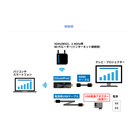
Projection method: * Connect the EZCast Pro2 to the monitor (TV/projector/monitor via HDMI) and to a power outlet (5V1.5A). * Once the home screen appears, project from your mobile device (PC/tablet/smartphone).
Line up(1)
| Model number | overview |
|---|---|
| EZCast Pro2 |
Company information

Our company operates as a solution provider for electronics engineering connecting Japan and Taiwan, developing businesses in high-tech fields such as IT equipment and semiconductors (ICs). Additionally, in Japan, we offer caregiving support services to meet the demands of the times. Please feel free to contact us if you have any inquiries.



![[Column] What is "Design Engineering"?](https://image.mono.ipros.com/public/product/image/b82/2001537877/IPROS14756964493319126745.jpg?w=280&h=280)