We have compiled a list of manufacturers, distributors, product information, reference prices, and rankings for Creation tools.
ipros is IPROS GMS IPROS One of the largest technical database sites in Japan that collects information on.

Creation tools Product List and Ranking from 67 Manufacturers, Suppliers and Companies | IPROS GMS

Last Updated: Aggregation Period:Feb 18, 2026~Mar 17, 2026
This ranking is based on the number of page views on our site.

Creation tools Manufacturer, Suppliers and Company Rankings

Last Updated: Aggregation Period:Feb 18, 2026~Mar 17, 2026
This ranking is based on the number of page views on our site.

  1. null/null
  2. 日本ケイデンス・デザイン・システムズ社 Kanagawa//software
  3. NEXTOPT Tokyo//Information and Communications
  4. テガラ Shizuoka//Trading company/Wholesale
  5. 5 Scene Tokyo//software

Creation tools Product ranking

Last Updated: Aggregation Period:Feb 18, 2026~Mar 17, 2026
This ranking is based on the number of page views on our site.

  1. Video manual creation tool '3T's'
  2. Non-structured lattice automatic creation tool 'HEXPRESS/Hybrid' 日本ケイデンス・デザイン・システムズ社
  3. 90% reduction in manual labor! AI automatic analysis that only requires uploading smartphone videos. NEXTOPT
  4. Vizcom: A tool that allows you to create 3D designs from sketches. テガラ
  5. 5 3D document tool "3D Docs" Scene

Creation tools Product List

61~85 item / All 85 items

Displayed results

Deformed map creation tool

A tool for creating maps easily and beautifully.

Based on the Mapple map database, you can easily create simplified maps for publications such as flyers and magazines, as well as guide maps for websites, in a short amount of time. ■ Create simplified maps from a national database ■ Batch create multiple simplified maps ■ Choose from multiple basic designs

  • Other information systems
  • Printing/Publishing
  • Creation tools

Added to bookmarks

Bookmarks list

Bookmark has been removed

Bookmarks list

You can't add any more bookmarks

By registering as a member, you can increase the number of bookmarks you can save and organize them with labels.

Free membership registration

Settlement Robot

Automatically generate corporate tax returns from accounting data.

The "Settlement Robot" is an automated corporate tax return creation tool that allows multiple users to access and edit simultaneously while sharing information. Being cloud-based, it ensures complete security and ample data capacity. You can access it from anywhere as long as you have the internet. Additionally, the separate tables are carefully selected according to the National Tax Agency's guidelines. On the PC screen, we utilize "tab switching" and "collapsing" features to make it intuitive and easy to understand. 【Features】 ■ Work can be done from home as everything is completed in the cloud ■ No restrictions on accounts ■ Data can be shared easily *For more details, please download the PDF or feel free to contact us.

  • Company:ROBON
  • Price:Other
  • Accounting and Finance
  • Creation tools

Added to bookmarks

Bookmarks list

Bookmark has been removed

Bookmarks list

You can't add any more bookmarks

By registering as a member, you can increase the number of bookmarks you can save and organize them with labels.

Free membership registration

IBM i Graphical PDF Creation Tool 'UT/400-iPDC'

It is a high-function graphical PDF creation tool that operates in the IBM i (AS/400) environment.

The "UT/400-iPDC" is a graphical PDF creation tool that differs from conventional products that simply convert to PDF. It creates expressive graphical PDF files. Since it generates PDF formats compliant with Acrobat using a unique engine, there is no need for dedicated servers. By converting to PDF, it enables the utilization of forms in various scenarios and contributes to the promotion of telework. 【Features】 ■ Converts duplicate slips from dedicated core printers to cut sheets for open printers ■ Converts dedicated label paper from label-specific machines to general-purpose label paper for open printers ■ Neatly layouts printed information on pre-printed paper with fine-tuning functions ■ Supports various business requirements with a wide range of options *For more details, please download the PDF or feel free to contact us.

  • Development support tools (ICE, emulators, debuggers, etc.)
  • Creation tools

Added to bookmarks

Bookmarks list

Bookmark has been removed

Bookmarks list

You can't add any more bookmarks

By registering as a member, you can increase the number of bookmarks you can save and organize them with labels.

Free membership registration

Outdoor line drop fiber optic V-shaped creation tool

The winding of the support line for the V-shaped construction method becomes easier.

We handle the "Outdoor Line and Drop Fiber Optic V-Shape Creation Tool." During the replacement of outdoor lines and drop fiber optics for service activation and repair, the V-Shape method, which is a countermeasure to prevent disconnection failures, allows for easy winding of support lines, thereby improving work efficiency. Please feel free to contact us if you have any requests. 【Features】 ■ NTT East Japan approved product ■ Can also attach a strap *For more details, please download the PDF or feel free to contact us.

  • Other work tools
  • Creation tools

Added to bookmarks

Bookmarks list

Bookmark has been removed

Bookmarks list

You can't add any more bookmarks

By registering as a member, you can increase the number of bookmarks you can save and organize them with labels.

Free membership registration

Forgers Inc.

RITTAI MANUAL

This is a tool that allows you to easily create and share "Rittai-style" manuals using 3D data on the web. It can convey procedures, functions, and usage more clearly than existing materials, and is primarily deployed in the manufacturing, infrastructure, and construction industries. (Case studies: Aisin, Ebara Corporation, etc.) It can be used for work instructions, maintenance manuals, presentation sales materials, and more.

Added to bookmarks

Bookmarks list

Bookmark has been removed

Bookmarks list

You can't add any more bookmarks

By registering as a member, you can increase the number of bookmarks you can save and organize them with labels.

Free membership registration

Video creation tool "Media Doctor"

Unlimited easy video creation!

"Media Doctor" is a video creation tool that allows for easy production of branding videos, promotional videos, internal communication videos, and advertisement videos. You can perform everything from simple video creation to convenient editing features and utilizing the created videos in a one-stop manner. Please feel free to contact us if you have any requests. 【Features】 ■ Multi-device support ■ No software download required ■ Original themes ■ Over 2000 background music tracks ■ Background music upload ■ Fixed logo display ■ Subtitle insertion feature ■ Real-time preview, etc. *For more details, please download the PDF or contact us.

  • Other information systems
  • Creation tools

Added to bookmarks

Bookmarks list

Bookmark has been removed

Bookmarks list

You can't add any more bookmarks

By registering as a member, you can increase the number of bookmarks you can save and organize them with labels.

Free membership registration

[Patent Obtained] Business flow creation tool 'BPM+' for practitioners.

Supporting proactive BPR with a new idea patent system created by a system, not by people.

"BPM+" is an automatic creation tool that instantly reflects answers to questions from the system as a flow (BPMN). The created BPMN can be used not only as a starting point for business improvement but also for necessary business manuals in training and handovers, as well as design documents in system upgrades. It is especially recommended for companies facing issues such as: - "Lack of experience and understanding in how to create and proceed." - "Formats vary greatly among individuals, and there is no consistency in the usage of symbols and notations." - "While there are creation skills, the workload at hand is overwhelming." 【Features】 - Simply answer questions to create BPMN "intuitively, easily, and for anyone." - The recommendation word feature predicts the next business tasks and supports business selection. - By quantifying business processes, it enables specific analysis and improvement planning. *BPM+ is a patented service (Registration date: August 27, 2024) Patent No. 7545132 / International Application PCT/JP2024/18362 / Registered Trademark No. 6300054 *For more details, please feel free to contact us.

  • Software (middle, driver, security, etc.)
  • Creation tools

Added to bookmarks

Bookmarks list

Bookmark has been removed

Bookmarks list

You can't add any more bookmarks

By registering as a member, you can increase the number of bookmarks you can save and organize them with labels.

Free membership registration

[Explanatory Material] What are the Advantages and Disadvantages of Turning Internal Manuals into Videos?

"How do you create an internal manual for videos?" We will solve this question by introducing examples from three companies.

Paper manuals that consist only of images and text have the drawback of being difficult to convey know-how, tips, and subtle nuances. This document introduces three companies that have successfully improved work efficiency through video manuals. It also includes the advantages and disadvantages of creating videos, as well as tips for doing so. Additionally, we provide detailed information about our feature-rich video creation tool, "Photron-Mobile Video Creator." We encourage you to read it. [Contents (excerpt)] ■ Three case studies/samples of internal manuals turned into videos ■ Advantages and disadvantages of converting internal manuals into videos ■ Three steps to create internal video manuals ■ Tips for creating internal video manuals *For more details, please refer to the PDF document or feel free to contact us. *We are currently seeking trading companies and sales agents.

  • Embedded applications for mobile phones and PDAs
  • Creation tools

Added to bookmarks

Bookmarks list

Bookmark has been removed

Bookmarks list

You can't add any more bookmarks

By registering as a member, you can increase the number of bookmarks you can save and organize them with labels.

Free membership registration

High-quality slide creation tool 'think-cell chart'

Enhance the completeness of the charts to increase the persuasiveness of the materials!

Are you spending too much time creating PowerPoint presentations? With think-cell chart, you can easily create persuasive, high-quality slides. It is an add-on software that adds table creation and layout features to Microsoft PowerPoint. Tables are automatically and in real-time generated in PowerPoint based on spreadsheets, and you can intuitively add annotations and adjust layouts with mouse operations. It supports various types of graphs, allowing for effective differentiation based on usage. It has powerful data linking features with Microsoft Excel, as well as layout functions such as shape creation and slide swapping via drag and drop, making it highly user-friendly. It is a standard tool adopted by consulting firms and investment banks around the world.

  • Other PCs and OA equipment
  • Creation tools

Added to bookmarks

Bookmarks list

Bookmark has been removed

Bookmarks list

You can't add any more bookmarks

By registering as a member, you can increase the number of bookmarks you can save and organize them with labels.

Free membership registration

Safety Design Free Layout Creation Tool

The online tool "Safety Design," which allows you to easily create layouts for safety fences and barriers, has finally been released!

I want to create a safe environment. To meet that request, we have released an online tool called "Safety Design," which allows you to easily create layouts for safety fences and barriers. It is available for anyone to use free of charge. With intuitive operations, you can place fences and barriers on a drawing, enabling you to create layouts that meet the needs of the site. You can also easily request estimates. User-friendly: We focused on ease of use that allows for intuitive operation. Even beginners can easily create layout drawings. Wide range of products: We offer a variety of safety products needed in various locations, from around machinery to warehouses. You can search for necessary safety items, such as safety fences and pedestrian barriers, using the catalog feature. Safety products for warehouses: Ensuring safety in warehouses has become easier. We provide the necessary tools to protect the safety of the work environment, including safety fences, fall prevention devices, and impact protectors. Comprehensive support and estimates: If you need assistance, our support team is here to help. You can also easily request estimates for the layouts you create. You can create safety with your own hands, tailored to various requirements.

  • Other safety and hygiene products
  • Creation tools

Added to bookmarks

Bookmarks list

Bookmark has been removed

Bookmarks list

You can't add any more bookmarks

By registering as a member, you can increase the number of bookmarks you can save and organize them with labels.

Free membership registration

Tool "UaModeler/UaExpert"

Improve developer productivity and efficiency! Debugging of sites and applications is possible.

We would like to introduce 'UaModeler/UaExpert' handled by B7 Corporation. 'UaModeler' is a tool for creating information models for OPC UA, which works in conjunction with the OPC UA SDK to generate source code from models. Models can be saved in XML format, and editing or modifications are also possible. 'UaExpert' is a convenient tool for testing and learning OPC UA, allowing for data access, alarm & condition handling, historical access, and method calls. 【Features】 <UaModeler> ■ Graphical design of address space ■ Ability to add nodes and references, and edit attributes ■ Code generation with a single button click ■ Creation of code compatible with various languages and frameworks ■ Saving and modifying standard models or custom models in XML format *For more details, please refer to the related links or feel free to contact us.

  • Company:B7
  • Price:Other
  • Development support tools (ICE, emulators, debuggers, etc.)
  • Creation tools

Added to bookmarks

Bookmarks list

Bookmark has been removed

Bookmarks list

You can't add any more bookmarks

By registering as a member, you can increase the number of bookmarks you can save and organize them with labels.

Free membership registration

Manual creation tool "Help Dog Manual"

Visualizing business operations! Achieving a smart way of working where each team member can thrive and be active.

The manual creation tool "Help Dog Manual" (formerly known as "Toaster Team") is an AI manual creation tool that allows anyone to easily create and organize manuals. It enables teams to utilize essential know-how and knowledge for their work, including manuals, video manuals, and glossaries. Even those with no experience in manual creation can quickly and neatly produce easy-to-understand manuals using a step-by-step structure. 【Features】 ■ Automatic AI manual creation ■ Manual creation with table of contents ■ Smartphone video manuals ■ Computer screen recording ■ Glossary ■ Multilingual translation *For more details, please refer to the PDF materials or feel free to contact us.

  • Company:noco
  • Price:Other
  • Catalog and manual creation
  • Creation tools

Added to bookmarks

Bookmarks list

Bookmark has been removed

Bookmarks list

You can't add any more bookmarks

By registering as a member, you can increase the number of bookmarks you can save and organize them with labels.

Free membership registration

AI Manual Creation Tool Toaster Team

Let's start visualizing our work with the Toaster team to make manual creation smoother with AI!

The Toaster Team is an AI manual creation and management tool that realizes improvements in operational efficiency and productivity, as well as the immediate effectiveness of personnel, through the visualization of business operations. It allows you to consolidate and utilize the necessary know-how, knowledge, and experience for your business, including manuals, video manuals, and glossaries.

  • Company:noco
  • Price:10,000 yen-100,000 yen
  • Document and Data Management
  • Corporate information portal/groupware
  • CTI Support Center
  • Creation tools

Added to bookmarks

Bookmarks list

Bookmark has been removed

Bookmarks list

You can't add any more bookmarks

By registering as a member, you can increase the number of bookmarks you can save and organize them with labels.

Free membership registration

AR content creation tool "Vuforia Studio"

Options for implementing extended 3D training and work instructions! Operation in an on-premises environment is also possible.

"Vuforia Studio" is an AR content creation tool provided by PTC. It enables the effective creation of immersive AR experiences using 3D models, images, videos, and IoT data, enhancing the safety, skills, and agility of workers. Additionally, on-site staff can access critical information at the right time and place. [Features] ■ Increased productivity and satisfaction of workers ■ Reduction of costs arising from errors, waste, and accidents ■ Improvement of customer experience and competitive advantage *For more details, please download the PDF or feel free to contact us.

  • Development support tools (ICE, emulators, debuggers, etc.)
  • Creation tools

Added to bookmarks

Bookmarks list

Bookmark has been removed

Bookmarks list

You can't add any more bookmarks

By registering as a member, you can increase the number of bookmarks you can save and organize them with labels.

Free membership registration

Form creation and task execution tool 'formwork'

Just by answering the form, the work progresses! Introducing a project execution and management tool.

"Formwork" is a form creation and task execution tool that allows you to complete tasks simply by filling out a form. It can be created with a feel similar to Google Forms. You can create your usual business processes as workflows. Additionally, if you include explanations, there is no need to explain to clients each time, and you can easily see at a glance which projects are at what stage in the Kanban view, allowing for progress management step by step. [Features] ■ Can be created with a feel similar to Google Forms ■ No explanation needed when shared with clients ■ Progress management possible step by step *For more details, please refer to the PDF document or feel free to contact us.

  • Company:Cone
  • Price:Other
  • project management
  • Creation tools

Added to bookmarks

Bookmarks list

Bookmark has been removed

Bookmarks list

You can't add any more bookmarks

By registering as a member, you can increase the number of bookmarks you can save and organize them with labels.

Free membership registration

Daily Report Automation Tool "Keigen-kun"

The daily report tasks that were previously done on paper can now be created with just one smartphone!

"Keigen-kun" is a cloud system that digitizes tasks involving human participation by converting them into QR codes, which can be scanned with a smartphone. Due to its cloud management, it allows for real-time data verification, aggregation, and analysis, and automatically generates daily reports. By converting processes and equipment into QR codes, it standardizes and formats information, making all operations visible. [Features] ■ Easy operation ■ Low cost ■ Immediate implementation ■ Digitizes all operations ■ Automatic data aggregation and daily report utilization *For more details, please download the PDF or feel free to contact us.

  • Other information systems
  • Creation tools

Added to bookmarks

Bookmarks list

Bookmark has been removed

Bookmarks list

You can't add any more bookmarks

By registering as a member, you can increase the number of bookmarks you can save and organize them with labels.

Free membership registration

HACCP Document Creation Tool for Beverage Manufacturing "HACCP Creator"

Response to the revision of the Food Sanitation Act! Quickly and easily create and manage HACCP documents.

In the beverage manufacturing industry, ensuring product quality and safety is the top priority. HACCP is a crucial method for identifying and managing hazards in the manufacturing process, but creating documentation requires time and effort. In particular, responding to legal amendments and maintaining consistency between documents can be a significant burden. HACCP Creator addresses these challenges and enables efficient document management. 【Usage Scenarios】 - Implementation and operation of HACCP in beverage manufacturing plants - Document creation and management in quality control departments - Obtaining ISO/TS22002-1 certification 【Benefits of Implementation】 - Reduction in document creation time - Streamlining of document management - Reliable compliance with regulations - Strengthening of quality management systems

  • img_func_01_01.png
  • img_func_02_04.png
  • img_func_02_05.png
  • Document and Data Management
  • Creation tools

Added to bookmarks

Bookmarks list

Bookmark has been removed

Bookmarks list

You can't add any more bookmarks

By registering as a member, you can increase the number of bookmarks you can save and organize them with labels.

Free membership registration

A report automation tool to solve the problem of incomplete on-site reports...

A tool for automatic report generation to solve the problem of incomplete field reports.

"Every time, just reminders for reports... "There are so many mistakes and omissions that it's a problem." "Handwritten work on-site is simply impossible." Smart Report Cloud responds to such voices. Smart Report is an AI-powered reporting support tool that automatically creates and structures reports just by using voice input or simple text input from a smartphone. The AI organizes the content according to the reporting format and digitizes the necessary information in real-time. The report content is instantly saved in the cloud, allowing for confirmation and sharing anytime, anywhere. ◆ Features Easy reporting on-site: With voice input and template usage, anyone can start using it right away. Automatic conversion to reporting format: Automatically structures the content of the report. Conversion to Word files is also possible. Smooth data utilization: Accumulated report content can be used for search and analysis. "Reports are late," "Content is inconsistent," "Records are not kept." Smart Report completely solves these on-site concerns. 【Contact Information】 Tel: 044-430-0743 Mail: seizo@toukei.co.jp Contact: Sano, Anzai

  • 2025-04-04_20h18_48.png
  • 20250512_1513_01.png
  • Document and Data Management
  • Creation tools

Added to bookmarks

Bookmarks list

Bookmark has been removed

Bookmarks list

You can't add any more bookmarks

By registering as a member, you can increase the number of bookmarks you can save and organize them with labels.

Free membership registration

What is the difference between KPI and KGI? An explanation of their meanings and specific setting methods.

I will explain the benefits of setting KPIs and KGIs, how to set them, and points to be cautious about.

KPI and KGI are closely related, but their meanings are significantly different. KPI is an indicator that serves as an intermediate goal to achieve KGI, while KGI is an indicator that represents the goal a company aims for. This article explains the benefits and methods of setting them. *You can view the detailed content of the article by downloading the PDF. For more information, please feel free to contact us.*

  • Other information systems
  • Creation tools

Added to bookmarks

Bookmarks list

Bookmark has been removed

Bookmarks list

You can't add any more bookmarks

By registering as a member, you can increase the number of bookmarks you can save and organize them with labels.

Free membership registration

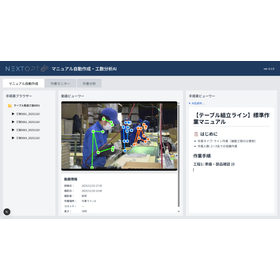
90% reduction in manual labor! AI automatic analysis that only requires uploading smartphone videos.

No specialized equipment required; immediate implementation possible! With advanced AI technology, we will transform workforce development in manufacturing sites.

"Factomate TAKT" is an app that automatically analyzes work using AI, making it easy to create manuals and measure work hours with just one click. Using it is simple! 1. Record a work video with your smartphone or similar device. 2. Upload it to the application. That's it! Anyone can easily perform the analysis. 【Case Studies of Customers Who Have Implemented It】 ■ Industry: Material Processing Manufacturer ■ Target Process: Processing and Final Packaging Processes ■ Implementation Effects - Manual creation work hours: Reduced by up to 90% "Just uploading one video neatly compiles everything, so there's no need to create it from scratch manually." - Business efficiency improvement: 15% reduction in processing work hours "Based on the output from the work analysis, we advanced the automation of part of the process and improved tools within the company. As a result, the work hours of skilled workers improved, and we were able to delegate tasks to trainees as well." You can also try it out with a limited-time trial instead of purchasing it outright! *For more details, please download the PDF or feel free to contact us.

  • Process Control System
  • Production Management System
  • Other production management systems
  • Creation tools

Added to bookmarks

Bookmarks list

Bookmark has been removed

Bookmarks list

You can't add any more bookmarks

By registering as a member, you can increase the number of bookmarks you can save and organize them with labels.

Free membership registration

Attention Programmers! Report Creation Tool "RapidReport"

Easy form creation tool. Migration from existing assets can be done easily!

Are you struggling with issues such as "I can't create the report design I want," "The licensing costs for report tools are too high," or "I want to reduce the costs of report development"? The "Rapid" in RapidReport means "swift," and it is designed to achieve rapid development speed as well as execution speed. 【Features】 ■ Expect significant reductions in product and development costs ■ Reduce development man-hours with a powerful report designer ■ Outstanding performance! Output a 1,000-page PDF report in about 3 seconds! (In our environment) ■ Highly praised comprehensive support *For more details, you can download a free trial version from our website or download the catalog!

  • Development support tools (ICE, emulators, debuggers, etc.)
  • Creation tools

Added to bookmarks

Bookmarks list

Bookmark has been removed

Bookmarks list

You can't add any more bookmarks

By registering as a member, you can increase the number of bookmarks you can save and organize them with labels.

Free membership registration

【Entertainment】AILP | Web Sales

Optimize the entertainment industry's landing page with ChatGPT and AI ART.

In the entertainment industry, improving the conversion rate of landing pages (LP) is crucial for effectively delivering engaging content. Especially when announcing new events or products, creative expressions that capture users' interest and encourage action are essential. AILP optimizes LPs in the entertainment industry through copy generation by ChatGPT and image generation by AI ART, contributing to an increase in conversion rates. 【Use Cases】 - Event announcement LP - New product introduction LP - Membership registration promotion LP 【Benefits of Implementation】 - Increased access due to SEO effects - Improved conversion rates - Enhanced efficiency in creative production

  • chatgpt.jpg
  • aiart.jpg
  • dormitory.jpg
  • samplelp.jpg
  • others
  • Creation tools

Added to bookmarks

Bookmarks list

Bookmark has been removed

Bookmarks list

You can't add any more bookmarks

By registering as a member, you can increase the number of bookmarks you can save and organize them with labels.

Free membership registration

Tools for work analysis, work efficiency improvement, and optimal manual creation to accelerate improvements.

Achieve visualization of waste in on-site work, work improvement, and the transmission of manual creation skills through video work analysis by "TimePrism"!

Improving the workplace is not progressing well... Are you thinking that doing it this way would make the work faster and smoother? For you, a tool that accelerates improvement activities in the workplace through digital work analysis is ideal! By using this improvement tool, you can digitize the movements and behaviors of employees. You can also create optimization manuals using the finely analyzed data, making it a popular choice for companies promoting IT and DX initiatives. By sharing the analysis results among veteran and new workers alike, you can achieve improvements in behavior and efficiency.

  • Catalog and manual creation
  • Business Intelligence and Data Analysis
  • Other information systems
  • Creation tools

Added to bookmarks

Bookmarks list

Bookmark has been removed

Bookmarks list

You can't add any more bookmarks

By registering as a member, you can increase the number of bookmarks you can save and organize them with labels.

Free membership registration

Comprehensive Guide: How to Create and Use Google Forms Basics

Smartly manage and aggregate tasks! We will explain the usage scenarios and the advantages and disadvantages.

Google Forms is a tool that is useful for management tasks, allowing for efficient handling of personnel management within project management, as well as individual interactions related to management tasks aimed at customers. By utilizing Google Forms, which allows you to easily and freely create web forms, you can eliminate the hassle of routine interactions and data aggregation, which is a significant advantage. I will explain in detail what you can do with Google Forms and how to perform actual screen operations. *For more details on the column, you can view it through the related links. Please feel free to contact us for more information.*

  • Other information systems
  • SFA/Sales Support System
  • Creation tools

Added to bookmarks

Bookmarks list

Bookmark has been removed

Bookmarks list

You can't add any more bookmarks

By registering as a member, you can increase the number of bookmarks you can save and organize them with labels.

Free membership registration

Creating a sales list is all about gathering information!

Strengthen your sales skills! An explanation of how to create a list and methods for gathering information to create it.

To strengthen sales capabilities, creating a sales list is a crucial key. Gathering information about potential client companies is essential for creating a sales list. There are several methods for information gathering, and by combining them, it is possible to obtain a wealth of information. Here, we will explain the methods for gathering information to create a sales list and how to create the sales list itself. *For detailed content of the column, you can view it through the related links. For more information, please feel free to contact us.*

  • Technical and Reference Books
  • SFA/Sales Support System
  • Creation tools

Added to bookmarks

Bookmarks list

Bookmark has been removed

Bookmarks list

You can't add any more bookmarks

By registering as a member, you can increase the number of bookmarks you can save and organize them with labels.

Free membership registration