We have compiled a list of manufacturers, distributors, product information, reference prices, and rankings for Support Tools.
ipros is IPROS GMS IPROS One of the largest technical database sites in Japan that collects information on.

Support Tools Product List and Ranking from 104 Manufacturers, Suppliers and Companies

Last Updated: Aggregation Period:Nov 19, 2025~Dec 16, 2025
This ranking is based on the number of page views on our site.

Support Tools Manufacturer, Suppliers and Company Rankings

Last Updated: Aggregation Period:Nov 19, 2025~Dec 16, 2025
This ranking is based on the number of page views on our site.

  1. ガイオ・テクノロジー Tokyo//IT/Telecommunications
  2. ストラテジー Saitama//Industrial Electrical Equipment
  3. IDAJ Kanagawa//software
  4. 4 レオクラン 本社 Osaka//others
  5. 5 ソフトウィング Gunma//software

Support Tools Product ranking

Last Updated: Aggregation Period:Nov 19, 2025~Dec 16, 2025
This ranking is based on the number of page views on our site.

  1. Embedded Software Unit Testing "Coverage Master winAMS" ガイオ・テクノロジー
  2. Design support tool "Strategy Time Chart Standard" ストラテジー
  3. Input support tool "BEAR-D2" レオクラン 本社
  4. 4 Report creation support tool 'WingReport v3.1' ソフトウィング
  5. 5 Multi-Objective Robust Design Optimization Support Tool 'modeFRONTIER' IDAJ

Support Tools Product List

121~135 item / All 213 items

Displayed results

Achieving 'Uniform Quality Worldwide' through Technology × Data Utilization

Collect data according to the stages of the work process! Analysis and response that do not depend on the experience of the workers are possible.

This document introduces effective data utilization for standardizing operations. It includes factors that cause quality variation and the "four types of data" that should be collected and visualized to eliminate dependency on individuals. Additionally, it presents systems capable of data collection, visualization, and analysis, namely "Facteye" and "MotionBoard." [Contents] - "Quality Variation" Threatening the Manufacturing Industry - Factors Causing Quality Variation - Effective "Data Utilization" for Standardizing Operations - "Four Types of Data" to Collect and Visualize to Eliminate Dependency - Methods to Achieve Data Collection, Visualization, and Analysis *For more details, please refer to the PDF document or feel free to contact us.

  • Other information systems

Added to bookmarks

Bookmarks list

Bookmark has been removed

Bookmarks list

You can't add any more bookmarks

By registering as a member, you can increase the number of bookmarks you can save and organize them with labels.

Free membership registration

[Information] First Steps to Digital Twin

By digitizing data, productivity is improved through automation and labor reduction!

This document provides an overview of digital twins, examples of their use, and detailed steps for implementation. It includes sections such as "What is a Production Digital Twin?", "What Applications Can a Production Digital Twin Be Used For?", and "Three Steps to Achieving a Digital Twin". Additionally, it introduces the features of the BI tool "MotionBoard," which analyzes and visualizes aggregated digital data. [Contents (partial)] ■ What is a Production Digital Twin? ■ What Applications Can a Production Digital Twin Be Used For? ■ Three Steps to Achieving a Digital Twin ■ What is Data Digitization? ■ Successful Case Studies in Data Utilization *For more details, please refer to the PDF document or feel free to contact us.

  • Other information systems

Added to bookmarks

Bookmarks list

Bookmark has been removed

Bookmarks list

You can't add any more bookmarks

By registering as a member, you can increase the number of bookmarks you can save and organize them with labels.

Free membership registration

JMAG-Express Online

JMAG-Express Online calculates the basic characteristics of motors in one second.

JMAG-Express Online is a motor design support tool for parameter-based design. By simply inputting parameters such as shape templates, materials, winding, and drive conditions, you can instantly obtain values for starting voltage constant, torque constant, inductance characteristics, current vs. torque characteristics, speed vs. torque characteristics, and iron loss/copper loss characteristics, among others. It can also be used on tablet devices and smartphones, allowing you to design motors anytime and anywhere, whether you are out and about or at home.

  • Magnetic field analysis/electromagnetic wave analysis

Added to bookmarks

Bookmarks list

Bookmark has been removed

Bookmarks list

You can't add any more bookmarks

By registering as a member, you can increase the number of bookmarks you can save and organize them with labels.

Free membership registration

JMAG-Express Online

JMAG-Express Online calculates the basic characteristics of motors in 1 second.

JMAG-Express Online is a motor design support tool based on a parameter database. By simply inputting parameters such as shape templates, materials, winding, and drive conditions, you can instantly obtain values for startup voltage constants, torque constants, inductance characteristics, current vs. torque characteristics, speed vs. torque characteristics, and iron/copper loss characteristics, among others. It can also be used on tablet devices and smartphones, allowing you to design motors anytime and anywhere, whether you are out and about or at home.

  • Other production and development software and systems

Added to bookmarks

Bookmarks list

Bookmark has been removed

Bookmarks list

You can't add any more bookmarks

By registering as a member, you can increase the number of bookmarks you can save and organize them with labels.

Free membership registration

SysClinic-C/C++

SysClinic-C/C++

It is an effective tool for derivative development of embedded systems and business applications. ◆ Short modification period ◆ No reliable functional specification documents ◆ Only the source code can be trusted ◆ Degradation occurs due to inappropriate modifications ◆ Inability to identify unnecessary functions ◆ Reverse engineering takes an enormous amount of time ◆ The source code is difficult to read It can provide reliable and rapid responses to these issues, reducing work hours by more than 30%.

  • Development support tools (ICE, emulators, debuggers, etc.)
  • others

Added to bookmarks

Bookmarks list

Bookmark has been removed

Bookmarks list

You can't add any more bookmarks

By registering as a member, you can increase the number of bookmarks you can save and organize them with labels.

Free membership registration

Substrate Assembly Work Support Tool 'CAFD Plus'

The substrate assembly support software "CAFD Plus" strongly supports various tasks in substrate assembly!

This is software that provides support for various work processes related to the implementation of circuit boards (such as component mounting, manual insertion of components, manual soldering of components, visual inspection, and component search during repairs, etc.). ◆ It allows for easy component searches that occur during the circuit board implementation process on a PC monitor. ◆ It can easily generate "work instructions" required for the circuit board implementation process.

  • Development support tools (ICE, emulators, debuggers, etc.)
  • Production Management System

Added to bookmarks

Bookmarks list

Bookmark has been removed

Bookmarks list

You can't add any more bookmarks

By registering as a member, you can increase the number of bookmarks you can save and organize them with labels.

Free membership registration

Work support tool "Projection Assembly System"

With projection mapping, accurately indicate the next parts to be taken! Reduce mistakes and improve productivity! Also solve the labor shortage!

The "Projection Assembly System" is a system that streamlines assembly tasks, which can become complex in low-volume, high-variety production, through visual displays and instructions using projection mapping. Since the locations for retrieving parts are visually clear, mistakes are less likely to occur, and it can accommodate frequent changes in products and lines. It also supports integration with electric tools and external applications via I/O. By using a dedicated app, it is possible to add various functions such as visualizing progress, identifying problem areas, and conducting analyses based on these features. 【Features】 ■ Prevents mistakes in part retrieval ■ Supports projection of work instructions ■ Capable of saving results of work performance and videos during work ■ Identifies tasks and processes that are problematic in operations In implementing such systems, Daiomiura is a company that can assist you with its extensive experience and know-how. We provide comprehensive support from issue identification and equipment selection to system construction. For more details, please check the PDF materials and our service website. Feel free to contact us with any inquiries.

Added to bookmarks

Bookmarks list

Bookmark has been removed

Bookmarks list

You can't add any more bookmarks

By registering as a member, you can increase the number of bookmarks you can save and organize them with labels.

Free membership registration

Web Template Collection (Smart Client Version)

Ideal for creating screens like spread display selection.

This is a collection of templates to assist in development work using Visual Basic 2005.

  • Development support tools (ICE, emulators, debuggers, etc.)

Added to bookmarks

Bookmarks list

Bookmark has been removed

Bookmarks list

You can't add any more bookmarks

By registering as a member, you can increase the number of bookmarks you can save and organize them with labels.

Free membership registration

Railway RAMS evaluation support tool "RWB/AWB/HAZOP"

We support the RAMS evaluation of railway vehicles, railway signals, and railway systems.

This software comprehensively evaluates and supports Reliability, Availability, Maintainability, and Safety from the development stage of railway vehicles and railway signals through the usage stage until the end of the product's life. The reliability, availability, and safety evaluation support tools, Reliability Workbench (RWB), Availability Workbench (AWB), and HAZOP, are products developed by Isograph Ltd. in the UK, and the Reliability Workbench has been implemented in over 10,000 sites worldwide. We also offer a free demo version, so please feel free to contact us.

  • Development support tools (ICE, emulators, debuggers, etc.)

Added to bookmarks

Bookmarks list

Bookmark has been removed

Bookmarks list

You can't add any more bookmarks

By registering as a member, you can increase the number of bookmarks you can save and organize them with labels.

Free membership registration

Digital Content Service for Residential Sales

We have prepared tools to solve challenges in housing sales, such as increasing order rates and acquiring new customers. There are various types, including VR tools that capture the hearts of customers.

Our company offers a variety of tools and services that help solve various challenges in housing sales, which can be easily integrated into existing business workflows. 【Examples of Tools】 ◎ General-purpose System "AUTOPERS VR" This system allows for the creation of 3D CG VR environments that can be freely navigated at any time. It operates simply by loading customer-specific data output from your current 3D CAD software. It is a general-purpose system that does not depend on CAD software. It enhances the accuracy of sharing customer requests and housing images, preventing complaints such as "it's different from the image." ◎ Automatic Architectural Perspective Creation System "AUTOPERS" This system automatically creates professional-level perspectives in just a few minutes and allows for instant changes to roofs, exterior walls, and more. It improves the efficiency of meetings and presentations, contributing to increased productivity. ◎ "Specification Decision Support System" This system allows for the consideration of specifications while simulating combinations of products and colors, significantly reducing human errors by automatically identifying options that change based on conditions. *We also propose various other tools and services. For more details, please view the materials from "PDF Download" or feel free to contact us.

  • SFA/Sales Support System

Added to bookmarks

Bookmarks list

Bookmark has been removed

Bookmarks list

You can't add any more bookmarks

By registering as a member, you can increase the number of bookmarks you can save and organize them with labels.

Free membership registration

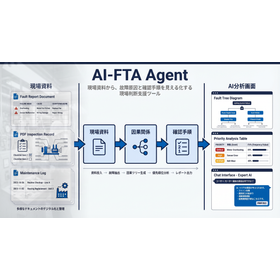
Learn from failure cases! What is FTA (Fault Tree Analysis)?

Learn from failure cases! Introduction to practical methods of FTA/FMEA using "Knowledge Board" and "Knowledge Base" <Live Streaming Seminar Held>

As methods used for preventing failures and malfunctions, there are FTA (Fault Tree Analysis) and FMEA (Failure Mode and Effects Analysis). However, even if one tries to implement FTA or FMEA, many may struggle with issues such as "there is available information, but it is difficult to visualize potential troubles for each part or product" and "experts are unavailable to participate in the analysis," leading to challenges in execution. In the seminar, we will address these issues and introduce actual case studies of FTA/FMEA utilizing "Knowledge Boards" and "Knowledge Bases" to maximize effectiveness. Participants will have the opportunity to use the Knowledge Board and experience "FTA" online. *For more details, please refer to the PDF materials or feel free to contact us.

Added to bookmarks

Bookmarks list

Bookmark has been removed

Bookmarks list

You can't add any more bookmarks

By registering as a member, you can increase the number of bookmarks you can save and organize them with labels.

Free membership registration

Analysis support tool "Pulse EYE"

Instantly analyze desired characteristic results from R&D to mass production testing! Analysis of test data from other companies is also possible.

"Pulse EYE" is a support tool for the analysis of Power semiconductor testing and waveforms. It features various modes such as "Waveform Analyze," which allows for graph display and manipulation of arbitrary signals, cursor display, selection of analysis position display, and locus graph display functionality, as well as "Dual File View," which enables easy comparison display by overlaying graphs from two files. Please feel free to contact us if you have any inquiries. 【Features】 ■Improved work efficiency/time reduction ■Displays all waveforms in 2-3 seconds with one click ■Analysis position information display ■Comparison of multiple file displays ■Waveform display with black and white inversion *For more details, please download the PDF or feel free to contact us.

Added to bookmarks

Bookmarks list

Bookmark has been removed

Bookmarks list

You can't add any more bookmarks

By registering as a member, you can increase the number of bookmarks you can save and organize them with labels.

Free membership registration

Substrate Inspection Support Tool 'CAFD Plus'

Ideal for work support in the inspection process after substrate manufacturing! Easy search with automatic inspection equipment installed.

"CAFD Plus" is a board inspection support tool manufactured by NEWLY that allows for easy searching of the mounting positions of parts determined to be defective by automatic inspection devices. You can easily search for parts using Gerber data (RS274D, RS274X), image data (BMP, JPEG, TIFF), and mount data, with simple link settings. It allows for the easy generation of work instructions in the inspection process, and you can aggregate and print output by part type. 【Features】 ■ Easy search ■ Displays Gerber data on the monitor ■ Simple generation of work instructions ■ Aggregation and print output by part type *For more details, please refer to the catalog or feel free to contact us.

  • Development support tools (ICE, emulators, debuggers, etc.)
  • Production Management System

Added to bookmarks

Bookmarks list

Bookmark has been removed

Bookmarks list

You can't add any more bookmarks

By registering as a member, you can increase the number of bookmarks you can save and organize them with labels.

Free membership registration

Excel Companion Attendant

The attendant is a collection of free tools that make Excel processing, born from the field, more convenient.

I selected frequently used processes that are necessary on the job site. For example, by consolidating sheets saved in various workbooks into one workbook, you can view them all at once without having to individually load each one into Excel. Sample data is included to make it easy to understand the functions, so you can quickly check the features by setting the sample data with the button. Note: The attendant is not a macro. It will work even if macros are disabled in Excel's security settings, so you can use it with confidence.

  • Document and Data Management

Added to bookmarks

Bookmarks list

Bookmark has been removed

Bookmarks list

You can't add any more bookmarks

By registering as a member, you can increase the number of bookmarks you can save and organize them with labels.

Free membership registration

ECU measurement compatibility, calibration, OBD diagnostics, development support tools

Software rapid prototyping, ECU calibration, data collection, ASAM-compliant XCP/CCP support.

ATI (Accurate Technologies Inc) has been a leading independent supplier of high-performance measurement and control system tools and software solutions since 1991. Today, we provide advanced development tools to help our customers bring high-quality products to market. This catalog features a variety of products, including the versatile engineering tool for calibration measurement "VISION," the innovative solution for network analysis "CANLab," and the "CANverter," which easily sends and receives signals in vehicle networks. [Featured Products] ■VISION ■Rapid Control Development Solutions ■No-Hooks On Target ■CANLab ■CANverter, among others *For more details, please refer to the PDF document or feel free to contact us.

  • Other measurement, recording and measuring instruments
  • Embedded system design service
  • Software (middle, driver, security, etc.)

Added to bookmarks

Bookmarks list

Bookmark has been removed

Bookmarks list

You can't add any more bookmarks

By registering as a member, you can increase the number of bookmarks you can save and organize them with labels.

Free membership registration