We have compiled a list of manufacturers, distributors, product information, reference prices, and rankings for CAD software.
ipros is IPROS GMS IPROS One of the largest technical database sites in Japan that collects information on.

CAD software Product List and Ranking from 23 Manufacturers, Suppliers and Companies

Last Updated: Aggregation Period:Nov 26, 2025~Dec 23, 2025
This ranking is based on the number of page views on our site.

CAD software Manufacturer, Suppliers and Company Rankings

Last Updated: Aggregation Period:Nov 26, 2025~Dec 23, 2025
This ranking is based on the number of page views on our site.

  1. ゴードーソリューション Shizuoka//software
  2. コンピュータシステム研究所 Miyagi//software
  3. アルゴジャパン・イーエス Nagano//Information and Communications
  4. Design Creation Inc. Tokyo//software
  5. 5 インフィニシス Miyagi//software

CAD software Product ranking

Last Updated: Aggregation Period:Nov 26, 2025~Dec 23, 2025
This ranking is based on the number of page views on our site.

  1. 2D CAD "NAZCA5 CAD" Nazca 2D CAD/CAM ゴードーソリューション
  2. SOLIDWORKS 2026 New Features Seminar [Free Participation] アルゴジャパン・イーエス
  3. [Free trial available] General-purpose compatible CAD "ARES Standard" コンピュータシステム研究所
  4. 4 CAD software "Drafting CAD Pro" インフィニシス
  5. 5 CAD software 'TE_FIND' Ver 2.4 南九州総合設計

CAD software Product List

46~57 item / All 57 items

Displayed results

PC | Solutions Department

Comprehensive support from selection and replacement of computers to maintenance and support.

Computers are now an essential tool for business. By selecting, replacing, and maintaining them properly, we achieve efficient operations and information security.

  • Other security

Added to bookmarks

Bookmarks list

Bookmark has been removed

Bookmarks list

You can't add any more bookmarks

By registering as a member, you can increase the number of bookmarks you can save and organize them with labels.

Free membership registration

CAD software "Drafting CAD Pro"

Easy-to-use new sensation design software

"DraftingCAD Pro" is a new sensation CAD software for Mac and Windows that incorporates the user-friendliness of drawing software. It can be used with a similar feel to familiar drawing software, making it very easy to use as design software, and unlike conventional CAD software, no specialized knowledge is required. You can use it for everything from personal use to professional use, such as creating architectural/civil engineering designs, floor plans, paper craft templates, and electrical wiring diagrams. It also allows for the conversion of AutoCAD DXF and DWG files. [Features] - Equipped with functions unique to CAD software, enabling easy and accurate drafting. - Focused on the minimum necessary functions for drafting, making it responsive unlike software that can do everything. *For more details, please download the PDF or feel free to contact us.

  • 2D CAD Construction
  • 3D CAD
  • Other CAD

Added to bookmarks

Bookmarks list

Bookmark has been removed

Bookmarks list

You can't add any more bookmarks

By registering as a member, you can increase the number of bookmarks you can save and organize them with labels.

Free membership registration

[B@Diagram Case Study] Takamatsu City General Affairs Department Finance Division

All completion drawings and confirmation application documents for management facilities have been digitized! Achieving long-term storage and maintenance of drawings.

In the General Affairs Department, Finance Division of Tokushima City, it has been about 10 years since the introduction of unified CAD across the entire office. However, the as-built drawings with CAD data are limited to very recent facilities, and for facilities that only have paper as-built drawings, partial drawings are generated each time renovations occur, making it difficult to grasp the current situation with just the drawings. Additionally, the hand-drawn paper drawings have become tattered, and the text is no longer legible. Considering cost-effectiveness, we implemented the digitization of drawings by combining scanning and tracing. Currently, the digitized drawings and documents are shared across the entire office and are utilized for ordering drawings during repairs and renovations. [Challenges] ■ As-built drawings with CAD data are limited to very recent facilities. ■ For facilities that only have paper as-built drawings, partial drawings are generated each time renovations occur, making it difficult to grasp the current situation with just the drawings. ■ In departments with many managed facilities, the organization of bound drawings has not always been conducted properly. ■ Hand-drawn paper drawings have become tattered, and the text is no longer legible. *For more details, please refer to the PDF document or feel free to contact us.

  • Other services

Added to bookmarks

Bookmarks list

Bookmark has been removed

Bookmarks list

You can't add any more bookmarks

By registering as a member, you can increase the number of bookmarks you can save and organize them with labels.

Free membership registration

[B@Diagram Case Study] Tendo City, Yamagata Prefecture, Urban Planning Division, Parks Section

Planning for long-term CAD data conversion! A case of improving work efficiency through data reuse for modifications and updates.

To the Park Division of the Urban Planning Department, Tendo City, Yamagata Prefecture, we would like to introduce a case study of the implementation of "B@Diagram." The company had previously managed only paper drawings, which led to limitations in correcting ledger drawings due to deterioration and maintenance issues. After the implementation, it became possible to reuse drawing data, making it easier to correct the ledger associated with updates to park facilities. Additionally, long-term storage became feasible, and the ability to print at the required size made it convenient for transport, facilitating quick exchanges of drawings via email. [Case Overview] ■ Issues - Many of the park ledger drawings were created before the start of electronic submissions. - Managing only paper drawings had led to limitations in correcting ledger drawings due to deterioration and maintenance issues. ■ Results - After implementation, it became possible to reuse drawing data, making it easier to correct the ledger associated with updates to park facilities, and long-term storage became feasible. - The ability to print at the required size made it convenient for transport, facilitating quick exchanges of drawings via email. *For more details, please refer to the PDF document or feel free to contact us.

  • Other contract services

Added to bookmarks

Bookmarks list

Bookmark has been removed

Bookmarks list

You can't add any more bookmarks

By registering as a member, you can increase the number of bookmarks you can save and organize them with labels.

Free membership registration

[CAC Guidance] Security Concerns

Over 120,000 licenses sold! Adopted by many local governments.

Are you worried about using free software because of the risks and the fear of taking responsibility for it? "DynaCAD Government Edition Plus" is adopted by many municipalities, including 204 cities and towns across 11 prefectures nationwide. We have 33 years of development experience as a manufacturer and have sold over 120,000 licenses in total. Please feel free to contact us when you need assistance. 【Is using free software scary?】 ■ No guarantees in exchange for free use ■ You are responsible for any issues that arise ■ No excuses if something goes wrong ■ You absolutely dislike taking on risks *For more details, please refer to the PDF materials or feel free to contact us.

  • Other contract services

Added to bookmarks

Bookmarks list

Bookmark has been removed

Bookmarks list

You can't add any more bookmarks

By registering as a member, you can increase the number of bookmarks you can save and organize them with labels.

Free membership registration

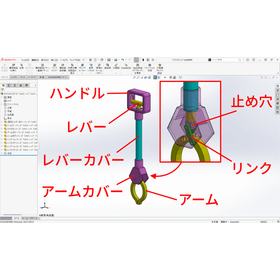
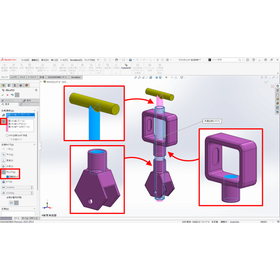
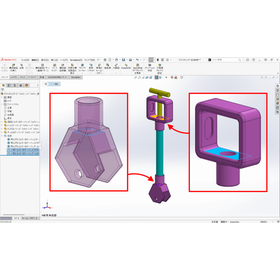
SOLIDWORKS Useful Features Part 7: Multiple Match Mode/Rotation Lock

Utilize functions related to compliance to streamline assembly creation! This leads to a reduction in work time.

Introducing the convenient features of SOLIDWORKS: "Multiple Mate Mode" and "Lock Rotation." By utilizing the functions related to mates, you can streamline assembly creation and reduce working time. These features are characterized by having fewer settings and being easier to use compared to standard mates. 【Features】 ■ By utilizing functions related to mates, you can streamline assembly creation and reduce working time. ■ It is easier to use with fewer settings compared to combining with standard mates. *For more details, please download the PDF or feel free to contact us.

Added to bookmarks

Bookmarks list

Bookmark has been removed

Bookmarks list

You can't add any more bookmarks

By registering as a member, you can increase the number of bookmarks you can save and organize them with labels.

Free membership registration

SOLIDWORKS 2026 New Features Seminar [Free Participation]

Introducing new features and improvements that lead to reduced working hours, such as filters by feature and component unit, AI-driven command prediction, and automatic drawing creation.

In the SOLIDWORKS 2026 new features seminar, we will introduce new features and improvements that lead to reduced working time. ■ Alignment of drawing annotation items using magnetic lines ■ Filtering by features and components ■ AI-driven command predictions and automatic drawing creation … etc. 【Seminar Information】 ■ Date: December 17 (Wednesday) 13:10–16:30 (Doors open at 13:00) ■ Venue: Sakaki Techno Center Training Room 1, 2 ■ Participation Fee: Free 【Program】 ■ 13:10–14:30 Introduction to SOLIDWORKS 2026 new features (Algo Japan ES Co., Ltd.) ■ 14:40–15:20 You Can Actually Do That! Introduction to Useful SOLIDWORKS Features (Dassault Systèmes Co., Ltd.) ■ 15:30–16:10 Do You Know? Surrounding Tools SOLIDWORKS Users Should Utilize (Algo Japan ES Co., Ltd.) ■ 16:10–16:30 Latest Information on SOLIDWORKS (Dassault Systèmes Co., Ltd.) *For details, please download the PDF document or feel free to contact us.

  • Technical Seminar
  • Analysis Services

Added to bookmarks

Bookmarks list

Bookmark has been removed

Bookmarks list

You can't add any more bookmarks

By registering as a member, you can increase the number of bookmarks you can save and organize them with labels.

Free membership registration

Case Study of Support for Introducing Business Improvement Subsidies | High-Performance PCs, CAD Software

Business improvement subsidy amount: 1.1 million yen. Upgrade the specifications of the PC used for drawing creation to high performance! Drawing creation time reduced by 40%.

Are you struggling with the introduction costs of high-performance PCs and CAD software? "The specifications of the PC used for drawing creation were low, resulting in poor work efficiency. Improving the salaries of the design staff was a challenge..." Introducing state-of-the-art equipment is key to enhancing a company's competitiveness, but the costs can pose a significant barrier. Our company offers "subsidy support" that makes high-cost equipment investment possible. Below, we present a case study where we supported the introduction of high-performance PCs and CAD software using business improvement subsidies. 【Case Study】 ■ Reasons for considering the introduction of high-performance PCs and CAD software → The specifications of the PC used for drawing creation were low, resulting in poor work efficiency. Improving the salaries of the design staff was a challenge. ■ Subsidy support achievements → Amount of business improvement subsidy obtained: 1.1 million yen ■ Effects of introducing high-performance PCs and CAD software → Drawing creation time was reduced by 40%. We were able to raise the salary of the design staff by 10,000 yen per month. By utilizing subsidies, it is possible to overcome cost barriers and achieve both technological innovation and business expansion. For more details on subsidy support, please check the catalog download button. Feel free to contact us with any inquiries.

  • Management consultant/Small business consultant
  • Other CAD

Added to bookmarks

Bookmarks list

Bookmark has been removed

Bookmarks list

You can't add any more bookmarks

By registering as a member, you can increase the number of bookmarks you can save and organize them with labels.

Free membership registration

PC School Yu CAD Standalone Course

When it comes to computer classes in Obihiro, it's the Computer School Yu.

This is a course for learning CAD software (such as AutoCAD LT and JW_CAD) widely used in the fields of architecture, machinery, and electrical engineering.

  • Qualification Seminar

Added to bookmarks

Bookmarks list

Bookmark has been removed

Bookmarks list

You can't add any more bookmarks

By registering as a member, you can increase the number of bookmarks you can save and organize them with labels.

Free membership registration

CAD software 'TE_FIND' Ver 2.4

It's free software!

You can use the FIND function in AutoCAD to convert alphanumeric characters between full-width and half-width. When opening DXF files output from other CAD software in AutoCAD, numbers may appear in full-width. This is useful when you want to convert them to half-width.

  • Corporate information portal/groupware

Added to bookmarks

Bookmarks list

Bookmark has been removed

Bookmarks list

You can't add any more bookmarks

By registering as a member, you can increase the number of bookmarks you can save and organize them with labels.

Free membership registration

[CAD Information] Concerns about compatibility with the new OS

33 years of development and sales experience! A package for government agencies adopted by many municipalities!

Do you have concerns about the provision of support for new OS compatibility or bug fix patches? "DynaCAD Government Edition Plus" is adopted by many municipalities, including 204 cities and towns across 11 prefectures nationwide. We have 33 years of development experience as a manufacturer and have sold over 120,000 licenses in total. Please feel free to contact us when you need assistance. 【Are you worried about new OS compatibility?】 ■ Concerns about the provision of support for new OS compatibility and bug fix patches ■ Very difficult since it is free software ■ Cannot be established as the main CAD within the office *For more details, please refer to the PDF document or feel free to contact us.

  • Other contract services

Added to bookmarks

Bookmarks list

Bookmark has been removed

Bookmarks list

You can't add any more bookmarks

By registering as a member, you can increase the number of bookmarks you can save and organize them with labels.

Free membership registration

[CAD Guide] Concerns about Support

A dedicated homepage for customers is available! You can also obtain product information and receive patches!

Are there any invisible costs that arise, such as inquiries concentrating on detailed staff or the time staff spend researching on the internet? "DynaCAD Government Edition Plus" allows customers who have contracted support services to use a dedicated homepage. We provide essential product information and patch updates necessary for maintaining stable system operations. 【What is the impact on productivity without a help desk?】 ■ Inquiries concentrate on detailed staff ■ Invisible costs arise from the time staff spend researching on the internet ■ Most people studying CAD are self-taught and many lack basic knowledge *For more details, please refer to the PDF document or feel free to contact us.

  • Other contract services

Added to bookmarks

Bookmarks list

Bookmark has been removed

Bookmarks list

You can't add any more bookmarks

By registering as a member, you can increase the number of bookmarks you can save and organize them with labels.

Free membership registration