- Publication year : 2026
1~6 item / All 6 items
Displayed results

Added to bookmarks
Bookmarks listBookmark has been removed
Bookmarks listYou can't add any more bookmarks
By registering as a member, you can increase the number of bookmarks you can save and organize them with labels.
Free membership registrationContact this company
Inquiry Form1~6 item / All 6 items
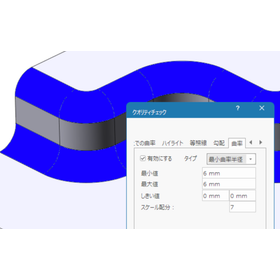
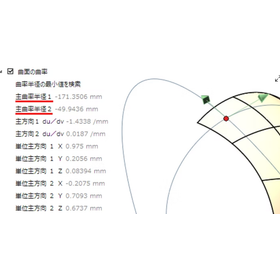
The "minimum curvature radius," which is essential for evaluating surface quality. However, the calculation logic varies depending on the shape. We compare and verify the adoption processes for cases where the principal curvature is zero, positive, and negative. We organized the nature of the intuitive discomfort from a mathematical perspective and condensed it into practical knowledge.
Added to bookmarks
Bookmarks listBookmark has been removed
Bookmarks listYou can't add any more bookmarks
By registering as a member, you can increase the number of bookmarks you can save and organize them with labels.
Free membership registration
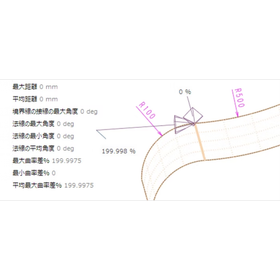
Are you using the ThinkDesign continuity check command without fully understanding it? In the "surface-to-surface" evaluation, the orientation of the surfaces (normals) greatly affects the numerical results. When an extreme value of 180 degrees appears, is it an error or just a display specification? In this seminar video, we will explain in three minutes the key points to avoid common mistakes that beginners tend to make and how to correctly interpret the results. By visually understanding the logic behind the calculations, you can achieve reliable surface evaluations without confusion. This is a must-watch for those who want to balance speed and accuracy in design!
Added to bookmarks
Bookmarks listBookmark has been removed
Bookmarks listYou can't add any more bookmarks
By registering as a member, you can increase the number of bookmarks you can save and organize them with labels.
Free membership registration
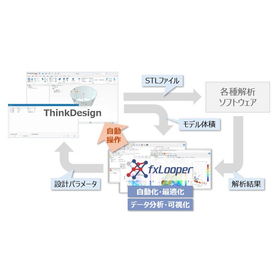
The general optimization software "fxLooper 3.4.0" developed by Anotherworker Co., Ltd. has added the 3D CAD software "ThinkDesign" to its lineup of supported CAD software. fxLooper is a Japan-origin general optimization and automation platform that collaborates with CAD and CAE software to derive the "correct answer" from a vast array of patterns. "ThinkDesign" is a next-generation 3D design platform that merges its unique "Global Shape Modeling (GSM)" with "Hybrid Modeling." ThinkDesign users will be able to utilize the design optimization workflow using fxLooper.
Added to bookmarks
Bookmarks listBookmark has been removed
Bookmarks listYou can't add any more bookmarks
By registering as a member, you can increase the number of bookmarks you can save and organize them with labels.
Free membership registration
Uncover the true nature of "that point" with numbers. ~Health check for curves, surfaces, and meshes, local information command~ No more guesswork! Attack with "points" of local information. Even if the connections between curves look nice, we want to avoid the tragedy of a bumpy interior. That's where this command comes in handy. By pinpointing and quantifying the desired location, what once felt "somehow good" transforms into "backed by evidence, it's a definite OK!" It's a slightly niche but incredibly useful feature that substantiates your preferences with numbers.
Added to bookmarks
Bookmarks listBookmark has been removed
Bookmarks listYou can't add any more bookmarks
By registering as a member, you can increase the number of bookmarks you can save and organize them with labels.
Free membership registration
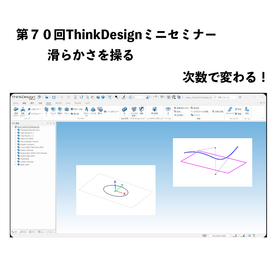
Welcome to the 70th ThinkDesign Mini Seminar! This time, we will thoroughly explain the essential concept of "degree," which is crucial for achieving high-quality modeling. In ThinkDesign, when creating curves and surfaces, there are many instances where you are required to specify "degree, continuity, and number of segments" within the commands. Are you setting these values based on a vague intuition? In fact, these numbers are the key determinants of the "beauty" and "usability" of the elements. In this video, we will particularly focus on "degree" and introduce it to you! - How does changing the degree affect the curve? - The relationship with control points and the underlying calculations - How to choose the appropriate degree that is useful in practice We will clearly explain these points again. By correctly understanding the meaning of degree, you will be able to create smooth surfaces without any bumps and develop smart data that is resilient to modifications. This content is a must-see for those who want to acquire a higher level of modeling skills. Please watch until the end and utilize it to improve the quality of your daily design workflow!
Added to bookmarks
Bookmarks listBookmark has been removed
Bookmarks listYou can't add any more bookmarks
By registering as a member, you can increase the number of bookmarks you can save and organize them with labels.
Free membership registration
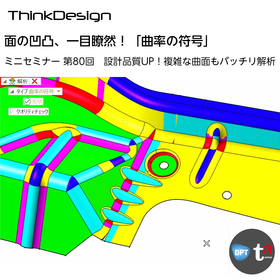
Points of the Curvature Sign Command This command calculates the product (Gaussian curvature) and sum (mean curvature) of the principal curvatures at each point on the surface and visualizes the state of the surface using color coding. Immediate Judgment of Convexity: It allows for instant identification of whether the surface corresponds to "convex (hill)," "concave (valley)," or "saddle shape (like a horse saddle)." Quality Check: It is ideal for confirming whether the curvature is not inverted at the seams of patches and whether unintended "gaps" or "waves" have occurred. Mold Consideration: It helps in understanding the properties of the surface before selecting tools during processing or considering draft angles.
Added to bookmarks
Bookmarks listBookmark has been removed
Bookmarks listYou can't add any more bookmarks
By registering as a member, you can increase the number of bookmarks you can save and organize them with labels.
Free membership registration