Extracting numerical data from graphs as images.
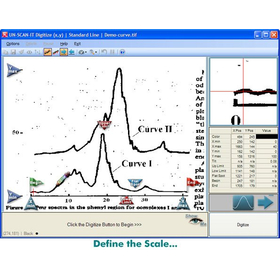
UN-SCAN-IT Graph Digitizing Software is a tool that automatically extracts data values represented by graphs saved as images. UN-SCAN-IT supports most image formats obtained through scanners, digital cameras, and other means (such as JPG, TIFF, GIF, BMP, PNG) and can digitize various plots, strip charts, equipment outputs, old graphs, and graphs published in publications. In addition to various digitization functions for graphs, UN-SCAN-IT also allows for area calculations of peak regions, data smoothing, derivative acquisition, graph rescaling, and exporting (x,y) data for use in other programs. If you have been comparing the data values of printed graphs by holding two overlaid graphs up to the light, calculating peak areas using a planimeter or cut-and-weigh method, or estimating values by "squinting" and clicking on each point with a digitizing tablet, you will understand that using UN-SCAN-IT can be done more accurately, quickly, and easily.
Inquire About This Product
basic information
What you can do with UN-SCAN-IT: Extract useful (x, y) data from graphs as images. Calculate the area of peak regions. Turn your scanner into an automatic graph digitizer. Automatically digitize XY output from strip charts and recorders. Digitize graphs with different scales and compare results. Compare your data with graphs published by other researchers. Digitize old plots and charts to compare with the latest data. Turn your computer into an automatic xy digitizing tablet. Change the scale of printed existing graphs and add data. Graph data, remove backgrounds, and perform smoothing. Save printed output results in digital (x,y) format. Create publication-quality graphs based on hard-to-read original graphs. Save acquired data in ASCII text, JCAMP, or clipboard format. Export digitized data to spreadsheet, data analysis, and graphing programs.
Price information
Please contact us.
Delivery Time
Applications/Examples of results
Interactive peak area calculation and data editing using cursor operations Digitization of graph images at full resolution Assignment of points using user-defined units Digitization of (x,y) data points at up to 10,000 per minute Digitization of various image formats including JPG, TIFF, GIF, BMP, and PNG Support for linear, semi-logarithmic, and logarithmic scales Filtering of grid lines in the image background Automatic line tracking mode (for spectra, chromatograms, strip charts, thermograms, etc.) Semi-automatic mode (for multiple curves, intersecting curves, charts, drawings, etc.) Raster scan mode (for scatter plots, drawings, etc.) Manual mode (digitization by pointing and clicking with the mouse: used like a digitizing tablet) Digitization of multiple lines Digitization of bar graphs / mass spectrometry Digitization of dashed and dotted lines Digitization of contour lines Insertion and editing of data via point-and-click Smoothing of standard and weighted data and fitting of cubic spline data
catalog(1)
Download All Catalogs
Company information

Even in a rapidly changing world, the philosophy of HuLinks has not changed since its founding. The greatness of humanity lies in our ability to think, create, and carve out a new tomorrow. We aim to contribute to society by providing carefully selected solutions that support this remarkable human ability—intellectual creation—while also offering a more comfortable environment and enhancing productivity.