List of 3D CAD products

  • classification:3D CAD

31~60 item / All 1560 items

Displayed results

Reduce the workload from handling heavy objects! Here are five case studies that solved customer challenges! We are also accepting free consultations and tests tailored to your work!

  • PRエリア.png
  • Other conveying machines

Added to bookmarks

Bookmarks list

Bookmark has been removed

Bookmarks list

You can't add any more bookmarks

By registering as a member, you can increase the number of bookmarks you can save and organize them with labels.

Free membership registration

Presentation of explanatory materials on JIS and ISO standards. We propose suitable safety barriers from a rich product series! Free rental of demo kits.

  • Satech - AdaptaGuard_Ipros_2023_JP_1.jpg
  • Satech - BlueGuard_Ipros_2023_JP_1.jpg
  • Satech - EasyGuard_Ipros_2023_JP_1.jpg
  • Satech - FastGuard_Ipros_2023_JP_2.jpg
  • Satech - ImpactGuard_Ipros_2023_JP_1.jpg
  • Satech - EasyGuard_Ipros_2023_JP_Media-gallery_1.jpg
  • Satech - ImpactGuard_Ipros_2023_JP_Media-gallery_2.jpg
  • Satech - AdaptaGuard_Ipros_2023_JP_Media-gallery_1.jpg
  • Satech - BlueGuard_Ipros_2023_JP_Media-gallery_2.jpg
  • Other safety and hygiene products

Added to bookmarks

Bookmarks list

Bookmark has been removed

Bookmarks list

You can't add any more bookmarks

By registering as a member, you can increase the number of bookmarks you can save and organize them with labels.

Free membership registration

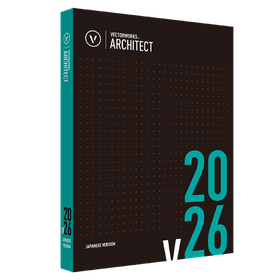
Stunning quality in all design phases Vectorworks 2025

  • 3D CAD

Added to bookmarks

Bookmarks list

Bookmark has been removed

Bookmarks list

You can't add any more bookmarks

By registering as a member, you can increase the number of bookmarks you can save and organize them with labels.

Free membership registration

Manage Mazatrol programs offline and resolve compatibility issues.
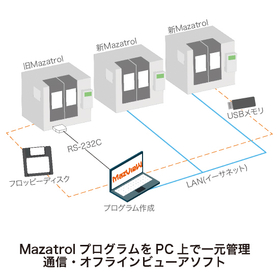
  • 一括管理.jpg
  • 3D CAM
  • 3D CAD
  • Other CAM related software

Added to bookmarks

Bookmarks list

Bookmark has been removed

Bookmarks list

You can't add any more bookmarks

By registering as a member, you can increase the number of bookmarks you can save and organize them with labels.

Free membership registration

Efficiently manage Mazatrol programs and ensure smooth collaboration with robots.
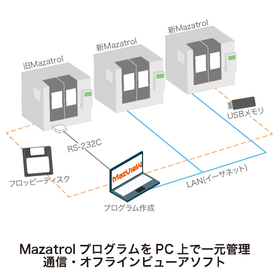
  • 一括管理.jpg
  • 3D CAM
  • 3D CAD
  • Other CAM related software

Added to bookmarks

Bookmarks list

Bookmark has been removed

Bookmarks list

You can't add any more bookmarks

By registering as a member, you can increase the number of bookmarks you can save and organize them with labels.

Free membership registration

High-speed display of various 2D/3D data! For simulation of machine tools.

  • 3D measuring device
  • Other CAD related software
  • 3D CAD

Added to bookmarks

Bookmarks list

Bookmark has been removed

Bookmarks list

You can't add any more bookmarks

By registering as a member, you can increase the number of bookmarks you can save and organize them with labels.

Free membership registration

A specialized team that supports you in obtaining high-precision spatial data and utilizing it for your business!

  • Other factory equipment
  • 3D CAD

Added to bookmarks

Bookmarks list

Bookmark has been removed

Bookmarks list

You can't add any more bookmarks

By registering as a member, you can increase the number of bookmarks you can save and organize them with labels.

Free membership registration

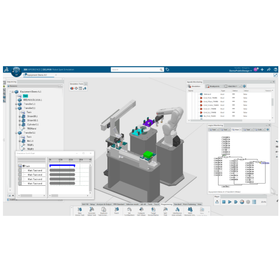
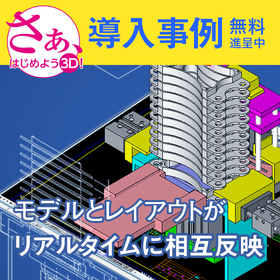
From equipment to line, simulate in advance with design data!

  • 3D CAD

Added to bookmarks

Bookmarks list

Bookmark has been removed

Bookmarks list

You can't add any more bookmarks

By registering as a member, you can increase the number of bookmarks you can save and organize them with labels.

Free membership registration

Added to bookmarks

Bookmarks list

Bookmark has been removed

Bookmarks list

You can't add any more bookmarks

By registering as a member, you can increase the number of bookmarks you can save and organize them with labels.

Free membership registration

Creating drawings of things that are not on the drawings! Realizing 'reverse engineering' with a 3D scanner measuring device.

  • 3D CAD
  • 3D measuring device

Added to bookmarks

Bookmarks list

Bookmark has been removed

Bookmarks list

You can't add any more bookmarks

By registering as a member, you can increase the number of bookmarks you can save and organize them with labels.

Free membership registration

A 3D CAD/CAM system that consistently performs everything from the design of progressive and single-type molds to the automatic creation of NC data.

  • 3D CAD

Added to bookmarks

Bookmarks list

Bookmark has been removed

Bookmarks list

You can't add any more bookmarks

By registering as a member, you can increase the number of bookmarks you can save and organize them with labels.

Free membership registration

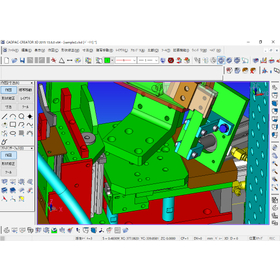
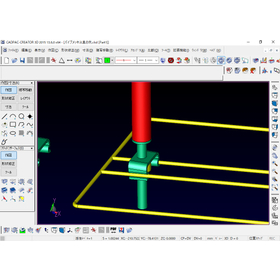
"Struggles with high-performance 3D" and "Exhausted from CATIA data modifications"... Presenting case studies from three companies that solved on-site issues! What is the design method that doesn't wa...
  • Clipboard02.jpg
  • Clipboard05.jpg
  • Clipboard06.jpg
  • Clipboard03.jpg
  • 3D CAD
  • 2D CAD machine
  • Other CAD

Added to bookmarks

Bookmarks list

Bookmark has been removed

Bookmarks list

You can't add any more bookmarks

By registering as a member, you can increase the number of bookmarks you can save and organize them with labels.

Free membership registration

For those struggling with SolidWorks analysis software [3D CAD]

  • 3D CAD

Added to bookmarks

Bookmarks list

Bookmark has been removed

Bookmarks list

You can't add any more bookmarks

By registering as a member, you can increase the number of bookmarks you can save and organize them with labels.

Free membership registration

Can be used without using conformity, without hindering the designer's thinking!

  • 3D CAD

Added to bookmarks

Bookmarks list

Bookmark has been removed

Bookmarks list

You can't add any more bookmarks

By registering as a member, you can increase the number of bookmarks you can save and organize them with labels.

Free membership registration

The SOLIDWORKS Utility Pack includes six types of tools and is available for an annual fee of ¥50,000 (excluding tax)!

  • 3D CAD

Added to bookmarks

Bookmarks list

Bookmark has been removed

Bookmarks list

You can't add any more bookmarks

By registering as a member, you can increase the number of bookmarks you can save and organize them with labels.

Free membership registration

Transitioning from 2D drawings to 3D models is also easy, allowing for more advanced design considerations to be conducted efficiently!

  • 3D CAD
  • Other CAD

Added to bookmarks

Bookmarks list

Bookmark has been removed

Bookmarks list

You can't add any more bookmarks

By registering as a member, you can increase the number of bookmarks you can save and organize them with labels.

Free membership registration

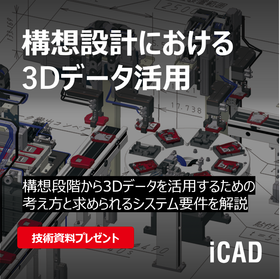
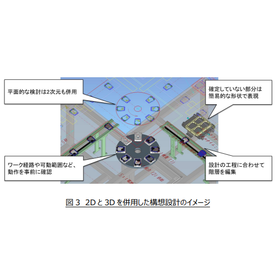
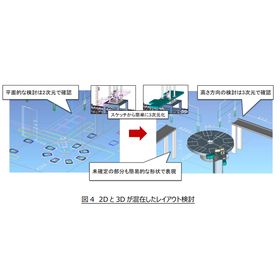
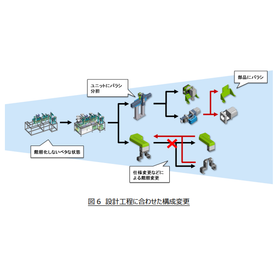
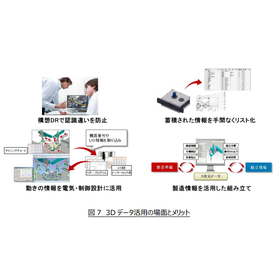
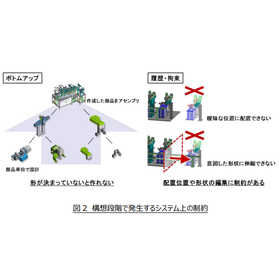
A must-see for mechanical designers! Key points for utilizing 3D data from the conceptual stage.
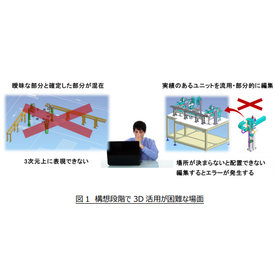
  • 1.png
  • 2.png
  • 3.png
  • 4.png
  • 6.png
  • 7.png
  • 9_PDF_DL案内.png
  • 3D CAD

Added to bookmarks

Bookmarks list

Bookmark has been removed

Bookmarks list

You can't add any more bookmarks

By registering as a member, you can increase the number of bookmarks you can save and organize them with labels.

Free membership registration

Standalone version lease monthly fee: 5,600 yen (excluding tax)

  • 3D CAD

Added to bookmarks

Bookmarks list

Bookmark has been removed

Bookmarks list

You can't add any more bookmarks

By registering as a member, you can increase the number of bookmarks you can save and organize them with labels.

Free membership registration

Standalone version lease monthly fee: 9,600 yen (excluding tax)

  • 3D CAD

Added to bookmarks

Bookmarks list

Bookmark has been removed

Bookmarks list

You can't add any more bookmarks

By registering as a member, you can increase the number of bookmarks you can save and organize them with labels.

Free membership registration

Standalone version lease monthly fee: 7,400 yen (excluding tax)

  • 3D CAD

Added to bookmarks

Bookmarks list

Bookmark has been removed

Bookmarks list

You can't add any more bookmarks

By registering as a member, you can increase the number of bookmarks you can save and organize them with labels.

Free membership registration

Standalone version lease monthly fee: 7,400 yen (excluding tax)

  • 3D CAD

Added to bookmarks

Bookmarks list

Bookmark has been removed

Bookmarks list

You can't add any more bookmarks

By registering as a member, you can increase the number of bookmarks you can save and organize them with labels.

Free membership registration

Standalone version lease monthly fee: 7,400 yen (excluding tax)

  • 3D CAD

Added to bookmarks

Bookmarks list

Bookmark has been removed

Bookmarks list

You can't add any more bookmarks

By registering as a member, you can increase the number of bookmarks you can save and organize them with labels.

Free membership registration

Added to bookmarks

Bookmarks list

Bookmark has been removed

Bookmarks list

You can't add any more bookmarks

By registering as a member, you can increase the number of bookmarks you can save and organize them with labels.

Free membership registration

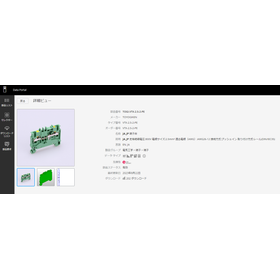
Portal site for component data necessary for electrical design.
  • EDP_Aug_Toyogiken.png
  • EDP_24Mar_ETI.gif
  • EDP_Fujielectric_Jul.gif
  • 3D CAD
  • 2D CAD Electrical

Added to bookmarks

Bookmarks list

Bookmark has been removed

Bookmarks list

You can't add any more bookmarks

By registering as a member, you can increase the number of bookmarks you can save and organize them with labels.

Free membership registration
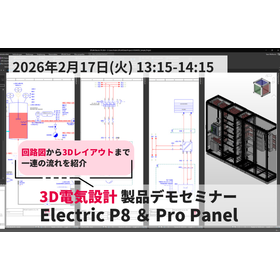
20260217_製品デモセミナーP8_ProP.png

◇February 17◇ 3D Electrical Design Product Demo Seminar Electric P8 & Pro Panel Product Seminar

On February 17th (Tuesday) from 13:15 to 14:15, we will hold a "3D Electrical Design Product Demo Seminar for Electric P8 and Pro Panel." Would you like to improve the productivity of electrical design and control panel manufacturing with Eplan's 3D electrical design? In this seminar, we will easily show you the entire process from electrical design (circuit diagram creation) to 3D layout design of control panels using actual operation screens. There will also be a demo by Eplan's technical staff and an anonymous Q&A session using the chat function, so please feel free to ask any questions or inquiries you may have.

Introducing the amazing features of "3AXIS Premium," compatible with 3-axis machining, from "BobCAD-CAM," which can be implemented at a low cost!

  • 3D CAM
  • Other CAM related software
  • 3D CAD

Added to bookmarks

Bookmarks list

Bookmark has been removed

Bookmarks list

You can't add any more bookmarks

By registering as a member, you can increase the number of bookmarks you can save and organize them with labels.

Free membership registration
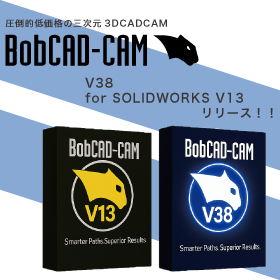
BobCADCAM_ipros_17.jpg

BobCAD-CAM V38/for SOLIDWORKS V13 Japanese version now available!!

The Japanese version of the latest V38 / BobCAM for SOLIDWORKS V13 has been officially released from BobCAD-CAM, which offers overwhelming low prices while being equipped with comprehensive features! This latest version achieves a more intuitive and flexible workflow. ■ Improved usability of the CAM wizard You can now set parameters while displaying the tool path. Automatic calculations and real-time visual feedback during feature creation enhance the speed and accuracy of setup. ■ Context help feature included Simply hovering over parameters will display images, descriptions, and help links, enabling smooth programming. ■ Standardization of work with CAD default settings Users can now save and restore their unique initial values, allowing for precision adjustments down to millimeters. Many other features have also been updated or added. If you would like a detailed introduction to the features or a demo, please feel free to contact us!

Pocket machining that achieves time reduction! "High-speed pocket machining" of 'Overwhelmingly low price & rich features BobCAD-CAM'

  • 3D CAM
  • 3D CAD

Added to bookmarks

Bookmarks list

Bookmark has been removed

Bookmarks list

You can't add any more bookmarks

By registering as a member, you can increase the number of bookmarks you can save and organize them with labels.

Free membership registration

Process STL directly without conversion! The "STL data" import feature of "BobCAD-CAM" with its overwhelming low price and rich functionality is amazing.

  • 3D CAD
  • 3D CAM

Added to bookmarks

Bookmarks list

Bookmark has been removed

Bookmarks list

You can't add any more bookmarks

By registering as a member, you can increase the number of bookmarks you can save and organize them with labels.

Free membership registration

Spiral machining that achieves beautiful cutting surfaces! We will explain the amazing features of "spiral machining" in "BobCAD-CAM," which offers overwhelming low prices and comprehensive functions!

  • 3D CAD
  • 3D CAM

Added to bookmarks

Bookmarks list

Bookmark has been removed

Bookmarks list

You can't add any more bookmarks

By registering as a member, you can increase the number of bookmarks you can save and organize them with labels.

Free membership registration

Explaining the greatness of "BobCAD-CAM," which has a wide range of processing functions that exceed the price of Marsgo, by module!

  • 3D CAM
  • Other CAM related software
  • 3D CAD

Added to bookmarks

Bookmarks list

Bookmark has been removed

Bookmarks list

You can't add any more bookmarks

By registering as a member, you can increase the number of bookmarks you can save and organize them with labels.

Free membership registration

Marsugo: 'Overwhelmingly low price! Yet packed with features! It's amazing.' Explaining BobCAD-CAM's 'Open Edge Detection Feature'!

  • 3D CAM
  • Other CAM related software
  • 3D CAD

Added to bookmarks

Bookmarks list

Bookmark has been removed

Bookmarks list

You can't add any more bookmarks

By registering as a member, you can increase the number of bookmarks you can save and organize them with labels.

Free membership registration
BobCADCAM_ipros_17.jpg

BobCAD-CAM V38/for SOLIDWORKS V13 Japanese version now available!!

The Japanese version of the latest V38 / BobCAM for SOLIDWORKS V13 has been officially released from BobCAD-CAM, which offers overwhelming low prices while being equipped with comprehensive features! This latest version achieves a more intuitive and flexible workflow. ■ Improved usability of the CAM wizard You can now set parameters while displaying the tool path. Automatic calculations and real-time visual feedback during feature creation enhance the speed and accuracy of setup. ■ Context help feature included Simply hovering over parameters will display images, descriptions, and help links, enabling smooth programming. ■ Standardization of work with CAD default settings Users can now save and restore their unique initial values, allowing for precision adjustments down to millimeters. Many other features have also been updated or added. If you would like a detailed introduction to the features or a demo, please feel free to contact us!

Low-cost, feature-rich CAD/CAM lathe processing module *Demo available

  • 3D CAD
  • 3D CAM
  • 2D CAM

Added to bookmarks

Bookmarks list

Bookmark has been removed

Bookmarks list

You can't add any more bookmarks

By registering as a member, you can increase the number of bookmarks you can save and organize them with labels.

Free membership registration
BobCADCAM_ipros_17.jpg

BobCAD-CAM V38/for SOLIDWORKS V13 Japanese version now available!!

The Japanese version of the latest V38 / BobCAM for SOLIDWORKS V13 has been officially released from BobCAD-CAM, which offers overwhelming low prices while being equipped with comprehensive features! This latest version achieves a more intuitive and flexible workflow. ■ Improved usability of the CAM wizard You can now set parameters while displaying the tool path. Automatic calculations and real-time visual feedback during feature creation enhance the speed and accuracy of setup. ■ Context help feature included Simply hovering over parameters will display images, descriptions, and help links, enabling smooth programming. ■ Standardization of work with CAD default settings Users can now save and restore their unique initial values, allowing for precision adjustments down to millimeters. Many other features have also been updated or added. If you would like a detailed introduction to the features or a demo, please feel free to contact us!
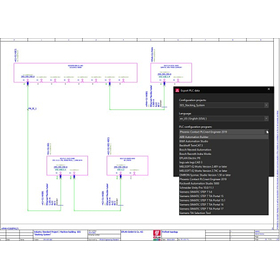
Answers to questions during the introduction consideration!

  • 3D CAD

Added to bookmarks

Bookmarks list

Bookmark has been removed

Bookmarks list

You can't add any more bookmarks

By registering as a member, you can increase the number of bookmarks you can save and organize them with labels.

Free membership registration

Filter

classification
Delivery Time
Location