We have compiled a list of manufacturers, distributors, product information, reference prices, and rankings for CAD.
ipros is IPROS GMS IPROS One of the largest technical database sites in Japan that collects information on.

CAD(建築) - List of Manufacturers, Suppliers, Companies and Products | IPROS GMS

Last Updated: Aggregation Period:Mar 18, 2026~Apr 14, 2026
This ranking is based on the number of page views on our site.

CAD Product List

1~30 item / All 32 items

Displayed results

IJCAD Arch

Equipped with symbols for scenery, sanitary facilities, kitchen equipment, furniture, and fixtures!

"IJCAD Arch" is a CAD software for architectural design that includes the necessary functions for basic design, detailed design, construction drawings, and full-scale drawings. It supports the reading and saving of DWG, DXF, and JWW files. It also features a conversion function that reduces data discrepancies that can be a bottleneck during data exchange between different file formats. Layer control is categorized and designed specifically for architectural and equipment drawings. 【Features】 ■ Supports industry-standard .dwg and .jww files ■ Easy data organization with layer control ■ Creation of quantity and area tables ■ Includes various architectural symbols ■ Capable of architectural drafting ■ Can extract wiring and piping lengths even in 2D drafting *For more details, please download the PDF or feel free to contact us.

Added to bookmarks

Bookmarks list

Bookmark has been removed

Bookmarks list

You can't add any more bookmarks

By registering as a member, you can increase the number of bookmarks you can save and organize them with labels.

Free membership registration

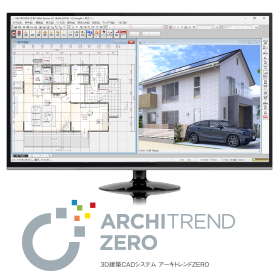
3D Architectural CAD System "ARCHITREND ZERO"

From design to presentation and application, everything in one go! The No. 1 residential design 3D CAD in Japan. Compliant with the revised Energy Conservation Act for Buildings effective April 1, 2021!

The first generation "ARCHITREND," released in 1987, has been adopted by over 38,000 companies, establishing itself as the standard domestic architectural CAD software, the "ARCHITREND series." The fifth installment, "ARCHITREND ZERO," pursues improved operability and functionality with a simple interface. It supports domestic housing design (traditional construction methods, 2x4 construction, S/RC construction). This 3D architectural design system provides total support for design work, from design to presentation, various applications, cost estimation, and after-management. 《ZEH Design》《Compliant with the new energy-saving standards of 2016!》《VR Integration》 ------------------------------------ ◎ Catalog data can be downloaded from the product site below. ◎ A 30-day "free trial version" is available! ◎ Events and seminars are being held nationwide! ▼ For applications and details, click here.

Added to bookmarks

Bookmarks list

Bookmark has been removed

Bookmarks list

You can't add any more bookmarks

By registering as a member, you can increase the number of bookmarks you can save and organize them with labels.

Free membership registration

High-performance general-purpose 2D/3D CAD MicroGDS

A CAD that handles everything from planning and detailed design to presentations, cost estimation/analysis, and facility management all in one.

The idea of creating "things" rather than just making "drawings"... In the fields of architecture, civil engineering, and engineering, databases of drawings and shapes are utilized as the foundation in various business scenarios. With the advancement of IT technology within and between companies, the circulation and maintenance of data tailored to the business lifecycle—from the initial planning and design phase to basic design, detailed design, construction management, and maintenance management—are becoming increasingly important. MicroGDS is a shape database system that is active in a wide range of fields, including the application to architectural design, structure, and equipment, as well as the design and maintenance of infrastructure such as civil engineering, electricity, gas, and water supply. *For more details, please request the materials.

Added to bookmarks

Bookmarks list

Bookmark has been removed

Bookmarks list

You can't add any more bookmarks

By registering as a member, you can increase the number of bookmarks you can save and organize them with labels.

Free membership registration

Design, Control, and Electrical CAD Software 'CADCity Series'

■A lineup tailored to your needs! ■Excellent compatibility with other CAD data! ■Increased work efficiency guaranteed!

【Contents】 ◆ CAD for electrical equipment design and construction ◆ CAD for electrical and control design ◆ CAD for air conditioning and sanitary piping equipment design and construction ◆ 2D CAD specifically for architecture This is a comprehensive catalog featuring a total of 14 types of products. The CADCity series comes standard with various functions necessary for creating CAD drawings! It enables beautiful drawing creation and improves work efficiency. 【Standard Functions of the CADCity Series】 ■ Binder Manage multiple drawings in one place. No need to "cross pages for each drawing"! ■ CAD Data Compatibility Standard equipped with various data compatibility functions such as "DWG," "DXF," "JWW," and "SXF." You can rest assured even if "the drawing received from the customer was in another file format"! ■ Drawing and Editing Functions You can create drawings with various expressions. It can also be configured for ease of use according to each customer's needs! ■ Output In addition to user-defined colors and extended color settings during output, PDF/TIFF output functions have been added. ■ CSB An interruptible (event-driven) operation system. It is unlikely that "edits are made automatically and cannot be reverted"!

  • 2D CAD Construction
  • CAD

Added to bookmarks

Bookmarks list

Bookmark has been removed

Bookmarks list

You can't add any more bookmarks

By registering as a member, you can increase the number of bookmarks you can save and organize them with labels.

Free membership registration

Recommended models for architectural design and drafting CAD "DRA-CAD"

Recommended operating model for design support software that can be used by individuals in various industries and job types.

"DRA-CAD" is a domestically produced architectural design CAD that meets the needs of designers with intuitive operability and high customization. It covers various aspects from planning to production and operation in architecture, including design, simulation, presentation, basic design, detailed design, applications, construction drawing creation, and maintenance-related tasks. At Applied, we offer the 'Be-Clia CAD Type-S12IS series / Be-Clia CAD Type-M12IS series' as recommended operating models. 【DRA-CAD Features】 ■ Data conversion between AutoCAD and Jw_cad ■ Creation of competition and presentation materials ■ Utilization of text information written on drawings ■ Function to check the consistency of drawings ■ CAD SHOP collaboration model *For more details, please refer to the related links or feel free to contact us.

  • 2022-04-11_10h27_10.png
  • 2022-04-11_10h27_16.png
  • Other CAD
  • CAD

Added to bookmarks

Bookmarks list

Bookmark has been removed

Bookmarks list

You can't add any more bookmarks

By registering as a member, you can increase the number of bookmarks you can save and organize them with labels.

Free membership registration

Steel Frame CAD "S/F REAL4"

A powerful steel frame CAD aimed at streamlining the entire process!

"S/F REAL4" is a CAD system specifically designed for steel structures, aiming to be more user-friendly, faster, and capable of handling a greater variety of cases. It manages all architectural steel structures in a three-dimensional model and can automatically generate general drawings, detailed drawings, processing drawings, and NC data related to steel fabrication. Additionally, this product series has a proven track record of implementation in many companies, contributing to the production of steel buildings, integration with production management systems, and cost reduction. 【Features】 ■ Automation of construction drawings ■ Optimization of the entire manufacturing process ■ Avoidance of mistakes during the design phase ■ Efficiency in communication and coordination among stakeholders *For more details, please refer to the catalog or feel free to contact us.

  • 3D CAD
  • Other CAD related software
  • CAD

Added to bookmarks

Bookmarks list

Bookmark has been removed

Bookmarks list

You can't add any more bookmarks

By registering as a member, you can increase the number of bookmarks you can save and organize them with labels.

Free membership registration

Free trial version of electrical equipment CAD "Brain Gear Supra" available.

Significantly improve work efficiency and create value from CAD data! Introduction to the architectural equipment CAD system.

"Brain Gear Supra Electric Equipment" is a building equipment CAD system that operates on AutoCAD. It standardly supports efficient equipment layout, conduit and wiring routing functions, 3D modeling, material aggregation functions, and interfaces with other CAD systems. It significantly improves work efficiency and creates value for CAD data. 【Features】 ■ Operates on AutoCAD ■ Standard support for efficient equipment layout, conduit and wiring routing functions, 3D modeling, material aggregation functions, and interfaces with other CAD systems ■ Significantly improves work efficiency ■ Creates value for CAD data *For more details, please refer to the PDF document. ★ A trial version is available. Please feel free to contact us. ★

  • 2D CAD Electrical
  • CAD

Added to bookmarks

Bookmarks list

Bookmark has been removed

Bookmarks list

You can't add any more bookmarks

By registering as a member, you can increase the number of bookmarks you can save and organize them with labels.

Free membership registration

[Case Study] 3D CAD 'Rebro'

Improving the quality of construction management through creative ingenuity! We are working on strengthening our system in anticipation of the spread of BIM.

We would like to introduce a case study on the introduction of the 3D CAD software 'Rebro' by Sangko Equipment Industry. Our company has been engaged in plumbing and sanitary equipment construction for buildings and apartment complexes for nearly 60 years since its founding. Anticipating the spread of BIM in the construction industry, we adopted 3D CAD a few years ago and switched to software with higher operability to further improve construction quality. As a result of the introduction, we experienced an increase in speed compared to drawing with 2D CAD, and the consistency of 3D CAD improved the quality of construction management. [Case Study] ■ Objectives of Introduction - To streamline the drawing work of piping diagrams - To enhance the accuracy of pre-construction considerations - To establish a system capable of supporting BIM ■ Introduced System - Building equipment dedicated CAD 'Rebro' *For more details, please refer to the PDF materials or feel free to contact us.

Added to bookmarks

Bookmarks list

Bookmark has been removed

Bookmarks list

You can't add any more bookmarks

By registering as a member, you can increase the number of bookmarks you can save and organize them with labels.

Free membership registration

3D CAD for Manufacturing Industry【Autodesk Inventor】

What if a client in the construction industry requests BIM support...?

In the construction industry, a new design concept known as BIM (Building Information Modeling) is becoming widespread. In the design of buildings using BIM, it is essential to have BIM-compatible 3D models that include not only shape information of elements such as doors and windows, but also attribute information such as performance and specifications for equipment like HVAC systems, lighting fixtures, and elevators. Manufacturers of these elements and equipment are also required to adopt BIM practices as part of the manufacturing industry. With Autodesk's 3D CAD "Inventor," not only can efficient 3D design be achieved, but it is also easy to output BIM-compatible models from the designed 3D models.

  • 3D CAD
  • CAD

Added to bookmarks

Bookmarks list

Bookmark has been removed

Bookmarks list

You can't add any more bookmarks

By registering as a member, you can increase the number of bookmarks you can save and organize them with labels.

Free membership registration

Building Equipment CAD "ARCADE NEO" Size Stamp Function

It is equipped with a convenient piping drawing feature. Please try it out with the free trial version.

"ARCADE NEO" is a cost-effective ARES-based architectural equipment CAD. We have now made it compatible with ARES Commander 2024 SP2 (build 24.2.1.3136). This product eliminates complex operations and achieves a unified, simple operation, allowing for the creation of drawings and summary tables with minimal training. Below, we introduce the wiring drawing function of "ARCADE NEO." Size Stamp Function - This function allows you to add sizes to pipes or ducts when drawing a route. Sizes can be added even after the drawing is completed, making it easier to make corrections and improving drawing efficiency. *For more details, please refer to the PDF materials. ★ A free trial version is available. Please feel free to contact us! ★

  • 2D CAD Construction
  • CAD

Added to bookmarks

Bookmarks list

Bookmark has been removed

Bookmarks list

You can't add any more bookmarks

By registering as a member, you can increase the number of bookmarks you can save and organize them with labels.

Free membership registration

IJCAD2020 PRO

Low-cost CAD compatible with AutoCAD. No. 1 in domestic achievements for compatible CAD with over 67,000 cumulative licenses.

- A high-quality texture that doesn't seem like compatible CAD - High-speed response (Pan & Zoom, instant shape selection, etc.) - Equipped with a new Japanese SHX font (almost no character garbling, which is common in compatible CAD)

  • 2D CAD machine
  • Other CAD
  • CAD

Added to bookmarks

Bookmarks list

Bookmark has been removed

Bookmarks list

You can't add any more bookmarks

By registering as a member, you can increase the number of bookmarks you can save and organize them with labels.

Free membership registration

2D CAD for Electrical Equipment Design and Construction in Architecture 'CADCity Electrical'

■Creation of illuminance distribution diagrams is also possible! ■Enhanced compatibility with drawings from other software! ■Integration with E-Calc◎

This is a CAD software for designing and creating construction electrical equipment installation drawings. 【Features】 ■ Capable of creating illuminance distribution diagrams! Through joint development with Panasonic Corporation, it is now possible to create and arrange illuminance distribution diagrams using the latest lighting fixtures. You can create your own illuminance distribution diagrams. If you feel that "it takes a bit of time to ask the manufacturer," please consider this. ■ Integration with E-Calc is also possible! (Optional) You can grasp the appropriate number of lighting fixtures and the size of the main line! This is perfect for those who feel that "it's a hassle to refer to different documents and drawings later after creating the drawings." ⇩ For more information about E-Calc, copy and paste this link ⇩ https://tanaksys.com/ecalcr3.html ■ Actively supports CAD data compatibility! Files created with other CAD software such as JWCAD and AutoCAD are also available! This is ideal for those who want to draw over the drawings received from customers. In the future, we will further support the smooth exchange of information in the electrical equipment industry with CAD as the core, providing features and offerings to enhance our customers' operational efficiency.

  • 2D CAD Electrical
  • CAD

Added to bookmarks

Bookmarks list

Bookmark has been removed

Bookmarks list

You can't add any more bookmarks

By registering as a member, you can increase the number of bookmarks you can save and organize them with labels.

Free membership registration

Building Equipment Dedicated CAD Rebro

From a single 3D model data, it is possible to create various drawings such as floor plans, cross-sectional views, and detailed drawings! Streamlining equipment operations from design to construction and maintenance management!

Rebro is a 3D CAD software specifically designed for architectural equipment that supports BIM. The 3D model is linked with floor plans and cross-sections, so when you draw or modify, the related drawings are updated simultaneously. You can create various drawings while ensuring consistency at all times. The integrated version includes functions for designing mechanical equipment (HVAC and sanitary) and electrical equipment. The mechanical equipment (HVAC and sanitary) functions include routing for easily drawing piping and ducts, automatic connection of outdoor and indoor units, batch slope processing, automatic sizing based on flow rate and air volume, automatic placement of equipment and fixtures, and processing of piping, spiral ducts, and rectangular ducts. The electrical equipment functions include batch electrical wiring for multiple fixtures, electrical symbols (JECA symbols), wiring notation tables and legends, wiring management, panel management, illuminance calculations, automatic placement of lighting fixtures, and illuminance distribution diagrams. Additionally, there are many features that facilitate efficient equipment design, such as equipment replacement, beam penetration areas, sleeves, interference checks, quantity takeoff, CG images and movies, and markup.

  • 3D CAD
  • CAD

Added to bookmarks

Bookmarks list

Bookmark has been removed

Bookmarks list

You can't add any more bookmarks

By registering as a member, you can increase the number of bookmarks you can save and organize them with labels.

Free membership registration

[User Report] Architectural Design and Drafting CAD DRA-CAD 1

DRA-CAD all the way. The key points are its simple functionality and sense of speed!

The engineers at Nisso Ken Co., Ltd. have been involved in the design of many large projects such as government offices, commercial buildings, and communication facilities. Most of their drawings are created using DRA-CAD. "We have been using DRA-CAD since the Structural Systems Group developed it, and its user-friendliness and suitability for expressing our work have led us to use it for the past 20 years. One of the main reasons DRA-CAD has become so widespread is its 'simple fundamental concept.' There are also opinions that it is pleasant to use because it feels like drawing by hand." "Nowadays, CAD has become more common, and there are increasing cases where it can be shared across different software. In the future, we hope to see how it can be compatible with DWG, Jw_Cad, and others." For more details, please contact us or refer to our catalog.

Added to bookmarks

Bookmarks list

Bookmark has been removed

Bookmarks list

You can't add any more bookmarks

By registering as a member, you can increase the number of bookmarks you can save and organize them with labels.

Free membership registration

Proposal for Utilizing CAD: Reasons to Choose BricsCAD

3D-BIM, providing mechanical functions on a single platform! Introducing the secrets of high compatibility and reliability.

This article introduces why "BricsCAD" is chosen in many design environments. Under the concept of "One platform, One file format," it offers 2D, 3D, and BIM, as well as mechanical functions all on a single platform. Everything can be created in the industry-standard .dwg file format. The related links below provide a detailed explanation of why it has garnered significant attention and is highly regarded in design environments across a wide range of industries, including manufacturing, architecture, and civil engineering. Please take a moment to read it. [Contents] ■ About Bricsys ■ History of BricsCAD / Compatible CAD ■ Value of BricsCAD *You can view the detailed content of the article through the related links. For more information, please feel free to contact us.

Added to bookmarks

Bookmarks list

Bookmark has been removed

Bookmarks list

You can't add any more bookmarks

By registering as a member, you can increase the number of bookmarks you can save and organize them with labels.

Free membership registration

Construction and Civil Engineering CAD 'IJCAD Civil'

Ministry of Land, Infrastructure, Transport and Tourism CAD drawing standards compliant! Equipped with functions compatible with electronic delivery!

"IJCAD Civil" is a construction and civil engineering solution based on the general-purpose CAD "IJCAD." In addition to handling DWG, DXF, and DWF files, it is built on IJCAD, which can also manage JWW files and includes features that support electronic delivery such as SXF conversion. It is a software with excellent performance and usability for large-scale drawings, as well as strong functional compatibility with AutoCAD. [Features] ■ Complies with the Ministry of Land, Infrastructure, Transport and Tourism's CAD drawing standards ■ Can handle JWW files and includes features that support electronic delivery such as SXF conversion ■ Equipped with functions specifically for civil engineering design ■ Excellent performance and usability for large-scale drawings ■ Strong functional compatibility with AutoCAD *For more details, please refer to the PDF materials or feel free to contact us.

  • 2D CAD Construction
  • CAD

Added to bookmarks

Bookmarks list

Bookmark has been removed

Bookmarks list

You can't add any more bookmarks

By registering as a member, you can increase the number of bookmarks you can save and organize them with labels.

Free membership registration

Electrical Equipment CAD System "Densho NX"

This is an electrical equipment CAD that can streamline the drafting work of electrical diagrams.

Denko NX is a CAD system designed to streamline various drawing creation tasks related to electrical equipment construction. It incorporates unique know-how developed over many years of CAD development and CAD development for electrical equipment construction, as well as numerous requests received from customers nationwide. This system, honed through practical experience, allows for the quick completion of design drawings, construction drawings, and application documents for power companies related to electrical equipment construction. 【Features】 - Equipped with numerous specialized functions for creating electrical equipment drawings - Streamlines the creation of design and construction drawings - Enhances efficiency in creating application documents for power companies - Improves efficiency in creating layout diagrams, panel diagrams, and system diagrams - Streamlines the process of material takeoff For more details, please contact us.

  • 2D CAD Electrical
  • Data conversion software
  • CAD

Added to bookmarks

Bookmarks list

Bookmark has been removed

Bookmarks list

You can't add any more bookmarks

By registering as a member, you can increase the number of bookmarks you can save and organize them with labels.

Free membership registration

MP-CAD8 Ver.2

A pre-cut CAD developed by a pre-cut production system manufacturer. Integrated with the production system, it achieves high operability and productivity.

【Available Pre-cut Data】 Horizontal members, columns, rafters (joists, purlins, intermediate studs, etc.), plywood, insulation materials, wall frames, gable panels, ceiling battens, siding, etc. 【Features】 ■ From ownership to utilization. Pioneering the subscription model in the industry. ■ 3D checks of interference conditions for all components. ■ Simulation of processing for created pre-cut data. ■ Data adjustment function for users with different tool diameters, etc. ■ Compatible with various hardware methods such as Tech One P3, HSS, Presetter, SS Multi, etc. ■ Supports structural strength calculations, building codes and specifications, quality assurance laws and performance displays, beam cross-section calculations, and vertical alignment rates of walls and columns, etc. ■ Compatible with trusses from PWA (Japan Association for Medium and Large Scale Wooden Pre-cut Technology). ■ Support for special fittings for manufactured hardware, etc. ■ Estimation of hardware related to pre-cut data. ■ Data linkage with various CAD systems by utilizing CEDXM files, etc. *For more details, please download the PDF or feel free to contact us.

  • 3D CAD
  • 2D CAD Construction
  • CAD

Added to bookmarks

Bookmarks list

Bookmark has been removed

Bookmarks list

You can't add any more bookmarks

By registering as a member, you can increase the number of bookmarks you can save and organize them with labels.

Free membership registration

Design Connect Service "ARCHITREND ONE"

Manage the latest data by integrating ARCHITREND ZERO with the cloud!

ARCHITREND ONE is a 3D architectural CAD system that seamlessly integrates with the data of "ARCHITREND ZERO," allowing for the management of always up-to-date data in the cloud. By setting viewing restrictions and editing permissions on an account basis, users can utilize the latest data from various devices regardless of location or time, enabling the sharing of consistent design information, progress checks, and remote work instructions with a sense of "connecting ARCHITREND," significantly improving productivity. ◎ Request for catalog materials ◎ A free trial version is available. ▼ For more details, click here.

Added to bookmarks

Bookmarks list

Bookmark has been removed

Bookmarks list

You can't add any more bookmarks

By registering as a member, you can increase the number of bookmarks you can save and organize them with labels.

Free membership registration

Recommended models for the general-purpose 2D CAD "ZWCAD"

Recommended model for high-performance 2D CAD software with high compatibility with AutoCAD.

"ZWCAD" is a high-performance, cost-effective general-purpose 2D CAD that is DWG compatible. It offers customizable features for engineers in various industries, including architecture and manufacturing. Currently, it supports 15 languages and boasts sales achievements of over 900,000 users in 90 countries worldwide. At Applied, we recommend the 'Be-Clia CAD Type-S12IS series / Be-Clia CAD Type-M12IS series' as the preferred operating models. 【ZWCAD Features】 ■ Can be operated without discomfort by AutoCAD users ■ Most AutoCAD commands can be used almost as they are ■ Ribbon and classic interface can be switched with one click ■ Customization can be easily transferred ■ Faithfully reproduces AutoCAD's detailed features ■ CAD SHOP collaboration model *For more details, please refer to the related links or feel free to contact us.

  • 2022-04-11_10h36_12.png
  • 2022-04-11_10h36_17.png
  • 2022-04-11_10h36_26.png
  • Other CAD
  • CAD

Added to bookmarks

Bookmarks list

Bookmark has been removed

Bookmarks list

You can't add any more bookmarks

By registering as a member, you can increase the number of bookmarks you can save and organize them with labels.

Free membership registration

[User Report] Architectural Design and Drafting CAD DRA-CAD 4

From planning and design to detailed design, all drawings are created with DRA-CAD!

The staff of the Architectural Design Department at Daiho Construction Co., Ltd. handles a wide range of architectural design, primarily focusing on condominiums, as well as offices and factories. The design drawings created by the 20 engineers are all designed using DRA-CAD. "We introduced it around 1991-1992, when CAD was not yet widespread. At that time, I believe there were very few CAD software options available, but we decided to adopt DRA-CAD from Structural Systems, a leading manufacturer of architectural design drafting software, because we had confidence in it, and we have continued to use it to this day. There have been suggestions to switch to other companies' software several times, but each time, we concluded that we should maintain productivity with the user-friendly DRA-CAD, and we still use it now. Particularly, since DRA-CAD is a domestically produced CAD, I think it matches the drawing sensibilities of Japanese designers." "The drawings produced in-house range from general drawings to detailed drawings, all created using DRA-CAD. While it is mainly used for drafting tasks, I believe it is a CAD with very high expressive power. It is also very useful for creating planning drawings and is greatly utilized in planning and presentations." For more details, please contact us or refer to the catalog.

Added to bookmarks

Bookmarks list

Bookmark has been removed

Bookmarks list

You can't add any more bookmarks

By registering as a member, you can increase the number of bookmarks you can save and organize them with labels.

Free membership registration

[User Report] Architectural Design and Drafting CAD DRA-CAD 2

A CAD software with excellent response time, making a significant impact within the company!

Chiyoda Techno Ace Co., Ltd. specializes in the design and construction of buildings and building facilities, including clean rooms for pharmaceutical factories and general work equipment factories, and has gained significant support in this field due to its high level of specialized technical expertise. In project management, including the Equipment and Electrical Headquarters, DRA-CAD is used as the standard CAD software. "Originally, we were using CAD software from another company, but the time-consuming process of redrawing drawings was a problem, and we were struggling to find software with good operability. That’s when DRA-CAD provided a solution. In terms of operation, its fast response and customizable icon menus make it very user-friendly, which is a major attraction of DRA-CAD. For engineers involved in design, DRA-CAD allows for scaling the drawing frame in a way that feels close to hand-drawn drafting, making it easily accepted by engineers and a significant reason for its company-wide adoption." "DRA-CAD is reportedly working on enhancing its features for the future, so we expect it to become even more convenient and efficient software." For more details, please contact us or refer to the catalog.

Added to bookmarks

Bookmarks list

Bookmark has been removed

Bookmarks list

You can't add any more bookmarks

By registering as a member, you can increase the number of bookmarks you can save and organize them with labels.

Free membership registration

[User Report] Architectural Design and Drafting CAD DRA-CAD 3

The decision to introduce it 15 years ago was correct! DRA-CAD is a partner in design work.

Kataoka Design Co., Ltd. is an architectural design office established in 1982. Their design projects primarily focus on single-family homes, but they also handle multi-family residences, stores, factories, offices, and hot spring inns, covering a wide area throughout the Kanto region. "When I became independent, I strongly felt that the future of design was in the CAD era, so I introduced computers and CAD software. After consulting with industry professionals and visiting various places, I decided to adopt DRA-CAD, which was already being used by major design firms and general contractors, had a large user base, and was highly regarded for its ease of use. Since it was my first experience with computers, I took foundational courses to learn, but DRA-CAD's operation felt very close to hand-drawing, which was a great help. Purchasing a computer and starting CAD at the age of 45, and still actively drawing plans even after turning 60, makes me feel that my way of thinking and the choice of DRA-CAD were indeed the right decisions." For more details, please contact us or refer to our catalog.

Added to bookmarks

Bookmarks list

Bookmark has been removed

Bookmarks list

You can't add any more bookmarks

By registering as a member, you can increase the number of bookmarks you can save and organize them with labels.

Free membership registration

Building Equipment CAD 'Brain Gear Supra' Route Editing Function

Automate the tedious drawing tasks of equipment design to reduce errors and significantly improve productivity!

"Brain Gear Supra" is an AutoCAD-based architectural equipment CAD system. By adopting a design manager, it eliminates complex operations and achieves a unified, easy operation. As a result, designers can create drawings, design documents, and summary tables more quickly with minimal training. Below, we will introduce the routing editing function of "Brain Gear Supra." Routing Editing Function - This function allows you to add sizes to pipes or ducts when drawing routes. Since sizes can also be added after the drawing is completed, it makes corrections easier and improves drawing efficiency. 【Features】 ■ Significant improvement in productivity ■ World standard ■ Easy operability ■ Pursuit of automation ■ Enhanced user interface *For more details, please refer to the PDF materials. ★ A free trial version is available. Please feel free to contact us! ★

  • Other CAD
  • CAD

Added to bookmarks

Bookmarks list

Bookmark has been removed

Bookmarks list

You can't add any more bookmarks

By registering as a member, you can increase the number of bookmarks you can save and organize them with labels.

Free membership registration

About the compatibility of architectural equipment CAD 'ARCADE NEO' with JWCAD.

Not only can you convert created drawings for JWCAD, but you can also import JWCAD data! Please try it out with the free trial version.

"ARCADE NEO" is a cost-effective ARES-based architectural equipment CAD. We have now made it compatible with ARES Commander 2024 SP2 (build 24.2.1.3136). This product eliminates complex operations and achieves a unified, easy operation, allowing for the creation of drawings and summary tables with minimal training. Additionally, it can convert created drawings into JWCAD format and read JWCAD data. We offer batch conversion features for individual sheets and folders. *For more details, please refer to the PDF materials. ★ A free trial version is available. Please feel free to contact us. ★

  • 2D CAD Construction
  • CAD

Added to bookmarks

Bookmarks list

Bookmark has been removed

Bookmarks list

You can't add any more bookmarks

By registering as a member, you can increase the number of bookmarks you can save and organize them with labels.

Free membership registration

Building Equipment CAD 'ARCADE NEO' Side Note Editing Function

It comes with a convenient piping drawing feature. Please try it out with the free trial version.

"ARCADE NEO" is a cost-effective ARES-based architectural equipment CAD. We have now made it compatible with ARES Commander 2024 SP2 (build 24.2.1.3136). This product eliminates complex operations and achieves a unified, easy operation, allowing for the creation of drawings and summary tables with minimal training. Below, we will introduce the wiring drawing function of "ARCADE NEO." Footnote Editing Function - You can edit footnote text replacement, footnote position, footnote size, and more. *For more details, please refer to the PDF document. ★ A free trial version is available. Please feel free to contact us! ★

  • 2D CAD Construction
  • CAD

Added to bookmarks

Bookmarks list

Bookmark has been removed

Bookmarks list

You can't add any more bookmarks

By registering as a member, you can increase the number of bookmarks you can save and organize them with labels.

Free membership registration

Building Equipment CAD 'ARCADE NEO' Sanitary Fixture Table Creation Function

It is equipped with a convenient piping drawing function. Please try it out with the free trial version.

"ARCADE NEO" is a cost-effective ARES-based architectural equipment CAD. We have now made it compatible with ARES Commander 2024 SP2 (build 24.2.1.3136). This product eliminates complex operations and achieves a unified, simple operation, allowing for the creation of drawings and summary tables with minimal training. Below, we will introduce the wiring drawing function of "ARCADE NEO." Sanitary Fixture Table Creation Function - You can create a list of sanitary fixtures within a specified range in the drawing. *For more details, please refer to the PDF materials. ★ A free trial version is available. Please feel free to contact us. ★

  • 2D CAD Construction
  • CAD

Added to bookmarks

Bookmarks list

Bookmark has been removed

Bookmarks list

You can't add any more bookmarks

By registering as a member, you can increase the number of bookmarks you can save and organize them with labels.

Free membership registration

2D/3D CAD DraftBoardVer2.0Hybrid

Design and drafting software that anyone can easily use to create accurate drawings.

We have updated to the easy and convenient design tool "Design FreeQ." For more details, please feel free to contact us.

  • 3D CAD
  • Other CAD
  • Other CAD related software
  • CAD

Added to bookmarks

Bookmarks list

Bookmark has been removed

Bookmarks list

You can't add any more bookmarks

By registering as a member, you can increase the number of bookmarks you can save and organize them with labels.

Free membership registration

[User Report] Architectural Design and Drafting CAD DRA-CAD 5

Full utilization of 3D for examining complex structural arrangements!

Kamikawa Structural Design Office Co., Ltd. is a structural design firm with one of the leading track records in the field of water supply and sewage system structural design in Japan. Since its establishment, it has efficiently carried out numerous structural designs utilizing BUS and DRA-CAD. "When the office was first established, we conducted structural calculations using BUS-1 and created drawings by hand. At that time, during a design project for a sewage treatment plant in Koto Ward, Tokyo, the design firm we were working with submitted drawings using DRA-CAD. Upon seeing those drawings, the convenience of making corrections stood out, leading us to the conclusion that we had to adopt DRA-CAD." "I appreciate that DRA-CAD is simple to operate, easy to remember, and easy to teach. Even when new staff join, with some guidance, they can start working with DRA-CAD. After that, they can use it independently while referring to the manual, which is very good. Above all, it is the easiest to handle compared to other products." For more details, please contact us or refer to our catalog.

Added to bookmarks

Bookmarks list

Bookmark has been removed

Bookmarks list

You can't add any more bookmarks

By registering as a member, you can increase the number of bookmarks you can save and organize them with labels.

Free membership registration