We have compiled a list of manufacturers, distributors, product information, reference prices, and rankings for CAD.
ipros is IPROS GMS IPROS One of the largest technical database sites in Japan that collects information on.

CAD(建築) - List of Manufacturers, Suppliers, Companies and Products | IPROS GMS

Last Updated: Aggregation Period:Mar 18, 2026~Apr 14, 2026
This ranking is based on the number of page views on our site.

CAD Product List

1~30 item / All 68 items

Displayed results

BIM "Archicad" by architects for architects

BIM software proposed by Graphisoft that solves various problems faced by architecture and construction.

Archicad is a BIM software that provides various tools that enable efficient and intuitive use, along with a user-friendly interface, supporting projects and teams of all sizes. It can be widely used by companies of all sizes, from small design firms to large construction companies, regardless of project scale. *For more details, please download the PDF or feel free to contact us.*

  • Other CAD related software
  • CAD

Added to bookmarks

Bookmarks list

Bookmark has been removed

Bookmarks list

You can't add any more bookmarks

By registering as a member, you can increase the number of bookmarks you can save and organize them with labels.

Free membership registration

Complex plans with irregularities can easily be turned into videos using architectural BIM.

We would like to introduce a case study of the implementation of architectural BIM "Archicad" at Ito Kizaburo Architectural Research Institute. A collection of case studies featuring numerous examples of BIM implementation is currently available.

We would like to introduce a case where our architectural BIM "Archicad" is utilized at Ito Kizaburo Architectural Institute Co., Ltd. This software was developed for architects, making it intuitive and easy to use. With the concept of OPENBIM, it also allows for smooth collaboration with other software necessary for architecture. Even complex designs with irregularities have become easier to understand and design using BIM. 【Case Overview】 - Creating floor plans was easier than drawing lines one by one in 2D CAD. - By creating BIMx and animations from the building model designed in BIM, we were able to delight our clients during presentations and realize the necessity for this in the future. - With the increasing demand for videos lately, Archicad allows for easy video creation by exporting models generated from drawings to Twinmotion. *For more details, please download the PDF or feel free to contact us.

  • Other CAD related software
  • CAD

Added to bookmarks

Bookmarks list

Bookmark has been removed

Bookmarks list

You can't add any more bookmarks

By registering as a member, you can increase the number of bookmarks you can save and organize them with labels.

Free membership registration

IJCAD Arch

Equipped with symbols for scenery, sanitary facilities, kitchen equipment, furniture, and fixtures!

"IJCAD Arch" is a CAD software for architectural design that includes the necessary functions for basic design, detailed design, construction drawings, and full-scale drawings. It supports the reading and saving of DWG, DXF, and JWW files. It also features a conversion function that reduces data discrepancies that can be a bottleneck during data exchange between different file formats. Layer control is categorized and designed specifically for architectural and equipment drawings. 【Features】 ■ Supports industry-standard .dwg and .jww files ■ Easy data organization with layer control ■ Creation of quantity and area tables ■ Includes various architectural symbols ■ Capable of architectural drafting ■ Can extract wiring and piping lengths even in 2D drafting *For more details, please download the PDF or feel free to contact us.

Added to bookmarks

Bookmarks list

Bookmark has been removed

Bookmarks list

You can't add any more bookmarks

By registering as a member, you can increase the number of bookmarks you can save and organize them with labels.

Free membership registration

With a level of consistency that cannot be achieved with 2DCAD, the document creation speed has increased by 1.5 times.

Introducing a case study on the implementation of architectural BIM "Archicad" at Sato Architectural Structural Design Office, LLC. We are currently offering a collection of case studies on the adoption of architectural BIM!

We would like to introduce a case study on the implementation of architectural BIM "Archicad" at Sato Architectural Structural Design Office, LLC. In traditional structural design, multiple drawings such as floor plans, framing plans, and detail drawings were interrelated, requiring the manipulation of separate files for each. By introducing BIM, any corrections made in one place are generally reflected in all drawings, eliminating discrepancies and ensuring consistency. 【Case Overview】 ■ Before Implementation - There were cases where consistency was lacking, and mistakes were likely to occur during the revision process. ■ After Implementation - The preparation of documents for building permit applications became about 1.5 times faster, reducing the workload and providing a sense of improved efficiency and labor-saving. *For more details, please download the PDF or feel free to contact us.

  • Other CAD related software
  • CAD

Added to bookmarks

Bookmarks list

Bookmark has been removed

Bookmarks list

You can't add any more bookmarks

By registering as a member, you can increase the number of bookmarks you can save and organize them with labels.

Free membership registration

Archicad User Case Studies Vol. 016

We are discussing how various industries are introducing and utilizing BIM.

This document is a collection of case studies on the implementation of the BIM software "Archicad." It includes various usage examples from companies such as Takenaka Corporation, Takato Tamagami Design Co., Ltd., and Ito Kishiro Architectural Institute, among others. Our BIM solutions are designed to enable stakeholders involved in architecture to unleash their creativity, improve efficiency, and achieve flexible collaboration, making them a choice for many customers across different scales and industries. [Contents (partial)] ■ Takenaka Corporation ■ Takamatsu Construction × Graphisoft Japan Roundtable ■ Takato Tamagami Design Co., Ltd. ■ Ito Kishiro Architectural Institute ■ Life Jam Co., Ltd. First-Class Architectural Office *For more details, please download the PDF or feel free to contact us.

  • Other CAD related software
  • CAD

Added to bookmarks

Bookmarks list

Bookmark has been removed

Bookmarks list

You can't add any more bookmarks

By registering as a member, you can increase the number of bookmarks you can save and organize them with labels.

Free membership registration

Architectural BIM Software Archicad Collaborate

With an Archicad subscription, you can use BIMcloud and BIMx Pro without limits! All-in-one BIM software.

Archicad Collaborate is a subscription service that packages the BIM software "Archicad," the BIM cloud service "BIMcloud," and the viewer app "BIMx." It reduces initial costs, allows for the utilization of BIM workflows, and offers flexible contract periods that can be chosen annually or monthly. Users can always access the latest version of Archicad, enabling real-time data sharing, smooth consensus building, and efficient design operations, thereby supporting the success of design projects. Additionally, it comes with a comprehensive support service called "Forward." **Benefits of Archicad Collaborate** - Reduces initial investment! - Licenses can be purchased only as needed during busy times! - Always has access to the latest version! - Comes with extensive support services! - Special prices for training programs such as BIM Classes!

  • Other CAD related software
  • CAD

Added to bookmarks

Bookmarks list

Bookmark has been removed

Bookmarks list

You can't add any more bookmarks

By registering as a member, you can increase the number of bookmarks you can save and organize them with labels.

Free membership registration

Experiencing the effects of architectural DX one year after the introduction of BIM.

We would like to introduce a case where Daima Construction Co., Ltd. implemented the architectural BIM "Solibri." We are currently offering a collection of case studies showcasing numerous examples of architectural BIM implementation.

At Oosumi Construction Co., Ltd., we would like to introduce a case where productivity and quality improved through highly consistent design just one year after the introduction of the architectural BIM software "Solibri." The company implemented this software with the aim of enhancing the consistency of drawings. By utilizing the software for interference checks, along with traditional visual checks, we aimed to improve the quality of the drawings. Everyone, including partner companies and construction staff, felt the importance of front-loading. 【Benefits Experienced】 ■ Accessible to everyone via the free viewer "Solibri Anywhere" ■ Clear instructions through marking on the BIM ■ User-friendly UI/UX that encourages further use of BIM *For more details, please download the PDF or feel free to contact us.

  • Other CAD related software
  • CAD

Added to bookmarks

Bookmarks list

Bookmark has been removed

Bookmarks list

You can't add any more bookmarks

By registering as a member, you can increase the number of bookmarks you can save and organize them with labels.

Free membership registration

Utilizing architectural BIM across departments between the design office and the estimation section.

Introducing a case study on the implementation of architectural BIM "Archicad" at Mabuchi Construction Co., Ltd. A collection of numerous case studies on the introduction of architectural BIM is currently being offered.

We would like to introduce a case study on the implementation of architectural BIM "Archicad" at Mabuchi Construction Co., Ltd. Until now, as long as there were no significant losses and the project was completed within the schedule, the on-site matters were left to the site engineers, and there was no verification of whether that was the best approach. However, by using BIM, it becomes possible to hand over conditions that are as close to optimal as possible to the site. 【Initiatives of the Design Department】 ■ Consideration of the benefits of creating design and structural models in a single file - To enhance the value of BIM, we presented the outcomes of BIM at an in-house technical presentation. - As BIM technology improved, the content of the presentations also became more advanced, and it gradually became recognized that we could create drawings and calculate quantities. - By inputting structural slits, which were previously represented only by symbols, as models, we can calculate quantities during the estimation phase. *For more details, please download the PDF or feel free to contact us.

  • Other CAD related software
  • CAD

Added to bookmarks

Bookmarks list

Bookmark has been removed

Bookmarks list

You can't add any more bookmarks

By registering as a member, you can increase the number of bookmarks you can save and organize them with labels.

Free membership registration

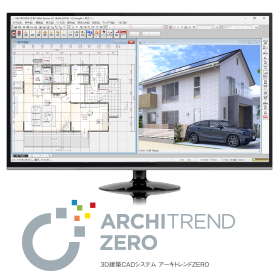
3D Architectural CAD System "ARCHITREND ZERO"

From design to presentation and application, everything in one go! The No. 1 residential design 3D CAD in Japan. Compliant with the revised Energy Conservation Act for Buildings effective April 1, 2021!

The first generation "ARCHITREND," released in 1987, has been adopted by over 38,000 companies, establishing itself as the standard domestic architectural CAD software, the "ARCHITREND series." The fifth installment, "ARCHITREND ZERO," pursues improved operability and functionality with a simple interface. It supports domestic housing design (traditional construction methods, 2x4 construction, S/RC construction). This 3D architectural design system provides total support for design work, from design to presentation, various applications, cost estimation, and after-management. 《ZEH Design》《Compliant with the new energy-saving standards of 2016!》《VR Integration》 ------------------------------------ ◎ Catalog data can be downloaded from the product site below. ◎ A 30-day "free trial version" is available! ◎ Events and seminars are being held nationwide! ▼ For applications and details, click here.

Added to bookmarks

Bookmarks list

Bookmark has been removed

Bookmarks list

You can't add any more bookmarks

By registering as a member, you can increase the number of bookmarks you can save and organize them with labels.

Free membership registration

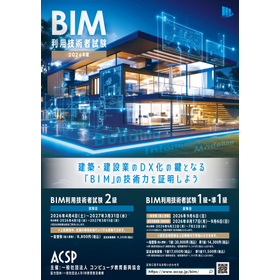
BIM Utilization Technician Examination

The key to the digital transformation of the architecture and construction industry is "BIM." It is a certification exam system that proves your "BIM skills"!

It is necessary to systematize BIM technology and knowledge and visualize what knowledge and skills companies seek when acquiring BIM personnel, which calls for the use of a certification system. Let's prove your "BIM capability" with the "BIM Utilization Technician Examination," which evaluates both BIM knowledge and skills.

  • 2D CAD Construction
  • 3D CAD
  • CAD

Added to bookmarks

Bookmarks list

Bookmark has been removed

Bookmarks list

You can't add any more bookmarks

By registering as a member, you can increase the number of bookmarks you can save and organize them with labels.

Free membership registration

High-performance general-purpose 2D/3D CAD MicroGDS

A CAD that handles everything from planning and detailed design to presentations, cost estimation/analysis, and facility management all in one.

The idea of creating "things" rather than just making "drawings"... In the fields of architecture, civil engineering, and engineering, databases of drawings and shapes are utilized as the foundation in various business scenarios. With the advancement of IT technology within and between companies, the circulation and maintenance of data tailored to the business lifecycle—from the initial planning and design phase to basic design, detailed design, construction management, and maintenance management—are becoming increasingly important. MicroGDS is a shape database system that is active in a wide range of fields, including the application to architectural design, structure, and equipment, as well as the design and maintenance of infrastructure such as civil engineering, electricity, gas, and water supply. *For more details, please request the materials.

Added to bookmarks

Bookmarks list

Bookmark has been removed

Bookmarks list

You can't add any more bookmarks

By registering as a member, you can increase the number of bookmarks you can save and organize them with labels.

Free membership registration

Graphisoft Solution Catalog

Graphisoft's proposed BIM workflow to solve the problems faced by architecture/construction!

This catalog is the solution catalog of Graphisoft, a BIM solution provider that comprehensively supports architecture and construction. It features BIM software "Archicad," which solves various problems faced by architecture and construction, as well as "BIMcloud" as an OPEN BIM data hub, and "BIMx," which allows participation in teamwork projects on "BIMcloud" from mobile devices. Additionally, we also introduce the subscription service "Archicad Collaborate." [Contents (partial)] ■Archicad ■BIMcloud ■BIMx ■Introduction of new features ■OPEN BIM *For more details, please download the PDF or feel free to contact us.

  • Other CAD related software
  • CAD

Added to bookmarks

Bookmarks list

Bookmark has been removed

Bookmarks list

You can't add any more bookmarks

By registering as a member, you can increase the number of bookmarks you can save and organize them with labels.

Free membership registration

Design, Control, and Electrical CAD Software 'CADCity Series'

■A lineup tailored to your needs! ■Excellent compatibility with other CAD data! ■Increased work efficiency guaranteed!

【Contents】 ◆ CAD for electrical equipment design and construction ◆ CAD for electrical and control design ◆ CAD for air conditioning and sanitary piping equipment design and construction ◆ 2D CAD specifically for architecture This is a comprehensive catalog featuring a total of 14 types of products. The CADCity series comes standard with various functions necessary for creating CAD drawings! It enables beautiful drawing creation and improves work efficiency. 【Standard Functions of the CADCity Series】 ■ Binder Manage multiple drawings in one place. No need to "cross pages for each drawing"! ■ CAD Data Compatibility Standard equipped with various data compatibility functions such as "DWG," "DXF," "JWW," and "SXF." You can rest assured even if "the drawing received from the customer was in another file format"! ■ Drawing and Editing Functions You can create drawings with various expressions. It can also be configured for ease of use according to each customer's needs! ■ Output In addition to user-defined colors and extended color settings during output, PDF/TIFF output functions have been added. ■ CSB An interruptible (event-driven) operation system. It is unlikely that "edits are made automatically and cannot be reverted"!

  • 2D CAD Construction
  • CAD

Added to bookmarks

Bookmarks list

Bookmark has been removed

Bookmarks list

You can't add any more bookmarks

By registering as a member, you can increase the number of bookmarks you can save and organize them with labels.

Free membership registration

BIM Software [Revit] User Case Vol. 5

Significant automation of construction drawing creation using BIM!

We would like to introduce a case study of how Hi-Big Architectural Drawing Studio utilized Autodesk's BIM software "Revit." <Overview> When creating drawings from a BIM model, manually inputting dimension lines and tags that represent the specifications of components can lead to significant effort in the creation of drawings and design changes. Hi-Big Architectural Drawing Studio successfully automated the drawing creation process significantly by utilizing the BIM software "Revit." <Implementation Results> Please check the PDF materials for more details.

  • 3D CAD
  • 2D CAD Construction
  • Other CAD related software
  • CAD

Added to bookmarks

Bookmarks list

Bookmark has been removed

Bookmarks list

You can't add any more bookmarks

By registering as a member, you can increase the number of bookmarks you can save and organize them with labels.

Free membership registration

Takamatsu Construction discusses efficient utilization methods of architectural BIM and its educational system.

We would like to introduce a case study of the implementation of architectural BIM "Archicad" at Takamatsu Construction. We are currently offering a collection of case studies featuring numerous examples of architectural BIM implementations.

Takamatsu Construction utilizes Graphisoft's BIM software "Archicad" from planning and design to construction. The decision to use this software was based on its ease of operation and the availability of tools for presenting drawings to clients. Its operability and layer functions are excellent, and the layer functionality is not commonly implemented in other BIM software, making it highly valuable. 【Case Overview】 ■ Began using Archicad around version 6.5 ■ Initially used as a tool for creating planning design drawings on a trial basis, it became established as the modeling software for the team creating perspectives ■ In 2019, a team was established to promote BIM, and a policy was set to utilize Archicad across all phases from design to construction company-wide *For more details, please download the PDF or feel free to contact us.

  • Other CAD related software
  • CAD

Added to bookmarks

Bookmarks list

Bookmark has been removed

Bookmarks list

You can't add any more bookmarks

By registering as a member, you can increase the number of bookmarks you can save and organize them with labels.

Free membership registration

A complex site involving nine companies is progressing swiftly with architectural BIM.

Introducing a case study on the implementation of architectural BIM by Aruku Design Office Co., Ltd. and Ogawa Kogyo Co., Ltd. A collection of case studies featuring numerous examples of architectural BIM implementation is available.

We would like to introduce a case where a design company and a construction company, who met for the first time, collaborated effectively using BIM in a complex public project. This complicated site involved the renovation of an existing building and the expansion of a new school building, with a total of nine companies participating. Aruku Design Office and Ogawa Industry worked together, transcending differences in companies and positions, with one responsible for design and the other for construction. By using a common BIM model, we achieved results that allowed for faster work and reduced costs. 【Case Overview】 - Features such as automatic quantity takeoff from 3D models and automatic generation of various construction drawings lead to a significant increase in productivity. - By conducting various preliminary studies quickly, it becomes possible to reduce rework on-site and material waste. - Using Archicad as a tool for common understanding among all stakeholders regarding challenges and situations is effective for smoothly advancing the construction process. *For more details, please download the PDF or feel free to contact us.

  • Other CAD related software
  • CAD

Added to bookmarks

Bookmarks list

Bookmark has been removed

Bookmarks list

You can't add any more bookmarks

By registering as a member, you can increase the number of bookmarks you can save and organize them with labels.

Free membership registration

Recommended models for architectural design and drafting CAD "DRA-CAD"

Recommended operating model for design support software that can be used by individuals in various industries and job types.

"DRA-CAD" is a domestically produced architectural design CAD that meets the needs of designers with intuitive operability and high customization. It covers various aspects from planning to production and operation in architecture, including design, simulation, presentation, basic design, detailed design, applications, construction drawing creation, and maintenance-related tasks. At Applied, we offer the 'Be-Clia CAD Type-S12IS series / Be-Clia CAD Type-M12IS series' as recommended operating models. 【DRA-CAD Features】 ■ Data conversion between AutoCAD and Jw_cad ■ Creation of competition and presentation materials ■ Utilization of text information written on drawings ■ Function to check the consistency of drawings ■ CAD SHOP collaboration model *For more details, please refer to the related links or feel free to contact us.

  • 2022-04-11_10h27_10.png
  • 2022-04-11_10h27_16.png
  • Other CAD
  • CAD

Added to bookmarks

Bookmarks list

Bookmark has been removed

Bookmarks list

You can't add any more bookmarks

By registering as a member, you can increase the number of bookmarks you can save and organize them with labels.

Free membership registration

PVC Cutter Edma Manual Tool Multi-Cup Extra

[Demo machine available] Cuts wood, moldings, rubber, and PVC at any angle. Angled cutting tool miter shear.

EDMA is a manufacturer specializing in hand tools, founded in France in 1937. With years of expertise and uniqueness honed in the French construction industry, EDMA tools are beginning to make their mark in Japanese job sites, responding to the demands of reliable on-site work. PVC Cutter EDMA Hand Tool Multi-Cut Extra A cutting tool that allows for precise angle cutting with a plate marked with angle scales. It features a single blade that is 65mm long.

  • cutter
  • Cutter/Scissors
  • CAD

Added to bookmarks

Bookmarks list

Bookmark has been removed

Bookmarks list

You can't add any more bookmarks

By registering as a member, you can increase the number of bookmarks you can save and organize them with labels.

Free membership registration

Introducing BIM for reskilling to build a long-term career.

Introducing a case study of the implementation of architectural BIM "Archicad" at Life Jam Co., Ltd. We are currently offering a collection of case studies featuring numerous examples of implementation.

We will introduce a case study on the implementation of BIM for reskilling to build a long-term career at Life Jam Co., Ltd., a first-class architectural design office. The company adopted "Archicad" in December 2019. Considering the Ministry of Land, Infrastructure, Transport and Tourism's promotion of BIM and the future career advancement of those involved in design, they decided to implement BIM, believing that BIM skills would become essential. After the introduction of BIM, they have achieved further operational efficiency and have successfully secured large projects that they could not participate in before. [Case Overview] - After the introduction of BIM, significant reductions in time and costs for proposal preparation. - Clearer roles for each staff member improved performance, leading to smoother collaboration as if passing a baton. - A seamless workflow from perspective creation to detailed design was realized. - As floor plans were drawn, 3D models were simultaneously created, allowing for a cohesive mental image of the building and facilitating information sharing. *For more details, please download the PDF or feel free to contact us.

  • Other CAD related software
  • CAD

Added to bookmarks

Bookmarks list

Bookmark has been removed

Bookmarks list

You can't add any more bookmarks

By registering as a member, you can increase the number of bookmarks you can save and organize them with labels.

Free membership registration

Steel Frame CAD "S/F REAL4"

A powerful steel frame CAD aimed at streamlining the entire process!

"S/F REAL4" is a CAD system specifically designed for steel structures, aiming to be more user-friendly, faster, and capable of handling a greater variety of cases. It manages all architectural steel structures in a three-dimensional model and can automatically generate general drawings, detailed drawings, processing drawings, and NC data related to steel fabrication. Additionally, this product series has a proven track record of implementation in many companies, contributing to the production of steel buildings, integration with production management systems, and cost reduction. 【Features】 ■ Automation of construction drawings ■ Optimization of the entire manufacturing process ■ Avoidance of mistakes during the design phase ■ Efficiency in communication and coordination among stakeholders *For more details, please refer to the catalog or feel free to contact us.

  • 3D CAD
  • Other CAD related software
  • CAD

Added to bookmarks

Bookmarks list

Bookmark has been removed

Bookmarks list

You can't add any more bookmarks

By registering as a member, you can increase the number of bookmarks you can save and organize them with labels.

Free membership registration

Just organize the drawings. Utilize architectural BIM that allows free navigation between drawings and models.

Introducing a case study of the implementation of architectural BIM "Archicad" at Takato Tamagami Design Co., Ltd. A collection of case studies featuring numerous BIM implementation examples is currently being distributed.

At Takato Tamagami Design, we utilize "Archicad" as a tool to freely traverse between drawings and models, allowing us to depict complex and dynamic spaces. The company has long felt limited by the method of drawing complex forms by manually creating lines for floor plans, elevations, and sections one by one. With the introduction of this software, the process of creating drawings has become significantly easier. By creating a 3D model from the start, the drawings are automatically generated in the background, making it feel like the task is completed without much effort. [Case Overview] ■ Before Implementation - We often displayed multiple 3D perspectives on-site and wrote explanations, which made it difficult to capture the three-dimensional aspect. ■ After Implementation - Being able to view from various angles and cut sections has deepened understanding. - People on-site have commented that "it's convenient to view on an iPad." *For more details, please download the PDF or feel free to contact us.

  • Other CAD related software
  • CAD

Added to bookmarks

Bookmarks list

Bookmark has been removed

Bookmarks list

You can't add any more bookmarks

By registering as a member, you can increase the number of bookmarks you can save and organize them with labels.

Free membership registration

Free trial version of electrical equipment CAD "Brain Gear Supra" available.

Significantly improve work efficiency and create value from CAD data! Introduction to the architectural equipment CAD system.

"Brain Gear Supra Electric Equipment" is a building equipment CAD system that operates on AutoCAD. It standardly supports efficient equipment layout, conduit and wiring routing functions, 3D modeling, material aggregation functions, and interfaces with other CAD systems. It significantly improves work efficiency and creates value for CAD data. 【Features】 ■ Operates on AutoCAD ■ Standard support for efficient equipment layout, conduit and wiring routing functions, 3D modeling, material aggregation functions, and interfaces with other CAD systems ■ Significantly improves work efficiency ■ Creates value for CAD data *For more details, please refer to the PDF document. ★ A trial version is available. Please feel free to contact us. ★

  • 2D CAD Electrical
  • CAD

Added to bookmarks

Bookmarks list

Bookmark has been removed

Bookmarks list

You can't add any more bookmarks

By registering as a member, you can increase the number of bookmarks you can save and organize them with labels.

Free membership registration

[Case Study] 3D CAD 'Rebro'

Improving the quality of construction management through creative ingenuity! We are working on strengthening our system in anticipation of the spread of BIM.

We would like to introduce a case study on the introduction of the 3D CAD software 'Rebro' by Sangko Equipment Industry. Our company has been engaged in plumbing and sanitary equipment construction for buildings and apartment complexes for nearly 60 years since its founding. Anticipating the spread of BIM in the construction industry, we adopted 3D CAD a few years ago and switched to software with higher operability to further improve construction quality. As a result of the introduction, we experienced an increase in speed compared to drawing with 2D CAD, and the consistency of 3D CAD improved the quality of construction management. [Case Study] ■ Objectives of Introduction - To streamline the drawing work of piping diagrams - To enhance the accuracy of pre-construction considerations - To establish a system capable of supporting BIM ■ Introduced System - Building equipment dedicated CAD 'Rebro' *For more details, please refer to the PDF materials or feel free to contact us.

Added to bookmarks

Bookmarks list

Bookmark has been removed

Bookmarks list

You can't add any more bookmarks

By registering as a member, you can increase the number of bookmarks you can save and organize them with labels.

Free membership registration

[BIM Software Implementation Case Study] Pasila District Development Project

Utilizing modeled information extensively in the production plan! Achieving impressive facade architecture.

Tripla is a large-scale project located in the Pasila district, consisting of a mixed-use area in Block 3, which includes the construction of the Tripla Mall, offices, apartments, hotels, and the renovation of Pasila Station. The success of the project can be attributed to the open attitude of all stakeholders towards BIM and digitalization, adopting an experimental approach. Various software products and technologies have been tested and utilized in the project. In cases where existing solutions are not available, custom solutions and methods have been established to support this large-scale development project. The construction of the BIM model and model-based visualization played a crucial role not only in negotiations among various stakeholders but also in marketing. [Case Overview] ■Challenge: The enormous data size of the design model ■Response: Dividing the model into units and separating the published model and documentation from the actual building's solid model *For more details, please refer to the PDF materials or feel free to contact us. (If the PDF button is not displayed) ⇩The catalog can be downloaded from the special website below⇩

  • 2D CAD Construction
  • 3D CAD
  • Modeler
  • CAD

Added to bookmarks

Bookmarks list

Bookmark has been removed

Bookmarks list

You can't add any more bookmarks

By registering as a member, you can increase the number of bookmarks you can save and organize them with labels.

Free membership registration

3D CAD for Manufacturing Industry【Autodesk Inventor】

What if a client in the construction industry requests BIM support...?

In the construction industry, a new design concept known as BIM (Building Information Modeling) is becoming widespread. In the design of buildings using BIM, it is essential to have BIM-compatible 3D models that include not only shape information of elements such as doors and windows, but also attribute information such as performance and specifications for equipment like HVAC systems, lighting fixtures, and elevators. Manufacturers of these elements and equipment are also required to adopt BIM practices as part of the manufacturing industry. With Autodesk's 3D CAD "Inventor," not only can efficient 3D design be achieved, but it is also easy to output BIM-compatible models from the designed 3D models.

  • 3D CAD
  • CAD

Added to bookmarks

Bookmarks list

Bookmark has been removed

Bookmarks list

You can't add any more bookmarks

By registering as a member, you can increase the number of bookmarks you can save and organize them with labels.

Free membership registration

Building Equipment CAD "ARCADE NEO" Size Stamp Function

It is equipped with a convenient piping drawing feature. Please try it out with the free trial version.

"ARCADE NEO" is a cost-effective ARES-based architectural equipment CAD. We have now made it compatible with ARES Commander 2024 SP2 (build 24.2.1.3136). This product eliminates complex operations and achieves a unified, simple operation, allowing for the creation of drawings and summary tables with minimal training. Below, we introduce the wiring drawing function of "ARCADE NEO." Size Stamp Function - This function allows you to add sizes to pipes or ducts when drawing a route. Sizes can be added even after the drawing is completed, making it easier to make corrections and improving drawing efficiency. *For more details, please refer to the PDF materials. ★ A free trial version is available. Please feel free to contact us! ★

  • 2D CAD Construction
  • CAD

Added to bookmarks

Bookmarks list

Bookmark has been removed

Bookmarks list

You can't add any more bookmarks

By registering as a member, you can increase the number of bookmarks you can save and organize them with labels.

Free membership registration

IJCAD2020 PRO

Low-cost CAD compatible with AutoCAD. No. 1 in domestic achievements for compatible CAD with over 67,000 cumulative licenses.

- A high-quality texture that doesn't seem like compatible CAD - High-speed response (Pan & Zoom, instant shape selection, etc.) - Equipped with a new Japanese SHX font (almost no character garbling, which is common in compatible CAD)

  • 2D CAD machine
  • Other CAD
  • CAD

Added to bookmarks

Bookmarks list

Bookmark has been removed

Bookmarks list

You can't add any more bookmarks

By registering as a member, you can increase the number of bookmarks you can save and organize them with labels.

Free membership registration

2D CAD for Electrical Equipment Design and Construction in Architecture 'CADCity Electrical'

■Creation of illuminance distribution diagrams is also possible! ■Enhanced compatibility with drawings from other software! ■Integration with E-Calc◎

This is a CAD software for designing and creating construction electrical equipment installation drawings. 【Features】 ■ Capable of creating illuminance distribution diagrams! Through joint development with Panasonic Corporation, it is now possible to create and arrange illuminance distribution diagrams using the latest lighting fixtures. You can create your own illuminance distribution diagrams. If you feel that "it takes a bit of time to ask the manufacturer," please consider this. ■ Integration with E-Calc is also possible! (Optional) You can grasp the appropriate number of lighting fixtures and the size of the main line! This is perfect for those who feel that "it's a hassle to refer to different documents and drawings later after creating the drawings." ⇩ For more information about E-Calc, copy and paste this link ⇩ https://tanaksys.com/ecalcr3.html ■ Actively supports CAD data compatibility! Files created with other CAD software such as JWCAD and AutoCAD are also available! This is ideal for those who want to draw over the drawings received from customers. In the future, we will further support the smooth exchange of information in the electrical equipment industry with CAD as the core, providing features and offerings to enhance our customers' operational efficiency.

  • 2D CAD Electrical
  • CAD

Added to bookmarks

Bookmarks list

Bookmark has been removed

Bookmarks list

You can't add any more bookmarks

By registering as a member, you can increase the number of bookmarks you can save and organize them with labels.

Free membership registration