We have compiled a list of manufacturers, distributors, product information, reference prices, and rankings for Support tools.
ipros is IPROS GMS IPROS One of the largest technical database sites in Japan that collects information on.

Support tools Product List and Ranking from 106 Manufacturers, Suppliers and Companies | IPROS GMS

Last Updated: Aggregation Period:Feb 04, 2026~Mar 03, 2026
This ranking is based on the number of page views on our site.

Support tools Manufacturer, Suppliers and Company Rankings

Last Updated: Aggregation Period:Feb 04, 2026~Mar 03, 2026
This ranking is based on the number of page views on our site.

  1. 日本生工技研 Tokyo//software
  2. IDAJ Kanagawa//software
  3. ソフトウィング Gunma//software
  4. 4 Translead Tokyo//Service Industry
  5. 4 null/null

Support tools Product ranking

Last Updated: Aggregation Period:Feb 04, 2026~Mar 03, 2026
This ranking is based on the number of page views on our site.

  1. Would you like to start on-site improvements and skill inheritance with Time Prism? 日本生工技研
  2. Report creation support tool 'WingReport v3.1' ソフトウィング
  3. Translead CRM Translead
  4. Design support tool "Strategy Time Chart Standard" ストラテジー
  5. 4 Current Status and Outlook of the 2025 Edition Medical Information System Peripheral (Data Utilization) Market

Support tools Product List

91~120 item / All 212 items

Displayed results

Thermal design support tool for circuit and PCB designers: Flotherm PCB

The world's number one thermal fluid analysis tool for electronic devices, for you as a circuit and PCB designer.

Simcenter Flotherm PCB is a "simplified" version of FloTHERM designed for circuit and PCB designers to evaluate component placement on the board. With simple operations, it allows for quick assessment of the impact of changes to the board's structure and component layout. By incorporating thermal design considerations into the initial floor plan, it contributes to improving the quality of circuit and PCB design.

  • Company:IDAJ
  • Price:Other
  • Thermo-fluid analysis
  • Support tools

Added to bookmarks

Bookmarks list

Bookmark has been removed

Bookmarks list

You can't add any more bookmarks

By registering as a member, you can increase the number of bookmarks you can save and organize them with labels.

Free membership registration

[Heat Design and Heat Design Consulting Case Studies] Transient Simulation

Reduce costs while ensuring safety! From robust design to SmartECO design.

We will introduce examples of thermal design and thermal design consulting. By using the electronic equipment-specific thermal design support tool "FloTHERM" for transient simulations, we can ensure safety while keeping costs down. We respond to requests such as "I want to check the temperature history associated with power changes" and "I want to reduce excessive manufacturing margins and costs." 【Case Study】 ■Challenges - I want to check the temperature history associated with power changes. - I want to reduce excessive manufacturing margins and costs. - I want to appropriately control heat generation and cooling devices. - I want to determine the quality of soldering in reflow and flow soldering. ■Proposed Product: Electronic equipment-specific thermal design support tool "FloTHERM" ■Benefits: Ensures safety while keeping costs down. *For more details, please refer to the PDF materials or feel free to contact us.

  • Company:IDAJ
  • Price:Other
  • Development support tools (ICE, emulators, debuggers, etc.)
  • simulator
  • Other analyses
  • Support tools

Added to bookmarks

Bookmarks list

Bookmark has been removed

Bookmarks list

You can't add any more bookmarks

By registering as a member, you can increase the number of bookmarks you can save and organize them with labels.

Free membership registration

Dedicated thermal design support tool for electronic devices 'Flotherm XT'

A thermal design support tool that can be utilized by thermal design engineers of all companies constituting the supply chain of various electronic devices.

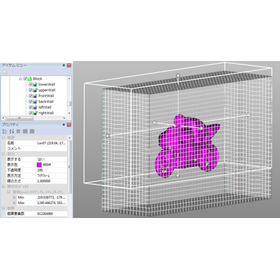
"Simcenter Flotherm XT" is a thermal fluid analysis tool specifically designed for electronic devices, based on SOLIDWORKS, which allows the use of modeling techniques for thermal design of electronic equipment developed through Flotherm on 3D CAD. While featuring seamless integration with 3D CAD, it provides an environment where essential modeling techniques for thermal design, such as modeling semiconductor packages and substrates, can be easily applied by mechanical designers. Additionally, as a thermal fluid analysis technology, it includes a unique "Multi-Control Volume" concept using cut cells, which offers automatic mesh generation and analysis capabilities that can flexibly accommodate curved and angled shapes. 【Features】 ■ SOLIDWORKS-based thermal fluid analysis tool ■ Extensive shape and material property libraries ■ Component templates specific to electronic devices ■ Utilization of semiconductor package models created with Flotherm PACK ■ Use of substrate CAD data ■ Automatic mesh generation for curved and angled shapes *For more details, please refer to the PDF materials or feel free to contact us.
  • Company:IDAJ
  • Price:Other
  • Development support tools (ICE, emulators, debuggers, etc.)
  • simulator
  • Other analyses
  • Support tools

Added to bookmarks

Bookmarks list

Bookmark has been removed

Bookmarks list

You can't add any more bookmarks

By registering as a member, you can increase the number of bookmarks you can save and organize them with labels.

Free membership registration

Flotherm: A Thermal Design Support Tool for Electronic Equipment

From semiconductor packages to enclosure sizes, analysis of various electronic devices is possible!

Simcenter Flotherm is a thermal fluid analysis tool that can be applied to a variety of electronic devices, from entire systems to individual semiconductor packages. To enable thermal designers to use it efficiently, it incorporates various features such as intuitive model creation capabilities, instant mesh generation, and result processing functions focused on thermal design. By effectively utilizing a suite of tools centered around this product, including "Flotherm PACK," which supports the modeling of semiconductor package components, as well as "FloEDA Bridge" and "FloMCAD Bridge," it facilitates collaborative electromechanical design between electrical and mechanical designers. 【Features】 - Numerous templates for electronic components with unique shapes, such as heat sinks and PCBs - Access to a library of approximately 4,000 types of shapes and material properties - Model creation utilizing design data from board CAD and mechanical CAD is also possible - By incorporating semiconductor package models, it achieves more accurate temperature predictions *For more details, please refer to the PDF document or feel free to contact us.

  • Company:IDAJ
  • Price:Other
  • Development support tools (ICE, emulators, debuggers, etc.)
  • simulator
  • Other analyses
  • Support tools

Added to bookmarks

Bookmarks list

Bookmark has been removed

Bookmarks list

You can't add any more bookmarks

By registering as a member, you can increase the number of bookmarks you can save and organize them with labels.

Free membership registration

Design support tool 'Ansys SCADE Architect'

Critical system design and architecture support tool

"Ansys SCADE Architect" is a model creation environment that supports SysML, enabling system engineers to more easily perform system and architecture design. Additionally, it provides a mechanism for seamless progression from architecture design to software design and display design using SCADE Suite or SCADE Display. This allows for the consistent construction of the software development process from model-based systems engineering (MBSE). 【Features】 ■ Integration of design environments ■ Modeling with SysML ■ Verification of system design ■ Integration with SCADE LifeCycle report generation ■ Collaboration with other SysML tools ■ Customization of the SysML language, etc. *For more details, please refer to the PDF materials or feel free to contact us.

  • Company:IDAJ
  • Price:Other
  • project management
  • Development support tools (ICE, emulators, debuggers, etc.)
  • Other embedded systems (software and hardware)
  • Support tools

Added to bookmarks

Bookmarks list

Bookmark has been removed

Bookmarks list

You can't add any more bookmarks

By registering as a member, you can increase the number of bookmarks you can save and organize them with labels.

Free membership registration

Development support tool "Ansys SCADE Suite"

Safety-critical embedded control software development support tool

"Ansys SCADE Suite" is a tool that supports the development of safety-critical embedded control software using model-based development methods. It utilizes a graphical language with strict semantics to achieve a consistent software development process, from "software design, verification (semantic checks, requirements-based testing, model test coverage analysis, formal verification, worst-case execution time analysis, stack size analysis), to automatic C code generation," all within a single tool environment. 【Features】 ■ Integrated development environment suitable for software development ■ Rich functionality in the editor environment ■ Certification-capable automatic C code generation for safety-critical industries ■ Support for multi-rate software ■ Support for multi-core ECUs, etc. *For more details, please refer to the PDF materials or feel free to contact us.

  • Company:IDAJ
  • Price:Other
  • project management
  • Development support tools (ICE, emulators, debuggers, etc.)
  • Other embedded systems (software and hardware)
  • Support tools

Added to bookmarks

Bookmarks list

Bookmark has been removed

Bookmarks list

You can't add any more bookmarks

By registering as a member, you can increase the number of bookmarks you can save and organize them with labels.

Free membership registration

[Case Study] Isuzu Central Research Institute

Automating the analysis of a vast number of cases! Examples of software that contribute to improving operational efficiency.

This time, we would like to introduce a case where our "modeFRONTIER" was effectively utilized to improve the development efficiency of diesel engines. At Isuzu Central Research Institute, "modeFRONTIER" is used to integrate and automate software. By streamlining processes and eliminating unnecessary experiments, they maintain a style where many researchers can conduct a large number of meaningful experiments at the same cost. [Case Study] ■ Software Used: modeFRONTIER ■ Challenge: Analysis of a vast number of cases ■ Result: By integrating and automating the software, unnecessary experiments were eliminated. *For more details, please refer to the external link or feel free to contact us.

  • Company:IDAJ
  • Price:Other
  • Other analyses
  • simulator
  • Support tools

Added to bookmarks

Bookmarks list

Bookmark has been removed

Bookmarks list

You can't add any more bookmarks

By registering as a member, you can increase the number of bookmarks you can save and organize them with labels.

Free membership registration

[Case Study] Automatic Fitting of 1D Engine Analysis Tool

Strict fitting completed in a short time! Introducing a case of multi-purpose optimization.

We would like to introduce a case study where we performed automatic fitting of a one-dimensional engine analysis tool using our "modeFRONTIER." We set design variables for parts that could not be accurately read from 2D drawings into 3D shapes, as well as parameters that are difficult to measure in experiments (a total of 14 variables). We established two objective functions: one for minimizing the squared difference between measured and calculated values, and another for expressing variability as standard deviation, with the goal of minimizing both. As a result, a fitting that is difficult to achieve through experience alone was completed in a short time. 【Case Study】 ■ Software Used: modeFRONTIER, GT-POWER ■ Challenge: Fitting between measured and calculated values ■ Method: Executed multi-objective optimization with a total of two objective functions ■ Result: Precise fitting completed in a short time *For more details, please refer to the PDF document or feel free to contact us.

  • Company:IDAJ
  • Price:Other
  • Other analyses
  • simulator
  • Support tools

Added to bookmarks

Bookmarks list

Bookmark has been removed

Bookmarks list

You can't add any more bookmarks

By registering as a member, you can increase the number of bookmarks you can save and organize them with labels.

Free membership registration

[Case Study] Optimization of Engine RPM Feedback Control Gain

Demonstrating its power in the development of embedded control environments! Introducing examples of the use of optimization support tools.

We would like to introduce a case study where we optimized the feedback control gain for engine RPM using our "modeFRONTIER." By using "modeFRONTIER" to optimize the control parameters within Simulink, we propose a method to design control characteristics at the algorithm design stage. The control target is an automotive engine modeled in GT-POWER. The throttle opening was controlled via PID feedback to maintain the engine speed at a specified value. 【Case Study】 ■ Software Used: modeFRONTIER, GT-POWER, MATLAB/Simulink ■ Objective: Optimize control parameters within Simulink using modeFRONTIER ■ Control Target: Automotive engine modeled in GT-POWER ■ Results - Controlled engine speed to the specified value - Simultaneously optimized parameters in GT-POWER *For more details, please refer to the external link or feel free to contact us.

  • Company:IDAJ
  • Price:Other
  • Other analyses
  • simulator
  • Support tools

Added to bookmarks

Bookmarks list

Bookmark has been removed

Bookmarks list

You can't add any more bookmarks

By registering as a member, you can increase the number of bookmarks you can save and organize them with labels.

Free membership registration

[Case Study] Optimization of Common Rail Injection System

Introducing examples of optimization for fuel injection systems!

We would like to introduce a case study of optimizing an injection system through the coupling of our "modeFRONTIER" and "AVL-Hydsim." We are optimizing parameters such as Nozzle Opening Pressure (NOP), average pressure at SAC, pressure fluctuation amplitude, and spray quantity. "modeFRONTIER" is a highly effective tool not only for engine-related applications but also for fuel injection systems like this. [Case Study] ■ Software Used: modeFRONTIER, AVL-Hydsim *For more details, please refer to the external link or feel free to contact us.

  • Company:IDAJ
  • Price:Other
  • Other analyses
  • simulator
  • Support tools

Added to bookmarks

Bookmarks list

Bookmark has been removed

Bookmarks list

You can't add any more bookmarks

By registering as a member, you can increase the number of bookmarks you can save and organize them with labels.

Free membership registration

[Case Study] Robust Optimization of ABS Control Parameters

We will introduce a case that achieved the minimization of braking distance and lateral sway!

We will introduce a case study of optimizing ABS control parameters using the automotive vehicle motion simulation tool "CarSim." The ground contact conditions are a very important factor, and the friction coefficient (μ) between the tires and the road surface has many uncertainties due to road conditions. Therefore, it is desirable to select parameters that are as robust as possible against the μ value in response to the requirement for shortening the braking distance. Additionally, ensuring straight-line stability during sudden braking on uneven μ roads is also important, which necessitates optimization that considers the need to minimize both braking distance and lateral deviation. By using the multi-objective robust optimization function of "modeFRONTIER," we were able to explore ABS control parameters that excel in straight-line stability and braking performance. 【Case Study】 ■ Software Used: modeFRONTIER, CarSim, MATLAB/Simulink ■ Challenge: Minimize both braking distance and lateral deviation ■ Result: Successfully explored ABS control parameters with excellent straight-line stability and braking performance *For more details, please refer to the external link or feel free to contact us.

  • Company:IDAJ
  • Price:Other
  • Other analyses
  • simulator
  • Support tools

Added to bookmarks

Bookmarks list

Bookmark has been removed

Bookmarks list

You can't add any more bookmarks

By registering as a member, you can increase the number of bookmarks you can save and organize them with labels.

Free membership registration

[Case Study] Optimization of IPM Motor Shape

You can choose a design that satisfies the designer's preferences from among the Pareto optimal solutions!

Our "modeFRONTIER" demonstrates great power in the development of high-performance motors with new shapes. Not only can material properties be treated as variables, but shape dimensions can also be treated as variables, allowing for the selection of designs that satisfy the designer's preferences from the Pareto optimal solutions through multi-objective optimization. Our strength lies in our ability to provide optimization tools while possessing expertise in mesh control. [Case Study] ■ Software Used: modeFRONTIER, J-MAG Studio ■ Objective: Development of high-performance motors with new shapes ■ Effects - Treating material properties and shape dimensions as variables - Executing multi-objective optimization - Selecting designs that satisfy the designer's preferences from the Pareto optimal solutions *For more details, please refer to the external link or feel free to contact us.

  • Company:IDAJ
  • Price:Other
  • Other analyses
  • simulator
  • Support tools

Added to bookmarks

Bookmarks list

Bookmark has been removed

Bookmarks list

You can't add any more bookmarks

By registering as a member, you can increase the number of bookmarks you can save and organize them with labels.

Free membership registration

[Case Study] Optimization of Refrigerator Shape by Electrolux

Introducing a case study that utilizes multidimensional display chart features for optimizing refrigerator shapes!

We would like to introduce a case study from Electrolux that applies our "modeFRONTIER" to the optimization of refrigerator shapes. When designing the performance of a refrigerator, factors such as the thickness of the insulation, the shape, position, and size of the evaporator are considered. Additionally, it is necessary to optimize the temperature distribution and flow velocity distribution inside the refrigerator while minimizing power consumption as much as possible. By using our "STAR-CD" and "modeFRONTIER," it is possible to narrow down suitable shape candidates in light of these trade-off relationships. When there are three or more objective functions, the multidimensional display chart of "modeFRONTIER" proves effective. [Case Study] - Software Used: modeFRONTIER - Objective: Narrow down candidates for optimal shapes - Effect: Compare preferred solutions using a multidimensional display chart *For more details, please refer to the external link or feel free to contact us.

  • Company:IDAJ
  • Price:Other
  • Other analyses
  • simulator
  • Support tools

Added to bookmarks

Bookmarks list

Bookmark has been removed

Bookmarks list

You can't add any more bookmarks

By registering as a member, you can increase the number of bookmarks you can save and organize them with labels.

Free membership registration

[Analysis Case] System Identification of Catalyst and Air-Fuel Ratio Sensor Model

We will introduce a case where the fitting parameters for all 6 cases were identified!

This case study presents an example of fitting the actual measured values of the O2 sensor signal and the output values of the air-fuel ratio sensor model using "MATLAB/Simulink" and "modeFRONTIER." In this case study, we explore common fitting parameters (eight parameters for the three-way catalyst model and the O2 sensor model) across six cases. The fitting degree is expressed by the correlation coefficient (R), and the objective function is set to maximize the six correlation coefficients. Additionally, since the matching of the rising edge waveform is important, we impose a constraint on the difference in rising times between the measured values and the model output values. By utilizing the multi-objective optimization algorithm of "modeFRONTIER," the identification of fitting parameters for all six cases was completed in a short time. 【Case Study】 ■ Software Used: modeFRONTIER, MATLAB/Simulink ■ Objective: Fitting the actual measured values of the O2 sensor signal and the output values of the air-fuel ratio sensor model ■ Result: Identification of fitting parameters for all six cases was completed in a short time *For more details, please refer to the external link or feel free to contact us.

  • Company:IDAJ
  • Price:Other
  • Other analyses
  • simulator
  • Support tools

Added to bookmarks

Bookmarks list

Bookmark has been removed

Bookmarks list

You can't add any more bookmarks

By registering as a member, you can increase the number of bookmarks you can save and organize them with labels.

Free membership registration

[Case Study] Optimization of Defroster Shape

Introducing a case of optimizing the shape of the defroster nozzle!

We will introduce a case study where our "modeFRONTIER" was applied to optimize the shape of the defroster nozzle. The air conditioning in a vehicle's cabin plays a role in ensuring passenger comfort and visibility, and fluid analysis can predict the temperature distribution caused by airflow and hot/cold air. Regarding visibility, the goal is to eliminate fogging on the front and side windshields, for which the design of the defroster nozzle is crucial. By investigating and predicting the temperature distribution of the airflow ejected from the defroster nozzle along the windshield surface, we can optimize the shape of the defroster while considering the fog removal pattern. [Case Study] - Software Used: modeFRONTIER, ANSYS CFX - Objective: Ensuring passenger comfort and visibility through vehicle cabin air conditioning - Challenge: Optimization of the defroster nozzle shape - Result: Achieved shape optimization considering the fog removal pattern *For more details, please refer to the external link or feel free to contact us.

  • Company:IDAJ
  • Price:Other
  • Other analyses
  • simulator
  • Support tools

Added to bookmarks

Bookmarks list

Bookmark has been removed

Bookmarks list

You can't add any more bookmarks

By registering as a member, you can increase the number of bookmarks you can save and organize them with labels.

Free membership registration

Excel Business Efficiency Support Tool "Rakuraku Web Database"

A web tool that allows you to improve work efficiency on your own and quickly implement improvements on-site!

"RakuRaku Web Database" is a tool that supports the efficiency of Excel-based operations by making tasks more efficient while using Excel, transforming what could not be done with Excel alone into a web-based solution for easy realization and improvement. It is a web tool that combines the three advantages of Excel's speed, the convenience of applications, and the ease of cloud services. 【Features】 ■ Application-based - Simply specify and import an Excel file ■ Web-based - Solves "environmental issues," "cost issues," and "distribution issues" ■ Active Excel - Utilizes existing Excel data to maintain the same operations as before *For more details, please download the PDF or feel free to contact us.

  • Data Search Software
  • Support tools

Added to bookmarks

Bookmarks list

Bookmark has been removed

Bookmarks list

You can't add any more bookmarks

By registering as a member, you can increase the number of bookmarks you can save and organize them with labels.

Free membership registration

Concept design support tool Enventive

Enventive is a conceptual design support tool.

Before 3D CAD design, if you feel that verification and optimization of functions are necessary, remember Enventive. By adding mathematical and physical attributes to a 2D model, you can freely test your design ideas through optimization of design variables, tolerances, mechanism checks, and mechanical verification. ☆ After CAD ⇒ Changes after CAD design can incur costs and time, and sometimes you have no choice but to compromise. ☆ Before CAD ⇒ Changes before CAD design are quick, easy, and incur no costs. You can also decide based on a variety of options and performance.

  • Other CAD related software
  • Support tools

Added to bookmarks

Bookmarks list

Bookmark has been removed

Bookmarks list

You can't add any more bookmarks

By registering as a member, you can increase the number of bookmarks you can save and organize them with labels.

Free membership registration

Environmentally friendly technologies using power electronics such as new energy and energy conservation.

With "high-efficiency digital control technology," we aim for zero loss in converters and contribute to the miniaturization of power electronics products.

It has been 20 years since we commercialized evaluation testing equipment for power electronics, and we have gained trust from various sectors. Based on the inverter technology and motor control technology we have cultivated so far, we are challenging new fields such as new energy and energy conservation, contributing to the reduction of the burden on the global environment. 【Business Content】 ○ Contract development, development consulting, and supply of OEM products using advanced technology ○ Provision of development support tools specialized for power electronics ○ Provision of evaluation equipment for motors and lithium-ion batteries ○ Provision of energy management systems for smart grids For more details, please download the catalog or contact us.

  • Inverter
  • Other process controls
  • Support tools

Added to bookmarks

Bookmarks list

Bookmark has been removed

Bookmarks list

You can't add any more bookmarks

By registering as a member, you can increase the number of bookmarks you can save and organize them with labels.

Free membership registration

FPGA Coordination Design Support Tool 'GPM'

Strongly supports collaborative design through the integration of four design processes: CAD library, FPGA, circuits, and PCB.

"GPM" is a collaborative design support tool for FPGA design that runs in parallel with circuit/PCB design. In addition to each design process, it aims for collaboration that includes CAD library management, providing overall optimization of circuit/PCB design surrounding FPGA components. It also supports various formats of FPGA design environments, enabling direct integration of circuit/PCB design data with FPGA design environments. We continuously update and provide information on GPM's FPGA devices. Design kits (footprints) compatible with FPGA families are available for free download from the web. 【Features】 ■ Circuit Design - Linked with circuit CAD symbols, pin changes from schematics, etc. ■ Collaboration with FPGA Design Environments - Verilog-HDL, VHDL descriptions, etc. ■ PCB Design - Linked with PCB CAD footprints, etc. ■ CAD Library Management - Generation and sharing of schematic symbols, etc. *For more details, please refer to the PDF materials or feel free to contact us.

  • Other embedded systems (software and hardware)
  • Other CAD related software
  • Other operation management software
  • Support tools

Added to bookmarks

Bookmarks list

Bookmark has been removed

Bookmarks list

You can't add any more bookmarks

By registering as a member, you can increase the number of bookmarks you can save and organize them with labels.

Free membership registration

Report creation support tool 'WingReport v3.1'

Inherited diverse features! Supporting your application development more powerfully.

"WingReport v3.1" is a report creation support tool compatible with .Net Framework. By controlling the printing engine from the program and loading the report definition information created in advance with the designer, it is possible to output reports to various destinations. Additionally, you can modify the content of the report before output (such as setting strings and numbers, changing designs, etc.), making it easy to output complex reports. 【Features】 <Designer Related> ■ Object List Function ■ Property Setting Window ■ Multi-Layer Function ■ Object Lock Function ■ Inherited Diverse Functions, etc. *For more details, please refer to the PDF materials or feel free to contact us.

  • SFA/Sales Support System
  • Support tools

Added to bookmarks

Bookmarks list

Bookmark has been removed

Bookmarks list

You can't add any more bookmarks

By registering as a member, you can increase the number of bookmarks you can save and organize them with labels.

Free membership registration

Remote concierge tool 'LiveTaskyell'

Quick and accurate support for troubles! You can start a video call immediately without needing an app.

"LiveTaskyell" is a new remote assistance tool that allows operators to manually control users' devices. Unlike typical web conferencing tools that are based on two-way interaction, this tool enables operators to remotely operate the devices of users who may struggle with operating smartphones and similar devices, facilitating speedy and accurate communication. 【Features】 ■ Operator-led ■ Easy connection without the need for an app ■ Smooth communication ■ Ability to share support content ■ Call history can be saved as an archive *For more details, please refer to the PDF document or feel free to contact us.

  • Other services
  • Support tools

Added to bookmarks

Bookmarks list

Bookmark has been removed

Bookmarks list

You can't add any more bookmarks

By registering as a member, you can increase the number of bookmarks you can save and organize them with labels.

Free membership registration

Development Support Tool xDTS

This is a development support tool designed to facilitate the collection of information and organization of data necessary for software development in a web-based environment without causing stress on-site!

In software development, diverse information arises, and the quality of information sharing has a significant impact on product quality. How efficiently this information is understood and addressed is key to improving quality. xDTS facilitates easy information sharing by managing various types of information that arise in software development—such as risks, issues, requirements, changes, defects, and tests—as reports with statuses on a web server. xDTS can collect various information in real-time without imposing a burden on developers, and it also includes support functions to feedback the collected information into product quality.

  • Development support tools (ICE, emulators, debuggers, etc.)
  • Other embedded systems (software and hardware)
  • Support tools

Added to bookmarks

Bookmarks list

Bookmark has been removed

Bookmarks list

You can't add any more bookmarks

By registering as a member, you can increase the number of bookmarks you can save and organize them with labels.

Free membership registration

AllexTools - SOLIDWORKS Design Support Tool

AllexTools is a design support tool for SOLIDWORKS developed by our company.

Dear SOLIDWORKS users, Do you have requests such as wanting to "easily and quickly execute a series of commonly used tasks" or finding it difficult to create models with standard features? Our developed tool for SOLIDWORKS, "AllexTools - Design Support Tool," can significantly improve your design work efficiency by adding it as an add-in to SOLIDWORKS. ● SwPrint You can perform "continuous printing of drawings" and "batch export of files" for SOLIDWORKS data. It allows you to index print multiple drawings onto one page and export SOLIDWORKS data to 3DPDF or intermediate files. ● SwProperty You can batch retrieve properties of multiple parts, assemblies, and drawings without opening SOLIDWORKS files. It allows for editing properties and updating SOLIDWORKS data. Additionally, it can save to a CSV file and read from a CSV file. ● GearGenerator You can automatically generate 3D models by simply specifying parameters. There are both "Precision Gear Version" and "Simple Gear Version" available.

  • others
  • 3D CAD
  • Support tools

Added to bookmarks

Bookmarks list

Bookmark has been removed

Bookmarks list

You can't add any more bookmarks

By registering as a member, you can increase the number of bookmarks you can save and organize them with labels.

Free membership registration

Achieving 'Uniform Quality Worldwide' through Technology × Data Utilization

Collect data according to the stages of the work process! Analysis and response that do not depend on the experience of the workers are possible.

This document introduces effective data utilization for standardizing operations. It includes factors that cause quality variation and the "four types of data" that should be collected and visualized to eliminate dependency on individuals. Additionally, it presents systems capable of data collection, visualization, and analysis, namely "Facteye" and "MotionBoard." [Contents] - "Quality Variation" Threatening the Manufacturing Industry - Factors Causing Quality Variation - Effective "Data Utilization" for Standardizing Operations - "Four Types of Data" to Collect and Visualize to Eliminate Dependency - Methods to Achieve Data Collection, Visualization, and Analysis *For more details, please refer to the PDF document or feel free to contact us.

  • Other information systems
  • Support tools

Added to bookmarks

Bookmarks list

Bookmark has been removed

Bookmarks list

You can't add any more bookmarks

By registering as a member, you can increase the number of bookmarks you can save and organize them with labels.

Free membership registration

[Information] First Steps to Digital Twin

By digitizing data, productivity is improved through automation and labor reduction!

This document provides an overview of digital twins, examples of their use, and detailed steps for implementation. It includes sections such as "What is a Production Digital Twin?", "What Applications Can a Production Digital Twin Be Used For?", and "Three Steps to Achieving a Digital Twin". Additionally, it introduces the features of the BI tool "MotionBoard," which analyzes and visualizes aggregated digital data. [Contents (partial)] ■ What is a Production Digital Twin? ■ What Applications Can a Production Digital Twin Be Used For? ■ Three Steps to Achieving a Digital Twin ■ What is Data Digitization? ■ Successful Case Studies in Data Utilization *For more details, please refer to the PDF document or feel free to contact us.

  • Other information systems
  • Support tools

Added to bookmarks

Bookmarks list

Bookmark has been removed

Bookmarks list

You can't add any more bookmarks

By registering as a member, you can increase the number of bookmarks you can save and organize them with labels.

Free membership registration

JMAG-Express Online

JMAG-Express Online calculates the basic characteristics of motors in one second.

JMAG-Express Online is a motor design support tool for parameter-based design. By simply inputting parameters such as shape templates, materials, winding, and drive conditions, you can instantly obtain values for starting voltage constant, torque constant, inductance characteristics, current vs. torque characteristics, speed vs. torque characteristics, and iron loss/copper loss characteristics, among others. It can also be used on tablet devices and smartphones, allowing you to design motors anytime and anywhere, whether you are out and about or at home.

  • Magnetic field analysis/electromagnetic wave analysis
  • Support tools

Added to bookmarks

Bookmarks list

Bookmark has been removed

Bookmarks list

You can't add any more bookmarks

By registering as a member, you can increase the number of bookmarks you can save and organize them with labels.

Free membership registration

SysClinic-C/C++

SysClinic-C/C++

It is an effective tool for derivative development of embedded systems and business applications. ◆ Short modification period ◆ No reliable functional specification documents ◆ Only the source code can be trusted ◆ Degradation occurs due to inappropriate modifications ◆ Inability to identify unnecessary functions ◆ Reverse engineering takes an enormous amount of time ◆ The source code is difficult to read It can provide reliable and rapid responses to these issues, reducing work hours by more than 30%.

  • Development support tools (ICE, emulators, debuggers, etc.)
  • others
  • Support tools

Added to bookmarks

Bookmarks list

Bookmark has been removed

Bookmarks list

You can't add any more bookmarks

By registering as a member, you can increase the number of bookmarks you can save and organize them with labels.

Free membership registration

Substrate Assembly Work Support Tool 'CAFD Plus'

The substrate assembly support software "CAFD Plus" strongly supports various tasks in substrate assembly!

This is software that provides support for various work processes related to the implementation of circuit boards (such as component mounting, manual insertion of components, manual soldering of components, visual inspection, and component search during repairs, etc.). ◆ It allows for easy component searches that occur during the circuit board implementation process on a PC monitor. ◆ It can easily generate "work instructions" required for the circuit board implementation process.

  • Development support tools (ICE, emulators, debuggers, etc.)
  • Production Management System
  • Support tools

Added to bookmarks

Bookmarks list

Bookmark has been removed

Bookmarks list

You can't add any more bookmarks

By registering as a member, you can increase the number of bookmarks you can save and organize them with labels.

Free membership registration

Would you like to start on-site improvements and skill inheritance with Time Prism?

Introducing an overview of the Time Prism, past implementation results, and news!

This document provides a detailed introduction to our improvement DX tool "Time Prism." It explains the utilization steps, sales performance by industry, subscription versions, and more, using diagrams and images for clarity. Information about exhibition events is also included, so please take a moment to read it. [Contents] ■ Introduction: What is Time Prism ■ Final Chapter of the Series: Serialized Column "Improvement Time Machine" ■ Useful Materials for the Field: Video Shooting Manual ■ Time Prism Integration: InQross Kaizen Maker Information ■ Exhibition Information: First Appearance in Shikoku & Overseas Exhibitions *For more details, please download the PDF or feel free to contact us.

  • Catalog and manual creation
  • Support tools

Added to bookmarks

Bookmarks list

Bookmark has been removed

Bookmarks list

You can't add any more bookmarks

By registering as a member, you can increase the number of bookmarks you can save and organize them with labels.

Free membership registration

Work support tool "Projection Assembly System"

With projection mapping, accurately indicate the next parts to be taken! Reduce mistakes and improve productivity! Also solve the labor shortage!

The "Projection Assembly System" is a system that streamlines assembly tasks, which can become complex in low-volume, high-variety production, through visual displays and instructions using projection mapping. Since the locations for retrieving parts are visually clear, mistakes are less likely to occur, and it can accommodate frequent changes in products and lines. It also supports integration with electric tools and external applications via I/O. By using a dedicated app, it is possible to add various functions such as visualizing progress, identifying problem areas, and conducting analyses based on these features. 【Features】 ■ Prevents mistakes in part retrieval ■ Supports projection of work instructions ■ Capable of saving results of work performance and videos during work ■ Identifies tasks and processes that are problematic in operations In implementing such systems, Daiomiura is a company that can assist you with its extensive experience and know-how. We provide comprehensive support from issue identification and equipment selection to system construction. For more details, please check the PDF materials and our service website. Feel free to contact us with any inquiries.

Added to bookmarks

Bookmarks list

Bookmark has been removed

Bookmarks list

You can't add any more bookmarks

By registering as a member, you can increase the number of bookmarks you can save and organize them with labels.

Free membership registration