We have compiled a list of manufacturers, distributors, product information, reference prices, and rankings for Support tools.
ipros is IPROS GMS IPROS One of the largest technical database sites in Japan that collects information on.

Support tools Product List and Ranking from 106 Manufacturers, Suppliers and Companies | IPROS GMS

Last Updated: Aggregation Period:Feb 04, 2026~Mar 03, 2026
This ranking is based on the number of page views on our site.

Support tools Manufacturer, Suppliers and Company Rankings

Last Updated: Aggregation Period:Feb 04, 2026~Mar 03, 2026
This ranking is based on the number of page views on our site.

  1. 日本生工技研 Tokyo//software
  2. IDAJ Kanagawa//software
  3. ソフトウィング Gunma//software
  4. 4 Translead Tokyo//Service Industry
  5. 4 null/null

Support tools Product ranking

Last Updated: Aggregation Period:Feb 04, 2026~Mar 03, 2026
This ranking is based on the number of page views on our site.

  1. Would you like to start on-site improvements and skill inheritance with Time Prism? 日本生工技研
  2. Report creation support tool 'WingReport v3.1' ソフトウィング
  3. Translead CRM Translead
  4. Design support tool "Strategy Time Chart Standard" ストラテジー
  5. 4 Current Status and Outlook of the 2025 Edition Medical Information System Peripheral (Data Utilization) Market

Support tools Product List

121~150 item / All 212 items

Displayed results

Web Template Collection (Smart Client Version)

Ideal for creating screens like spread display selection.

This is a collection of templates to assist in development work using Visual Basic 2005.

  • Development support tools (ICE, emulators, debuggers, etc.)
  • Support tools

Added to bookmarks

Bookmarks list

Bookmark has been removed

Bookmarks list

You can't add any more bookmarks

By registering as a member, you can increase the number of bookmarks you can save and organize them with labels.

Free membership registration

Railway RAMS evaluation support tool "RWB/AWB/HAZOP"

We support the RAMS evaluation of railway vehicles, railway signals, and railway systems.

This software comprehensively evaluates and supports Reliability, Availability, Maintainability, and Safety from the development stage of railway vehicles and railway signals through the usage stage until the end of the product's life. The reliability, availability, and safety evaluation support tools, Reliability Workbench (RWB), Availability Workbench (AWB), and HAZOP, are products developed by Isograph Ltd. in the UK, and the Reliability Workbench has been implemented in over 10,000 sites worldwide. We also offer a free demo version, so please feel free to contact us.

  • Development support tools (ICE, emulators, debuggers, etc.)
  • Support tools

Added to bookmarks

Bookmarks list

Bookmark has been removed

Bookmarks list

You can't add any more bookmarks

By registering as a member, you can increase the number of bookmarks you can save and organize them with labels.

Free membership registration

Digital Content Service for Residential Sales

We have prepared tools to solve challenges in housing sales, such as increasing order rates and acquiring new customers. There are various types, including VR tools that capture the hearts of customers.

Our company offers a variety of tools and services that help solve various challenges in housing sales, which can be easily integrated into existing business workflows. 【Examples of Tools】 ◎ General-purpose System "AUTOPERS VR" This system allows for the creation of 3D CG VR environments that can be freely navigated at any time. It operates simply by loading customer-specific data output from your current 3D CAD software. It is a general-purpose system that does not depend on CAD software. It enhances the accuracy of sharing customer requests and housing images, preventing complaints such as "it's different from the image." ◎ Automatic Architectural Perspective Creation System "AUTOPERS" This system automatically creates professional-level perspectives in just a few minutes and allows for instant changes to roofs, exterior walls, and more. It improves the efficiency of meetings and presentations, contributing to increased productivity. ◎ "Specification Decision Support System" This system allows for the consideration of specifications while simulating combinations of products and colors, significantly reducing human errors by automatically identifying options that change based on conditions. *We also propose various other tools and services. For more details, please view the materials from "PDF Download" or feel free to contact us.

  • SFA/Sales Support System
  • Support tools

Added to bookmarks

Bookmarks list

Bookmark has been removed

Bookmarks list

You can't add any more bookmarks

By registering as a member, you can increase the number of bookmarks you can save and organize them with labels.

Free membership registration

Learn from failure cases! What is FTA (Fault Tree Analysis)?

Learn from failure cases! Introduction to practical methods of FTA/FMEA using "Knowledge Board" and "Knowledge Base" <Live Streaming Seminar Held>

As methods used for preventing failures and malfunctions, there are FTA (Fault Tree Analysis) and FMEA (Failure Mode and Effects Analysis). However, even if one tries to implement FTA or FMEA, many may struggle with issues such as "there is available information, but it is difficult to visualize potential troubles for each part or product" and "experts are unavailable to participate in the analysis," leading to challenges in execution. In the seminar, we will address these issues and introduce actual case studies of FTA/FMEA utilizing "Knowledge Boards" and "Knowledge Bases" to maximize effectiveness. Participants will have the opportunity to use the Knowledge Board and experience "FTA" online. *For more details, please refer to the PDF materials or feel free to contact us.

  • Database
  • Support tools

Added to bookmarks

Bookmarks list

Bookmark has been removed

Bookmarks list

You can't add any more bookmarks

By registering as a member, you can increase the number of bookmarks you can save and organize them with labels.

Free membership registration

Analysis support tool "Pulse EYE"

Instantly analyze desired characteristic results from R&D to mass production testing! Analysis of test data from other companies is also possible.

"Pulse EYE" is a support tool for the analysis of Power semiconductor testing and waveforms. It features various modes such as "Waveform Analyze," which allows for graph display and manipulation of arbitrary signals, cursor display, selection of analysis position display, and locus graph display functionality, as well as "Dual File View," which enables easy comparison display by overlaying graphs from two files. Please feel free to contact us if you have any inquiries. 【Features】 ■Improved work efficiency/time reduction ■Displays all waveforms in 2-3 seconds with one click ■Analysis position information display ■Comparison of multiple file displays ■Waveform display with black and white inversion *For more details, please download the PDF or feel free to contact us.

Added to bookmarks

Bookmarks list

Bookmark has been removed

Bookmarks list

You can't add any more bookmarks

By registering as a member, you can increase the number of bookmarks you can save and organize them with labels.

Free membership registration

Substrate Inspection Support Tool 'CAFD Plus'

Ideal for work support in the inspection process after substrate manufacturing! Easy search with automatic inspection equipment installed.

"CAFD Plus" is a board inspection support tool manufactured by NEWLY that allows for easy searching of the mounting positions of parts determined to be defective by automatic inspection devices. You can easily search for parts using Gerber data (RS274D, RS274X), image data (BMP, JPEG, TIFF), and mount data, with simple link settings. It allows for the easy generation of work instructions in the inspection process, and you can aggregate and print output by part type. 【Features】 ■ Easy search ■ Displays Gerber data on the monitor ■ Simple generation of work instructions ■ Aggregation and print output by part type *For more details, please refer to the catalog or feel free to contact us.

  • Development support tools (ICE, emulators, debuggers, etc.)
  • Production Management System
  • Support tools

Added to bookmarks

Bookmarks list

Bookmark has been removed

Bookmarks list

You can't add any more bookmarks

By registering as a member, you can increase the number of bookmarks you can save and organize them with labels.

Free membership registration

Excel Companion Attendant

The attendant is a collection of free tools that make Excel processing, born from the field, more convenient.

I selected frequently used processes that are necessary on the job site. For example, by consolidating sheets saved in various workbooks into one workbook, you can view them all at once without having to individually load each one into Excel. Sample data is included to make it easy to understand the functions, so you can quickly check the features by setting the sample data with the button. Note: The attendant is not a macro. It will work even if macros are disabled in Excel's security settings, so you can use it with confidence.

  • Document and Data Management
  • Support tools

Added to bookmarks

Bookmarks list

Bookmark has been removed

Bookmarks list

You can't add any more bookmarks

By registering as a member, you can increase the number of bookmarks you can save and organize them with labels.

Free membership registration

ECU measurement compatibility, calibration, OBD diagnostics, development support tools

Software rapid prototyping, ECU calibration, data collection, ASAM-compliant XCP/CCP support.

ATI (Accurate Technologies Inc) has been a leading independent supplier of high-performance measurement and control system tools and software solutions since 1991. Today, we provide advanced development tools to help our customers bring high-quality products to market. This catalog features a variety of products, including the versatile engineering tool for calibration measurement "VISION," the innovative solution for network analysis "CANLab," and the "CANverter," which easily sends and receives signals in vehicle networks. [Featured Products] ■VISION ■Rapid Control Development Solutions ■No-Hooks On Target ■CANLab ■CANverter, among others *For more details, please refer to the PDF document or feel free to contact us.

  • Other measurement, recording and measuring instruments
  • Embedded system design service
  • Software (middle, driver, security, etc.)
  • Support tools

Added to bookmarks

Bookmarks list

Bookmark has been removed

Bookmarks list

You can't add any more bookmarks

By registering as a member, you can increase the number of bookmarks you can save and organize them with labels.

Free membership registration

Cloud service "Sasuke"

Sales and marketing support tool to connect prospective customers to orders.

This is a marketing tool boasting over 1,000 successful implementations of inside sales. It specializes in "enhancing the willingness of potential customers before negotiations," a feature that has been improved over 11 years and has resulted in more than 90 functionalities. Additionally, it includes the industry's only CTI (computer telephony integration for making and recording calls on a PC). The outbound-focused interface inherited from the original Sasuke "Telemarketing Artisan," released in 2009, has received high praise from companies that "make new sales calls by phone." There are customers who have achieved a sales growth rate of 150% by implementing the cloud service Sasuke and thoroughly managing leads (potential customers).

  • Other information systems
  • Support tools

Added to bookmarks

Bookmarks list

Bookmark has been removed

Bookmarks list

You can't add any more bookmarks

By registering as a member, you can increase the number of bookmarks you can save and organize them with labels.

Free membership registration

Exhibition Support System

By registering business negotiation information and inputting surveys at the exhibition, it will be effective for gathering information about the exhibition!

The "Exhibition Support System" consists of functions for managing customer data, registering business negotiation information, creating surveys, and aggregating survey results. Using the created customer data, it is possible to handle customer reception at exhibitions. Customer data that has been used once can be reused for the next exhibition. Surveys can be easily created as needed, and since the surveys are directly input into tablets, there is no need for data entry of survey results after the exhibition. 【Features】 ■ Realization of customer data creation and customer reception ■ Registration of business negotiation details and utilization for future negotiations ■ Easy creation of survey content, reducing data entry time ■ Tablet PCs can be used in both standalone and network modes (in standalone mode, data can be registered in the database as needed) *For more details, please refer to the PDF document or feel free to contact us.

  • Company:KIT
  • Price:Other
  • Other information systems
  • Document and Data Management
  • Support tools

Added to bookmarks

Bookmarks list

Bookmark has been removed

Bookmarks list

You can't add any more bookmarks

By registering as a member, you can increase the number of bookmarks you can save and organize them with labels.

Free membership registration

The on-site observation support tool "J-View" is available for free.

Introduction to the observation support tool "J-View" for network-based RTK.

"J-View" is a tool that allows you to check the observation status using our network-based RTK service. This tool is available for customers on our annual, fixed-rate, and pay-as-you-go plans through our website or smartphone app for free. - Website URL: https://www.jenoba.jp/support/#anc-4 - Smartphone App: Compatible with iOS (iOS 11 and later) and Android devices (Android 7.0 and later) *Please use the QR code provided in the PDF for installation.* 【Main Features】 ■ Positioning Status Display (Unpositioned, Standalone Positioning, FLOAT, FIX) ■ Number of Supplemental Satellites Display ■ Latitude, Longitude, and Height Display ■ Positioning Location Map Display

  • Distance measuring device
  • 3D measuring device
  • Other network tools
  • Support tools

Added to bookmarks

Bookmarks list

Bookmark has been removed

Bookmarks list

You can't add any more bookmarks

By registering as a member, you can increase the number of bookmarks you can save and organize them with labels.

Free membership registration

営業支援ツール『@pocket』

営業効率を最大化する!営業前後の業務を一括管理、高いシステム連携で業務効率化

『@pocket』は、売上アップを実現する、手軽に使える営業支援ツールです。 お客様の目的や業務に合わせて、自分たちで使いやすい業務アプリを 直感的に作成できます。テンプレートが用意されており、プログラミングに 精通していない方でも、ドラッグ&ドロップでアプリ開発が可能。 また、さまざまな管理業務システムをアプリに置き換えることができます。 【特長】 ■ノーコードで業務アプリが作成可能 ■様々な管理をアプリに置き換え可能 ■高いシステム連携で業務効率化 ※詳しくは関連リンクをご覧いただくか、お気軽にお問い合わせください。

  • Other IT tools
  • Support tools

Added to bookmarks

Bookmarks list

Bookmark has been removed

Bookmarks list

You can't add any more bookmarks

By registering as a member, you can increase the number of bookmarks you can save and organize them with labels.

Free membership registration

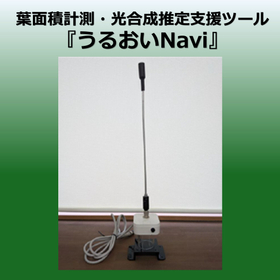
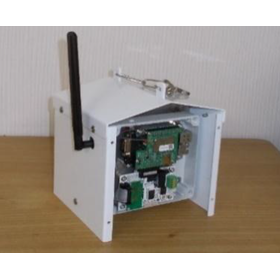
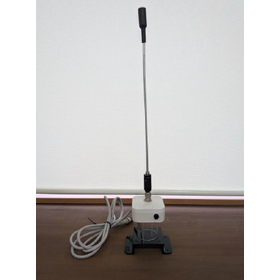
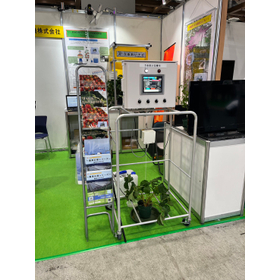
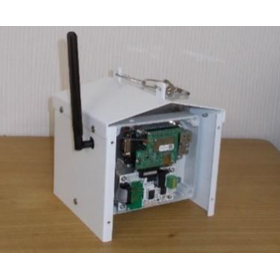
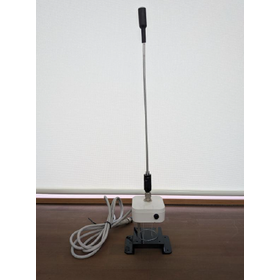
Photosynthesis Maximization Support Tool

No dedicated app is needed! You can easily change settings and check data on your PC or smartphone.

The "Photosynthesis Maximization Support Tool" is a device that can continuously measure leaf area in a non-destructive and non-contact manner. The sensor itself is simply placed between the plants. It measures the ratio of near-infrared light and visible light that passes through the leaves and automatically calculates it using a unique method. Additionally, by utilizing a simple simulation, you can check for deficiencies in the field (such as temperature and humidity). It assists in making cultivation management decisions. 【Features】 ■ Continuous measurement of leaf area in a non-destructive and non-contact manner ■ Equipped with a program for estimating photosynthesis and transpiration rates ■ Can be installed using only a 100V or 200V power supply ■ No dedicated app required ■ Assists cultivation management with a simple simulation function *For more details, please feel free to contact us.

  • ?光合成最大化支援ツール 画像2.png
  • ?光合成最大化支援ツール 画像3.png
  • Other measurement, recording and measuring instruments
  • Support tools

Added to bookmarks

Bookmarks list

Bookmark has been removed

Bookmarks list

You can't add any more bookmarks

By registering as a member, you can increase the number of bookmarks you can save and organize them with labels.

Free membership registration

Inventory Support Tool "NTFS Analyzer"

Automatic collection and visualization of access rights + audit support made easy and low-cost.

The "NTFS Analyzer" is a file server access rights inventory support tool that visualizes access rights from various perspectives. It allows for automatic retrieval of access rights at the domain and file server level, viewing access rights at the folder level, and searching by username, folder name, or granted access rights. 【Capabilities】 ■ Viewing access rights by group ■ Viewing access rights granted to users ■ CSV output of viewing results ■ Snapshot (Access rights at the time of data retrieval can be viewed at any time) and more *For more details, please download the PDF or feel free to contact us.

  • server
  • Other security
  • Support tools

Added to bookmarks

Bookmarks list

Bookmark has been removed

Bookmarks list

You can't add any more bookmarks

By registering as a member, you can increase the number of bookmarks you can save and organize them with labels.

Free membership registration

Film Thickness Measurement Support Tool 'Check Tab Linkage'

A revolution in the measurement of coating film thickness! A film thickness measurement support tool that dramatically improves work efficiency.

"Check Tab Linkage" is a support tool that allows for the automatic transmission of data measured by a thickness gauge to a tablet. Since the measurement results are automatically transferred to the tablet, one person can perform the task. There is no need for handwritten transcription, eliminating recording errors, and data can be directly transferred to the Excel measurement sheet created by the customer, dramatically improving work efficiency. [Features] ■ Automatic transmission of data measured by the thickness gauge to the tablet ■ Work can be done by one person ■ No need for handwritten transcription ■ Direct data transfer to the created Excel measurement sheet ■ Dramatic improvement in work efficiency *For more details, please refer to the PDF document or feel free to contact us.

  • Coating thickness gauge
  • Other network tools
  • Support tools

Added to bookmarks

Bookmarks list

Bookmark has been removed

Bookmarks list

You can't add any more bookmarks

By registering as a member, you can increase the number of bookmarks you can save and organize them with labels.

Free membership registration

IW bug countermeasures

To eliminate bug countermeasures [Ah, it bugged again!].

To eliminate the "bug" that comes with programming, let's use the Cyber Jizo information component SEED. For details, please refer to the "Cyber Jizo Website" and "Technical Chapter 5" at https://www.denno-jizou.com/. - A one-click method to paste what you always type each time. - A method to generate scripts with three lines or more, and with line spacing. - Once you create a SEED, you can copy it and change the values to create various patterns of SEEDs, making it very convenient.

  • Other operation management software
  • Support tools

Added to bookmarks

Bookmarks list

Bookmark has been removed

Bookmarks list

You can't add any more bookmarks

By registering as a member, you can increase the number of bookmarks you can save and organize them with labels.

Free membership registration

Management reform support tool 'RoboRoid-HIT.s log'

A service for visualizing work styles and enhancing security!

"RoboRoid-HIT.s log" is a management reform support tool that visualizes the overall picture of work styles, monthly changes, individual employee work hours, website browsing time, and more, using a uniquely developed AI. Additionally, by visualizing the time and percentage of "repetitive tasks" and work flows, it is possible to identify points for business improvement and tasks suitable for RPA application. 【Features】 ■ Understanding actual work conditions ■ Automatic analysis of repetitive tasks ■ Management of security risks ■ Management of IT assets *For more details, please download the PDF or feel free to contact us.

  • Integrated operation management
  • Support tools

Added to bookmarks

Bookmarks list

Bookmark has been removed

Bookmarks list

You can't add any more bookmarks

By registering as a member, you can increase the number of bookmarks you can save and organize them with labels.

Free membership registration

Business analysis and visualization support tool "From M"

The recording method is easy in 3 steps! Just press the start recording button before the task!

"FromM" is a business visualization support tool that records operations in three steps. It can record not only mouse and keyboard actions but also operation screens. It can be widely used for business analysis and manual creation. 【Features】 ■ NSK's uniquely developed business analysis tool ■ Records operations in three steps ■ Can record not only mouse and keyboard actions but also operation screens ■ Offers a wide range of uses such as business analysis and manual creation *For more details, please refer to the PDF document or feel free to contact us.

  • Image Processing Software
  • SFA/Sales Support System
  • Document and Data Management
  • Support tools

Added to bookmarks

Bookmarks list

Bookmark has been removed

Bookmarks list

You can't add any more bookmarks

By registering as a member, you can increase the number of bookmarks you can save and organize them with labels.

Free membership registration

Business automation support tool "Membership Fee Pay"

Automating "applications," "membership management," and "billing management" for membership organizations and subscription services.

"Membership Pay" is an automation support tool for membership applications, member management, billing management, and payment processing. Application information received through the membership application web form is automatically reflected in the management screen. Billing information is generated automatically every month, and payments are processed via credit card or bank transfer. Additionally, payment results are automatically reflected in the management screen, and if a payment fails, an automatic email notification for re-payment is sent. 【Features】 ■ Membership Application: Reduces management costs such as filing and storing paper application forms. ■ Member Management DB Registration: Eliminates the need for re-entering data into Excel. ■ Payment Method Registration: Avoids the need for stamping and mailing transfer request forms that were previously required for registration. ■ Monthly Collection: Payments are processed automatically, and results are also automatically reflected in the management screen. ■ Reminders: Automatic reminder emails are sent, prompting members to pay using alternative payment methods. *For more details, please download the PDF or feel free to contact us.

  • Other operation management software
  • Other information systems
  • Other services
  • Support tools

Added to bookmarks

Bookmarks list

Bookmark has been removed

Bookmarks list

You can't add any more bookmarks

By registering as a member, you can increase the number of bookmarks you can save and organize them with labels.

Free membership registration

Residential design sales support tool "Connected Home Building Plantable"

We will streamline online customer service for housing companies, contractors, and housing sales during the COVID-19 pandemic.

Eliminate "he said, she said" and achieve zero oversight in sharing images and managing status with clients! We support efficient housing sales during the COVID-19 pandemic! This is a cloud service specialized for home builders, construction companies, and design offices. You can exchange messages with clients regarding home building, and by organizing and streamlining interactions at each stage, we enhance online sales activities, supporting improved customer satisfaction and increased order rates. The operation is very simple and can be used intuitively on smartphones and tablets. [Voices from Sales Representatives at Construction Companies] Mr. H: "With communication tools, individual responses can become the norm, but with Plantable, all sales staff can share customer information. Additionally, since we can manage topics, there's no longer the issue of wondering where I wrote something." Mr. N: "We use Plantable during meetings. We can immediately reflect interactions on the screen, which has helped reduce misunderstandings in explanations and omissions in reflecting requests!" *For more details, please download the PDF or feel free to contact us.

  • SFA/Sales Support System
  • Integrated operation management
  • Support tools

Added to bookmarks

Bookmarks list

Bookmark has been removed

Bookmarks list

You can't add any more bookmarks

By registering as a member, you can increase the number of bookmarks you can save and organize them with labels.

Free membership registration

【Case Study】A Method for Resolving Homebuilding Disputes to Eliminate "He Said, She Said" Issues

Introducing case studies of the "plantable" tool for housing sales, design, and business support for construction companies!

By using "plantable," all interactions with customers are organized through status management. This eliminates any missed requests or disputes over "who said what," and the interface is designed to facilitate shared understanding between contractors and clients, enabling more in-depth meetings to resolve issues in home building. Furthermore, by using this product to advance meetings, it becomes a resource for sharing information within the sales department and between sales and design, without the need for special tasks, allowing for smooth handovers. Since everyone can check the history of exchanges in drawings and the status of each project, it can also be utilized for risk management purposes, such as confirming progress and pointing out areas for improvement. *For more details, please refer to the PDF document or feel free to contact us.*

  • SFA/Sales Support System
  • Integrated operation management
  • Support tools

Added to bookmarks

Bookmarks list

Bookmark has been removed

Bookmarks list

You can't add any more bookmarks

By registering as a member, you can increase the number of bookmarks you can save and organize them with labels.

Free membership registration

[Use Case] Housing Sales and Business Support Tools for Improving Sales Efficiency

We provide one-stop support for industry-specific housing sales by integrating customer management and chat tools into one!

With the spread of smartphones, it has become easy to communicate using chat tools. However, as interactions through chat tools become more common, have you ever struggled to find past conversations? The housing sales, design, and business support tool for construction companies, 'plantable,' eliminates the "he said, she said" issue by managing customer information through a web browser. As a result, information can be shared in real-time as soon as customer information is registered. Customer data is accumulated, allowing for casual interactions with registered customers through the chat tool. Since conversations can progress while sharing screens and using the chat tool, you can always communicate with customers, and the exchanges are documented in writing, which helps resolve the common "he said, she said" issues related to complaints. *For more details, please refer to the PDF materials or feel free to contact us.

  • SFA/Sales Support System
  • Integrated operation management
  • Support tools

Added to bookmarks

Bookmarks list

Bookmark has been removed

Bookmarks list

You can't add any more bookmarks

By registering as a member, you can increase the number of bookmarks you can save and organize them with labels.

Free membership registration

What is QC Circle activity (small group improvement activity)?

Explaining the purpose, basic philosophy, approach, examples of QC circle activities, and the reasons why they are considered outdated!

QC circle activities (small group activities) are an important initiative for strengthening the overall quality management system within a company. They are widely implemented not only in general businesses that provide products and services but also in organizations such as medical institutions and local governments. These activities are expected to lead to increased productivity through quality improvement, better responsiveness to customer needs, and expansion of company sales. However, if the purpose and approach of QC circle activities are not properly understood, employees may feel a strong sense of being forced to participate, which could lead to the activities becoming mere formalities. To achieve quality improvement through QC circle activities, everyone must recognize the purpose of the initiative, while reducing the burden on employees and continuously working on solving the problems faced on the ground. This article will explain the purpose of QC circle activities, the background of their emergence, their benefits, reasons they are considered outdated, specific methods for implementation, and points to enhance their effectiveness. *For more detailed content of the article, please refer to the link below.*

  • Internal Control and Operational Management
  • Support tools

Added to bookmarks

Bookmarks list

Bookmark has been removed

Bookmarks list

You can't add any more bookmarks

By registering as a member, you can increase the number of bookmarks you can save and organize them with labels.

Free membership registration

What are the steps and key points for successfully implementing OJT in the manufacturing industry?

Explaining the necessity and drawbacks! Let's aim for consistency in educational content on the teaching side as well.

In the training of personnel in the manufacturing industry, OJT (On-the-Job Training) is useful as a practical form of education. In the manufacturing sector, many companies incorporate OJT not only to develop immediate contributors on the ground but also to ensure the transfer of skills. However, there are many workplaces that face challenges such as not being able to develop personnel as expected and the burden on the instructors being too great, even after implementing OJT. This article will explain the basics of OJT, its advantages and disadvantages, effective operational steps, and key points for instruction. We hope it will be beneficial for your company's personnel development. *For detailed content of the article, please refer to the link below.*

  • Catalog and manual creation
  • Support tools

Added to bookmarks

Bookmarks list

Bookmark has been removed

Bookmarks list

You can't add any more bookmarks

By registering as a member, you can increase the number of bookmarks you can save and organize them with labels.

Free membership registration

What is QC Circle activity? An explanation of its purpose, basic elements, and effective implementation methods.

Explaining the basic concepts, significance in modern times, introduction benefits, and specific approaches!

QC Circle activities (small group improvement activities) refer to small group activities that involve employees engaged in on-site operations, dividing them into small groups to manage and improve quality. Even with the introduction of QC Circle activities, many challenges such as "not knowing how to proceed," "not achieving results," and "becoming formalized" are often heard. This activity can have a significant impact on workplace quality improvement and problem-solving, but to fully realize its true value, it is essential to deeply understand effective approaches and key points for success. This article will explain the basic philosophy of QC Circle activities, their significance in modern times, the benefits of implementation, and specific methods for advancement. Additionally, it will clarify misunderstandings that QC Circle activities are "outdated" by presenting successful case studies and demonstrating that they remain an effective method today. *For more detailed content of the article, please refer to the link below.

  • Catalog and manual creation
  • Document and Data Management
  • Other services
  • Support tools

Added to bookmarks

Bookmarks list

Bookmark has been removed

Bookmarks list

You can't add any more bookmarks

By registering as a member, you can increase the number of bookmarks you can save and organize them with labels.

Free membership registration

Cloud-based agricultural support tool "Agrinote"

Agriculture: From Memory to Record! A Farming Support Tool Usable for GAP.

"AgriNote" is a cloud-based farming support tool that can be used on computers, smartphones, and tablets. Based on farm maps utilizing aerial photographs, it allows for easy recording of daily tasks and achievements, as well as task instructions and progress management. 【Features】 ■ Records and outputs all tasks, growth, harvesting, and shipping ■ Enables creation of cultivation plans and progress management ■ Provides insights into income and expenses for each crop ■ Automatically generates records ■ Integrates with soil diagnosis services ■ Collaborates with other smart agriculture solutions *For more details, please download the PDF or feel free to contact us.

  • Production Management System
  • Other services
  • Support tools

Added to bookmarks

Bookmarks list

Bookmark has been removed

Bookmarks list

You can't add any more bookmarks

By registering as a member, you can increase the number of bookmarks you can save and organize them with labels.

Free membership registration

Telework support tool "Kaomiru Remote Work"

Identity verification to prevent impersonation and snooping! Automatic aggregation of work hours and break times! Solving telework challenges with facial recognition AI.

"Kaomiru Remote Work" performs identity verification for individuals sitting in front of a computer and automatically aggregates work hours. Employee photos are used for facial recognition utilizing edge AI technology, ensuring that no facial images are sent to the cloud. This minimizes the risk of important employee personal information being leaked. Additionally, administrators can monitor in real-time whether employees are working or on break. 【Features】 ■ Edge AI facial recognition ■ Automatic aggregation of work hours ■ Glasses and masks are acceptable ■ Peace of mind even if AI makes mistakes ■ Real-time monitoring *For more details, please refer to the PDF document or feel free to contact us.

  • Other operation management software
  • Support tools

Added to bookmarks

Bookmarks list

Bookmark has been removed

Bookmarks list

You can't add any more bookmarks

By registering as a member, you can increase the number of bookmarks you can save and organize them with labels.

Free membership registration