We have compiled a list of manufacturers, distributors, product information, reference prices, and rankings for Viewer.
ipros is IPROS GMS IPROS One of the largest technical database sites in Japan that collects information on.

Viewer Product List and Ranking from 63 Manufacturers, Suppliers and Companies | IPROS GMS

Last Updated: Aggregation Period:Feb 04, 2026~Mar 03, 2026
This ranking is based on the number of page views on our site.

Viewer Manufacturer, Suppliers and Company Rankings

Last Updated: Aggregation Period:Feb 04, 2026~Mar 03, 2026
This ranking is based on the number of page views on our site.

  1. Design Creation Inc. Tokyo//software
  2. Tsubosaka Electric Co., Ltd. Hachioji Main Office Tokyo//Industrial Electrical Equipment
  3. ダイナトロン Tokyo//CAD/CAM
  4. 4 Isoplotec Corporation Tokyo//CAD/CAM
  5. 4 プロノハーツ 塩尻テクノセンター Nagano//Other manufacturing

Viewer Product ranking

Last Updated: Aggregation Period:Feb 04, 2026~Mar 03, 2026
This ranking is based on the number of page views on our site.

  1. CADPAC-2D Drawing Viewer 'CADPAC-PRINT' Design Creation Inc.
  2. Garbage Data Viewer "DynaViewer" *Free Distribution ダイナトロン
  3. Manufacturing Industry MR Drawing Viewer pronoDR+Draw プロノハーツ 塩尻テクノセンター
  4. 4 Ultra High Color Rendering LED Viewer 'VLB-1411FBC-CRI' Tsubosaka Electric Co., Ltd. Hachioji Main Office
  5. 4 Air Leak Discharge Viewer "MK-770" SANKO ELECTRONIC LABORATORY CO.,LTD.

Viewer Product List

91~120 item / All 138 items

Displayed results

I compared the loading times of large-capacity data!

I compared the time it takes to load large data using three different viewers!

"Mitarepo" is a series based on the concept of "I tried doing this!" where we introduce what can be done using various products. Each time, we deliver useful information from the wide range of product categories handled by System Create. The theme of Vol. 2 is "Comparing the loading times of large data." This time, we prepared two types of software, including "3DViewStation," which can open large data at "super high speed," and compared the time taken to display. Using assembly CAD native data (597MB), we present the loading times and progress in a ranking format. - How much time is "super high speed"? - Is there really such a time difference between the software? We explain the "real situation" with comments from technical staff and actual screen displays. *You can download the materials from the button below.

  • Other CAD related software
  • Data conversion software
  • Document and Data Management
  • Viewer

Added to bookmarks

Bookmarks list

Bookmark has been removed

Bookmarks list

You can't add any more bookmarks

By registering as a member, you can increase the number of bookmarks you can save and organize them with labels.

Free membership registration

Achieved with a 3D CAD viewer! Advanced digital inspection of MBD models.

Centralized digital management of inspection history, comparison, and approval.

To ensure the design quality of MBD models, a reliable inspection process for 3D annotations (3DA) is essential. Creo View MBD Analysis strongly supports this inspection process. The inspection function (Design Check) provided by this 3D viewer allows tagging of each annotation and geometry on the 3D model, managing inspectors, time, and history. This clarifies design changes and the approval process, ensuring traceability. Furthermore, using the View State Compare function, annotations between different versions of the 3D viewer can be compared, allowing for immediate understanding and management of changes in content such as numerical values. These features integrate with data management systems to establish a high-quality design review process centered around MBD models. Please refer to the materials for details on the new workflow for inspection utilizing 3D models and its integration with data management. *For more information, please download the PDF or feel free to contact us.*

  • 3D CAD
  • Viewer

Added to bookmarks

Bookmarks list

Bookmark has been removed

Bookmarks list

You can't add any more bookmarks

By registering as a member, you can increase the number of bookmarks you can save and organize them with labels.

Free membership registration

3D CAD Viewer "Glovius"

Supports a wide range of 3D and 2D data! You can check the data with a smartphone app.

"Glovius" is a 3D CAD viewer that allows for quick verification and sharing of 3D design data, as well as data conversion. It can be used immediately with intuitive operation. Utilizing proprietary technology, it displays and analyzes shapes more rapidly. Additionally, it supports multiple languages, including Japanese. 【Features】 ■ Compatible with Windows, Cloud, iOS, and Android ■ Supports a wide range of 3D and 2D data ■ Uses proprietary technology ■ Easy to operate ■ Usable anywhere *For more details, please refer to the PDF materials or feel free to contact us.

  • Other CAD related software
  • Viewer

Added to bookmarks

Bookmarks list

Bookmark has been removed

Bookmarks list

You can't add any more bookmarks

By registering as a member, you can increase the number of bookmarks you can save and organize them with labels.

Free membership registration

LED Film Viewer "HAT-R5000LED"

The long-awaited new LED design! A compact film viewer that pursues usability.

The "HAT-R5000LED" is a compactly designed LED film viewer that prioritizes usability. Despite its brightness equivalent to 500 100W incandescent bulbs, it is energy-efficient and long-lasting due to the use of LEDs. Additionally, you can tilt it while pressing the angle adjustment buttons on both sides and fix the viewer surface at your preferred angle. We also offer the LED viewer "HAT-R6000LED," which supports film density D4.5. 【Features】 ■ Energy-efficient and long-lasting due to LEDs ■ Usage durability: 40,000 hours ■ Full flat uniform light source ■ Stepless dimming volume ■ Adjustable viewer surface angle *For more details, please refer to the PDF document or feel free to contact us.

  • hat7000mset.jpg
  • Other measurement, recording and measuring instruments
  • Viewer

Added to bookmarks

Bookmarks list

Bookmark has been removed

Bookmarks list

You can't add any more bookmarks

By registering as a member, you can increase the number of bookmarks you can save and organize them with labels.

Free membership registration

You can also write in red! High-function viewer for drawing data/image data VoiCe

VoiCe is a high-performance viewer for drawing data/image data that implements a rich set of annotation features.

- You can view drawing data/image data*. Layer display ON/OFF is also possible. *CAD data (DXF/DWG/JWC/JWK/JWW/SFC/P21), image data (BMP/JPG/TIF). A separate conversion tool is required for DWG. For more details, please visit our company website. - Using the rich annotation features, you can add red pen marks and comments to the data. - Since both drawing data and image data can be handled with the same operations, including the annotation feature, you can use operations such as overall display, zoom, and screen movement without being aware of the type of data. - The added red pen marks and comments can remain as they are, while only the original drawing data/image data can be replaced. - Copying the entire data/parts to the clipboard makes it easy to paste data into other applications. - Printing of the entire data/parts is possible. Additionally, it is equipped with a convenient "continuous printing" feature.

  • Other CAD related software
  • Corporate information portal/groupware
  • SFA/Sales Support System
  • Viewer

Added to bookmarks

Bookmarks list

Bookmark has been removed

Bookmarks list

You can't add any more bookmarks

By registering as a member, you can increase the number of bookmarks you can save and organize them with labels.

Free membership registration

3D Model Viewer "APS-3D Viewer"

This is a viewer that allows you to view 3D models created with the APS21 series.

〇Features ◆ Road and railway alignment planning system "APS-MarkIV" or "APS-MarkIV LT" ◆ Intersection design drawing system "APS-C" ◆ Current height editing software "APS-ZE" ◆ Railway BIM planning system "APS-RailBIM" ◆ Tunnel design support system "APL" *Our company provides a viewer that allows you to view 3D models created with the above corresponding software. (3D model file name [*.aps3d]) You can download it for free from our company website. https://www.mtcaps.co.jp *It can be used even by those who do not have our software.

  • Other CAD related software
  • Viewer

Added to bookmarks

Bookmarks list

Bookmark has been removed

Bookmarks list

You can't add any more bookmarks

By registering as a member, you can increase the number of bookmarks you can save and organize them with labels.

Free membership registration

Air Leak Viewer "MK-750ST"

Adoption of new TFT LCD for a screen that is easy to see outdoors! Visualizes gas leak points and contributes to energy savings.

The "MK-750ST" is an air leak viewer that allows you to easily identify the location of air leaks through camera images. It is a compact version of the highly acclaimed "MK-750," reduced to about half its size. It can quickly identify a wide range of leak locations. It can be used for detecting leaks from pinholes due to pipe corrosion, as well as leaks caused by loose flanges or deteriorated gaskets, and for detecting suction in vacuum piping. 【Features】 ■ Compact version of the highly acclaimed "MK-750," reduced to about half its size ■ New TFT LCD screen for better visibility outdoors ■ Newly equipped with "simple leak amount display" ■ Quickly identifies a wide range of leak locations ■ Can detect air leaks from a distance *For more details, please refer to the PDF document or feel free to contact us.

Added to bookmarks

Bookmarks list

Bookmark has been removed

Bookmarks list

You can't add any more bookmarks

By registering as a member, you can increase the number of bookmarks you can save and organize them with labels.

Free membership registration

Crack Viewer FCV-30 Rental

Achieving smooth operations from crack width measurement to data storage and utilization.

By simply connecting the FCV-30 to your computer, you can measure crack width with one touch. The crack profile display and histogram display functions are useful for maintenance management and test data measurement. Additionally, it is compatible with pocket PCs, improving handling.

  • Analytical Equipment and Devices
  • Viewer

Added to bookmarks

Bookmarks list

Bookmark has been removed

Bookmarks list

You can't add any more bookmarks

By registering as a member, you can increase the number of bookmarks you can save and organize them with labels.

Free membership registration

Air Leak Viewer "MK-750" Rental

Air leak viewer that allows for easy identification of the location of air leaks at a glance.

The "MK-750" is an air leak viewer that can identify the direction of ultrasonic sound sources by detecting ultrasonic waves caused by air leaks with an array sensor and displaying a sound pressure map. In addition to being able to easily identify the location of air leaks at a glance, it can also overlay the leak direction on a camera image, making it easy to verify measurement results. 【Features】 ■ Quickly identifies leak positions over a wide range (50° horizontally, 30° vertically) ■ Detects leaks in distant locations, such as in overhead piping ■ Uses ultrasonic waves to determine the direction of sound sources ■ Capable of identifying leak positions even in noisy environments ■ Displays camera images and sound pressure maps, and saves to SD card *For more details, please feel free to contact us.

  • Other measurement, recording and measuring instruments
  • Viewer

Added to bookmarks

Bookmarks list

Bookmark has been removed

Bookmarks list

You can't add any more bookmarks

By registering as a member, you can increase the number of bookmarks you can save and organize them with labels.

Free membership registration

Oriental Instruments Super LED Viewer

Remove UV!! Multi-compatible with excitation wavelengths of 460 to 520 nm.

UV exposure to the human body damages the collagen fibers that form the skin, accelerates skin aging, and has the potential to cause DNA damage and mutations such as skin cancer. Switching to green LED during gel cutting protects researchers from prolonged UV exposure.

  • Analytical Equipment and Devices
  • Viewer

Added to bookmarks

Bookmarks list

Bookmark has been removed

Bookmarks list

You can't add any more bookmarks

By registering as a member, you can increase the number of bookmarks you can save and organize them with labels.

Free membership registration

Multi 3D Viewer "MViEW"

Web, smartphones, tablets, and our own website! Effective promotion of our products is now possible!

"MViEW" is a multi-3D viewer that clearly conveys the "shape," "function," and "movement" you want to show. With the ability to switch cross-sectional displays and decompose views, the mechanisms and structures are easy to understand, and displaying/switching optional parts is simple. Various movements can also be reproduced with a touch. Please consider it as a new tool for product promotion. 【Features】 ■ Various movements can be reproduced with a touch ■ Easy display/switching of optional parts ■ Mechanisms and structures are easy to understand with cross-sectional display switching and decomposition ■ Chrome browser is recommended for operation *For more details, please refer to the PDF materials or feel free to contact us.

Added to bookmarks

Bookmarks list

Bookmark has been removed

Bookmarks list

You can't add any more bookmarks

By registering as a member, you can increase the number of bookmarks you can save and organize them with labels.

Free membership registration

マンモグラフィビュアー『Sumire』

マンモグラフィに特化した操作性で高速画像表示!マウス操作のみでわかりやすいレポート作成が可能です

当製品は、優れた画像参照機能を装備したマンモグラフィビュアーです。 マンモグラフィに特化した操作性で高速画像表示。 現在画像/過去画像/超音波を同時に参照可能で、CAD結果表示、 サブピクセル表示が可能です。また、レポーティング機能も充実しており、 マウス操作のみでわかりやすいレポート作成が可能です。 【特長】 ■マンモグラフィに特化した操作性 ■高速画像表示 ■現在画像/過去画像/超音波を同時に参照可能 ■CAD結果表示/サブピクセル表示が可能 ■マウス操作のみでわかりやすいレポート作成 ※詳しくはPDF資料をご覧いただくか、お気軽にお問い合わせ下さい。

  • others
  • Viewer

Added to bookmarks

Bookmarks list

Bookmark has been removed

Bookmarks list

You can't add any more bookmarks

By registering as a member, you can increase the number of bookmarks you can save and organize them with labels.

Free membership registration

Case Study of 3D Scan Utilization Viewer Development

Developing a site-oriented viewer using 3D scanning and point cloud analysis!

The "3D Data Management Viewer App" developed by our company is a dedicated application that incorporates only the essential functions needed for on-site work, based on 3D scanning measurement services and point cloud data analysis at construction sites. ■Development Background In response to the feedback that "there is no 3D viewer that can be used on-site," we developed an app equipped with the following features. ■Main Features - Reading and displaying point cloud data obtained from non-contact measurement services - Integration with laser scans and 360-degree images - Creation of reference planes and dimension measurement (for piping, steel materials, etc.) - Simulation of heavy machinery and worker placement - Automatic aggregation and management of the number of components - Generation and viewing of 3D models - On-site data integration using robots and drones This is the ideal solution for sites facing challenges in building digital twins and utilizing 3D data. *For more details, please download the PDF document or feel free to contact us.

  • Image Processing Software
  • Other contract services
  • Viewer

Added to bookmarks

Bookmarks list

Bookmark has been removed

Bookmarks list

You can't add any more bookmarks

By registering as a member, you can increase the number of bookmarks you can save and organize them with labels.

Free membership registration

HPGL/Vector/Image Viewer PloView

PloView is a viewer for HPGL/vector/image files that allows you to view drawings, with data conversion and editing functions comparable to 2D CAD.

It has become common for drawings designed with CAD systems to be distributed and stored as electronic data in de facto formats such as HPGL, PDF, and TIFF. PloView is a viewer for viewing drawings that operates on Windows computers. With PloView, many people can instantly participate in checking design drawings, arranging drawings, and distributing them to manufacturing and maintenance-related departments. Additionally, it has high-performance drawing editing features, allowing for easy creation of drawings for different purposes by reusing design drawings. Function introduction video: https://youtu.be/cuExaAHjYlk PloView is available in an English version.

  • Other CAD related software
  • Viewer

Added to bookmarks

Bookmarks list

Bookmark has been removed

Bookmarks list

You can't add any more bookmarks

By registering as a member, you can increase the number of bookmarks you can save and organize them with labels.

Free membership registration

HPGL/Vector/Image Overlay Viewer PloComp

PloComp is a viewer that allows you to overlay multiple vector/image files, enabling data conversion, drawing comparison, and editing comparable to 2D CAD.

It has become common for drawings designed with CAD systems to be distributed and stored as electronic data in de facto formats such as HPGL, PDF, and TIFF. PloComp is a viewer that runs on Windows computers, allowing users to overlay and view multiple drawings simultaneously, with features for drawing comparison and automatic cloud marking of changed areas. With PloComp, many people can instantly participate in tasks such as checking design drawings and distributing them to manufacturing and maintenance departments. Additionally, it has high-functionality drawing editing capabilities, making it easy to create drawings for different purposes by reusing design drawings. Video on drawing comparison and PDF output: https://youtu.be/8_0Bu50wL9U PloComp is available in an English version.

  • Other CAD related software
  • Viewer

Added to bookmarks

Bookmarks list

Bookmark has been removed

Bookmarks list

You can't add any more bookmarks

By registering as a member, you can increase the number of bookmarks you can save and organize them with labels.

Free membership registration

HPGL/Vector/Image Viewer PloView

PloView is HPGL/Vector/Image viewer converter

PloView is viewer converter for viewing drawing which works on Windows PC. If there is PloView, many people can take part in the planning in instant, such as checking drawing and distributing drawing to section of buy, manufacture, and maintenance. And, since PloView has highly efficient drawing edit function like 2D-CAD, it diverts design drawing and can create drawing of another use easily. Feature introduction video ... https://youtu.be/uL5eR5r3bIA

  • Other CAD related software
  • Viewer

Added to bookmarks

Bookmarks list

Bookmark has been removed

Bookmarks list

You can't add any more bookmarks

By registering as a member, you can increase the number of bookmarks you can save and organize them with labels.

Free membership registration

Air Leak Viewer "MAINTE PRO MK-750ST"

Weighing approximately 740g, it can be easily operated with one hand! Visualizes gas leak points and contributes to energy savings.

The "MAINTE PRO MK-750ST" is an air leak viewer that allows you to easily identify the location of air leaks through camera images. It can detect air leaks from a distance and is suitable for inspecting overhead piping and similar applications. With the adoption of a new TFT LCD, the screen is easy to see even outdoors, and we provide a convenient portable storage case for easy transport. 【Features】 ■ Approximately half the size of the highly acclaimed previous model "MK-750" ■ Newly equipped with a simple leak volume display ■ Convenient portable storage case available (optional) ■ Capable of quickly identifying a wide range of leak locations ■ Can detect air leaks from a distance *For more details, please refer to the PDF document or feel free to contact us.

  • 2021-09-06_14h47_48.png
  • 2021-09-06_14h47_56.png
  • 2021-09-06_14h48_04.png
  • 2021-09-06_14h48_12.png
  • 2021-09-06_14h48_57.png
  • 2021-09-06_14h49_04.png
  • Other inspection equipment and devices
  • Viewer

Added to bookmarks

Bookmarks list

Bookmark has been removed

Bookmarks list

You can't add any more bookmarks

By registering as a member, you can increase the number of bookmarks you can save and organize them with labels.

Free membership registration

Virtual Reality Viewer [As if you are in that space]

Experience the results of the created layout in 3D stereoscopic view directly from a web browser subjectively! It can be completed using only a web browser, with no installation required!

The "Virtual Reality Viewer" allows you to subjectively experience the results of layouts created with the device layout tool in 3D stereoscopic view directly from a web browser. By using a head-mounted display, you can move within a three-dimensional space and check whether the distance to the furnishings in the space is sufficient. We solve your VR data creation concerns on the web browser. 【Features】 ■ Instant sharing of layout results ■ Reduction of time and costs associated with data creation ■ Intuitive operation by hand ■ Distance measurement function *For more details, please request materials or view the PDF data available for download.

  • Other CAD related software
  • Viewer

Added to bookmarks

Bookmarks list

Bookmark has been removed

Bookmarks list

You can't add any more bookmarks

By registering as a member, you can increase the number of bookmarks you can save and organize them with labels.

Free membership registration

UV Meter "OPSA-150"

UV and turbidity meter utilizing HORIBA's unique "rotating cell super modulation method" with years of proven performance.

The "OPSA-150" is a UV meter that can be used for monitoring organic pollutants at discharge points in water quality shipping regulations, monitoring water quality through organic matter measurement at water intake points, and monitoring organic matter (such as phenol meters) in process lines. By conducting multi-point measurements of the indicated values due to changes in cell length, it is possible to collect measurement values that account for differences in cell length. This allows a single unit to cover a wide measurement range from low concentrations of 0 to 0.1 Abs to high concentrations of 0 to 5.0 Abs. 【Features】 ■ Sensor utilizing a rotating cell length modulation method (Patent No. 4627022) ■ Easy-to-use operation screen ■ Automatic memory of one year's worth of data ■ HORIBA's unique wiper method ■ Resolution increased by one digit, etc. *For more details, please download the PDF or contact us.

  • Other measurement, recording and measuring instruments
  • Viewer

Added to bookmarks

Bookmarks list

Bookmark has been removed

Bookmarks list

You can't add any more bookmarks

By registering as a member, you can increase the number of bookmarks you can save and organize them with labels.

Free membership registration

Air Leak Viewer "MK-750" [Rental]

Display the leak direction overlaid on the camera image! Contributing to energy savings through visualization of air leaks.

The "MK-750" is an air leak viewer that can detect leaks in remote locations, such as in overhead piping. It detects ultrasonic waves generated by air leaks using an array sensor and can identify the direction of the ultrasonic sound source by displaying a sound pressure map. It can quickly pinpoint leak locations over a wide range (50° horizontally and 30° vertically). It is capable of displaying camera images and sound pressure maps, as well as saving them to an SD card. 【Features】 ■ Quickly identifies leak locations over a wide range ■ Detects leaks in remote locations, such as in overhead piping ■ Uses ultrasound to identify the direction of the sound source ■ Can identify leak locations even in noisy environments ■ Capable of displaying camera images and sound pressure maps, as well as saving them to an SD card *For more details, please refer to the PDF document or feel free to contact us.

  • Rental/lease
  • Other electric meters
  • Viewer

Added to bookmarks

Bookmarks list

Bookmark has been removed

Bookmarks list

You can't add any more bookmarks

By registering as a member, you can increase the number of bookmarks you can save and organize them with labels.

Free membership registration

MICRO CADAM Official Viewer "HD XViewer"

MICRO CADAM Official Viewer is an easy-to-use tool for referencing MC drawings in environments where MICRO CADAM Helix is not installed.

HD XViewer allows you to directly display and output MICRO CADAM drawings on computers that do not have MICRO CADAM Helix installed. It enables departments that need to reference drawings outside of the design department, such as manufacturing, production planning, and inspection, to easily display and verify drawings. 【Features of HD Xviewer】 - It can directly display and output MC drawings. - Viewing operations can be performed similarly to those in MICRO CADAM Helix. - You can toggle the visibility of elements such as dimensions and notes, and display them by child drawings or overlay units. - The markup feature allows you to write shapes, clouds, arrows, text, etc., and save them as data that can be referenced in the viewer.

  • 2D CAD machine
  • Other CAD related software
  • Other CAD
  • Viewer

Added to bookmarks

Bookmarks list

Bookmark has been removed

Bookmarks list

You can't add any more bookmarks

By registering as a member, you can increase the number of bookmarks you can save and organize them with labels.

Free membership registration

Tool "Open Text Desktop Viewer"

A tool that excels in information access, sharing, and distribution!

"Open Text Desktop Viewer" is a tool that can handle a variety of document views, including native files, 3D CAD model views, direct scanning and cleanup of paper documents, as well as markup and vision for documents. Please feel free to contact us if you have any requests. 【Common Application Adaptations】 ■ Universal viewer in ECM ■ Engineering viewer ■ View and markup in ECM and PLM ■ Format conversion ■ PDF viewing and markup, etc. *For more details, please download the PDF or feel free to contact us.

  • Other information systems
  • Viewer

Added to bookmarks

Bookmarks list

Bookmark has been removed

Bookmarks list

You can't add any more bookmarks

By registering as a member, you can increase the number of bookmarks you can save and organize them with labels.

Free membership registration

Matrix Web Viewer

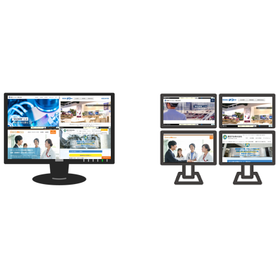
Simultaneous monitoring of multiple websites - Matrix Web Viewer

The Matrix Web Viewer is a browser-based comprehensive viewer specialized in simultaneously monitoring multiple websites. It allows you to freely combine and display the web screens of various different systems that were previously viewed individually. It can be split into a maximum of 16 (4×4) sections, enhancing screen operation efficiency. Up to 64 URLs can be registered per group, with a maximum of 512 URLs across 8 groups. Easy operation is achieved through dedicated software. 【Features】 - Freely display layouts - "High degree of freedom" and "adjustable display positions and sizes" - Screen assignments can be easily configured - "Multiple group settings" and "display page settings" are possible - Usable in both single-monitor and multi-monitor environments.

  • Integrated operation management
  • Viewer

Added to bookmarks

Bookmarks list

Bookmark has been removed

Bookmarks list

You can't add any more bookmarks

By registering as a member, you can increase the number of bookmarks you can save and organize them with labels.

Free membership registration

Patent Search Result Viewer "TR-viewer"

A patent search result viewer that allows you to read the text while looking at the drawings!

"TR-viewer" is a patent investigation result viewer that responds to the request for "making the verification of investigation results simpler and faster." Even when there are many items to read, you can browse smoothly. Additionally, since it processes without using a network, the display is quick. 【Features】 ■ You can read the text while viewing the drawings. ■ Important words in the text can be highlighted. *For more details, please download the PDF or feel free to contact us.

  • Patent/Copyright related services
  • Viewer

Added to bookmarks

Bookmarks list

Bookmark has been removed

Bookmarks list

You can't add any more bookmarks

By registering as a member, you can increase the number of bookmarks you can save and organize them with labels.

Free membership registration

3D viewer for manufacturing processes "3DTascalX"

A 3D viewer that achieves high functionality and low cost, positioned as 'more than a viewer but less than CAD'.

High-quality data conversion capable of inputting and outputting various 3D CAD data, high-precision measurement usable for processing and inspection utilizing auxiliary coordinates, easy 2D drawing creation from 3D, and the ability to verify a wide range of secondary usable data such as design change locations, heights, slopes, holes, undercuts color-coded, projected areas, cross-sections, surface areas, and mass. By utilizing it in various manufacturing processes such as sales estimates, drawing checks, construction method considerations, data conversion, processing drawings, inspections, and assembly instructions, it promotes the effective use of your company's three-dimensional data. 【Features】 - Rich handling of data including CATIA V4, V5, NX, Creo, SolidWorks, JT, Parasolid, IGES, STEP, ACIS, Cfio, Inventor, 3DPDF, etc. - Dedicated function for batch processing data conversion - High-precision measurement up to 1/10,000,000 order - Approximate circular arc interpolation for ellipses and splines - Visual verification made easy by color-coding design change locations, heights, slopes, holes, undercuts, etc. - Ability to share a lot of information with minimal licensing using a free viewer.

  • Other CAD
  • Other CAM related software
  • Data conversion software
  • Viewer

Added to bookmarks

Bookmarks list

Bookmark has been removed

Bookmarks list

You can't add any more bookmarks

By registering as a member, you can increase the number of bookmarks you can save and organize them with labels.

Free membership registration

Do you know of a 3D viewer that can be used for molding and processing plastic products?

Create drawings from 3D data with low cost and easy operation - '3DFovi' makes estimation work easier! Free interview article with companies that have implemented it.

【Solving Such Problems!】 ☑ Efficiently create proposal-based estimates by checking for undercuts, sink marks, insufficient strength, etc. ☑ View product cross-sections and structures in detail. ☑ The sales department can also view 3D data, reducing the workload within the department. ☑ Easily present issues related to mold production and create documentation. ☑ Halve the man-hours required for estimating plastic molded products. ☑ Reduce prototype lead time by 10% and improve quality, etc. Recommended for those who say, "I don't need 3D CAD..." or "I want to transition from 2D to 3D without burden..." Why not try the free trial version to experience ease of use and efficiency improvements? ★ If you are interested, please enter "Request for trial version" in the inquiry button. *Please download the interview article as a PDF.

  • Other CAD related software
  • Resin mold
  • Injection Molding Machine
  • Viewer

Added to bookmarks

Bookmarks list

Bookmark has been removed

Bookmarks list

You can't add any more bookmarks

By registering as a member, you can increase the number of bookmarks you can save and organize them with labels.

Free membership registration

Simple 3D Viewer [3DFovi]

Easy to operate even for beginners with its simple usability! A 3D viewer that achieves a low price.

"3DFovi" is a 3D viewer that focuses on "simplicity," achieving overwhelming low prices and easy operation. It can display data from major 3D CAD software such as CATIAV5, NX, Creo (formerly Pro/ENGINEER), SolidWorks, as well as 2D CAD data like DXF and DWG, and allows for simple measurements. Even those who already have a 3D viewer can reduce data conversion, management workload, and running costs for 3D viewer data due to the large variety of supported data and low price. 【Features】 ■ The two main features are "Viewing" and "Measuring"! ■ Directly read various data formats ■ Simple functionality that anyone can easily use 【Main Functions】 "Viewing" Loading shapes, hierarchies (assemblies), colors, cross-sections, and screen splitting. "Measuring" You can measure distances, angles, and diameters, and add annotations (comments) and numbering, as well as colors. Additionally, mass and external dimensions can be checked with a single command. ★ A 30-day free trial version can be downloaded from the following link: https://www.3dtascal.com/products/trial.html

  • Other CAD related software
  • 3D CAD
  • Other CAD
  • Viewer

Added to bookmarks

Bookmarks list

Bookmark has been removed

Bookmarks list

You can't add any more bookmarks

By registering as a member, you can increase the number of bookmarks you can save and organize them with labels.

Free membership registration

[Free Trial Download] Low-Cost 3D Viewer '3DFovi'

"I want to easily check more 3D data." 3D is now data that everyone can handle as easily as a PDF.

"3DFovi" is a 3D viewer that emphasizes "simplicity," achieving low cost and easy operation. It can display major 3D CAD data such as CATIA V5, NX, Creo Parametric, SOLIDWORKS, and Inventor, as well as 2D CAD data like DXF and DWG, and allows for simple measurements. Since the maximum dimensions and mass of products can be calculated with a single click, there is no need to use 3D CAD when estimating molded products like resin or aluminum. Its ease of use is appealing, allowing even sales representatives, not just CAD operators, to operate it. By responding quickly to estimation requests, you can differentiate yourself and use it as a powerful sales tool to stay ahead of competitors. Additionally, the output function for STL and VRML data enables integration with 3D printers and CAE software. ★ You can download the latest trial version for free ★ http://www.3dtascal.com/products/trial.html#fovi_trial ★ If you would like to request a free trial version, please enter "Trial version request" using the inquiry button below.

  • Other CAD related software
  • Other CAM related software
  • Data conversion software
  • Viewer

Added to bookmarks

Bookmarks list

Bookmark has been removed

Bookmarks list

You can't add any more bookmarks

By registering as a member, you can increase the number of bookmarks you can save and organize them with labels.

Free membership registration