We have compiled a list of manufacturers, distributors, product information, reference prices, and rankings for mouse.
ipros is IPROS GMS IPROS One of the largest technical database sites in Japan that collects information on.

mouse(work) - List of Manufacturers, Suppliers, Companies and Products | IPROS GMS

mouse Product List

1~2 item / All 2 items

Displayed results

Trackball & Mouse

Free software that allows customization of cursor speed and more!

We would like to introduce the "Trackball & Mouse" from Kensington that we handle. With direct control, more precise operations become possible. In particular, the trackball is designed to be operated by moving the ball, even in limited desk space. The larger the ball, the more cursor control can be achieved with minimal movement, allowing for increased speed. 【Features】 ■ Compact ■ Ergonomically designed ■ Speed ■ Accuracy ■ Customizable with the free software "KensingtonWorks" *For more details, please refer to the PDF document or feel free to contact us.

  • Other PCs and OA equipment
  • mouse

Added to bookmarks

Bookmarks list

Bookmark has been removed

Bookmarks list

You can't add any more bookmarks

By registering as a member, you can increase the number of bookmarks you can save and organize them with labels.

Free membership registration

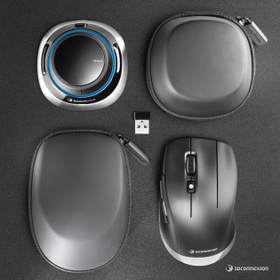
Comfortable long hours of CAD work. Achieve fatigue reduction and improved work efficiency with dual-hand operation.

Distributing the operational burden with the combined use of SpaceMouse and CadMouse! Supporting design work with a smooth workflow.

The "SpaceMouse Wireless Kit 2" is a product that makes daily CAD work more comfortable and contributes to improved work efficiency. By using the SpaceMouse for viewpoint control and the CadMouse for selection and editing, the "two-handed operation workflow" distributes the operational burden. It allows for smoother design and review work while reducing the strain on the hands, fingers, and arms during long hours of CAD work. 【Features】 ■ Two-handed operation with SpaceMouse for viewpoint control and CadMouse for selection and editing ■ Reduction of strain on hands, fingers, and arms during long CAD sessions ■ Increased efficiency in design and review tasks ■ Designed for CAD users of AutoCAD, SOLIDWORKS, CATIA, NX, Fusion 360, and more *For more details, please refer to the related links or feel free to contact us.

Added to bookmarks

Bookmarks list

Bookmark has been removed

Bookmarks list

You can't add any more bookmarks

By registering as a member, you can increase the number of bookmarks you can save and organize them with labels.

Free membership registration