We have compiled a list of manufacturers, distributors, product information, reference prices, and rankings for soft.
ipros is IPROS GMS IPROS One of the largest technical database sites in Japan that collects information on.

soft(3D CAD) - List of Manufacturers, Suppliers, Companies and Products

Last Updated: Aggregation Period:Dec 10, 2025~Jan 06, 2026
This ranking is based on the number of page views on our site.

soft Product List

376~390 item / All 641 items

Displayed results

[START Feature Introduction] What is the customization-specific tool SeF?

Prevent leakage of specialized processing technology! It is possible to build a unique environment and differentiate from competitors.

This document introduces the features of the CAD/CAM integration programming tool 'START'. It includes the significant user benefits of the database publication "SSF" and the dedicated programming language "SeF," as well as an introduction to the offset correction function and the automatic creation of dot patterns for empty spaces. Additionally, it also covers the automation of Boolean processing. We encourage you to read it. 【Contents (partial)】 ■ Database publication "SSF" START STACK FORMAT ■ GND connection distance check for conductive films SeF custom ■ Introduction to the offset correction function ■ Introduction to the intelligent line reinforcement function ■ Automatic creation of dot patterns for empty spaces *For more details, please refer to the PDF document or feel free to contact us.

  • 2D CAD Electrical

Added to bookmarks

Bookmarks list

Bookmark has been removed

Bookmarks list

You can't add any more bookmarks

By registering as a member, you can increase the number of bookmarks you can save and organize them with labels.

Free membership registration

Mitarepo [45] Testing the capabilities of BobCAD-CAM's deburring path.

[Mitarepo] I want to automate the troublesome deburring process! What is the capability of BobCAD-CAM's deburring path? | System Create

"Mitarepo" is a series that introduces what can be done using various products with the concept of "I tried doing this!" We will deliver useful information each time from the wide range of product genres handled by System Create. The theme of Vol. 45 is "Testing the capabilities of the deburring tool path in BobCAD-CAM!" Recently, we will actually verify the capabilities of the newly added deburring tool path in "BobCAD-CAM 3AXIS Premium," which was introduced at Marsgo. This time, we collaborated with G-BEC Technology Co., Ltd. and used their dedicated deburring end mill to perform the deburring! We used aluminum for the workpiece. Assuming the processing of flat holes and tolerance holes, we will check the state of each burr and the processing time. "Can low-cost CAD/CAM really handle deburring?" "Will secondary burrs still appear in the end?" We will explain the capabilities of the BobCAD-CAM deburring tool, along with verification photos and comments from the technical staff. *You can download the materials from the button above.

  • 3D CAD
  • Other CAD related software
  • Milling machine

Added to bookmarks

Bookmarks list

Bookmark has been removed

Bookmarks list

You can't add any more bookmarks

By registering as a member, you can increase the number of bookmarks you can save and organize them with labels.

Free membership registration

LiveXR 360

Experience difficult-to-access locations and remote facilities in a 3D virtual space with 360° photos.

"LiveXR 360" is a VR solution based on photos, known as photo VR. Locations that exist in the real world are reconstructed in high quality as digital twins on the web. Being a web service, it allows for easy viewing from any device. 【Recommended for those who have the following challenges or concerns:】 - I want to visually understand the spatial information of the site before entering the actual work area. - In unfamiliar environments, it can be difficult to quickly identify the locations of equipment and system diagrams. - When performing inspection work on-site, it takes time and effort to reach the destination. - There are many types of paper documents, photos, and videos related to equipment and the site, making management complicated. - It takes time just to find specific documents when I want to view them. - Training personnel want to efficiently grasp work procedures in various environments that differ from one another.

  • 画像1.png
  • 画像2.jpg
  • 画像5.jpg
  • 画像7.png
  • 画像8.jpg
  • 画像9.jpg
  • 画像10.png
  • Software (middle, driver, security, etc.)

Added to bookmarks

Bookmarks list

Bookmark has been removed

Bookmarks list

You can't add any more bookmarks

By registering as a member, you can increase the number of bookmarks you can save and organize them with labels.

Free membership registration

FIMMWAVE (Waveguide mode solver)

FIMMWAVE is software that allows for easy mode analysis of complex waveguide and fiber structures using a waveguide mode solver.

A large number of complementary solvers ・FIMMWAVE contains a variety of robust and computationally efficient solvers optimised for such structures. ・FIMMWAVE combines:methods based on semi-analytic techniques, which allow to tackle efficiently problems with strong variations in refractive index, thin layers, etc. ・numerical methods such as finite elements (FEM) or finite differences (FDM), providing robust solutions to arbitrary problems.

  • Company:CTflo
  • Price:Other
  • Contract Analysis
  • Other analyses
  • simulator

Added to bookmarks

Bookmarks list

Bookmark has been removed

Bookmarks list

You can't add any more bookmarks

By registering as a member, you can increase the number of bookmarks you can save and organize them with labels.

Free membership registration

Example: Warpage countermeasures for connectors in injection molding.

By collaborating with 3D TIMON, we automatically adjust the thickness of solid element models, thereby suppressing warping deformation.

We will introduce a case where warping was minimized by changing the thickness of solid elements. The analysis was conducted using the "basis vector method," which modifies the shape by moving the nodes of the finite element model without using CAD. Several patterns (basis vectors) of the desired shape were prepared from the initial model and combined. As a result of the optimization, the sum of squares of warping improved by 33% to 4.9480e-004 compared to the initial shape, and the maximum warping amount (mm) improved by 12% to 3.8607e-002. [Case Overview] ■ Optimization Conditions - Design Variables: Thickness A, B - Sampling: Initially LHS 20 points, Approximate optimal solution + 10 recommended points - Approximate Model: CRBF (Convolutional RBF) ■ Analysis: Basis Vector Method *For more details, please refer to the PDF document or feel free to contact us.

  • Other analyses

Added to bookmarks

Bookmarks list

Bookmark has been removed

Bookmarks list

You can't add any more bookmarks

By registering as a member, you can increase the number of bookmarks you can save and organize them with labels.

Free membership registration

Material Development Simulation for Research and Development - GeoDict

Solving everything from μCT image loading and modeling for structure generation to functional property evaluation and visualization in one go.

GeoDict is an innovative material development simulation that facilitates the generation of various porous material structures such as lithium-ion secondary batteries, fuel cells, all-solid-state batteries, filter media, composites, structural components/high-performance materials, textiles, and non-woven fabrics, while optimizing their material properties and functions. It provides a wide range of analysis functions for generating 3D structures at nm to mm scales through image processing/loading of FIB-SEM images and input of geometric parameters, as well as geometric shape analysis and performance evaluation. By using the digital twin created through GeoDict simulations in conjunction with or as a replacement for the traditional material development process based on samples and test pieces, the development of new materials and high-performance materials can be accelerated.

Added to bookmarks

Bookmarks list

Bookmark has been removed

Bookmarks list

You can't add any more bookmarks

By registering as a member, you can increase the number of bookmarks you can save and organize them with labels.

Free membership registration

GT-SUITE Features: Engine Cooling

Achieving predictive and non-stationary analysis! Introducing the thermal distribution through engine structure.

"GT-SUITE" is an analysis tool for modeling the distribution of heat from the combustion chamber to the coolant, oil, and surrounding environment through engine structures. With its unique features, it predicts heat dissipation to water and oil, accommodating both steady-state and transient analyses. When modeling internal structures, it is easy to use its proprietary parametric FE cylinder model. Heat from the engine is transmitted from the FE model to the coolant and oil circuits, as well as to the "external" structures of the block and head simultaneously. The circuits and thermal mass of these flows can be easily generated from CAD data using a 3D pre-processing tool. 【Features】 ■ Model individual components of the A/C system or the entire system ■ Spatially analyze condenser models and evaporator models in detail ■ Automatic calibration of all heat exchangers ■ Support for single and multi-volume cabin models ■ REFPROP properties for single and mixed refrigerants *For more details, please refer to the PDF materials or feel free to contact us.

  • Company:IDAJ
  • Price:Other
  • Mechanism Analysis
  • Other analyses

Added to bookmarks

Bookmarks list

Bookmark has been removed

Bookmarks list

You can't add any more bookmarks

By registering as a member, you can increase the number of bookmarks you can save and organize them with labels.

Free membership registration

3D Architectural System: Daily drawing creation becomes overwhelmingly faster.

Automatically create various drawings! Contributing to speeding up daily drawing creation!

The housing construction software "B-MOS" provided by our company automatically creates detailed floor plans, elevation drawings, site maps, and more. It dramatically speeds up daily drawing creation. 【Features】 ■ Detailed Drawings - Automatically creates 1/100 and 1/50 detailed floor plans - Easily switches wall fill and detail display with mouse operations ■ Elevation Drawings - Supports line and color elevation drawings - Once the floor plan and roof plan are completed, elevation drawings can be easily output automatically ■ Site Maps - Compatible with flat plates, traverses, and GPS - By setting the site boundary lines and elevation values, the input site map is automatically converted to 3D *For more details, please refer to the catalog or feel free to contact us.

  • 3D CAD

Added to bookmarks

Bookmarks list

Bookmark has been removed

Bookmarks list

You can't add any more bookmarks

By registering as a member, you can increase the number of bookmarks you can save and organize them with labels.

Free membership registration

Fully Automated AI Software "ARUMCODE1" Recommended Operating Model

Recommended model of AI software capable of reducing overall costs by 50% in the machining industry.

"ARUMCODE1" is software that automatically outputs processing programs by analyzing drawing data created in 3D CAD using AI. This eliminates the need for operators to be solely focused on program creation, significantly reducing the time and effort required. It excels not only in simple and easy drawings but also in precise and complex shapes that require the skills, experience, and knowledge of engineers. At Applied, we offer the 'Be-Clia Type-M11IS25/Be-Clia Type-M11IS26/Be-Clia Type-Z11IS27' as recommended operating models. 【ARUMCODE1 Basic Functions (Excerpt)】 ■ Batch analysis of multiple drawings ■ Batch analysis of six surfaces ■ Automatic setting of workpiece dimensions ■ Arc interpolation function ■ Automatic settlement ■ Collaboration model with Arum Corporation *For more details, please refer to the related links or feel free to contact us.

  • 2022-04-11_11h13_23.png
  • 2022-04-11_11h13_29.png
  • 2022-04-11_11h13_35.png
  • 2022-04-11_11h13_44.png
  • 2022-04-11_11h13_56.png
  • 2022-04-11_11h14_02.png
  • 2022-04-11_11h14_15.png
  • 2022-04-11_11h14_24.png
  • 2022-04-11_11h14_31.png
  • Image analysis software

Added to bookmarks

Bookmarks list

Bookmark has been removed

Bookmarks list

You can't add any more bookmarks

By registering as a member, you can increase the number of bookmarks you can save and organize them with labels.

Free membership registration

Heat Transfer Fluid Analysis Software WindPerfectDX

Have you ever seen the wind? 【For the architecture and civil engineering industry】 Heat transfer fluid analysis software WindPerfectDX

● WindPerfectDX 2012 Edition 2 Released! It has been reborn as software that can solve problems in the fields of architecture and civil engineering, from simple to complex and large-scale, with easy operations for airflow and temperature. ―――――― ◆ Features 1. Wind environment and external airflow simulation 2. Heat island simulation 3. Natural ventilation simulation 4. Wind load simulation (planned for release) 5. Other simulations (rainwater drainage and snow retention issues, performance verification of cool bits, and other thermal fluid-related problems) ―――――― <Simple interface, 3D CAD data import function, and diverse result visualization features> - With an easy-to-use interface, built-in various data, and excellent 3D graphics visualization capabilities, it is widely usable from beginners in analysis to heavy users of CFD. - By incorporating CAD data import and CFD parts functionality, it strongly supports simulation operations in BIM. - Equipped with numerous convenient features for various analyses, including wind damage rank evaluation, radiation calculation, PMV evaluation, condensation determination, heat island assessment, parameter evaluation, and airflow thermal balance checks.

  • Thermo-fluid analysis
  • simulator
  • Contract Analysis

Added to bookmarks

Bookmarks list

Bookmark has been removed

Bookmarks list

You can't add any more bookmarks

By registering as a member, you can increase the number of bookmarks you can save and organize them with labels.

Free membership registration

Antenna analysis and EMC measures are performed using electromagnetic field analysis software CST Studio.

Leave antenna design and analysis solutions, as well as EMC countermeasures, to the world-class electromagnetic field simulator CST Studio Suite!

For those struggling with reducing development costs and lead times in electromechanical design. Would you consider using electromagnetic field simulation to improve efficiency and reduce costs? CST Studio Suite is a high-performance 3D electromagnetic (EM) analysis software package that performs design, analysis, and optimization of components and systems considering electromagnetic fields. It is widely adopted in various fields such as electrical engineering, automotive, and industrial machinery for product development and research, and it is a world-class simulation software that addresses all electromagnetic field issues, from antennas and wireless communication to EMC noise countermeasures. 【Features】 1. A rich lineup of analysis methods from electrostatics to high frequency 2. Excellent operability and a user-friendly interface 3. Comprehensive CAD interface 4. Extensive usage records by companies and research institutions worldwide 5. Support for advanced analysis technologies 6. Advanced technologies enabling fast and large-scale analysis 7. Complete post-processing capabilities For more details, please refer to the related links below.

  • Magnetic field analysis/electromagnetic wave analysis

Added to bookmarks

Bookmarks list

Bookmark has been removed

Bookmarks list

You can't add any more bookmarks

By registering as a member, you can increase the number of bookmarks you can save and organize them with labels.

Free membership registration

Purely Japanese-made VR software "moage"

Moage is a purely Japanese-made VR software that enables the construction and experience of VR spaces.

Moage is a VR-specific software designed to build and experience VR spaces. It integrates with various devices such as sensors, gloves, reaction devices, and external software, enabling high-quality VR experiences in various environments, including projections, HMDs, multi-screen monitors, and other special display devices (such as half-mirror holograms). By using Moage, students and the general public can easily create simple VR experiences, while those familiar with CAD or modeling software can produce more specialized content. Its applications are diverse, ranging from various simulators, research and development, educational training, skill transfer, to amusement.

  • Virtual Reality Related

Added to bookmarks

Bookmarks list

Bookmark has been removed

Bookmarks list

You can't add any more bookmarks

By registering as a member, you can increase the number of bookmarks you can save and organize them with labels.

Free membership registration

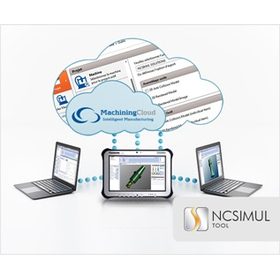
Machine Motion Cutting Simulator 【NCSIMUL】

A high-precision NC simulator that can accurately visualize blade edges down to the micron order. It fully simulates the movements of special machine tools, such as composite machining centers.

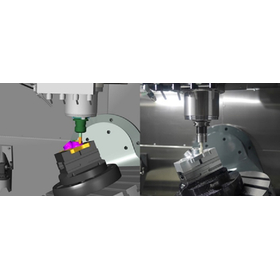
NCSIMUL is an all-in-one solution software that can simulate 5-axis CNC machines. It virtually reproduces the environment of actual CNC machines in software, allowing for the early detection of issues that may arise during machining, such as error avoidance. ◆ It is a simulator based on G-code that allows for the verification of cutting and layering operations. ◆ It can integrate with various CAD/CAM systems, allowing you to use the same environment from CAM directly in NCSIMUL. ◆ Without returning to CAM, you can import G-code or APT files to rearrange or add to the sequence of machining processes.

  • NCS_Machine01.jpg
  • NCS_Machine06.jpg
  • ncs_player_synchro_1GB.jpg
  • NCS_Tool01.jpg
  • Other CAM related software
  • simulator

Added to bookmarks

Bookmarks list

Bookmark has been removed

Bookmarks list

You can't add any more bookmarks

By registering as a member, you can increase the number of bookmarks you can save and organize them with labels.

Free membership registration