We have compiled a list of manufacturers, distributors, product information, reference prices, and rankings for soft.
ipros is IPROS GMS IPROS One of the largest technical database sites in Japan that collects information on.

soft(3D CAD) - List of Manufacturers, Suppliers, Companies and Products

Last Updated: Aggregation Period:Dec 10, 2025~Jan 06, 2026
This ranking is based on the number of page views on our site.

soft Product List

601~615 item / All 622 items

Displayed results

OpenLM (iTraction Inc.)

Visualization solutions for the use of engineering software

OpenLM is a solution for managing the operation of expensive engineering software. It primarily receives information from management servers of software that mainly adopt a floating license model and achieves "visibility of software operation" by providing unified reporting. Expensive applications such as 3D CAD are increasing in variety, making it difficult to grasp the number of users, and it is said that without managing operational performance, efficient and effective use cannot be achieved. By implementing OpenLM, it is possible not only to achieve "cost reduction" but also to maximize the use of existing licenses and improve corporate productivity.

  • Company:iTraction
  • Price:Less than 10,000 yen
  • 3D CAD
  • Other CAD
  • simulator

Added to bookmarks

Bookmarks list

Bookmark has been removed

Bookmarks list

You can't add any more bookmarks

By registering as a member, you can increase the number of bookmarks you can save and organize them with labels.

Free membership registration

Design tools for next-generation device developers [START] Case studies

Introduction to the features of the all-around tool START that responds to the flow of the times.

[START] is a software that serves as a "CAM tool capable of design," an "I/F tool for consolidating different formats," a "fusion tool for 2D/3D," and a "tool that combines manual operation with programming execution," all in one, offering excellent cost performance that can accommodate various industries and products. Other special features: ■ Circuit diagram creation ■ Resistance value measurement ■ Bwire batch editing/3D DRC ■ Special correction ■ Image editing ■ Reverse engineering ■ Pre-simulation calculations ■ ODB input/output ■ Cutting plotter direct output ■ Various simulation I/F ■ DEMITASNX with back annotation I/F *For details, please refer to the catalog available for download below "PDF Download."

  • 2D CAD Electrical

Added to bookmarks

Bookmarks list

Bookmark has been removed

Bookmarks list

You can't add any more bookmarks

By registering as a member, you can increase the number of bookmarks you can save and organize them with labels.

Free membership registration

Case Studies: Machine Learning for Materials Research

Case studies on inorganic solids and polymers! Designing new compounds in a cost-effective and time-efficient manner.

High-quality physics-based simulations and machine learning approaches accelerate the research of new materials and shorten the time to market. Through the workflow, it is possible to automatically create hundreds of predictive models using representative machine learning techniques (Partial Least Squares Regression (PLS), Multiple Linear Regression (MLR), Principal Component Regression (PCR), Kernel PLS) combined with descriptors and fingerprints, and select models with high predictive performance (AutoQSAR). For datasets with thousands of data points, similar to AutoQSAR, the workflow allows for the automatic creation of predictive models using deep learning (DeepAutoQSAR, DeepChem/AutoQSAR). To represent the properties of a wide range of materials (polymers, molecules, solids), effective descriptors customized for each system can be utilized.

  • MS_Maestro.png
  • LiveDesign.png
  • 【製品総合ガイド】product-overview.jpg
  • Software (middle, driver, security, etc.)

Added to bookmarks

Bookmarks list

Bookmark has been removed

Bookmarks list

You can't add any more bookmarks

By registering as a member, you can increase the number of bookmarks you can save and organize them with labels.

Free membership registration

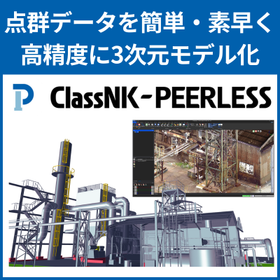
Point cloud processing software 'ClassNK-PEERLESS' point cloud modeling

ClassNK-PEERLESS is a "point cloud processing software" specialized in "point cloud modeling."

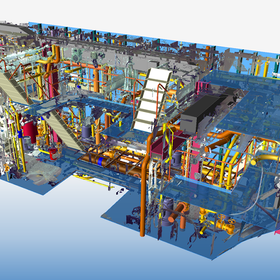
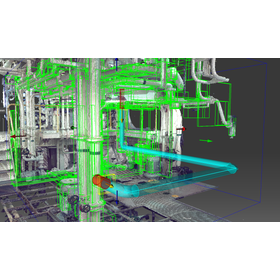
ClassNK-PEERLESS creates 3D models from point clouds obtained by 3D laser scanners with the necessary accuracy in a short time. By utilizing a database that aggregates standardized parts and specialized rules and knowledge from various fields, modeling can be easily performed without specialized knowledge through simple operations. It supports the efficiency of modification and maintenance work for large structures such as shipbuilding, factories, and plants, as well as layout planning for equipment. 【Solving Point Cloud Data Issues】 - The data size is too large to share easily. - It cannot be utilized in the in-house CAD system. - Measuring on the point cloud is difficult. - It is challenging to check for interference in areas where point clouds cannot be obtained due to blind spots. - The visibility of point clouds is not good. In addition to creating models from point clouds, it also includes features that utilize point clouds and created models. Here are some of those features that assist with tasks such as renovation work and layout planning: - Dimension measurement function - Error evaluation function - Interference simulation - Free Viewer - Piping route exploration

  • P3_3.png
  • 配管経路探索2New.png
  • others
  • Modeler

Added to bookmarks

Bookmarks list

Bookmark has been removed

Bookmarks list

You can't add any more bookmarks

By registering as a member, you can increase the number of bookmarks you can save and organize them with labels.

Free membership registration

Contracted analysis ★ Lightweight design, increased rigidity/strength, resonance and other vibration issues, various automation, etc.

Leveraging years of experience in the manufacturing industry, we propose methods tailored to your challenges and requests, handling everything from data creation to analysis, evaluation, and reporting. ★ Case studies available ★

If you are working on structural optimization related to lightweight design, strength improvement, vibration issues, or if you are struggling with that approach, or if you are exploring 3D printing, scanning image processing, modeling, and analysis, our experienced technical staff will work with you to solve your problems. We can take on everything from data creation to analysis, evaluation, and report preparation (even just part of it). Even if your issues are vague and specific details have not been decided, we will engage in detailed discussions and propose methods that align with your requests. Please feel free to contact us. ◎ Main Achievements Various lightweight designs, strength improvements, reverse engineering, resonance avoidance, numerical fitting, noise and vibration reduction, trade-off analysis in structural optimization, CAD model generation for optimized shapes, reinforcement design, reduction of mesh creation man-hours, simulation model creation, editing STL data for 3D printing... and many more. ★ We are currently offering a collection of various problem-solving case studies: Download from [PDF Download] ↓ Download from our website here ↓ https://www.quint.co.jp/cgi-bin/solution-CS.cgi

  • Analysis Services
  • Structural Analysis
  • Contract Analysis

Added to bookmarks

Bookmarks list

Bookmark has been removed

Bookmarks list

You can't add any more bookmarks

By registering as a member, you can increase the number of bookmarks you can save and organize them with labels.

Free membership registration

STL Editing Software STL Studio 2

From STL data simplification to CAD conversion! Industry-specific model provision!

STL files can become extremely large, making them difficult to edit. STL Workshop 2 addresses these issues. (1) Automatic adjustment of parameter values that require expertise (2) User interface compliant with Windows software (3) Efficient display control of large polygon data, incorporating polygon editing algorithms developed by the RIKEN National Research and Development Institute (4) Features tailored to specific industries and sectors If you would like detailed materials, please contact us at the information below. Marble Inc. Embedded Product Division, Product Business Department Phone: (03) 3419-6011

Added to bookmarks

Bookmarks list

Bookmark has been removed

Bookmarks list

You can't add any more bookmarks

By registering as a member, you can increase the number of bookmarks you can save and organize them with labels.

Free membership registration

[Industry's First VR Service] Instant Customer Service VR

"Instant Customer Service VR" is recommended for the real estate, travel accommodation, events, food and beverage, wedding, and HR industries.

**Features of Instant Customer Service VR** (1) Synchronization between the VR device that customers view and the screens of PCs or smartphones is possible with one click. (2) Collaboration with various VR devices, starting with the latest VR goggles, Oculus Go. (3) A reasonable operating cost of less than 10,000 yen per month per unit, including rental of Oculus Go. (4) Provides a more convenient and enjoyable store experience for both consumers and businesses, contributing to operational efficiency and increased conversion rates.

  • others

Added to bookmarks

Bookmarks list

Bookmark has been removed

Bookmarks list

You can't add any more bookmarks

By registering as a member, you can increase the number of bookmarks you can save and organize them with labels.

Free membership registration

【Business Efficiency】Reproducing Actual Movements in VR Space! 3D CAD Add-on Functionality

Simply press the button to enable VR viewing! It also reproduces movements such as joint parts, contributing to improved work efficiency.

The "Demo3DVR CAD Package" is an add-on feature for 3D CAD. By simply pressing a button added to the CAD software, VR viewing using HMD devices such as HTC Vive and Oculus Quest is possible. You can look around, dive underneath objects, and perform verification tasks that are impossible in the real world. Additionally, using this add-on, you can easily define joints (moving parts) for each part and assembly, and you can actually move the defined joints with the controllers of the VR device. 【Features】 ■ During VR execution, you can move within the model and change the scale of the model. ■ You can look around, dive underneath objects, climb, and even pass through things. ■ In the virtual environment of VR, you can try things that are impossible in the real world, which is expected to contribute to the efficiency of work. *For more details, please refer to the PDF materials or feel free to contact us.

  • Company:ITAGE
  • Price:Other
  • Other CAD

Added to bookmarks

Bookmarks list

Bookmark has been removed

Bookmarks list

You can't add any more bookmarks

By registering as a member, you can increase the number of bookmarks you can save and organize them with labels.

Free membership registration

Recreate "Creo" in VR space with a single click!

Achieve efficiency in 3D CAD work! You can recreate real objects in a virtual space just by pressing a button.

The "Demo3DVR CAD Package" is an add-on feature for 3D CAD. By simply pressing a button added to the CAD software, VR viewing using HMD devices such as HTC Vive and Oculus Quest is possible. You can look around, dive underneath objects, and perform verification tasks that are impossible in the real world. Additionally, you can define and operate link mechanisms, allowing you to check things like the opening and closing of gears and doors in a VR space. 【Features】 ■ During VR execution, you can move within the model and change the scale of the model. ■ You can look around, dive underneath objects, climb, and even pass through things. ■ In the virtual environment of VR, you can try things that are impossible in the real world, which is expected to contribute to increased work efficiency. *For more details, please refer to the PDF document or feel free to contact us.

  • Company:ITAGE
  • Price:Other
  • Other CAD

Added to bookmarks

Bookmarks list

Bookmark has been removed

Bookmarks list

You can't add any more bookmarks

By registering as a member, you can increase the number of bookmarks you can save and organize them with labels.

Free membership registration

[Case Study of 3D CAD Software for Mechanical Design] Towa Corporation

[Free Case Study Available] Digitizing Skilled Techniques through Automated Design of Transmission Towers!

We would like to introduce a case study of the implementation of "iCAD SX" at Tsubasa Corporation, which has successfully achieved the domestication of transmission and distribution iron towers and poles. The company adopted our product because it allowed for customization specialized in tower design. As a result of the implementation, solid models are now automatically created simply by inputting the specifications of the towers, and the design of the joints, which previously required advanced skills, has also been semi-automated. 【Case Overview】 ■ Reasons for Adoption - Customization specialized in tower design was possible. ■ Implementation Effects - The training period, which used to take 10 years, has been shortened to 1 year. - The design of step bolts for maintenance inspections can now be handled by CAD, allowing them to be used in conjunction with the main material's joint bolts at the tower's joint sections. *For more details, please refer to the PDF document or feel free to contact us.

Added to bookmarks

Bookmarks list

Bookmark has been removed

Bookmarks list

You can't add any more bookmarks

By registering as a member, you can increase the number of bookmarks you can save and organize them with labels.

Free membership registration

Recreate 'Revit' in VR space with a single click!

Achieve efficiency in 3D CAD work! You can recreate real objects in a virtual space just by pressing a button.

The "Demo3DVR CAD Package" is an add-on feature for 3D CAD. By simply pressing a button added to the CAD software, VR viewing using HMD devices such as HTC Vive and Oculus Quest is possible. You can look around, dive underneath objects, and perform verification tasks that are impossible in the real world. Additionally, you can define and operate link mechanisms, allowing you to check things like gears and door openings in a VR space. 【Features】 ■ During VR execution, you can move within the model and change the model's scale. ■ You can look around, dive underneath objects, climb, and even pass through items. ■ In the virtual environment of VR, you can try things that are impossible in the real world, which is expected to contribute to work efficiency. *For more details, please refer to the PDF document or feel free to contact us.

  • Company:ITAGE
  • Price:Other
  • Other CAD

Added to bookmarks

Bookmarks list

Bookmark has been removed

Bookmarks list

You can't add any more bookmarks

By registering as a member, you can increase the number of bookmarks you can save and organize them with labels.

Free membership registration

Reproduce 'SOLIDWORKS' in VR space with a single click!

Achieve efficiency in 3D CAD work! You can recreate real objects in a virtual space just by pressing a button.

The "Demo3DVR CAD Package" is an add-on feature for 3D CAD. By simply pressing a button added to the CAD software, VR viewing using HMD devices such as HTC Vive and Oculus Quest is possible. You can look around, dive underneath objects, and perform verification tasks that are impossible in the real world. Additionally, you can define and operate link mechanisms, allowing you to check things like the opening and closing of gears and doors in a VR space. 【Features】 ■ During VR execution, you can move within the model and change the model's scale. ■ You can look around, dive underneath objects, climb, and even pass through things. ■ In the virtual environment of VR, you can try things that are impossible in the real world, contributing to increased work efficiency. *For more details, please refer to the PDF document or feel free to contact us.

  • Company:ITAGE
  • Price:Other
  • Other CAD

Added to bookmarks

Bookmarks list

Bookmark has been removed

Bookmarks list

You can't add any more bookmarks

By registering as a member, you can increase the number of bookmarks you can save and organize them with labels.

Free membership registration

Recreate "Navisworks" in a VR space with "one click"!

Achieve efficiency in 3D CAD work! You can recreate real objects in a virtual space just by pressing a button.

The "Demo3DVR CAD Package" is an add-on feature for 3D CAD. By simply pressing a button added to the CAD software, VR viewing using HMD devices such as HTC Vive and Oculus Quest is possible. You can look around, dive underneath objects, and perform verification tasks that are impossible in the real world. Additionally, you can define and operate link mechanisms, allowing you to check the opening and closing of gears and doors in a VR space. 【Features】 ■ During VR execution, you can move within the model and change the model's scale. ■ You can look around, dive underneath objects, climb, and even pass through things. ■ In the virtual environment of VR, you can try things that are impossible in the real world, which is expected to contribute to work efficiency. *For more details, please refer to the PDF document or feel free to contact us.

  • Company:ITAGE
  • Price:Other
  • Other CAD

Added to bookmarks

Bookmarks list

Bookmark has been removed

Bookmarks list

You can't add any more bookmarks

By registering as a member, you can increase the number of bookmarks you can save and organize them with labels.

Free membership registration

Recreate "Inventor" in VR space with a "one-click"!

Achieve efficiency in 3D CAD work! You can recreate real objects in a virtual space just by pressing a button.

The "Demo3DVR CAD Package" is an add-on feature for 3D CAD. By simply pressing a button added to the CAD software, VR viewing using HMD devices such as HTC Vive and Oculus Quest is possible. You can look around, dive underneath objects, and perform verification tasks that are impossible in the real world. Additionally, you can define and operate link mechanisms, allowing you to check things like the opening and closing of gears and doors in a VR space. 【Features】 ■ During VR execution, you can move within the model and change the scale of the model. ■ You can look around, dive underneath objects, climb, and even pass through things. ■ In the virtual environment of VR, you can try things that are impossible in the real world, which is expected to contribute to increased work efficiency. *For more details, please refer to the PDF document or feel free to contact us.

  • Company:ITAGE
  • Price:Other
  • Other CAD

Added to bookmarks

Bookmarks list

Bookmark has been removed

Bookmarks list

You can't add any more bookmarks

By registering as a member, you can increase the number of bookmarks you can save and organize them with labels.

Free membership registration