We have compiled a list of manufacturers, distributors, product information, reference prices, and rankings for Editing software.
ipros is IPROS GMS IPROS One of the largest technical database sites in Japan that collects information on.

Editing software Product List and Ranking from 61 Manufacturers, Suppliers and Companies | IPROS GMS

Last Updated: Aggregation Period:Mar 04, 2026~Mar 31, 2026
This ranking is based on the number of page views on our site.

Editing software Manufacturer, Suppliers and Company Rankings

Last Updated: Aggregation Period:Mar 04, 2026~Mar 31, 2026
This ranking is based on the number of page views on our site.

  1. マリン・ワーク・ジャパン Kanagawa//Testing, Analysis and Measurement
  2. B7 Tokyo//software
  3. システムクリエイト Osaka//Industrial Machinery
  4. 4 Aiソリューションズ 本社 Osaka//software
  5. 4 プレミアムアーツ Tokyo//IT/Telecommunications

Editing software Product ranking

Last Updated: Aggregation Period:Mar 04, 2026~Mar 31, 2026
This ranking is based on the number of page views on our site.

  1. Underwater time-lapse camera 'MW-UWC-01' マリン・ワーク・ジャパン
  2. NC drawing and editing software [CIMCO Edit] Aiソリューションズ 本社
  3. PDF Solution Adobe PDF Library SDK イースト
  4. I tried cutting it with a section cut and assembling the model. システムクリエイト
  5. 4 GT Series Screen Editing Software Terminal GTWIN Ver.2 インフォホビー インフォホビー

Editing software Product List

31~60 item / All 127 items

Displayed results

Water drone collection kit

Collection of large dead fish at fish farms and bottom sediment sampling at aquaculture sites using underwater drones.

We offer a "Sampling Kit for Underwater Drones" that can be customized to fit the arms of your underwater drone. We design and manufacture large dead fish retrieval kits, grab sediment kits, and core sediment kits that utilize the robotic arm of your underwater drone. By using underwater drones, you can safely and easily address challenges in aquaculture facilities and port facilities. 【Features】 <Large Dead Fish Retrieval Kit> ■ Operates buoyancy devices with the robotic arm ■ Capable of retrieving dead fish weighing up to 130 kg ■ We can suggest retrieval kits based on the target fish *For more details, please download the PDF or feel free to contact us.

  • Other contract services
  • Editing software

Added to bookmarks

Bookmarks list

Bookmark has been removed

Bookmarks list

You can't add any more bookmarks

By registering as a member, you can increase the number of bookmarks you can save and organize them with labels.

Free membership registration

Damage monitoring

The reality of damage caused by eating captured with an underwater time-lapse camera.

Monitoring using an underwater time-lapse camera Meeting expectations for long-term unmanned shooting in aquaculture and seaweed bed sites This underwater time-lapse camera is capable of long-term fixed-point shooting with a water pressure resistance equivalent to a depth of 50 meters. It is designed for use in harsh underwater environments and comes with built-in batteries and memory, allowing for standalone operation. The camera can continuously shoot for up to 13 months (with a shooting interval of 10 minutes), and the shooting interval can be set from 1 minute to 99 minutes according to the scene being used. 【Features】 ■ Water pressure resistance equivalent to a depth of 50 meters ■ Usable in harsh underwater environments ■ Built-in batteries and memory ■ Usable as a standalone device ■ Continuous shooting for up to 13 months (with a shooting interval of 10 minutes), etc. *For more details, please download the PDF or contact us.

  • Color camera
  • Editing software

Added to bookmarks

Bookmarks list

Bookmark has been removed

Bookmarks list

You can't add any more bookmarks

By registering as a member, you can increase the number of bookmarks you can save and organize them with labels.

Free membership registration

On-site work support solution "MARS"

A solution that connects field workers with experienced professionals in the back office using smart glasses!

"MARS" is a field work support solution that connects on-site workers with skilled professionals in the back office through multimedia communication, utilizing wearable devices (smart glasses) and smart devices (smartphones, tablets, etc.) to efficiently and collaboratively carry out fieldwork. In addition to being able to use the same system across multiple network environments, it allows for the simultaneous use of various types of smart glasses and smart devices, thereby resolving compatibility issues in the manufacturing application of AR solutions. 【Features】 ■ Flexibility in usage environment ■ Flexibility in hardware selection ■ Flexibility in usage methods ■ Flexibility in data management ■ High confidentiality *For more details, please download the PDF or feel free to contact us.

  • Software (middle, driver, security, etc.)
  • Editing software

Added to bookmarks

Bookmarks list

Bookmark has been removed

Bookmarks list

You can't add any more bookmarks

By registering as a member, you can increase the number of bookmarks you can save and organize them with labels.

Free membership registration

CAD/CAM Integration CAM Editing Software [START]

Customizable CAM editing software that utilizes electrical connections and 3D representation.

We maximally support the manufacturing process of electronic devices with CAM functions that utilize electrical connections and 3D settings. It is possible to add unique rules for smooth incorporation of external design data/manufacturing, editing after MRC/MRC, editing of panel layouts and assembly boards, correction functions that allow for the addition of unique rules, and the creation of approval, delivery, and product drawings with centralized data. We are equipped with necessary functions for centralized management of multi-step manufacturing processes and CAM editing required for interfacing with equipment.

  • 2D CAM
  • 2D CAD Electrical
  • Data conversion software
  • Editing software

Added to bookmarks

Bookmarks list

Bookmark has been removed

Bookmarks list

You can't add any more bookmarks

By registering as a member, you can increase the number of bookmarks you can save and organize them with labels.

Free membership registration

quadient Inspire Designer

The concept of functional modules makes it easier to understand data processing.

"Quadient Inspire Designer" is a layout application for variable printing used in countries around the world. It serves as an editing system application that enables personalized communication known as transpromo, in addition to general variable printing. Please feel free to contact us if you have any requests. 【Features】 ■ Supports Unicode variation selectors; IPAmj fonts are available. *Inspire R15 latest SP version is recommended. ■ Windows-based application ■ Editing software for variable printing ■ Provides an easy-to-understand graphical user interface *For more details, please download the PDF or feel free to contact us.

  • Other production and development software and systems
  • Editing software

Added to bookmarks

Bookmarks list

Bookmark has been removed

Bookmarks list

You can't add any more bookmarks

By registering as a member, you can increase the number of bookmarks you can save and organize them with labels.

Free membership registration

Express Animate (Master Version)

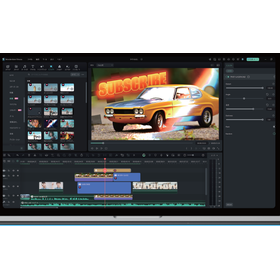
Completely free and easy to use! VideoPad video editing software comes with a variety of effects.

We would like to introduce our product, "Express Animate (Master Version)." You can freely add movement to objects such as illustrations and videos, allowing you to create creative animations. Equipped with a variety of effects and tools, you can easily create animations just the way you want. Please feel free to contact us when you need assistance. 【Main Features (Excerpt)】 ■ Insert videos and images into footage ■ Move, resize, and rotate objects ■ Adjust brightness and contrast, and insert effects ■ Add keyframes to each object and parameter ■ Insert animated text into videos *For more details, please refer to the related links or feel free to contact us.

  • Company:B7
  • Price:Other
  • Development support tools (ICE, emulators, debuggers, etc.)
  • Editing software

Added to bookmarks

Bookmarks list

Bookmark has been removed

Bookmarks list

You can't add any more bookmarks

By registering as a member, you can increase the number of bookmarks you can save and organize them with labels.

Free membership registration

Video editing software 'Videopad'

Anyway, it's easy to use! It supports almost all common video file formats.

"Videopad" is an easy-to-use video editing software for beginners, equipped with professional-grade features. It allows for effortless special effects using chroma key and work with 3D visuals. You can easily create high-quality video projects using special effects, transitions, subtitles, and narration. 【Features】 ■ Easily create professional-quality video projects with a variety of transition effects ■ 3D video editing and conversion from 2D to 3D ■ Freely set the length of transition effects ■ Easily insert layers for subtitles and end credits ■ Mix audio and music to insert professional-quality sound *For more details, please refer to the related links or feel free to contact us.

  • Company:B7
  • Price:Other
  • Image Processing Software
  • Editing software

Added to bookmarks

Bookmarks list

Bookmark has been removed

Bookmarks list

You can't add any more bookmarks

By registering as a member, you can increase the number of bookmarks you can save and organize them with labels.

Free membership registration

Tool "Resource Tuner"

The usage is very simple! Rebrand the application by exchanging icons and logos.

"Resource Tuner" is a reliable tool for modifying the resources of executable PE files. It allows you to customize your favorite programs by modifying the resources of executable files (EXE, DLL, SYS, MSSTYLES, SCR, etc.). You can visually inspect, extract, convert, edit, and delete the resources of embedded executable files, enabling you to visually edit Windows programs such as icons, strings, images, sounds, dialogs, and menus. 【Features】 ■ Capable of browsing all types of resources with a resource viewer ■ Allows rebranding of applications by swapping icons and logos ■ Enables customization of GUI elements of your favorite Windows programs ■ Interprets third-party applications *For more details, please refer to the related links or feel free to contact us.

  • Company:B7
  • Price:Other
  • Software (middle, driver, security, etc.)
  • Other network tools
  • Editing software

Added to bookmarks

Bookmarks list

Bookmark has been removed

Bookmarks list

You can't add any more bookmarks

By registering as a member, you can increase the number of bookmarks you can save and organize them with labels.

Free membership registration

Coherent PDF Tools

It is possible to repair corrupted files! Apply operations to any page range.

"Coherent PDF Tools" is a professional and robust tool for editing PDF files. It allows you to split and merge PDF files while retaining bookmarks, as well as apply operations by specifying page ranges such as 1-3, 1-end, 6-30 even, etc. Furthermore, you can combine multiple operations into a single command. Please feel free to contact us if you have any requests. 【Features (partial)】 ■ Apply operations to any page range ■ Merge or split pages ■ Copy, delete, or add bookmarks ■ Create a table of contents from bookmarks ■ Stamp logos, shapes, watermarks, page numbers, multi-line text, and more *For more details, please refer to the related links or feel free to contact us.

  • Company:B7
  • Price:Other
  • Document and Data Management
  • Editing software

Added to bookmarks

Bookmarks list

Bookmark has been removed

Bookmarks list

You can't add any more bookmarks

By registering as a member, you can increase the number of bookmarks you can save and organize them with labels.

Free membership registration

Fontlab

From simple designs to complex projects, it helps you create fonts from start to finish.

We would like to introduce our "Fontlab." We offer font applications such as FontLab and FontLab Studio, the popular font editor Fontographer, TypeTool, and the universal font converter TransType for OpenType and web fonts. Professional type designers can create smooth and consistent curves, comfortably fine-tune fonts, adjust spacing and kerning, and export technically sound fonts in any format. 【Features】 ■ Type: Shareware ■ Language: English ■ Operating Environment: Mac, Windows *For more details, please refer to the related links or feel free to contact us.

  • Company:B7
  • Price:Other
  • Other network tools
  • Editing software

Added to bookmarks

Bookmarks list

Bookmark has been removed

Bookmarks list

You can't add any more bookmarks

By registering as a member, you can increase the number of bookmarks you can save and organize them with labels.

Free membership registration

Big Faceless

Create, edit, view, and print PDF documents! We also provide a tool to convert HTML to PDF.

"Big Faceless" provides a Java API for creating PDF documents and graphs. We offer the "Java PDF Library" for creating, editing, displaying, and printing PDF documents, as well as the "BFO Publisher," a tool for converting HTML to PDF. Additionally, we have the "Report Generator," a key Java reporting tool for converting XML to PDF documents. 【Product Lineup】 ■Java PDF Library ■BFO Publisher ■Report Generator ■Graph Library ■Java PDF Viewer *For more details, please refer to the related links or feel free to contact us.

  • Company:B7
  • Price:Other
  • Software (middle, driver, security, etc.)
  • Other embedded systems (software and hardware)
  • Editing software

Added to bookmarks

Bookmarks list

Bookmark has been removed

Bookmarks list

You can't add any more bookmarks

By registering as a member, you can increase the number of bookmarks you can save and organize them with labels.

Free membership registration

The Plugin Site

Image editing, photo enhancement, and graphic design! Various software products.

We would like to introduce "The Plugin Site," which we handle. We offer a variety of software products for image editing, photo enhancement, and graphic design. Our lineup includes many products such as "Edge & Frame Galaxy," which provides a special touch to images, and "Plugin Galaxy," a collection of Photoshop-compatible plugins. 【Partial Lineup】 <GALAXY BUNDLE> ■Edge & Frame Galaxy ■Plugin Galaxy ■HyperTyle ■Plugin Commander *For more details, please refer to the PDF document or feel free to contact us.

  • Company:B7
  • Price:Other
  • Image Processing Software
  • Editing software

Added to bookmarks

Bookmarks list

Bookmark has been removed

Bookmarks list

You can't add any more bookmarks

By registering as a member, you can increase the number of bookmarks you can save and organize them with labels.

Free membership registration

A-PDF.com

A variety of products are lined up, including PDF Editor for Mac and PDF Restrictions Remover!

A-PDF.com is a product that provides tools for displaying and modifying PDF (Portable Document Format) files. We offer PDF tools for Windows, such as PDF Merger and Split PDF Content Splitter. Please feel free to contact us if you have any inquiries. 【Main Products (Excerpt)】 ■PDF Editor for Mac ■PDF Merger PDF ■Split PDF Content Splitter ■PDF Restrictions Remover ■PDF Watermark ■PDF Watermark Service *For more details, please refer to the related links or feel free to contact us.

  • Company:B7
  • Price:Other
  • Software (middle, driver, security, etc.)
  • Editing software

Added to bookmarks

Bookmarks list

Bookmark has been removed

Bookmarks list

You can't add any more bookmarks

By registering as a member, you can increase the number of bookmarks you can save and organize them with labels.

Free membership registration

AR call service "Meta Assist"

We will solve that problem that cannot be resolved with just a phone call.

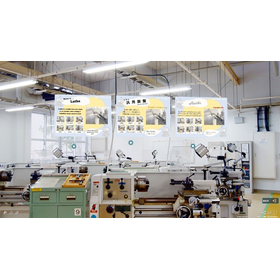
"Meta Assist" is a video call solution that utilizes AR. It allows for support in repairing and assembling machines for customers who are far away. You can draw signs in the space with AR and navigate visually. Additionally, by sharing the view and receiving support from headquarters while on the call, the need for support engineers to rush to the site can be eliminated. Please feel free to contact us if you have any requests. 【Features】 ■ Instructions are visually clear, so customers won't get lost ■ No need to rush to the site, saving labor costs and time ■ Can be used immediately with your smartphone *For more details, please download the PDF or feel free to contact us.

  • Other Auto Parts
  • Editing software

Added to bookmarks

Bookmarks list

Bookmark has been removed

Bookmarks list

You can't add any more bookmarks

By registering as a member, you can increase the number of bookmarks you can save and organize them with labels.

Free membership registration

PDF correction and preflight tool 'Enfocus PitStop'

Provides high operability and flexibility through PDF checking and editing! Excellent manual editing tools.

"Enfocus PitStop" is a PDF editing and preflight tool that allows for easy inspection and correction of a wide range of PDFs. It offers various manual editing tools and features for verifying PDF details, making it effective for checking problematic PDFs. Additionally, when there is a need to check PDFs for purposes such as web publication or printing, the preflight feature allows for a one-click check of the entire PDF. [Features] ■ Excellent manual editing tools ■ Action feature to execute corrections with one click ■ Preflight feature to perform checks with one click *For more details, please refer to the related links or feel free to contact us.

  • Company:Too
  • Price:Other
  • Other Software
  • Editing software

Added to bookmarks

Bookmarks list

Bookmark has been removed

Bookmarks list

You can't add any more bookmarks

By registering as a member, you can increase the number of bookmarks you can save and organize them with labels.

Free membership registration

LiveXR 360

Experience difficult-to-access locations and remote facilities in a 3D virtual space with 360° photos.

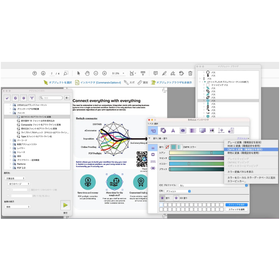
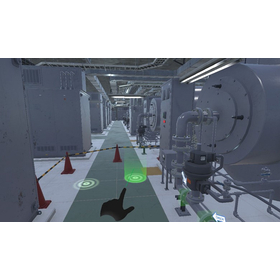
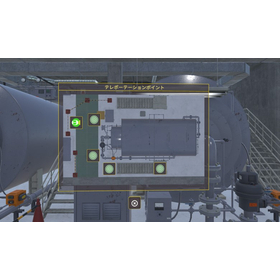
"LiveXR 360" is a VR solution based on photos, known as photo VR. Locations that exist in the real world are reconstructed in high quality as digital twins on the web. Being a web service, it allows for easy viewing from any device. 【Recommended for those who have the following challenges or concerns:】 - I want to visually understand the spatial information of the site before entering the actual work area. - In unfamiliar environments, it can be difficult to quickly identify the locations of equipment and system diagrams. - When performing inspection work on-site, it takes time and effort to reach the destination. - There are many types of paper documents, photos, and videos related to equipment and the site, making management complicated. - It takes time just to find specific documents when I want to view them. - Training personnel want to efficiently grasp work procedures in various environments that differ from one another.

  • 画像1.png
  • 画像2.jpg
  • 画像5.jpg
  • 画像7.png
  • 画像8.jpg
  • 画像9.jpg
  • 画像10.png
  • Software (middle, driver, security, etc.)
  • Editing software

Added to bookmarks

Bookmarks list

Bookmark has been removed

Bookmarks list

You can't add any more bookmarks

By registering as a member, you can increase the number of bookmarks you can save and organize them with labels.

Free membership registration

LiveXR Video App

Experience difficult-to-access locations and remote facilities in a 3D virtual space and through 360° videos.

The "LiveXR Video App" is a VR solution that displays <360-degree videos> known as video VR. The data is managed in the cloud. It is offered as an app, allowing for an easy viewing experience from VR devices. There is also a multiplayer mode available for simultaneous viewing and conversation among multiple users. 【Recommended for those who have the following challenges or concerns:】 - I want to conduct facility tour visits, but many customers find it difficult to come on-site... - I want to conduct factory tours, but there are dangers associated with actual factories... - I want to introduce the layout of complex facilities or large equipment, but actual guidance is difficult.

  • Casting_Screenshot_1715243946646.jpg
  • Casting_Screenshot_1715244013824.jpg
  • Casting_Screenshot_1715244084934.jpg
  • Software (middle, driver, security, etc.)
  • Editing software

Added to bookmarks

Bookmarks list

Bookmark has been removed

Bookmarks list

You can't add any more bookmarks

By registering as a member, you can increase the number of bookmarks you can save and organize them with labels.

Free membership registration

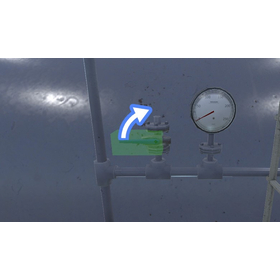
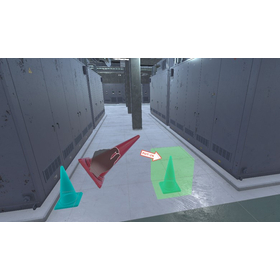
Factory and plant-oriented┃Achieving realistic and efficient on-site procedure training through VR education.

Streamline new employee training with VR training that is not affected by equipment operation! Training in a realistic virtual space is effective for reducing OJT time and improving safety.

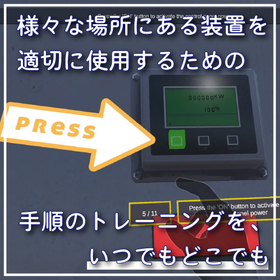
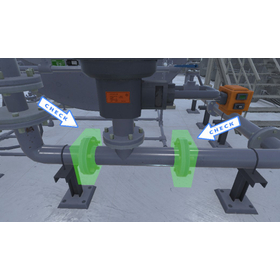
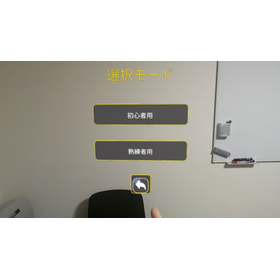
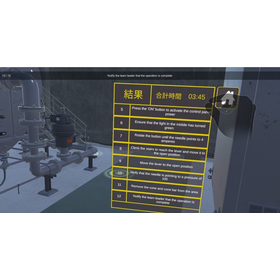
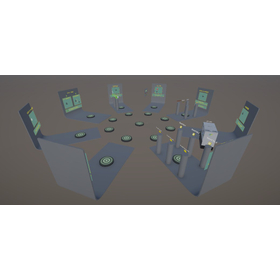
"LiveXR Workflow" is an XR solution specialized in training procedures and processes. By recreating various situations according to scenarios, it allows for the verification of formal procedures (correct routes). It displays the corresponding sections of the operation manual in a virtual space, enabling difficulty adjustments based on the skill level of the workers. Additionally, it records the time required for each step, which can be used for measuring training effectiveness and improving operations. 【Recommended for those facing the following challenges:】 - Want to shorten the OJT period on-site using VR and reduce the learning costs for newcomers... - Cannot instantly identify the "operating locations" or "positions of target switches" in the actual space with just paper manuals... - Workers lack practical experience (such as assembly), resulting in overall poor work efficiency. *For more details, please download the PDF or feel free to contact us.

  • 画像16.jpg
  • 画像17.jpg
  • 画像18.jpg
  • 画像19.jpg
  • 画像20.jpg
  • 画像21.jpg
  • 画像22.jpg
  • 画像23.jpg
  • Vocational Training/Technical School
  • Editing software

Added to bookmarks

Bookmarks list

Bookmark has been removed

Bookmarks list

You can't add any more bookmarks

By registering as a member, you can increase the number of bookmarks you can save and organize them with labels.

Free membership registration

3D scan data simple editing software 'Geomagic Wrap'

It is software that can quickly, accurately, and easily convert 3D scan data and mesh data. It can be smoothly utilized in subsequent processes. *Demo available.

Geomagic Wrap allows you to convert point cloud data obtained from 3D scans or input 3D formats (such as STL, OBJ) into 3D polygon meshes or surfaces. The converted data can be utilized in manufacturing, analysis, design, entertainment, archaeology, and more. It enables data modifications beyond the correction software included with 3D scanners. [Features] ■ Easy repair of noise and errors The automatic re-meshing tool searches for and automatically repairs irregularities and invalid polygon structures caused by noise. ■ Optimal repairs tailored to the situation With the hole-filling function, you can select the most suitable hole-filling options based on curvature, tangents, and plane settings. ■ Convert data into a format usable with existing CAD Automatic surface creation from polygon data is possible. The surfaced data can be output as an intermediate file, making it editable with your CAD software. ■ Convert data and use it immediately in the next process Supports various output formats, allowing for output suitable for CAD, 3D printing, and other processing. *For more details, please request a catalog or view the PDF data via the download button below.

  • wrap_2.jpg
  • wrap_3.jpg
  • Other CAD related software
  • Image analysis software
  • others
  • Editing software

Added to bookmarks

Bookmarks list

Bookmark has been removed

Bookmarks list

You can't add any more bookmarks

By registering as a member, you can increase the number of bookmarks you can save and organize them with labels.

Free membership registration

Marsgo Easy CAD! Software "peel.CAD" for peel3

Easily convert scan data into CAD!! Let me explain the amazing features of the software "peel.CAD" for peel3!

Marsugo is a document that picks up the functions and features of various products and introduces the "amazing!" aspects. This time, we will introduce the software "peel.CAD" for the 3D scanner "peel 3," which has intuitive operability and excellent versatility. The use of 3D scanners is expanding rapidly, including applications such as creating drawings from physical objects and archiving. The data obtained during 3D scanning is composed of point cloud data, which is not numerically controlled, making it difficult to edit. By using "peel.CAD," you can easily modify mesh data and fill holes, and in no time at all, convert it into CAD data with simple operations! After conversion, you can freely edit it using your usual CAD system. The document introduces the workflow after 3D scanning and the operation steps for peel.CAD, so please take a look. *You can download the document using the button below.

  • Other CAD
  • 3D measuring device
  • 3D CAD
  • Editing software

Added to bookmarks

Bookmarks list

Bookmark has been removed

Bookmarks list

You can't add any more bookmarks

By registering as a member, you can increase the number of bookmarks you can save and organize them with labels.

Free membership registration

I tried cutting it with a section cut and assembling the model.

【Mitarepo】Is it easy to split and assemble 3D printed models!? I tried the section cut feature! | System Create

"Mitarepo" is a series that introduces what can be done using various products with the concept of "I tried doing this!" From the wide range of product categories handled by System Create, we deliver useful information each time. In Vol. 100, we tried out the "Section Cut" feature included in the data editing/generation software for 3D printers, "VoxelDance Additive." The "Section Cut" feature of "VoxelDance Additive" allows for easy division operations that take into account the joining parts necessary for assembling the model! You can simply select the division points, and choose from two types of connection methods: lap joints and connector pins. This time, we prepared two types of models and performed the data division, followed by actual printing and assembly. "There seems to be a difficult image associated with data division..." "Can I align the model correctly and neatly...?" We will introduce the actual operations and images of the printed models along with these points of interest. *You can download the materials from the button below.

  • 3D CAD
  • Data conversion software
  • 3D Printer
  • Editing software

Added to bookmarks

Bookmarks list

Bookmark has been removed

Bookmarks list

You can't add any more bookmarks

By registering as a member, you can increase the number of bookmarks you can save and organize them with labels.

Free membership registration

"Raster Editing" Option Feature [Explained in Video]

Clean up your scanned raster data! Introducing editing and correction features.

"Raster Editing" is an editing and correction function that cleans up scanned raster data for use as survey data. It is recommended for addressing issues such as wrinkles and unevenness from the original drawing, noise problems after scanning, expansion and contraction due to long-term storage of the original drawing, and correcting coordinates and distortions after raster composition. [Video Introduction] - Overview of Raster Editing and its use for vector conversion - Removal of noise and area deletion due to wrinkles and fading - Thinning and dilation of raster - Adding survey coordinates to raster - Example of distortion correction of raster [Multi-point Affine Transformation] *For more details, please refer to the PDF materials or feel free to contact us.

  • Other measurement, recording and measuring instruments
  • Software (middle, driver, security, etc.)
  • Editing software

Added to bookmarks

Bookmarks list

Bookmark has been removed

Bookmarks list

You can't add any more bookmarks

By registering as a member, you can increase the number of bookmarks you can save and organize them with labels.

Free membership registration

Utilization at Landslide Disaster Recovery Sites [Example of 3D Point Cloud Editing]

"For construction and surveying design consultants! Introducing case studies on the use of WingEarth" A series of tasks leading to the creation of results is possible.

WingEarth, handled by Aisan Technology, is a large-scale point cloud editing tool based on three-dimensional point cloud processing capabilities, capable of handling point cloud data exceeding 10 billion points at high speed. 【Use Cases of the 3D Point Cloud Editing Tool (WingEarth)】 ◆Industry: For construction and surveying design consultants ◆Utilization in landslide disaster recovery sites → It can be used in disaster sites where early recovery work is required. 【Points】 - The ground filtering function allows for the removal of trees and other objects not on the surface. - A series of tasks from mesh creation (TIN, grid, 3D mesh, etc.) to contour line drawing can be performed to produce results. *You can check the collection of use cases from the PDF download. Please feel free to contact us for more product details.

  • Other measurement, recording and measuring instruments
  • Other CAD related software
  • Editing software

Added to bookmarks

Bookmarks list

Bookmark has been removed

Bookmarks list

You can't add any more bookmarks

By registering as a member, you can increase the number of bookmarks you can save and organize them with labels.

Free membership registration

NC drawing and editing software [CIMCO Edit]

NC editing, drawing, and communication system that can draw FANUC, Heidenhain, and Siemens for 2-axis to 5-axis milling and lathes.

The NC drawing and editing software "CIMCO Edit" allows for smooth reading, drawing, editing, and verification of tool paths even with large NC data. It has a sales record of over 80,000 licenses worldwide and is equipped with basic NC data editing tools and drawing functions. It supports high-speed drawing of FANUC, Heidenhain, Siemens, and ISO codes, with trajectory and solid display for 3-axis paths, and trajectory display for 5-axis paths. It can import CAD models in STL format and overlay them with the trajectory. It can be used as a standalone system or integrated with CAD/CAM as a data verification system.

  • Other CAM related software
  • Editing software

Added to bookmarks

Bookmarks list

Bookmark has been removed

Bookmarks list

You can't add any more bookmarks

By registering as a member, you can increase the number of bookmarks you can save and organize them with labels.

Free membership registration

Current Height Editing Software "APS-ZE"

Creation of a 3D terrain model

APS-ZE is software for creating and loading 3D terrain models. It integrates route data and terrain models planned with APS-MarkIV, APS-RailBIM, and others, allowing for 3D model visualization, making it essential for BIM/CIM and 3D design.

  • Other CAM related software
  • Editing software

Added to bookmarks

Bookmarks list

Bookmark has been removed

Bookmarks list

You can't add any more bookmarks

By registering as a member, you can increase the number of bookmarks you can save and organize them with labels.

Free membership registration

Supports models with a scale of 50 million faces - 'STL Workshop 2'

Domestic software with reliable support! Outputs high-quality data with fewer errors through easy one-click operation.

By incorporating the polygon editing algorithm developed by the National Research and Development Agency RIKEN, we facilitate high-performance and high-quality data editing, thereby reducing the workload of engineers. "STL Workshop 2" is software that allows for easy STL data editing with just one click, without the need for complicated operations or knowledge. It automatically sets initial values for parameters that require expertise and efficiently displays and controls large polygon data with a user interface compliant with Windows software. By integrating the polygon editing algorithm, we enable easy high-performance and high-quality data editing, reducing the workload of engineers. 【Features】 ■ Easy operation with one click ■ Reliable support for domestically produced software ■ Comfortable operation even with tens of millions of polygons ■ High-quality data output that retains shape features ■ Intuitive operation *For more details, please refer to the PDF materials or feel free to contact us.

  • Other CAD related software
  • Editing software

Added to bookmarks

Bookmarks list

Bookmark has been removed

Bookmarks list

You can't add any more bookmarks

By registering as a member, you can increase the number of bookmarks you can save and organize them with labels.

Free membership registration

Cloning Tool Gene Construction Kit

Construction and editing of DNA sequences and creation of plasmid maps.

This is a desktop cloning tool that has dramatically simplified the handling of DNA sequences with its graphical operation system and advanced drawing features. You can customize various formatting options for nucleotide sequence strings, features, annotations, and graphic elements as you wish. With the Gene Construction Kit, you can obtain electrophoresis patterns simply by selecting enzymes on the restriction enzyme map.

  • new03_09_ss.png
  • GCKfig1.gif
  • DNA analysis
  • Editing software

Added to bookmarks

Bookmarks list

Bookmark has been removed

Bookmarks list

You can't add any more bookmarks

By registering as a member, you can increase the number of bookmarks you can save and organize them with labels.

Free membership registration

[English Market Research Report] Global Market for Photo Editing Software

"Free samples" are currently being offered! Please check the application method from the [PDF download] button, or apply directly from the related links.

The photo editing software market is expected to grow to USD 520.16 million from 2023 to 2028, with a CAGR of 7.81% during the forecast period. This report provides a comprehensive analysis of the photo editing software market, including market size and forecasts, trends, growth drivers, challenges, and vendor analysis covering approximately 25 vendors. It offers the latest analysis of the current market scenario, recent trends and drivers, and the overall market environment. The increase in the use of photo editing software in the global events industry, rising demand for web design services, and increased investments and partnerships for the expansion of photo editing services are driving the market.

  • Other services
  • Editing software

Added to bookmarks

Bookmarks list

Bookmark has been removed

Bookmarks list

You can't add any more bookmarks

By registering as a member, you can increase the number of bookmarks you can save and organize them with labels.

Free membership registration

Data Entry and Editing Software RS-receiver Lite

Easily input data from RS-232C and virtual COM into the active screen.

You can easily input serial data from barcode readers, RFID readers, magnetic card readers, OCR readers, sheet readers, digital scales, measuring instruments, etc., into the active screen. Additionally, you can edit the data by deleting unnecessary information, adding custom strings, extracting data, or replacing commas with tabs. Compatible with Windows 10/11.

  • Other network tools
  • Editing software

Added to bookmarks

Bookmarks list

Bookmark has been removed

Bookmarks list

You can't add any more bookmarks

By registering as a member, you can increase the number of bookmarks you can save and organize them with labels.

Free membership registration

Simple data editing tool for 3D printer use | STL/Polygon editing

Simplify the removal of troublesome waste, surface smoothing, and automatic hole filling from 3D printer outputs automatically! *Free trial available.

Our developed "Large-scale 3D Data Viewer" is a framework that provides essential 3D data visualization and accompanying standard GUI operations for the development of visualization applications that handle 3D data. It can load large-scale data quickly, allowing for the import of previously unreadable scan data and the reduction of data size. Additionally, it can automatically perform simple edits, making it perfect for those who find the tedious pre-processing for 3D printing, such as removing debris, filling holes, and surface smoothing, to be cumbersome! 【Recommended for】 ⇒ 3D printer users 【Features】 ■ Visualize/edit 3D data at hundreds of millions of polygons ■ Fast loading processing ■ Easy customization and addition of plugins ■ Supports various data formats 《Free trial currently available! You can apply through the link below!》 *For more details, please refer to the PDF or feel free to contact us.

  • Other image-related equipment
  • simulator
  • 3D Printer
  • Editing software

Added to bookmarks

Bookmarks list

Bookmark has been removed

Bookmarks list

You can't add any more bookmarks

By registering as a member, you can increase the number of bookmarks you can save and organize them with labels.

Free membership registration