We have compiled a list of manufacturers, distributors, product information, reference prices, and rankings for cam.
ipros is IPROS GMS IPROS One of the largest technical database sites in Japan that collects information on.

cam Product List and Ranking from 10 Manufacturers, Suppliers and Companies

Last Updated: Aggregation Period:Jan 07, 2026~Feb 03, 2026
This ranking is based on the number of page views on our site.

cam Manufacturer, Suppliers and Company Rankings

Last Updated: Aggregation Period:Jan 07, 2026~Feb 03, 2026
This ranking is based on the number of page views on our site.

  1. システムクリエイト Osaka//Industrial Machinery
  2. null/null
  3. Corelss Motor Co.,ltd HQ Kanagawa//Machine elements and parts
  4. 4 エイキューブ Aichi//software
  5. 4 マシンソル Tokyo//Manufacturing and processing contract

cam Product ranking

Last Updated: Aggregation Period:Jan 07, 2026~Feb 03, 2026
This ranking is based on the number of page views on our site.

  1. I tried converting the Mazatrol dialogue data into G-code! システムクリエイト
  2. Low-cost CAM "VisualMill" システムクリエイト
  3. CAM Assist for Mastercam
  4. 4 2D・2.5D CAD/CAM NAZCA CAM Mill システムクリエイト
  5. 5 CAM system "ESPRIT" エイキューブ

cam Product List

1~19 item / All 19 items

Displayed results

4 Tips for Choosing CAM to Avoid Failure

An explanation from four points: functionality, scalability, UI/usability, and support! Tips for selecting a CAM system that suits your company.

This document explains four points to consider when selecting a CAM system that fits your company's manufacturing process. From the perspectives of "function," "expandability," "UI/usability," and "support," it includes specific comparison points such as standard features, the customizability of databases, the clarity of screens, and the robustness of support systems. This book serves as a helpful resource for comparing products from multiple angles to avoid failures in CAM implementation, so please make use of it. [Contents] ■ Four Ways to Choose CAM ■ CAM Selection Checklist ■ Summary ■ What is GO2cam ■ About Seiro Japan *For more details, please download the PDF or feel free to contact us.

  • 2D CAM
  • 3D CAM
  • Other CAM related software
  • cam

Added to bookmarks

Bookmarks list

Bookmark has been removed

Bookmarks list

You can't add any more bookmarks

By registering as a member, you can increase the number of bookmarks you can save and organize them with labels.

Free membership registration

Low-cost CAM "VisualMill"

VisualMill is an affordable CAM software that supports 2D, 3D, as well as 4-axis and 5-axis machining.

A CAM software that offers excellent cost performance while catering to a wide range of needs, including molds, parts, jigs, wooden patterns, woodworking parts, and prototype parts. VisualMill can also be added to Rhinoceros and SolidWorks. You can choose from a minimum configuration for CAM to a configuration that supports 5-axis machining, depending on your needs. Please feel free to consult with us first.

  • Other CAM related software
  • 3D CAM
  • 2D CAM
  • cam

Added to bookmarks

Bookmarks list

Bookmark has been removed

Bookmarks list

You can't add any more bookmarks

By registering as a member, you can increase the number of bookmarks you can save and organize them with labels.

Free membership registration

I tried converting the Mazatrol dialogue data into G-code!

I tried converting the dialogue data of Mazatrol into G-code!

【Mita Repo】I tried converting Mazatrol dialogue data to G-code! "Mita Repo" is a series based on the concept of "I tried doing this!" where we introduce various products and what can be done with them. Each time, we deliver a bit of useful information from the wide range of product categories handled by System Create. The theme of Vol. 9 is "I tried converting Mazatrol dialogue data to G-code." MazaCAM is a CAM system that can convert the dialogue programs characteristic of Mazatrol for both old and new Mazatrol machines, allowing for compatibility. In fact, it can also be converted to G-code. So, we actually tried the conversion. In the materials, we checked how the dialogue programs created with Mazatrol are converted into G-code data. "Isn't it a CAM specifically for Mazak?" "How does the dialogue program change into G-code?" We will explain these points of interest along with actual images and comments from our technical staff! *You can download the materials from the button below.

  • Milling machine
  • lathe
  • Other CAM related software
  • cam

Added to bookmarks

Bookmarks list

Bookmark has been removed

Bookmarks list

You can't add any more bookmarks

By registering as a member, you can increase the number of bookmarks you can save and organize them with labels.

Free membership registration

High-speed calculation 3D CAM system DEPO CAM

High-speed calculation 3D CAM system DEPO CAM

Generate the ideal machining path! Achieve reduced tool load and shortened cutting time with a high-speed machining compatible, high-speed calculation 3D CAM system. 【Features】 ○ Fully compatible with high-speed, high-feed machining ○ Significant reduction in program creation time ○ Significant reduction in cutting time  An ideal path that maximizes the machine's capabilities to 100%  An ideal path that minimizes air cuts to the extreme ○ Significant reduction in consumable tool costs  A refined path that is gentle on tools and machines ○ Macro function reduces time during actual operation  Register processes created once and apply to other shapes ○ Immediately effective after implementation  Excellent operability. Can be operational after just one day of training ● For other features and details, please download the catalog.

  • Other CAM related software
  • 3D CAM
  • cam

Added to bookmarks

Bookmarks list

Bookmark has been removed

Bookmarks list

You can't add any more bookmarks

By registering as a member, you can increase the number of bookmarks you can save and organize them with labels.

Free membership registration

Fully Automatic Hole and Pocket Machining CAM System【Prog-Lesys】

Fully Automatic Hole and Pocket Machining CAM System [Prog-Lesys]

◆Solid Data Import Formats◆ Solid Works Direct Interface Inventor Direct Interface CATIA V5 Direct Interface Solid Edge Direct Interface Pro ENGINEER Direct Interface Para Solid・ACIS Interface ◆Automatic Hole Feature Recognition◆ Automatically detects hole features from the imported solid shape. NC data is automatically generated from the detected hole features using the diagram function. ◆Diagram Function◆ The diagram function is a feature that succinctly represents the "complex processing steps and processing know-how" that customers actually perform in various hole machining processes in a diagrammatic form. By using the diagrammatic representation of the diagram function, NC data can be automatically generated without causing processing errors, allowing for standardization of the process. Additionally, the time required to create NC data can be significantly reduced.

  • Other CAM related software
  • 3D CAM
  • cam

Added to bookmarks

Bookmarks list

Bookmark has been removed

Bookmarks list

You can't add any more bookmarks

By registering as a member, you can increase the number of bookmarks you can save and organize them with labels.

Free membership registration

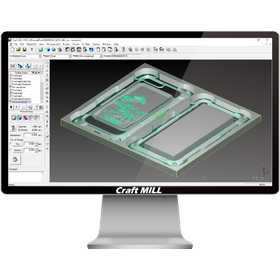
Design and Prototyping CAM System "Craft MILL"

Simple multiple-choice operations that can be used by designers and planners.

Craft MILL is equipped with a database based on experimental values for tool and material settings, which are considered difficult to configure. Therefore, all tasks leading up to outputting processing data are done through a selection method, allowing anyone to use it easily and safely. Of course, detailed parameter settings for professional use are also available, so it can adequately handle advanced processing as well.

  • 3D CAM
  • Prototype Services
  • 3D Printer
  • cam

Added to bookmarks

Bookmarks list

Bookmark has been removed

Bookmarks list

You can't add any more bookmarks

By registering as a member, you can increase the number of bookmarks you can save and organize them with labels.

Free membership registration

CAM System InventorCAM Xpress

A CAM system integrated with Autodesk Inventor. Offered by SolidCAM at an affordable price!!

InventorCAM Xpress is fully integrated with Autodesk Inventor, allowing not only 2.5-axis machining but also 3D surface machining. 【Features】 ● Seamless integration into Inventor with a single window ● Demonstrates the convenience of SolidCAM's tool paths on design models ● Familiar features as a powerful CAM solution, requiring minimal training and setup time ● Proven reliability through innovative experiences as a CAM *For more details, please download the catalog or contact us.

  • Other CAM related software
  • cam

Added to bookmarks

Bookmarks list

Bookmark has been removed

Bookmarks list

You can't add any more bookmarks

By registering as a member, you can increase the number of bookmarks you can save and organize them with labels.

Free membership registration

ViewCAM/PG-CAM-II

We will introduce an add-on system that reduces the burden on operators and a high-performance CAM system.

Nitto Shoji Co., Ltd. handles "ViewCAM/PG-CAM-II." "ViewCAM" is an add-on system that reduces investment costs and the burden on operators. It features digital zooms of 40x, 125x, 250x, 500x, and 1000x. Additionally, "PG-CAM-II" is a high-function CAM system that creates programs based on the actual worn shape of grinding wheels. Even grinding wheels that have lost their sharpness and are no longer perfectly round can achieve ultra-high precision machining. We also offer the "CG.0A," a CAM image-type profile grinding machine. 【Features】 <ViewCAM> ■ Digital zooms of 40x, 125x, 250x, 500x, and 1000x ■ No need for chart paper ■ Unique CAM reduces the burden on the machinist *For more details, please refer to the PDF materials or feel free to contact us.

  • 3D CAM
  • cam

Added to bookmarks

Bookmarks list

Bookmark has been removed

Bookmarks list

You can't add any more bookmarks

By registering as a member, you can increase the number of bookmarks you can save and organize them with labels.

Free membership registration

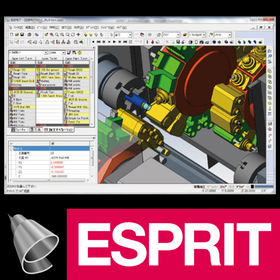
CAM system "ESPRIT"

A 3D CAD/CAM system compatible with all types of machine tools!

"ESPRIT" is a high-performance CAM system backed by accumulated technology, always adapting to new cutting methods. It features a universal post-processor that can define various machining methods tailored to any part shape and create NC data compatible with almost all machine tools. Additionally, it includes a machine simulator that allows for the verification of actual machine models in the interface, significantly contributing to productivity improvements, such as reducing idle run time of machines. 【Features】 ■ Compatible with all machine tools ■ Capable of simultaneous synchronized control of up to 22 axes and 5 spindles with 5 turrets ■ Ideal for Swiss-style automatic lathes ■ Equipped with diverse simultaneous 5-axis machining capabilities ■ Features high-performance high-speed milling functions *For more details, please refer to the catalog or feel free to contact us.

  • Other CAM related software
  • 3D CAM
  • Other CAD related software
  • cam

Added to bookmarks

Bookmarks list

Bookmark has been removed

Bookmarks list

You can't add any more bookmarks

By registering as a member, you can increase the number of bookmarks you can save and organize them with labels.

Free membership registration

CAM『Alphacam Router』

Addressing various needs! Introducing the global CAM used in over 50 countries worldwide.

"Alphacam Router" has been a long-time favorite as one of the few CAM solutions for woodworking, catering to various needs. In Japan, it is used for a wide range of manufacturing, from simple router-processed parts to complex 5-axis processed furniture. We offer "ESSENTIAL" for 2D processing, "STANDARD" for 2.5D processing, "ADVANCED" for indexed 3D processing, and "ULTIMATE" for simultaneous 4/5-axis 3D processing. [Features] ■ Freely customizable to meet needs ■ Infinite applications such as special processing commands and full automation ■ Customization using open APIs and VBA ■ Capable of handling processing programs that generic CAM systems could not output *For more details, please refer to the PDF materials or feel free to contact us.

  • 3D CAM
  • 2D CAM
  • Other CAM related software
  • cam

Added to bookmarks

Bookmarks list

Bookmark has been removed

Bookmarks list

You can't add any more bookmarks

By registering as a member, you can increase the number of bookmarks you can save and organize them with labels.

Free membership registration

WALL ART & RELIEF

A texture-specific CAM that supports images, STL, and NURBS.

This CAM system supports images, STL, and NURBS. By accessing the geometry directly without using offsets, textures are fully reproduced. In particular, there are various modes for importing images tailored for wall material specialists, texture artists, and relief-related designers.

  • 3D CAM
  • cam

Added to bookmarks

Bookmarks list

Bookmark has been removed

Bookmarks list

You can't add any more bookmarks

By registering as a member, you can increase the number of bookmarks you can save and organize them with labels.

Free membership registration

Optimization of Processing Time with ESPRIT for Machine Tools

A CAM system that maximizes the performance of all machine tools.

In the machine tool industry, reducing processing time and improving quality are essential for enhancing productivity. Particularly in low-volume, high-variety production and complex shape machining, optimizing NC programs becomes crucial. Inappropriate programming can lead to increased processing time, premature tool wear, and even a decline in machining accuracy. ESPRIT CAM addresses these challenges and significantly contributes to improving production efficiency by maximizing the potential of machine tools. 【Application Scenarios】 - Reduction of processing time in multi-axis machining and complex lathes - Process optimization in machining complex-shaped parts - Machining of parts requiring high precision 【Benefits of Implementation】 - Maximization of processing time - Extension of tool life - Improvement in machining accuracy - Reduction of setup time

  • 3D CAM
  • lathe
  • Other machine tools
  • cam

Added to bookmarks

Bookmarks list

Bookmark has been removed

Bookmarks list

You can't add any more bookmarks

By registering as a member, you can increase the number of bookmarks you can save and organize them with labels.

Free membership registration

Maximum rating: 48V 1200W Brushless Motor #CAM

We deliver high-capacity core motors for battery-powered robots at low prices and with short lead times. #CAM

As a standard option, please refer to the catalog for geared motors with gear heads. Product Strengths Low Cost: The CMH series employs a design philosophy based on traditional coreless motor technology, actively utilizing low-cost silicon steel sheets, magnet wires, rare earth magnets, and iron materials to achieve cost reduction, making it a model that can be mass-produced with inexpensive automation equipment. For more details, please contact us or download the catalog.

  • Cored-png.png
  • CMH110-E.png
  • wechatimg1967-min_optimized.png
  • wechatimg1971-min_optimized.png
  • IMG_3618-fotor-bg-remover-20241105164018.png
  • mosaic_20241107130256-fotor-bg-remover-2024110713614.png
  • mosaic_20241107130530-removebg-preview.png
  • c59bf0144279527cfb50c3c0749db4c7-fotor-bg-remover-20241107105646.png
  • mosaic_20241106160148.png
  • Brushless DC Motor
  • cam

Added to bookmarks

Bookmarks list

Bookmark has been removed

Bookmarks list

You can't add any more bookmarks

By registering as a member, you can increase the number of bookmarks you can save and organize them with labels.

Free membership registration

【Maximum rating 24V 800W】 Brushless motor #CAM

We deliver high-capacity core motors for battery-powered robots at low prices and with short delivery times. #CAM

As a standard option, please refer to the catalog for geared motors with gear heads. Product Strengths Low Cost: The CMH series employs a design philosophy using conventional core motor technology, actively adopting low-cost silicon steel sheets, magnet wires, rare earth magnets, and iron materials to achieve cost reduction, making it a model that can be mass-produced with inexpensive automation equipment. For more details, please contact us or download the catalog.

  • Cored-png.png
  • CMH110-A.png
  • wechatimg1971-min_optimized.png
  • wechatimg1967-min_optimized.png
  • c59bf0144279527cfb50c3c0749db4c7-fotor-bg-remover-20241107105646.png
  • mosaic_20241107130256-fotor-bg-remover-2024110713614.png
  • IMG_3611-fotor-bg-remover-20241105163847.png
  • VENUS.png
  • Brushless DC Motor
  • cam

Added to bookmarks

Bookmarks list

Bookmark has been removed

Bookmarks list

You can't add any more bookmarks

By registering as a member, you can increase the number of bookmarks you can save and organize them with labels.

Free membership registration

2D・2.5D CAD/CAM NAZCA CAM Mill

Low-cost CAD/CAM for machining. Can be implemented in configurations as needed, from 2D, 2.5D, to hole processing. *Demo available.

The "NAZCA CAM Mill" series is an affordable CAD/CAM for machining and milling that allows you to choose the software configuration based on the processing content. You can select configurations for CAD, 2D processing, 2.5D processing (with optional projection calculations), and hole processing. *CAD functions are included in each processing module. [Features] ■ NAZCA5 CAD Standard equipped with 2D CAD functions. You can efficiently create drawings by snapping to endpoints, midpoints, and the centers of circles. It is also possible to create a single-stroke drawing by clicking on the necessary parts to delete the unnecessary ones. ■ Shorten the time for creating processing programs Chamfering can be easily set up with just condition input. ■ Easily create 3D shapes (2.5D) You can easily create various 3D shapes using 2D drawings such as cross-sections and top views. It is possible to add R/C surfaces during the processing instructions for 3D shapes. ■ Easy processing setup even with mixed hole counts and diameters In addition to selection from shapes, you can perform bulk selection by specifying seat diameters, drawing colors, and line types. You can assign processes manually or automatically to the selected holes. *Please view the PDF data from the download button below.

  • 2D CAM
  • 2D CAD machine
  • Other CAM related software
  • cam

Added to bookmarks

Bookmarks list

Bookmark has been removed

Bookmarks list

You can't add any more bookmarks

By registering as a member, you can increase the number of bookmarks you can save and organize them with labels.

Free membership registration

Maximum rating: 48V 800W Brushless Motor #CAM

We deliver large-capacity core motors for battery-powered robots at low prices and with short delivery times. #CAM

As a standard option, please refer to the geared motor catalog for models with gearheads. Product Strengths Low Cost: The CMH series employs a design philosophy based on conventional coreless motor technology, actively utilizing low-cost silicon steel sheets, magnet wires, rare earth magnets, and iron materials to achieve cost reduction, making it a model that can be mass-produced with inexpensive automation equipment. For more details, please contact us or download the catalog.

  • Cored-png.png
  • CMH110-A1.png
  • wechatimg1967-min_optimized.png
  • wechatimg1971-min_optimized.png
  • mosaic_20241107130530-removebg-preview.png
  • mosaic_20241107130256.png
  • IMG_3618-fotor-bg-remover-20241105164018.png
  • c59bf0144279527cfb50c3c0749db4c7-fotor-bg-remover-20241107105646.png
  • mosaic_20241106160148.png
  • Brushless DC Motor
  • cam

Added to bookmarks

Bookmarks list

Bookmark has been removed

Bookmarks list

You can't add any more bookmarks

By registering as a member, you can increase the number of bookmarks you can save and organize them with labels.

Free membership registration