We have compiled a list of manufacturers, distributors, product information, reference prices, and rankings for soft.
ipros is IPROS GMS IPROS One of the largest technical database sites in Japan that collects information on.

soft Product List and Ranking from 372 Manufacturers, Suppliers and Companies | IPROS GMS

Last Updated: Aggregation Period:Apr 22, 2026~May 19, 2026
This ranking is based on the number of page views on our site.

soft Manufacturer, Suppliers and Company Rankings

Last Updated: Aggregation Period:Apr 22, 2026~May 19, 2026
This ranking is based on the number of page views on our site.

  1. SAS Institute Japan JMP Japan Division Tokyo//software
  2. B7 Tokyo//software
  3. ミューテック Tokyo//software
  4. 4 ウェーブフロント 本社 Kanagawa//software
  5. 5 フォトン Kyoto//software

soft Product ranking

Last Updated: Aggregation Period:Apr 22, 2026~May 19, 2026
This ranking is based on the number of page views on our site.

  1. JMP SAS Institute Japan JMP Japan Division
  2. [FEM Analysis Case] Stress Analysis of a Crusher
  3. Impact and Collision Analysis Software PAM-CRASH 日本イーエスアイ
  4. 4 High-precision casting analysis software ProCAST 日本イーエスアイ
  5. 5 "Kubota Air Handling Unit" General Catalog クボタ空調

soft Product List

931~960 item / All 1482 items

Displayed results

Free Seminar: "Challenges in Sports Rehabilitation and Muscle Strength Analysis"

March 18, 2020 (Wednesday) - Held a seminar on muscle strength analysis technology in the fields of sports and rehabilitation.

This seminar aims to discuss the challenges faced in various fields by leading experts in the theories of two-joint muscles, sports for people with disabilities, and rehabilitation, while exploring the direction of muscle strength analysis. Additionally, we will introduce training support tools based on the FEMS program. If you are interested, we kindly ask you to attend this seminar. 【Seminar Overview】 ■ Date and Time - March 18, 2020 (Wednesday) - 13:00-17:00 (Registration starts at 12:30) - A networking event (light refreshments) is planned from 17:00 to 19:00 ■ Venue - Seminar Room, Computational Mechanics Research Center, Inc. (8F Tokyu Togoshi Building, 1-7-1 Togoshi, Shinagawa-ku, Tokyo) ■ Organized by: Computational Mechanics Research Center, Inc. ■ Participation Fee: Free (Pre-registration required) ■ Capacity: 50 people *For more details, please refer to the PDF document or feel free to contact us.

Added to bookmarks

Bookmarks list

Bookmark has been removed

Bookmarks list

You can't add any more bookmarks

By registering as a member, you can increase the number of bookmarks you can save and organize them with labels.

Free membership registration

Fluid analysis software "Particleworks"

Mesh-free particle method fluid analysis software for evaluating the behavior of liquids such as water and oil.

This is a meshless fluid analysis software designed to evaluate the behavior of liquids such as water and oil. With an intuitive interface, it processes large-scale computations and visualizations quickly, enabling design optimization and compelling visualizations. It simulates a wide range of fluid problems across various fields, from lubrication of transmissions and engines, motor cooling, floodway operations, mixing and kneading of chemicals, resins, and food, to sediment disasters and floods. 【Features】 ■ Adopts a particle method that does not require mesh generation ■ Easily analyzes liquid mixing and splashing involving large deformations of free surfaces ■ Flexibly supports coupled analysis with other CAE tools ■ Optimized for the latest CPU/GPU architectures ■ Offers robust support unique to domestically developed software *For more details, please refer to the PDF materials or feel free to contact us.

  • Thermo-fluid analysis
  • simulator
  • soft

Added to bookmarks

Bookmarks list

Bookmark has been removed

Bookmarks list

You can't add any more bookmarks

By registering as a member, you can increase the number of bookmarks you can save and organize them with labels.

Free membership registration

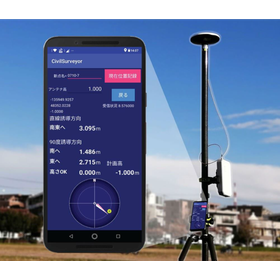
Centimeter-level standalone high-precision GNSS positioning system

"Making high-precision GNSS more accessible" We will achieve significant cost reduction and labor savings in outdoor positioning measurement.

Our company's "Centimeter-Level Standalone High-Precision GNSS Positioning System" is a system that can be utilized at a cost that is a fraction of traditional GNSS systems used for surveying purposes, such as RTK and VRS. Since it does not require communication with reference stations or electronic reference points, as long as there is a clear view of the sky, it is possible to use high-precision positioning data in real-time throughout Japan. Additionally, it is compatible with Ntrip-based VRS and RTK systems, allowing it to be used in the same manner as traditional high-precision GNSS devices by simply switching the app settings. If you have any questions, please feel free to contact us. 【Strengths of Our System】 ■ Can be used throughout Japan with standalone high-precision positioning ■ Significantly reduces costs compared to GNSS surveying equipment ■ Easy to use due to its simple functional configuration ■ Can adapt to traditional high-precision positioning methods *Please feel free to contact us.

  • Other measurement, recording and measuring instruments
  • soft

Added to bookmarks

Bookmarks list

Bookmark has been removed

Bookmarks list

You can't add any more bookmarks

By registering as a member, you can increase the number of bookmarks you can save and organize them with labels.

Free membership registration

Creo Simulate

Enabling 3D virtual typing to develop higher quality products at lower development costs!

Creo Simulate is a simulator option that allows for structural strength analysis, thermal analysis, vibration analysis, and more within the Creo Parametric operating environment. This comprehensive functionality enables you to verify the performance of a 3D virtual prototype before creating the first physical part. It provides valuable insights that can shorten time-to-market while improving product durability, reliability, and safety. With Creo Simulate, the need for physical prototypes is reduced, which also lowers manufacturing costs. By using these solutions, you can quickly and easily modify designs, reduce errors, and lightweight products, ensuring a cost-effective manufacturing process and material selection. **Key Benefits** - You can understand product performance early on and detect design flaws, which enhances the quality of the initial design. - An intuitive and user-friendly interface improves work efficiency.

  • 3D CAD
  • soft

Added to bookmarks

Bookmarks list

Bookmark has been removed

Bookmarks list

You can't add any more bookmarks

By registering as a member, you can increase the number of bookmarks you can save and organize them with labels.

Free membership registration

[EOL Measures] Design and Development of Replacement for Embedded Systems <Case Study Collection Provided>

Avoiding the crisis of production interruption! Achieving rapid and reliable EOL response through replacement design and reverse engineering.

We provide remanufacturing, EOL response replacement design, and reverse engineering for companies facing difficulties in continuing production due to component EOL or delivery delays. We update and optimize components, circuits, and software, designing and manufacturing alternatives with equivalent functionality. We can also accommodate the addition of new features. If you are looking to urgently respond to EOL issues, are short on personnel, or are too busy with work to manage, please feel free to consult with us. 【Features】 ■ Support from analysis of devices, boards, enclosures, and systems to the design and manufacturing of alternatives ■ Rapid response to EOL components and boards ■ Continuous support to mitigate risks of production interruption and delivery delays ■ Comprehensive support from component procurement, design, development, to support ■ Experienced engineers propose suitable solutions ★ We are currently offering materials summarizing proposal examples! - Complete guide for design replacement to avoid risks associated with component supply discontinuation https://mono.ipros.com/product/detail/2001514621 - [EOL Response] Transition guide from Renesas microcontrollers to RX microcontrollers https://mono.ipros.com/product/detail/2001274125

  • Circuit board design and manufacturing
  • Microcomputer
  • EMS
  • soft

Added to bookmarks

Bookmarks list

Bookmark has been removed

Bookmarks list

You can't add any more bookmarks

By registering as a member, you can increase the number of bookmarks you can save and organize them with labels.

Free membership registration

Software "LiveMonitor"

Visualize the internal state of the drive! Enables access analysis and lifespan prediction.

"LiveMonitor" is software that monitors flash storage based on S.M.A.R.T. information. It can display various information such as different transfer sizes for read/write operations. Additionally, it allows you to check the usage status of each block, enabling you to select the appropriate product capacity and type. 【Features】 ■ Display overview ■ Display S.M.A.R.T. information ■ Display remaining lifespan ■ Access analysis ■ Retrieve internal SSD information *For more details, please refer to the PDF document or feel free to contact us.

  • Software (middle, driver, security, etc.)
  • soft

Added to bookmarks

Bookmarks list

Bookmark has been removed

Bookmarks list

You can't add any more bookmarks

By registering as a member, you can increase the number of bookmarks you can save and organize them with labels.

Free membership registration

AI software "Ascent Pick" [Yamazen TFS]

Installable with inexpensive cameras and hardware! Easily implemented without complex programming!

"Ascentpick" is an AI software for robot picking in manufacturing environments. It features an intuitive and user-friendly web-based UI, enabling improvements in production line productivity while keeping costs low for both hardware and integration. Additionally, we will hold a webinar to specifically introduce this product on Thursday, April 22, 2021. Please check the related link for more details. 【Features】 ■ Easy implementation without complex programming ■ Operates with various materials and shapes of workpieces ■ Can be installed with inexpensive cameras and hardware ■ Learning does not require real data or human labeling ■ Compatible with various robot manufacturers ■ Supports various gripping methods (suction cups, parallel grippers) *For more details, please refer to the PDF materials or feel free to contact us.

  • Other industrial robots
  • soft

Added to bookmarks

Bookmarks list

Bookmark has been removed

Bookmarks list

You can't add any more bookmarks

By registering as a member, you can increase the number of bookmarks you can save and organize them with labels.

Free membership registration

Software "AutoForm-StampingAdviser"

Initial assessment of moldability based solely on the shape of the part, without considering the mold shape!

"AutoForm-StampingAdviser" is software that allows for the rapid and easy execution of feasibility evaluations for parts and processes, as well as considerations of blank shapes, material yield, and blank costs. It provides feedback on quality issues related to press forming, such as the risks of wrinkles, cracks, and excessive sheet thinning, as well as evaluations of blank unfolding shapes and material costs. 【Features】 ■ Feasibility evaluation of parts and processes ■ Feedback on quality issues related to press forming ■ Predictions of blank shapes and nesting 【Main Functions】 ■ Powerful and flexible configuration options ■ Quick modifications of part shapes ■ Multiple blanking options ■ Use based on parts only or complete die shapes *For more details, please refer to the PDF document or feel free to contact us.

  • Press Dies
  • Mold Design
  • Stress Analysis
  • soft

Added to bookmarks

Bookmarks list

Bookmark has been removed

Bookmarks list

You can't add any more bookmarks

By registering as a member, you can increase the number of bookmarks you can save and organize them with labels.

Free membership registration

Software "AutoForm-Explorer"

It is possible to easily visualize defects on mold surfaces using digital stoning techniques!

"AutoForm-Explorer" is software that allows for easy and quick setup of simulations and evaluation of important result variables. For process planners and process engineers, it enables detailed definition and evaluation of manufacturing processes for press forming die components. Additionally, the interpretation of results can be executed quickly and easily. 【Features】 ■ Efficient simulation setup ■ Identification and interpretation of defects ■ Verification of process feasibility ■ Rapid evaluation of results ■ Improvement of forming behavior for press forming die components 【Main Functions】 ■ User-friendly navigation based on workflow concepts ■ Semi-automatic result evaluation ■ Application and management of corporate standards ■ Display of surface defects - digital stoning *For more details, please refer to the PDF materials or feel free to contact us.

  • Press Dies
  • Mold Design
  • Stress Analysis
  • soft

Added to bookmarks

Bookmarks list

Bookmark has been removed

Bookmarks list

You can't add any more bookmarks

By registering as a member, you can increase the number of bookmarks you can save and organize them with labels.

Free membership registration

Software "AutoForm-Sigma"

It brings deep understanding and transparency to the molding process from the early engineering stages.

"AutoForm-Sigma" is software that enables the analysis of press-formed parts and processes, as well as the improvement of robustness. It is possible to identify which design parameters affect the quality of parts and to what extent. Additionally, if issues arise during trials or production, it supports the identification of corrective actions. Furthermore, it can also identify ineffective corrective measures and appropriate means that lead to problem resolution. 【Features】 ■ Analytical process improvement ■ Stability and reliability of the forming process ■ Robust manufacturing processes ■ Minimization of defective formed parts ■ Minimization of correction loops and associated costs 【Main Functions】 ■ Automatic variation of design parameters ■ Verification of key design parameters ■ Assessment of noise and variation range of process parameters ■ Evaluation of process capability ■ Automatic execution of multiple simulations *For more details, please refer to the PDF materials or feel free to contact us.

  • Press Dies
  • Mold Design
  • Stress Analysis
  • soft

Added to bookmarks

Bookmarks list

Bookmark has been removed

Bookmarks list

You can't add any more bookmarks

By registering as a member, you can increase the number of bookmarks you can save and organize them with labels.

Free membership registration

Software "AutoForm-DieDesigner"

You can proceed with the operation step by step throughout the entire process!

"AutoForm-DieDesigner" is software that allows for the rapid creation of alternative designs for die faces throughout the entire press forming process. Once the die face design is created, it can be used for process simulation with AutoForm-FormingSolver. The results can be evaluated with AutoForm-Explorer. By fully integrating die face design with simulation and result evaluation, it enables the quick assessment of multiple alternative process and mold concepts, as well as the selection of optimal concepts regarding formability, quality, and cost. 【Features】 ■ Creation of concept die faces ■ Evaluation of multiple process concept alternatives through direct integration with process simulation ■ Deep understanding and verification of the entire process design 【Main Functions】 ■ Creation of parameterized die face shapes for all processes ■ Creation of excess material based on customized profiles ■ Automatic unfolding of flanges on excess material surfaces ■ Modeling of shapes using morphing technology

  • Press Dies
  • Mold Design
  • Stress Analysis
  • soft

Added to bookmarks

Bookmarks list

Bookmark has been removed

Bookmarks list

You can't add any more bookmarks

By registering as a member, you can increase the number of bookmarks you can save and organize them with labels.

Free membership registration

Software "AutoForm-Compensator"

Since multiple areas can be defined within the mold, the expected correction can be controlled analytically.

The "AutoForm-Compensator" is software that automatically adjusts the die surface based on accurate springback calculations or measured springback data. When the user defines the anticipated correction area, that area is automatically corrected based on the springback calculation results. Using the anticipated correction shape, rapid and accurate die verification can be performed. 【Features】 ■ Reliability in process planning and process engineering ■ Reduction of correction loops ■ No risk of corrections in subsequent processes due to springback 【Main Functions】 ■ User-defined anticipated correction areas ■ Support for free springback and springback fixed by clamps ■ Automatic adjustment of die shapes *For more details, please refer to the PDF document or feel free to contact us.

  • Press Dies
  • Mold Design
  • Stress Analysis
  • soft

Added to bookmarks

Bookmarks list

Bookmark has been removed

Bookmarks list

You can't add any more bookmarks

By registering as a member, you can increase the number of bookmarks you can save and organize them with labels.

Free membership registration

Software "AutoForm-CostEstimator"

An ideal method to replace traditional Excel-based worksheets and cumbersome manual calculations.

"AutoForm-CostEstimator" is designed for OEMs and mold manufacturers, allowing for quick calculation of mold costs during the process planning and cost estimation stages. This software automatically associates details of parts that affect mold costs with the production steps. With just a few clicks of the mouse, this product calculates mold costs based on the defined production sequence. This enables analytical evaluation of alternative production concepts and quickly identifies the most cost-effective concept. 【Features】 ■ Measurement of the impact of alternative press forming processes on mold costs ■ Calculation of mold costs based on CAD part data and press forming processes ■ Creation of reliable cost estimates in a short time 【Main Functions】 ■ Full graphic-based 3D approach using CAD part shapes ■ Automatic feature detection of part shapes ■ Intelligent cost calculation engine for press forming processes *For more details, please refer to the PDF materials or feel free to contact us.

  • Press Dies
  • Mold Design
  • Stress Analysis
  • soft

Added to bookmarks

Bookmarks list

Bookmark has been removed

Bookmarks list

You can't add any more bookmarks

By registering as a member, you can increase the number of bookmarks you can save and organize them with labels.

Free membership registration

Software "AutoForm-FormingSolver"

We will conduct a simulation of press molding using line, transfer type, or progressive type.

"AutoForm-FormingSolver" is software that simulates press forming using line, transfer, or progressive dies. It accurately and quickly simulates the entire press forming process, including the drawing process and springback and hemming from the second operation onward, allowing for verification. Once the simulation results are available, they can be displayed in AutoForm-Explorer to obtain detailed information about the forming process. 【Features】 ■ Simulation of line and progressive die press forming ■ Fast and accurate simulation of deep drawing, re-strike, trimming, flanging, and hemming processes ■ Accurate simulation of springback ■ Deep understanding of the entire press forming process 【Other Features】 ■ Rapid verification of new process concepts to improve quality and reduce costs ■ Reduced computation time utilizing SMP or MPP parallel processing technology ■ Enhanced options such as thermal effects, phase transformation, and tribology improvements *For more details, please refer to the PDF materials or feel free to contact us.

  • Press Dies
  • Mold Design
  • Stress Analysis
  • soft

Added to bookmarks

Bookmarks list

Bookmark has been removed

Bookmarks list

You can't add any more bookmarks

By registering as a member, you can increase the number of bookmarks you can save and organize them with labels.

Free membership registration

Software "AutoForm-Thermo Plug-In"

You can analyze the impact of the actual mold temperature and its further effect on the molding results.

The "AutoForm-Thermo Plug-In" is software used in conjunction with AutoForm-FormingSolver to consider common thermal effects in cold, warm, and hot press forming simulations. If there is no need to consider the effects of phase transformation, this plug-in can be used to examine the feasibility of parts and processes. It optimizes forming and production process parameters while executing final validation analysis, taking thermal behavior into account. 【Features】 ■ Realistic simulation of thermal effects in the press forming process ■ More realistic modeling of temperature-dependent friction behavior when used in conjunction with the TriboForm Plug-In ■ Simulation of the quenching process for manganese-boron steel using the AutoForm-PhaseChange Plug-In 【Main Functions】 ■ Fast simulation of thermal behavior in the press forming process ■ Complete thermo-mechanical coupled simulation that does not consider phase-dependent material properties ■ Graphic display of simulation results ■ Final part characteristics display, including temperature changes and distribution of parts and molds, thickness distribution, strain-stress distribution, and springback.

  • Press Dies
  • Mold Design
  • Stress Analysis
  • soft

Added to bookmarks

Bookmarks list

Bookmark has been removed

Bookmarks list

You can't add any more bookmarks

By registering as a member, you can increase the number of bookmarks you can save and organize them with labels.

Free membership registration

Software "AutoForm-Trim"

The blank outline is optimized so that the part boundary matches the target shape and dimensions!

"AutoForm-Trim" is a tool used in conjunction with AutoForm-FormingSolver to determine the blank outline and to examine suitable trim lines during the trim die trial-out. This software allows for the simultaneous design of draw dies and trim dies. At the end of the pre-process for the trim operation, the trim line is optimized so that the part boundaries conform to the target shape and dimensions. 【Features】 ■ Determination of suitable trim lines and blank outlines ■ Time reduction and cost savings through simultaneous development of trim dies and draw dies ■ Reduction of trial-out time for laser trimming of complex parts 【Main Functions】 ■ Automatic determination of blank outlines for near-net-shape manufacturing ■ Automatic calculation of multiple blank outlines ■ Calculation of segments for customer-specified blank outlines or cut outlines ■ Simultaneous determination of all cut-out lines for multiple cutting processes *For more details, please refer to the PDF document or feel free to contact us.

  • Press Dies
  • Mold Design
  • Stress Analysis
  • soft

Added to bookmarks

Bookmarks list

Bookmark has been removed

Bookmarks list

You can't add any more bookmarks

By registering as a member, you can increase the number of bookmarks you can save and organize them with labels.

Free membership registration

Software "AutoForm-TubeBend"

Equipped with functions specialized for mold forming tube bending, supporting general processes such as CNC tube bending, press bending, and tube end forming!

By utilizing AutoForm-TubeBend, you can quickly design and simulate the tube bending, forming, and tube end forming processes. 【Advantages】 - Rapid design and simulation of tube components - Improvement in quality and cost through verification of multiple concept proposals - Detailed examination of tube bending, forming, and tube end forming processes - Reduction in development time and cost savings in molds, materials, and production - Quick springback prediction correction for mold shapes and bending lines *For more details, please refer to the PDF document or feel free to contact us.

Added to bookmarks

Bookmarks list

Bookmark has been removed

Bookmarks list

You can't add any more bookmarks

By registering as a member, you can increase the number of bookmarks you can save and organize them with labels.

Free membership registration

Analysis of Elastic Mold Deflection and Anticipatory Correction

Software 'AutoForm-ToolDeflect' for efficient analysis and correction of elastic mold deflection.

Due to the recent expansion of high-strength steel applications, simulations that take into account mold deflection are being required. By enabling the prediction of mold deflection and feeding back the deformation to the mold shape, it contributes to reducing the number of trial runs. AutoForm-ToolDeflect can be used from the early stages of process design when the final shape of the mold is not yet determined in CAD. It allows for the quick creation of initial concepts for mold design based solely on the part shape. Additionally, by analyzing various concepts, it becomes possible to select the most effective design. When utilizing AutoForm-ToolDeflect for final verification, the final mold shape data created in CAD is used. Once the mold deflection is calculated, over-crowning can be performed. This result can also be used as data for machining.

  • Press Dies
  • Mold Design
  • Stress Analysis
  • soft

Added to bookmarks

Bookmarks list

Bookmark has been removed

Bookmarks list

You can't add any more bookmarks

By registering as a member, you can increase the number of bookmarks you can save and organize them with labels.

Free membership registration

Solid Edge Simulation (Analysis Package)

Embedded in Solid Edge, utilizing simulation technology Simcenter Femap and Nastran for designers.

Solid Edge Simulation is equipped with the industry-standard solver NASTRAN and utilizes Femap technology for pre- and post-processing, allowing for the creation of thin plate meshes and the ability to change mesh sizes on a per-part basis. 【Key Points for Selection】 - The technology of Femap with NX NASTRAN is integrated into the Solid Edge interface, making the analysis features user-friendly even for beginners. - Automatic mesh generation - Flexible mesh size adjustments in manual mode - User-friendly UI and analysis features focused on design - Types of analysis: ○ Linear static analysis ○ Linear buckling analysis ○ Eigenvalue analysis ○ Heat conduction analysis (steady/transient) ○ Optimization ○ MOTION analysis ○ Vibration response analysis Additionally, coupled analyses such as: ○ Linear static analysis + steady heat conduction ○ Linear buckling analysis + steady heat conduction are possible. - Scalable integration with the higher-level Femap is available. The Solid Edge Premium package primarily supports linear static analysis and MOTION analysis. For more details, please download the catalog or contact us.

  • Company:TAC
  • Price:Other
  • 3D CAD
  • soft

Added to bookmarks

Bookmarks list

Bookmark has been removed

Bookmarks list

You can't add any more bookmarks

By registering as a member, you can increase the number of bookmarks you can save and organize them with labels.

Free membership registration

3DEXPERIENCE SIMULIA <buckling, special elements, etc.>

We also ensure consistency with the user interface used by design engineers!

"3DEXPERIENCE SIMULIA" is an enhanced version of "Generative Part Structural Analysis" equipped with multiple analyses for static, frequency, and buckling analysis. It is a product tailored to the needs of analysis specialists, while also ensuring consistency with the user interface used by design engineers. With "SIMULIA," designers can perform advanced analyses themselves, allowing for repeated cycles of design, analysis, and redesign to improve quality. 【Features】 ■ Equipped with multiple analyses for static, frequency, and buckling analysis ■ Ensures consistency with the user interface used by design engineers ■ Improves product performance and reduces physical prototypes ■ Allows designers to perform advanced analyses themselves ■ Enables repeated cycles of design, analysis, and redesign to enhance quality *For more details, please refer to the PDF document or feel free to contact us.

  • image_31.png
  • Other analyses
  • Structural Analysis
  • Other operation management software
  • soft

Added to bookmarks

Bookmarks list

Bookmark has been removed

Bookmarks list

You can't add any more bookmarks

By registering as a member, you can increase the number of bookmarks you can save and organize them with labels.

Free membership registration

3DEXPERIENCE SIMULIA <Solid Element Creation Function>

You can display various predefined standards and customizable criteria that define mesh quality!

The solid element creation feature "FEM Solid" of 3DEXPERIENCE SIMULIA provides a tool to create 6-sided meshes along with a mesh algorithm using 4-sided fillers. It allows the display of various predefined criteria and customizable standards that define mesh quality. Targeted at professionals who want to quickly and efficiently mesh complex solid geometries while managing the quality of the generated elements and the number of elements within the mesh over a wide range. 【Features】 ■ Provides a tool to create 6-sided meshes along with a mesh algorithm using 4-sided fillers. ■ Allows the display of various predefined criteria and customizable standards that define mesh quality. *For more details, please refer to the PDF document or feel free to contact us.

  • image_31.png
  • Other analyses
  • Structural Analysis
  • Other operation management software
  • soft

Added to bookmarks

Bookmarks list

Bookmark has been removed

Bookmarks list

You can't add any more bookmarks

By registering as a member, you can increase the number of bookmarks you can save and organize them with labels.

Free membership registration

3DEXPERIENCE SIMULIA <Nonlinear Analysis>

Provides advanced contact features! Models the nonlinear elasticity of material plasticity and superelastic materials.

"3DEXPERIENCE SIMULIA" extends the capabilities of "CATIA V5 Analysis," enabling more advanced simulations that include nonlinear effects. It primarily models the plasticity of materials such as metals and the nonlinear elasticity of hyperelastic materials like rubber. In "Nonlinear Structural Analysis," it also offers more advanced contact features, such as the automatic creation of contact surfaces based on the proximity of geometries. 【Features】 ■ Enables more advanced simulations that include nonlinear effects (such as large displacements and material nonlinearities) ■ Primarily models the plasticity of materials such as metals and the nonlinear elasticity of hyperelastic materials like rubber ■ Provides more advanced contact features, including the automatic creation of contact surfaces based on the proximity of geometries *For more details, please refer to the PDF document or feel free to contact us.

  • image_31.png
  • Other analyses
  • Structural Analysis
  • Other operation management software
  • soft

Added to bookmarks

Bookmarks list

Bookmark has been removed

Bookmarks list

You can't add any more bookmarks

By registering as a member, you can increase the number of bookmarks you can save and organize them with labels.

Free membership registration

TracePro

LED and general sources for lighting design/lighting analysis/optimization in all scenes.

TracePro provides the most accurate and comprehensive integrated environment for lighting designers. In the design of lighting systems, there is often a strict focus on spatial and angular light output distribution, uniformity, intensity, and spatial characteristics, along with how they appear when turned on and off. By using TracePro, you can meet the demands for system performance and appearance without the need for costly repeated prototyping, resulting in a cost-effective product design. As a result, you can obtain designs from TracePro that can be immediately transitioned into manufacturing.

  • Other optical parts
  • Mechanical Design
  • Other lighting equipment
  • soft

Added to bookmarks

Bookmarks list

Bookmark has been removed

Bookmarks list

You can't add any more bookmarks

By registering as a member, you can increase the number of bookmarks you can save and organize them with labels.

Free membership registration

[Application Example] 3D Image Visualization System BS-VA

This is a jointly developed product with iPlants System Co., Ltd.

We would like to introduce a product that applies "Smart X-ray." The "3D Image Visualization System BS-VA" is a 3D CT image measurement and analysis software designed to analyze image information in more detail from the 3D image data created by BEAMSENSE CT. It was developed in collaboration with iPlants System Co., Ltd., a venture originating from Iwate Prefectural University. 【Applicable Uses】 - Measurement of distances and angles between two or multiple points within a 3D image - Calculation of the size, number, and volume ratio of voids within a three-dimensional image - Calculation of volume ratios of materials with significantly different absorption coefficients - Creation of STL data for 3D printers *For more details, please refer to the PDF materials or feel free to contact us.

  • X-ray inspection equipment
  • Other measurement, recording and measuring instruments
  • Other image-related equipment
  • soft

Added to bookmarks

Bookmarks list

Bookmark has been removed

Bookmarks list

You can't add any more bookmarks

By registering as a member, you can increase the number of bookmarks you can save and organize them with labels.

Free membership registration

Skeleton Model Analysis Software Visual3D

Three-dimensional motion analysis software Visual3D

Visual3D is a globally recognized three-dimensional motion analysis software in the field of biomechanics that allows for the creation of biomechanical models, data analysis, and report generation based on measurement data obtained from a three-dimensional motion analysis system. Users from various fields such as rehabilitation, neuroscience, engineering, robotics, sports (performance, injury prevention), and orthopedics utilize it. By using Visual3D, you can fully analyze data obtained from your existing motion capture system and maximize the potential of that data.

  • 3D measuring device
  • soft

Added to bookmarks

Bookmarks list

Bookmark has been removed

Bookmarks list

You can't add any more bookmarks

By registering as a member, you can increase the number of bookmarks you can save and organize them with labels.

Free membership registration

Software【PolyWorks|ReportLoop】

3D inspection data can be used to create inspection reports in a company-specific format! Smart Report Solution [Product demo available now]

PolyWorks|ReportLoop is a free Excel-based reporting solution that allows you to create inspection reports in a custom format by linking measurement results from PolyWorks|Inspector projects to cells within existing Excel sheets. **Benefits** - Link cells in Excel to part measurement information, dimension management items, control views, report tables, and snapshots from PolyWorks|Inspector projects. - Automatically update values in the Excel sheet whenever the inspection project changes, thanks to PolyWorks|ReportLoop. - Achieve greater efficiency in report creation and cost reduction by operating alongside the free viewer software for PolyWorks|Reviewer inspection projects. *For more details about the product, please contact us directly. Demos are also available!*

  • Document and Data Management
  • Other network tools
  • Database
  • soft

Added to bookmarks

Bookmarks list

Bookmark has been removed

Bookmarks list

You can't add any more bookmarks

By registering as a member, you can increase the number of bookmarks you can save and organize them with labels.

Free membership registration

Software "VEKTOR DIREKTOR"

It can be widely used for data analysis, from data import and visualization to analysis and prediction.

"VEKTOR DIREKTOR" allows for effective data analysis through an intuitive workflow, from data import to prediction and classification. It enables easy import of various data, from common file formats to specialized formats. Equipped with numerous plotting and data visualization tools, group plots using class variables enhance data interpretation and presentation effectiveness. 【Features】 ■ Data Import ■ Visualization ■ Data Preprocessing ■ Multivariate Analysis ■ Predictive Analysis *For more details, please refer to the PDF document or feel free to contact us.

  • Other Analysis
  • Other analysis software
  • soft

Added to bookmarks

Bookmarks list

Bookmark has been removed

Bookmarks list

You can't add any more bookmarks

By registering as a member, you can increase the number of bookmarks you can save and organize them with labels.

Free membership registration

ASU/MOLD series resin flow analysis software

[New Features and Practical Examples of Actual Machine Comparisons] 3D Resin Injection Molding Software that Effectively Addresses Warping and Shrinkage at a Practical Level.

"ASU/MOLD" is a resin injection molding simulation software that analyzes the resin injection molding process with high speed and precision, leading to solutions for various challenges that arise in mold design and molding sites. It visualizes processes from filling to warpage, shrinkage analysis, and mold cooling using 3D solids, delivering results with high accuracy in a short time. It is utilized in various stages from product design to mold manufacturing and molding sites. We offer a lineup that includes "ASU/MOLD-EX" and "ASU/MOLD-EX Pro," which incorporates features such as mold temperature analysis and valve gate functionality. 【2023 Edition EX Pro New Features】 - Mesh density function - Gas vent - High-speed warpage analysis - Rendering function 【Features】 - High-precision solver validated by actual machine testing - Analysis using 3D solid elements with minimal geometric errors - Shortened time due to high-speed and robust computational capabilities - Easy operation with dedicated automatic mesher and process setting functions - Reduction of development time, cost savings, and quality improvement Please check from the download.

Added to bookmarks

Bookmarks list

Bookmark has been removed

Bookmarks list

You can't add any more bookmarks

By registering as a member, you can increase the number of bookmarks you can save and organize them with labels.

Free membership registration

General-purpose structural analysis software "ASU/ISTR" for structure, heat transfer, and vibration.

A dedicated pre/post-processor that supports the practical use of the free solver FrontISTR, capable of large-scale analysis of various engineering problems such as structural, heat transfer, and vibration analysis.

ASU/ISTR has packaged the free general-purpose structural analysis software FrontISTR, developed by FrontISTR Commons (Representative Director: Professor Hiroshi Okuda, The University of Tokyo), into a Windows version with pre- and post-processing capabilities for easy use by anyone. - Covers the main features of FrontISTR - Equipped with a robust automatic solid mesh generation function that supports multi-part models, allowing for immediate analysis setup and execution once CAD data is provided. - The open-source solver can be used commercially at no cost, and license fees do not increase even for large-scale problems. - A basic material database is provided, supporting isotropic and orthotropic materials. - We also offer customization development of pre- and post-processing to fit your unique workflow. - Utilizes our GUI platform ASU/GROOVE, which has over 140 successful implementations. - Our company has members who are part of the FrontISTR solver development team, capable of addressing advanced technical requests, such as adding unique calculation routines to the solver.

  • Structural Analysis
  • Stress Analysis
  • simulator
  • soft

Added to bookmarks

Bookmarks list

Bookmark has been removed

Bookmarks list

You can't add any more bookmarks

By registering as a member, you can increase the number of bookmarks you can save and organize them with labels.

Free membership registration