We have compiled a list of manufacturers, distributors, product information, reference prices, and rankings for Laptop.
ipros is IPROS GMS IPROS One of the largest technical database sites in Japan that collects information on.

Laptop Product List and Ranking from 7 Manufacturers, Suppliers and Companies | IPROS GMS

Last Updated: Aggregation Period:May 27, 2026~Jun 23, 2026
This ranking is based on the number of page views on our site.

Laptop Manufacturer, Suppliers and Company Rankings

Last Updated: Aggregation Period:May 27, 2026~Jun 23, 2026
This ranking is based on the number of page views on our site.

  1. エムエスアイコンピュータージャパン 法人営業部 Tokyo//Consumer Electronics
  2. 日本HP Tokyo//IT/Telecommunications
  3. 三城 Hokkaido//Trading company/Wholesale
  4. 4 MCS Tokyo//IT/Telecommunications
  5. 5 恵安 法人営業部 Tokyo//Machine elements and parts

Laptop Product ranking

Last Updated: Aggregation Period:May 27, 2026~Jun 23, 2026
This ranking is based on the number of page views on our site.

  1. HP Education Products Comprehensive Catalog 日本HP
  2. Copilot+ PC『Prestige 16 AI+ C3M』 エムエスアイコンピュータージャパン 法人営業部
  3. [Case Study] A laptop that can be comfortably used for design and rendering. エムエスアイコンピュータージャパン 法人営業部
  4. 【Case Study】Essential for engineering university students, from CAD learning to AI education. エムエスアイコンピュータージャパン 法人営業部
  5. 4 IT Infrastructure Services 三城

Laptop Product List

1~12 item / All 12 items

Displayed results

[Campaign] Recycled Laptop

A limited-time campaign exclusively for those who saw this flyer! We are offering recycled computers at a limited quantity and special prices.

MCS Corporation is conducting a limited-time campaign where you can purchase "recycled laptops" at a special campaign price. The eligible products include the "Core i3 model," as well as the "Core i5 model" and "Core i7 model." Even if the campaign period has ended, please feel free to contact us if you are interested. 【Eligible Products】 ■Core i3 model ■Core i5 model ■Core i7 model *For more details, please refer to the PDF document or feel free to contact us.

  • Company:MCS
  • Price:Other
  • Notebook PC
  • Laptop

Added to bookmarks

Bookmarks list

Bookmark has been removed

Bookmarks list

You can't add any more bookmarks

By registering as a member, you can increase the number of bookmarks you can save and organize them with labels.

Free membership registration

[Case Study] A laptop that can be comfortably used for design and rendering.

Introduced as a machine to run advanced design software! Avoiding situations where students' learning does not progress.

We would like to introduce a case study of the introduction of MSI gaming laptops at Tokai Technical College Kanayama Campus. Students aiming for the architecture industry at this school are required to master advanced software for design and rendering. Of course, machines that can run these applications smoothly are also essential. Therefore, the school selected the 'GS66 Stealth' series and 'GF65 Thin' series as recommended machines for student sales. [Expected Outcomes] - Avoid situations where a lack of CAD rooms and computers hinders student learning. - Ensure that students can work without issues on the newly introduced machines. - Improve efficiency by conducting student consultations online, among other measures. *For more details, please refer to the "Link to the case study article."

Added to bookmarks

Bookmarks list

Bookmark has been removed

Bookmarks list

You can't add any more bookmarks

By registering as a member, you can increase the number of bookmarks you can save and organize them with labels.

Free membership registration

【Case Study】Essential for engineering university students, from CAD learning to AI education.

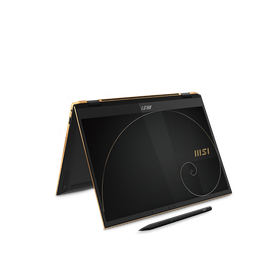
The university has introduced a mandatory PC system and has adopted the "Summit-E13 Flip Evo," which supports pen touch, as the recommended model for new students.

At Kurume Institute of Technology, which has produced over 17,000 talented individuals contributing to Japan's manufacturing and industrial sectors, practical education using PCs begins immediately after enrollment. In classes, a mandatory PC system is implemented to learn how to use applications and work on assignments. As a recommended model that meets the requirements, we introduce the MSI "Summit-E13FlipEvo-A12MT," which supports pen touch and has been adopted since the 2022 academic year. We have had an interest in MSI, a manufacturer known for gaming PCs, for some time. After testing it in the university's research lab, we found no issues with the specifications or usability, and it met the necessary requirements, including pen touch support. With guaranteed delivery times and proposals for cost-effective configurations, we felt confident in adopting it as a university-recommended model, leading to the decision to implement the Summit-E13FlipEvo-A12MT. [Results] - We were able to provide new students with a clear and smooth delivery. - Support is prompt, and responses to malfunctions are quick, minimizing the impact on classes. *For more details, please see the "Link to Case Study Article."

Added to bookmarks

Bookmarks list

Bookmark has been removed

Bookmarks list

You can't add any more bookmarks

By registering as a member, you can increase the number of bookmarks you can save and organize them with labels.

Free membership registration

HP Education Products Comprehensive Catalog

A long-lasting, highly durable battery suitable for educational settings! Supports various learning styles.

This catalog introduces HP's "Education PCs." It features products specifically designed for education, highlighting durability and long-term stable use, such as batteries designed for educational purposes. Additionally, we also introduce basic packages, unlimited LTE application packages, notebooks for school administration, and devices for hybrid-flexible classes. 【Featured Products (Partial)】 ■HP Fortis Flip G1i 11 Notebook PC ■HP Fortis Flip G1i 11 Chromebook ■HP Fortis Flip G1m 11 Chromebook ■HP Dragonfly G4 ■HP EliteBook 630 G11 ■HP Elite c640 G3 Chromebook Enterprise *For more details, please download the PDF or feel free to contact us.

  • Notebook PC
  • Industrial PCs
  • Other PCs and OA equipment
  • Laptop

Added to bookmarks

Bookmarks list

Bookmark has been removed

Bookmarks list

You can't add any more bookmarks

By registering as a member, you can increase the number of bookmarks you can save and organize them with labels.

Free membership registration

IT Infrastructure Services

A digital transformation IT partner that stands by our customers.

From the beginning of IT usage, such as purchasing a computer and internet connection, to troubleshooting and information security measures, knowledgeable engineers will support you with your daily concerns.

  • Notebook PC
  • Laptop

Added to bookmarks

Bookmarks list

Bookmark has been removed

Bookmarks list

You can't add any more bookmarks

By registering as a member, you can increase the number of bookmarks you can save and organize them with labels.

Free membership registration

Laptop "WiZBOOK"

The touchpad is wide, and the operation is smooth. It also supports high-speed wireless LAN standards A/AC.

The "WiZBOOK" is a laptop equipped with Windows 10 Pro 64bit in a 2-in-1 tablet PC format. You can enjoy bright and vivid visuals from any angle while ensuring a wide workspace. It can store photos and videos, and you can also add high-speed, large-capacity storage. Additionally, it comes bundled with KINGSOFT WPS Office 2, allowing you to easily create word processing documents, spreadsheets, and presentations without needing to purchase separate software. 【Features】 ■ Equipped with Windows 10 Pro 64bit ■ 128GB storage and expandable with an M.2 SSD slot ■ Powered by an Intel Quad Core CPU ■ 14-inch wide viewing angle IPS display with 1920 x 1080 resolution ■ Supports MicroSD cards up to 128GB *For more details, please refer to the PDF document or feel free to contact us.

  • Industrial PCs
  • Laptop

Added to bookmarks

Bookmarks list

Bookmark has been removed

Bookmarks list

You can't add any more bookmarks

By registering as a member, you can increase the number of bookmarks you can save and organize them with labels.

Free membership registration

[Case Study of Vocational Schools] Reducing Student Burden through Lightweight Notebooks

Lightweight laptops! Introducing a case study that has reduced the burden for students who carry them every day.

We would like to introduce a case where Kobe Electronic Specialized School adopted powerful and high-performance MSI workstation laptops in the 2019 academic year. Starting in 2019, the 'WE63' workstation laptop was introduced as the recommended machine for new students in four departments, including the 3DCG Animation Department. With the laptop being lightweight, it has reduced the burden on students who carry it every day. Additionally, anticipating that high-load tasks would be performed in class, we expected a machine with ample performance, and it exceeded those expectations. [Challenges] - Many gaming laptops are heavy, and when combined with the AC adapter, the total weight can exceed 4 kg. - The route to school includes slopes, which posed a significant burden for students who carry it daily. *For more details, please refer to the "Link to Case Study Article."

Added to bookmarks

Bookmarks list

Bookmark has been removed

Bookmarks list

You can't add any more bookmarks

By registering as a member, you can increase the number of bookmarks you can save and organize them with labels.

Free membership registration

[Case Study] Improving Work Efficiency in CG Production and 3D Model Editing with High-Performance Laptops

Migrating high-load tasks from workstations to MSI laptops! Significant improvement in work efficiency.

We would like to introduce a case study of Toyo Construction Co., Ltd., which has adopted MSI's creator-oriented notebook PC, the 'Prestige 15' series. In the construction industry, high-performance machines are essential for comfortably running advanced software for tasks such as CG production and 3D model editing. The company had been using workstations equipped with NVIDIA Quadro series for many years, but in 2020, they introduced this product. They are now performing some of the demanding design tasks on this device. [Results] - Monthly costs have been reduced by over 50% compared to the cost of introducing workstations. - The lightweight model at 1.6 kg has significantly reduced the burden of transporting it to job sites. - It is capable of handling tasks such as 3D design sufficiently. - The ability to share 3D models during web meetings has decreased the number of trips to the job site, leading to improved operational efficiency. *For more details, please see the "Link to the case study article."

Added to bookmarks

Bookmarks list

Bookmark has been removed

Bookmarks list

You can't add any more bookmarks

By registering as a member, you can increase the number of bookmarks you can save and organize them with labels.

Free membership registration

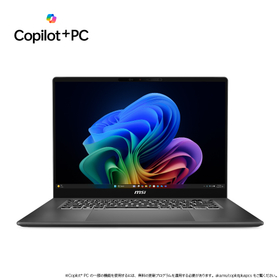
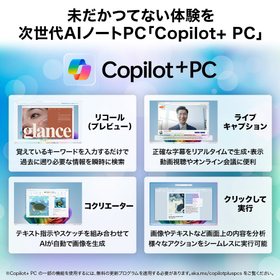
Copilot+ PC『Prestige 16 AI+ C3M』

The achievement of the Prestige series aimed at users seeking "performance," "design," and "comfort."

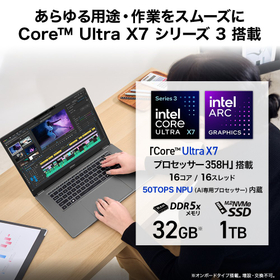
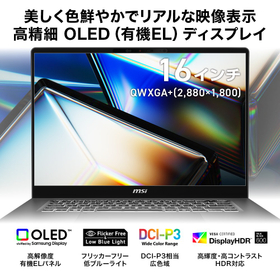
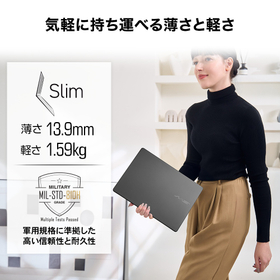
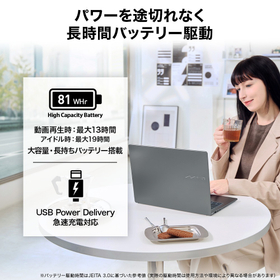
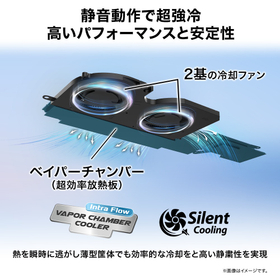
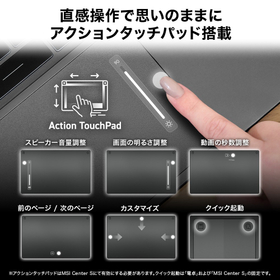
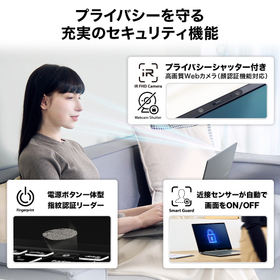
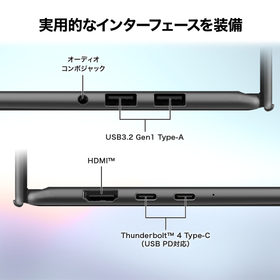
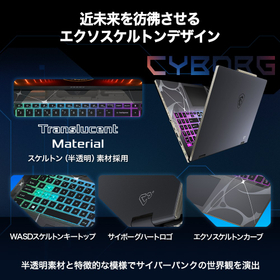
The "Prestige 16 AI+ C3M" is a 16-inch premium mobile notebook PC equipped with a Core Ultra Series 3 processor, pursuing high standards in performance, display quality, and portability. With a slim and lightweight body measuring just 13.9mm thick and approximately 1.59kg, it condenses advanced performance that supports business and creative work in the AI era. It achieves high processing performance and excellent power efficiency, providing comfortable and stable performance not only for everyday business tasks but also for large document creation, video editing, RAW processing, and advanced multitasking environments where multiple applications are used simultaneously. It is equipped with performance that meets the demands of future business styles, including everyday business processing, document creation, and AI-assisted work support. *Product configurations may vary by model number. For more details, please refer to the PDF materials or feel free to contact us.

Added to bookmarks

Bookmarks list

Bookmark has been removed

Bookmarks list

You can't add any more bookmarks

By registering as a member, you can increase the number of bookmarks you can save and organize them with labels.

Free membership registration

Introducing how to choose a PC for remote work and recommended locations!

Let's choose a comfortable work environment! We will introduce recommended methods for selecting a PC and locations in a column format.

With the advancement of remote work (telework) implementation, many may feel that this wave has also reached their company. When introducing remote work, it is necessary to consider the specifications and settings of the PC for comfortable work, as well as the appropriate locations for conducting business in advance. In this article, we will review what remote work is, discuss its security aspects, and introduce recommended methods for selecting PCs and suitable locations. *For detailed content of the column, please refer to the related links. For more information, please check the PDF materials or feel free to contact us.*

  • Technical and Reference Books
  • Laptop

Added to bookmarks

Bookmarks list

Bookmark has been removed

Bookmarks list

You can't add any more bookmarks

By registering as a member, you can increase the number of bookmarks you can save and organize them with labels.

Free membership registration

How to choose the right Mac for video editing?

Key points of recommended specifications you should know, and the advantages of using a Mac for video editing!

To comfortably perform video editing tasks, choosing the right computer specifications is very important. Mac is a popular choice among creators due to its intuitive usability and high performance. Additionally, regarding the MacBook, its high specifications relative to its weight and size have made it a strong option for those seeking lightweight, high-spec laptops in recent years. However, there are various models of Mac, and to choose one suitable for video editing, it is necessary to organize your intended use and workload, and select specifications accordingly. This article will provide a detailed explanation of the specifications needed for video editing on a Mac, as well as recommended models. *For more details, you can view the related links. Please feel free to contact us for more information.*

  • Other services
  • Laptop

Added to bookmarks

Bookmarks list

Bookmark has been removed

Bookmarks list

You can't add any more bookmarks

By registering as a member, you can increase the number of bookmarks you can save and organize them with labels.

Free membership registration