We have compiled a list of manufacturers, distributors, product information, reference prices, and rankings for Workstation.
ipros is IPROS GMS IPROS One of the largest technical database sites in Japan that collects information on.

Workstation Product List and Ranking from 15 Manufacturers, Suppliers and Companies

Last Updated: Aggregation Period:Jan 07, 2026~Feb 03, 2026
This ranking is based on the number of page views on our site.

Workstation Manufacturer, Suppliers and Company Rankings

Last Updated: Aggregation Period:Jan 07, 2026~Feb 03, 2026
This ranking is based on the number of page views on our site.

  1. オカムラ 物流システム事業本部 Tokyo//Other manufacturing
  2. アプライド Fukuoka//Trading company/Wholesale
  3. 日本精密 Kanagawa//Industrial Machinery
  4. 4 null/null
  5. 5 ナセル Tokyo//Industrial Electrical Equipment

Workstation Product ranking

Last Updated: Aggregation Period:Jan 07, 2026~Feb 03, 2026
This ranking is based on the number of page views on our site.

  1. Workstation "Your Fit" オカムラ 物流システム事業本部
  2. Work Desk "YourFit": Okamura
  3. Workstation "Workman Fort V" オカムラ 物流システム事業本部
  4. GPU compatible high-performance PC ECX-3800PEG - Vecow Corporation ナセル
  5. 4 Aerospace Workstation 日本精密

Workstation Product List

46~60 item / All 73 items

Displayed results

AI Development Z8 Fury G5 Workstation Special Model

Price negotiation and custom options available! AI development and Deep Learning workstation equipped with high heat dissipation, quiet operation, and reliability, capable of supporting 4 GPUs.

We would like to introduce the "HP Z8 Fury G5 Workstation" that we handle. It is suitable for workloads that require high processor and GPU performance. It achieves efficient heat dissipation by utilizing the latent heat of vaporization of liquids. We offer a "fully customized model" equipped with Xeon w5-3423 and RTX A6000, as well as the "latest GPU campaign model" equipped with four RTX 6000 Ada cards. We will negotiate with the manufacturer regarding pricing, so please contact us first. 【Features】 ■ Achieves efficient heat dissipation by utilizing the latent heat of vaporization of liquids ■ Sensors are placed in zones within the chassis to detect fan rotation speed ■ Fans are arranged by zone ■ Suitable for workloads that require high processor and GPU performance ■ Ideal for AI development and deep learning *For more details, please refer to the PDF materials or feel free to contact us.

Added to bookmarks

Bookmarks list

Bookmark has been removed

Bookmarks list

You can't add any more bookmarks

By registering as a member, you can increase the number of bookmarks you can save and organize them with labels.

Free membership registration

[Information] Custom Workstation for AI Development and Simulation

Custom Workstation for AI Development and Simulation Selected by GPU (Customizable)

In this document, we introduce the workstations recommended by our company for AI development and deep learning. We offer a cost-effective combination using Core i9 as well as configurations equipped with the latest 4th generation Xeon processors. GPUs can be selected from A2000 to A6000 Ada. Each model is a reference configuration and can be customized. 【Featured Products】 ■ UA-WCUS-MCi913A6 RTX A4000 x1 ■ UA-WCUS-MXW524A2 RTX A2000 x1 ■ UA-WCUS-MXW934R48D RTX A5000 x1 ■ DEEP-740GP-XeS4-QPQX RTX A5000 x4 ■ UA-WCUS-MX642A6D RTX A6000 x2 ■ UA-WCUS-MX848A6AD RTX A6000 Ada x2 *For more details, please refer to the PDF document or feel free to contact us.

Added to bookmarks

Bookmarks list

Bookmark has been removed

Bookmarks list

You can't add any more bookmarks

By registering as a member, you can increase the number of bookmarks you can save and organize them with labels.

Free membership registration

Machine for machine learning and quantum chemistry calculation simulations.

This is the principle of a machine designed for machine learning and quantum chemistry calculation simulations.

We have prepared a configuration that allows the use of four RTX A6000 graphics cards in a 100V environment. The power supply unit is rated at 1600W, but in a 100V environment, it effectively has a power delivery capability of just over 1300W. The two power supplies included in this configuration are not intended for redundancy (meaning that if one fails, the system will stop). Therefore, if either power supply fails, the system will cease to operate. Please be aware that this configuration does not prioritize server-like stability and is intended for use in applications and scenarios where downtime is acceptable, with a focus on the 100V environment. 【Points to Note for This Configuration】 - This is a dual power supply configuration to ensure adequate power delivery. If one power supply fails, the system will not function. Please avoid using it for critical applications. - To accommodate the 100V requirement, the power consumption will exceed 15A. Both power supplies must be powered from separate outlets. (Using a multi-outlet from a single outlet or operating under a 15A electrical contract is not permitted.) - It does not support the addition of HDDs or other expansions. (The maximum number of internal drives that can be installed is two M.2 type storage devices.)

  • Industrial PCs
  • Workstation

Added to bookmarks

Bookmarks list

Bookmark has been removed

Bookmarks list

You can't add any more bookmarks

By registering as a member, you can increase the number of bookmarks you can save and organize them with labels.

Free membership registration

How to set up a CUDA environment on WSL2 in Windows 11

I will explain how to set up a CUDA Toolkit environment on WSL2 in Windows 11!

WSL2 (Windows Subsystem for Linux 2) is a compatibility layer that allows you to run Linux binary executables directly on Windows OS. By using WSL2, you can run a Linux environment directly within Windows and utilize Linux-specific tools and applications, especially those aimed at developers. This PDF introduces the steps to set up a CUDA environment using Ubuntu 22.04 on WSL2 on Windows 11, as well as how to enable GPU options in WSL2.

  • Desktop PC
  • Workstation

Added to bookmarks

Bookmarks list

Bookmark has been removed

Bookmarks list

You can't add any more bookmarks

By registering as a member, you can increase the number of bookmarks you can save and organize them with labels.

Free membership registration

Key Points for Machine Selection in Materials Engineering and Material Research

We propose PCs suitable for research purposes! Introducing key computational methods and the necessary PC specifications.

This site introduces the main computational methods used in materials engineering and materials research, as well as the required PC specifications. It includes common points such as "the need for a high-performance CPU and large memory," along with important considerations. Additionally, it summarizes common points among software in the materials field and rough specifications for each software used. [Content Overview] ■ Main computational methods and required PC specifications - Common points - Main computational methods and required PC specifications ■ Major software used and required PC specifications - Common points - Major software and its requirements *For more details, please refer to the related links or feel free to contact us.

  • Other embedded systems (software and hardware)
  • Workstation

Added to bookmarks

Bookmarks list

Bookmark has been removed

Bookmarks list

You can't add any more bookmarks

By registering as a member, you can increase the number of bookmarks you can save and organize them with labels.

Free membership registration

AI Workstation "Noel Spec"

Workstation + environment setup! Proven track record in research institutions.

"Noel Spec" is an AI workstation that provides a deep learning development environment tailored to your needs. Deep learning is one of the machine learning techniques that enables computers to learn tasks that humans perform naturally. It is a technology that supports the rapid development of AI (artificial intelligence), and its advancements are leading to practical applications in various fields. [Practical Examples] ■ Image recognition (medical image diagnosis, facial recognition) ■ Voice recognition (smart speakers) ■ Natural language processing (automatic translation) ■ Anomaly detection by robots (autonomous driving, manufacturing) *For more details, please download the PDF or feel free to contact us.

  • Company:Noel
  • Price:Other
  • others
  • Workstation

Added to bookmarks

Bookmarks list

Bookmark has been removed

Bookmarks list

You can't add any more bookmarks

By registering as a member, you can increase the number of bookmarks you can save and organize them with labels.

Free membership registration

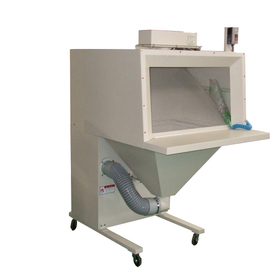
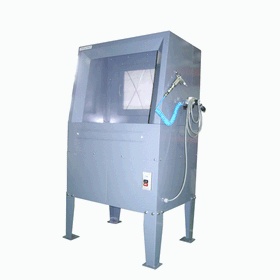
Workstation for Media Editing

A workstation that allows for easy powder removal operations.

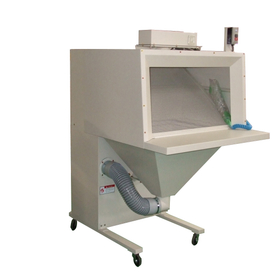
In the media editing environment, the cleanliness of equipment and workspace is crucial. In particular, dust and shavings can lead to equipment malfunctions and contamination of footage. The workstation is designed with an integrated hood and dust collector, preventing dust from escaping and maintaining a clean environment. This supports the efficiency of the editing process and the production of high-quality footage. 【Usage Scenarios】 * Video editing studios * Audio editing studios * Equipment maintenance areas 【Benefits of Implementation】 * Extended equipment lifespan * Improved working environment * Prevention of foreign matter contamination in footage

  • ワークステーション(イヤサカ).gif
  • s-ワークステーション防爆形.jpg
  • Other machine tools
  • Workstation

Added to bookmarks

Bookmarks list

Bookmark has been removed

Bookmarks list

You can't add any more bookmarks

By registering as a member, you can increase the number of bookmarks you can save and organize them with labels.

Free membership registration

Workstation for medical imaging

Powder removal operations can also be easily performed.

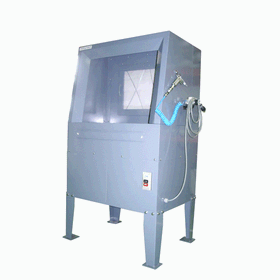
In the medical imaging industry, a clean environment is essential to maintain the accuracy of image diagnostics. In particular, dust generated during the image processing can lead to equipment failure and image degradation. Our workstations efficiently carry out dust removal tasks, providing a clean environment. 【Usage Scenarios】 * X-ray image processing * CT image processing * MRI image processing 【Benefits of Implementation】 * Improved accuracy of image diagnostics * Extended equipment lifespan * Improved working environment

  • ワークステーション(イヤサカ).gif
  • s-ワークステーション防爆形.jpg
  • Other machine tools
  • Workstation

Added to bookmarks

Bookmarks list

Bookmark has been removed

Bookmarks list

You can't add any more bookmarks

By registering as a member, you can increase the number of bookmarks you can save and organize them with labels.

Free membership registration

Workstation for Oil and Gas Exploration

Powder removal operations can also be easily performed.

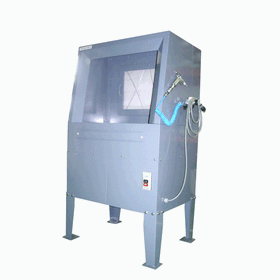
In the field of oil and gas exploration, the generation of dust associated with drilling and sampling operations poses a challenge. This dust not only harms the health of workers but also leads to equipment failures and decreased work efficiency. The workstation addresses these issues by preventing dust from escaping and providing a clean working environment. 【Usage Scenarios】 - Sample analysis at drilling sites - Dust removal during equipment maintenance - Powder handling in research and development facilities 【Benefits of Implementation】 - Protection of worker health - Increased equipment longevity - Improved work efficiency

  • ワークステーション(イヤサカ).gif
  • s-ワークステーション防爆形.jpg
  • Other machine tools
  • Workstation

Added to bookmarks

Bookmarks list

Bookmark has been removed

Bookmarks list

You can't add any more bookmarks

By registering as a member, you can increase the number of bookmarks you can save and organize them with labels.

Free membership registration

Workstation for VFX

Powder removal operations can also be easily performed.

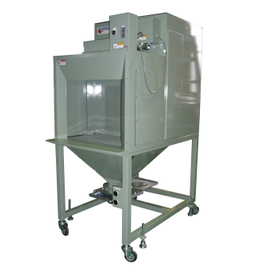
In the VFX industry, a clean environment is required to perform precise work. Especially in model production and special effects creation, dust and shavings can adversely affect the work. The workstation combines a hood and a dust collector to prevent dust from scattering outside and provides a comfortable working environment. 【Usage Scenarios】 * 3D model production * Special effects production * Model making 【Benefits of Implementation】 * Improvement of the working environment * Prevention of foreign matter contamination in works * Increased work efficiency

  • ワークステーション(イヤサカ).gif
  • s-ワークステーション防爆形.jpg
  • Other machine tools
  • Workstation

Added to bookmarks

Bookmarks list

Bookmark has been removed

Bookmarks list

You can't add any more bookmarks

By registering as a member, you can increase the number of bookmarks you can save and organize them with labels.

Free membership registration

ZEUS-MULTIGPU/RTX5000ada x2

Adopting the Zen 4 architecture, easily achieving power, performance, scalability, and efficiency!

We would like to introduce the "ZEUS-MULTIGPU/Ryzen Threadripper PRO 7000 RTX5000ada x2" that we handle. Maximizing the power of dual RTX5000ada cards. It supports a default of 24 cores and 48 threads, and can be customized to 96 cores and 192 threads. Additionally, the AMD Ryzen Threadripper processor eliminates common bottlenecks in both single-threaded and multi-threaded tasks, allowing artists, architects, and engineers to focus on their creative workflows. 【PC Case Features】 <ANTEC P20C WHITE EEB> ■ E-ATX compatible mid-tower case with 3 PWM fans and tempered glass ■ 8 cable holes and wide rear cable management space ■ Supports large 360mm radiators in the front and top ■ Can accommodate up to 9 x 120mm fans ■ Expansion card space secured at 375mm ■ Compatible with CPU coolers up to 170mm in height *For more details, please refer to the related links or feel free to contact us.

  • ZEUS WSマルチGPUワークステーション2.jpg
  • ZEUS WSマルチGPUワークステーション3.PNG
  • 5,6.PNG
  • Other PCs and OA equipment
  • Workstation

Added to bookmarks

Bookmarks list

Bookmark has been removed

Bookmarks list

You can't add any more bookmarks

By registering as a member, you can increase the number of bookmarks you can save and organize them with labels.

Free membership registration

[Research and Development PC Configuration Example] Machine for Finite Element Method Analysis

This is an example of a machine for the finite element method analysis software "DIANA FEA."

This is a proposal example for customers conducting finite element method analysis with DIANA FEA. The overall specifications are based on the configuration examples listed in the "EXAMPLE CONFIGURATIONS" section of the official DIANA FEA website. Since video editing was planned, a mid-range Quadro series graphics card was selected. It has the performance to handle general-level video editing without any issues. Additionally, anticipating a future transition to Windows 11, a TPM module was included. The CPU is prioritized for clock speed, featuring the Xeon W-2265 (3.50GHz, 12 cores). Our company can propose custom PCs tailored to your applications, budget, and software needs. - We would like the necessary software to be set up and delivered. - We want to upgrade parts in the next fiscal year’s budget. - We would like to know the compatibility with software used in parallel. We also accept inquiries regarding the introduction, customization, and operation of PCs. Please feel free to contact us.

  • Structural Analysis
  • Workstation

Added to bookmarks

Bookmarks list

Bookmark has been removed

Bookmarks list

You can't add any more bookmarks

By registering as a member, you can increase the number of bookmarks you can save and organize them with labels.

Free membership registration

[Research and Development PC Configuration Example] Machine for Lens Design for LCD Displays

This is an example of a machine for the optical design software "Zemax OpticStudio."

This is a case study for machines using the optical design software "Zemax OpticStudio." We investigated "the optimal number of CPU cores for Zemax." Due to limitations in the processor group, we are proposing a 32-core CPU, which offers better cost performance than a 64-core option. We can propose custom PCs tailored to your applications, budget, and software requirements. - I would like the necessary software to be set up and delivered. - I want to upgrade parts with the budget for the next fiscal year. - I would like to know the compatibility with software I will be using concurrently. We also accept inquiries regarding the introduction, customization, and operation of PCs. Please feel free to contact us.

  • Other analyses
  • Workstation

Added to bookmarks

Bookmarks list

Bookmark has been removed

Bookmarks list

You can't add any more bookmarks

By registering as a member, you can increase the number of bookmarks you can save and organize them with labels.

Free membership registration

[Research and Development PC Configuration Example] Machine equipped with 4 RTX A6000 cards

This is a configuration that allows the use of four RTX A6000 units in a 100V environment.

- This is a dual power supply configuration to ensure power supply. If one power supply fails, the system will not function. Please avoid using it for critical applications. - To accommodate 100V, the power consumption exceeds 15A. Please ensure that the two power supplies are connected to separate outlets. (Using a power strip from a single outlet or using a 15A electrical contract is not permitted.) - It does not support the addition of HDDs or similar devices. (The internal drives that can be installed are limited to two M.2 type storage devices.)

  • Desktop PC
  • Workstation

Added to bookmarks

Bookmarks list

Bookmark has been removed

Bookmarks list

You can't add any more bookmarks

By registering as a member, you can increase the number of bookmarks you can save and organize them with labels.

Free membership registration