CADのメーカーや取扱い企業、製品情報、参考価格、ランキングをまとめています。
イプロスは、 製造業 BtoB における情報を集めた国内最大級の技術データベースサイトです。

CAD(扉 3d) - メーカー・企業と業務用製品 | イプロスものづくり

更新日: 集計期間:Feb 25, 2026~Mar 24, 2026
※当サイトの各ページの閲覧回数を元に算出したランキングです。

CADの製品一覧

151~180 件を表示 / 全 215 件

表示件数

Until when will we differentiate between 2D CAD and 3D CAD?

Eliminate hassle with the linkage between drawings and models 'CADPAC'

Are you currently using both 2D CAD and 3D CAD and experiencing any of these frustrations? - Going back and forth between 2D CAD and 3D CAD - There's no time on-site, so only the drawings are modified. The drawings are left to stand alone. - You went through the trouble of implementing 3D CAD, but... - You've ended up going back to 2D CAD. With CADPAC3D, models and drawings are linked in real-time. When the model is created, the drawing is also created! ■ CAD Usability What designers need is the realization of their ideas. There's no time to be tossed around by CAD. With intuitive operations, learning is a breeze. You no longer need unwanted breaks. With CADPAC, even modification tasks respond immediately. This could be the opportunity to change your common sense.

  • nws_05.png
  • 3D CAD
  • 2D CAD machine
  • Other CAD
  • CAD

ブックマークに追加いたしました

ブックマーク一覧

ブックマークを削除いたしました

ブックマーク一覧

これ以上ブックマークできません

会員登録すると、ブックマークできる件数が増えて、ラベルをつけて整理することもできます

無料会員登録

BIM Software [Revit] User Case Vol. 12

Automating Revit's design functions to improve productivity! A strategy for transitioning from manual work to programming-based BIM.

We would like to introduce a case study of Sato Kogyo Co., Ltd. utilizing Autodesk's BIM software "Revit." <Overview> In preparation for the increasingly severe labor shortage era, Sato Kogyo is working on automating the creation of BIM models and drafting, which were previously done manually, through programming. The tool that serves as their weapon for this is "Dynamo," a visual programming tool developed to automate software like Revit. How did they achieve automation and improve productivity? We will present the case study. <Implementation Results> Please check the PDF document for more details.

  • 2D CAD Construction
  • 3D CAD
  • Other CAD related software
  • CAD

ブックマークに追加いたしました

ブックマーク一覧

ブックマークを削除いたしました

ブックマーク一覧

これ以上ブックマークできません

会員登録すると、ブックマークできる件数が増えて、ラベルをつけて整理することもできます

無料会員登録

High functionality and low price! Circuit diagram/PCB design tool "Quadcept"

Next-generation cloud-based electronic CAD system Quadcept, which integrates EDA solutions and the cloud.

Quadcept Inc. is on a mission to gather the voices of users around the world in the EDA industry, prioritize their wishes, and provide a cloud-based electronic CAD that grows together with our customers. Based on feedback from many designers, we developed Quadcept. Quadcept offers a high-performance schematic editor and PCB design CAD with no initial costs. It is an innovative CAD software that continues to evolve based on user feedback. Customization is easy, and we provide real-time support through an open user forum. Additionally, to continuously achieve corporate innovation within the development environment, we swiftly absorb customer requests and provide the highest quality service to meet our customers' business needs through rapid deployment of solutions.

  • 企業:Quadcept
  • 価格:Less than 10,000 yen
  • Other CAD
  • others
  • CAD

ブックマークに追加いたしました

ブックマーク一覧

ブックマークを削除いたしました

ブックマーク一覧

これ以上ブックマークできません

会員登録すると、ブックマークできる件数が増えて、ラベルをつけて整理することもできます

無料会員登録

Efficiency improvement of routine tasks such as CAD, drawings, and printing - "Software Development"

Improvement of work efficiency, enhancement of productivity, prevention of mistakes, and improvement of quality! We will fulfill a variety of requests.

In Toyohashi's software development, we conduct design and development based on the individual requirements defined by our customers. <Development Examples> - Automation of CAD routine tasks - Standard modeling work - Drafting work - Printing processes, etc. We realize various requests such as improving work efficiency, enhancing productivity, preventing errors, and improving quality. We propose suitable solutions such as original development through advanced programming and customization of packaged software. ■Features - Once a 3D model is created, all types of production drawings and site deployment drawings can be fully automated. - We provide AI and development design together to streamline on-site work. - Automation is possible even without RPA. *For more details, please refer to the related link page or feel free to contact us.

  • Embedded system design service
  • Software (middle, driver, security, etc.)
  • Other contract services
  • CAD

ブックマークに追加いたしました

ブックマーク一覧

ブックマークを削除いたしました

ブックマーク一覧

これ以上ブックマークできません

会員登録すると、ブックマークできる件数が増えて、ラベルをつけて整理することもできます

無料会員登録

BricsCAD/ACAD-DENKI New Features Announcement Event

Currently streaming the archive! Announcement of the latest features of BricsCAD and ACAD-DENKI.

There is about one week left until the BricsCAD/ACAD-DENKI new features presentation event, the "Zuken Alphatech Conference," and there are still a few seats available! At this conference, we will introduce the new features of BricsCAD V23/ACAD-DENKI 2023, which will be released soon, and focus on user presentations to maximize the value of your .dwg design assets. We will present solutions that add "plus alpha" to your current design operations. For companies that are struggling to grasp the definition of "DX" and are unsure where to start, companies seeking "plus alpha" in their design operations, and those considering the introduction of compatible CAD or 3D CAD, participating in this event may help you find solutions to your challenges. We look forward to your participation!

ブックマークに追加いたしました

ブックマーク一覧

ブックマークを削除いたしました

ブックマーク一覧

これ以上ブックマークできません

会員登録すると、ブックマークできる件数が増えて、ラベルをつけて整理することもできます

無料会員登録

Lightweight drawing data with independent correction function 'CADSUPER Works'

From quality development upstream to drawing creation! We provide a comprehensive design support environment.

"CADSUPER Works" is an integrated 2D/3D CAD system that coexists with a highly flexible 2D drawing creation environment and advanced feature parametric 3D design. We provide a comprehensive design support environment from quality assurance in the upstream process to drawing creation. 【Features (excerpt)】 ■ Analysis functions ■ Import/Export ■ Dedicated modeling functions ■ Shape interference check ■ Dedicated modeling functions *For more details, please feel free to contact us.

ブックマークに追加いたしました

ブックマーク一覧

ブックマークを削除いたしました

ブックマーク一覧

これ以上ブックマークできません

会員登録すると、ブックマークできる件数が増えて、ラベルをつけて整理することもできます

無料会員登録

BIM Software [Revit] User Case Vol. 11

Improving productivity through BIM/CIM collaboration. Maintaining good performance even during the COVID-19 pandemic.

We would like to introduce a case study of how Waskita Karya, a major state-owned construction company in Indonesia, utilized Autodesk's BIM software "Revit." <Overview> Waskita Karya plays a crucial role in infrastructure development in Indonesia. Under the vision of "aiming to be a sustainable and reliable construction company," they have implemented Autodesk's BIM/CIM solutions to drive digital transformation. We will present examples of how they have efficiently conducted operations even during the COVID-19 pandemic. <Implementation Results> Please refer to the PDF document for more details.

  • 2D CAD Construction
  • 3D CAD
  • Other CAD related software
  • CAD

ブックマークに追加いたしました

ブックマーク一覧

ブックマークを削除いたしました

ブックマーク一覧

これ以上ブックマークできません

会員登録すると、ブックマークできる件数が増えて、ラベルをつけて整理することもできます

無料会員登録

HANDY CAD MARK II

Faster! Easier! More accurately!

2D design and drafting are evolving daily with the designer's demands for "more simplicity and more efficiency." This is true across various fields, from beginners to professional use. HandyCAD Mark II liberates designers from daily stress with its long-cultivated know-how and refined usability, supporting new ideas from designers. It supports new concepts in manufacturing with its "intuitive operability"!

ブックマークに追加いたしました

ブックマーク一覧

ブックマークを削除いたしました

ブックマーク一覧

これ以上ブックマークできません

会員登録すると、ブックマークできる件数が増えて、ラベルをつけて整理することもできます

無料会員登録

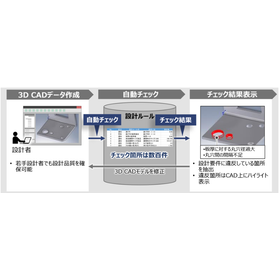
Awareness Support CAD System

Achieve a reduction in design lead time through automatic checks of design rules!

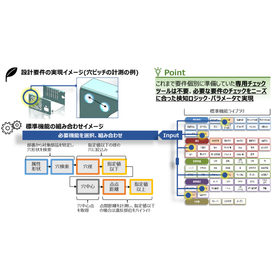
The "Awareness Support CAD System" is a system that analyzes design data and the designer's operation history to detect potential issues and inefficient processes in real-time during the design process. By utilizing past design data and best practices, it provides specific improvement suggestions to designers. It automatically checks 3D CAD models based on design requirements (design rules and ease of processing). Compared to visual checks, it significantly reduces the time required for checks and rework. 【Features】 ■ Real-time problem detection ■ Utilization of knowledge base ■ Analysis of operation history ■ Collaboration features ■ Customizability *For more details, please download the PDF or feel free to contact us.

ブックマークに追加いたしました

ブックマーク一覧

ブックマークを削除いたしました

ブックマーク一覧

これ以上ブックマークできません

会員登録すると、ブックマークできる件数が増えて、ラベルをつけて整理することもできます

無料会員登録

CAD system "MYPAC BOX-Design"

Simplifying packaging design through collaboration with other devices! 2D/3D integrated CAD system for packaging design.

"MYPAC BOX-Design" is a 2D/3D integrated CAD system for packaging design. It inherits the well-established 2D drawing capabilities of "MYPAC" and possesses high drawing functionality equivalent to that of dedicated 2D CAD. This system enables easier packaging design and provides excellent products that meet various needs through collaboration with peripheral devices. 【Features】 ■ User-friendly and intuitive 2D drawing functionality ■ Design cushioning materials from product data ■ Users can easily set cardboard parameters ■ Instant and easy output of unfolded diagrams ■ 3D visualization of unfolded diagrams *For more details, please refer to the PDF materials or feel free to contact us.

ブックマークに追加いたしました

ブックマーク一覧

ブックマークを削除いたしました

ブックマーク一覧

これ以上ブックマークできません

会員登録すると、ブックマークできる件数が増えて、ラベルをつけて整理することもできます

無料会員登録

MP-CAD8 Ver.2

A pre-cut CAD developed by a pre-cut production system manufacturer. Integrated with the production system, it achieves high operability and productivity.

【Available Pre-cut Data】 Horizontal members, columns, rafters (joists, purlins, intermediate studs, etc.), plywood, insulation materials, wall frames, gable panels, ceiling battens, siding, etc. 【Features】 ■ From ownership to utilization. Pioneering the subscription model in the industry. ■ 3D checks of interference conditions for all components. ■ Simulation of processing for created pre-cut data. ■ Data adjustment function for users with different tool diameters, etc. ■ Compatible with various hardware methods such as Tech One P3, HSS, Presetter, SS Multi, etc. ■ Supports structural strength calculations, building codes and specifications, quality assurance laws and performance displays, beam cross-section calculations, and vertical alignment rates of walls and columns, etc. ■ Compatible with trusses from PWA (Japan Association for Medium and Large Scale Wooden Pre-cut Technology). ■ Support for special fittings for manufactured hardware, etc. ■ Estimation of hardware related to pre-cut data. ■ Data linkage with various CAD systems by utilizing CEDXM files, etc. *For more details, please download the PDF or feel free to contact us.

  • 3D CAD
  • 2D CAD Construction
  • CAD

ブックマークに追加いたしました

ブックマーク一覧

ブックマークを削除いたしました

ブックマーク一覧

これ以上ブックマークできません

会員登録すると、ブックマークできる件数が増えて、ラベルをつけて整理することもできます

無料会員登録

【Significant Reduction in Work Hours】 Drainage Main CAD 'Kenshin-kun'

We introduce a reliable automatic drainage main pipe drawing system that is compatible with AutoCAD, so you can use it without hesitation.

"Kenshin-kun" is a drainage main pipe CAD that significantly reduces work time with 3D input, packed with design office know-how, and offers outstanding ease of use. Design drawings from clients can be used as is. It has abundant automatic functions, allowing for the creation of daily reports and completion drawings from standard drawings in one go. Additionally, inquiries about operations are completely free, and we also provide reliable remote services. 【Features】 ■ A main pipe CAD system compatible with AutoCAD ■ Significant reduction in work time with our unique input system (standard drawings) ■ Packed with automatic functions such as centralized management of daily reports and completion drawings, as well as part cutting features ■ Comprehensive after-sales support *For more details, please refer to the PDF materials or feel free to contact us.

  • 3D CAD
  • Other CAD
  • Other CAD related software
  • CAD

ブックマークに追加いたしました

ブックマーク一覧

ブックマークを削除いたしました

ブックマーク一覧

これ以上ブックマークできません

会員登録すると、ブックマークできる件数が増えて、ラベルをつけて整理することもできます

無料会員登録

BricsCAD V22

DWG-compatible CAD allows you to work consistently from 2D to 3D CAD.

You can directly read DWG data from AutoCAD. You can also save it as DWG data without any changes. It can be used in conjunction with AutoCAD. We offer it at a price lower than AutoCAD. The operating methods are almost the same as those of AutoCAD. It is a versatile CAD with excellent cost performance.

  • Other CAD
  • CAD

ブックマークに追加いたしました

ブックマーク一覧

ブックマークを削除いたしました

ブックマーク一覧

これ以上ブックマークできません

会員登録すると、ブックマークできる件数が増えて、ラベルをつけて整理することもできます

無料会員登録

FTZ Japan Company Introduction

Over 30 years of accumulated experience! We will support our customers globally.

FTZ Corporation (France) started as an engineering company in 1981 and developed the electrical and control engineering tool "SchemELECT" in collaboration with other engineering companies in 1986. Since 1993, we have been selling an integrated CAD system for electrical and control engineering (Japanese version) in Japan. We have also established a support system within Japan, where experienced engineers in electrical engineering provide problem-solving support, and software customization is implemented domestically. We will realize business reform with the integrated CAD system "SchemELECT." 【Features】 ○ Over 30 years of accumulated experience ○ Achieving labor reduction and quality improvement across design departments ○ Global support for customers → Available in 20 languages, active in 30 countries ○ Standardization and automation of FA system design and implementation, and plant system design For more details, please contact us or download the catalog.

ブックマークに追加いたしました

ブックマーク一覧

ブックマークを削除いたしました

ブックマーク一覧

これ以上ブックマークできません

会員登録すると、ブックマークできる件数が増えて、ラベルをつけて整理することもできます

無料会員登録

[Case Study] Reduction of design man-hours and utilization of data for subsequent processes such as procurement/manufacturing.

Contributing to the reduction of mistakes and losses in design operations, pursuing cost reduction and cost-effectiveness of existing electrical CAD, and utilizing design data for subsequent processes.

Introduction of the case study for the electrical and control design CAD system 'ACAD-DENKI' Mitsuba Electric Industry Co., Ltd. faced two major challenges: 1. Improving the quality of manufacturing drawings raised by the manufacturing department during the production design process. 2. Issues related to licensing costs. By introducing our developed and sold electrical design CAD 'ACAD-DENKI', they achieved a reduction in design man-hours and enabled data utilization for subsequent processes such as procurement and manufacturing. We have conducted multiple proof-of-concept experiments leveraging the 3D capabilities of the base CAD, BricsCAD, and are advancing further data integration. [Challenges before introduction] - Reducing mistakes and losses in design operations - Pursuing cost reduction and cost-effectiveness of existing electrical CAD - Utilizing design data for subsequent processes *For more details, please refer to the related links or feel free to contact us.

ブックマークに追加いたしました

ブックマーク一覧

ブックマークを削除いたしました

ブックマーク一覧

これ以上ブックマークできません

会員登録すると、ブックマークできる件数が増えて、ラベルをつけて整理することもできます

無料会員登録

[BIM Software Implementation Case] AFAS Stadium

An example of minimizing miscommunication and work-related errors!

In August 2019, part of the roof of the Morenaar Stand at AFAS Stadium collapsed due to strong winds. Fortunately, there were no matches taking place, and no injuries were reported, but the damage was significant. There was a design flaw in the structural joints, with insufficient thickness in the welds, and damage from strong winds experienced in the past contributed to the collapse. At the end of 2019, ASK Romein was selected for the design and structural engineering, and they began collaborating with BAM Bouw en Techniek. BIM was maximally utilized throughout the engineering process, enabling clear communication among project stakeholders and seamless interaction between different software. Since there are many points of contact between the existing structure and the new structure, point cloud data measured with a 3D scanner is being used in the engineering and assembly processes. *For more details, please refer to the PDF materials or feel free to contact us. (If the PDF button is not displayed) ⇩ The catalog can be downloaded from the special website below ⇩

  • 3D CAD
  • antenna
  • 2D CAD Construction
  • CAD

ブックマークに追加いたしました

ブックマーク一覧

ブックマークを削除いたしました

ブックマーク一覧

これ以上ブックマークできません

会員登録すると、ブックマークできる件数が増えて、ラベルをつけて整理することもできます

無料会員登録

"Six Things to Check When Introducing BIM" Basic Knowledge Materials Provided!

A must-read before introducing new BIM or replacing existing ones! A compilation of checkpoints to consider for selecting the appropriate BIM solution!

Choosing which BIM software to select is a very important factor related to a company's competitiveness. There are many points to consider when selecting a BIM solution and many things to confirm with each vendor, but we have summarized the six most important points in a checklist. Please make use of this when implementing BIM. 【Content (Excerpt)】 《check1》Sharing BIM information among project participants 《check2》Efficient modeling and flexible response to design changes 《check3》Smooth editing of BIM models for large projects ⇩ You can download the continuation of the checklist and details from the special site or the PDF button below ⇩

  • 2D CAD Construction
  • CAD

ブックマークに追加いたしました

ブックマーク一覧

ブックマークを削除いたしました

ブックマーク一覧

これ以上ブックマークできません

会員登録すると、ブックマークできる件数が増えて、ラベルをつけて整理することもできます

無料会員登録

Control Panel DX Assist

One-stop support from the introduction of electrical CAD to verification! We flexibly assist in manufacturing, starting with the promotion of DX in electrical control panel and equipment design.

This is a one-stop service where you can leave everything from the selection, consulting, implementation support, to verification of electrical CAD to us. We will broadly assist in realizing the digital transformation (DX) of your manufacturing, starting with the production of control panels and electrical design, making the most of 3D electrical CAD. We initially offer free support for hearings, current situation surveys, and proposal creation. 【Features】 ■ Electrical CAD Selection / We propose the optimal electrical CAD tailored to the characteristics and challenges of your manufacturing. Our company, which has introduced various electrical CADs, can provide support from the user's perspective. ■ Electrical CAD Implementation Support / We assist with training on operation methods, building component databases, and creating project data. Utilizing our extensive knowledge as a control panel manufacturer, we can provide highly accurate support. ■ Consulting / We implement proposals that effectively leverage production and can also conduct verification of prototypes. We have many experts well-versed in electrical CAD. *For more details, please refer to the PDF materials or feel free to contact us.

ブックマークに追加いたしました

ブックマーク一覧

ブックマークを削除いたしました

ブックマーク一覧

これ以上ブックマークできません

会員登録すると、ブックマークできる件数が増えて、ラベルをつけて整理することもできます

無料会員登録

CAD System Development

Total support from consulting to system development and implementation assistance!

Our "CAD System Development" has over 30 years of extensive customization experience with Autodesk products, and we assist in building specialized CAD systems tailored to our customers' needs. Our experienced dedicated engineers provide total support from consulting to system development and implementation assistance. 【Features】 ■ Capable of planning and creating layouts for kitchens and furniture ■ Conducts material arrangement, allocation, and estimation for key components of single-family homes ■ Aids in consensus building among construction stakeholders and future maintenance management *For more details, please refer to the PDF document or feel free to contact us.

ブックマークに追加いたしました

ブックマーク一覧

ブックマークを削除いたしました

ブックマーク一覧

これ以上ブックマークできません

会員登録すると、ブックマークできる件数が増えて、ラベルをつけて整理することもできます

無料会員登録

A complex site involving nine companies is progressing swiftly with architectural BIM.

Introducing a case study on the implementation of architectural BIM by Aruku Design Office Co., Ltd. and Ogawa Kogyo Co., Ltd. A collection of case studies featuring numerous examples of architectural BIM implementation is available.

We would like to introduce a case where a design company and a construction company, who met for the first time, collaborated effectively using BIM in a complex public project. This complicated site involved the renovation of an existing building and the expansion of a new school building, with a total of nine companies participating. Aruku Design Office and Ogawa Industry worked together, transcending differences in companies and positions, with one responsible for design and the other for construction. By using a common BIM model, we achieved results that allowed for faster work and reduced costs. 【Case Overview】 - Features such as automatic quantity takeoff from 3D models and automatic generation of various construction drawings lead to a significant increase in productivity. - By conducting various preliminary studies quickly, it becomes possible to reduce rework on-site and material waste. - Using Archicad as a tool for common understanding among all stakeholders regarding challenges and situations is effective for smoothly advancing the construction process. *For more details, please download the PDF or feel free to contact us.

  • Other CAD related software
  • CAD

ブックマークに追加いたしました

ブックマーク一覧

ブックマークを削除いたしました

ブックマーク一覧

これ以上ブックマークできません

会員登録すると、ブックマークできる件数が増えて、ラベルをつけて整理することもできます

無料会員登録

[BIM Software Implementation Case Study] Sutter Medical Center

Dramatically reduce on-site errors with a single 3D model! Reduce time and costs with BIM technology!

Sutter Medical Center, located in Castro Valley, California, had a schedule that was 30% shorter than comparable healthcare projects in California. This required the introduction of construction principles and technologies from lean production methods, such as BIM. "Tekla Structures" is one of the tools that enabled the integration of Harris Rebar into this process. By using Tekla, it became possible to quickly and accurately identify design and constructability issues and discrepancies, as well as to communicate with other contractors. *For more details, please refer to the PDF materials or feel free to contact us. (If the PDF button is not displayed) ⇩ The catalog can be downloaded from the special website below ⇩

  • Software (middle, driver, security, etc.)
  • 3D CAD
  • CAD

ブックマークに追加いたしました

ブックマーク一覧

ブックマークを削除いたしました

ブックマーク一覧

これ以上ブックマークできません

会員登録すると、ブックマークできる件数が増えて、ラベルをつけて整理することもできます

無料会員登録

3D CAD Packaging Design Simulation 'Box-module'

3D CAD/CAM solution equipped with a direct translator standard!

The "Box-module" is developed with a consistent architecture based on ZWsoft's unique kernel, providing many features for manufacturing high-quality products in a short period, along with easy operability and flexible modeling capabilities. It can directly read not only general intermediate format files but also the unique format data (native data) of each CAD system. We offer smooth CAD editing and cutting solutions that are well-suited for cardboard packaging manufacturers. 【Features】 ■ Agile operability and advanced functions through hybrid modeling ■ Effective definition, operation, and management for assembly modeling ■ Realization of quick drawing and quick dimensioning through the fusion of drawing creation from 3D models and 2D CAD technology ■ Strong support for reducing rework losses due to design changes through the integration of CAD and CAM *For more details, please refer to the PDF materials or feel free to contact us.

ブックマークに追加いたしました

ブックマーク一覧

ブックマークを削除いたしました

ブックマーク一覧

これ以上ブックマークできません

会員登録すると、ブックマークできる件数が増えて、ラベルをつけて整理することもできます

無料会員登録

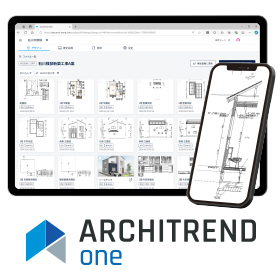
Design Connect Service "ARCHITREND ONE"

Manage the latest data by integrating ARCHITREND ZERO with the cloud!

ARCHITREND ONE is a 3D architectural CAD system that seamlessly integrates with the data of "ARCHITREND ZERO," allowing for the management of always up-to-date data in the cloud. By setting viewing restrictions and editing permissions on an account basis, users can utilize the latest data from various devices regardless of location or time, enabling the sharing of consistent design information, progress checks, and remote work instructions with a sense of "connecting ARCHITREND," significantly improving productivity. ◎ Request for catalog materials ◎ A free trial version is available. ▼ For more details, click here.

ブックマークに追加いたしました

ブックマーク一覧

ブックマークを削除いたしました

ブックマーク一覧

これ以上ブックマークできません

会員登録すると、ブックマークできる件数が増えて、ラベルをつけて整理することもできます

無料会員登録

What is CAD specifically for electrical design?

Answers to questions during the introduction consideration!

In creating circuit diagrams for control panels and distribution boards, introducing "Electrical CAD," which is specialized for electrical design, is highly efficient. This article explains the basic information about electrical design CAD and answers common questions when considering its implementation. Please check the full text via the related link URL. Table of Contents 1. What is Electrical Design CAD? 2. Functions of Electrical Design CAD 3. Benefits of Electrical Design CAD - Connecting circuit diagram creation to document creation - Supporting 3D layout design - Integration with PLM - Achieving manufacturing collaboration 4. Background of the Demand for Electrical Design CAD 5. Differences Between Electrical Design CAD and General-purpose CAD 6. Q&A When Considering the Introduction of Electrical Design CAD - Q. How to choose Electrical Design CAD? - Q. What is the difference between free software and paid software? - Q. Standard functions or customization? - Q. How much efficiency can be achieved by introducing Electrical Design CAD? - Q. What to do with past electrical design data when switching Electrical Design CAD? 7. For Efficiency in Electrical Design, Eplan

ブックマークに追加いたしました

ブックマーク一覧

ブックマークを削除いたしました

ブックマーク一覧

これ以上ブックマークできません

会員登録すると、ブックマークできる件数が増えて、ラベルをつけて整理することもできます

無料会員登録

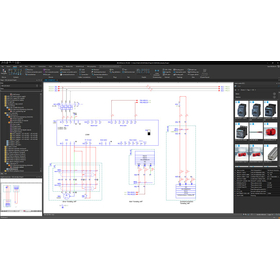
Electrical control and electrical design system 'E3.series'

Integrated electrical CAD to support the advanced and complex design of electrical control and cable connections! *Case studies are available.

"E3.series" is an integrated electrical CAD that supports electrical control, electrical equipment, and cable and harness design. By consolidating the design data of one product into a single file, it allows for the sharing of component information and connection/signal information across all design drawings. This feature helps resolve various practical issues, such as transcription errors between drawings that occur during manual work. "E3.series" has a proven track record with over 3,000 companies, primarily among automotive manufacturers and their related equipment companies, as well as machine tool and industrial equipment manufacturers. ★ A new special page has been opened! ★ 【Features】 ■ Symbols, components, terminals, and other necessary items for design are shared as a library. ■ Parent-child relationships between components, such as connectors and pins, and terminal block components and terminals can be established. ■ Connection information can be hierarchically managed from connections on circuit diagrams to connections between components and units. ■ Information required for each drawing can be output in a flexible format. *For more details, please refer to the PDF materials or feel free to contact us.

ブックマークに追加いたしました

ブックマーク一覧

ブックマークを削除いたしました

ブックマーク一覧

これ以上ブックマークできません

会員登録すると、ブックマークできる件数が増えて、ラベルをつけて整理することもできます

無料会員登録

Productivity of Steel Frame Fabrication Evolving with BIM: Structural BIM Software

◆ Improvement of productivity, integration with automatic processing machines and assembly robots for steel frame production ◆ 3D software 'Tekla Structures'

"Tekla Structures" is a BIM software for structural detailing. By utilizing the detailed and accurate 3D models of Tekla Structures, which are modeled to a construction-ready level, unexpected costs and rework can be minimized, optimizing the entire process and enabling the realization of more profitable projects. The BIM models of Tekla software facilitate collaboration in design, fabrication, and site management, improving workflows not only in the office but also on construction sites. [Other Features] - Integrated management of all structural information from basic design to detailed design, estimation, production management, and construction on a 3D model, regardless of material or structural type. - Automatic generation of drawings, reports, and NC data from the model, allowing for reduced design time, quick and flexible responses to design changes, and the elimination of drawing inconsistencies. - Excellent operability with a GUI and graphic processing that comply with Windows standards, enabling the rapid generation of 3D models. (If the PDF button is not displayed) ⇩ The catalog can be downloaded from the special website below ⇩

ブックマークに追加いたしました

ブックマーク一覧

ブックマークを削除いたしました

ブックマーク一覧

これ以上ブックマークできません

会員登録すると、ブックマークできる件数が増えて、ラベルをつけて整理することもできます

無料会員登録

[User Report] Architectural Design and Drafting CAD DRA-CAD 1

DRA-CAD all the way. The key points are its simple functionality and sense of speed!

The engineers at Nisso Ken Co., Ltd. have been involved in the design of many large projects such as government offices, commercial buildings, and communication facilities. Most of their drawings are created using DRA-CAD. "We have been using DRA-CAD since the Structural Systems Group developed it, and its user-friendliness and suitability for expressing our work have led us to use it for the past 20 years. One of the main reasons DRA-CAD has become so widespread is its 'simple fundamental concept.' There are also opinions that it is pleasant to use because it feels like drawing by hand." "Nowadays, CAD has become more common, and there are increasing cases where it can be shared across different software. In the future, we hope to see how it can be compatible with DWG, Jw_Cad, and others." For more details, please contact us or refer to our catalog.

ブックマークに追加いたしました

ブックマーク一覧

ブックマークを削除いたしました

ブックマーク一覧

これ以上ブックマークできません

会員登録すると、ブックマークできる件数が増えて、ラベルをつけて整理することもできます

無料会員登録

BIM software [Revit] world standard tool

BIM software that excels in all aspects such as design, structure, equipment, and construction is 'Autodesk Revit'.

◆What is BIM? An abbreviation for Building Information Modeling. It is a "concept" aimed at improving the productivity of building design and construction. The Ministry of Land, Infrastructure, Transport and Tourism is promoting the BIM acceleration project for architecture in 2023 and the application of BIM/CIM principles for civil engineering, leading to the adoption of BIM not only by large general contractors but also by small and medium-sized enterprises. ◆Main Features of Autodesk Revit - A world-standard BIM tool for structural design - Active in all processes including design, structure, equipment, and construction - Prevents rework by creating building models that closely resemble the actual structure - Enables collaboration and modifications anytime and anywhere by utilizing cloud features There are various other functions and benefits! *For more details, please refer to the materials or feel free to contact us.

  • 3D CAD
  • Modeler
  • Workflow System
  • CAD

ブックマークに追加いたしました

ブックマーク一覧

ブックマークを削除いたしました

ブックマーク一覧

これ以上ブックマークできません

会員登録すると、ブックマークできる件数が増えて、ラベルをつけて整理することもできます

無料会員登録

Designer: CAD for creating manufacturing data

The designer specializes in production design CAD, enhancing CAM operability.

You can intuitively operate various modeling functions from solid, surface, and 2D to 3D, create 2D drawings, and perform shape analysis using various analysis commands. Additionally, it offers various modules for surfaces, electrodes, and reverse engineering, as well as a link to Hexagon CAM software, making it a highly versatile CAD. 【Coexistence of Direct Modeling and Parametric Modeling】

  • 2D CAD machine
  • 3D CAD
  • CAD

ブックマークに追加いたしました

ブックマーク一覧

ブックマークを削除いたしました

ブックマーク一覧

これ以上ブックマークできません

会員登録すると、ブックマークできる件数が増えて、ラベルをつけて整理することもできます

無料会員登録