CADのメーカーや取扱い企業、製品情報、参考価格、ランキングをまとめています。
イプロスは、 製造業 BtoB における情報を集めた国内最大級の技術データベースサイトです。

CAD(3dモデリング) - メーカー・企業と業務用製品 | イプロスものづくり

更新日: 集計期間:Apr 08, 2026~May 05, 2026
※当サイトの各ページの閲覧回数を元に算出したランキングです。

CADの製品一覧

1~30 件を表示 / 全 59 件

表示件数

Cloud-based 3D CAD 'Fusion 360'

3D CAD utilizing cloud technology! Seamless modeling is possible without the need to launch each software individually.

"Fusion 360" is a new 3D CAD software that has all the necessary features for manufacturing. It is equipped with T-Spline modeling, solid modeling, surface modeling, assembly, and drawing creation functions, allowing you to create 3D models that meet design requirements. Additionally, it enables behavior checks through animations and interference checks. You can also apply the appearance of actual materials and consider aesthetics before creating prototype models. [Features] - 3D CAD utilizing cloud technology - Compatible with Mac & Windows - Updates approximately every two weeks - Major updates every three months - Update content determined based on customer feedback (Idea Station) - Hybrid modeling (solid, surface, polygon, mesh) - All-in-one (3D modeling, visualization, CAM, CAE, PLM) *Please feel free to contact us for more details.

  • Software (middle, driver, security, etc.)
  • Other CAM related software
  • CAD

ブックマークに追加いたしました

ブックマーク一覧

ブックマークを削除いたしました

ブックマーク一覧

これ以上ブックマークできません

会員登録すると、ブックマークできる件数が増えて、ラベルをつけて整理することもできます

無料会員登録

Fusion 360 - Cloud-based 3D CAD -

A cloud-based product development platform for 3D CAD/CAM/CAE.

Fusion 360 is software that consolidates all the necessary functions for various manufacturing environments into one platform. It is equipped with 3D modeling, assembly, 2D drawing creation, analysis functions, and CAM (Computer-Aided Manufacturing) capabilities for creating cutting tool paths, as well as features for higher-quality product design, such as circuit design and generative design tools that utilize AI. Additionally, by leveraging cloud technology, it enables reduced analysis computation times and data sharing that is not limited by location.

  • 2D CAD machine
  • 3D CAD
  • CAD

ブックマークに追加いたしました

ブックマーク一覧

ブックマークを削除いたしました

ブックマーク一覧

これ以上ブックマークできません

会員登録すると、ブックマークできる件数が増えて、ラベルをつけて整理することもできます

無料会員登録

Industrial Design 3D CAD ThinkDesign Styling

3D CAD suitable for industrial design through 3D modeling.

"Think Design Styling" is the ideal 3D modeling tool for industrial design work involving products with complex freeform surfaces. It supports surface features including GSM with highlight control, high-quality still image rendering, and drawing creation.

  • 3D CAD
  • Rendering software
  • Other CAD
  • CAD

ブックマークに追加いたしました

ブックマーク一覧

ブックマークを削除いたしました

ブックマーク一覧

これ以上ブックマークできません

会員登録すると、ブックマークできる件数が増えて、ラベルをつけて整理することもできます

無料会員登録

Conceptual Design Support 3D CAD

Conceptual Design Support 3D CAD

Further evolution centered on non-historical technology! Dynamic modeling technology conceptual design support 3D CAD ■□■Features■□■ ■When drawing 2D shapes that form the basis of 2D co-pilot modeling, the co-pilot function provides support, significantly reducing the number of clicks compared to traditional drafting. ■3D co-pilot enhancement: The 3D co-pilot, essential for 3D modeling, has also been enhanced. With the addition of real-time preview and snap functions, operability has improved dramatically. ■The blend function has been further enhanced, making it easy to create gradual blends. ■Sheet metal and mold design support: Unique support functions for sheet metal and mold design. ■Utilizing a database to manage complex 3D CAD data, it is equipped with functions that support the daily tasks of designers. ■Related Services PDM Product Information Management System "Base-Right" https://nsw-manufacturing.jp/baseright/index.html *For more detailed materials, please contact us via the URL above.

ブックマークに追加いたしました

ブックマーク一覧

ブックマークを削除いたしました

ブックマーク一覧

これ以上ブックマークできません

会員登録すると、ブックマークできる件数が増えて、ラベルをつけて整理することもできます

無料会員登録

CAD (3D modeling/design/3D scanning)

Supports multiple software! Staff with diverse expertise are available to assist.

We would like to introduce our "CAD (3D Modeling/Design/3D Scanning)". Transform your envisioned image into 3D data. We support multiple software, including "CATIA V5". Our staff, equipped with diverse expertise, will address your design concerns. Please feel free to contact us with your requests. 【Features】 ■ 3D data creation from sketches and simple instructions ■ Ray tracing simulation ■ 3D scanning *For more details, please refer to the related links or feel free to contact us.

  • 3D CAD
  • CAD

ブックマークに追加いたしました

ブックマーク一覧

ブックマークを削除いたしました

ブックマーク一覧

これ以上ブックマークできません

会員登録すると、ブックマークできる件数が増えて、ラベルをつけて整理することもできます

無料会員登録

ThinkDesign 【3D CAD with excellent freeform surface capabilities】

Achieving high-quality reverse engineering through full hybrid modeling.

"ThinkDesign" is a hybrid 3D CAD that allows designers to create 3D models exactly as they envision. With the innovative design approach "Target-Driven Design," users can create freeform 3D models without complex operations or mathematical knowledge. The hybrid 3D modeling environment that merges surfaces and solids is exceptionally effective for creating and editing product shapes. ThinkDesign is utilized for various applications, including the creation of high-quality curved 3D models, generating CAD models from scan data, deforming 3D models that include meshes, automatic deformation prediction for press molds, and countermeasures for springback.

ブックマークに追加いたしました

ブックマーク一覧

ブックマークを削除いたしました

ブックマーク一覧

これ以上ブックマークできません

会員登録すると、ブックマークできる件数が増えて、ラベルをつけて整理することもできます

無料会員登録

3D CAD ZW3D Professional

Mold design functionality, point cloud necessary for reverse engineering, importing STL, surface creation, equipped with part library.

ZW3D Professional is designed for mold design and reverse engineering. In addition to standard features, it includes modules necessary for mold design, such as slope analysis, cavity-core splitting, parting lines & surfaces, and electrode design. It also encompasses point cloud and STL import, as well as surface creation needed for reverse engineering, allowing for the scanning of handmade models and old molds to replicate them as digital data.

  • 3D CAD
  • Data conversion software
  • Modeler
  • CAD

ブックマークに追加いたしました

ブックマーク一覧

ブックマークを削除いたしました

ブックマーク一覧

これ以上ブックマークできません

会員登録すると、ブックマークできる件数が増えて、ラベルをつけて整理することもできます

無料会員登録

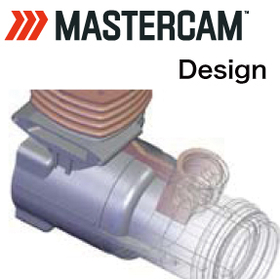
3DCAD『Mastercam Design』

Equipped with various CAD features such as 2D wireframe and 3D surface and solid modeling.

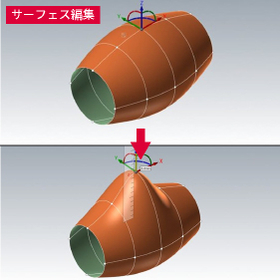
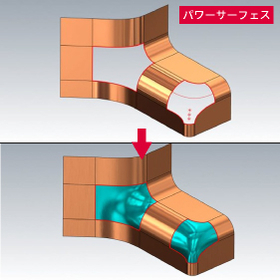
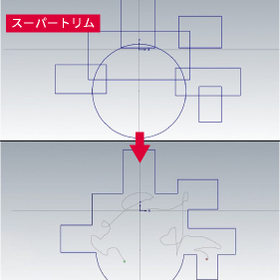
■Design (2D/3D CAD) Equipped with various CAD functions ranging from 2D wireframe drawing to 3D modeling using surfaces and solids. Additionally, it includes analysis functions that take processing steps into consideration.

ブックマークに追加いたしました

ブックマーク一覧

ブックマークを削除いたしました

ブックマーク一覧

これ以上ブックマークできません

会員登録すると、ブックマークできる件数が増えて、ラベルをつけて整理することもできます

無料会員登録

Explanation material "How to Choose the Right CAD"

What are the reasons for the unsuccessful implementation of 3D CAD? Here are some key points to prevent mismatches.

Is the introduction and utilization of 3D CAD progressing without issues? ● Stuck in 2D design as the mainstream ● Using 3D only for presentation modeling ● Unable to create conceptual designs from scratch in 3D ● Veteran users accustomed to 2D are not using it ● 3D design is difficult. Even with effort, it takes too much time If you have ever felt any of these concerns, please refer to this document to reconsider your CAD choices. "How to Choose the Right CAD" is available for free. Why do many companies experience mismatches in CAD selection? This document delves into the reasons. ● Ipros Product Ranking: Highest 3rd place ● Apelza Download Ranking: Highest 1st place

  • 3D CAD
  • 2D CAD machine
  • Other CAD related software
  • CAD

ブックマークに追加いたしました

ブックマーク一覧

ブックマークを削除いたしました

ブックマーク一覧

これ以上ブックマークできません

会員登録すると、ブックマークできる件数が増えて、ラベルをつけて整理することもできます

無料会員登録

3DCAD [Fusion design, manufacturing, analysis, rendering, etc.]

Leave your 3D data utilization for manufacturing to Pronoharts.

■Product Overview Fusion is a cloud-based software that encompasses a wide range of functions required in the manufacturing industry, including 3D CAD modeling, drawing creation, visualization, CAM, and CAE. ■Sketch In sketch creation, it is possible to efficiently create sketches using dimensioning and constraint features. ■Features In addition to basic feature commands such as extrusion and rotation, there are many powerful commands available, including hole creation commands. It also allows for seamless switching between parametric modeling and direct modeling. There are robust features such as freeform modeling and generative design, enabling quick modeling of design ideas and concepts. ■Drawings It is possible to create drawings from the generated 3D data. You can create balloons, bill of materials, and even custom drawing frames. ■Analysis, CAM, Animation, Rendering A variety of necessary functions are provided, including analysis, CAM, animation creation, and rendering. With Fusion, you can perform all tasks consistently within the software, eliminating the need to switch between various programs based on your objectives.

  • Software (middle, driver, security, etc.)
  • CAD

ブックマークに追加いたしました

ブックマーク一覧

ブックマークを削除いたしました

ブックマーク一覧

これ以上ブックマークできません

会員登録すると、ブックマークできる件数が増えて、ラベルをつけて整理することもできます

無料会員登録

Hybrid modeling specialized 3D CAD 'ThinkDesign'

An innovative design approach, Target-Driven Design, directly connects completion to product strength, fulfilling such dreams of designers.

"ThinkDesign," an integrated 2D and 3D CAD, is a parametric CAD specialized in hybrid modeling such as solids, surfaces, and meshes. It has features that cover all stages of the design process, allowing for the elimination of barriers during information exchange at various stages of product definition, enabling rapid product development. In particular, its unique GSM (Global Modeling) function allows for the quick, easy, and accurate creation, modification, and verification of any shape. ◯ Recommended for companies that: ■ Want to implement an easy-to-use integrated 2D and 3D CAD ■ Want to introduce a CAD with excellent surface capabilities ■ Want to perform deformations considering factors like springback in press molds in a short time ■ Want to create meshes for reverse engineering from measurement meshes or for 3D printers *For more details, please refer to the PDF document or feel free to contact us.

ブックマークに追加いたしました

ブックマーク一覧

ブックマークを削除いたしました

ブックマーク一覧

これ以上ブックマークできません

会員登録すると、ブックマークできる件数が増えて、ラベルをつけて整理することもできます

無料会員登録

3D Design CAD System Solid Edge

History modeling and direct modeling: Merging the strengths of both. Solid Edge Synchronous Technology.

Solid Edge is a mid-range 3D CAD system developed and provided by Siemens PLM Software, a leading company in the PLM (Product Lifecycle Management) software industry, achieving top-class operability. With its unique synchronous technology that combines parametric modeling and intuitive editing, it supports efficient design work in all design scenarios. By using Solid Edge's modeling/assembly tools, a wide range of products can be easily developed, from single parts to assemblies composed of thousands of components. 【Key Points for Choosing Solid Edge】 ■ Solid Edge can be implemented and launched in a short period of time ■ Solid Edge operates at a low cost ■ Intuitive operation allows anyone to use it (Solid Edge ST) ■ Features focused on design ○ Tools to support the transition from 2D to 3D ○ Support for large assemblies ○ Tools specifically for sheet metal and drawings ○ Highly reliable analysis (NX Nastran) ■ Scalable design data management product suite

ブックマークに追加いたしました

ブックマーク一覧

ブックマークを削除いたしました

ブックマーク一覧

これ以上ブックマークできません

会員登録すると、ブックマークできる件数が増えて、ラベルをつけて整理することもできます

無料会員登録

Mid-range 3D CAD for mechanical design 'IRONCAD'

3D CAD suitable for mechanical design of devices and jigs.

"IronCAD" is a 3D CAD that boasts exceptional operability. With unique features such as drag-and-drop from the "catalog" and the constraint-free placement tool "TriBall," quick modeling is possible. It allows for treating parts and assemblies the same, making it suitable for conceptual design and enabling ideas to be quickly realized. Its simplicity means that it doesn't take long to learn. In mechanical design for devices and jigs, it enables a significant speed-up in design and a substantial reduction in man-hours. <IronCAD's 7 Strengths> ● Feature-based direct modeling ● No constraints needed for assembly work ● Easy top-down design ● Smooth handling of large assemblies ● High data compatibility ● Editable intermediate files ● Equipped with DWG-compatible 2D CAD

ブックマークに追加いたしました

ブックマーク一覧

ブックマークを削除いたしました

ブックマーク一覧

これ以上ブックマークできません

会員登録すると、ブックマークできる件数が増えて、ラベルをつけて整理することもできます

無料会員登録

Sheet Metal 3D CAD ZW3D (Sheet Metal)

Are you suddenly struggling with receiving 3D CAD data? High functionality! Easy to use! Low price! Solve it with ZW3D, the definitive CAD for sheet metal unfolding!

"I want to introduce 3D CAD, but I don't know which one to choose," "I have already implemented it, but it's difficult to operate and hard to use," "The data formats I can receive are limited," "I can't afford expensive CAD" ... If you have such concerns or challenges, please try ZW3D.

  • 3D CAD
  • Data conversion software
  • Modeler
  • CAD

ブックマークに追加いたしました

ブックマーク一覧

ブックマークを削除いたしました

ブックマーク一覧

これ以上ブックマークできません

会員登録すると、ブックマークできる件数が増えて、ラベルをつけて整理することもできます

無料会員登録

3D CAD CADSUPERWorks Mini/Lite

A 3D CAD with intuitive operations that allows for smooth componentization.

【Features】 ■ Suitable for 3D printing applications ■ Equipped with interference check function between parts ■ Excellent compatibility with other CAD software ■ Capable of converting 3D information to 2D You can choose from two types: the "Mini model," which has the basic functions necessary for 3D modeling of parts, and the "Lite model," which includes assembly design functions. *For more details, please refer to the PDF catalog. If you would like detailed materials, please contact us at the information below. ■ Contact Marble Co., Ltd. Embedded Product Division, Product Business Department Phone: (03) 3419-6011

ブックマークに追加いたしました

ブックマーク一覧

ブックマークを削除いたしました

ブックマーク一覧

これ以上ブックマークできません

会員登録すると、ブックマークできる件数が増えて、ラベルをつけて整理することもできます

無料会員登録

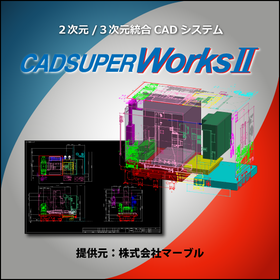
2D・3D Integrated CAD System 'CADSUPER Works'

A design support tool that can utilize existing 2D and 3D assets.

"CADSUPER Works" is a design support tool that combines a highly flexible 2D drawing creation environment with advanced feature-parametric 3D design. You can intuitively perform 3D modeling by importing drawings, and the projection update function allows changes made to the 3D model to be reflected in the 2D CAD, enabling smooth design modifications through the integration of 2D and 3D. High-performance rendering and analysis functions can also be selected as options, allowing you to choose from multiple models based on the necessary features. 【Model Lineup】 ■Basic… A model that combines 3D part design functions, assembly design functions, and 2D CAD functions. ■Pro… A model that adds extended functions to the Basic model. ■Premium… A model that adds analysis tools such as linear static analysis and mechanism analysis to the Pro model. ■Drawing Plus Model… A model that includes auxiliary drawing functions within the 3D features in addition to the above models. *For more details about the product, please download the materials and take a look.

ブックマークに追加いたしました

ブックマーク一覧

ブックマークを削除いたしました

ブックマーク一覧

これ以上ブックマークできません

会員登録すると、ブックマークできる件数が増えて、ラベルをつけて整理することもできます

無料会員登録

Accelerate design and reduce man-hours! 3D CAD 'IRONCAD' for mechanical design.

Achieved approximately half the man-hours with implementation! Modeling without sketching! Easy 3D CAD for anyone (※Free case study collection)

"IronCAD" is a 3D CAD that boasts exceptional operability. With unique features such as drag-and-drop from the "catalog" and the constraint-free placement tool "TriBall," quick modeling is possible. Since parts and assemblies can be treated the same, it is suitable for conceptual design, allowing ideas to be quickly realized. It is easy to learn, so it doesn't take much time to master. In mechanical design for devices and jigs, it enables a significant speed-up in design and a substantial reduction in man-hours. <IronCAD's 7 Strengths> ● Feature-based direct modeling ● No constraints needed for assembly work ● Easy top-down design ● Smooth handling of large assemblies ● High data compatibility ● Editable intermediate files ● Equipped with DWG-compatible 2D CAD

ブックマークに追加いたしました

ブックマーク一覧

ブックマークを削除いたしました

ブックマーク一覧

これ以上ブックマークできません

会員登録すると、ブックマークできる件数が増えて、ラベルをつけて整理することもできます

無料会員登録

3D CAD "CADPAC-NT 3D" Recommended Operating Model

It is possible to convert 2D data into 3D! This reduces the time spent on inspection and corrections due to design errors.

"CADPAC-NT 3D" is a very easy-to-use 3D CAD that allows those with 2D design experience to model with the same feel as before. It displays 2D and 3D operations simultaneously, enabling 3D modeling while drawing in 2D. Additionally, various converters are available to directly import and export raw data created with other 3D CAD software. We offer the recommended models for operation: 'Be-Clia Type-T11RIS75/Be-Clia Type-T11RIS76/CERVO Grasta Type-IS2WR-Q-IS77'. 【Features of CADPAC-NT 3D】 ■ Simple operation that feels like 2D design ■ Powerful data conversion with commercial 3D CAD ■ Direct editing with intuitive operation ■ Significant reduction in design time ■ Effective use of 2D data and collaboration with 3D ■ Modification, table creation, and output functions for part information linked to the CAD database ■ CAD SHOP collaborative model ■ DESIGN CREATION collaborative model *For more details, please refer to the related links or feel free to contact us.

ブックマークに追加いたしました

ブックマーク一覧

ブックマークを削除いたしました

ブックマーク一覧

これ以上ブックマークできません

会員登録すると、ブックマークできる件数が増えて、ラベルをつけて整理することもできます

無料会員登録

3D CAD Packaging Design Simulation 'Box-module'

3D CAD/CAM solution equipped with a direct translator standard!

The "Box-module" is developed with a consistent architecture based on ZWsoft's unique kernel, providing many features for manufacturing high-quality products in a short period, along with easy operability and flexible modeling capabilities. It can directly read not only general intermediate format files but also the unique format data (native data) of each CAD system. We offer smooth CAD editing and cutting solutions that are well-suited for cardboard packaging manufacturers. 【Features】 ■ Agile operability and advanced functions through hybrid modeling ■ Effective definition, operation, and management for assembly modeling ■ Realization of quick drawing and quick dimensioning through the fusion of drawing creation from 3D models and 2D CAD technology ■ Strong support for reducing rework losses due to design changes through the integration of CAD and CAM *For more details, please refer to the PDF materials or feel free to contact us.

ブックマークに追加いたしました

ブックマーク一覧

ブックマークを削除いたしました

ブックマーク一覧

これ以上ブックマークできません

会員登録すると、ブックマークできる件数が増えて、ラベルをつけて整理することもできます

無料会員登録

New Product! Seamlessly integrate 2D and 3D CADPAC NewWorld

Shape your ideas as you wish!

"CADPAC NewWorld" is a CAD system designed for companies to thrive in the new world ahead. It realizes an efficient design environment through a total management system with stable security and smooth communication. It serves as a powerful tool that enables the efficient and smooth creation of "products" from "ideas." [Features] ■ Share accurately integrated information across various locations ■ Efficiently operate in an optimal state among departments such as design development, manufacturing, sales, quality control, and maintenance ■ Support for various file formats ■ Assist in the online transformation of companies *For more details, please download the PDF below or contact us.

ブックマークに追加いたしました

ブックマーク一覧

ブックマークを削除いたしました

ブックマーク一覧

これ以上ブックマークできません

会員登録すると、ブックマークできる件数が増えて、ラベルをつけて整理することもできます

無料会員登録

Lighting Simulator CAD Rhinoceros Compatible Version

We will strengthen the integration with the 3D modeling software "Rhinoceros 5" to seamlessly utilize model data and improve the efficiency of analysis work.

The "Lighting Simulator CAD Rhinoceros Compatible Version" is a purely domestic simulation software "Lighting Simulator CAD" that is optimal for performance evaluation of various latest lighting devices using LEDs and other technologies. It retains its easy operability and high calculation accuracy while enhancing collaboration with the 3D modeling software "Rhinoceros 5." By seamlessly utilizing model data, it aims to shorten analysis work and further improve the efficiency of the development process.

  • lens
  • Lighting for image processing
  • Other security and surveillance systems
  • CAD

ブックマークに追加いたしました

ブックマーク一覧

ブックマークを削除いたしました

ブックマーク一覧

これ以上ブックマークできません

会員登録すると、ブックマークできる件数が増えて、ラベルをつけて整理することもできます

無料会員登録

3DCAD Semiconductor Industry Case Study: "Design to Productization of Semiconductor Inspection Equipment"

Completed from design to product in just six months! Introducing a case study of a semiconductor inspection device utilizing 3D CAD 'CreatorVenture'.

To create better products, it is necessary to prototype repeatedly. The most important aspect during the prototyping stage is the two-way communication between designers and manufacturers. While it is essential to consider the selection of processing methods, costs, and delivery times, it is also necessary to confirm whether the design can be processed at various stages of the design process. This "concurrent network" is extremely important. At the center of this is Kubotec Inc.'s newly developed 3D design tool, "CreatorVenture." The company's inspection equipment is already widely used in various generations and types of manufacturing lines for LCDs, organic ELs, etc., with over 1,000 units currently in full operation. Based on the technology cultivated there, they have also entered the field of semiconductor inspection equipment as a new business. ■ Features of CreatorVenture 1. Direct modeling 2. Hybrid modeling 3. Concurrent design *For more details, please refer to the PDF materials or feel free to contact us.

  • iprosimage012.png
  • iprosimage011.png
  • iprosimage013.png
  • iprosimage01.png
  • スライド1_0009_スライド6.png
  • スライド1_0008_スライド7.png
  • スライド1_0007_スライド8.png
  • スライド1_0004_スライド11.png
  • スライド1_0001_スライド14.png
  • 3D CAD
  • Other CAD
  • Other CAD related software
  • CAD

ブックマークに追加いたしました

ブックマーク一覧

ブックマークを削除いたしました

ブックマーク一覧

これ以上ブックマークできません

会員登録すると、ブックマークできる件数が増えて、ラベルをつけて整理することもできます

無料会員登録

Lightweight drawing data with independent correction function 'CADSUPER Works'

From quality development upstream to drawing creation! We provide a comprehensive design support environment.

"CADSUPER Works" is an integrated 2D/3D CAD system that coexists with a highly flexible 2D drawing creation environment and advanced feature parametric 3D design. We provide a comprehensive design support environment from quality assurance in the upstream process to drawing creation. 【Features (excerpt)】 ■ Analysis functions ■ Import/Export ■ Dedicated modeling functions ■ Shape interference check ■ Dedicated modeling functions *For more details, please feel free to contact us.

ブックマークに追加いたしました

ブックマーク一覧

ブックマークを削除いたしました

ブックマーク一覧

これ以上ブックマークできません

会員登録すると、ブックマークできる件数が増えて、ラベルをつけて整理することもできます

無料会員登録

2D/3D Integrated CAD CADSUPERWorks

3DCAD that coexists with a highly advanced 3D design environment and a highly flexible 2D design/drawing creation environment.

Proposal for customers who use 3D models to complement main 2D drawings or 2D drawings to complement main 3D models. For customers primarily using 3D models (time-saving in drawing): - Comprehensive drawing functions for 3D models! - Function to add or remove hidden lines only for the necessary parts from the drawings projected from the 3D model! For customers primarily using 2D drawings (effective utilization of drawings): - Effective use of existing 2D drawing assets! - Unique modeling methods required by the field! For details and features, please feel free to download the catalog or contact us with any questions. Marble Inc. Embedded Product Division, Product Business Department Phone: (03) 3419-6011

ブックマークに追加いたしました

ブックマーク一覧

ブックマークを削除いたしました

ブックマーク一覧

これ以上ブックマークできません

会員登録すると、ブックマークできる件数が増えて、ラベルをつけて整理することもできます

無料会員登録

Speed up your 3D design! Reverse Engineering Seminar

This method explains how to create "usable CAD data" that can be utilized in the manufacturing process by 3D scanning a physical object and generating 3D data from it.

This seminar is an on-demand video distribution of the Zoom webinar held on November 17, 2021. In this seminar, we will introduce high-quality reverse engineering techniques using the top-tier package "TD Professional" of the 3D CAD "ThinkDesign," which has received high praise from users in design and automotive press-related fields, and the portable multi-joint arm 3D scanner "HEXAGON Absolute Arm," capable of high-speed and high-precision scanning. [Recommended for] - Those who want to learn about reverse engineering techniques - Those struggling with the time required for reverse engineering - Those dissatisfied with auto-surfacing - Those wanting to modify or change curved surface data created through reverse engineering - Those dissatisfied with the speed and quality of 3D scanning [Seminar Content] Part 1: Introduction to HEXAGON Absolute Arm Part 2: Introduction to reverse engineering techniques using ThinkDesign [How to Watch] Please apply from the seminar details page linked above. (Free to watch)

  • 3D CAD
  • 3D measuring device
  • CAD

ブックマークに追加いたしました

ブックマーク一覧

ブックマークを削除いたしました

ブックマーク一覧

これ以上ブックマークできません

会員登録すると、ブックマークできる件数が増えて、ラベルをつけて整理することもできます

無料会員登録

Direct Feature-Based CAD "CADPAC-NT 3D"

Creating the future with original and innovative products, Direct Feature-Based CAD.

CADPAC-NT 3D allows you to directly specify the areas you want to edit without constraints or work history, enabling edits and deletions according to the designer's intent. It also features the ability to freely change the model shape by modifying dimension values entered after modeling, as well as intuitive and dynamic deformation capabilities. This product comes with various converters that can directly read and export raw data created in other 3D CAD systems. With these powerful data conversion functions, it is possible to expand into various applications, including CAM, 3D printing, analysis software, and the comparative verification of 3D and 2D drawings.

  • 3D CAD
  • Data conversion software
  • Modeler
  • CAD

ブックマークに追加いたしました

ブックマーク一覧

ブックマークを削除いたしました

ブックマーク一覧

これ以上ブックマークできません

会員登録すると、ブックマークできる件数が増えて、ラベルをつけて整理することもできます

無料会員登録

Mid-range 3D CAD 'Autodesk Inventor'

Establish a 3D design environment early at low cost. We are offering materials that introduce case studies from machinery manufacturers.

"Autodesk Inventor" is a mid-range 3D CAD software equipped with numerous tools necessary for mechanical design, drafting, and product simulation. It supports various design methods, including parametric modeling, direct modeling, and rule-based modeling. The cloud-based design review feature allows for smooth collaboration with stakeholders, contributing to improved efficiency and quality in design and related tasks. As a subscription service that can be used for the required duration and number of accounts, it has been adopted by many companies aiming for cost optimization and reduction. 【Features】 ■ Capable of importing 3D CAD data created with various software ■ Smooth processing of assembly data for a large number of components ■ Capable of creating data for BIM ■ Plans that include a variety of compatible software are also available *Why did a machinery manufacturer that successfully utilized and established 3D design choose this product? You can view materials introducing case studies and product features from the <PDF download>.

ブックマークに追加いたしました

ブックマーク一覧

ブックマークを削除いたしました

ブックマーク一覧

これ以上ブックマークできません

会員登録すると、ブックマークできる件数が増えて、ラベルをつけて整理することもできます

無料会員登録

Designer: CAD for creating manufacturing data

The designer specializes in production design CAD, enhancing CAM operability.

You can intuitively operate various modeling functions from solid, surface, and 2D to 3D, create 2D drawings, and perform shape analysis using various analysis commands. Additionally, it offers various modules for surfaces, electrodes, and reverse engineering, as well as a link to Hexagon CAM software, making it a highly versatile CAD. 【Coexistence of Direct Modeling and Parametric Modeling】

  • 2D CAD machine
  • 3D CAD
  • CAD

ブックマークに追加いたしました

ブックマーク一覧

ブックマークを削除いたしました

ブックマーク一覧

これ以上ブックマークできません

会員登録すると、ブックマークできる件数が増えて、ラベルをつけて整理することもできます

無料会員登録

All-in-One Package SHARK FX Ver8.0

A 3D solid modeler designed with a thorough pursuit of usability.

Competition among companies is intensifying, and how quickly products can be brought to market is becoming increasingly important. However, in product design using 3D CAD software, detailed design CAD systems have been utilized from the conceptual design stage, resulting in many designers spending considerable time and effort on system operation and learning how to use the software rather than on the actual design work. To address this issue, the 3D solid modeler "SHARK FX" for conceptual design has been developed. By integrating a clean user interface, intuitive input methods, photorealistic rendering, and animation into a single package, "SHARK FX" allows designers to focus on the design itself, improving design efficiency and enabling them to freely express their ideas. It is a new tool created for conceptual design.

ブックマークに追加いたしました

ブックマーク一覧

ブックマークを削除いたしました

ブックマーク一覧

これ以上ブックマークできません

会員登録すると、ブックマークできる件数が増えて、ラベルをつけて整理することもできます

無料会員登録

3D CAD "KEYCREATOR"

Fusion of 3D functionality and 2D drawing capabilities! Comprehensive support for the design trial and error process.

"KEYCREATOR" is a system that allows anyone to easily create 3D models with the feeling of drawing three-view drawings in 2D design. By avoiding careless mistakes during 2D design, it achieves a reduction in design time. By effectively utilizing existing 2D data, it eliminates the hassle of re-entering shapes while referring to 2D drawings, and thanks to interfaces with various 3D CAD systems, smooth work can be done without the need for intermediate file data compatibility. [Features] ■ Direct editing is possible even with data converted from other CAD systems. ■ 2D drawings, 3D wires, surfaces, and solids can all be used together in the same space. ■ Direct shape changes can be made simply by changing the dimension numbers. *For more details, please refer to the PDF materials or feel free to contact us.

ブックマークに追加いたしました

ブックマーク一覧

ブックマークを削除いたしました

ブックマーク一覧

これ以上ブックマークできません

会員登録すると、ブックマークできる件数が増えて、ラベルをつけて整理することもできます

無料会員登録