We have compiled a list of manufacturers, distributors, product information, reference prices, and rankings for Simulation Software.
ipros is IPROS GMS IPROS One of the largest technical database sites in Japan that collects information on.

Simulation Software Product List and Ranking from 176 Manufacturers, Suppliers and Companies | IPROS GMS

Last Updated: Aggregation Period:Jan 14, 2026~Feb 10, 2026
This ranking is based on the number of page views on our site.

Simulation Software Manufacturer, Suppliers and Company Rankings

Last Updated: Aggregation Period:Jan 14, 2026~Feb 10, 2026
This ranking is based on the number of page views on our site.

  1. FsTech Kanagawa//software
  2. アスペンテックジャパン/AspenTech Tokyo//software
  3. ウェーブフロント 本社 Kanagawa//software
  4. 4 シュレーディンガー Tokyo//software
  5. 5 IDAJ Kanagawa//software

Simulation Software Product ranking

Last Updated: Aggregation Period:Jan 14, 2026~Feb 10, 2026
This ranking is based on the number of page views on our site.

  1. Aspen Plus process simulation software アスペンテックジャパン/AspenTech
  2. Design and Optimization of VOITH Linear Jet FsTech
  3. Engine simulation software "GT-POWER" IDAJ
  4. 4 Virtual Control Program Verification
  5. 5 Satara Phoenix WinNonlin

Simulation Software Product List

211~240 item / All 745 items

Displayed results

[AdvantEdge FEM Analysis Case] Tool Deflection Evaluation

We can quantitatively grasp the factors that influence tool deflection! Introduction of analysis cases.

In "AdvantEdge FEM," it is possible to evaluate parameters that are difficult to measure, such as tool deflection, through cutting simulation. We will introduce a case study of a cutting simulation experiment where tool deflection varies due to machining factors. There were challenges associated with tool deflection, such as "degradation of shape accuracy," "the occurrence of chatter," and "difficulty in measuring deflection." With our product, you can quantitatively understand the factors that influence tool deflection. Please feel free to contact us when needed. [Challenges due to tool deflection] ■ Degradation of shape accuracy ■ Occurrence of chatter ■ Difficulty in measuring deflection *For more details, please refer to the PDF document or feel free to contact us.

Added to bookmarks

Bookmarks list

Bookmark has been removed

Bookmarks list

You can't add any more bookmarks

By registering as a member, you can increase the number of bookmarks you can save and organize them with labels.

Free membership registration

Application of the alloy design tool Thermo-Calc to high-entropy alloys.

Introducing case studies on high-entropy alloys! The alloy design tool Thermo-Calc can be used for material development and various manufacturing processes!

This is a collection of calculation examples for high-entropy alloys using the alloy design tool Thermo-Calc. Thermo-Calc allows for the optimization of alloy processes, the impact of processes on microstructure, and the prediction of properties. 【Thermo-Calc】 - Temperature-phase diagram of CoCrFeMnNi (Cantor alloy) - Temperature-phase diagram of IrMoRhRuW - Phase diagram of CoCrFeNiAlx (FCC+BCC) - Liquid phase projection diagram of CrFeNi - Solidification microstructure prediction of CoCrCuFeMnNi (FCC-based) - Density calculation of CrNbTiVZr (BCC-based) - Liquid phase viscosity - Thermal properties - Electrical properties 【Diffusion Module DICTRA】 - Element diffusion in CoCrFeMnNi (FCC) 【Precipitation Module TC-PRISMA】 - L12 phase precipitation calculation in (NiCoFeCr)94Ti2Al4

  • alloy
  • Non-ferrous metals
  • Other metal materials
  • Simulation Software

Added to bookmarks

Bookmarks list

Bookmark has been removed

Bookmarks list

You can't add any more bookmarks

By registering as a member, you can increase the number of bookmarks you can save and organize them with labels.

Free membership registration

Application examples of the alloy design tool Thermo-Calc for magnetic materials.

Introducing case studies on permanent magnet materials! The alloy design tool Thermo-Calc can be used for material development and various manufacturing processes!

This is a collection of calculation examples for permanent magnet materials using the alloy design tool Thermo-Calc. Thermo-Calc can optimize alloy processes, predict the effects of processes on microstructures, and forecast properties. 【Thermo-Calc】 - Phase diagram of Nd-Fe-B - Heat capacity of the Nd2Fe14B (T1) phase - Curie temperature (Tc) - Surface tension of the liquid phase of 72Nd-26.1Fr-1.9B (at%)

  • alloy
  • Other metal materials
  • Simulation Software

Added to bookmarks

Bookmarks list

Bookmark has been removed

Bookmarks list

You can't add any more bookmarks

By registering as a member, you can increase the number of bookmarks you can save and organize them with labels.

Free membership registration

New Approach to Processing Program Analysis Method: Distortio

Consideration of clamp position also in the simulation!

The deformation analysis option "Distortio" of the cutting process simulation Production Module allows for the analysis and simulation of material deformation caused by machining. This shifts the decision-making of machining conditions from experience and intuition to pre-examination through simulation. Itochu Techno-Solutions Corporation, which supports your company's digital transformation (DX), offers cutting process simulation. We are now in the era of digital twins, where you can simulate the machining results by changing tools or modifying machining paths. We would be happy to assist you in digitizing your machining challenges! *For more details, please refer to the PDF materials or feel free to contact us.

  • Other processing machines
  • Technical Seminar
  • Other cutting tools
  • Simulation Software

Added to bookmarks

Bookmarks list

Bookmark has been removed

Bookmarks list

You can't add any more bookmarks

By registering as a member, you can increase the number of bookmarks you can save and organize them with labels.

Free membership registration

General-purpose process simulation software "Witness"

Feature-rich general-purpose process simulator: Make free choices in a risk-free virtual environment. [Online experience seminar in progress]

This is a simulator developed for examining the movement of goods/people and processes in production lines, logistics systems, facilities, etc. By recreating the system on WITNESS, it is possible to quantify complex systems that cannot be formulated. Additionally, by analyzing the changes in the model's situation and state over time, as well as the interactions between elements, it is also possible to optimize the system. For inquiries, please contact: witsales@ctc-g.co.jp

  • simulator
  • Simulation Software

Added to bookmarks

Bookmarks list

Bookmark has been removed

Bookmarks list

You can't add any more bookmarks

By registering as a member, you can increase the number of bookmarks you can save and organize them with labels.

Free membership registration

hyperMILL VIRTUAL Machining

High-efficiency and highly reliable simulation based on NC code! Everything is for the purpose of utilization in analysis.

The simulation feature 'VIRTUAL Machining' of 'hyperMILL' reproduces the operation of machine tools on a PC and checks the program. Users can grasp all processes and analyze them in detail. In real-time, it allows users to confirm the actual machining situation within the simulation environment, with machining and simulation completely synchronized, and it enables easy control of the machine from a laptop PC. 【Features】 ■ Checking, evaluating, and optimizing machining processes ■ Job matching to available machine tools ■ Easy transfer of job tasks between available machine tools ■ Support for considering the purchase of new machine tools ■ Accurate cost estimation for competitive projects *For more details, please refer to the PDF document or feel free to contact us.

Added to bookmarks

Bookmarks list

Bookmark has been removed

Bookmarks list

You can't add any more bookmarks

By registering as a member, you can increase the number of bookmarks you can save and organize them with labels.

Free membership registration

VERICUT<Force-Milling>

Improving machining is about balancing tool life and speed! By optimizing force, it is possible to align machining goals!

"VERICUT" is a simulation software for G-code NC programs executed on machine tools. Force-Milling creates effective NC programs for specified materials, cutting tools, and machining conditions. It significantly saves machining time and improves the lifespan of cutting tools and machines. [Features] - Cost savings and significant production increase - Maximizes the functionality of cutting tools - Supports various tools and materials - Compatible with various CAM and NC programs *For more details, please refer to the PDF document or feel free to contact us.

Added to bookmarks

Bookmarks list

Bookmark has been removed

Bookmarks list

You can't add any more bookmarks

By registering as a member, you can increase the number of bookmarks you can save and organize them with labels.

Free membership registration

Avoid risks in advance! Equipment introduction simulation 'MR'

Avoid risks before equipment introduction! A simulation that realizes early equipment startup.

"MR" is a facility introduction simulation that allows for the verification of the "layout" and "workability" of the installation site by overlaying 3D data onto the real world. Layout issues, such as those involving other equipment, can be checked using "HoloLens." It enables pre-simulation from the perspective of the workers, facilitating the creation of a smooth working environment. 【Features】 ■ Ability to verify the "layout" and "workability" of the installation site ■ Layout issues can be checked using "HoloLens" ■ Pre-simulation from the perspective of the workers can be conducted ■ Realization of a smooth working environment ■ Risk avoidance before equipment installation *For more details, please refer to the PDF document or feel free to contact us.

  • Virtual Reality Related
  • Simulation Software

Added to bookmarks

Bookmarks list

Bookmark has been removed

Bookmarks list

You can't add any more bookmarks

By registering as a member, you can increase the number of bookmarks you can save and organize them with labels.

Free membership registration

BUNSHIN: Realizing the efficiency of equipment moving operations.

By fully digitizing the factory with 3D scanning, we can simulate the loading and unloading operations of equipment, achieving greater efficiency in the work process.

"BUNSHIN" digitizes the entire factory through 3D scanning of the actual site, enabling various solutions such as simulations for equipment installation and layout changes by merging with 3D CAD models. It is a new system that meets the demands of the era, such as digital transformation (DX) and remote capabilities. During the COVID-19 pandemic, the introduction of large machinery to factories required many stakeholders to gather on-site for work discussions. By utilizing "BUNSHIN," it is possible to gather online as many times as needed in the digitized factory to simulate the addition, movement, or removal of equipment, leading to reductions in processes and costs through the digital transformation of factory equipment installation and layout changes. **Features of BUNSHIN:** - Digitization through 3D scanning of the actual site - Editable 3D scan data! - Possible integration with CAD data! - Recreate the site online and reduce business trips!

  • Other operation management software
  • Simulation Software

Added to bookmarks

Bookmarks list

Bookmark has been removed

Bookmarks list

You can't add any more bookmarks

By registering as a member, you can increase the number of bookmarks you can save and organize them with labels.

Free membership registration

"Equipment verification solution" that significantly shortens lead time.

The entire factory is converted into point cloud data through 3D scanning. By merging with 3D data, equipment installation simulations can be conducted!

■Factory-wide Cloning Solution 'BUNSHIN' 'BUNSHIN' scans the entire factory in 3D (laser) and quickly digitizes existing equipment that lacks data, allowing for the integration of newly 3D-modeled equipment. This enables simulation of equipment installation that closely resembles the actual site. Stakeholders can hold meetings and confirmations remotely without having to visit the site, significantly reducing lead time. A major feature is that point cloud data can be edited, allowing for the removal or relocation of existing equipment. 【Benefits of BUNSHIN】 ■ Digitization of existing equipment without 3D data can be done in a short time. ■ Stakeholders can participate in remote meetings from distant locations without gathering on-site, leading to a significant reduction in lead time.

  • Other operation management software
  • Simulation Software

Added to bookmarks

Bookmarks list

Bookmark has been removed

Bookmarks list

You can't add any more bookmarks

By registering as a member, you can increase the number of bookmarks you can save and organize them with labels.

Free membership registration

NC3 Axis Processing Interference and Macro Verification System 'NCVIEW MC3'

NC simulation that allows for drawing comparison and tool length optimization. With features unique to domestic development and rapid support, it enables verification of machining operations and improves work efficiency.

"NCVIEW MC3" is a simulation software that reproduces NC program machining for machine tools, helping to prevent accidents and improve productivity. It is a high-cost performance product specialized for 3-axis machining center processing, packaged with convenient features. You can check tool shapes, tool paths, and the cutting shapes of workpieces as standard. Additional options can be added to the main body (basic module) to expand its functionality. It also supports undercut machining with T-slot tools and setup change simulation. The software comes standard with useful features such as tool and holder interference checks, macro debuggers, and model comparisons. 【Benefits of Implementation】 ■ Achieving safe machining without accidents ■ Reducing wear on machines, tools, and materials ■ Improving machine operating rates without the need for dry runs ■ Enhancing quality and work efficiency ■ Safe training ■ Accurate support unique to domestic software *For more details, please download the PDF or contact us.

  • Other CAM related software
  • Simulation Software

Added to bookmarks

Bookmarks list

Bookmark has been removed

Bookmarks list

You can't add any more bookmarks

By registering as a member, you can increase the number of bookmarks you can save and organize them with labels.

Free membership registration

Trouble during processing: Inner diameter cutting interference

It's hard to check the status of the tool entry... "NCVIEW" allows you to observe the condition in real time!

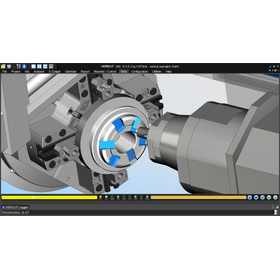
Internal diameter cutting on a lathe makes it difficult to confirm the tool's entry, often resulting in holder interference. "NCVIEW" detects such interferences. When exploring methods to avoid interference, you can observe the tool's movements for internal diameter processing and the state of the workpiece in real-time while displaying the workpiece cross-section on the turning solid screen. [Causes of Trouble] - Internal diameter cutting on a lathe makes it difficult to confirm the tool's entry. - Holder interference occurs. *For more details, please refer to the PDF document or feel free to contact us.

  • simulator
  • Simulation Software

Added to bookmarks

Bookmarks list

Bookmark has been removed

Bookmarks list

You can't add any more bookmarks

By registering as a member, you can increase the number of bookmarks you can save and organize them with labels.

Free membership registration

[Processing Troubles] Tool breakage, tap, and counterbore leakage.

Considering the delivery time, cost, and quality, there is a significant loss... NCVIEW can prevent drilling troubles!

Even when proceeding carefully with drilling and tapping operations, processing troubles often occur where the tool breaks into the workpiece. When a tool breaks, it becomes necessary to either remake the workpiece, ask a skilled worker to remove it, or melt it away with discharge machining, which results in significant losses in terms of delivery time, cost, and quality. To shorten working hours and ensure quality, 'NCVIEW' is useful as it automatically verifies and reports on hole processing thoroughly. [Causes of Troubles] <Drilling and Tapping> ■ Processing troubles often occur where the tool breaks into the workpiece. ■ It is necessary to remake the workpiece, ask a skilled worker to remove it, or melt it away with discharge machining.  → This results in significant losses considering delivery time, cost, and quality. <Processing with Many Holes> ■ It becomes unclear which holes have been checked, leading to overlooked holes. ■ Visual confirmation alone always raises concerns. *For more details, please refer to the PDF document or feel free to contact us.

  • 2023-02-13_10h11_38.png
  • simulator
  • Simulation Software

Added to bookmarks

Bookmarks list

Bookmark has been removed

Bookmarks list

You can't add any more bookmarks

By registering as a member, you can increase the number of bookmarks you can save and organize them with labels.

Free membership registration

Trouble during processing: Poor hole machining

If the hole becomes eccentric due to some reason, it will affect subsequent processes! It can be improved with NCVIEW!

Hole processing is one of the machining processes where achieving precision is difficult due to the complex interplay of various factors. If, for any reason, the hole becomes eccentric, it will affect subsequent reaming, tapping, and counterboring operations. With 'NCVIEW', you can pre-verify and improve various troubles such as NC data format errors, tool setting errors, and interference accidents. 【Overview of Hole Processing】 ■ Tool accuracy such as drill shoulder height, blade angle, and thinning ■ Compatibility of tool, workpiece, and coolant properties ■ Tool deflection, chatter, wear, chip clogging, and friction heat ■ Hole depth, diameter, positioning, and accuracy of pilot holes ■ Feed rate and backlash  → Achieving precision is difficult due to the complex interplay of various factors. *For more details, please refer to the PDF document or feel free to contact us.

  • simulator
  • Simulation Software

Added to bookmarks

Bookmarks list

Bookmark has been removed

Bookmarks list

You can't add any more bookmarks

By registering as a member, you can increase the number of bookmarks you can save and organize them with labels.

Free membership registration

【Trouble during processing】Insufficient protrusion length

If it's too short, it will cause interference with the holder and spindle... This can be avoided with NCVIEW's tool length optimization!

To suppress tool deflection and chatter and improve processing efficiency, we want to keep the protrusion length as short as possible. However, if it is too short, it will cause interference with the holder or spindle. By using the tool length optimization feature of 'NCVIEW', you can find the shortest protrusion length, allowing you to avoid interference with the holder or spindle. Please feel free to contact us if you need assistance. [Cause of Trouble] ■ Suppressing tool deflection and chatter to improve processing efficiency - For that, we want to keep the protrusion length as short as possible - If it is too short, it will cause interference with the holder or spindle * For more details, please refer to the PDF document or feel free to contact us.

  • simulator
  • Simulation Software

Added to bookmarks

Bookmarks list

Bookmark has been removed

Bookmarks list

You can't add any more bookmarks

By registering as a member, you can increase the number of bookmarks you can save and organize them with labels.

Free membership registration

Heat Treatment Process Simulation Software 'COSMAP'

Analysis software constructed based on the theory of thermodynamics and mechanics of materials using the finite element method.

"COSMAP" is simulation software for heat treatment processes that analyzes the coupled effects of carbon and nitrogen chemical composition concentration, temperature distribution, phase transformation, and deformation/stress distribution during processes such as quenching, carburizing, nitriding, and local heating. It is also capable of simulating carburizing, nitriding, quenching, high-frequency quenching, and local heating and cooling processes. Anyone with basic knowledge of materials science, heat transfer, stress analysis, and electromagnetic fields can use it. 【Operating Environment】 ■ Supported OS: Windows XP, 2000 ■ Memory: 1GB or more ■ CPU: 1GHz or more ■ Pre/Post-processor: GID or FEMAP is required separately. *For more details, please download the PDF or feel free to contact us.

  • Software (middle, driver, security, etc.)
  • Production Management System
  • Other analyses
  • Simulation Software

Added to bookmarks

Bookmarks list

Bookmark has been removed

Bookmarks list

You can't add any more bookmarks

By registering as a member, you can increase the number of bookmarks you can save and organize them with labels.

Free membership registration

Waveform deformation simulation software "EGWAVE"

Strongly supports engineers with high precision and reliability! This software is suitable for practical design work.

"EGWAVE" is a groundbreaking wave deformation simulation software based on a highly accurate energy balance equation that can calculate refraction, diffraction, reflection, and transmission. With diffraction calculations achieved through high-order differences, it offers rich post-processing capabilities, including the extraction of arbitrary data such as vector diagrams. The ability to edit and create computational grids, water depths, and structures allows for large-area analysis to be performed effortlessly. 【Features】 ■ In addition to refraction deformation of conventional models, it analyzes diffraction, reflection, and transmission with high accuracy. ■ Water depth data can incorporate "basic ocean maps and numerical data (issued by the navigation department). ■ All ocean condition and boundary condition settings can be created via the GUI. ■ Data management is easy. ■ Rich post-processing is possible through the extraction of arbitrary data. *For more details, please download the PDF or feel free to contact us.

  • Other operation management software
  • Other services
  • Simulation Software

Added to bookmarks

Bookmarks list

Bookmark has been removed

Bookmarks list

You can't add any more bookmarks

By registering as a member, you can increase the number of bookmarks you can save and organize them with labels.

Free membership registration

[Information] VR Driving School

Improving the pass rate of students not only enhances their success but also leads to increased efficiency for instructors and promotes public relations activities.

This document introduces 'VR Driving School,' a VR software designed for driving schools and training centers. In traditional driving instruction, it is difficult to practice S-curves and cranks repeatedly at one's preferred time, which has become a bottleneck causing students to fail their tests. At BeRise, we have developed VR software to help driving schools overcome S-curves and cranks. We believe that by implementing this software, it will lead to an increase in students' test pass rates and improve instructors' work efficiency. *For more details, please refer to the PDF document or feel free to contact us.*

  • Software (middle, driver, security, etc.)
  • Other services
  • Simulation Software

Added to bookmarks

Bookmarks list

Bookmark has been removed

Bookmarks list

You can't add any more bookmarks

By registering as a member, you can increase the number of bookmarks you can save and organize them with labels.

Free membership registration

10 Methods for Rapid Design of Digital Control Power Converters

Introducing a method for speedily designing a digital control power converter using Simulink.

When designing digital control for power converters, there are many reasons to build models and simulate them. For example, the behavior of the converter during fluctuations in power supply and load, circuit topologies that combine passive components (such as resistors and capacitors) with active components (such as power transistors), and the design of feedback and monitoring control algorithms necessary to control voltage and meet stringent design requirements. This white paper introduces 10 methods for rapidly designing digital control power converters using "Simulink." [Contents] - Simultaneous simulation of analog and digital components - Automation of controller analysis and tuning in the frequency domain - Simulation of control algorithms to improve power quality - Verification of fault detection, mode logic, and monitoring control across all operating conditions - Validation of power converter operation within larger electrical systems *For more details, please refer to the PDF document or feel free to contact us.

  • Software (middle, driver, security, etc.)
  • Simulation Software

Added to bookmarks

Bookmarks list

Bookmark has been removed

Bookmarks list

You can't add any more bookmarks

By registering as a member, you can increase the number of bookmarks you can save and organize them with labels.

Free membership registration

Inventory simulator that allows part expansion via copy-paste from Excel.

【User case presentation ongoing!】Are you feeling limited by inventory simulations using Excel? It can be used on a single PC and is customizable!

This is an inventory simulation software that can be used on a single PC. It can be utilized for production planning, outsourcing management, procurement planning for materials, and product inventory replenishment planning. This software allows you to copy and paste data from Excel, enabling immediate inventory simulation. It can perform real-time inventory simulations that include common parts and child components, which are difficult to achieve in Excel. The production plans entered in the inventory simulation screen can be copied and pasted back into Excel. Of course, internally, the data is stored in a database, so it is possible to customize it for expansion to core systems or integration with existing core systems. Do you have any of these concerns? "I want to streamline the manual ordering process for materials." "I want to build a production management system that can manage the entire flow of information from order to procurement, production, receipt, shipping, and returns." We can design a production management system that addresses these issues according to your needs! *For more details, please refer to the PDF document or feel free to contact us.

  • Production Management System
  • Simulation Software

Added to bookmarks

Bookmarks list

Bookmark has been removed

Bookmarks list

You can't add any more bookmarks

By registering as a member, you can increase the number of bookmarks you can save and organize them with labels.

Free membership registration

OMNISIM (Photonic simulation)

OMNISIM is software that analyzes photonic devices/grating structures using solvers such as FDTD/FETD/RCWA.

A unique combination of FDTD and FETD simulators OmniSim is the only software package to include both FDTD and FETD engines. This combination allows you to get the best of both worlds: FDTD for quick approximate simulations and FETD for higher accuracy, or even just to check your FDTD calculations with an alternative method.

  • Company:CTflo
  • Price:1 million yen-5 million yen
  • Contract Analysis
  • Other analyses
  • simulator
  • Simulation Software

Added to bookmarks

Bookmarks list

Bookmark has been removed

Bookmarks list

You can't add any more bookmarks

By registering as a member, you can increase the number of bookmarks you can save and organize them with labels.

Free membership registration

[Video Introduction] Understand in 7 Minutes! Hydraulic Circuit Design Simulation Software

Intuitive design and immediate simulation, circuit design simulation software specialized in hydraulics, electricity, and pneumatics: Automation Studio.

We would like to introduce a demo video of "Automation Studio(TM)", a circuit design simulation software essential for the development of construction and agricultural machinery! When choosing design software, the intuitive feel for design and simulation is important. Automation Studio(TM) comes with a library of circuits that comply with international standards, allowing for intuitive operation and design. Additionally, you can immediately simulate the completed circuit diagram. It is also easy to graph the measurement values from the simulation or replace components with those from any manufacturer. Please take a look at our introduction video (approximately 7 minutes) covering hydraulic, pneumatic, and electrical circuits, circuit diagram creation and simulation, plotter and data export, and catalog manager! [For more details about Automation Studio(TM), click here] https://www.itnet.co.jp/lp/automation-studio/ If you have any questions, please feel free to contact us.

  • Other CAD related software
  • Simulation Software

Added to bookmarks

Bookmarks list

Bookmark has been removed

Bookmarks list

You can't add any more bookmarks

By registering as a member, you can increase the number of bookmarks you can save and organize them with labels.

Free membership registration

[Video Introduction] 10 Basic Functions of Hydraulic Circuit Design Simulation Software

Intuitive design and immediate simulation, circuit design simulation software specialized in hydraulics, electricity, and pneumatics - Automation Studio.

"Automation Studio(TM) P7" is a hydraulic, electrical, and pneumatic circuit design and simulation software that can improve the design and development process. It allows for circuit modifications and redesigns, enabling verification through simulation, which makes it possible to create a more suitable version before producing a prototype. As a result, it significantly reduces the time and costs associated with design and development. We would like to introduce the 10 basic functions of "Automation Studio(TM)" through videos! *Please refer to "More Information" for the links to each video. 1: Library Interface 2: Easy Circuit Diagram Creation 3: Dynamic Measuring Instruments 4: Plotter and Data Export 5: Catalog Manager 6: Troubleshooting 7: Hydraulic/Electric (IEC) 8: Ladder Diagram 9: Sequence Diagram 10: Automatic Design of Manifold Blocks [For more information about Automation Studio(TM), click here] https://www.itnet.co.jp/lp/automation-studio/

  • Other CAD related software
  • Simulation Software

Added to bookmarks

Bookmarks list

Bookmark has been removed

Bookmarks list

You can't add any more bookmarks

By registering as a member, you can increase the number of bookmarks you can save and organize them with labels.

Free membership registration

exothermia suite(et-suite)

A simulation tool that incorporates the academic theories necessary for exhaust aftertreatment, batteries, and various synthesis analyses!

The "et-suite/exothermia suite" is the successor version of the CAE product axisuite(R) in the field of exhaust aftertreatment, adopted by many automotive OEMs and suppliers. It achieves unique features, precise models, and fast simulations, supporting the development and design of various aftertreatment devices (such as TWC, LNT, GPF, DOC, SCR, etc.). Additionally, it expands its application range to battery (cell, module, pack) development and various synthetic reaction simulations using catalytic reactions. 【Features】 ■ Achieves stability of solutions and fast analytical calculations using unique mathematical methods ■ Equipped with a rich chemical reaction library backed by experimental data ■ Includes analysis and evaluation functions with 3D visualization for computational results

Added to bookmarks

Bookmarks list

Bookmark has been removed

Bookmarks list

You can't add any more bookmarks

By registering as a member, you can increase the number of bookmarks you can save and organize them with labels.

Free membership registration

FL3X Config BASIC

Simulation software compatible with various in-vehicle network buses (CAN, CAN-FD, 100BASE-T1, 1000BASE-T1, etc.)

FL3X Config BASIC is software for creating RBS (unconnected bus simulation) and gateways for various buses in the free version. It supports multiple in-vehicle network description formats (DB formats). The generated RBS runs independently on individual hardware. Configuration operations or routing can be implemented very quickly using a visual GUI. Additionally, you can implement your own requirements in the code using the "User Function Editor." It is also possible to log various in-vehicle buses simultaneously. There is also a paid version, Professional/Enterprise, based on team development.

  • Engine parts
  • Other network tools
  • Data Logger
  • Simulation Software

Added to bookmarks

Bookmarks list

Bookmark has been removed

Bookmarks list

You can't add any more bookmarks

By registering as a member, you can increase the number of bookmarks you can save and organize them with labels.

Free membership registration

FL3X Config BASIC can be used intuitively even for beginners.

A tool for simulation (RBS), visualization, operation, and recording of vehicle-mounted bus data!

At Shellpa Co., Ltd., we handle "FL3X Config BASIC." It is a versatile tool that addresses all challenges related to in-vehicle bus systems. Using this product, you can easily simulate, visualize, operate, and record bus data. This software is implemented in almost all OEMs of automotive environments and nearly all bus systems, with a constant emphasis on simple operation to facilitate implementation even in complex applications. While the software itself is fundamentally free, some features cannot be realized without hardware. 【Features】 ■ Support for 1000BASE-T1, 100BASE-T1, 100BASE-TX, CAN-FD, CAN-HS, FlexRay, LIN, and SENT ■ Tools for simulating, visualizing, operating, and recording in-vehicle bus data ■ Support for a wide range of interfaces *For more details, please refer to the PDF document or feel free to contact us.

  • Other network tools
  • Simulation Software

Added to bookmarks

Bookmarks list

Bookmark has been removed

Bookmarks list

You can't add any more bookmarks

By registering as a member, you can increase the number of bookmarks you can save and organize them with labels.

Free membership registration

[Data] CFD Software - Simulation of Plastic Technology

We are publishing the flow of CFD simulations and the definition of geometry using photos!

This document introduces the CFD software plastic technology simulations from IANUS Corporation. It includes topics such as "Design of Plastic Processes Without CFD Simulation," "Flow of CFD Simulation," and "Definition of Geometry." Please take a moment to read it. [Contents] ■ IANUS Corporation - Business Overview ■ Design of Plastic Processes Without CFD Simulation ■ Design of Plastic Processes With CFD Simulation ■ Flow of CFD Simulation ■ CFD Simulation Rheology Model *For more details, please refer to the PDF document or feel free to contact us.

  • others
  • Simulation Software

Added to bookmarks

Bookmarks list

Bookmark has been removed

Bookmarks list

You can't add any more bookmarks

By registering as a member, you can increase the number of bookmarks you can save and organize them with labels.

Free membership registration

[Development Case] Simulation

You can operate each device's functions on the simulator! This allows for smooth real-world operational procedures.

We would like to introduce a case of "simulation" developed by TCC. This system simulates various devices and physical phenomena using the OPTO22 company's "SNAP Control System," which automatically controls air conditioning, measurement, temperature, pressure, flow rate, and more. By modeling the plant, it can accurately simulate the actual equipment in various scenarios such as startup, shutdown, load changes, and accident response. The simulation speed can be adjusted to double speed, allowing for efficient simulation. 【Implementation Effects and Points】 ■ By using the monitoring terminal that is used in actual equipment, smooth operation in real operations is possible. ■ Training for handling troubles can be conducted through the simulator. *For more details, please refer to the related link page or feel free to contact us.

  • Company:TCC
  • Price:Other
  • Instrumentation and Control Systems
  • Production Management System
  • Other production management systems
  • Simulation Software

Added to bookmarks

Bookmarks list

Bookmark has been removed

Bookmarks list

You can't add any more bookmarks

By registering as a member, you can increase the number of bookmarks you can save and organize them with labels.

Free membership registration

Simulation software "MCSimulator"

Display communication logs for core applications and PLCs! You can choose between TCP and UDP communication protocols.

"MCSimulator" is simulation software compatible with MELSEC PLCs. It allows debugging with core applications without a PLC. It operates in a configuration of core application ⇔ this product ⇔ PLC or GT Simulator. For the communication settings between the core application and this product, the communication data can be selected as binary communication or ASCII communication, and the communication protocol can be chosen between TCP and UDP. Additionally, devices within the PLC or GT Simulator can be displayed on up to 10 monitor screens. 【Features】 ■ Debugging with core applications without a PLC ■ Device monitoring can display up to 10 screens ■ Displays communication logs for core applications, PLCs, etc. ■ Can choose either GT Simulator or MELSEC PLC as the connection destination *For more details, please refer to the PDF materials or feel free to contact us.

  • Company:TCC
  • Price:Other
  • Software (middle, driver, security, etc.)
  • ERP Package
  • Simulation Software

Added to bookmarks

Bookmarks list

Bookmark has been removed

Bookmarks list

You can't add any more bookmarks

By registering as a member, you can increase the number of bookmarks you can save and organize them with labels.

Free membership registration

【Equipment】Casting simulation software "JSCAST"

Establishing a quality assurance system! We would like to introduce the quality assurance equipment manufactured by Qualica, which we possess.

Our company possesses the casting simulation software "JSCAST" manufactured by Qualica as part of our quality assurance equipment. With the motto "Stable quality leads to customer trust," we are committed to thorough quality management. We have established a quality assurance system based on our extensive track record, casting simulation analysis, and the operation of various inspection and measurement equipment. 【Quality Assurance Equipment Owned】 ■ Casting simulation software "JSCAST" ■ Emission spectrometer ■ Arm-type 3D measuring instrument *For more details, please refer to the PDF document or feel free to contact us.

  • others
  • Testing Equipment and Devices
  • Simulation Software

Added to bookmarks

Bookmarks list

Bookmark has been removed

Bookmarks list

You can't add any more bookmarks

By registering as a member, you can increase the number of bookmarks you can save and organize them with labels.

Free membership registration