1~28 item / All 28 items
Displayed results
Added to bookmarks
Bookmarks listBookmark has been removed
Bookmarks listYou can't add any more bookmarks
By registering as a member, you can increase the number of bookmarks you can save and organize them with labels.
Free membership registration
Contact this company
Contact Us Online1~28 item / All 28 items

"3DTascalX/Light" is a high-precision, multifunctional 3D viewer software developed with the concept of being more than a viewer but less than CAD. It can read major 3D model formats available in the market, allowing not only viewing and measuring but also converting 3D to 2D drawings, color-coding slope angles, wall thickness, design changes, and other necessary information for processing personnel, such as section lines, contour lines, and the center coordinates of holes, can be easily obtained from the 3D model. It supports standard reading of formats like "STEP," "Parasolid," "CATIA V5," "NX," "Creo," and "JT." ■ Standard support for CATIA V5 and NX! A high-precision 3D CAD viewer with overwhelming cost performance. ■ Easily create 2D drawings including plan, front, section, and isometric views. ■ No intermediate files needed! 3DTascalX/Light connects directly with NAZCA5 CAD. * Starting in June 2025, with the integration of 2D CAD/CAM "NAZCA5," it will be possible to transfer high-precision 2D data from 3D models to NAZCA5, enabling efficient NC program creation.
Added to bookmarks
Bookmarks listBookmark has been removed
Bookmarks listYou can't add any more bookmarks
By registering as a member, you can increase the number of bookmarks you can save and organize them with labels.
Free membership registration
Nazca Neo Linka is a production management system developed with the concept of "factory management" for the manufacturing industry. It can connect to equipment without a dedicated interface, allowing centralized management of operational data from various machines in the factory, regardless of manufacturer or model year. Furthermore, it supports data acquisition from various sensing devices such as RFID and barcodes, enabling complex display and aggregation of manufacturing-related data, including equipment operating status, personnel, working hours, and work information. This comprehensive data management facilitates accurate cost management by project and quick delivery responses to customers. 【Features】 - Capable of supporting various data acquisition - Centralized management of complex information, including personnel and working hours, along with equipment information - Easy data access via web browsers on PCs and smartphones - Specializes in NC machine tools, capable of NC program input/output operations and management - Compatible with the cloud service kintone - Supports data integration with Excel - Flexible response to equipment expansion with a simple system structure and scalability - Possible integration with existing production management systems
Added to bookmarks
Bookmarks listBookmark has been removed
Bookmarks listYou can't add any more bookmarks
By registering as a member, you can increase the number of bookmarks you can save and organize them with labels.
Free membership registration
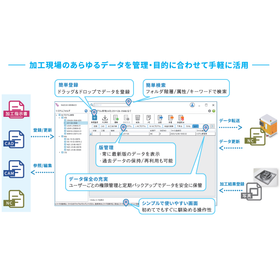
Do you have any of these concerns? - Unable to find necessary drawing data - Information sharing regarding drawing data is not safe and efficient - Want to implement a drawing management system but worried about costs - Approval of drawings requires a seal, making it difficult to accommodate remote work NAZCA5 EDM offers high-precision search, easy registration, notifications to responsible parties during drawing revisions, history management, and workflow features that are useful for practical work, contributing to improved operational efficiency and effective asset utilization. Achieve low costs while covering the necessary functions of a drawing management system! You can build a system tailored to your company with additional add-ons and customizations. It is available not only on-premises but also in the cloud! Please feel free to consult with us.
Added to bookmarks
Bookmarks listBookmark has been removed
Bookmarks listYou can't add any more bookmarks
By registering as a member, you can increase the number of bookmarks you can save and organize them with labels.
Free membership registration
\Carefully selected essential features reduce the burden of drawing tasks with outstanding operability and mobility/ NAZCA5 CAD is a CAD software that can be intuitively operated, making it safe for beginners to use. ■ Input/Output Functions - Input: DWG, DXF, IGES, NC programs, bitmap - Output: DXF, IGES (unlimited number of geometric elements for input/output) - Compatible with AutoCAD series (2D) standard CAD files ■ Drawing Functions Single-stroke drawing (trimming), automatic connection of tiny endpoints, merging of duplicate lines, font support, dimension drawing, etc. ■ Supports NC lathes in mirror mode By switching to lathe mode, coordinate values are displayed in ZX. Switching between upright/mirror is also possible. ■ Supports gear drawing By simply inputting parameters, involute gears can be created. *Equivalent to N6 grade (formerly JIS grade 2) Calculations for involute splines and involute serrations are also possible. *NAZCA5 CAD is the successor product to Nasca Pro CAD. <Trial> We offer a trial version that allows you to test all the features of the full product as many times as you like within the usage period! Please feel free to contact us.
Added to bookmarks
Bookmarks listBookmark has been removed
Bookmarks listYou can't add any more bookmarks
By registering as a member, you can increase the number of bookmarks you can save and organize them with labels.
Free membership registration
You can use all the features of hole processing, 2D, 2.5D, projection calculation, and processing instruction documents. ■ CAM Hole Processing Function - Excels in processing with a large number and variety of holes! The more you use it, the more convenient it becomes! - Hole information can be registered from CSV or existing patterns even without drawings! ■ CAM 2D Function - Enhances efficiency in 2D processing with a variety of operations! - Includes pocket processing, contour processing, text processing, chamfering, etc. - A rich variety of processing patterns is available! ■ CAM 2.5D Function - Easily create three-dimensional shapes based on 2D drawings! - Includes contour processing, kamaboko processing, rotational body processing, etc. - Equipped with convenient features such as the ability to add R/C without drawing in CAD! ■ CAM Projection Calculation Function - Deform shapes created with the 2.5D function to create complex shapes! - Includes projection escape, rotational transformation, cross-section projection, rotational surface projection, etc. ■ Processing Instruction Document - Outputs processing conditions and processing paths created in CAM in Excel format. *NAZCA5 CAM Mill is the successor product to Nazca Pro 2D/2.5D/hole processing. <Trial> We offer a trial version that allows you to try all the features of the full product as many times as you like within the usage period! Please feel free to contact us.
Added to bookmarks
Bookmarks listBookmark has been removed
Bookmarks listYou can't add any more bookmarks
By registering as a member, you can increase the number of bookmarks you can save and organize them with labels.
Free membership registration
\Outstanding operability and simple, easy-to-understand features strongly support data creation for NC lathes/ We provide numerous easy-to-understand illustrated screens, allowing for smooth operation without confusion, while also considering air cut measures and safety. ■ Air Cut Measures ・Material shape recognition ・Trajectory area avoidance ■ Safety and Security Measures ・Barrier interference prevention ・Interference prevention through two-stage escape ■ Compatible Machines ・Vertical/mirror switching available ・Supports coordinate axes for horizontal lathes, vertical lathes, and more ■ Abundant Processing Patterns ・Numerous processing patterns suitable for lathe machining ■ High-Precision Processing ・Separate allowance settings for X/Z ・Reduces unevenness on the machined surface ■ Simulation ・Displays not only the chip but the entire tool to check for interference in the axis parts ■ Register and Reuse Data ・Allows registration of arbitrary tool shapes ・Can be used according to the manufacturer of NC machine tools *NAZCA5 CAM Lathe is the successor product to the Nasca Pro Lathe. <Trial> We offer a trial version that allows you to test all the functions of the genuine product as many times as you like within the usage period! Please feel free to contact us.
Added to bookmarks
Bookmarks listBookmark has been removed
Bookmarks listYou can't add any more bookmarks
By registering as a member, you can increase the number of bookmarks you can save and organize them with labels.
Free membership registration
\You can easily make processing instructions unique to wire cutting, such as processing types and approach methods/ For processing patterns and approaches that are difficult to understand with text alone, you can select while checking illustrations, and in the approach condition editing screen, the illustrations change according to the selected pattern. ■Rich processing patterns - From reducing processing time to high-precision processing - Coreless processing - Selection of processing order - Abundant approach methods ■Edit processing trajectories - Corner deformation/taper processing - Insertion of NC programs - Angle calculations for simultaneous processing - Multiple workpiece handling ■Upper and lower different shapes In addition to creating complex shapes, processing with the same R on the upper and lower sides is also possible. ■A wealth of sample posts available Seibu Electric Industry Co., Ltd., Brother Industries, Ltd., Makino Milling Machine Co., Ltd., Fanuc Corporation, Mitsubishi Electric Corporation, and others. *NAZCA5 CAM Wire is a successor product to Nasca Pro Wire. <Trial> We offer a trial version that allows you to test all the features of the official product as many times as you like within the usage period! Please feel free to contact us.
Added to bookmarks
Bookmarks listBookmark has been removed
Bookmarks listYou can't add any more bookmarks
By registering as a member, you can increase the number of bookmarks you can save and organize them with labels.
Free membership registration
\Visualizing the trajectory of NC programs in 3D and line drawings/ NAZCA5 SIM Mill is a drawing and editing software for machining and milling. It allows for error verification and on-the-spot modifications of NC programs, reducing mistakes with its specialized checking functions. ■ Optimal as a guideline for setup You can check major items such as coolant ON/OFF and spindle rotation. It can be used as a guideline for setup by displaying processing time and cutting range. ■ Detects mistakes and interference errors in NC programs It detects grammatical errors and errors during non-rotating cutting of tools, notifying you with alarms. ■ Macro drawing function Displays local variables, common variables, and system variables during drawing. ■ Features for educational institutions You can confirm the drawing with each input, allowing for immediate understanding of how it operates and speeding up the comprehension of G-code. Help includes a G-code reference table. *NAZCA5 SIM Mill is the successor to Nazca Pro ETM View. <Trial> We offer a trial version that allows you to test all the functions of the official product as many times as you like within the usage period! Please feel free to contact us.
Added to bookmarks
Bookmarks listBookmark has been removed
Bookmarks listYou can't add any more bookmarks
By registering as a member, you can increase the number of bookmarks you can save and organize them with labels.
Free membership registration
\Strongly supports verification work for processing with various functions/ NAZCA5 SIM Lathe is a drawing and editing software for NC programs used in lathe processing. It not only allows you to draw processing trajectories but also enables checking NC data and displaying processing time. ■ Packed with features unique to NC program dedicated editors It includes IK/R conversion, sequence renumbering, decimal ON/OFF, GF modal, sign inversion, arithmetic conversion, and replacement, making it different from general editors like Notepad. Even old NC programs can be instantly transformed into an easily readable format. Edited data can be checked immediately with line drawing. ■ Check not only the trajectory but also setup guidelines It is convenient and reassuring as you can also check processing time, processing distance, coordinate values, rotation speed, and feed rate. ■ Realistic solid drawing It detects not only the shape but also interference from holders and chucks, significantly reducing processing errors. *NAZCA5 SIM Lathe is the successor product to Nazca drawing and editing (for lathes). <Trial> We offer a trial version that allows you to test all the features of the official product as many times as you like within the usage period! Please feel free to contact us.
Added to bookmarks
Bookmarks listBookmark has been removed
Bookmarks listYou can't add any more bookmarks
By registering as a member, you can increase the number of bookmarks you can save and organize them with labels.
Free membership registration
\With strict checking functions and realistic simulations, mistakes are immediately detected and corrected! Strongly supports efficiency improvement/ NAZCA5 SIM Wire is a drawing and editing software for NC programs used in wire electrical discharge machining. It not only allows you to draw machining trajectories but also check NC data and display machining time. ■ Optimal as a setup guideline for machining It displays current states such as coordinate values and G-code, making it easy to see changes when wiring or when the machining fluid is turned ON. ■ Supports taper and upper/lower irregular shapes Simulates taper shapes and upper/lower irregular shapes in a way that closely resembles actual machining. Mistakes can be checked in advance, allowing for safe machining. The direction of the taper, which can be difficult to understand with just the NC program, is clear at a glance. ■ Supported manufacturers Mitsubishi Electric Corporation / Fanuc Corporation / Makino Milling Machine Co., Ltd. / Seibu Electric Co., Ltd. / Sodick Co., Ltd. / Brother Industries, Ltd. *NAZCA5 SIM Wire is the successor product to Nazca Wire View. <Trial> We offer a trial version that allows you to test all the features of the full product as many times as you like within the usage period! Please feel free to contact us.
Added to bookmarks
Bookmarks listBookmark has been removed
Bookmarks listYou can't add any more bookmarks
By registering as a member, you can increase the number of bookmarks you can save and organize them with labels.
Free membership registration
\You can purchase additional licenses as needed to match the number of machines, minimizing costs/ ■Compatible with most major domestic manufacturers' machines ■Simultaneous communication with multiple machines possible with additional licenses ■Communication possible with machines away from the computer ・Supports not only RS232C but also LAN connections ・With LAN, communication is possible with machines far from the computer ■Supports remote commands ・Data can be retrieved from the machine to the computer ■Perfect for unmanned processing with the "Schedule Transmission Function" ・Continuous output of multiple files ・Stop settings for setup change processing are also possible ■DNC operation compatible ・Data that cannot fit in memory can also be transmitted (condition: DNC compatible machine) ■Subprogram expansion ・Unlimited depth of subprograms ・Expansion possible even if the main program and subprogram are in the same file ■Progress of communication displayed in graph form ・Operators can always check the communication status *NAZCA5 DNC is the successor product to Nasca Pro Multi Communication. <Trial> We offer a trial version that allows you to test all the features of the official product as many times as you like within the usage period! Please feel free to contact us.
Added to bookmarks
Bookmarks listBookmark has been removed
Bookmarks listYou can't add any more bookmarks
By registering as a member, you can increase the number of bookmarks you can save and organize them with labels.
Free membership registration
\Intuitive operability allows even CAM beginners to use it easily/ This software is user-friendly, low-cost, and offers excellent cost performance. It supports a wide range of machines, including laser cutters, gas cutters, plasma, and water jets. ■ CAD (Drawing) - Compatibility with CAD from other manufacturers - Text expansion - Pattern drawing ■ CAM (NC Program Creation) - Easily generate NC programs from CAD drawings - Output processing instructions - Auto-sequence - Processing simulation ■ Options - Automatic nesting module - G-Tracer [Simulation] - Duct expansion module - Sheet metal expansion module <Trial Version> We offer a trial version that allows you to try out the product's operations! Please feel free to contact us.
Added to bookmarks
Bookmarks listBookmark has been removed
Bookmarks listYou can't add any more bookmarks
By registering as a member, you can increase the number of bookmarks you can save and organize them with labels.
Free membership registration
The automatic nesting module is an option for the CAD/CAM "Naska SQ Laser" for laser processing machines. The automatic nesting module allows for real shape automatic nesting with parts-in-parts capability. By simply setting the parts to be processed and the sheet, it instantly arranges the parts on the material. It also places parts in holes while considering the area of the parts, thereby reducing waste of cut materials. ■ High-speed, high-yield automatic nesting By using parts-in-parts, it automatically places parts inside holes, achieving a high yield rate. This maximizes the use of materials. ■ Additional nesting Additional nesting is performed on scrap areas. Parts can be added without moving the original nesting results. ■ Grammar check It checks for invalid codes within the NC code. This helps avoid mistakes in the NC program in advance and improves work efficiency. <Trial version> We offer a trial version that allows you to test the operation of the product! Please feel free to contact us.
Added to bookmarks
Bookmarks listBookmark has been removed
Bookmarks listYou can't add any more bookmarks
By registering as a member, you can increase the number of bookmarks you can save and organize them with labels.
Free membership registration
The duct unfolding module is an option for the CAD/CAM "Nasca SQ Laser" for laser processing machines. It allows tasks that previously required complex calculations by designers and on-site personnel to be easily accomplished. After launching the command, you can simply input the necessary parameters to create the unfolding shape, making it easy for beginners to operate. ■ Input of unfolding parameters By sequentially entering values according to the sample diagram, the unfolding shape is instantly created and transferred to CAD. ■ 37 types of unfolding shapes The standard unfolding shapes consist of 37 patterns. The unfolded shapes can be processed into NC codes for machining with minimal operation using the cutting CAM software Laser Module. Cylinders: 5 patterns Cones: 11 patterns Pyramids: 7 patterns Cylindrical intersections: 11 patterns Screws: 3 patterns <Trial version> We offer a trial version that allows you to test the operation of the product! Please feel free to contact us.
Added to bookmarks
Bookmarks listBookmark has been removed
Bookmarks listYou can't add any more bookmarks
By registering as a member, you can increase the number of bookmarks you can save and organize them with labels.
Free membership registration
The sheet metal unfolding module is an option for the CAD/CAM "Nasca SQ Laser" for laser processing machines. It automatically adjusts troublesome elongation calculations, making it easy to create unfolding drawings. Elongation values can be registered for each material and plate thickness. By registering the values used on-site, you can leverage the know-how from the field. ■ Creation of Unfolding Drawings Flat and side views created in advance with CAD are combined using the surface synthesis command. By simply specifying the surfaces to be combined with the mouse, surface synthesis is performed automatically. Additionally, the surface extraction command creates extraction surfaces by specifying parts of the shape by a given value. In both cases, unfolding drawings are created while automatically adjusting the pre-set elongation values. ■ Bending List You can create a list of bending information such as valley/peak bends, inner radius values, bending angles, elongation values, and bend line lengths. <Trial Version> We offer a trial version that allows you to test the product's operation! Please feel free to contact us.
Added to bookmarks
Bookmarks listBookmark has been removed
Bookmarks listYou can't add any more bookmarks
By registering as a member, you can increase the number of bookmarks you can save and organize them with labels.
Free membership registration
\NC Program Data Bank for Manufacturing Sites/ Ranta is an NC program input/output device that connects to NC machine tools via RS232C, enabling high-speed DNC operation of NC programs and input/output of NC control machine memory. It can be used safely and securely even in demanding work environments, thanks to its high durability and functionality. ■ Compatible with USB memory - Works even without a network environment at the site ■ FTP server/file sharing function - Standardly equipped with FTP server and file sharing functions - Models compatible with SMB 2.0 available ■ Supports subprogram loading - Supports hierarchical calls of subprograms ■ Equipped with a semiconductor disk that retains data even when powered off - High durability against vibration, heat, and electrical noise - Enables safe input/output of NC programs even in harsh working conditions ■ Scheduled operation function ■ Email sending function - Capable of sending emails at the start of data transmission, upon completion, or when interrupted - Allows you to understand the status of the NC machine tool even from a distance, enabling efficient work progress If you have any questions, please feel free to contact us.
Added to bookmarks
Bookmarks listBookmark has been removed
Bookmarks listYou can't add any more bookmarks
By registering as a member, you can increase the number of bookmarks you can save and organize them with labels.
Free membership registration
\An easy-to-use app for sending and receiving NC programs/ Nazca Neo Verio LT-Com allows you to send, receive, and edit NC programs using just a tablet. You can import NC programs to the tablet via Wi-Fi or USB, and connect it to NC machine tools with a cable for sending and receiving. ■ Edit and send/receive NC programs with this one app - Save communication settings for each NC machine - Simple editing of NC programs - Easily import and export programs from the company server ■ Easy operation like a smartphone! But the features are impressive - Equipped with a dedicated G-code keyboard, making it easy to edit G-codes and values for X, Y, and Z. - Compatible with various NC machine tools that support RS232C communication, regardless of manufacturer or model year. *Note: DNC operation is not supported. It can be used as memory operation. <Trial> If within the usage period, a trial version is available that allows you to test all the features of the official product! Feel free to contact us.
Added to bookmarks
Bookmarks listBookmark has been removed
Bookmarks listYou can't add any more bookmarks
By registering as a member, you can increase the number of bookmarks you can save and organize them with labels.
Free membership registration
\No CAD drawings needed, just input the coordinates and calculations are done quickly/ It can be used in any machining environment without being limited to specific machine tools! The functions include a wide range such as function calculations, coordinate calculations, machining condition calculations, wire processing functions, sheet metal processing functions, threading calculations, and nose R correction. 【Common Functions】 <1. Function Calculation> Only two items need to be input, and the rest is calculated automatically. <2. Coordinate Calculation> Intersection points, pin angles, tangents, circumscribed circles, corner R, unknown radius circles, etc. <3. Conversion, Geodetic Drawing, Shape Division> Angle conversion, length conversion, coordinate conversion, distance measurement of line segments, etc. 【Milling Functions】 Supports milling, machining, NC routers, wire, and laser. In "Contour NC Program Creation," simply input the endpoint coordinates, and an NC program with tool diameter correction is automatically generated. 【Lathe Functions】 Lathes, multi-tasking lathes, automatic lathes. In "Contour NC Program Creation," simply input the endpoint coordinates, and an NC program with nose R correction is automatically generated. \Please feel free to contact us if you have any inquiries regarding our products/
Added to bookmarks
Bookmarks listBookmark has been removed
Bookmarks listYou can't add any more bookmarks
By registering as a member, you can increase the number of bookmarks you can save and organize them with labels.
Free membership registration
Nazca Pro 3D View & Connect allows you to recognize feature information and easily set processing conditions on a 3D model. Additionally, with the CAM linkage function, you can directly transfer processing information from the 3D model to the 2D CAM software "NAZCA5 CAM Mill" for machining/milling, making NC program creation smooth. ■ Main Features - 3D data loading function - Cross-section confirmation function - Simple measurement function - Property display - Printing function - Copy function - NAZCA5 CAM Mill integration ■ CAD Linkage Functions - Front view/three-view - Arc approximation ■ CAM Integration Functions - NC program output - Automatic recognition of open pockets - Editing functions ■ Convenient Features - Utilizing Feature and Processing Information - Confirmation of processing steps and feature information - Work information settings <Trial Version> We offer a trial version that allows you to test features equivalent to the full version within the usage period or number of uses! Please feel free to contact us.
Added to bookmarks
Bookmarks listBookmark has been removed
Bookmarks listYou can't add any more bookmarks
By registering as a member, you can increase the number of bookmarks you can save and organize them with labels.
Free membership registration
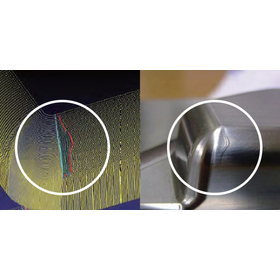
The path scope helps in identifying the causes of defects on the machined surface. It enables early resolution of machining issues and prevention of recurrence! A new concept CAE software for machining processes. It addresses concerns such as recurring similar scratches on the machined surface without a clear cause and the lack of time to identify the source of defects. ■ Defect Analysis Features - Backlash analysis - Cross-sectional line and scanning line analysis - Curvature radius analysis - Contour line analysis - Tolerance error analysis - Detailed trajectory information display ■ Editing Features - Simultaneous replacement function for up to 128 pairs - Calculation transformation - Other transformation functions (angle rotation, G90/91 conversion, sign inversion, etc.) <Trial Version> We offer a trial version that allows you to test the product's operation! Please feel free to contact us.
Added to bookmarks
Bookmarks listBookmark has been removed
Bookmarks listYou can't add any more bookmarks
By registering as a member, you can increase the number of bookmarks you can save and organize them with labels.
Free membership registration
You can download a catalog that compiles the product lineup of Gordo Solutions from Ipros. It features many tools that enable a smarter work environment and effective management! The catalog clearly shows software that matches your processing machines, so please take a look.
Added to bookmarks
Bookmarks listBookmark has been removed
Bookmarks listYou can't add any more bookmarks
By registering as a member, you can increase the number of bookmarks you can save and organize them with labels.
Free membership registration
\Equipped with diverse CAD data conversion and defect correction features/ spGate supports all standard formats of 3D CAD data. Since all necessary formats are included, there are no additional costs. It is a cost-effective data conversion tool. ■ 3D Multi-Data Translator ■ PDQ Verification Function ■ Correction (Healing) Function
Added to bookmarks
Bookmarks listBookmark has been removed
Bookmarks listYou can't add any more bookmarks
By registering as a member, you can increase the number of bookmarks you can save and organize them with labels.
Free membership registration
\G-Tracer is an option for the CAD/CAM "Naska SQ Laser" for laser processing machines/ Not only can it simulate NC programs from numerous processing machine manufacturers accurately and quickly, but it also allows for editing of NC programs using search and replace functions within G-Tracer. ■Trace You can simulate the processing path while referring to the created NC program. The trace speed can be selected from three levels: low, medium, and high, and breakpoints can be set. You can stop the trace at any desired position. ■Instruction Reference Function You can open an instruction manual (created with the same file name as the NC program, output in PDF or XPS format using our CAD/CAM) with the push of a button. ■Grammar Check It checks for grammatical errors within the NC program. This helps avoid mistakes in the NC program in advance and improves work efficiency. <Trial Version> We offer a trial version that allows you to test the product's operation! Please feel free to contact us.
Added to bookmarks
Bookmarks listBookmark has been removed
Bookmarks listYou can't add any more bookmarks
By registering as a member, you can increase the number of bookmarks you can save and organize them with labels.
Free membership registration
■Directly reflect the designer's inspiration in the drawings After clicking on the shape you want to edit, you can directly edit the size, line type, and line color in the shape properties, as well as move or copy it directly. This eliminates the need to select shape editing commands, reducing drawing time. ■Remember frequently used commands for prioritized display The software learns frequently used commands and automatically displays a history of high-frequency commands. Since commonly used commands are always shown at the top, command selection becomes smoother. ■Mechanical Kit for ZUNO RAPID (optional) An optional kit optimized for mechanical drafting is also available. Data created in ZUNO RAPIDPRO can be imported into NAZCA5 CAD! (Output in Nazca format) <Trial Version> We offer a trial version where you can test the product's operations! Please feel free to contact us.
Added to bookmarks
Bookmarks listBookmark has been removed
Bookmarks listYou can't add any more bookmarks
By registering as a member, you can increase the number of bookmarks you can save and organize them with labels.
Free membership registration
Nazca Neo Linka is an IoT system developed for the manufacturing industry with the concept of "factory management." It connects with various production equipment, including machine tools and PLCs. It can centrally manage operational data obtained from multiple devices of different manufacturers and models. Additionally, it supports data acquisition from various sensing devices such as RFID and barcodes. With a simple system configuration and scalability, it can flexibly accommodate the addition of equipment. Please feel free to consult us about integration with existing production management systems. ■ Capable of obtaining not only operation and stop information but also detailed information such as alarm data and program numbers ■ Centrally manages complex information such as personnel and working hours along with equipment information ■ Allows real-time confirmation from PCs and smartphones using a web browser ■ Specializes in NC machine tools, capable of input/output operations and management of NC programs ■ Can be integrated with Cybozu's cloud service "kintone" ■ Also supports data integration with Excel *You can view case studies from the PDF download button. (For more details, please refer to the downloaded materials.) Feel free to contact us with any inquiries.
Added to bookmarks
Bookmarks listBookmark has been removed
Bookmarks listYou can't add any more bookmarks
By registering as a member, you can increase the number of bookmarks you can save and organize them with labels.
Free membership registration
Nazca Neo Linka is a visualization system for factories that enables remote operation monitoring of production equipment, as well as performance aggregation and analysis. [Nazca Neo Linka Case Study: Totsuka Co., Ltd.] At Totsuka, the site was unable to grasp the overall order status of the factory, and the president had to check the progress of each process with the respective personnel. To visualize the overall order status and the progress of each process, they decided to implement IoT. The introduction of Nazca Neo Linka solved the issues! - When order details are registered, that information is displayed as a list in the planning table. - Tablets were distributed to the personnel, allowing them to input their working hours and output. - The order status, delivery dates, and progress can now be shared in real-time. - There is no longer a need to create work instructions on paper. *For more details, please refer to the PDF document or feel free to contact us.
Added to bookmarks
Bookmarks listBookmark has been removed
Bookmarks listYou can't add any more bookmarks
By registering as a member, you can increase the number of bookmarks you can save and organize them with labels.
Free membership registration
Nazca Neo Linka is a visualization system for factories that enables remote operation monitoring of production equipment and performance aggregation and analysis. It allows for communication operation and data management of NC programs for connected machine tools. [Nazca Neo Linka Case Study: Daiya Seiki Co., Ltd.] Daiya Seiki operates a production style that handles small quantities of a wide variety of products, accepting orders from just one piece. The challenge for improving productivity was how to shorten setup time. The introduction of Nazca Neo Linka solved this! - NC programs created on a computer can now be saved directly to the company's file server and sent directly to NC machine tools. - An internal operation was established to ensure that "programs created must be stored." - Programs created in the past can now be reused, significantly reducing creation time. - Technical interns from overseas can use it smoothly with simple lectures. *For more details, please refer to the PDF materials or feel free to contact us.
Added to bookmarks
Bookmarks listBookmark has been removed
Bookmarks listYou can't add any more bookmarks
By registering as a member, you can increase the number of bookmarks you can save and organize them with labels.
Free membership registration
Nazca Neo Linka is a factory visualization system that enables remote operation monitoring of production equipment, as well as performance aggregation and analysis. It allows for remote confirmation and modification of parameter values for connected machine tools. [Nazca Neo Linka Case Study: Atsumihamakita Co., Ltd.] At Atsumihamakita, the line using robots is surrounded by safety fences. When changing settings or checking values on the machining center, the robot had to be stopped, and then the operator would enter the safety fence to operate the control panel. The introduction of Nazca Neo Linka solved these issues! - It became possible to remotely change tool correction values from a single smartphone. - Work can now be done remotely without stopping the line, resulting in an increase in output of over 5%. - The operation screen is mostly selection-based, reducing the likelihood of input errors. - It is now possible to check the tool life counter anytime on a smartphone. - Information from multiple machines can be consolidated and checked at any time, significantly reducing the workload. *For more details, please refer to the PDF document or feel free to contact us.
Added to bookmarks
Bookmarks listBookmark has been removed
Bookmarks listYou can't add any more bookmarks
By registering as a member, you can increase the number of bookmarks you can save and organize them with labels.
Free membership registration