iPROS Manufacturing
  • Search for products by classification category

    • Electronic Components and Modules
      Electronic Components and Modules
      58945items
    • Machinery Parts
      Machinery Parts
      74226items
    • Manufacturing and processing machinery
      Manufacturing and processing machinery
      98854items
    • Scientific and Physics Equipment
      Scientific and Physics Equipment
      34156items
    • Materials
      Materials
      36675items
    • Measurement and Analysis
      Measurement and Analysis
      54310items
    • Image Processing
      Image Processing
      14956items
    • Control and Electrical Equipment
      Control and Electrical Equipment
      52490items
    • Tools, consumables, and supplies
      Tools, consumables, and supplies
      64148items
    • Design and production support
      Design and production support
      12312items
    • IT/Network
      IT/Network
      43029items
    • Office
      Office
      13660items
    • Business support services
      Business support services
      33069items
    • Seminars and Skill Development
      Seminars and Skill Development
      6077items
    • Pharmaceutical and food related
      Pharmaceutical and food related
      28431items
    • others
      72711items
  • Search for companies by industry

    • Manufacturing and processing contract
      7344
    • others
      5008
    • Industrial Machinery
      4419
    • Machine elements and parts
      3280
    • Other manufacturing
      2884
    • IT/Telecommunications
      2548
    • Trading company/Wholesale
      2470
    • Industrial Electrical Equipment
      2300
    • Building materials, supplies and fixtures
      1813
    • software
      1637
    • Electronic Components and Semiconductors
      1563
    • Resin/Plastic
      1488
    • Service Industry
      1440
    • Testing, Analysis and Measurement
      1129
    • Ferrous/Non-ferrous metals
      985
    • environment
      702
    • Chemical
      630
    • Automobiles and Transportation Equipment
      560
    • Printing Industry
      509
    • Information and Communications
      452
    • Consumer Electronics
      416
    • Energy
      325
    • Rubber products
      313
    • Food Machinery
      305
    • Optical Instruments
      279
    • robot
      270
    • fiber
      250
    • Paper and pulp
      233
    • Electricity, Gas and Water Industry
      169
    • Pharmaceuticals and Biotechnology
      167
    • Warehousing and transport related industries
      146
    • Glass and clay products
      141
    • Food and Beverage
      129
    • CAD/CAM
      124
    • retail
      109
    • Educational and Research Institutions
      105
    • Medical Devices
      102
    • Ceramics
      97
    • wood
      89
    • Transportation
      83
    • Medical and Welfare
      63
    • Petroleum and coal products
      62
    • Shipbuilding and heavy machinery
      52
    • Aviation & Aerospace
      47
    • Fisheries, Agriculture and Forestry
      41
    • equipment
      30
    • Public interest/special/independent administrative agency
      29
    • self-employed
      24
    • Research and development equipment and devices
      23
    • Government
      21
    • Materials
      21
    • Mining
      17
    • Finance, securities and insurance
      13
    • Individual
      10
    • cosmetics
      10
    • Restaurants and accommodations
      9
    • Police, Fire Department, Self-Defense Forces
      7
    • Raw materials for reagents and chemicals
      3
    • Laboratory Equipment and Consumables
      3
    • Contracted research
      3
  • Special Features
  • Ranking

    • Overall Products Ranking
    • Overall Company Ranking
Search for Products
  • Search for products by classification category

  • Electronic Components and Modules
  • Machinery Parts
  • Manufacturing and processing machinery
  • Scientific and Physics Equipment
  • Materials
  • Measurement and Analysis
  • Image Processing
  • Control and Electrical Equipment
  • Tools, consumables, and supplies
  • Design and production support
  • IT/Network
  • Office
  • Business support services
  • Seminars and Skill Development
  • Pharmaceutical and food related
  • others
Search for Companies
  • Search for companies by industry

  • Manufacturing and processing contract
  • others
  • Industrial Machinery
  • Machine elements and parts
  • Other manufacturing
  • IT/Telecommunications
  • Trading company/Wholesale
  • Industrial Electrical Equipment
  • Building materials, supplies and fixtures
  • software
  • Electronic Components and Semiconductors
  • Resin/Plastic
  • Service Industry
  • Testing, Analysis and Measurement
  • Ferrous/Non-ferrous metals
  • environment
  • Chemical
  • Automobiles and Transportation Equipment
  • Printing Industry
  • Information and Communications
  • Consumer Electronics
  • Energy
  • Rubber products
  • Food Machinery
  • Optical Instruments
  • robot
  • fiber
  • Paper and pulp
  • Electricity, Gas and Water Industry
  • Pharmaceuticals and Biotechnology
  • Warehousing and transport related industries
  • Glass and clay products
  • Food and Beverage
  • CAD/CAM
  • retail
  • Educational and Research Institutions
  • Medical Devices
  • Ceramics
  • wood
  • Transportation
  • Medical and Welfare
  • Petroleum and coal products
  • Shipbuilding and heavy machinery
  • Aviation & Aerospace
  • Fisheries, Agriculture and Forestry
  • equipment
  • Public interest/special/independent administrative agency
  • self-employed
  • Research and development equipment and devices
  • Government
  • Materials
  • Mining
  • Finance, securities and insurance
  • Individual
  • cosmetics
  • Restaurants and accommodations
  • Police, Fire Department, Self-Defense Forces
  • Raw materials for reagents and chemicals
  • Laboratory Equipment and Consumables
  • Contracted research
Special Features
Ranking
  • Overall Products Ranking
  • Overall Company Ranking
  • privacy policy
  • terms of service
  • About Us
  • Careers
  • Advertising
  1. Home
  2. Consumer Electronics
  3. EIZO
  4. Product/Service List
Consumer Electronics
  • Added to bookmarks

    Bookmarks list

    Bookmark has been removed

    Bookmarks list

    You can't add any more bookmarks

    By registering as a member, you can increase the number of bookmarks you can save and organize them with labels.

    Free membership registration

EIZO

EstablishmentMarch 6, 1968
capital442574Ten thousand
number of employees1031
addressIshikawa/Hakusan-shi/153 Bayocho
phone03-5764-3401
  • Special site
  • Official site
last updated:Dec 12, 2025
EIZOlogo
  • Contact this company

    Inquiry Form
  • Company information
  • Products/Services(130)
  • catalog(35)
  • news(86)

EIZO Product Lineup

  • category

1~31 item / All 31 items

Displayed results

Filter by category

Security solutions Security solutions
Image enhancement solution Image enhancement solution
Touch panel monitor Touch panel monitor
Small monitor Small monitor
Railway solutions Railway solutions
Solutions for vessels Solutions for vessels
Office monitor Office monitor
Other materials Other materials
Office

Office monitor

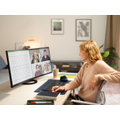
Introducing our FlexScan series of monitors for office use. With a frameless, sophisticated design, they are easy on the eyes and energy-efficient. They are also perfect for telecommuting.

Office stress? EIZO monitors solve it all!

Transform meetings into ultra-short sessions! True work style reform begins with EIZO monitors.

This document introduces a true work style reform that begins with EIZO monitors. Office stress such as "the atmosphere is too dark and quiet," "I can't make progress on documents with my laptop," and "meetings are sluggish" can all be resolved with EIZO monitors. Please take a moment to read it. 【Contents】 ■ The office atmosphere is too dark and quiet  → Brighten and energize the office with white monitors ■ I can't make progress on documents with my laptop  → Double your work speed with a laptop + monitor?! ■ Meetings are sluggish  → Make meetings super efficient ● For more details, please download the PDF document or feel free to contact us.

Added to bookmarks

Bookmarks list

Bookmark has been removed

Bookmarks list

You can't add any more bookmarks

By registering as a member, you can increase the number of bookmarks you can save and organize them with labels.

Free membership registration

Reduce eye strain from PC work! [Essential monitor tips for office workers]

Investigating the relationship between PC work environments and eye fatigue! Introducing monitor usage techniques. You can significantly reduce eye strain by choosing and using your monitor wisely.

This document presents the results of a study conducted by EIZO, under the supervision of ophthalmologists and VDT (Visual Display Terminal) occupational health education instructors, regarding the relationship between PC work environments and eye fatigue. Based on these results, we provide a wealth of "monitor usage techniques" that help reduce the occurrence of eye strain. Additionally, we introduce unique features of EIZO monitors, such as "brightness can be reduced to about 1 cd/m2" and "glare is less noticeable," so please take a moment to read through it. [Contents] ■ Results of eye strain countermeasures ■ Implementation of eye strain countermeasures ■ Monitor usage techniques ● For more details, please download the PDF document or feel free to contact us.

Added to bookmarks

Bookmarks list

Bookmark has been removed

Bookmarks list

You can't add any more bookmarks

By registering as a member, you can increase the number of bookmarks you can save and organize them with labels.

Free membership registration

Ultra-wide curved monitor 'FlexScan EV3895'

【For Business】Can display information equivalent to about 3 monitors! The curved design envelops your field of vision, making it easier to concentrate, and it can be used seamlessly on one surface!

"Now, let's bend common sense." The "Flex Scan EV3895" is a 37.5-inch UWQHD+ (3840×1600) ultra-wide curved LCD monitor. You can freely arrange necessary windows without overlapping, such as placing applications in operation alongside comparison data. Compared to using multiple monitors, there are no bezels between the monitors, allowing for smooth eye movement even with wide information displayed horizontally. It excels in visibility, eliminating the need for complicated window operations, which leads to increased work efficiency. ● For more details, please download the PDF document or feel free to contact us.

Added to bookmarks

Bookmarks list

Bookmark has been removed

Bookmarks list

You can't add any more bookmarks

By registering as a member, you can increase the number of bookmarks you can save and organize them with labels.

Free membership registration

EIZO LCD Monitor 'FlexScan EV2460'

"Energy saving, space saving, labor saving" Achieve a clean and bright workplace environment!

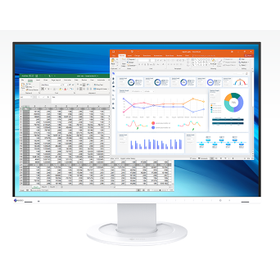
The "FlexScan EV2460" is a 23.8-inch Full HD LCD monitor. <Energy Saving> - Automatically adjusts brightness, gentle on both the eyes and the environment - Designed with consideration for the environment, compliant with major domestic and international environmental standards <Space Saving> - Space-saving design (width 537 mm) with a wide working area - Doubles the working area when connected to a laptop <Work Efficiency> - Adjusts to the optimal screen position for each individual - Frameless and white design brightens and declutters the office - Offers applications to enhance office work efficiency ■Screen InStyle■ - Automatically switches display modes (Paper mode, Movie mode, sRGB mode) for each application (document creation, video viewing, photo editing) - Quickly switches input signals with a hotkey ● For more details, please refer to the PDF document or feel free to contact us.

Added to bookmarks

Bookmarks list

Bookmark has been removed

Bookmarks list

You can't add any more bookmarks

By registering as a member, you can increase the number of bookmarks you can save and organize them with labels.

Free membership registration

EIZO LCD Monitor 'FlexScan EV2360'

EIZO's frameless monitor smallest model! Spacious desk, spacious workspace.

The "FlexScan EV2360" is a 22.5-inch WUXGA (1920×1200) resolution LCD monitor. It is the smallest among EIZO's frameless monitors. It takes up little space, allowing for a spacious desk! ...It can be easily installed not only on standard office desks but also on compact height-adjustable desks. The resolution is WUXGA, which is 11% wider vertically than Full HD (1920×1080). ...You can view tall documents at a glance, reducing the hassle of frequent scrolling and improving work efficiency. 【Convenient applications for office work are also available】 ■Screen InStyle■ 〇 Automatically switches display modes (Paper mode, Movie mode, sRGB mode) for each application (document creation, video viewing, photo editing) 〇 Quickly switch input signals with hotkeys ■Screen Instyle Server■ 〇 Efficient asset management of monitors 〇 Easily set up multiple monitors at once without hassle ● For more details, please refer to the PDF document or feel free to contact us.

Added to bookmarks

Bookmarks list

Bookmark has been removed

Bookmarks list

You can't add any more bookmarks

By registering as a member, you can increase the number of bookmarks you can save and organize them with labels.

Free membership registration

EIZO LCD Monitor 'FlexScan EV2456'

24.1-inch frameless full flat with four sides, combining functionality and beauty.

The "FlexScan EV2456" is a 24.1-inch frameless monitor from EIZO. ★Awarded the Good Design Award 2016★ It was recognized for its careful design considerations. (Excerpt from the evaluation below) - A bezel reduced to the extreme - A boldly miniaturized simple stand compared to previous models - A display height adjustment feature that expands the vertical movement range to accommodate user posture - A function that adjusts brightness according to ambient light to reduce eye strain 【Convenient applications for office work】 ■Screen InStyle■ 〇 Automatic switching of display modes (Paper mode, Movie mode, sRGB mode) for each application (document creation, video viewing, photo editing) 〇 Quick switching of input signals with hotkeys ■Screen Instyle Server■ 〇 Efficient asset management of monitors 〇 Easy bulk settings for multiple monitors ● For more details, please refer to the PDF document or feel free to contact us.

Added to bookmarks

Bookmarks list

Bookmark has been removed

Bookmarks list

You can't add any more bookmarks

By registering as a member, you can increase the number of bookmarks you can save and organize them with labels.

Free membership registration

LCD monitor 'S1934'

Introducing a 19-inch monitor with enhanced power-saving features and a wide viewing angle that reduces eye strain!

The S1934 is an LCD monitor equipped with the Auto EcoView feature, which automatically adjusts the screen brightness to a comfortable level based on the surrounding light conditions. It uses an IPS panel that minimizes changes in color and contrast even when viewed from an angle. Additionally, the anti-glare treatment on the screen surface diffuses reflected light, reducing visibility issues and eye strain caused by glare. 【Features】 ■ Reduces eye strain ■ Up to 3 input sources including DisplayPort ■ Vivid colors across the entire IPS panel ■ Blue light reduction ■ Full-color display with 16.77 million colors using 10bit LUT *For more details, please refer to the PDF document or feel free to contact us.

Added to bookmarks

Bookmarks list

Bookmark has been removed

Bookmarks list

You can't add any more bookmarks

By registering as a member, you can increase the number of bookmarks you can save and organize them with labels.

Free membership registration

Software "Screen InStyle"

It enables asset management and bulk configuration of monitors and PCs, significantly reducing the workload for equipment managers.

"Screen InStyle" is a free software designed to make using FlexScan monitors more comfortable. Instead of operating each multi-monitor individually, you can control them all at once. When you turn the power on or off for one monitor or adjust the screen brightness, the other monitors will also respond, saving you the hassle of operating each monitor separately. 【Features】 ■ Easy setting changes without hassle ■ Further reduces eye strain ■ Centralized management of monitors ■ Simple color adjustments on the screen ■ Carry your preferred display settings and have them automatically applied upon connection *For more details, please refer to the PDF document or feel free to contact us.

Added to bookmarks

Bookmarks list

Bookmark has been removed

Bookmarks list

You can't add any more bookmarks

By registering as a member, you can increase the number of bookmarks you can save and organize them with labels.

Free membership registration

Software "Screen InStyle Server"

Significant reduction in the workload for device administrators! Strengthening security during times of absence that are often overlooked.

"Screen InStyle Server" is a free software that is convenient for equipment managers managing a large number of monitors. Through the network, it allows for asset management and bulk configuration of monitors, significantly reducing management effort. Additionally, it is possible to export and import information about monitors and PCs in Excel format. Transferring information to asset management software from other companies that you are currently using is also easy. 【Features】 ■ Automatically acquire equipment information for monitors and PCs ■ Easily configure multiple monitors in bulk ■ For large-scale deployments, configure optimal monitor settings remotely in bulk (Supported from Ver.1.1.0) ■ Centralized management for overall energy saving within the company ■ Strengthen security during absences, which is often overlooked *For more details, please refer to the PDF document or feel free to contact us.

Added to bookmarks

Bookmarks list

Bookmark has been removed

Bookmarks list

You can't add any more bookmarks

By registering as a member, you can increase the number of bookmarks you can save and organize them with labels.

Free membership registration

LCD Monitor "FlexScan EV2795"

Get Connected. Get Started. Equipped with USB Type-C input/output ports, supports daisy chaining and LAN.

"One cable, instant focus mode." With the introduction of EIZO's 27-inch LCD monitor "FlexScan 2795," you can eliminate the need for complicated cable wiring, transforming your work environment! By simply connecting the EV2795 to your laptop with a single USB Type-C cable, you can achieve multi-monitor setup, power supply to your laptop, audio playback, wired LAN, and USB hub functionality. When you return to your desk from a company meeting or outing, you can start comfortable PC work immediately by connecting just one cable from your laptop. Why not enhance your workspace with the EV2795? ● For more details, please download the PDF document or feel free to contact us.

Added to bookmarks

Bookmarks list

Bookmark has been removed

Bookmarks list

You can't add any more bookmarks

By registering as a member, you can increase the number of bookmarks you can save and organize them with labels.

Free membership registration

LCD Monitor "FlexScan EV2495"

"Get Connected. Get Started." Equipped with USB Type-C input/output ports, supports daisy chaining and LAN.

"One cable, instant focus mode." With the introduction of EIZO's 24-inch LCD monitor "FlexScan 2495," you can eliminate the need for complicated cable wiring, completely transforming your work environment! By simply connecting the EV2495 to your laptop with a single USB Type-C cable, you can achieve multi-monitor setup, power delivery to your laptop, audio playback, wired LAN, and USB hub functionality. When you return to your desk from an internal meeting or outing, you can start comfortable PC work immediately by connecting just one cable from your laptop. Why not introduce the EV2495 and achieve a tidy workspace? ● For more details, please download the PDF document or feel free to contact us.

Added to bookmarks

Bookmarks list

Bookmark has been removed

Bookmarks list

You can't add any more bookmarks

By registering as a member, you can increase the number of bookmarks you can save and organize them with labels.

Free membership registration

【Basic Knowledge】Three Reasons Why EIZO is Chosen for Telework

Easy multitasking! With a "laptop + monitor," remote work becomes more comfortable!

Due to changes in social conditions, work styles have diversified, and the adoption of telework is increasing. In this context, there are also voices expressing that efficiency has decreased while working from home. In fact, one of the reasons is working on a small display of a laptop. With "laptop + monitor," telework can become much more comfortable. In this article, we will introduce three reasons why EIZO is chosen for monitors. Please take a moment to read it. [Content] ■ Three reasons why EIZO is chosen for telework *For more details, you can view them through the related links. Please feel free to contact us for more information.

Added to bookmarks

Bookmarks list

Bookmark has been removed

Bookmarks list

You can't add any more bookmarks

By registering as a member, you can increase the number of bookmarks you can save and organize them with labels.

Free membership registration

[Basic Knowledge] True Work Style Reform Begins with EIZO Monitors

You don't need to worry about connecting or setting up the monitor. In addition to the instruction manual, there is also plenty of explanatory content available.

Are you experiencing issues such as "the office atmosphere is too dark and quiet," "I can't make progress on documents with my laptop," or "meetings are dragging on"? In this article, we will introduce EIZO monitors, including our "product lineup," "case studies," and "compatibility with laptops." Feel free to consult us about choosing monitor sizes and resolutions, as well as combinations with laptops. 【Contents】 ■ Product Lineup ■ Case Studies ■ Compatibility with Laptops *For more details, you can view them through the related links. Please feel free to contact us for more information.

Added to bookmarks

Bookmarks list

Bookmark has been removed

Bookmarks list

You can't add any more bookmarks

By registering as a member, you can increase the number of bookmarks you can save and organize them with labels.

Free membership registration

[Basic Knowledge] Why do eyes get tired from using a PC? A thorough investigation of the causes of eye fatigue.

Hybrid type with DC dimming + PWM dimming! Achieved flicker-free operation regardless of application or environment.

"Eye strain from PC work" is inevitable, as you are staring at the screen up close for long periods of time, so naturally, the level of fatigue is greater than that from watching television. So, is there a way to alleviate this fatigue? Our company has pursued the "ideal monitor" for a comfortable PC life and has examined the causes of eye strain. [Contents (partial)] ■Verification 1: LED backlight ■Verification 2: Bright screen ■Verification 3: Blue light *For detailed information, please refer to the related links. Feel free to contact us for more information.

Added to bookmarks

Bookmarks list

Bookmark has been removed

Bookmarks list

You can't add any more bookmarks

By registering as a member, you can increase the number of bookmarks you can save and organize them with labels.

Free membership registration

[Basic Knowledge] A Thorough Explanation of HiDPI Basics and Settings

To display in high definition as expected, it is necessary to correctly understand DPI Awareness.

"Considering the purchase of a high pixel density (HiDPI) monitor to enjoy high-resolution and smooth displays," but did you know that even with a HiDPI monitor, there can be cases where it appears blurry depending on the combination with a laptop and the applications used? In this article, we will explain the key points to know for achieving HiDPI display with the popular combination of "laptop + external HiDPI monitor (EV2785)." Please take a moment to read it. [Contents] ■ Blurry text despite being a HiDPI monitor ■ What is DPI Awareness? ■ DPI Awareness compatibility chart by application ■ Useful links ■ Recommended models *You can view detailed content through the related links. For more information, please feel free to contact us.

Added to bookmarks

Bookmarks list

Bookmark has been removed

Bookmarks list

You can't add any more bookmarks

By registering as a member, you can increase the number of bookmarks you can save and organize them with labels.

Free membership registration

【Basic Knowledge】Recommended Resolution and Pixel Pitch for Monitors

For those using a monitor! Introducing the differences in "pixel pitch" and "images when enlarged"!

What do the monitor's "recommended resolution" and "pixel pitch" refer to? In this article, we will explain how each of these relates to the appearance of the monitor, with examples. Please take a moment to read it. [Contents] ■ Displaying a 1280×1024 image on a monitor with a recommended resolution of 1920×1200 ■ How to set the monitor resolution ■ Differences in pixel pitch (image) ■ Image when enlarged *For more details, you can view them through the related links. Please feel free to contact us for more information.

Added to bookmarks

Bookmarks list

Bookmark has been removed

Bookmarks list

You can't add any more bookmarks

By registering as a member, you can increase the number of bookmarks you can save and organize them with labels.

Free membership registration

[Basic Knowledge] About the Ghosting Phenomenon in LCD Monitors

You can remove it by changing the display screen or turning off the main unit!

LCD monitors have a characteristic where displaying the same screen for an extended period can result in ghosting of that image. This is different from the burn-in phenomenon associated with CRT monitors (where the displayed image becomes permanently etched onto the CRT surface), as it can be removed by changing the displayed image or turning off the monitor. In this article, we will explain the principles behind ghosting and methods for its removal. Please take a moment to read it. [Contents] ■ Principles of Ghosting *For detailed information, please refer to the related links. For further inquiries, feel free to contact us.

Added to bookmarks

Bookmarks list

Bookmark has been removed

Bookmarks list

You can't add any more bookmarks

By registering as a member, you can increase the number of bookmarks you can save and organize them with labels.

Free membership registration

[Basic Knowledge] Introduction to Paper Mode

A technology born from a design philosophy that takes ergonomics into consideration! A function that brings the appearance of the monitor closer to that of paper.

The monitor comes with various adjustment features. If the monitor feels too bright and makes it difficult to read documents, lowering the brightness should make it easier to read. However, the issue is that what is displayed on the monitor is not just documents. In daily life, we display various things such as websites, videos, and photos, and the appropriate display settings differ for each. In this article, we will introduce the mechanism and benefits of the "Paper mode," which adjusts the display to have a paper-like texture. Please take a moment to read it. [Contents (partial)] ■ Why are documents on the monitor hard to see? ■ The monitor needs adjustments depending on what you are viewing ■ The monitor that comes as a bonus with your PC has its limitations ■ Paper mode simply switches to a pre-set configuration! *For more details, you can view them through the related links. Please feel free to contact us for more information.

Added to bookmarks

Bookmarks list

Bookmark has been removed

Bookmarks list

You can't add any more bookmarks

By registering as a member, you can increase the number of bookmarks you can save and organize them with labels.

Free membership registration

【Basic Knowledge】A Gentle Talk for the Eyes and Body

It is necessary to be cautious as prolonged use may put a strain on the eyes.

Recently, the performance of monitors has improved, but if the monitor is not set up correctly, you cannot fully utilize its capabilities. On the contrary, it may end up putting unnecessary strain on your eyes, so it's something to be cautious about. In this article, we will introduce contrast and brightness. Please take a moment to read it. 【Contents】 ■ What are contrast and brightness? ■ What happens if contrast and brightness are not set correctly...? ■ Check contrast and brightness! *For detailed information, please refer to the related links. Feel free to contact us for more details.

Added to bookmarks

Bookmarks list

Bookmark has been removed

Bookmarks list

You can't add any more bookmarks

By registering as a member, you can increase the number of bookmarks you can save and organize them with labels.

Free membership registration

[Basic Knowledge] Seismic Performance of EIZO Monitors

By setting the monitor position lower, you can reduce the shaking of the monitor during vibrations.

The stand equipped with EIZO's LCD monitors is designed to withstand seismic vibrations as much as possible. In this article, we will introduce the results of seismic tests conducted using a vibration testing machine that generated strong tremors. (Please note that these results are based on our testing environment and do not guarantee performance during actual earthquakes.) We invite you to read on. [Contents (partial)] ■ Test Conditions ■ Vertical Vibration ■ Horizontal Vibration *For detailed information, please refer to the related links. For further inquiries, feel free to contact us.

Added to bookmarks

Bookmarks list

Bookmark has been removed

Bookmarks list

You can't add any more bookmarks

By registering as a member, you can increase the number of bookmarks you can save and organize them with labels.

Free membership registration

EIZO 21.3-inch LCD Monitor "FlexScan S2134"

21.3-inch square monitor with high brightness and high contrast ratio

The "FlexScan S2134" is a square monitor with a 21.3-inch UXGA (1600×1200) resolution. The S2134 inherits the basic performance of its predecessor, the S2133-H, while adopting a higher brightness and higher contrast ratio LCD panel, allowing for clear visibility of displayed content even in brightly lit environments. We plan to continue the stable supply of the 21.3-inch square model, making it a reliable choice for various devices and systems. ◆Improved work efficiency with a screen size that fits A3 dimensions◆ Frequent window switching and scrolling are minimized, enhancing work efficiency. ◆Eye-friendly features for desk work fatigue◆ It includes the Auto EcoView function, which automatically adjusts screen brightness to reduce eye strain from glare or overly dark displays, and a Paper mode that cuts blue light and changes the screen to a paper-like texture. ◆Equipped with both digital and analog input terminals◆ It features input terminals for digital signals, including DisplayPort and DVI-D, as well as an analog signal input terminal, D-Sub 15 pin (mini). ●For more details, please visit the EIZO website.

Added to bookmarks

Bookmarks list

Bookmark has been removed

Bookmarks list

You can't add any more bookmarks

By registering as a member, you can increase the number of bookmarks you can save and organize them with labels.

Free membership registration

EIZO LCD Monitor 'FlexScan EV3450XC'

High-quality webcam and microphone built into the top bezel of the monitor! Ultra-wide curved monitor with a large horizontal screen.

- Built-in high-performance camera/microphone/speaker - 5-megapixel camera that captures natural expressions - Noise and echo cancellation features for clear audio delivery - 4.0W + 4.0W speakers for excellent voice clarity - Wide-screen, high-resolution display that is seamless and spacious - USB-C connection for transmitting video, audio, and USB signals - USB-C connection provides 94W power supply to laptops and allows wired LAN usage For more details, please refer to the comprehensive catalog or feel free to contact us.

Added to bookmarks

Bookmarks list

Bookmark has been removed

Bookmarks list

You can't add any more bookmarks

By registering as a member, you can increase the number of bookmarks you can save and organize them with labels.

Free membership registration

EIZO LCD Monitor 'FlexScan EV4340X'

Perfect for video surveillance! A large 42.5-inch 4K monitor that is easy on the eyes. Displays information equivalent to four Full HD screens at a glance!

■ 4K high resolution and an overwhelming 42.5-inch large screen display for improved work efficiency ■ Slim design despite the large screen ■ USB-C connection that transmits video, audio, and USB signals ■ USB-C connection provides up to 94W power to laptops and supports wired LAN ■ Equipped with a 3-port USB hub ■ Rich features convenient for meetings, including PbyP function, 4.0W + 4.0W speakers, and included remote control For more details, please refer to the comprehensive catalog or feel free to contact us.

Added to bookmarks

Bookmarks list

Bookmark has been removed

Bookmarks list

You can't add any more bookmarks

By registering as a member, you can increase the number of bookmarks you can save and organize them with labels.

Free membership registration

FlexScan EV2410R

Introducing a 24.1-inch long-term stable supply model that combines high versatility and beauty!

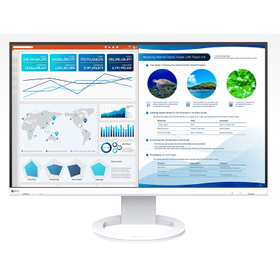
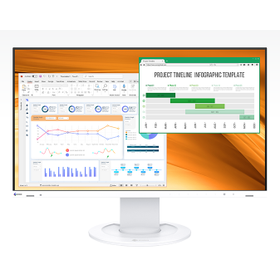
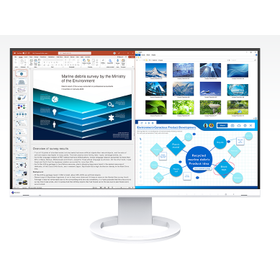
The "FlexScan EV2410R" is a 24.1-inch color LCD monitor that is space-saving and offers a wide working area. With a resolution of WUXGA (1920×1200), it is 120 pixels taller than Full HD (1920×1080), allowing for approximately a 15% increase in the number of rows displayed in Excel. Documents formatted as A4 two-page spreads fit entirely on the screen, enhancing visibility and significantly improving work efficiency when creating and viewing business documents. 【Features】 ■ Three times the screen size, increased work efficiency ■ Wider vertical space, further enhancing work efficiency ■ Space-saving design for effective use of desk space ■ Supports a total of four input systems, both digital and analog ■ Long-term stable supply model *For more details, please download the PDF or feel free to contact us.

Added to bookmarks

Bookmarks list

Bookmark has been removed

Bookmarks list

You can't add any more bookmarks

By registering as a member, you can increase the number of bookmarks you can save and organize them with labels.

Free membership registration

FlexScan FLT

Introducing a 23.8-inch Full HD color LCD monitor with a standard power consumption of just 6W!

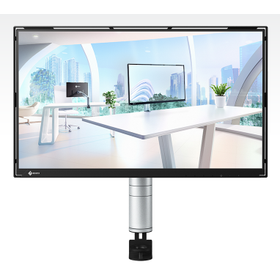
The "FlexScan FLT" is a flagship model in environmental compatibility, designed by consolidating EIZO's technology in line with the low-carbon transition plan. Recycled plastic materials from used plastics are used for the exterior of the monitor. The packaging materials also utilize environmentally friendly materials such as recycled paper and recycled plastics to reduce environmental impact. By mounting the slim monitor on a sleek arm and adopting a hollow bezel, it creates a lightness that makes it appear as if it is floating in mid-air. 【Features】 - Lightness that makes the frame almost unnoticeable - An arm that balances design and functionality - Pursuit of thinness and lightweight - Free adjustment of screen position - Equipped with USB Type-C for power supply to the PC and operation from external devices *For more details, please download the PDF or feel free to contact us.

Added to bookmarks

Bookmarks list

Bookmark has been removed

Bookmarks list

You can't add any more bookmarks

By registering as a member, you can increase the number of bookmarks you can save and organize them with labels.

Free membership registration

FlexScan EV2740S

USB Type-C compatible, 27-inch 4K model! A new standard for business that meets the diverse ways of working.

The "FlexScan EV2740S" is a 27-inch color LCD monitor that combines a wide screen with compactness and supports a 4K (3840×2160) resolution. By connecting a notebook PC with a single USB Type-C cable, it enables not only screen display and audio playback but also USB signal transmission and power supply to the PC. In free-address offices and telework environments, you can start your PC work immediately and comfortably by simply connecting one cable from your notebook PC. 【Features】 ■ Easy-to-use 27-inch display with 4K high resolution for improved work efficiency ■ Sharp and easy-to-read text and images at 4K resolution ■ No hassle, simultaneously charges your notebook PC ■ USB hub allows you to use your familiar mouse and keyboard right away ■ Improved efficiency for open meetings *For more details, please download the PDF or feel free to contact us.

Added to bookmarks

Bookmarks list

Bookmark has been removed

Bookmarks list

You can't add any more bookmarks

By registering as a member, you can increase the number of bookmarks you can save and organize them with labels.

Free membership registration

FlexScan EV2400R

Contributing to energy conservation in the office! Introducing the 23.8-inch Full HD energy-saving model.

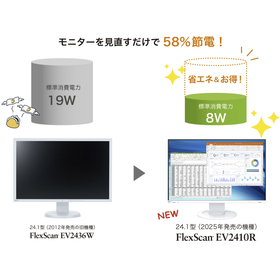
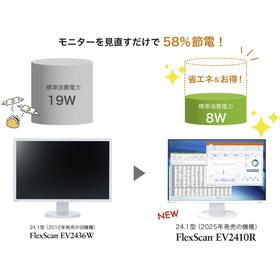
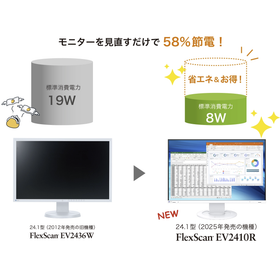
The "FlexScan EV2400R" is an energy-saving model designed with a thorough low power consumption approach, achieving a standard power consumption of just 8W. It is equipped with a wealth of energy-saving features and complies with advanced environmental standards both domestically and internationally. It contributes to reducing power consumption in offices and minimizing environmental impact. With a space-saving design measuring 537.8mm in width and 233mm in depth, it allows for a compact multi-screen setup. 【Features】 ■ Expands workspace and increases productivity ■ Effectively utilizes desk space with a compact design ■ Supports a refresh rate of 100Hz ■ Achieves a standard power consumption of 8W despite being 23.8 inches ■ Automatically reduces power consumption during monitor use *For more details, please download the PDF or feel free to contact us.

Added to bookmarks

Bookmarks list

Bookmark has been removed

Bookmarks list

You can't add any more bookmarks

By registering as a member, you can increase the number of bookmarks you can save and organize them with labels.

Free membership registration

FlexScan EV2720S

USB Type-C compatible, 27-inch WQHD! A new standard for business that meets the diverse ways of working.

The "FlexScan EV2720S" is a 27-inch WQHD (2560×1440) resolution three-sided frameless monitor. With a wide workspace that is approximately 1.8 times that of a typical Full HD (1920×1080) monitor, it allows for multiple windows to be displayed without overlapping. It reduces the hassle of frequently switching between windows and scrolling, thereby improving efficiency in desk work. 【Features】 ■ Spacious 27-inch WQHD resolution for enhanced work efficiency ■ No hassle, charges your laptop simultaneously ■ USB hub allows you to use your familiar mouse and keyboard right away ■ Improves efficiency in open meetings ■ Adjustable screen position tailored to each individual *For more details, please download the PDF or feel free to contact us.

Added to bookmarks

Bookmarks list

Bookmark has been removed

Bookmarks list

You can't add any more bookmarks

By registering as a member, you can increase the number of bookmarks you can save and organize them with labels.

Free membership registration

FlexScan EV2410R for Office

Improve office operational efficiency with space-saving design and a wide work area.

In terms of improving work efficiency in the office, the size of the monitor's display area is an important factor. Particularly when it is necessary to display multiple windows simultaneously, a small screen can significantly reduce work efficiency. The FlexScan EV2410R offers a wider display area than Full HD, thanks to its WUXGA (1920×1200) resolution, contributing to improved work efficiency. Additionally, its space-saving design and energy-saving performance make it suitable for office environments. 【Usage Scenarios】 - Office administrative tasks - Document creation - Data analysis - Simultaneous display of multiple windows 【Benefits of Implementation】 - Improved work efficiency - Space-saving - Cost reduction through energy savings

Added to bookmarks

Bookmarks list

Bookmark has been removed

Bookmarks list

You can't add any more bookmarks

By registering as a member, you can increase the number of bookmarks you can save and organize them with labels.

Free membership registration

[For Research] FlexScan EV2410R

24.1-inch monitor for streamlining analysis tasks.

In research fields, analysis work requires an environment that efficiently displays large amounts of data and materials, enabling accurate analysis. Particularly when displaying multiple windows simultaneously or checking detailed information, a wide display area and high resolution are essential. The FlexScan EV2410R, with its WUXGA (1920×1200) resolution, provides a wider display area than Full HD, contributing to the efficiency of analysis work. 【Usage Scenarios】 - Data analysis - Thesis writing - Viewing research materials 【Benefits of Implementation】 - Improved work efficiency - Reduced eye strain - Space-saving design

Added to bookmarks

Bookmarks list

Bookmark has been removed

Bookmarks list

You can't add any more bookmarks

By registering as a member, you can increase the number of bookmarks you can save and organize them with labels.

Free membership registration

FlexScan EV2410R for Educational Institutions

24.1-inch WUXGA monitor that improves learning efficiency

In educational institutions, learning activities require a wide display area and high visibility, such as viewing materials and displaying multiple windows simultaneously. Particularly during lessons when teaching materials are presented or when students are preparing reports, the clarity of the screen significantly impacts learning efficiency. The FlexScan EV2410R, with its WUXGA (1920×1200) resolution, can display more information at once than Full HD, contributing to improved learning efficiency. 【Usage Scenarios】 - Displaying teaching materials in class - Attending online classes - Preparing reports - Research activities 【Benefits of Implementation】 - Supports efficient learning by displaying a large amount of information at once - Reduces eye strain during long study sessions - Space-saving design effectively utilizes limited space

Added to bookmarks

Bookmarks list

Bookmark has been removed

Bookmarks list

You can't add any more bookmarks

By registering as a member, you can increase the number of bookmarks you can save and organize them with labels.

Free membership registration
Prev 1 Next
  • IoTデバイス開発・運用の課題を解決。各ポイント解説資料を進呈

    IoTデバイス開発・運用の課題を解決。各ポイント解説資料を進呈

  • your vision, smarter…
  • UPSの選び方が変わる 過負荷耐量200%のUPS SANUPS N11D 鉛バッテリ リチウムイオンバッテリ EDLC
    • Contact this company

      Inquiry Form

    Products

    • Search for Products

    Company

    • Search for Companies

    Special Features

    • Special Features

    Ranking

    • Overall Products Ranking
    • Overall Company Ranking

    support

    • site map
    IPROS
    • privacy policy Regarding external transmission of information
    • terms of service
    • About Us
    • Careers
    • Advertising
    COPYRIGHT © 2001-2026 IPROS CORPORATION ALL RIGHTS RESERVED.
    Please note that the English text on this page is automatically translated and may contain inaccuracies.