
Simple Browser Chromium
Inform Plus Simple Browser Chromium

A dedicated browser that allows you to "safely operate" only specific sites. It completely blocks pranks and accidental operations.
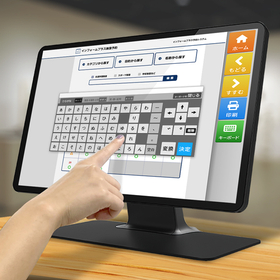
Do you have any of these concerns with touch panel terminals in public facilities or stores? "With the standard browser, links can lead to other sites." "There is no back button, causing operations to stop." "The browser closes on its own." The Simple Browser Chromium solves these unique challenges of unattended terminals and enables comfortable web operations. ■ Enhanced display speed and technology with Chromium It uses the same engine as Google Chrome and others. It supports the latest web technologies, improving display speed. Guidance pages and reservation systems can be displayed smoothly without stress. ■ Safe and convenient features specialized for unattended operation - Full-screen display & access restrictions: Hides the desktop and displays only permitted sites. - Simple button settings: Place operation buttons like "Back" and "Home" on the screen. Text and links can be freely configured. - Smooth input operations: Automatically displays the software keyboard when selecting an input area. - Signage function: Includes a feature to return to the home screen when idle and plays a slideshow. With easy configuration through the setup tool, it can be operated as a safe and user-friendly dedicated terminal right after installation.
Inquire About This Product
basic information
【Supported Operating Systems】 Windows 11 Home / Pro (from 21H2 onwards) Windows 10 Home / Pro (from 1803 onwards) / IoT Enterprise LTSC 2019 【Main Features List】 - Full Screen Display: Prevents users from interacting with the desktop by displaying in full screen. - Access Restrictions: Blocks navigation to sites other than specified ones through allowed/forbidden URL settings. - Button Customization: Allows free configuration of selected buttons, their order, and destination links (URL/local path). - Button Layout: Options for vertical alignment (right side) or horizontal alignment (bottom side). - Inactivity Timeout: Automatically returns to the home screen if there is no URL navigation for a certain period. - Slideshow Display: Automatically plays images or URLs when not in use (for signage purposes). - Text Input: Touch input of text using a software keyboard. - Print Control: Direct printing without displaying the standard Windows dialog. - Window Control: Overwrites display in full screen for tabs and new windows as well. - Log Acquisition: Logs URL navigation and print commands.
Price information
Open price *Prices may vary depending on quantity and whether customization is available.
Delivery Time
Applications/Examples of results
■Usage / Examples of Achievements 【For facility reservation systems for local governments】 We have numerous implementation records, including many municipalities in Tokyo. All of them are operating stably. 【For kiosk terminals and digital signage】 Examples: Disaster information display, event information display for universities, information display for factory sites, HTML5 game content for exhibition facilities, fitting simulation for clothing stores, multilingual information terminals, signage for roadside stations / hotels / tourist information centers, etc. ■Can be useful in the following situations 【Reducing staff burden】 - Rental ski & calling system - Family doctor* search system (*local practitioners in the patient's area) 【Alleviating customer congestion】 - Ticket issuance system for indoor amusement parks - Ticket issuance system for time-slot play parks 【Further efficiency in operations through system integration】 - Ticket issuance system for pre-paid tickets for cinema complexes
Detailed information
-
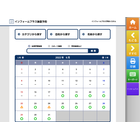
■Free and Easy-to-Use Buttons A simple browser designed with a focus on functionality for kiosk terminals. It provides comfortable touch panel screen operation with large buttons. The layout of the buttons, displayed text, and links can be freely configured. 【Points】 It is also useful when you want to use websites that are not designed with touch operation in mind as terminal content. The layout and text of the buttons can be freely configured. *Please consult us for button design customization.
-
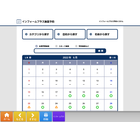
■Smooth Operation of Unmanned Terminals We have equipped our system with essential features for unmanned terminals, such as full-screen display of web applications, restrictions on access URLs, automatic page return functionality, and hiding dialogs during printing. 【Key Points】 Issues can arise during normal browser use, such as the previous user's screen remaining visible or the user changing the print settings. We have prepared features to avoid such operational troubles.
-
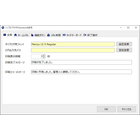
■Easy Setup Screen The settings for the Simple Browser are operated through the settings tool. You can easily configure button link settings, allowed/blocked URLs, printing messages, and more. We have made it easy to set up, even for those who do not understand programming.
-
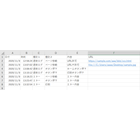
■Enhanced Log Output Function The log files will output a history of accessed pages and error logs. Each log is now output in more detail and categorized for easier analysis. By opening the CSV file in Excel or similar software, you can use it as material for site improvement by measuring page access counts. 【Points】 - Support for full URL log output - Support for local path log output - Log output in CSV format
-
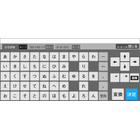
■User-friendly software keyboard When you select a text area, the software keyboard automatically pops up, allowing you to input characters. You can easily close the keyboard when it's no longer needed, or forcibly call it up with a button. 【Features】 - Input of hiragana, katakana, English letters, and predefined phrases (predefined phrases can also be set in the settings screen) - Kanji conversion function (uses Microsoft IME) - Keyboard initial display position settings (can be set for left, right, up, and down)
-
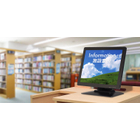
■When not in use, it can switch to a digital signage mode. If it has not been used for a certain period, it can automatically switch to a slideshow. This can be utilized for displaying information such as advertisements, effectively utilizing the screen when not in use. You can specify URLs or image files from the web for the slides. *Video files are not supported.
Company information

The Inform Plus of DX Kiosk is a kiosk terminal brand with the concept of "providing all services related to the introduction of kiosk terminals flexibly," contributing to the realization of improved operational efficiency, increased productivity, and enhanced competitive advantage for our customers, as well as the creation of new business value through digital transformation (DX). We provide full support from planning kiosk terminals to maintenance after installation. You can request all services or just a part of them. We will collaborate with our customers by dividing roles. At Inform Plus, we design not only for ease of manufacturing and aesthetic appeal but also from the perspective of all users. By understanding the system's purpose, user characteristics, installation environment, and operational environment, we design terminals that are truly user-friendly for everyone, contributing to our customers' DX initiatives. We can also develop original terminals and systems, so please feel free to consult with us.


![[For Embedded Devices] HTML5 Browser *Case Studies Available](https://image.mono.ipros.com/public/product/image/5c0/2000603275/IPROS1786635079085488451.png?w=280&h=280)


![[White Paper] What is Required for HMI and Browsers in Industrial Machinery](https://image.mono.ipros.com/public/product/image/ee8/2000780143/IPROS6486433915549129918.png?w=280&h=280)
