Mastering the "presentation" in Surfer's light source settings.
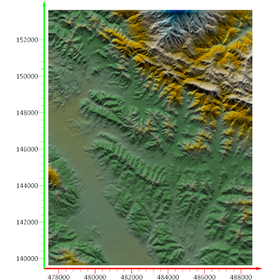
The same data, the same 3D surface. Yet, one appears distinctly three-dimensional with its bumps and hollows, while the other looks flat and smooth—this difference is created by "lighting (light sources)." In Surfer 30, the light sources in the 3D View can now be set up to a maximum of four directions, allowing you to illuminate surfaces that were previously flattened by shadows or blown out by highlights just the way you want. In this article, we will introduce tips to enhance the "presentation" of 3D models by utilizing multiple light sources.
Inquire About This Product
basic information
1. Why does the way of presentation change the way of communication? The 3D model that you painstakingly created can have its impression greatly altered by the way light is cast upon it. The undulations of the terrain, the layering of strata, and the distribution of density—these are only recognized as three-dimensional through shading. If the lighting is monotonous, the carefully crafted undulations appear flat, and important features become buried in the background. Conversely, appropriate lighting naturally guides the viewer's gaze to the key points, intuitively conveying to those without specialized knowledge "where it is high and where it is low" and "where anomalies exist." The way it is presented can influence decision-making just as much as the accuracy of the model itself.
Price information
(Hulinks page)
Price range
P3
Delivery Time
P3
Applications/Examples of results
【Surfer Use Cases】 (All links lead to HuLinks pages) □ How to Utilize LiDAR Data in Surfer https://www.hulinks.co.jp/software/surfer/support/lidar/ □ Utilizing Borehole Data in Surfer https://www.hulinks.co.jp/software/surfer/support/index/ □ Grapher Utilization for Surfer Users https://www.hulinks.co.jp/software/grapher/support/ □ Visualizing the Geological History of the Blue Mountains https://www.hulinks.co.jp/software/surfer/support/lidar/p09-2/ □ Unraveling the Structure of 18th Century Military Fortifications with LiDAR https://www.hulinks.co.jp/software/surfer/support/lidar/p09/
Detailed information
-
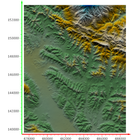
1 light source (directly above, high angle) = follows the camera Both hills and valleys have the same brightness. The unevenness is hard to discern, making it look flat.
-
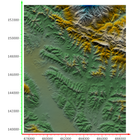
Multiple light sources (low angle × 2 directions) The orientation of the hill's ridge, valley, and slope is clear. The terrain can be intuitively understood even without specialized knowledge.
-
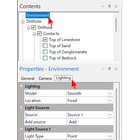
To set the lighting effects, select Environment in the Contents window of the 3D View, and then select the Lighting tab in Properties.
Line up(1)
| Model number | overview |
|---|---|
| "Grapher" is a 2D & 3D graph creation tool specialized in specific fields (to the Hyolinks page). | https://www.hulinks.co.jp/software/grapher/ |
catalog(1)
Download All Catalogs
Company information

Even in a rapidly changing world, the philosophy of HuLinks has not changed since its founding. The greatness of humanity lies in our ability to think, create, and carve out a new tomorrow. We aim to contribute to society by providing carefully selected solutions that support this remarkable human ability—intellectual creation—while also offering a more comfortable environment and enhancing productivity.