Create material take-off drawings and output to PDF | CutPlan
Material Takeoff Calculation CutPlan

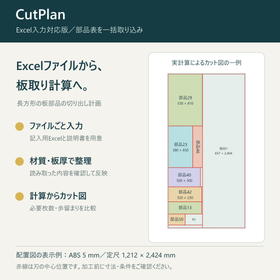
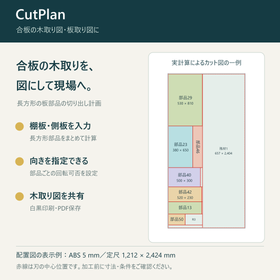
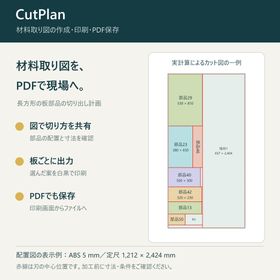
Share how to cut the board using the material layout drawing. Confirm the arrangement and dimensions of the parts, and proceed to black-and-white printing and PDF saving.
For those who want to create a material cutting diagram and share the cutting details with the processing personnel. CutPlan is a Windows software that creates cutting diagrams for rectangular sheet parts based on their dimensions and quantities. By specifying usable standard lengths, leftover materials, blade width, outer margins, and processing allowances, it calculates and allows you to choose the plan to adopt. The diagram shows the arrangement of parts, cutting lines, and the shape and dimensions of the leftover materials after cutting. You can print the selected plan in black and white as a material cutting diagram, sheet layout diagram, or cutting layout diagram. By saving it as a PDF from the print screen, both the material procurement personnel and the processing personnel can view the same diagram.
Inquire About This Product
basic information
【Product】Material Cutting Calculation CutPlan (for Windows) 【Input】Width and height of parts, quantity, material, sheet thickness, dimensions and number of available sheets 【Comparison】Required number of sheets, yield, material cost, standard sizes and available offcuts 【Conditions】Specify blade width, outer margin, processing allowance, and whether parts can be rotated 【Output】Black and white printing of cut diagrams, PDF saving from the print screen This is used for cutting rectangular sheets and parts along vertical and horizontal lines. It does not guarantee the minimum number of sheets or the lowest price at all times.
Price information
Windows version - one-time purchase for 19,800 yen (tax included). No monthly fees. Up to two Windows PCs for the same purchaser. Please check the official website for the latest purchase availability and system requirements.
Delivery Time
Applications/Examples of results
【Examples of Use】 - Discussion of cutting details using material take-off drawings - Sharing board layout and cutting layout drawings as PDFs within the company - Printing and confirming the drawings and dimensions of the proposed design The target is straight cutting of rectangular parts. The cutting lines in the drawings represent the center position of the blade. Please check the original part dimensions and actual cutting conditions before processing.
catalog(1)
Download All Catalogs
Company information

Hibiki Kisha Labo LLC is a company that provides AI business support tools, web application development, DX implementation support, AI utilization courses, and marketing automation, among other services. The goal is not merely to "use technology," but to constantly consider "what can be achieved with it" and "what value can be delivered to whom." Even vague concerns like "Is there a way to do this?" or "I want to make it more efficient" are welcome. Please consult us for your first step in digital utilization.