
List of Other CAM related software products
- classification:Other CAM related software
91~135 item / All 420 items


Reduce the workload from handling heavy objects! Here are five case studies that solved customer challenges! We are also accepting free consultations and tests tailored to your work!

- Other conveying machines


No more need to lift heavy one-gallon cans! Enjoy comfortable liquid transfer in the central kitchen.
- Other Pumps

Decision to exhibit at the 1st Chubu Food Industry Creation Exhibition '26!
We will be exhibiting at the "1st Chubu Food Industry Creation Exhibition '26" to be held at Port Messe Nagoya from November 4 (Wednesday) to November 6 (Friday), 2026. As a new addition to our lineup, we will showcase the "Cordless Sanitary Handy Pump," which is a product we started selling in April last year, alongside our "Compact Sanitary Handy Pump Model MHS." - Cordless! Portable anywhere! Easy to use! Simple cleaning! It is compatible with standard 18L cans and BIB (Bag-in-Box) and features a structure that allows for easy disassembly and cleaning. We would like to invite you to visit us at this opportunity. - Venue: Port Messe Nagoya - Our exhibition booth: Hall 1 "C-66"

Improving the quality and efficiency of automotive parts processing through NC data verification, optimization, and machine simulation.
- Other CAM related software
- simulator
- 3D CAM
Verification of NC data / Optimization of NC data / Achieving safe machining through machine simulation
- Other CAM related software
- simulator
- 3D CAM

Introducing the amazing features of "3AXIS Premium," compatible with 3-axis machining, from "BobCAD-CAM," which can be implemented at a low cost!
- 3D CAM
- Other CAM related software
- 3D CAD
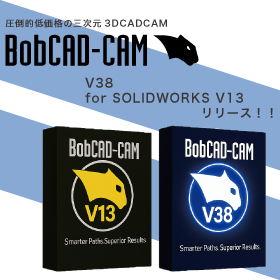
BobCAD-CAM V38/for SOLIDWORKS V13 Japanese version now available!!
The Japanese version of the latest V38 / BobCAM for SOLIDWORKS V13 has been officially released from BobCAD-CAM, which offers overwhelming low prices while being equipped with comprehensive features! This latest version achieves a more intuitive and flexible workflow. ■ Improved usability of the CAM wizard You can now set parameters while displaying the tool path. Automatic calculations and real-time visual feedback during feature creation enhance the speed and accuracy of setup. ■ Context help feature included Simply hovering over parameters will display images, descriptions, and help links, enabling smooth programming. ■ Standardization of work with CAD default settings Users can now save and restore their unique initial values, allowing for precision adjustments down to millimeters. Many other features have also been updated or added. If you would like a detailed introduction to the features or a demo, please feel free to contact us!

Achieve both time reduction and quality optimization in rough machining! An explanation of "Rough Machining Pro" from 'Overwhelmingly Low Price & Rich Features BobCAD-CAM'.
- 3D CAM
- Other CAM related software
- Other CAD related software

Efficient processing that eliminates waste through additional processing is possible! This explains the "stock recognition feature" of "BobCAD-CAM," which offers overwhelming low prices and comprehens...
- 3D CAM
- Other CAM related software
- Other CAD related software

Efficient roughing of deep cavity shapes! An explanation of "plunge machining" in 'BobCAD-CAM' | System Create
- 3D CAM
- Other CAM related software
- Other CAD related software

Automatically recognize multiple flat areas and create machining paths! Explanation of "Flat Area Machining" in 'BobCAD-CAM' | System Create
- 3D CAM
- Other CAM related software
- Other CAD related software

Easily perform wire electrical discharge machining with different shapes on the top and bottom! An explanation of "Wire EDM" in 'BobCAD-CAM' | System Create
- 3D CAM
- Other CAM related software
- Other CAD related software

Uniformly finish mixed steep and gentle slopes and curved surfaces! This explains the 'scallop machining' of 'overwhelmingly low price & rich features BobCAD-CAM'.
- 3D CAM
- Other CAM related software
- Other CAD related software

Create 2D machining drawings for turning processes from 3D models! We will explain the "Rotational Profile" of BobCAD-CAM, which offers overwhelming low prices and comprehensive features.
- 3D CAM
- Other CAM related software
- Other CAD related software

Improve quality by easily removing leftover material! An explanation of "leftover machining" in the overwhelmingly low-priced and feature-rich BobCAD-CAM.
- 3D CAM
- Other CAM related software
- Other CAD related software

Easily create gear drawings! An explanation of "GEAR+" from 'Overwhelmingly Low Price & Rich Features BobCAD-CAM'.
- 3D CAM
- Other CAM related software
- Other CAD related software

Automatically adjusts pitch according to shape & streamlines with automatic trim of paths: An explanation of the adaptive pitch and optimal trim of 'overwhelmingly low-priced BobCAD-CAM.'
- 3D CAM
- Other CAM related software
- Other CAD related software

Automatically calculate machining paths from DXF data! Unbeatable low price and comprehensive features. This explains BobCAD-CAM's "Hole Machining from 2D."
- 3D CAM
- Other CAM related software
- Other CAD related software

You can finish without interference using the shortest tool! Overwhelmingly low price and rich features. This explains BobCAD-CAM's "Dynamic Holder Check."
- 3D CAM
- Other CAM related software
- Other CAD related software

Completing surface chamfering through machining! This explains the "chamfering process" of 'BobCAD-CAM' with its overwhelming low price and rich features.
- 3D CAM
- Other CAM related software
- Other CAD related software

Easily convey processing technology! This explains the "template function" of BobCAD-CAM, which offers overwhelming low prices and rich features.
- 3D CAM
- Other CAM related software
- Other CAD related software

Automatically remove leftover material from corners! This explains the "Corner Peg Removal Function" of BobCAD-CAM, which offers overwhelming low prices and comprehensive features.
- 3D CAM
- Other CAM related software
- Other CAD related software

Instant automatic calculation of processing conditions for different materials based on hole shapes! An explanation of 'BobCAD-CAM's automatic tool path for hole shapes.'
- 3D CAM
- Other CAM related software
- Other CAD related software

No need for tedious calculations; you can efficiently create programs! An explanation of the "BobCAD-CAM Contour Roughing and Side Roughing Functions."
- 3D CAM
- Other CAM related software
- Other CAD related software

Explaining the greatness of "BobCAD-CAM," which has a wide range of processing functions that exceed the price of Marsgo, by module!
- 3D CAM
- Other CAM related software
- 3D CAD
![[Marusugo] Open Edge Detection with...](https://image.mono.ipros.com/public/product/image/434/2000699973/IPROS69190623965126085359.jpeg?w=280&h=280)
Marsugo: 'Overwhelmingly low price! Yet packed with features! It's amazing.' Explaining BobCAD-CAM's 'Open Edge Detection Feature'!
- 3D CAM
- Other CAM related software
- 3D CAD
BobCAD-CAM V38/for SOLIDWORKS V13 Japanese version now available!!
The Japanese version of the latest V38 / BobCAM for SOLIDWORKS V13 has been officially released from BobCAD-CAM, which offers overwhelming low prices while being equipped with comprehensive features! This latest version achieves a more intuitive and flexible workflow. ■ Improved usability of the CAM wizard You can now set parameters while displaying the tool path. Automatic calculations and real-time visual feedback during feature creation enhance the speed and accuracy of setup. ■ Context help feature included Simply hovering over parameters will display images, descriptions, and help links, enabling smooth programming. ■ Standardization of work with CAD default settings Users can now save and restore their unique initial values, allowing for precision adjustments down to millimeters. Many other features have also been updated or added. If you would like a detailed introduction to the features or a demo, please feel free to contact us!

Easily create and convert processing programs interactively *Demo available
- 2D CAM
- 3D CAM
- Other CAM related software
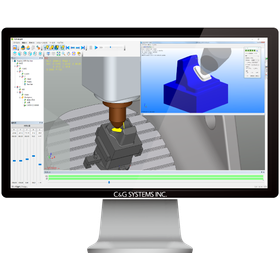

Innovation in manufacturing with "CAM-TOOL" that goes beyond milling!!
- 3D CAM
- Other CAM related software
- 3D Printer


Maximize the performance of the cutting machine! Manage the entire processing workflow from estimation to production and shipping.
- Other CAD related software
- Other CAM related software
- Other CAD

50% reduction in labor hours! Greatly contributes to improving machine operating rates and achieving a paperless environment.
- Other CAD related software
- Other CAM related software
- Other CAD

Achieving a reduction of 40 hours per month and 480 hours per year in labor! Cleanup can be completed faster and more accurately compared to conventional methods. *Video available now.
- 3D CAM
- Other CAM related software
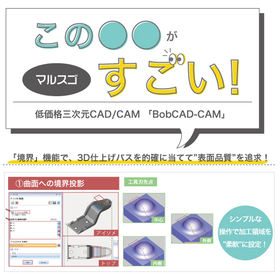
Creating paths that pursue surface quality! This explains the "Boundary" function of "BobCAD-CAM," which offers overwhelming low prices and comprehensive features.
- Other CAD related software
- Other CAM related software
- 3D CAM


Automatically calculates tool rotation speed, feed speed, step-over adjustment, and cutting depth!
- Other CAM related software

Determine the order of tool paths for rough machining and finishing machining using advanced analysis algorithms!


- Other CAM related software
![[Information] Thorough Explanation:...](https://image.mono.ipros.com/public/product/image/2382/IPROS13497532231862347799.png?w=280&h=280)

What are the criteria for choosing CAM as on-site utilization progresses! Here’s how to break free from the easily fallen negative cycle.
- 3D CAM
- 2D CAM
- Other CAM related software

An explanation from four points: functionality, scalability, UI/usability, and support! Tips for selecting a CAM system that suits your company.
- 2D CAM
- 3D CAM
- Other CAM related software

For those who want to confirm the relationship between the precision symbols on the drawings and the processing! An explanation of CAM settings and surface roughness.
- 2D CAM
- 3D CAM
- Other CAM related software

For those who are confused about setting the pitch between passes in CAM! An explanation of CAM settings and the size of the scallop.
- 2D CAM
- 3D CAM
- Other CAM related software
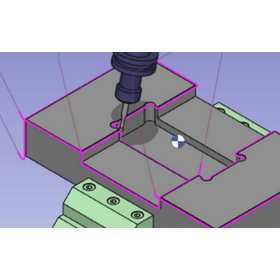
In machining, deburring is possible! It reduces manual deburring work and allows for automation.
- 3D CAM
- 3D CAD
- Other CAM related software


Utilizing WinTool, we reengineered our company's machining business processes. We successfully reduced the time and costs required for machining operations!
- Process Control System
- Other CAM related software
- Other cutting tools

Achieving compliance with manufacturing schedules and minimizing setup time through accurate production preparation of production resources/tools using WinTool!
- Process Control System
- Other CAM related software
- Other cutting tools

Utilize WinTool to achieve improvements in production preparation and setup work!
- Process Control System
- Other CAM related software
- Other cutting tools

Utilize WinTool to visualize the location of tools. Ensure accurate tool setup and reliable attachment of tools to the tool magazine!
- Process Control System
- Other CAM related software
- Other cutting tools

Utilizing WinTool, we consolidated the nine tool databases within the company into one!
- Process Control System
- Other CAM related software
- Other cutting tools

Would you like to utilize the tool data from the WinTool integrated tool library in the CAM system while managing tool information at the machining site?
- Other CAM related software
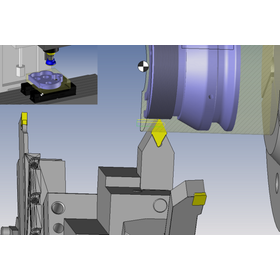
Updated the interface with the tool management system WinTool and TopSolid'Cam.
The WinTool-TopSolid'CAM interface function has been updated. Tool data is deployed from WinTool, which serves as the command center for tool information management in the machining business process, to TopSolid'CAM. This reduces the effort required to register and manage tool data within TopSolid'CAM. By using WinTool as a foundation, it is also possible to implement tool inventory management and tool setup management together. This ensures the consistency of tool data across the entire business process! WinTool-TopSolid'CAM Interface (V1.10.0) ● Compatibility with TopSolid'CAM 7.20 ● Added support for composite tools (milling) ● Improved 3D model import (milling & turning) ● Enhanced user interface for importing cutting condition data ● Created tool reference points when importing milling tool data ● Ability to define custom tool reference points using the tracking point feature

Let's utilize the tool data from the WinTool integrated tool library in NC machining simulation, while also managing tool information at the machining site!
- Other CAM related software

Update the interface of the tool management system WinTool with Vericut.
The WinTool-Vericut interface functionality has been updated. By obtaining data from WinTool, which serves as the command center for tool information management in the machining business process, you can not only effectively utilize tool data in NC simulation but also apply it to tool information management on the shop floor! WinTool Vericut Interface (V3.2.0) ● Refinement of target tool types (contour-based) ● Added target tool type "Thread Mill (parameter values)." ● Added target tool type "Drilling (contour)," including the tool type "Tap (contour)." ● Improved import of target tool type "Probe (contour)." ● Added new configuration setting option: STEP transfer for milling.