We have compiled a list of manufacturers, distributors, product information, reference prices, and rankings for soft.
ipros is IPROS GMS IPROS One of the largest technical database sites in Japan that collects information on.

soft(2D CAD) - List of Manufacturers, Suppliers, Companies and Products | IPROS GMS

Last Updated: Aggregation Period:Jan 21, 2026~Feb 17, 2026
This ranking is based on the number of page views on our site.

soft Product List

151~180 item / All 360 items

Displayed results

『Pix4D』

Drone photogrammetry & mapping software 'Pix4D'

"Pix4D" is a photogrammetry software that automatically converts images captured by drones and mobile devices into high-precision 2D maps and 3D models, supporting decision-making across various fields such as surveying, construction, agriculture, inspection, and disaster prevention. 【Features】 - Generates orthomosaics with centimeter-level accuracy from images, which can be utilized as survey maps. - Automatically outputs high-density point clouds and textured 3D meshes, aiding in detailed analysis of structures. - The rayCloud feature associates each point with the original images, allowing for visual quality verification and editing. - Cloud processing and sharing capabilities enable teams and clients to view and measure models in a browser. - Utilizes AI for automatic component detection and dimension measurement, streamlining remote inspections of communication towers and infrastructure. *For more details, please refer to the related links or feel free to contact us.*

  • Company:B7
  • Price:Other
  • Software (middle, driver, security, etc.)
  • soft

Added to bookmarks

Bookmarks list

Bookmark has been removed

Bookmarks list

You can't add any more bookmarks

By registering as a member, you can increase the number of bookmarks you can save and organize them with labels.

Free membership registration

Crowd flow simulation software "MassMotion"

Recommended for safe building design and smooth facility operation. It predicts pedestrian movement routes and identifies conditions and density for congestion occurrence.

Software for simulating and analyzing how many pedestrians move within buildings, what routes each person chooses, and where congestion occurs as a result. By defining individual agendas and personalities for each pedestrian model moving within 2D/3D CAD models, it is possible to conduct very realistic pedestrian flow simulations, as each pedestrian model independently selects routes and behaves accordingly. This can be utilized in various architectural designs, disaster simulations, and redevelopment of existing facilities.

  • simulator
  • soft

Added to bookmarks

Bookmarks list

Bookmark has been removed

Bookmarks list

You can't add any more bookmarks

By registering as a member, you can increase the number of bookmarks you can save and organize them with labels.

Free membership registration

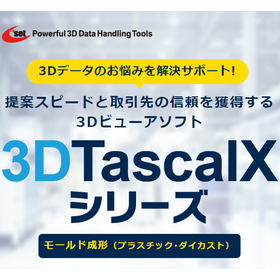
Viewer software for mold forming: "3DTascalX Series"

Instantly grasp shapes such as "clamping force, undercut, slope, and wall thickness"! Reducing man-hours for creating 2D drawings and estimating costs. Over 3,000 companies have adopted it in Japan.

The "3DTascalX series" is a 3D CAD viewer software that allows users to easily obtain the information needed on-site. It supports not only CAD data from CATIA, NX, Creo, SOLIDWORKS, and Inventor but also nearly all 3D data formats in circulation, including intermediate data such as IGES, STEP, Parasolid, ACIS, and JT. It also includes features useful for the "mold manufacturing" industry. It supports maximum outer dimensions, weight calculations, clamping force, slope, wall thickness, undercuts, color coding of design change areas, and the creation of 2D drawings such as three-view drawings, isometric drawings, and cross-sectional views. 【Features】 ■ Obtain necessary information on-site and simplify 2D drawings ■ Achieve high precision and quick estimate responses to prevent loss of opportunities ■ Reduce waste in operations such as waiting and rework ■ Optimize the running costs of 3D CAD *For more details, please refer to the materials. Feel free to contact us with any inquiries.

  • Data conversion software
  • plastic
  • Other polymer materials
  • soft

Added to bookmarks

Bookmarks list

Bookmark has been removed

Bookmarks list

You can't add any more bookmarks

By registering as a member, you can increase the number of bookmarks you can save and organize them with labels.

Free membership registration

Problem-Solving Materials: 3D Data Compatibility Edition 2 | Cost of 3D CAD/CAM

What are the challenges of introducing and operating 3D CAD/CAM costs, and how can they be resolved? A resource for identifying and solving issues in the production field.

This document is a series that proposes solutions to various challenges faced in production sites, from identifying issues to finding resolutions. In the [3D Data Compatibility Edition], we will introduce solutions aimed at addressing the challenges of "adapting to 3D data." [Document Overview] With the expansion of design and development based on 3D data, the utilization of 3D data in production sites is more essential than ever. By utilizing 3D CAD/CAM, it is possible to create programs more efficiently than traditional methods. However, many may be struggling with the balance between cost and functionality, facing issues such as: - Higher initial costs compared to 2D CAD/CAM - Unnecessarily high operational costs - Concerns that low-cost products may lack necessary features Therefore, in this document, we will introduce recommended 3D CAD/CAM solutions that allow for the selection and implementation of necessary features while minimizing both initial and operational costs. We will also explain functionalities that contribute to improving operational efficiency. *You can download the document using the button below.

  • 3D CAM
  • 2D CAM
  • Other CAM related software
  • soft

Added to bookmarks

Bookmarks list

Bookmark has been removed

Bookmarks list

You can't add any more bookmarks

By registering as a member, you can increase the number of bookmarks you can save and organize them with labels.

Free membership registration

Attention steel frame fabricators: related to architectural plate cutting!

You are using flat cutting machines such as lasers, plasma, and gas on-site!

If you are having trouble with the time and effort required for your current CAD/CAM, please feel free to consult us. 【Do you have any of these concerns?】 ■ It takes a long time to process CAD data from other companies... ■ Parts are drawn together, making it very time-consuming and labor-intensive to separate them... ■ Circular holes are drawn with hole symbols, so I have to redraw each circular hole one by one... ■ Component information is written as text within the parts, but the text is scattered and not recognized as component information... ⇒ Solve it with 2D CAD/CAM 'SheetPartner'! <Features> - Even with drawings where parts are in contact, you can separate them into individual parts with one click. - Even with drawings that use hole symbols, it converts them to the specified circular hole diameter. - By effectively utilizing the text information drawn in the drawings, it significantly reduces work time. It converts scattered text that is not recognized as component information into recognizable format. - Registration of 100 types of parts, nesting, and NC creation can be completed in just 1 minute.

  • 2D CAM
  • 2D CAD machine
  • soft

Added to bookmarks

Bookmarks list

Bookmark has been removed

Bookmarks list

You can't add any more bookmarks

By registering as a member, you can increase the number of bookmarks you can save and organize them with labels.

Free membership registration

[Case Study] Parts Processing (Design and Delivery Management Using 3D Data)

If you have concerns about part processing, from design (CAD and drafting) to delivery and installation, such as the centralization of 3D data design and deadline management, please contact us.

Our company develops, designs, and manufactures jigs, prototype equipment, and systems according to our customers' requests. We would like to introduce a case where we implemented our "design and delivery management using 3D data" for Company A, a manufacturer of automotive parts. At this company, processing parts based on 2D drawings was time-consuming and labor-intensive, and input errors were occurring. Additionally, the difficulties in delivery management due to individual ordering of materials and the complexity of adjustment tasks were problematic. Therefore, they requested our services to achieve integrated management of 3D data design and delivery management. As a result, input errors during parts processing were eliminated, the man-hours for creating drawings were reduced, and improvements in processing accuracy and overall efficiency of the processing process were achieved. Furthermore, the introduction of integrated management led to the consolidation of order quantities and increased efficiency in delivery management, reducing the workload for the responsible personnel. *For more details, please refer to the PDF document or feel free to contact us.

  • 3D CAD
  • soft

Added to bookmarks

Bookmarks list

Bookmark has been removed

Bookmarks list

You can't add any more bookmarks

By registering as a member, you can increase the number of bookmarks you can save and organize them with labels.

Free membership registration

Product inspection using point clouds 'spGauge' automatically reflects drawing tolerances in 3D.

Automatic application of dimensional tolerances from 2D drawings to 3D models.

In the preparation for product inspection, there was a challenge where the information on dimensional tolerances existed only in 2D drawings, and the task of manually applying this to 3D models was very time-consuming and prone to human error. The "drawing import function" has made it possible to automatically recognize dimensional tolerance information from 2D DXF drawing data and directly reflect it in the corresponding 3D model. This significantly reduces the time required for inspection preparation. 【Features of the spGauge Drawing Import Function】 - Import of 2D drawing information: Information such as "dimensions," "geometric tolerances," and "datums" is imported from 2D drawing data (DXF) into the 3D coordinate space of spGauge. - Element identification and placement in 3D: The imported 2D drawing data is separated into elements such as front view and top view, and placed in the corresponding positions within the 3D shape data. - Automatic recognition of dimensions and geometric tolerances: Dimensional attributes such as dimension values, tolerance values, symbols, and leader lines are automatically recognized. - Automation of GD&T inspection: The recognized information is converted into spGauge's GD&T inspection attributes, enabling automatic inspection of the measured point cloud data! *For more details, please refer to the page below or feel free to contact us.

  • Other CAD related software
  • soft

Added to bookmarks

Bookmarks list

Bookmark has been removed

Bookmarks list

You can't add any more bookmarks

By registering as a member, you can increase the number of bookmarks you can save and organize them with labels.

Free membership registration

3D Viewer Software for Mold Manufacturing: 3DTascalX Series

Quickly check necessary information for mold manufacturing such as "data conversion, undercut, processing/inspection dimensions"! To reduce the time spent waiting and rework in creating 2D drawings.

The "3DTascalX series" is a 3D CAD viewer software that allows easy access to the information needed during mold manufacturing. It supports not only CAD data from CATIA, NX, Creo, SOLIDWORKS, and Inventor, but also almost all 3D data available in the market, including intermediate data formats such as IGES, STEP, Parasolid, ACIS, and JT. There are many features available for "mold manufacturing": For design → data conversion, healing For processing → auxiliary coordinate setting, 3D sketch (material shape), high-precision measurement, 2D drawing For inspection → probe coordinate setting, actual measurement input, error determination 【Features】 ■ Suitable for mold drawing-less projects ■ Enables acquisition of necessary information on-site, simplifying 2D drawings ■ Reduces waiting and rework time with high-precision and quick checks ■ Additional functions for inspection departments ■ Can be distributed to clients with a free viewer *For more details, please refer to the materials. Feel free to contact us with any inquiries.

  • Data conversion software
  • Press Dies
  • Mold Design
  • soft

Added to bookmarks

Bookmarks list

Bookmark has been removed

Bookmarks list

You can't add any more bookmarks

By registering as a member, you can increase the number of bookmarks you can save and organize them with labels.

Free membership registration

Problem-Solving Materials: Utilizing 3D Data Part 6 | Shortening the Development Cycle

Reduce the costs associated with prototyping! How to effectively utilize two prototyping tools? A resource for discovering and solving challenges in the production site.

This document is a series that proposes solutions for various challenges faced in production sites, from identifying issues to finding solutions. In the "3D Data Utilization Edition," we will introduce various solutions to manufacturing challenges through the use of 3D data. In Vol. 6, we will focus on "Shortening the Development Cycle" and discuss improvements in the prototyping process using 3D modeling tools. [Document Overview] The internalization of the prototyping process is making significant progress alongside the trend of shortening product development cycles, such as reducing the number of prototypes through the use of CAD and CAE analysis. However, in prototyping with widely used 3D printers, we often hear about challenges such as: - Inability to evaluate with desired materials - Dissatisfaction with precision - Excessive costs for maintaining equipment To address these challenges, an increasing number of people are considering the use of "modeling machines." This document introduces the features of "3D modeling tools" that achieve cost reduction and shorten the development process. It explains the scenarios in which the two tools, 3D printers and modeling machines, excel and struggle. *You can download the document using the button below.

  • Grinding Machine
  • others
  • soft

Added to bookmarks

Bookmarks list

Bookmark has been removed

Bookmarks list

You can't add any more bookmarks

By registering as a member, you can increase the number of bookmarks you can save and organize them with labels.

Free membership registration

Metal Press Molding Viewer Software "3DTascalX Series"

Instantly grasp shapes such as 'welding points, negative angles, cross-sections, and line length measurements'! Reducing man-hours for creating 2D drawings and estimating costs. Over 3,000 companies have adopted it domestically.

The "3DTascalX series" is a 3D CAD viewer software that allows users to easily obtain the information needed during metal press molding. It supports not only CAD data from CATIA, NX, Creo, SOLIDWORKS, and INVENTOR but also almost all 3D data formats in circulation, including intermediate data such as IGES, STEP, Parasolid, ACIS, and JT. It also includes features useful for the "metal press molding" industry. It supports the creation of 2D drawings such as welding points, cross-section lines, negative angles, line length measurements, parts lists, color coding of design changes, and three-view drawings and cross-sections. 【Features】 ■ Enables the acquisition of necessary information on-site, simplifying 2D drawings ■ Achieves high precision and quick estimation responses to prevent opportunity loss ■ Reduces waste in operations such as waiting and rework ■ Optimizes the running costs of 3D CAD *For more details, please refer to the materials. Feel free to contact us with any inquiries.

  • Data conversion software
  • soft

Added to bookmarks

Bookmarks list

Bookmark has been removed

Bookmarks list

You can't add any more bookmarks

By registering as a member, you can increase the number of bookmarks you can save and organize them with labels.

Free membership registration

PTC Creo ジェネレーティブ・デザイン・ソリューション

AIベースの最適化エンジンによる高精度・高速な形状生成を実現。設計リードタイムの短縮に貢献

『PTC Creo Generative Designソリューション』は、AIベースの最適化エンジンにより、 高精度かつ高速に最適化された形状を生成できる設計支援ソリューションです。 トポロジー最適化(GTO)と数値最適化(BMX)を組み合わせることで、 設計者の意図を保ちながら、軽量化・高剛性化・設計品質向上が図れます。 3DCAD「Creo」環境に統合された直感的な操作性と即時再計算機能により、 生成された結果をそのままCADモデルに変換できるなど、高い実用性も特長です。 【特長】 ■AIベースの最適化エンジンによる高精度かつ高速な形状生成 ■設計意図を反映した最適設計が可能。設計リードタイムの短縮にも貢献 ■CADモデルへの変換が容易でそのまま設計に活用可能 ■質量約23%削減、材料使用量約10~15%削減に貢献したユーザー事例あり ★2025年11月27日にオンライン(事前登録制)にて、  Webセミナー「リアルDX改革者が語る4つの重大要素とは?」を開催します。  参加をご希望の方は、下記リンク先よりお申込みください。

Added to bookmarks

Bookmarks list

Bookmark has been removed

Bookmarks list

You can't add any more bookmarks

By registering as a member, you can increase the number of bookmarks you can save and organize them with labels.

Free membership registration

Create and edit DWG drawing data with BricsCAD Lite/Pro.

A CAD software with DWG compatibility that offers ease of use, a wealth of features, and high DWG compatibility, all at a reasonable price.

It supports the latest DWG data format and can handle drawing data created with AutoCAD and other software. The commands and menus are in a UI format familiar to AutoCAD users. You can choose between a perpetual license and a subscription license, allowing you to select a licensing model that fits your operations and budget. It is equipped with features comparable to AutoCAD, unique functions of BricsCAD, and design capabilities such as machine learning features powered by AI.

  • 2D CAD Construction
  • 2D CAD machine
  • 3D CAD
  • soft

Added to bookmarks

Bookmarks list

Bookmark has been removed

Bookmarks list

You can't add any more bookmarks

By registering as a member, you can increase the number of bookmarks you can save and organize them with labels.

Free membership registration

General-purpose magnetic field analysis software "Simcenter MAGNET"

Colorful equations of motion! Software specialized in magnetic field analysis compatible with system simulation.

"Simcenter MAGNET" is a general-purpose magnetic field analysis software equipped with features such as 3D winding modeling, circuit coupling capabilities, and electronic trajectory drawing functions. It supports analyses that take into account multi-threading and hysteresis loops, and is widely used in research institutions and companies both domestically and internationally. Additionally, we also offer the software "Simcenter MAGNET Thermal," which analyzes temperature rise and performance degradation due to losses in induction heating and electromagnetic devices. 【Features】 ■ User-friendly GUI ■ 2D, 3D CAD import/export functions ■ Parametric modeling ■ 3D winding modeling capabilities ■ Multi-threading support *For more details, please refer to the PDF document or feel free to contact us.

  • Magnetic field analysis/electromagnetic wave analysis
  • Other analyses
  • Software (middle, driver, security, etc.)
  • soft

Added to bookmarks

Bookmarks list

Bookmark has been removed

Bookmarks list

You can't add any more bookmarks

By registering as a member, you can increase the number of bookmarks you can save and organize them with labels.

Free membership registration

List of SOLIDWORKS Products

A clear introduction to the range of "SOLIDWORKS" products developed as a multi-product line!

Digital design services offer the product design tool "3D CAD/SOLIDWORKS," which combines usability, functionality, and implementation cost. This catalog provides a clear introduction to the range of "SOLIDWORKS" products. For customers who want to switch from their current tools to a different one or want to implement 3D CAD, we propose tools suitable for their business and environment, and we support them with a series of requests from operational methods after implementation to maintenance. [Contents] ■ Product Design ■ Design Verification ■ Product Data Management ■ Communication ■ SOLIDWORKS Features/Tool Names/Packages, etc. *For more details, please refer to the PDF document or feel free to contact us.

Added to bookmarks

Bookmarks list

Bookmark has been removed

Bookmarks list

You can't add any more bookmarks

By registering as a member, you can increase the number of bookmarks you can save and organize them with labels.

Free membership registration

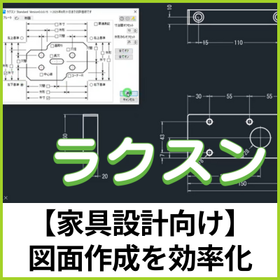
[Free trial version available] Software 'Raksun' that assists in dimension creation.

Easy dimension layout as intended by the designer. Simply select a shape and press a button to automatically arrange necessary dimensions such as outer dimensions and hole spacing!

"Raksun" is an add-in software developed with the concept of "easy dimension creation." It assists in dimension creation within your current CAD environment. This time, we are releasing a trial version of the AutoCAD-specific add-in software in advance! It will be available for free until August 31. ✓ Automatic dimension creation    → Reduction of human errors ✓ Standardization of in-house creation rules    → Reduction of variations ✓ Time-saving in drawing tasks Try it out first and experience the changes in your work. ▼ Download the free trial version from the URL below ▼

  • ラクスン操作画面.jpg
  • 2D CAD machine
  • soft

Added to bookmarks

Bookmarks list

Bookmark has been removed

Bookmarks list

You can't add any more bookmarks

By registering as a member, you can increase the number of bookmarks you can save and organize them with labels.

Free membership registration

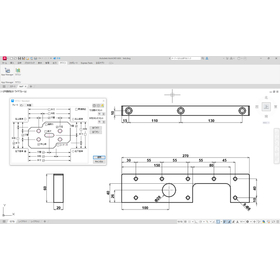
Easy Dimension Layout Software for Furniture Design

Dimension arrangement as intended by the designer! Significant reduction in design man-hours.

In the furniture industry, accuracy and efficiency in design drawings are essential. Furniture design, which combines complex shapes and diverse parts, often requires significant time for dimension notation and is prone to manual errors. "Raksun" is software that analyzes the shape information of 2D drawings and assists in dimension placement according to the designer's intent. By simply selecting the target rectangle, it automatically generates dimensions based on rules. It achieves a "visually appealing arrangement" that was difficult with the automatic functions of general-purpose CAD, dramatically reducing manual labor. 【Usage Scenarios】 - Dimension notation for part drawings - Efficient dimension addition to 2D drawings - Systematizing the know-how of experienced designers to support younger designers in drafting 【Benefits of Implementation】 - Labor reduction: Significantly reduces the effort required for manual dimension input. - Quality stabilization: Reduces human errors and minimizes variations among designers. - Smoother collaboration: Prevents discrepancies in interpretation during later processes through common rules for drafting. In addition to standalone use, "Raksun" can be flexibly customized to fit the specific design environment of customers. By incorporating unique dimension creation rules into the system, a more practical environment can be established. Please feel free to consult us.

  • ラクスン操作画面.jpg
  • 2D CAD machine
  • soft

Added to bookmarks

Bookmarks list

Bookmark has been removed

Bookmarks list

You can't add any more bookmarks

By registering as a member, you can increase the number of bookmarks you can save and organize them with labels.

Free membership registration

[2024 Edition] Device and Jig Design Made Easy and Fast! IRONCAD

[Version 2024] The long-awaited "linking later" feature has been implemented, making it even more convenient.

"IronCAD" is a 3D CAD that boasts exceptional operability. With unique features such as drag-and-drop from the "catalog" and the placement tool "TriBall" that does not use constraints, quick modeling is possible. Since parts and assemblies can be created within the same file, it is suitable for conceptual design, allowing ideas to be quickly realized. It is easy to learn, so it does not take much time to master. In mechanical design for devices and jigs, it enables significant speed-up in design and substantial reduction in man-hours. In version 2024, the long-awaited "linking later" feature has been implemented. Additionally, it includes many new features and improvements that enhance user convenience, such as a projection mode that shortens CAXA projection time and the ability to display multiple external link configurations in the same scene.

Added to bookmarks

Bookmarks list

Bookmark has been removed

Bookmarks list

You can't add any more bookmarks

By registering as a member, you can increase the number of bookmarks you can save and organize them with labels.

Free membership registration

2D-3D AutoCAD compatible BricsCAD V25

[Latest Version] Improved interface for greater user-friendliness & Enhanced AutoCAD Mechanical compatibility for increased drawing efficiency!

■Do you have any of the following concerns? - I want a calculator function within CAD. - I want to add dimensions to objects in bulk. - I want to create parts references and bill of materials compatible with AutoCAD Mechanical. The latest version of BricsCAD, BricsCAD V25, which is popular both domestically and internationally as an AutoCAD-compatible software, has been released. ■The latest BricsCAD V25 has implemented even more user-friendly features! - A calculator panel has been added, responding to numerous requests. It can perform functions and unit conversions, which can be utilized in drafting. - A quick dimensioning feature has been added, allowing for bulk dimensioning of objects. - Improved compatibility with ACM! New commands for creating parts references and parts lists have been added.

  • 2D CAD machine
  • soft

Added to bookmarks

Bookmarks list

Bookmark has been removed

Bookmarks list

You can't add any more bookmarks

By registering as a member, you can increase the number of bookmarks you can save and organize them with labels.

Free membership registration

[Presentation of Case Study Materials] Atmosphere Corporation BricsCAD Implementation Case Study

Achieving cost reduction through network licensing and providing high added value through customization.

Objective: Cost reduction, business efficiency improvement Implementing Company: Taikisha Ltd. Industry: Equipment construction ■Challenges Before Implementation 1. High CAD costs, unable to provide licenses to all designers 2. Existing 3D CAD does not support DWG, making data conversion labor-intensive These challenges are resolved by implementing BricsCAD. Moving forward, there are expectations for further functionalities of BricsCAD BIM, and it is anticipated to be utilized as software for "BIM compatibility in the manufacturing industry." *For more details, please download the PDF document.*

  • 2D CAD machine
  • soft

Added to bookmarks

Bookmarks list

Bookmark has been removed

Bookmarks list

You can't add any more bookmarks

By registering as a member, you can increase the number of bookmarks you can save and organize them with labels.

Free membership registration

Coating software

Continuous interpolation of the route is possible! Correction of X, Y, and Z coordinates is performed using a combination of CCD and laser.

The "Coating Software" is easy to use and learn, and can convert 2D DXF files into point coordinates and point formats through a multi-faceted operation interface. The related control methods for the coating function are designed to be user-friendly for operators. With a simple step control program, it can communicate with external systems and enable control. Please feel free to contact us if you have any inquiries. 【Features】 ■ Converts CAD to a format that is easy to understand immediately ■ CCD & Laser support function (optional) ■ Rich coating features * For more details, please refer to the PDF materials or feel free to contact us.

  • Software (middle, driver, security, etc.)
  • soft

Added to bookmarks

Bookmarks list

Bookmark has been removed

Bookmarks list

You can't add any more bookmarks

By registering as a member, you can increase the number of bookmarks you can save and organize them with labels.

Free membership registration

Solution: FactoryDesignUtilities

Autodesk products provide efficiency in factory layout through the Factory Layout feature.

We would like to introduce the solutions of our "Product Design & Manufacturing Collection." "Factory Design Utilities" can be used as a solution for factory layout, equipment design, and visualization by integrating it with "AutoCAD" and "Inventor." Additionally, before installing equipment in the factory, you can consider factory layout proposals and equipment placement positions in a virtual environment, allowing for more efficient design. 【Features】 <Factory Layout with AutoCAD and Inventor> ■ Efficient design, creation, and management of factory layout drawings in DWG format ■ Easily create accurate digital models during factory layout considerations ■ Automatic generation of 3D models ■ Reflection through modifications and additions to 3D models *For more details, please refer to the PDF materials or feel free to contact us.

Added to bookmarks

Bookmarks list

Bookmark has been removed

Bookmarks list

You can't add any more bookmarks

By registering as a member, you can increase the number of bookmarks you can save and organize them with labels.

Free membership registration

BIM "Archicad" for small-scale design offices and individual designers.

Improving productivity and reducing mistakes! BIM for small design firms and individual designers to simplify communication with clients and enhance competitiveness.

"Archicad Studio" is a subscription plan for small design firms and individual designers that allows access to the main features of Archicad at an affordable price. Collaborate with local teams using BIMcloud Basic and impress clients with the excellent 3D walkthrough presentations of BIMx Pro. Additionally, transition from 2D CAD to 3D BIM models, automatically updating models and drawings simultaneously. 【Features】 ■ Increased productivity and reduced errors ■ Local teamwork > Collaboration is primarily through a local server (on-premises), but by purchasing a BIMcloud SaaS subscription license, you can also benefit from cloud-based backup data while performing collaborative work. ■ Shortened review cycles ■ Simplified communication with clients, enhancing competitiveness ■ Strengthened collaboration between different teams ■ Support for professional growth *For more details, please download the PDF or feel free to contact us.

  • Other CAD related software
  • soft

Added to bookmarks

Bookmarks list

Bookmark has been removed

Bookmarks list

You can't add any more bookmarks

By registering as a member, you can increase the number of bookmarks you can save and organize them with labels.

Free membership registration

Automation of CAM programming "hyperMILL"

Proposing solutions for the automation of machining programming in CAD/CAM.

Our company proposes the automation of CAM programming using the modular CAM solution 'hyperMILL', which supports simultaneous 5-axis machining as well as 2D, 2.5D, 3D, turning, and hybrid machining. The automation programming of this software does not require specialized knowledge, making it operable even by those who are not skilled programmers. It is well-suited for similar products, products of different sizes, and workpieces with holes and pockets. 【Features】 ■ High-speed and reliable feature recognition Feature recognition automatically applies not only geometric elements but also machining-related data. ■ Manufacturing know-how stored in macros Job macros and feature macros enable the reuse of machining processes and automatic sorting. ■ NC code-based machine simulation Bridges the gap between the CAM system and the actual machining environment, ensuring safety. *For more details, please refer to the PDF document or feel free to contact us.

Added to bookmarks

Bookmarks list

Bookmark has been removed

Bookmarks list

You can't add any more bookmarks

By registering as a member, you can increase the number of bookmarks you can save and organize them with labels.

Free membership registration

Beginner-friendly 3D features + AutoCAD compatible "BricsCAD"

[Free trial available] Regular technical training sessions are being held! Models can be created for improving the visibility of instruction manuals, assembly diagrams, and sales materials, as well as for interference checks.

- Since it is a non-history type, modeling can be done intuitively without clearly defined drawing rules. - You can access extensive email support and tutorial videos at the WEB support center. - It can handle 3D models in .dwg format while maintaining the familiar operability of AutoCAD. ==================== BricsCAD is an affordable and high-functionality CAD software that allows you to create 2D, 3D, and BIM in .dwg files. It has been adopted by over 190,000 companies and more than 450,000 users worldwide, including over 10,000 companies in Japan, and is praised for its reliability, scalability, and stability. - Models can be created in a way that suits the user's preferences through direct modeling and parametric modeling. - It covers the basic functions of 3D CAD, including model creation, bill of materials, and creation of orthographic views. - It is possible to import and edit models created in other companies' 3D CAD software. *Optional feature required. Please download the PDF below to check the details. Also, feel free to contact us. 【check】The trial version is available here: https://www.bj-soft.jp/support/flow/

  • 2D CAD machine
  • soft

Added to bookmarks

Bookmarks list

Bookmark has been removed

Bookmarks list

You can't add any more bookmarks

By registering as a member, you can increase the number of bookmarks you can save and organize them with labels.

Free membership registration

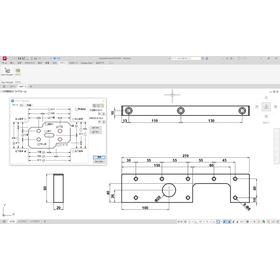
[For the Machinery Industry] Raksun: Dimension Creation Assistance Software

Dimension layout as intended by the designer! Streamlining dimension notation in 2D drawings.

In the machinery industry, accurate verification of the range of motion is required during the product design stage. Dimensioning in 2D drawings is essential for confirming the arrangement of parts and checking for interference, but manual dimension placement is time-consuming and prone to errors. Raksun addresses this challenge by analyzing the shape information of 2D drawings and supporting dimension placement that aligns with the designer's intent. 【Usage Scenarios】 - Dimensioning for part drawings with complex shapes and numerous holes - Efficient dimension addition to 2D drawings - Systematizing the know-how of experienced designers to support younger designers in drafting 【Benefits of Implementation】 - Labor reduction: Significantly reduces the effort required for manual dimension input. - Quality stabilization: Reduces human error and minimizes variation among different designers. - Smooth collaboration: Prevents discrepancies in interpretation in later processes through common rules for drafting. "Raksun" offers flexible customization tailored to the specific design environment of each customer. By incorporating unique dimension creation rules established by the company into the system, a more practical environment can be built. Please feel free to consult us.

  • ラクスン操作画面.jpg
  • 2D CAD machine
  • soft

Added to bookmarks

Bookmarks list

Bookmark has been removed

Bookmarks list

You can't add any more bookmarks

By registering as a member, you can increase the number of bookmarks you can save and organize them with labels.

Free membership registration

Simulation & Offline Programming Software

Information on simulation and offline programming software for robots from various companies! We provide software that meets your needs, taking into account the characteristics of each company!

At Tri Engineering, we handle simulation and offline programming software for various companies' robots. We can make proposals tailored to our customers' needs. 【Service Features】 - Providing software that meets customer requirements while considering the characteristics of each company - Offering know-how that we use in our daily operations - Development of unique features such as hem functions - Providing 3D data of delivered equipment to support from environment setup 【Services Introduced in the Catalog】 - CENIT FAST SUITE V5 - CENIT FAST SUITE E2 - GENETEC VISUAL COMPONENTS - GENETEC Mastercam (CAM software for NC machining) - JBM Engineering OCTOPUZ/Mastercam - Software from various robot manufacturers YASKAWA / MOTOSIM EG VRC FANUC / ROBOGUIDE NACHI / FD on DESK *For more details, please refer to the PDF document or feel free to contact us.

Added to bookmarks

Bookmarks list

Bookmark has been removed

Bookmarks list

You can't add any more bookmarks

By registering as a member, you can increase the number of bookmarks you can save and organize them with labels.

Free membership registration

Proposal for the Utilization of CAD: BricsCAD (Construction Industry)

The construction and civil engineering industry is facing intense market competition. To avoid falling behind in AI construction.

BricsCAD has excellent compatibility with the widely used 2D design system "AutoCAD" in the industry. It is possible to import and edit point cloud data. By using the linked application "ENSCAPE" (separate contract), real-time rendering can be performed from BIM software. Furthermore, with features like AI-powered matching functions, simple repetitive tasks can be streamlined, allowing you to focus on design and engineering work. 【Features】 ■ High compatibility with AutoCAD - Enables stable, high-quality work - Offers a wealth of features ■ Support for point cloud data and rendering - By using the linked application "ENSCAPE" (separate contract), real-time rendering from BIM software is possible. *For more details, please refer to the related links or feel free to contact us.

Added to bookmarks

Bookmarks list

Bookmark has been removed

Bookmarks list

You can't add any more bookmarks

By registering as a member, you can increase the number of bookmarks you can save and organize them with labels.

Free membership registration