We have compiled a list of manufacturers, distributors, product information, reference prices, and rankings for Design Software.
ipros is IPROS GMS IPROS One of the largest technical database sites in Japan that collects information on.

Design Software Product List and Ranking from 67 Manufacturers, Suppliers and Companies | IPROS GMS

Last Updated: Aggregation Period:Jan 14, 2026~Feb 10, 2026
This ranking is based on the number of page views on our site.

Design Software Manufacturer, Suppliers and Company Rankings

Last Updated: Aggregation Period:Jan 14, 2026~Feb 10, 2026
This ranking is based on the number of page views on our site.

  1. i CAD - 機械設計向け3DCAD(3次元CAD)開発元 - Tokyo//CAD/CAM
  2. タツタ Osaka//Machine elements and parts
  3. アキュレイト 東京カスタマーセンター Tokyo//Ferrous/Non-ferrous metals
  4. 4 JBCC Tokyo//software
  5. 5 くいんと Tokyo//software

Design Software Product ranking

Last Updated: Aggregation Period:Jan 14, 2026~Feb 10, 2026
This ranking is based on the number of page views on our site.

  1. Caliper Brake BMK ASAHI Caliper / Asahi Seiko タツタ
  2. Spring selection and design software "Select Spring-kun" アキュレイト 東京カスタマーセンター
  3. PrintPro 2.0 JBCC
  4. 4 AVEVA P&ID AVEVA
  5. 4 [Case Study of 3D CAD Software for Mechanical Design] Mitsubishi Heavy Industries, Ltd. i CAD - 機械設計向け3DCAD(3次元CAD)開発元 -

Design Software Product List

91~120 item / All 163 items

Displayed results

Design support CAE for cooling structural components ToffeeX

Proposing a new design through fluid analysis and multi-objective topology optimization.

ToffeeX is a topology optimization software based on fluid analysis, featuring fast computation, multi-objective optimization, and an intuitive GUI/cloud service (SaaS).

  • Thermo-fluid analysis
  • Design Software

Added to bookmarks

Bookmarks list

Bookmark has been removed

Bookmarks list

You can't add any more bookmarks

By registering as a member, you can increase the number of bookmarks you can save and organize them with labels.

Free membership registration

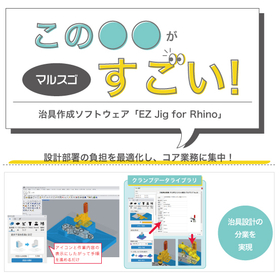
Optimize the burden on the Marsgo design department and focus on core operations!

Dramatically reduce the "drawing burden" of jig design! We will explain the secrets to strategically utilizing designers' resources.

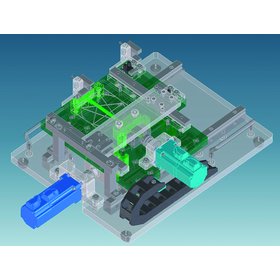
Jig design requires consideration from scratch and labor-intensive drawing work for each product shape and processing condition, and requests for "urgent jigs" become a significant burden on the design department, potentially straining the resources that should be focused on core design tasks. In particular, if the design department is responsible for all jig designs that arise, it becomes difficult to "quickly create the jigs needed on-site." This is where we introduce the jig design software "EZ Jig for Rhino." It is a software focused on jig design that simplifies operations, allowing for speedy jig design without advanced CAD skills. As a result, on-site personnel can easily create the necessary jigs themselves, freeing the design department from the burdensome drawing tasks and allowing them to concentrate on higher value-added design and planning work. You can proceed with the design without overthinking it and quickly create the jigs needed while on-site. The materials provide a detailed explanation of specific functions that enable "division of design work" and maximize "operational efficiency," so please take a look. *You can download the materials from the button below.

  • jig
  • Inspection fixture
  • Other CAD related software
  • Design Software

Added to bookmarks

Bookmarks list

Bookmark has been removed

Bookmarks list

You can't add any more bookmarks

By registering as a member, you can increase the number of bookmarks you can save and organize them with labels.

Free membership registration

Structural optimization design software 'HiramekiWorks'

One-click generation of solid models! Responding to practical needs in the design field.

"HiramekiWorks" is a structural optimization design software that boasts a proven track record in the manufacturing industry, equipped with both "Topology Optimization" and "Shape Optimization" functions as an add-in product for the 3D CAD SOLIDWORKS. Using the analysis conditions set in SOLIDWORKS, you can complete everything from running the analysis to importing the result model with just one click. Why not try designing in a way that has never been done before with our software, which incorporates unique know-how? 【Features】 ■ Easy optimization in a familiar environment ■ Addresses practical needs such as weight reduction and stress reduction under various conditions ■ Automatically generates solid models of optimization results ■ Use the geometry editor to create solid models more suitable for analysis *For more details, please refer to the related links or feel free to contact us.

  • Structural Analysis
  • Design Software

Added to bookmarks

Bookmarks list

Bookmark has been removed

Bookmarks list

You can't add any more bookmarks

By registering as a member, you can increase the number of bookmarks you can save and organize them with labels.

Free membership registration

[Case Study] Structural Examination of Drone Skeleton: Optimization Using Level Set Method

"HiramekiWorks" is a structural optimization design software that features both "topology optimization" and "shape optimization" functions.

Topology optimization using the level set method can yield clear optimal structures without grayscale. Additionally, it provides results that accurately satisfy the given volume constraints, allowing busy designers to utilize structural optimization in product design more easily, without struggling to interpret the optimization results. Here, we present an example of applying topology optimization using the level set method in the structural examination of delivery drones. *For more details, please refer to the related links or feel free to contact us.*

  • Structural Analysis
  • Design Software

Added to bookmarks

Bookmarks list

Bookmark has been removed

Bookmarks list

You can't add any more bookmarks

By registering as a member, you can increase the number of bookmarks you can save and organize them with labels.

Free membership registration

Case Studies on the Introduction of Structural Optimization Software for Component Lightweighting and Topology Optimization

Detailed explanations of examples of shape optimization that aligns the natural frequency with experimental measurement results, and examples of topology optimization that consider manufacturing requirements, using diagrams and tables!

In this case study collection, we introduce problem-solving examples using the structural optimization design software 'OPTISHAPE-TS'. We include examples of shape optimization that aligns natural frequencies with experimental measurement results, as well as topology optimization examples that consider manufacturing requirements. From the analysis model to optimization conditions, results, and discussions, we provide detailed explanations using figures and tables. Please feel free to download and take a look. [Contents] ■ Shape optimization that aligns natural frequencies with experimental measurement results ■ Lightweight design of rotating parts considering rigidity and manufacturing requirements ■ Topology optimization considering manufacturing requirements ■ Shape optimization considering rigidity in the arrangement patterns of multiple parts * For more details, please refer to the PDF materials or feel free to contact us. * Those who are not members of Ipros can also download the materials from the related links below (within our company site).

  • Structural Analysis
  • Design Software

Added to bookmarks

Bookmarks list

Bookmark has been removed

Bookmarks list

You can't add any more bookmarks

By registering as a member, you can increase the number of bookmarks you can save and organize them with labels.

Free membership registration

[Technical Column] The Theory of OPTISHAPE-TS Topology Optimization

The emergence of the H1 gradient method and its background! Introduction to a technical column on structural optimization design software.

In the previous article, I explained the calculation procedure of the force method, which is an H1 gradient method in shape optimization, including the previously proposed growth strain method. In this article, I will explain the H gradient method in topology optimization. Please feel free to download and take a look. [Contents] ■ Episode 7: The Emergence of the H1 Gradient Method and Its Background Part 2 "Topology Optimization" *For more details, please refer to the PDF document or feel free to contact us.

  • Structural Analysis
  • Design Software

Added to bookmarks

Bookmarks list

Bookmark has been removed

Bookmarks list

You can't add any more bookmarks

By registering as a member, you can increase the number of bookmarks you can save and organize them with labels.

Free membership registration

Theory of OPTISHAPE-TS Compliance Sensitivity Part 2

Compliance with design variables! An introduction to substitution method and direct differentiation method in a column.

We would like to introduce a technical column on our structural optimization design software "OPTISHAPE-TS." The discussion began in the previous article about deriving the sensitivity of compliance. This is the second installment of that article, where we will consider the derivative of compliance with respect to design variables. Please feel free to download and take a look. [Contents] ■ Episode 23: Sensitivity of Compliance Part 2 "Substitution Method and Direct Differentiation Method" *For more details, please refer to the PDF document or feel free to contact us.

  • Structural Analysis
  • Design Software

Added to bookmarks

Bookmarks list

Bookmark has been removed

Bookmarks list

You can't add any more bookmarks

By registering as a member, you can increase the number of bookmarks you can save and organize them with labels.

Free membership registration

Structural optimization design software "HiramekiWorks"

Addressing practical needs on the design site. The prototype model of the optimized result shape can be smoothly created with easy editing of STL data!

HiramekiWorks is an add-in structural optimization design software for 3D CAD SOLIDWORKS, boasting a proven track record in the manufacturing industry. Using the analysis conditions set in SOLIDWORKS, you can complete everything from running the analysis to importing the result model with just one click. Additionally, the optimized result shape can be easily edited into STL data for 3D printing using the included "Geometry Editor," making it simple and smooth to create prototype models. Would you like to try designing something that has never been done before with our software, which incorporates unique know-how? 【Features】 ■ Easy optimization in a familiar environment ■ Addresses practical needs such as weight reduction and stress reduction under various conditions ■ Automatically generates solid models of the optimized result shapes ■ Easily generates STL data for 3D printing using the Geometry Editor *For more details, please refer to the related links or feel free to contact us. We are currently offering the "HiramekiWorks Product Catalog" and "STL Editing Case Studies" (S-Generator Case Studies) for download in PDF format!

  • Structural Analysis
  • Design Software

Added to bookmarks

Bookmarks list

Bookmark has been removed

Bookmarks list

You can't add any more bookmarks

By registering as a member, you can increase the number of bookmarks you can save and organize them with labels.

Free membership registration

Spot Welding Shape Optimization, etc.: Case Studies on Structural Optimization Design Software Solutions

We will introduce examples of optimization related to spot-welded components and cases proposing shapes that equalize reaction forces ★ Detailed explanations of analysis models, optimization conditions, and discussions!

In this case study collection, we introduce problem-solving examples using the structural optimization design software 'OPTISHAPE-TS'. We present cases of optimizing the shape of spot-welded flat plate stiffeners, optimizing the optimal arrangement of spot welds themselves, and optimizing shapes to equalize reaction forces. We provide a detailed explanation using diagrams, covering the analysis model, optimization conditions, results, and discussions. Please feel free to download and take a look. [Featured Cases] ■ Shape optimization of spot-welded flat plate stiffeners ■ Topology optimization to reduce spot welding ■ Shape optimization to equalize reaction forces *For more details, please refer to the PDF materials or feel free to contact us! *For those who are not members of Ipros, you can also download the materials from the related links below (within our company site).

  • Structural Analysis
  • Contract Analysis
  • Other analyses
  • Design Software

Added to bookmarks

Bookmarks list

Bookmark has been removed

Bookmarks list

You can't add any more bookmarks

By registering as a member, you can increase the number of bookmarks you can save and organize them with labels.

Free membership registration

Ion beam design software

We will evaluate the results easily using an Excel macro for the axisymmetric model.

Ion beam device design software. Limited to axisymmetric models, but allows for easy evaluation of results using Excel macros. Calculates electric field distribution, magnetic field distribution, and trajectory distribution. Can take into account space charge effects.

  • others
  • Design Software

Added to bookmarks

Bookmarks list

Bookmark has been removed

Bookmarks list

You can't add any more bookmarks

By registering as a member, you can increase the number of bookmarks you can save and organize them with labels.

Free membership registration

Analysis Know-How.com MRI Magnetic Shield Room Design Software

With one button, execute calculations from mesh division! Complex analyses can be performed by anyone.

Would you like to conduct a simulation yourself to check if the 5GAUSS line leaks from the room? We have developed software that is easy to operate, even for construction design personnel who are not familiar with analysis. By setting the room layout and the number of shields, you can simply press the execute button to output the 5GAUSS line drawing. By performing repeated calculations, you can consider the optimal shield placement and the minimum number of shields needed. For more details, please visit [Analysis Know-How.com] and see "062 Introduction to μ-MRI." Here are the key points: - Dedicated software for MRI shield rooms - Specification of room layout and the number of shields for walls and floors - One-button operation for mesh division and calculation execution - Direct display of the 5GAUSS line - Complex analyses made accessible to anyone Additionally: - We offer professional consulting that addresses your specific issues - We provide contracted analysis and custom development at a low cost.

  • Other analyses
  • Design Software

Added to bookmarks

Bookmarks list

Bookmark has been removed

Bookmarks list

You can't add any more bookmarks

By registering as a member, you can increase the number of bookmarks you can save and organize them with labels.

Free membership registration

Ansys Zemax OpticStudio

For a wide variety of optical design and analysis! High-quality product development is possible through structural, thermal, and optical performance analysis.

"Ansys Zemax OpticStudio" is an optical design software suitable for designing various applications such as LiDAR, head-up displays, interchangeable lenses, and FA cameras. It enables a wide range of analyses, including imaging and illumination analysis, optimization, and tolerance analysis. It features a highly visible and intuitive user interface. Please feel free to contact us if you have any inquiries. 【Functionality Overview】 ■ Imaging and illumination analysis of optical performance ■ Tolerance analysis to verify manufacturability ■ Highly visible user interface ■ Structural, thermal, and optical performance (STOP) analysis ■ Accurate optimization capabilities ■ Diverse optical system modeling *For more details, please refer to the PDF materials or feel free to contact us.

  • Software (middle, driver, security, etc.)
  • Other embedded systems (software and hardware)
  • Design Software

Added to bookmarks

Bookmarks list

Bookmark has been removed

Bookmarks list

You can't add any more bookmarks

By registering as a member, you can increase the number of bookmarks you can save and organize them with labels.

Free membership registration

Design & Simulation Software that Makes Progressive Die Design Easier

Reduce the time for creating drawings and modeling! Streamline the design work!

In the design of progressive press molds, there are challenges such as the need for processes like "blank development," "strip layout," and "mold structure design," which take time. To address this, our "SOLIDWORKS Add-in" software is helpful for reducing mold design time and improving operational efficiency. 【Lineup】  ■3DQuickPress: Software for press mold design  ■3DQuickForm: Simulation for creating blank development shapes  ■3DSimSTAMP: Forming simulation incorporating mold structure This enables a reduction in "trial counts" and "design work efficiency," allowing for a shorter production preparation time.

  • Press Dies
  • Design Software

Added to bookmarks

Bookmarks list

Bookmark has been removed

Bookmarks list

You can't add any more bookmarks

By registering as a member, you can increase the number of bookmarks you can save and organize them with labels.

Free membership registration

Improvement of quality, cost reduction, and efficiency enhancement through model-based definition.

White Paper Presentation!! The Era of No Drawings! Achieving Quality Improvement, Cost Reduction, and Efficiency Enhancement with MBD

MBD, the so-called model-based definition manufacturing solution, expands the benefits of 3D design into the manufacturing sector. Advantages such as time and cost reduction contribute to the reduction of scrap and rework, improvement of accuracy, and acceleration of throughput, along with the transmission of tightly integrated product manufacturing information (PMI) for improved production. SOLIDWORKS MBD software automates the generation, organization, customization, and sharing of PMI data, enabling production in an easy-to-understand 3D digital format (such as SOLIDWORKS parts and assemblies, eDrawings, and 3D PDFs) that incorporates more information, significantly enhancing the competitiveness of product development and manufacturing operations. *For more details, please refer to the materials. Feel free to contact us as well.

  • 3D CAD
  • Other CAD related software
  • Other CAD
  • Design Software

Added to bookmarks

Bookmarks list

Bookmark has been removed

Bookmarks list

You can't add any more bookmarks

By registering as a member, you can increase the number of bookmarks you can save and organize them with labels.

Free membership registration

S-NAP Microwave Suite Catalog

It is possible to design and analyze patterns for ultra-high-speed logic circuits.

The S-NAP Microwave Suite is an EDA tool for microwave applications composed of three software components: a linear/non-linear circuit simulator (S-NAP/Pro), an automatic design software (S-NAP/Design), and a moment method electromagnetic field simulator (S-NAP/Field). S-NAP/Field comes standard with a harmonic balance analysis engine, allowing for non-linear analysis, such as that of rectenna antennas, to be performed directly on the electromagnetic field simulator. It enables the design and analysis of microwave circuits, patterned antennas, and ultra-high-speed logic circuit patterns. *For more details, please download the catalog.*

  • Other embedded systems (software and hardware)
  • Design Software

Added to bookmarks

Bookmarks list

Bookmark has been removed

Bookmarks list

You can't add any more bookmarks

By registering as a member, you can increase the number of bookmarks you can save and organize them with labels.

Free membership registration

Mastercam Design 【CAD Module】

Flexible CAD features with high degrees of freedom that can accept various other types of data.

We would like to introduce the CAD function 'Design' included in the CAD/CAM system 'Mastercam'. Mastercam Design comes standard with 2D drafting capabilities as well as 3D surface and solid modeling functions. It allows intuitive modeling of various shapes such as freeform surfaces, extrusions, rotations, and sweeps. It also includes editing functions for solid models imported from external sources, enabling flexible responses to design changes. Additionally, it features a high degree of freedom and flexible CAD capabilities that can accept various other format data. 【Features】 ■ High degree of freedom equipped ■ Can accept various other format data ■ Curvature analysis function allows detection of the minimum R of the model and color display based on specifications *For more details, please refer to the PDF materials or feel free to contact us.

  • 3D CAD
  • Design Software

Added to bookmarks

Bookmarks list

Bookmark has been removed

Bookmarks list

You can't add any more bookmarks

By registering as a member, you can increase the number of bookmarks you can save and organize them with labels.

Free membership registration

3D Architecture Designer Professional Office Pack

Office layout and simulation software that can design a single office room, one floor, multi-story levels, and an entire office building in 3DCG.

We can create office structural drawings (floor plans), layout diagrams with office furniture and equipment arranged, high-quality 3D images of office building entrances and exteriors, indoor and outdoor walkthrough movies, and PowerPoint presentation materials. In addition to manufacturer-made office furniture and supplies, we also include over 21,000 3D materials such as home furniture and equipment increasingly used in refresh spaces, parts like ornamental plants, and textures like flooring and wallpaper. By simply arranging these with a mouse, you can complete the image of the office space, making it accessible even for sales representatives who have not learned specialized design or CAD operations. Moreover, the aggregation and numbering functions for the arranged furniture can be utilized for creating estimates and planning relocation, and the information from the created office space can be transferred to existing systems or other tools. Furthermore, the office image can be output as a 360-degree panoramic image to share on social media, viewed through applications like IeCloud (3D data sharing app) and Megasoft VR solutions (separate product), or uploaded to the metaverse via GLB files.

  • Office furniture
  • Design Software

Added to bookmarks

Bookmarks list

Bookmark has been removed

Bookmarks list

You can't add any more bookmarks

By registering as a member, you can increase the number of bookmarks you can save and organize them with labels.

Free membership registration

Bridge Superstructure System "OP-BRIDGE"

Based on the centerline of the road/railway, the coordinates of the bridge superstructure will be calculated.

Efficient operations through interactive input of main beams and cross beams, etc., will enable coordinate calculations.

  • 2D CAD Construction
  • Design Software

Added to bookmarks

Bookmarks list

Bookmark has been removed

Bookmarks list

You can't add any more bookmarks

By registering as a member, you can increase the number of bookmarks you can save and organize them with labels.

Free membership registration

Intersection design for V-nasClair

Automatically create 3D models of intersections on V-nasClair.

◆ By inputting minimum conditions such as linearity and width composition, a 3D model of the intersection is automatically created. ◆ It also supports the design and visualization of various intersections, including 3-4 way junctions and roundabouts. ◆ Intersections can be edited on a dedicated screen. ◆ You can directly edit the areas you want to change (such as guiding paths, turning circles, and corner cut lines) simply by selecting them. ◆ The position of the stop line is updated simultaneously with the "crosswalk" and "road markings." ◆ Longitudinal and transverse profiles are automatically calculated and created from surface contour lines. ◆ The current longitudinal and transverse conditions are automatically obtained from a 3D terrain model, and the slopes at the intersection are automatically expanded. * To operate Intersection Design for V-nasClair, V-nasClair version 2020.2 or higher (64-bit version), Basic Suite, and ROAD_Kit are required.

  • Other embedded systems (software and hardware)
  • Design Software

Added to bookmarks

Bookmarks list

Bookmark has been removed

Bookmarks list

You can't add any more bookmarks

By registering as a member, you can increase the number of bookmarks you can save and organize them with labels.

Free membership registration

General-purpose 2D/3D finite element analysis and design software for semiconductor devices: APSYS

A semiconductor device simulator equipped with a variety of materials and physical models, enabling various analyses. Downloading the catalog is free!

<Main Features> ■ General-purpose 2D/3D finite element analysis and design software for semiconductor devices ■ Applicable to almost all device design and analysis except for semiconductor lasers (Simulation for semiconductor lasers is possible with separate products LASTIP and PICS3D) ■ Usable for the design of devices made from silicon and compounds <Diverse Physical Models and Functions> ■ Current-voltage (I-V) characteristics ■ Two-dimensional distribution of potential, electric field, and current ■ Two-dimensional distribution of hot carrier temperature in fluid dynamics models ■ Two-dimensional distribution of lattice temperature used in thermal transport models ■ Band diagrams under various bias conditions ■ Results of AC small-signal response analysis at arbitrary frequency ranges ■ Subbands of quantum wells using a carrier mixing model ■ Two-dimensional distribution of impurity occupancy and density trapped at deep levels in semiconductors ■ Two-dimensional optical field distribution of optical devices such as photodetectors ■ Current dependence of the self-emission spectrum of LEDs ■ FDTD interface ■ For other functions and details, please download the catalog or contact us. ■ For requests for a trial version, please contact us using the information below.

Added to bookmarks

Bookmarks list

Bookmark has been removed

Bookmarks list

You can't add any more bookmarks

By registering as a member, you can increase the number of bookmarks you can save and organize them with labels.

Free membership registration

Control Software Simulator 'XVL VmechSimulator'

Achieving concurrent development of equipment/devices in collaboration with the mech simulator.

"XVL VmechSimulator" is a control software simulator that enables the verification of large-scale equipment/control systems in 3D. This product realizes front-loading of control design, which is one of the trouble factors during the startup of equipment/systems. Additionally, it can connect to a wide variety of control controllers. 【Features】 ■ Front-loading of control design using a 3D mech simulator ■ Verification including existing equipment with CAD + 1 ■ 3D digital twin realized with CAD + 1 ■ Can connect to a wide variety of control controllers *For more details, please refer to the PDF document or feel free to contact us.

  • 3D measuring device
  • Other operation management software
  • Design Software

Added to bookmarks

Bookmarks list

Bookmark has been removed

Bookmarks list

You can't add any more bookmarks

By registering as a member, you can increase the number of bookmarks you can save and organize them with labels.

Free membership registration

[Case Study of 3D CAD Software for Mechanical Design] Izumi Food Machinery Co., Ltd.

[Free Case Studies] Enhancing product added value through the challenge of 3D design tailored to our own design requirements!

We would like to introduce a case study of the implementation of "iCAD SX" at Izumi Food Machinery Co., Ltd., a manufacturer of various equipment for food and beverage production. The company has taken on the challenge of creating added value for its products in the increasingly competitive food manufacturing machinery market by focusing on 3D design, specifically tackling the difficult task of 3D designing the sterilization equipment, which is the heart of food manufacturing plants. With the introduction of this product, they were able to achieve effects that contribute to increased customer satisfaction, such as product compactness and improved maintainability. 【Case Overview】 ■ Challenges - 3D design of the sterilization equipment, which is the heart of food manufacturing plants ■ Results - Product compactness - Improved maintainability *For more details, please refer to the PDF document or feel free to contact us.

Added to bookmarks

Bookmarks list

Bookmark has been removed

Bookmarks list

You can't add any more bookmarks

By registering as a member, you can increase the number of bookmarks you can save and organize them with labels.

Free membership registration

SigmaDEVELOP

Easily create HVAC and duct shapes parametrically! Design tailored to processing is possible.

"SigmaDEVELOP" allows for easy creation of HVAC and duct shapes. Thanks to its unique unfolding technology, it can accurately perform stretch corrections for each material and unfold quickly. With batch files, it can instantly create part groups automatically, and by using the integrated "SigmaNEST," it can export unfolding data and nest parts. [Features] ■ Easy shape creation and accurate unfolding ■ Customization and integration ■ Create shapes directly from SigmaNEST and nest with one click ■ Output bend lines and shape information to DXF, CSV, or instruction sheets ■ Group parts and support bill of materials and quantity management *For more details, please refer to the PDF materials or feel free to contact us.

  • Other CAD related software
  • Other CAM related software
  • Other CAD
  • Design Software

Added to bookmarks

Bookmarks list

Bookmark has been removed

Bookmarks list

You can't add any more bookmarks

By registering as a member, you can increase the number of bookmarks you can save and organize them with labels.

Free membership registration

[Data] Shirutoku Report No. 5 # Data Structure of the Circuit Board

Knowing the configuration (types) of substrate data can prevent unexpected schedule delays.

★★Shirutoku Report: Useful Information You Should Know★★ This report introduces the composition (types) of circuit board data. We provide a diagram outlining the general flow from circuit board design to manufacturing. Our company can convert Gerber data into our CAD data (CR5000BD) for design purposes when revisions to existing circuit boards are necessary, such as for the development of similar models or for dealing with discontinued parts (EOL, discon). If you need design work that utilizes existing design assets, please feel free to contact us. 【Main Circuit Board Design CAD (Excerpt)】 ■CR5000BD (Zuken) - Circuit board CAD data file extension: .pcb/.rul - Cover data file extension: .phl/.phd ■CR8000DF (Zuken) - Circuit board CAD data file extension: .dsgn - Cover data file extension: fph/fpl *For more details, please refer to the PDF document or feel free to contact us.

  • Circuit board design and manufacturing
  • Design Software

Added to bookmarks

Bookmarks list

Bookmark has been removed

Bookmarks list

You can't add any more bookmarks

By registering as a member, you can increase the number of bookmarks you can save and organize them with labels.

Free membership registration

Circuit design software "CADLUS Schematic"

CADLUS Schematic with intuitive operation - a circuit diagram editor compatible with multiple PCB design CADs.

Create a workspace to your liking! - You can specify the window position to a location that is easy for you to work in. - The tab shape can also be customized to your preference. Freely changeable drawing frames - You can choose from existing templates or create new ones. - Created templates can also be registered. - The placement of title frames can be freely set. Equipped with convenient features - Easy drawing of various shapes with an operation feel similar to painting software. - Bus wiring can be done with minimal settings. - Support for efficient wiring is also available.

  • Other CAD
  • Other CAD related software
  • Circuit board design and manufacturing
  • Design Software

Added to bookmarks

Bookmarks list

Bookmark has been removed

Bookmarks list

You can't add any more bookmarks

By registering as a member, you can increase the number of bookmarks you can save and organize them with labels.

Free membership registration

Nagashima Engineering Co., Ltd. Business Introduction

We will respond to the needs of a wide range of industries based on our rich experience and track record!

At Nagashima Engineering Co., Ltd., we offer design contracting services (from design to prototyping) and engineer dispatch services. In our design contracting services, we leverage our design expertise in customer products (related products), adjacent areas, and different fields to provide services from design to prototyping. Additionally, we dispatch highly skilled engineers with extensive knowledge and veteran engineers well-versed in various specialized fields, providing immediate support across a wide range of areas. 【Main CAD Equipment (Partial)】 ■3D/2D: Solid Works ■3D/2D: CATIA V5 ■3D/2D: 3DEXPERIENCE CATIA (V6) ■3D/2D: Creo Elements/Direct Modeling ■3D/2D: Creo Parametric *For more details, please download the PDF or feel free to contact us.

  • Mechanical Design
  • Temporary staffing business
  • Design Software

Added to bookmarks

Bookmarks list

Bookmark has been removed

Bookmarks list

You can't add any more bookmarks

By registering as a member, you can increase the number of bookmarks you can save and organize them with labels.

Free membership registration

Case Studies on Utilizing Digital Prototypes to Reform the Design and Development Process

Gain an edge over competitors! Achieve an innovative workflow.

Autodesk Product Design Suite 2016 is a comprehensive solution for digital prototyping, equipped with a suite of 3D design, visualization, and simulation tools that cover the entire engineering process. By using Product Design Suite, you can bring better products to market at lower costs and with greater speed. [Contents] - Utilize design models in a realistic 3D environment that closely resembles the actual product - Add new value to your 3D designs - Reduce development time and further cut costs For more details, please contact us or download the catalog.

Added to bookmarks

Bookmarks list

Bookmark has been removed

Bookmarks list

You can't add any more bookmarks

By registering as a member, you can increase the number of bookmarks you can save and organize them with labels.

Free membership registration

[Inventor Utilization Case] Niigata Power Systems Co., Ltd. (Planning and Management)

Seeking the evolution of the Niigata brand, widely utilizing 3D data from design to marketing.

We would like to introduce a case where Niigata Power Systems Co., Ltd., an engine manufacturer, utilized Autodesk products that our company handles. The company, which offers a wide range of products, was using dozens of catalogs, but the existence of cover format regulations was not well communicated, leading to each department producing and controlling them independently. As a solution, they utilized Autodesk products such as "Autodesk Inventor," "Autodesk 3ds Max," and "Autodesk Showcase." This led to a 30% increase in efficiency in the visualization process. [Case Overview] <Challenges> ■ The cost of producing promotional videos was higher than expected. ■ They could only create catalogs with low visual quality. <Result> ■ A total efficiency improvement of 20-30% was achieved in catalog production. *For more details, please refer to the PDF document or feel free to contact us.

  • Other CAD related software
  • 3D CAD
  • Design Software

Added to bookmarks

Bookmarks list

Bookmark has been removed

Bookmarks list

You can't add any more bookmarks

By registering as a member, you can increase the number of bookmarks you can save and organize them with labels.

Free membership registration