We have compiled a list of manufacturers, distributors, product information, reference prices, and rankings for Simulation software.
ipros is IPROS GMS IPROS One of the largest technical database sites in Japan that collects information on.

Simulation software Product List and Ranking from 175 Manufacturers, Suppliers and Companies

Last Updated: Aggregation Period:Dec 31, 2025~Jan 27, 2026
This ranking is based on the number of page views on our site.

Simulation software Manufacturer, Suppliers and Company Rankings

Last Updated: Aggregation Period:Dec 31, 2025~Jan 27, 2026
This ranking is based on the number of page views on our site.

  1. FsTech Kanagawa//software
  2. アスペンテックジャパン/AspenTech Tokyo//software
  3. CGTech Tokyo//software
  4. 4 シュレーディンガー Tokyo//software
  5. 5 null/null

Simulation software Product ranking

Last Updated: Aggregation Period:Dec 31, 2025~Jan 27, 2026
This ranking is based on the number of page views on our site.

  1. Design and Optimization of VOITH Linear Jet FsTech
  2. Aspen Plus process simulation software アスペンテックジャパン/AspenTech
  3. [Research and Development] Mixing Simulation Software 'TEX-FAN'
  4. 4 Engine simulation software "GT-POWER" IDAJ
  5. 5 CNC simulation software『Vericut 9.6』 CGTech

Simulation software Product List

511~525 item / All 727 items

Displayed results

Analysis case: Machining simulation targeting vehicle impellers.

Introduction of the deformation analysis results of the workpiece using cutting forces calculated by cutting simulation.

This is a case where the tool deflection was evaluated from the cutting force assessed in the cutting simulation of the "Production Module." By applying the analysis results from AdvantEdge to the geometric simulation on the CAD/CAM model, the cutting force during machining was calculated. The cutting force, which is the analysis result, can also be utilized for strain deformation analysis during machining. Additionally, in a case where mesh generation was performed on the shape of the workpiece during machining, and strain deformation analysis due to cutting force was conducted, it was found that the strain deformation on the workpiece side is not determined solely by the cutting force, but that the contribution of the rigidity on the workpiece side is also significant. 【Tool Path Analysis】 ■ Operation equivalent to CAM using GUI ■ Supports importing chatter stability limit curve diagrams ■ Navigator function ・Tool position ・Target NC line *For more details, please refer to the PDF document or feel free to contact us.

Added to bookmarks

Bookmarks list

Bookmark has been removed

Bookmarks list

You can't add any more bookmarks

By registering as a member, you can increase the number of bookmarks you can save and organize them with labels.

Free membership registration

Steelmaking Process Simulation: Metallurgical Process Module

Streamlining the exploration of conditions in the steelmaking process! Calculations considering slag quantity, gas partial pressure, temperature, and time for dephosphorization, deoxidation, desulfurization, and inclusion removal are possible!

The Metallurgical Process Module, an add-on module of the alloy design tool Thermo-Calc, allows for the calculation of steelmaking processes such as BOF and arc furnace melting, dephosphorization, deoxidation, and desulfurization in LF, as well as inclusion removal, taking into account factors like slag quantity, gas partial pressure, temperature, and time. Applicable processes include EAF (Electric Arc Furnace), LD-BOF (Converter), Tapping, LF (Ladle Refining Furnace), and VOD (Vacuum Oxygen Decarburization). For example, in the LF process, you can specify the amount and composition of the molten steel and slag, as well as the timing for introducing process conditions (temperature, time, gas) and additives (deoxidizers and specific alloying elements), and evaluate the slag quantity, slag composition, and impurity levels in the molten steel during the process. The use of this module requires the TCOX8 or later version of the oxide database. Calculation workflows and example problems are provided for each process.

Added to bookmarks

Bookmarks list

Bookmark has been removed

Bookmarks list

You can't add any more bookmarks

By registering as a member, you can increase the number of bookmarks you can save and organize them with labels.

Free membership registration

Application examples of the alloy design tool Thermo-Calc for Ni-based superalloys.

Introducing analysis examples for Ni-based superalloys! The alloy design tool Thermo-Calc can be used for material development and various manufacturing processes!

This is a collection of calculation examples for Ni-based superalloys using the alloy design tool Thermo-Calc. Thermo-Calc can optimize alloy processes, predict the effects of processes on microstructure, and forecast properties. 【Thermo-Calc】 - Temperature-phase diagram for Ni-24Al-15Cr-19Co - Temperature-phase diagram for 718Plus - Evaluation of the solvus temperature of the γ’ phase - Evaluation of equilibrium distribution coefficients - Evaluation of liquid phase density for Ni-Cr-Al-XMo - Evaluation of lattice constants for γ/γ’ phases - Evaluation of oxidation and sulfidation treatments - Evaluation of viscosity and surface tension for CMSX-10 - Electrical properties (electrical resistivity, electrical conductivity) - Thermal properties (thermal conductivity, thermal resistivity, thermal diffusivity) 【Diffusion Module DICTRA】 - Diffusion between GTD-111 alloy and coating - Diffusion in welds of steel materials and nickel alloys 【Precipitation Module TC-PRISMA】 - Precipitation of γ‘ and γ’‘ phases in 718 alloy 【Property Models for Ni Alloys】 - Anti-phase boundary energy - Temperature dependence of properties in frozen microstructures - Coarsening rate constant of precipitates

  • Rare metals
  • alloy
  • Non-ferrous metals
  • Simulation software

Added to bookmarks

Bookmarks list

Bookmark has been removed

Bookmarks list

You can't add any more bookmarks

By registering as a member, you can increase the number of bookmarks you can save and organize them with labels.

Free membership registration

Application examples of the alloy design tool Thermo-Calc for copper alloys.

Introducing analysis examples for copper alloys! The alloy design tool Thermo-Calc can be used for material development and various manufacturing processes!

This is a collection of calculation examples for copper alloys using the alloy design tool Thermo-Calc. Thermo-Calc allows for the optimization of alloy processes, the impact of processes on microstructure, and the prediction of properties. 【Thermo-Calc】 - Phase diagrams for Cu-Zn and Cu-Sn - Isothermal sections for Cu-Mn-Sn and Cu-Ni-Sn - Vertical sections (with fixed element ratios) - Liquid phase projection diagram for Cu-Ag-Sn - Evaluation of liquid phase density for Cu-Co-Fe - Evaluation of surface tension and viscosity - Evaluation of liquidus/solidus temperatures - Solidification calculations for Cu-8.32Ni-1.68Si 【Diffusion Module DICTRA】 - Interface movement and microsegregation during the solidification process 【Precipitation Module TC-PRISMA】 - Precipitation calculations for Ni2Si precipitate phase during aging process - Precipitation calculations for Co-Fe precipitate phase during aging process

  • alloy
  • Non-ferrous metals
  • Other metal materials
  • Simulation software

Added to bookmarks

Bookmarks list

Bookmark has been removed

Bookmarks list

You can't add any more bookmarks

By registering as a member, you can increase the number of bookmarks you can save and organize them with labels.

Free membership registration

Application examples of the alloy design tool Thermo-Calc for titanium alloys.

Introducing analysis examples for titanium alloys! The alloy design tool Thermo-Calc can be used for material development and various manufacturing processes!

This is a collection of calculation examples for titanium alloys using the alloy design tool Thermo-Calc. Thermo-Calc can optimize alloy processes, predict the effects of processes on microstructures, and forecast properties. 【Thermo-Calc】 - Temperature - phase fraction diagram for Ti-43.3Al-4.3Nb-1.2Mo-0.1B (at%) - Phase diagram of the Ti3Al-Nb pseudo-binary system - Evaluation of transformation temperature (β transus) - Evaluation of volume fractions of α and β phases - Surface tension of the liquid phase - Electrical resistivity of Ti6242Si - Thermal conductivity of Ti64 【Diffusion Module DICTRA】 - Evaluation of α phase fraction according to cooling rate

  • alloy
  • Non-ferrous metals
  • Other metal materials
  • Simulation software

Added to bookmarks

Bookmarks list

Bookmark has been removed

Bookmarks list

You can't add any more bookmarks

By registering as a member, you can increase the number of bookmarks you can save and organize them with labels.

Free membership registration

Layered manufacturing simulation AM module *Test calculations now accepted

Support for predicting temperature history and molten morphology in metal additive manufacturing! Ideal for condition examination for AM!

The AM module is a simulation module specialized in predicting complex temperature histories and melt pool shapes in the metal additive manufacturing process. It enables analysis that takes into account temperature changes and phase transformations in relation to shaping conditions such as laser and electron beams. By collaborating with Thermo-Calc and utilizing thermodynamic and kinetic databases, it strongly supports material design and optimization of process conditions under rapid cooling conditions. It is particularly effective for analyses such as: 【Calculation Examples】 - Setting and reproducing thermal history profiles - Simulation of phase generation and disappearance - Changes in temperature distribution during multilayer additive manufacturing - Correlation analysis between cooling rate and microstructural changes - Comparison of microstructural evolution before and after aging treatment - Estimation of fine microstructures near the melt pool ★ For more details, please download the PDF or feel free to contact us ★ ★ For test calculations, please consult us through "Contact" ★

Added to bookmarks

Bookmarks list

Bookmark has been removed

Bookmarks list

You can't add any more bookmarks

By registering as a member, you can increase the number of bookmarks you can save and organize them with labels.

Free membership registration

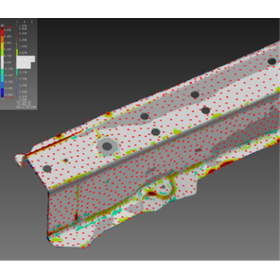
Innovating molding simulation with AE-Deform for molds.

Optimize mold design and molding simulation with analysis reflecting real shapes.

In the mold industry, the accuracy of molding simulation greatly influences product quality and manufacturing efficiency. It is important to accurately predict the actual molding process and identify potential issues during the mold design phase. AE-Deform achieves high-precision simulations by reflecting realistic mold shapes obtained from non-contact measurement data into the analysis mesh. This contributes to a reduction in the number of prototypes, an improvement in product quality, and a shortening of development time. 【Application Scenarios】 - Molding simulation based on mold shape - Press panel molding analysis - Application to digital twin technology 【Effects of Implementation】 - Optimization of modification plans and reduction of man-hours - Realistic collision and safety performance analysis - Reduction of trial-and-error man-hours in testing and increased development efficiency

  • 02-2.png
  • Other CAD related software
  • Simulation software

Added to bookmarks

Bookmarks list

Bookmark has been removed

Bookmarks list

You can't add any more bookmarks

By registering as a member, you can increase the number of bookmarks you can save and organize them with labels.

Free membership registration

NC machine simulation software "VERICUT"

Identify mistakes and inefficient areas! Collisions in the "virtual machine" serve to protect the actual machines.

"VERICUT" is simulation software for G-code NC programs executed on machine tools. Before processing on machine tools, it verifies NC data created by CAM software on a PC. It reproduces the machine tool and its movements on the PC, preventing errors and troubles such as collisions caused by the program. By utilizing CAD data, it is also possible to conduct detailed inspections of leftover material and overcutting. 【Features】 ■ Supports simulation of "G-code NC programs" for various NC machine tools ■ Faithfully reproduces in-machine operations in detail ■ Reproduces all elements in 3D, detecting collisions and interferences ■ Significantly reduces verification work on actual machines, enabling quick start of processing ■ Reduces costs associated with machine damage and troubles *For more details, please refer to the PDF document or feel free to contact us.

  • Other CAM related software
  • Simulation software

Added to bookmarks

Bookmarks list

Bookmark has been removed

Bookmarks list

You can't add any more bookmarks

By registering as a member, you can increase the number of bookmarks you can save and organize them with labels.

Free membership registration

Lithography simulation software

Eliminate waste of cost and time, and achieve high-performance, low-cost product development in a short period.

At Intersoft, we handle "Lithography Simulation Software." We offer a variety of products, including "FullChip," which supports a computing environment consisting of a layout server and multiple clients, as well as the very user-friendly, flexible, and powerful "HyperLith" and "EM-Suite." We eliminate costs and wasted time, enabling high-performance, low-cost product development in a short period. 【Product Lineup (Partial)】 ■FullChip ■HyperLith ■EM-Suite ■TEMPESTpr2 ■TRIG, etc. *For more details, please refer to the PDF materials or feel free to contact us.

  • Software (middle, driver, security, etc.)
  • Simulation software

Added to bookmarks

Bookmarks list

Bookmark has been removed

Bookmarks list

You can't add any more bookmarks

By registering as a member, you can increase the number of bookmarks you can save and organize them with labels.

Free membership registration

OpenLM Server

Maximize the usage efficiency of expensive network licenses!

OpenLM Core is software that further monitors and analyzes the usage of licenses managed by various license managers in detail. It also maximizes usage efficiency with various accompanying tools. Rather than explaining it, we encourage you to install the trial version (without any purchase conditions) and try it out for yourself. You will gain access to information about licenses that you have not been able to obtain from license managers until now. This enables various responses and allows you to actively work to enhance license usage efficiency. We guarantee a 15% reduction in license costs, and some companies have achieved a 30% reduction. Please estimate how much this could amount to.

  • Other CAD related software
  • Industrial PCs
  • others
  • Simulation software

Added to bookmarks

Bookmarks list

Bookmark has been removed

Bookmarks list

You can't add any more bookmarks

By registering as a member, you can increase the number of bookmarks you can save and organize them with labels.

Free membership registration

ACT Analysis Simulation Software

Supporting a wide range of industrial sectors! Achieving high-precision analysis simulations!

Our company conducts research and development, sales, and consulting services for analysis simulation software across a wide range of industrial sectors. We have tools that can accurately simulate complex material behavior and mechanical properties in manufacturing and design processes. Since we possess the source program, customization to meet customer needs is also possible. In addition to having extensive analysis results in various industrial fields, we are capable of optimal shape analysis using AI technology. 【Features】 ■ Analysis simulation software that supports a wide range of industrial sectors ■ Ability to accurately simulate complex material behavior and mechanical properties in manufacturing and design processes ■ Customization available to meet customer needs due to possession of the source program ■ Capability for optimal shape analysis using AI technology *For more details, please refer to the PDF materials or feel free to contact us.

  • Structural Analysis
  • Thermo-fluid analysis
  • Analysis Services
  • Simulation software

Added to bookmarks

Bookmarks list

Bookmark has been removed

Bookmarks list

You can't add any more bookmarks

By registering as a member, you can increase the number of bookmarks you can save and organize them with labels.

Free membership registration

About NC data simulation software NCVIEW

Achieving safe processing and improving productivity! Specializing in simulation verification of the NC data applied to machine tools.

"NCVIEW" is a domestic NC data simulation system that reproduces machine tools in a virtual space and simulates NC data precisely and at high speed. It continuously monitors interference accidents, which are the most undesirable troubles in machining, and notifies the situation with an alarm if any abnormalities occur. It is also excellent for verifying machining using macro programs. 【Features】 ■ Precise and high-speed simulation of NC data ■ Continuous monitoring of interference accidents, with alarm notifications for any abnormalities ■ Excellent for verifying machining with macro programs ■ Equipped with a wealth of features to improve machining productivity ■ Actively responds to customization requests *For more details, please refer to the PDF materials or feel free to contact us.

  • 2023-02-13_09h43_47.png
  • simulator
  • Simulation software

Added to bookmarks

Bookmarks list

Bookmark has been removed

Bookmarks list

You can't add any more bookmarks

By registering as a member, you can increase the number of bookmarks you can save and organize them with labels.

Free membership registration

Troubles during processing: Tool collision and damage

Expert metalworking know-how is essential for prediction and prevention... 'NCVIEW' makes this a reality!

There may be mistakes in NC data or manual operations that cause tools to collide with workpieces, jigs, or machine structures, which can lead to spindle damage and is considered a dangerous accident, also referred to as tool interference. Additionally, various factors such as the type of workpiece, the number of cutting edges, material and shape of the tool, coolant, cutting speed, rotation speed, and poor chip removal can also lead to tool breakage. Preventing and predicting these issues requires the expertise of skilled metalworking professionals, but the tool and holder interference check in 'NCVIEW' makes this possible. [Causes of Trouble] ■ Mistakes in NC data ■ Manual operations causing tools to collide with workpieces, jigs, or machine structures → A dangerous accident that can lead to spindle damage, known as tool interference ■ Various factors such as the type of workpiece, the number of cutting edges, material and shape of the tool, coolant, cutting speed, rotation speed, and poor chip removal → Tool breakage *For more details, please refer to the PDF document or feel free to contact us.

  • simulator
  • Simulation software

Added to bookmarks

Bookmarks list

Bookmark has been removed

Bookmarks list

You can't add any more bookmarks

By registering as a member, you can increase the number of bookmarks you can save and organize them with labels.

Free membership registration

Troubles during processing: Human error

It can lead to serious troubles that may result in interference incidents... "NCVIEW" allows for efficient verification of troubles!

Even if you create NC data through CAM after modeling in CAD, if there are errors in the data input into the CAD/CAM, you will not obtain correct NC data. Even if the NC data is accurate, mistakes in the NC macro program, incorrect tool compensation settings, or errors in the workpiece's position, orientation, or coordinate system settings can lead to significant problems, such as reduced operational efficiency and quality defects, and in some cases, even interference accidents. By using 'NCVIEW,' which allows simulations in an environment similar to the actual machining setup and has a macro debugger, you can efficiently verify machining troubles. [Causes of Problems] ■ If there are errors in the data input into CAD/CAM, correct NC data cannot be obtained. ■ Mistakes in the NC macro program. ■ Tool compensation settings are not correctly set. ■ Errors in the workpiece's position, orientation, or coordinate system settings. → This can lead to significant problems, such as reduced operational efficiency and quality defects, and in some cases, even interference accidents. *For more details, please refer to the PDF document or feel free to contact us.

  • simulator
  • Simulation software

Added to bookmarks

Bookmarks list

Bookmark has been removed

Bookmarks list

You can't add any more bookmarks

By registering as a member, you can increase the number of bookmarks you can save and organize them with labels.

Free membership registration

BTO for ASU/MOLD-EX resin flow analysis software for the manufacturing industry.

BTO for the resin flow analysis software 'ASU/MOLD-EX' for the manufacturing industry.

The resin injection molding simulation software ASU/MOLD visualizes processes such as filling, warpage and shrinkage analysis, and mold cooling using a three-dimensional solid mesh, providing high-precision results in a short time. It is utilized in various stages from product design to mold creation and molding sites. There are no limitations on the number of CPU cores for calculations on a single PC. It is possible to execute multiple calculation jobs simultaneously, allowing for quick feedback cycles through the comparison of results based on mold shapes and molding conditions. We are configuring the optimal PC for that software.

  • Desktop PC
  • Simulation software

Added to bookmarks

Bookmarks list

Bookmark has been removed

Bookmarks list

You can't add any more bookmarks

By registering as a member, you can increase the number of bookmarks you can save and organize them with labels.

Free membership registration