We have compiled a list of manufacturers, distributors, product information, reference prices, and rankings for Support software.
ipros is IPROS GMS ・ IPROS One of the largest technical database sites in Japan that collects information on.

Support software(3D CAD) - List of Manufacturers, Suppliers, Companies and Products | IPROS GMS

Last Updated: Aggregation Period:Sep 16, 2026~Oct 13, 2026
This ranking is based on the number of page views on our site.

Support software Product List

1~30 item / All 47 items

Displayed results

3D CAD convenience tool

Implemented a model quality check tool, achieving a reduction of 100 hours of labor annually.

In the "3D CAD Convenience Tools," we have developed unique tools to improve work efficiency and support the enhancement and review of design operations. In the current era where manufacturing with 3D data has accelerated, verifying data quality has become one of the most important tasks. To reduce this burden, we implement and automate parts of the work using 3D convenience tools, achieving a reduction in man-hours. 【Examples of Convenience Tools】 ■ Display Angle Matching Matching the display angle and magnification of active/inactive data ■ Automatic Modeling Tool Creating and modifying 3D models using Excel ■ Analysis Result Reading Tool Automating the reading of stress concentration points from analysis results *For more details, please refer to the PDF materials or feel free to contact us.

Added to bookmarks

Bookmarks list

Bookmark has been removed

Bookmarks list

You can't add any more bookmarks

By registering as a member, you can increase the number of bookmarks you can save and organize them with labels.

Free membership registration

2D/3D Sheet Metal Manufacturing Support Software "MACsheet Series"

Improve business efficiency and manufacturing systems! Software solutions for 'monozukuri' (manufacturing).

The "MACsheet series" enables the construction of systems that utilize existing systems and data without being constrained by manufacturers or models. Starting with "MACsheet SEG5," which allows anyone to easily create, edit, and generate unfolded drawings of 3D models with intuitive operations, we also offer a lineup that includes "MACsheet IST," a CAD/CAM software with enhanced nesting capabilities. We also provide "Taktory," a cloud-based process management system for sheet metal that allows real-time progress tracking and immediate responses to sudden inquiries from clients. 【Features (MACsheet SEG5)】 ■ 3D design CAD for sheet metal ■ Synchronization technology that enables intuitive operations ■ Import and utilize 3D CAD data ■ Utilize 2D data such as DXF ■ One-click unfolding of created models and imported data *For more details, please refer to the PDF materials or feel free to contact us.

  • 3D CAD
  • Other CAD related software
  • Other CAM related software
  • Support software

Added to bookmarks

Bookmarks list

Bookmark has been removed

Bookmarks list

You can't add any more bookmarks

By registering as a member, you can increase the number of bookmarks you can save and organize them with labels.

Free membership registration

3D Data Document Creation Support Tool 'Canvas X Pro'

A great ally for companies involved in manufacturing when creating technical documents that include 3D CAD data!

"Canvas X Pro" is a program that allows for the creation of various technical documents by directly importing 3D CAD data and utilizing technical illustration features. It enables the creation of all visual documents from start to finish without the need to switch to other applications, using 3D CAD model processing, display, and graphic functions. *Canvas X Pro is available only in English. [Canvas X Pro Video Links] (1) https://www.youtube.com/watch?v=3kYFbTRfsnQ (2) https://www.youtube.com/watch?v=u2BpH6uDAxY [About Canvas X Pro License Types] http://www.poladigital.co.jp/canvas/xpro.html *For more details, please refer to the PDF materials or feel free to contact us.

  • Image Processing Software
  • 3D CAD
  • Other CAD related software
  • Support software

Added to bookmarks

Bookmarks list

Bookmark has been removed

Bookmarks list

You can't add any more bookmarks

By registering as a member, you can increase the number of bookmarks you can save and organize them with labels.

Free membership registration

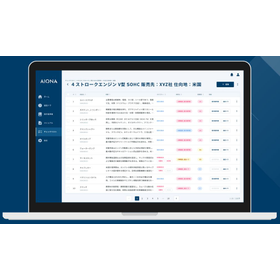
An AI reviewer that supports design and development by leveraging manufacturing know-how.

Multimodal AI compatible with images and 3D CAD, and the formalization of knowledge through automatic generation of technical documents!

We provide an AI agent that automates design by leveraging vast technical documentation and implicit knowledge in design. We support design tasks that cannot be solved by knowledge management alone through process automation. Additionally, while cross-referencing geometric analysis from 3D CAD with technical documents such as design standards and past trouble reports, the AI identifies risks and provides clear answers by pointing out areas of concern on the model with pins when asked in a chat. 【Features】 ■ Utilization and accumulation of design knowledge linked with 3D CAD ■ Continuous accuracy improvement through AI self-evaluation ■ Generation and accumulation of high-quality knowledge that leads to defect prevention and technical inheritance *For more details, please download the PDF or feel free to contact us.

  • Company:AIONA
  • Price:Other
  • Other information systems
  • Document and Data Management
  • Support software

Added to bookmarks

Bookmarks list

Bookmark has been removed

Bookmarks list

You can't add any more bookmarks

By registering as a member, you can increase the number of bookmarks you can save and organize them with labels.

Free membership registration

TSAssist

TSAssist - A new generation robot program creation support tool by Shibaura Machine.

TSAssist, a new generation robot program creation support tool from Shibaura Machine. It strongly assists in the preliminary tasks from planning to implementation and improvement of automated systems using robots. By utilizing this PC software, maximize the investment benefits of automation and labor-saving systems using Shibaura Machine robots. Multilingual support (Japanese, English, Chinese (traditional and simplified)). Collaborative work with overseas bases can be conducted smoothly.

  • Articulated Robot
  • Articulated Robot
  • simulator
  • Support software

Added to bookmarks

Bookmarks list

Bookmark has been removed

Bookmarks list

You can't add any more bookmarks

By registering as a member, you can increase the number of bookmarks you can save and organize them with labels.

Free membership registration

Awareness Support CAD System

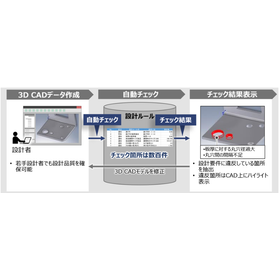
Achieve a reduction in design lead time through automatic checks of design rules!

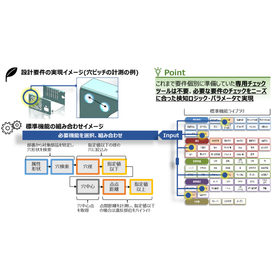
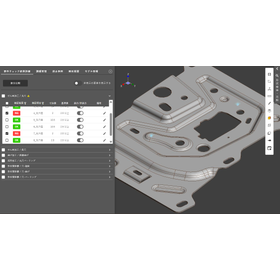
The "Awareness Support CAD System" is a system that analyzes design data and the designer's operation history to detect potential issues and inefficient processes in real-time during the design process. By utilizing past design data and best practices, it provides specific improvement suggestions to designers. It automatically checks 3D CAD models based on design requirements (design rules and ease of processing). Compared to visual checks, it significantly reduces the time required for checks and rework. 【Features】 ■ Real-time problem detection ■ Utilization of knowledge base ■ Analysis of operation history ■ Collaboration features ■ Customizability *For more details, please download the PDF or feel free to contact us.

  • 気づき支援2.png
  • Other CAD related software
  • Support software

Added to bookmarks

Bookmarks list

Bookmark has been removed

Bookmarks list

You can't add any more bookmarks

By registering as a member, you can increase the number of bookmarks you can save and organize them with labels.

Free membership registration

3D CAD Data | Automatic Requirement Check

Design checks, faster and more reliably.

"Blooplinter" is a knowledge utilization tool that links design know-how and past examples to 3D CAD data, allowing users to quickly search for necessary information. By managing past drawings, design decisions, trouble cases, and check items alongside 3D shapes, it makes it easier for anyone to reuse the verification tasks and judgments that relied on the experience of skilled professionals. It supports the prevention of design rework, reduction of verification workload, and knowledge sharing through similar shape searches, requirement checks, and difference confirmations during design changes. 【Expected Effects】 ■ Sharing of Skilled Professionals' Know-How By visualizing the judgment criteria and design know-how of skilled professionals, it makes it easier to utilize across departments and among personnel. ■ Prevention of Recurrence of Troubles and Defects By linking past defects and points of caution to 3D shapes, it supports the prevention of similar mistakes and troubles from recurring. ■ Reduction of Design and Verification Time Since past similar shapes and related information can be searched immediately, it reduces the time spent on drawing verification and information exploration. ■ Reduction of Variability in Design Quality By sharing the different verification perspectives and judgment criteria that varied by personnel, it supports the standardization of design quality.

  • スクリーンショット 2026-06-09 064401.png
  • Database
  • Support software

Added to bookmarks

Bookmarks list

Bookmark has been removed

Bookmarks list

You can't add any more bookmarks

By registering as a member, you can increase the number of bookmarks you can save and organize them with labels.

Free membership registration

CAM solution "2.5-axis machining"

Creating 2.5D CNC machining tool paths is the most powerful and easy!

The combination of the most intuitive, user-friendly interface, seamless integration with SolidWorks, and the latest tool path technology creates the most powerful and easiest way to generate 2.5D tool paths. Working with parts, assemblies, and sketch shapes to define CNC machining jobs is simple. You can quickly and visually place fixtures and components. 【Features】 - Intuitive and user-friendly interface - Seamless integration with SolidWorks, combined with the latest tool path technology, allows for fast, powerful, and easy creation of 2.5D CNC milling tool paths - Easy work with parts, assemblies, and sketch shapes to define CNC machining jobs - Quick and visual placement of fixtures and components For more information, please contact us or download the catalog.

  • Other CAM related software
  • Support software

Added to bookmarks

Bookmarks list

Bookmark has been removed

Bookmarks list

You can't add any more bookmarks

By registering as a member, you can increase the number of bookmarks you can save and organize them with labels.

Free membership registration

VISOMETRY Corporation AR Visual Inspection Support Software Twyn

Software that assists in the appearance inspection of large and complex shapes, also automatically generates inspection reports.

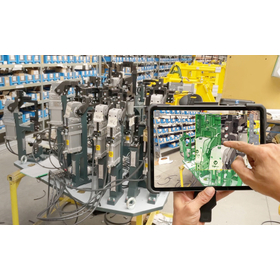
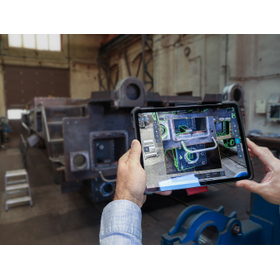
Software that displays 3D CAD data of products on an iPad and overlays it with the actual object captured by a camera, allowing for comparison and discovery of discrepancies between the data and the physical item. Discovered discrepancies can be recorded in terms of location and condition through freehand drawing, and a photo report can be automatically generated. Key inspection points and areas that require special attention can be set in advance, and by displaying caution instructions on the screen, work time can be reduced. Until now, even visual inspections that required skilled labor can be performed with high accuracy with only minimal training. Typical applications: ✓ Large sheet metal parts ✓ Canned structures ✓ Large jigs - Used for inspections during processes, before shipment, and upon receipt. It helps to identify mistakes arising from forgotten part installations, processing omissions, positional differences, and mix-ups of drawing versions, thereby improving the accuracy of visual inspections and promoting labor-saving measures.

  • 2021-02_SVK_Costumer_Slavia Productions_Jig and Fixture.jpg
  • 2023-10_CSZ_Customer_Loko_IMG-4973.jpg
  • 2024-01_SVK_Customer_SlaviaProductions_DSCF0082.jpg
  • Image Processing Software
  • Support software

Added to bookmarks

Bookmarks list

Bookmark has been removed

Bookmarks list

You can't add any more bookmarks

By registering as a member, you can increase the number of bookmarks you can save and organize them with labels.

Free membership registration

Raksun for Manufacturing: Streamlining Dimension Creation for Parts Drawings

Dimension layout as intended by the designer! Achieving a reduction in man-hours for component drawings.

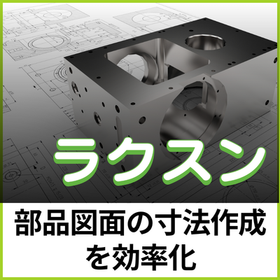
In the manufacturing industry, 2D drawings remain an important source of information for parts management. Accurate dimension information is essential as part of the bill of materials and manufacturing instructions, and the way dimensions are recorded is a crucial factor that affects the quality of the drawings. Raksun is software that analyzes the shape information of 2D drawings and assists in the arrangement of dimensions in line with the designer's intent. By setting rules in advance, such as reference planes and dimension directions, and simply selecting the target with a rectangular selection, dimensions based on those rules are automatically generated. It achieves a "visually appealing arrangement" that was difficult to accomplish with the automatic functions of general-purpose CAD, reducing the burden of manual work. [Usage Scenarios] - Dimensioning parts drawings with complex shapes or numerous holes - Efficiently adding dimensions to 2D drawings - Systematizing the know-how of experienced designers to support younger designers in drafting [Effects of Implementation] - Significantly reduces the effort required for dimension input. - Reduces human error and minimizes variations among different designers. - Prevents discrepancies in interpretation in later processes through drawing based on common rules. "Raksun" allows for flexible customization tailored to the specific design environment of each customer. By incorporating unique dimension creation rules established by the company into the system, a more practical environment can be built. Please feel free to consult with us.

  • ラクスン操作画面.jpg
  • 2D CAD machine
  • Support software

Added to bookmarks

Bookmarks list

Bookmark has been removed

Bookmarks list

You can't add any more bookmarks

By registering as a member, you can increase the number of bookmarks you can save and organize them with labels.

Free membership registration

Collaboration of Automotive PLM and Utilization of 3D CAD Data

Integrate automotive PLM and 3D CAD data to eliminate the fragmentation of design information.

For the automotive sector: We will address the challenge of disconnected information between core systems like PLM and 3D CAD data by utilizing the 3D CAD data application features of blooplinter. 'blooplinter' is a knowledge utilization tool that links design know-how and past examples to 3D CAD data, allowing users to quickly find the necessary information. It manages past drawings, design decisions, trouble cases, and check items alongside 3D shapes, enabling anyone to reuse verification tasks that were previously reliant on the experience of skilled professionals. 【Usage Scenarios】 ■ Fast search for past similar design cases ■ Automatic checking of requirements in accordance with design standards ■ Differential checks during design changes ■ Sharing of trouble cases and prevention of recurrence ■ Passing on design know-how to new personnel 【Implementation Effects】 ■ Reduction of variability in design quality and promotion of standardization ■ Shortening of development time through reduction of design and verification man-hours ■ Continuous sharing and promotion of the utilization of skilled professionals' know-how

  • others
  • Support software

Added to bookmarks

Bookmarks list

Bookmark has been removed

Bookmarks list

You can't add any more bookmarks

By registering as a member, you can increase the number of bookmarks you can save and organize them with labels.

Free membership registration

Collaboration of PLM for aircraft parts and utilization of 3D CAD data

Integrating PLM of aircraft components with 3D CAD data to eliminate the fragmentation of design information.

For aircraft parts: We will solve the issue of disconnected information between core systems such as PLM and 3D CAD data with the 3D CAD data utilization feature of blooplinter. 'blooplinter' is a knowledge utilization tool that links design know-how and past examples to 3D CAD data, allowing users to quickly find the necessary information. It manages past drawings, design decisions, trouble cases, and check items alongside 3D shapes, enabling anyone to reuse verification tasks that relied on the experience of skilled professionals. 【Usage Scenarios】 ■ Fast search for past similar design cases ■ Automatic checks of requirements in accordance with design standards ■ Difference confirmation during design changes ■ Sharing of trouble cases and prevention of recurrence ■ Transmission of design know-how to new personnel 【Implementation Effects】 ■ Reduction of variation in design quality and promotion of standardization ■ Shortening of development periods through reduction of design and verification man-hours ■ Continuous sharing and promotion of the utilization of skilled professionals' know-how

  • others
  • Support software

Added to bookmarks

Bookmarks list

Bookmark has been removed

Bookmarks list

You can't add any more bookmarks

By registering as a member, you can increase the number of bookmarks you can save and organize them with labels.

Free membership registration

PLM integration of railway vehicle parts and utilization of 3D CAD data.

Integrate PLM and 3D CAD data for railway vehicle parts to eliminate the fragmentation of design information.

For railway vehicle parts: We will address the issue of disconnected information due to the lack of integration between core systems like PLM and 3D CAD data by utilizing the 3D CAD data capabilities of blooplinter. 'blooplinter' is a knowledge utilization tool that links design know-how and past examples to 3D CAD data, allowing users to quickly find the necessary information. It manages past drawings, design decisions, trouble cases, and check items alongside 3D shapes, enabling anyone to reuse verification tasks that were previously reliant on the experience of skilled workers. 【Usage Scenarios】 ■ Fast search for past similar design cases ■ Automatic checks of requirements in accordance with design standards ■ Confirmation of differences during design changes ■ Sharing of trouble cases and prevention of recurrence ■ Transfer of design know-how to new personnel 【Implementation Effects】 ■ Reduction of variability in design quality and promotion of standardization ■ Shortening of development periods through reduction of design and verification man-hours ■ Continuous sharing and promotion of the utilization of skilled workers' know-how

  • others
  • Support software

Added to bookmarks

Bookmarks list

Bookmark has been removed

Bookmarks list

You can't add any more bookmarks

By registering as a member, you can increase the number of bookmarks you can save and organize them with labels.

Free membership registration

PLM integration of construction machinery parts and utilization of 3D CAD data.

Integrate PLM of construction machinery parts with 3D CAD data to eliminate fragmentation of design information.

For construction machinery parts: We will solve the issue of disconnected information between core systems like PLM and 3D CAD data with the 3D CAD data utilization feature of blooplinter. 'blooplinter' is a knowledge utilization tool that links design know-how and past examples to 3D CAD data, allowing users to quickly find the necessary information. It manages past drawings, design decisions, trouble cases, and check items alongside 3D shapes, enabling anyone to reuse verification tasks that were previously reliant on the experience of skilled workers. 【Usage Scenarios】 ■ Fast search for past similar design cases ■ Automatic checks of requirements in accordance with design standards ■ Difference confirmation during design changes ■ Sharing of trouble cases and prevention of recurrence ■ Transmission of design know-how to new personnel 【Implementation Effects】 ■ Reduction of variability in design quality and promotion of standardization ■ Shortening of development periods through reduction of design and verification man-hours ■ Continuous sharing and promotion of the utilization of skilled workers' know-how

  • others
  • Support software

Added to bookmarks

Bookmarks list

Bookmark has been removed

Bookmarks list

You can't add any more bookmarks

By registering as a member, you can increase the number of bookmarks you can save and organize them with labels.

Free membership registration

Collaboration of PLM in automotive parts and utilization of 3D CAD data

Integrating automotive parts PLM with 3D CAD data to eliminate the fragmentation of design information.

For automotive parts: We will solve the issue of disconnected information between core systems like PLM and 3D CAD data with the 3D CAD data utilization feature of blooplinter. 'blooplinter' is a knowledge utilization tool that links design know-how and past examples to 3D CAD data, allowing users to quickly find the necessary information. It manages past drawings, design decisions, trouble cases, and check items alongside 3D shapes, enabling anyone to reuse verification tasks that were previously reliant on the experience of skilled workers. 【Usage Scenarios】 ■ Fast search for past similar design cases ■ Automatic checking of requirements in accordance with design standards ■ Difference confirmation during design changes ■ Sharing of trouble cases and prevention of recurrence ■ Transmission of design know-how to new personnel 【Implementation Effects】 ■ Reduction of variation in design quality and promotion of standardization ■ Shortening of development periods through reduction of design and verification man-hours ■ Continuous sharing and promotion of the utilization of skilled workers' know-how

  • others
  • Support software

Added to bookmarks

Bookmarks list

Bookmark has been removed

Bookmarks list

You can't add any more bookmarks

By registering as a member, you can increase the number of bookmarks you can save and organize them with labels.

Free membership registration

Collaboration of PLM in shipbuilding and utilization of 3D CAD data

Integrate shipbuilding PLM and 3D CAD data to eliminate the fragmentation of design information.

For shipbuilding: We will solve the issue of disconnected information between core systems such as PLM and 3D CAD data with the 3D CAD data utilization feature of blooplinter. 'blooplinter' is a knowledge utilization tool that links design know-how and past examples to 3D CAD data, allowing users to quickly find the necessary information. It manages past drawings, design decisions, trouble cases, and check items alongside 3D shapes, enabling anyone to reuse verification tasks that were previously reliant on the experience of skilled workers. 【Usage Scenarios】 ■ Fast search for past similar design cases ■ Automatic checks of requirements in accordance with design standards ■ Difference confirmation during design changes ■ Sharing of trouble cases and prevention of recurrence ■ Transfer of design know-how to new personnel 【Implementation Effects】 ■ Reduction of variability in design quality and promotion of standardization ■ Shortening of development periods through reduction of design and verification man-hours ■ Continuous sharing and promotion of the utilization of skilled workers' know-how

  • others
  • Support software

Added to bookmarks

Bookmarks list

Bookmark has been removed

Bookmarks list

You can't add any more bookmarks

By registering as a member, you can increase the number of bookmarks you can save and organize them with labels.

Free membership registration

Collaboration with automotive suppliers and utilization of 3D CAD data

Facilitating the collaboration of design data with automotive suppliers through the use of 3D CAD data.

For the automotive sector: We will solve the issue of inefficient exchange of design data with suppliers and the resulting rework due to misunderstandings through the 3D CAD data utilization feature of blooplinter. 'blooplinter' is a knowledge utilization tool that links design know-how and past examples to 3D CAD data, allowing users to quickly find the necessary information. It manages past drawings, design decisions, trouble cases, and check items alongside 3D shapes, enabling anyone to reuse verification tasks that were previously reliant on the experience of skilled professionals. [Utilization Scenarios] ■ Fast search for past similar design cases ■ Automatic checking of requirements in accordance with design standards ■ Difference confirmation during design changes ■ Sharing of trouble cases and prevention of recurrence ■ Transmission of design know-how to new personnel [Implementation Effects] ■ Reduction of variability in design quality and promotion of standardization ■ Shortening of development periods through reduction of design and verification man-hours ■ Continuous sharing and promotion of the utilization of skilled professionals' know-how

  • others
  • Support software

Added to bookmarks

Bookmarks list

Bookmark has been removed

Bookmarks list

You can't add any more bookmarks

By registering as a member, you can increase the number of bookmarks you can save and organize them with labels.

Free membership registration

Collaboration with automotive parts suppliers and utilization of 3D CAD data.

Facilitating the collaboration of design data with automotive parts suppliers through the use of 3D CAD data.

For automotive parts: We address the issue of inefficient design data exchange with suppliers and rework caused by misunderstandings through the utilization features of blooplinter's 3D CAD data. 'blooplinter' is a knowledge utilization tool that links design know-how and past examples to 3D CAD data, allowing users to quickly find the necessary information. It manages past drawings, design decisions, trouble cases, and check items alongside 3D shapes, enabling anyone to reuse verification tasks that were previously reliant on the experience of skilled workers. 【Usage Scenarios】 ■ Fast search for past similar design cases ■ Automatic checks of requirements in accordance with design standards ■ Difference confirmation during design changes ■ Sharing of trouble cases and prevention of recurrence ■ Transmission of design know-how to new personnel 【Implementation Effects】 ■ Reduction of variation in design quality and promotion of standardization ■ Shortening of development periods through reduction of design and verification man-hours ■ Continuous sharing and promotion of the utilization of skilled workers' know-how

  • others
  • Support software

Added to bookmarks

Bookmarks list

Bookmark has been removed

Bookmarks list

You can't add any more bookmarks

By registering as a member, you can increase the number of bookmarks you can save and organize them with labels.

Free membership registration

[Data] DX of Mechanical Design and Control Design Using 3D CAD

Includes modeling methods and various usage examples along with graphs and diagrams!

This document introduces "DX in Mechanical Design and Control Design Using 3D CAD." It includes trends and current status of DX, modeling methods, various usage examples, and applications, presented with graphs and diagrams. Please take a look. 【Contents】 ■ Current Status and Challenges of DX ■ Operation Instructions ■ Usage Images ■ Application Images *For more details, please refer to the PDF document or feel free to contact us.

  • Company:ITAGE
  • Price:Other
  • others
  • Support software

Added to bookmarks

Bookmarks list

Bookmark has been removed

Bookmarks list

You can't add any more bookmarks

By registering as a member, you can increase the number of bookmarks you can save and organize them with labels.

Free membership registration

Reducing Rework in Shipbuilding Design: Utilizing 3D CAD Techniques

Preventing shipbuilding design revisions in advance by utilizing 3D CAD data.

For shipbuilding: We will solve the issue of frequent rework and reconsideration due to the discovery of defects in the post-design process with the design rework reduction feature of blooplinter. 'blooplinter' is a knowledge utilization tool that links design know-how and past cases to 3D CAD data, allowing users to quickly find the necessary information. It manages past drawings, design decisions, trouble cases, and check items alongside 3D shapes, enabling anyone to reuse the verification tasks that relied on the experience of skilled workers. [Usage Scenarios] ■ Fast search for past similar design cases ■ Automatic checks of requirements in accordance with design standards ■ Difference confirmation during design changes ■ Sharing of trouble cases and prevention of recurrence ■ Transmission of design know-how to new personnel [Implementation Effects] ■ Reduction of variability in design quality and promotion of standardization ■ Shortening of development time through reduction of design and verification man-hours ■ Continuous sharing and promotion of the utilization of skilled workers' know-how

  • others
  • Support software

Added to bookmarks

Bookmarks list

Bookmark has been removed

Bookmarks list

You can't add any more bookmarks

By registering as a member, you can increase the number of bookmarks you can save and organize them with labels.

Free membership registration

Reducing Rework in Railway Vehicle Parts Design: Techniques for Utilizing 3D CAD

Preventing design rework of railway vehicle parts by utilizing 3D CAD data.

For railway vehicle parts: To address the issue of frequent rework and reconsideration due to the discovery of defects in the design post-process, we will solve this with blooplinter's design rework reduction feature. 'blooplinter' is a knowledge utilization tool that links design know-how and past cases to 3D CAD data, allowing you to quickly find the necessary information. It manages past drawings, design decisions, trouble cases, and check items alongside 3D shapes, enabling anyone to reuse the verification tasks that relied on the experience of skilled workers. [Usage Scenarios] ■ Fast search for past similar design cases ■ Automatic checks of requirements in accordance with design standards ■ Difference confirmation during design changes ■ Sharing of trouble cases and prevention of recurrence ■ Transmission of design know-how to new personnel [Implementation Effects] ■ Reduction of variation in design quality and promotion of standardization ■ Shortening of development time through reduction of design and verification man-hours ■ Continuous sharing and promotion of the utilization of skilled workers' know-how

  • others
  • Support software

Added to bookmarks

Bookmarks list

Bookmark has been removed

Bookmarks list

You can't add any more bookmarks

By registering as a member, you can increase the number of bookmarks you can save and organize them with labels.

Free membership registration

Significantly reduce 3D CAD simulation time! Labor cost reduction using AI.

A must-see for 3D CAD engineers in the automotive, machinery, and electronics fields! Significantly reduce analysis execution time by utilizing AI models in simulations!

The "3D Surrogate Model" is a product developed with the intention of training AI using simulation results obtained from existing CAE analysis solvers, and then using the trained AI model to conduct similar simulations. By utilizing AI for simulations, it significantly reduces computation time and, due to its reliance on simple multiplication, prevents analysis results from halting due to divergence. Additionally, it can directly learn from the mesh as an AI model, allowing features such as material properties and edge lengths to be represented. 【Features】 ■ Significant reduction in analysis execution time ■ Stability of analysis processing ■ Improved ease of use ■ Reduction in analysis resources *For more details, please refer to the PDF materials or feel free to contact us.

Added to bookmarks

Bookmarks list

Bookmark has been removed

Bookmarks list

You can't add any more bookmarks

By registering as a member, you can increase the number of bookmarks you can save and organize them with labels.

Free membership registration

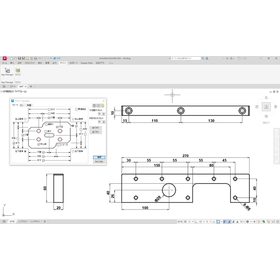
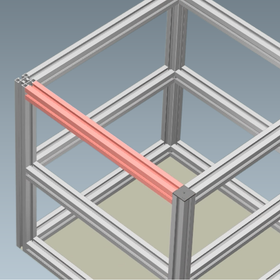
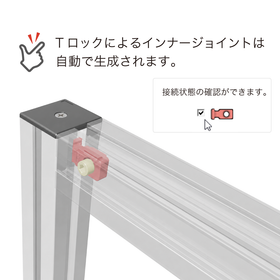
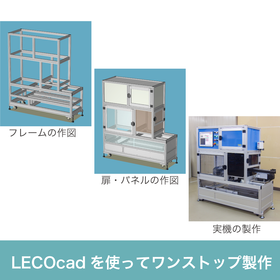
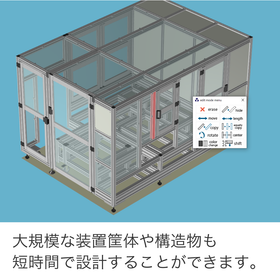
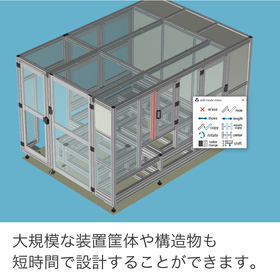
3D CAD 'LECOcad' for Aluminum Frames for Industrial Machinery

From the design of the device housing to ordering, made easier. CAD dedicated to RecoFrame.

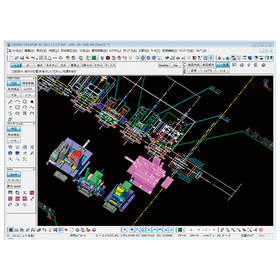
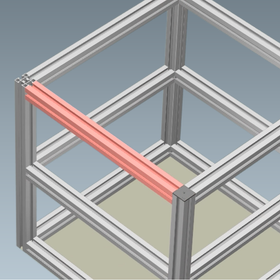
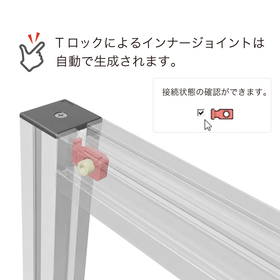
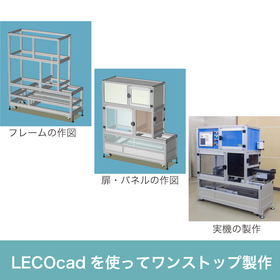
In the design of industrial machinery equipment enclosures, high precision and rigidity, as well as a rapid development cycle, are required. Particularly for enclosures with complex structures, selecting components and verifying assembly procedures can take a significant amount of time and effort. Flexible responses to design changes and accurate ordering of components without excess or shortage are also essential elements for the success of a project. LECOcad is a dedicated 3D design support software developed to address these challenges and streamline the process from equipment enclosure design to component selection, estimation, and ordering. 【Usage Scenarios】 - 3D modeling of equipment enclosures - Design of structures including doors, panels, and accessories - Automatic listing and ordering of components 【Benefits of Implementation】 - Reduction in design time - Decrease in component selection and ordering errors - Acceleration of the development cycle

Added to bookmarks

Bookmarks list

Bookmark has been removed

Bookmarks list

You can't add any more bookmarks

By registering as a member, you can increase the number of bookmarks you can save and organize them with labels.

Free membership registration

Real-time diagnosis of the design integrity of 3D CAD models.

Visualize the excess and deficiency of geometric tolerances with color! Aim for "Fully constrained."

One of the core features of the Creo GD&T Advisor Extension is the Advisor Tree and the Constraint State Legend. These are essential tools for designers to understand the integrity of the model in real-time during the process of applying GD&T. The Advisor Tree displays information, warnings, and error messages related to the applied GD&T in a hierarchical structure, pointing out design issues and violations of standards. Furthermore, the Constraint State Legend highlights the surfaces on the model with color coding to indicate whether they are "Fully constrained," "Partially constrained," or "Unconstrained" based on the tolerances. This allows for the visual identification of areas with insufficient or excessive tolerances, supporting complete and efficient tolerance design. Please check the details of the Advisor Tree, which prevents overlooking design intent, and the legend that indicates the state of tolerances with colors in the screen captures of the materials.

  • 3D CAD
  • Support software

Added to bookmarks

Bookmarks list

Bookmark has been removed

Bookmarks list

You can't add any more bookmarks

By registering as a member, you can increase the number of bookmarks you can save and organize them with labels.

Free membership registration

GEO-DESIGNER for Medical Devices

Reduce design and processing lead time with simple and speedy analysis.

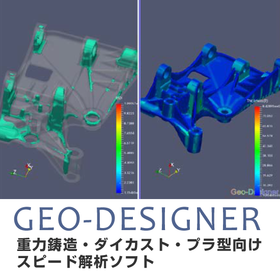
In the medical device industry, the precision and safety of products are of utmost importance. Particularly in the manufacturing of medical device components with complex shapes, verifying manufacturability during the design phase is essential. Geo-Designer supports the rapid delivery of high-quality medical devices by early identification of issues in the design process and reducing rework in the manufacturing process. 【Usage Scenarios】 - Design of precision parts - Mold design - Optimization of manufacturing processes 【Benefits of Implementation】 - Reduction of design changes and rework - Stable supply of high-quality products - Cost reduction

  • simulator
  • Other analyses
  • Support software

Added to bookmarks

Bookmarks list

Bookmark has been removed

Bookmarks list

You can't add any more bookmarks

By registering as a member, you can increase the number of bookmarks you can save and organize them with labels.

Free membership registration

Instantly solve geometric tolerance questions! The era when 3D CAD tools become educators.

No need to worry if you don't have knowledge of specifications! We support practical GD&T education.

The Creo GD&T Advisor Extension is not just a tool for checking tolerances; it is also a powerful educational platform with rich help content built in. Even designers who are unfamiliar with GD&T standards can acquire knowledge while progressing with their work. If questions or errors arise regarding the application of GD&T during design, help can be accessed with a simple right-click on the messages displayed in the Advisor Tree. This help feature provides detailed information on the principles of GD&T, interpretations of the standards, and specific solutions to errors. As a result, designers can refer to the standards and acquire GD&T knowledge in a practical context without interrupting their work. This feature eliminates the hassle of flipping through standard documents and allows for immediate access to correct information, significantly contributing to the improvement of GD&T skill levels across the entire design team. Examples of tutorials are also included. For more details on the helpful features that aid in knowledge acquisition, please refer to the documentation. *For more information, please download the PDF or feel free to contact us.*

  • 3D CAD
  • Support software

Added to bookmarks

Bookmarks list

Bookmark has been removed

Bookmarks list

You can't add any more bookmarks

By registering as a member, you can increase the number of bookmarks you can save and organize them with labels.

Free membership registration

Robot programming support software "neoROSET"

neoROSET is a programming tool that allows for robot programming and accurate simulation on a PC.

neoROSET is a programming tool that allows for robot programming and accurate simulation on a PC. By conducting offline verification in advance, it mitigates the risks associated with the implementation of robotic systems.

  • Other industrial robots
  • Support software

Added to bookmarks

Bookmarks list

Bookmark has been removed

Bookmarks list

You can't add any more bookmarks

By registering as a member, you can increase the number of bookmarks you can save and organize them with labels.

Free membership registration

Aerospace CADPAC-CREATOR

Support for strength analysis in the aerospace field using 2D3D integrated design CAD.

In the aerospace industry, advanced strength analysis is essential to ensure the safety and reliability of products. In particular, the design of aircraft fuselages and components must withstand use in harsh environments. Inadequate design can lead to serious accidents. CADPAC-CREATOR integrates 2D and 3D data, making it easy to create and edit the shape data necessary for strength analysis. 【Usage Scenarios】 - Design of aircraft components - Structural design of spacecraft - Strength analysis simulation 【Benefits of Implementation】 - Reduced design time - Improved design quality - Cost reduction

  • cadpac-creator_02.png
  • 2D CAD machine
  • 3D CAD
  • Other CAD
  • Support software

Added to bookmarks

Bookmarks list

Bookmark has been removed

Bookmarks list

You can't add any more bookmarks

By registering as a member, you can increase the number of bookmarks you can save and organize them with labels.

Free membership registration

3D CAD 'LECOcad' for Designing Aluminum Frames for Fixtures

Furniture and fixture design made easier. Free 3D design software exclusively for RecoFrame.

In the furniture and fixture industry, product design that balances aesthetics and functionality is essential. Particularly for fixtures, efficient arrangement in limited spaces and flexibility to accommodate various uses are crucial. Additionally, ease of assembly and visual appeal are factors that enhance the product's value. LECOcad is a dedicated 3D design support software developed to streamline the process from the design of the Recoframe to material selection, estimation, and ordering, supporting the resolution of these challenges. 【Usage Scenarios】 - Design and planning of store fixtures - Structural design of exhibition booths - Modular design of office furniture - Prototyping and consideration of DIY furniture - Drafting structures that combine various accessories 【Benefits of Implementation】 - Reduction in design time - Streamlining of material selection - Centralization of estimation and ordering processes - Increased design flexibility - Visualization of the final image

Added to bookmarks

Bookmarks list

Bookmark has been removed

Bookmarks list

You can't add any more bookmarks

By registering as a member, you can increase the number of bookmarks you can save and organize them with labels.

Free membership registration

Finishing Estimation Software [Neo Finishing] Case Study: Daishin Construction Co., Ltd.

It's been about 12 years since its introduction! The more I get used to it, the more I realize what a wonderful software it is!

We would like to introduce a case study of the finishing estimation software "Neo Finishing" implemented by Daijin Construction Co., Ltd. The company faced the challenge of improving the efficiency of its estimation operations at the time of implementation. It was essential for the estimation work to be completed in a short time, and a flexible system was desired. The simple and user-friendly system from Advantech perfectly met these expectations. About 12 years have passed since its implementation (as of November 2021), and both structural and finishing estimations can be linked to CAD data, resulting in a reduction in estimation time. Recently, we learned that we can create 3D models and perspectives based on CAD data drawn for estimation, and we would like to utilize this for sales support. 【Case Overview】 ■ Implementing Company: Daijin Construction Co., Ltd. (Naha City, Okinawa Prefecture) ■ Employee Scale: Less than 100 to 500 people ■ Implemented Software: Neo Finishing *For more details, please refer to the PDF document or feel free to contact us.

  • Software (middle, driver, security, etc.)
  • Support software

Added to bookmarks

Bookmarks list

Bookmark has been removed

Bookmarks list

You can't add any more bookmarks

By registering as a member, you can increase the number of bookmarks you can save and organize them with labels.

Free membership registration