1~16 item / All 16 items
Displayed results
Filter by category

Added to bookmarks
Bookmarks listBookmark has been removed
Bookmarks listYou can't add any more bookmarks
By registering as a member, you can increase the number of bookmarks you can save and organize them with labels.
Free membership registration
Contact this company
Inquiry FormBefore making an inquiry
Download Profile1~16 item / All 16 items
Filter by category

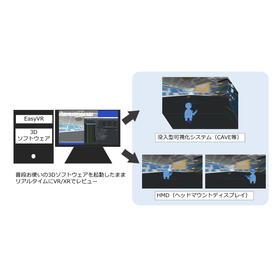
Do you have any challenges like wanting to check CAD data in VR but finding it cumbersome to convert the data for VR? Or feeling burdened by the need to learn how to operate new VR software? The real-time 3D visualization XR platform 'EasyVR' allows you to utilize your existing CAD and CAE software and various 3D applications in a VR/XR space without any modifications. By capturing and analyzing the OpenGL rendering information of the software in real-time, you can transform your existing 3D workflow into VR/XR without the need for data conversion or the development of dedicated applications. [Features] - Changes made in your usual 3D software, including edits and analysis results, are reflected in real-time in the VR/XR space. - No need for 3D data conversion tasks or learning dedicated tools. You can use this to create a VR/XR environment leveraging existing 3D assets for VR conversion of CAD/CAE data, design and prototype reviews, sharing analysis results, and verifying workability. *For more details, please download the PDF or contact us directly.
Added to bookmarks
Bookmarks listBookmark has been removed
Bookmarks listYou can't add any more bookmarks
By registering as a member, you can increase the number of bookmarks you can save and organize them with labels.
Free membership registration
A compact aggregation of EasyVR's rich features. You can utilize basic functions, including real-time VR conversion of 3D applications through OpenGL capture, with the same performance as EasyVR. This is an option for those who want to introduce VR focusing on the necessary features of EasyVR. <Features> - Real-time VR display of models shown in the 3D software window - Full-scale display of models (scaling is also possible), rotation, movement, walkthrough, dimension measurement, collision detection, etc. - Direct import of 3D files is also supported - Compatible with general-purpose OpenXR-compliant HMDs (Note: Passthrough is not supported)
Added to bookmarks
Bookmarks listBookmark has been removed
Bookmarks listYou can't add any more bookmarks
By registering as a member, you can increase the number of bookmarks you can save and organize them with labels.
Free membership registration
Utilize models displayed in 3D software with immersive VR systems such as CAVE, Powerwall, and LED video walls. Capture OpenGL rendering information to use existing content for VR reviews and demos without modifying the 3D software. <Features> - Compatible with VR systems using projectors (screens) and LEDs (CAVE, Powerwall, LED video walls, etc.) - Real-time VR display of models shown in the 3D software window - Enables VR experiences using lightweight 3D glasses without HMDs (VR goggles) - Capable of creating an environment where VR can be experienced while observing the surroundings - Useful for VR reviews, internal and external demos, technical exhibitions, etc. - Can be utilized even when developing VR compatibility for existing 3D software is challenging.
Added to bookmarks
Bookmarks listBookmark has been removed
Bookmarks listYou can't add any more bookmarks
By registering as a member, you can increase the number of bookmarks you can save and organize them with labels.
Free membership registration
Bring the 3D models you usually handle in your 3D software directly into VR/XR through OpenGL capture. You can utilize existing 3D content for product and technology presentations, technical exhibitions, and demonstrations both inside and outside the company. <Features> - Real-time VR/XR display of models shown in the 3D software window - Full-scale display (scalable), rotation, movement, and walkthroughs to showcase products and equipment - Ability to explain while manipulating models in VR - Compatible with VR systems using projectors (screens) and LEDs (CAVE, Powerwall, LED video walls, etc.), in addition to HMDs (VR goggles) - Supports image and PDF display in VR, note-taking features, and playback of 360-degree videos - Useful for company tours, public exhibitions, technical displays, product introductions, and external demonstrations - Can also be used for presentations of research results and technologies - Compatible with HMDs - Compatible with VR systems (projectors and LEDs)
Added to bookmarks
Bookmarks listBookmark has been removed
Bookmarks listYou can't add any more bookmarks
By registering as a member, you can increase the number of bookmarks you can save and organize them with labels.
Free membership registration
Utilize the display of your regular 3D software in VR/XR through OpenGL capture. You can use existing 3D models for education and training in full scale and three-dimensional space without developing new VR content. <Features> - Real-time VR/XR conversion of models displayed in the 3D software window - Check size and space with full-scale display (scaling is also possible) - Supports full-scale display (scaling is also possible), rotation, movement, walkthroughs, dimension measurement, collision detection, cross-section display, and the display of images, PDFs, notes, and 360-degree videos in VR - Applicable for corporate training and education as well as use in universities and research institutions - Direct import of 3D files is also supported (some optional features) - Compatible with HMDs - Compatible with VR systems (projectors and LEDs)
Added to bookmarks
Bookmarks listBookmark has been removed
Bookmarks listYou can't add any more bookmarks
By registering as a member, you can increase the number of bookmarks you can save and organize them with labels.
Free membership registration
Check the display of your usual 3D software directly in VR/XR. We enable VR reviews utilizing existing 3D software by capturing OpenGL rendering information in real-time. <Features> - Real-time VR/XR display of models shown in the 3D software window - Real-time reflection of model changes from the 3D software to the VR/XR side - Full-scale display (scalable), rotation, movement, walkthrough, dimension measurement, collision detection, cross-section display, and support for displaying images, PDFs, and notes in VR - Useful for design reviews, prototype reviews, workability verification, and research and development - Supports direct import of 3D files (some optional features) - Compatible with HMDs - Compatible with VR systems (projectors, LEDs)
Added to bookmarks
Bookmarks listBookmark has been removed
Bookmarks listYou can't add any more bookmarks
By registering as a member, you can increase the number of bookmarks you can save and organize them with labels.
Free membership registration
Transform 3D software into VR/XR without changing the existing operating environment. Capture OpenGL rendering information in real-time, allowing you to view and share the display on 3D software directly in VR/XR. <Features> - Enable VR/XR transformation without modifying existing 3D software or developing dedicated XR content. - Real-time VR/XR display of models shown in the 3D software window. - Reflect model changes and display content from the 3D software to the VR/XR side. - Support for direct import of 3D files (some features may be optional). - Compatible with HMDs. - Compatible with VR systems (projectors, LEDs).
Added to bookmarks
Bookmarks listBookmark has been removed
Bookmarks listYou can't add any more bookmarks
By registering as a member, you can increase the number of bookmarks you can save and organize them with labels.
Free membership registration
Check the display of your usual CAE and analysis software directly in VR/XR. By capturing OpenGL rendering information in real-time, you can visualize results of fluid analysis, structural analysis, etc., in VR/XR without data conversion for XR. <Features> - Real-time VR/XR display of results shown in the analysis software window - Animation of analysis results can also be checked in VR/XR - Changes made to the model on the analysis software side are reflected in real-time on the VR/XR side - Supports full-scale display (zooming in and out is also possible), rotation, movement, walkthrough, cross-section display, dimension measurement, etc. - Sharing and reviewing analysis results in VR/XR space - Usable from corporate design and development departments to research at universities and research institutions - Supports direct import of 3D files (some features are optional) - Compatible with HMDs - Compatible with VR systems (projectors, LEDs)
Added to bookmarks
Bookmarks listBookmark has been removed
Bookmarks listYou can't add any more bookmarks
By registering as a member, you can increase the number of bookmarks you can save and organize them with labels.
Free membership registration
Check the display of your usual 3D CAD directly in VR/XR. By capturing OpenGL rendering information in real-time, you can add VR reviews to your existing CAD and design workflow without the need for data conversion or dedicated app development. <Features> - Real-time VR/XR display of 3D models shown in the CAD window - Real-time reflection of model changes from the CAD side to the VR/XR side - Supports full-scale display (zooming in and out), rotation, movement, walkthroughs, dimension measurement, collision detection, etc. - Direct import of 3D files is also supported (some features are optional) - Can be used for design and prototype reviews as well as usability verification - Compatible with HMDs - Compatible with VR systems (projectors, LEDs)
Added to bookmarks
Bookmarks listBookmark has been removed
Bookmarks listYou can't add any more bookmarks
By registering as a member, you can increase the number of bookmarks you can save and organize them with labels.
Free membership registrationWe sell PCs or PC clusters with pre-installed molecular dynamics calculation programs. You can choose from Amber, NAMD, or GROMACS for the molecular dynamics calculation program. Additionally, the hardware (PC or PC cluster) can be selected from DELL, HP, or original PC clusters. We will set up the environment so that you can immediately perform molecular dynamics calculations in a parallel environment after purchase. 【Hardware】 - The configuration and specifications of the hardware can be customized from DELL, HP, or original PC clusters. - The OS can be chosen from CentOS, Redhat, or openSUSE. - Infiniband support is also available. 【Setup Prices】 (MD program + pre-installation work + 1 month on-call support) Software Setup Cost Amber ¥240,000 (excluding tax) NAMD ¥100,000 (excluding tax) GROMACS ¥100,000 (excluding tax) *For more details, please contact us.
Added to bookmarks
Bookmarks listBookmark has been removed
Bookmarks listYou can't add any more bookmarks
By registering as a member, you can increase the number of bookmarks you can save and organize them with labels.
Free membership registration
Fiarax Co., Ltd. develops software and total systems with real-time CG technology as its core technology, focusing on visualization, virtual reality, and visual simulation. The role of software as a tool in research and product development is becoming increasingly important. Our company provides cost-effective and beneficial tools and solutions. 【Business Activities】 ■ Research and development of 3D visualization technology ■ Development of general-purpose package software and commissioned software ■ Design, production, and sales of stereoscopic image presentation systems and various visual simulators *For more details, please refer to the PDF materials or feel free to contact us.
Added to bookmarks
Bookmarks listBookmark has been removed
Bookmarks listYou can't add any more bookmarks
By registering as a member, you can increase the number of bookmarks you can save and organize them with labels.
Free membership registration
MolCollabo is software that displays biomolecules such as proteins and nucleic acids in 3D on a head-mounted display, allowing for a VR experience. By connecting VR spaces through network communication, multiple users, including those in remote locations, can share and view the displayed molecular structures, facilitating communication with researchers involved in structural analysis and molecular simulations. It is also possible to set up and operate using only a PC screen. 【Recommended Operating Environment】 ■ OS: Windows 11 ■ CPU: Intel i5-4590 / AMD FX 8350 or equivalent ■ Memory: 4GB or more ■ GPU: NVIDIA GeForce GTX 1060 *For more details, please refer to the product documentation or feel free to contact us.
Added to bookmarks
Bookmarks listBookmark has been removed
Bookmarks listYou can't add any more bookmarks
By registering as a member, you can increase the number of bookmarks you can save and organize them with labels.
Free membership registration
"MF myPresto" is the graphical user interface (GUI) software for the molecular simulation program myPresto, which is developed at the National Institute of Advanced Industrial Science and Technology. By using this software, molecular dynamics (MD) calculations, docking simulations, and in-silico screenings with myPresto can be easily performed. All operations are GUI-based, so there is no need to memorize command operations. It can be widely used by everyone from beginners to professional users. 【Features】 ■ A suite of molecular simulation calculation programs created to support drug development ■ Converts the two-dimensional structure of compounds into three-dimensional structures ■ Allows for modeling of proteins, drug docking, and in-silico screenings to be conducted with high precision and efficiency in a shorter time compared to conventional methods *For more details, please refer to the PDF document or feel free to contact us.
Added to bookmarks
Bookmarks listBookmark has been removed
Bookmarks listYou can't add any more bookmarks
By registering as a member, you can increase the number of bookmarks you can save and organize them with labels.
Free membership registration
"MolFeat" is a 3D imaging software for proteins/nucleic acids. It allows for easy loading of molecular data, editing of display shapes, and creation of high-quality images/videos. Using the included plugin software, you can freely rotate, zoom in, and zoom out the edited molecular structures on PowerPoint slides with mouse operations. (Available for Windows only) Additionally, it supports Python scripts, enabling you to save your operations in a script file for repeated execution or create scripts for animations for presentations. 【Features】 ■ Operate MolFeat with Python scripts ■ Possible to animate molecular trajectories and molecules using scripts ■ Can overlay molecular orbitals on displayed molecular structures ■ During slideshow execution, you can freely rotate, zoom in, and zoom out the molecular structures using the mouse *For more details, please refer to the PDF materials or feel free to contact us.
Added to bookmarks
Bookmarks listBookmark has been removed
Bookmarks listYou can't add any more bookmarks
By registering as a member, you can increase the number of bookmarks you can save and organize them with labels.
Free membership registration
"MolCrystal" is a product that features three-dimensional sculptures of molecular structures within crystal glass. By viewing not only the virtual three-dimensional structures on a monitor but also the tangible three-dimensional structures, you can deepen your understanding of proteins. We can accommodate various expressions of molecules according to customer requests, as well as custom crystal sizes beyond standard options, so please feel free to consult with us. 【Features】 ■ Supports PDB, MOL, and MOL2 data formats ■ For proteins, ribbon representation is recommended ■ For small molecules, space-fill and ball & stick representations are also possible ■ Custom orders available *For more details, please refer to the product documentation or feel free to contact us.
Added to bookmarks
Bookmarks listBookmark has been removed
Bookmarks listYou can't add any more bookmarks
By registering as a member, you can increase the number of bookmarks you can save and organize them with labels.
Free membership registration
"Fusion" is a groundbreaking technology that merges and displays the rendering spaces of multiple general-purpose 3D applications into a single 3D space in real-time. There is no need for data conversion, allowing for faithful data representation based on the original rendering information. This technology is particularly beneficial in the fields of automotive and architectural design. For example, in automotive design, it enables real-time comparison and examination of the design department and the mechanical design department within the same space, significantly reducing the vast amount of time and effort previously spent on data sharing between departments. 【Features】 ■ Reflected in real-time on the Fusion space ■ Images are reproduced faithfully to the original data ■ Each data can be individually moved and rotated ■ It is also possible to display in full scale in a virtual space *For more details, please refer to the PDF materials or feel free to contact us.
Added to bookmarks
Bookmarks listBookmark has been removed
Bookmarks listYou can't add any more bookmarks
By registering as a member, you can increase the number of bookmarks you can save and organize them with labels.
Free membership registration