iPROS Manufacturing
  • Search for products by classification category

    • Electronic Components and Modules
      Electronic Components and Modules
      60444items
    • Machinery Parts
      Machinery Parts
      75251items
    • Manufacturing and processing machinery
      Manufacturing and processing machinery
      101273items
    • Scientific and Physics Equipment
      Scientific and Physics Equipment
      35857items
    • Materials
      Materials
      37383items
    • Measurement and Analysis
      Measurement and Analysis
      55117items
    • Image Processing
      Image Processing
      15245items
    • Control and Electrical Equipment
      Control and Electrical Equipment
      53795items
    • Tools, consumables, and supplies
      Tools, consumables, and supplies
      65007items
    • Design and production support
      Design and production support
      12533items
    • IT/Network
      IT/Network
      44549items
    • Office
      Office
      14007items
    • Business support services
      Business support services
      24921items
    • Seminars and Skill Development
      Seminars and Skill Development
      6465items
    • Pharmaceutical and food related
      Pharmaceutical and food related
      32339items
    • others
      74258items
  • Search for companies by industry

    • Manufacturing and processing contract
      7333
    • others
      4991
    • Industrial Machinery
      4414
    • Machine elements and parts
      3298
    • Other manufacturing
      2882
    • IT/Telecommunications
      2552
    • Trading company/Wholesale
      2512
    • Industrial Electrical Equipment
      2305
    • Building materials, supplies and fixtures
      1815
    • software
      1642
    • Electronic Components and Semiconductors
      1564
    • Resin/Plastic
      1496
    • Service Industry
      1455
    • Testing, Analysis and Measurement
      1125
    • Ferrous/Non-ferrous metals
      983
    • environment
      698
    • Chemical
      631
    • Automobiles and Transportation Equipment
      566
    • Printing Industry
      510
    • Information and Communications
      459
    • Consumer Electronics
      412
    • Energy
      327
    • Rubber products
      314
    • Food Machinery
      307
    • Optical Instruments
      277
    • robot
      274
    • fiber
      250
    • Paper and pulp
      227
    • Pharmaceuticals and Biotechnology
      168
    • Electricity, Gas and Water Industry
      166
    • Warehousing and transport related industries
      147
    • Glass and clay products
      140
    • Food and Beverage
      129
    • CAD/CAM
      123
    • retail
      108
    • Medical Devices
      103
    • Educational and Research Institutions
      102
    • Ceramics
      98
    • wood
      88
    • Transportation
      82
    • Petroleum and coal products
      63
    • Medical and Welfare
      62
    • Shipbuilding and heavy machinery
      51
    • Aviation & Aerospace
      47
    • Fisheries, Agriculture and Forestry
      41
    • equipment
      33
    • Public interest/special/independent administrative agency
      31
    • Research and development equipment and devices
      28
    • Materials
      27
    • self-employed
      24
    • Government
      23
    • Mining
      17
    • Finance, securities and insurance
      13
    • cosmetics
      13
    • Individual
      10
    • Restaurants and accommodations
      9
    • Police, Fire Department, Self-Defense Forces
      7
    • Laboratory Equipment and Consumables
      4
    • Raw materials for reagents and chemicals
      3
    • Contracted research
      3
  • Special Features
  • Ranking

    • Overall Products Ranking
    • Overall Company Ranking
Search for Products
  • Search for products by classification category

  • Electronic Components and Modules
  • Machinery Parts
  • Manufacturing and processing machinery
  • Scientific and Physics Equipment
  • Materials
  • Measurement and Analysis
  • Image Processing
  • Control and Electrical Equipment
  • Tools, consumables, and supplies
  • Design and production support
  • IT/Network
  • Office
  • Business support services
  • Seminars and Skill Development
  • Pharmaceutical and food related
  • others
Search for Companies
  • Search for companies by industry

  • Manufacturing and processing contract
  • others
  • Industrial Machinery
  • Machine elements and parts
  • Other manufacturing
  • IT/Telecommunications
  • Trading company/Wholesale
  • Industrial Electrical Equipment
  • Building materials, supplies and fixtures
  • software
  • Electronic Components and Semiconductors
  • Resin/Plastic
  • Service Industry
  • Testing, Analysis and Measurement
  • Ferrous/Non-ferrous metals
  • environment
  • Chemical
  • Automobiles and Transportation Equipment
  • Printing Industry
  • Information and Communications
  • Consumer Electronics
  • Energy
  • Rubber products
  • Food Machinery
  • Optical Instruments
  • robot
  • fiber
  • Paper and pulp
  • Pharmaceuticals and Biotechnology
  • Electricity, Gas and Water Industry
  • Warehousing and transport related industries
  • Glass and clay products
  • Food and Beverage
  • CAD/CAM
  • retail
  • Medical Devices
  • Educational and Research Institutions
  • Ceramics
  • wood
  • Transportation
  • Petroleum and coal products
  • Medical and Welfare
  • Shipbuilding and heavy machinery
  • Aviation & Aerospace
  • Fisheries, Agriculture and Forestry
  • equipment
  • Public interest/special/independent administrative agency
  • Research and development equipment and devices
  • Materials
  • self-employed
  • Government
  • Mining
  • Finance, securities and insurance
  • cosmetics
  • Individual
  • Restaurants and accommodations
  • Police, Fire Department, Self-Defense Forces
  • Laboratory Equipment and Consumables
  • Raw materials for reagents and chemicals
  • Contracted research
Special Features
Ranking
  • Overall Products Ranking
  • Overall Company Ranking
  • privacy policy
  • terms of service
  • About Us
  • Careers
  • Advertising
  1. Home
  2. software
  3. ヒューリンクス
  4. Product/Service List
software
  • Added to bookmarks

    Bookmarks list

    Bookmark has been removed

    Bookmarks list

    You can't add any more bookmarks

    By registering as a member, you can increase the number of bookmarks you can save and organize them with labels.

    Free membership registration

ヒューリンクス

EstablishmentSeptember 25, 1986
capital9500Ten thousand
addressTokyo/Chuo-ku/5-14 Hakozaki-cho, Nihonbashi
phone03-5642-8380
  • Special site
  • Official site
last updated:May 21, 2026
ヒューリンクスlogo
  • Contact this company

    Inquiry Form
  • Company information
  • Products/Services(232)
  • catalog(54)
  • news(4)

ヒューリンクス Product Lineup

  • category

1~29 item / All 29 items

Displayed results

Filter by category

Document Management / Quality Management Document Management / Quality Management
Numerical data analysis/visualization Numerical data analysis/visualization
Statistical analysis/graph analysis Statistical analysis/graph analysis
Mathematical processing / modeling and simulation Mathematical processing / modeling and simulation
Earth Science Earth Science
Chemistry / Drug Discovery / Computational Chemistry / Crystallography Chemistry / Drug Discovery / Computational Chemistry / Crystallography
Case study Case study
Document

Document Management / Quality Management

We will achieve document management through the comparison of old and new documents, and quality management through systematic failure analysis (FMEA/Fault Mode and Effects Analysis).

Generation of a comparison table that clearly shows the results of old and new documents - 'Old and New Document Word Version'

Generate a comparison table that clearly shows the results of the Word document comparison.

The New and Old Document Word version operates as a plugin for Microsoft Word. It mainly assists with the following two tasks: ■ Load new and old documents to generate a comparison table ■ Load the original document to create a new document while generating a comparison table * A server version that operates via command line for integration with other systems is also available.

Added to bookmarks

Bookmarks list

Bookmark has been removed

Bookmarks list

You can't add any more bookmarks

By registering as a member, you can increase the number of bookmarks you can save and organize them with labels.

Free membership registration

Streamlining Failure Analysis: Quality Management Software 'APIS IQ'

Integrated FMEA software that supports the promotion of quality management and functional safety.

APIS IQ is a standard product in the field of FMEA and risk analysis, having met the high demands of over 2,000 companies worldwide for many years. APIS IQ addresses issues that were difficult to achieve with traditional spreadsheet procedures. Unlike conventional tabular forms of FMEA, it enhances efficiency by clearly defining the relationships between components and processes in a tree structure. [Features] - Fully compliant with the international standard for the automotive industry, AIAG&VDA FMEA - Visualizes causal relationships through a network representation of structure, function, and failure - Mutual synchronization between the network and FMEA sheets - Management and support of documents in 31 languages - Supports automotive international safety standards ISO26262 and IATF16949 - Output functionality for FMEA sheets in AIAG/VDA and DRBFM formats - Statistical functions capable of outputting various statistical graphs - Ability to generate and synchronize process flow diagrams and control plans from PFMEA trees *Product names and other terms are trademarks or registered trademarks of APIS Informationstechnologien GmbH.

Added to bookmarks

Bookmarks list

Bookmark has been removed

Bookmarks list

You can't add any more bookmarks

By registering as a member, you can increase the number of bookmarks you can save and organize them with labels.

Free membership registration

Introduction to FMEA Using APIS IQ

FMEA - Introduction of Case Studies Using Automated Driving Monitoring Systems

[Steps in APIS IQ] FMEA consists of seven steps. Here, we will focus on the three most important and fundamental steps for conducting FMEA: structural analysis, functional analysis, and failure analysis. 1. Planning and Preparation: FMEA Scope Analysis 2. Structural Analysis: Create a structure tree from the selected system elements 3. Functional Analysis: Describe the "functions" of the system elements and create a function network 4. Failure Analysis: Describe the "failures" corresponding to the functions of the system elements and create a failure network 5. Risk Analysis: Management responsibilities, failure ranking: AIAG/VDA form / AP correspondence 6. Optimization: Measures to mitigate risks: AIAG/VDA form / AP correspondence 7. Documentation: Output and communication of results: AIAG/VDA form For more details, please check below. https://www.hulinks.co.jp/support/apis/gs/index.html

Added to bookmarks

Bookmarks list

Bookmark has been removed

Bookmarks list

You can't add any more bookmarks

By registering as a member, you can increase the number of bookmarks you can save and organize them with labels.

Free membership registration

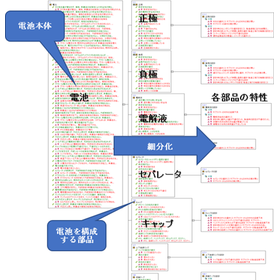
FMEA of secondary batteries

FMEA - Application Example for Cylindrical Lithium-Ion Secondary Batteries

Lithium-ion batteries are high-energy-density secondary batteries used in various fields such as onboard applications for HEVs and EVs, backup for power systems, and storage for renewable energy. As their range of use expands, safety has also become a focus of attention. Particularly, due to the high energy density of the batteries, caution is necessary as internal short circuits and thermal runaway can lead to major accidents. Against this backdrop, the quality of onboard batteries is regulated by the automotive-related standard IATF16949, and when exporting, the submission of documents (FMEA sheets) in accordance with the IATF16949 standard is mandatory. Additionally, for stationary secondary batteries, the safety standard IEC 62619 has been established. There are several shapes of lithium-ion batteries, but here we will explain cylindrical lithium-ion secondary batteries. The components of cylindrical lithium-ion secondary batteries can be broadly classified into eight elements.

Added to bookmarks

Bookmarks list

Bookmark has been removed

Bookmarks list

You can't add any more bookmarks

By registering as a member, you can increase the number of bookmarks you can save and organize them with labels.

Free membership registration

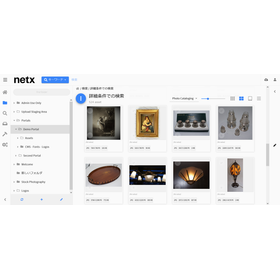
Digital Asset Management Solution 'NetX'

Building an on-premises digital asset management infrastructure.

We provide comprehensive support for the implementation of on-premises digital asset management NetX, including technical support, customization, and integration with other systems. We also offer consulting on building and optimizing workflows prior to implementation.

Added to bookmarks

Bookmarks list

Bookmark has been removed

Bookmarks list

You can't add any more bookmarks

By registering as a member, you can increase the number of bookmarks you can save and organize them with labels.

Free membership registration

Cloud-based digital asset management solution "Canto"

Consolidate all content into one and enrich the brand experience.

Canto's digital asset management platform is a next-generation content hub equipped with AI. It consolidates content management, collaboration, and distribution to maximize your team's creativity. With Canto connecting people, tools, and workflows, managing digital assets becomes smarter and safer. It centralizes the content lifecycle, making your brand shine at every touchpoint. Quickly access the assets you need and effortlessly optimize content that fits your brand. Expand your reach, gain insights that evolve your strategy, and infinitely enhance your brand's potential.

Added to bookmarks

Bookmarks list

Bookmark has been removed

Bookmarks list

You can't add any more bookmarks

By registering as a member, you can increase the number of bookmarks you can save and organize them with labels.

Free membership registration

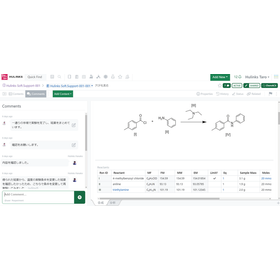
Five advantages of a cloud-native electronic lab notebook system.

Explaining the benefits of using cloud-based electronic lab notebooks (ELN) for research and development organizations and individual users.

The percentage of companies using cloud services has been increasing year by year, and the use of cloud services in the research and development field is also accelerating. With cloud-native ELN, researchers in all fields can easily record their work and collaborate within and between organizations, while the IT department can leverage more efficient and cost-effective storage and performance, enabling integration with other informatics platforms. This white paper explains five advantages and also presents a future vision to expand those advantages.

Added to bookmarks

Bookmarks list

Bookmark has been removed

Bookmarks list

You can't add any more bookmarks

By registering as a member, you can increase the number of bookmarks you can save and organize them with labels.

Free membership registration

New and Old Comparison Table Generation 'New and Old Document Excel Version' that Clearly Shows Comparison Results at a Glance

The comparison results of the Excel document are clear at a glance, making it easy to see differences and missed updates.

The New and Old Document Excel version operates as a plugin for Microsoft Excel. It offers the following features: ■ Compare two documents to quickly identify changes, even in large worksheets ■ Automatically generate accurate and easy-to-read "Difference Lists" and "Difference Reports" with simple operations ■ Jump to the cells with changes from the comparison display with one click ■ Compare not only text and values but also formulas and calculation results ■ Compare old versions of Excel and CSV files ■ Items that can be compared ・Changes in strings, numbers, and formulas within cells ・Addition of rows/columns ・Deletion of rows/columns ・Movement of rows/columns

Added to bookmarks

Bookmarks list

Bookmark has been removed

Bookmarks list

You can't add any more bookmarks

By registering as a member, you can increase the number of bookmarks you can save and organize them with labels.

Free membership registration

Revision work of quality standard documents for the manufacturing industry with 'Old and New Document Word Versions'

A tool for comparing old and new documents to support the revision of quality standards in the manufacturing industry.

In the manufacturing industry, revisions of quality standards are frequently conducted to maintain and improve product quality. It is particularly important to accurately understand the differences between the revised standards and the old standards, and to share this information among stakeholders to prevent misunderstandings and maintain consistent quality. If the changes in the standards are unclear, there is a risk of confusion in the manufacturing process and a decline in product quality. Our product "New and Old Document Word Version" supports the comparison of new and old Word documents, clarifying changes to facilitate accurate information transmission and smooth operations in quality standard revisions. [Usage Scenarios] - Revision of quality standard documents - Updating manufacturing manuals - Change management of inspection standards - Revision of internal regulations [Benefits of Implementation] - Rapid identification of revision points - Prevention of discrepancies in understanding among stakeholders - Accurate communication of quality standards - Increased efficiency in revision work

Added to bookmarks

Bookmarks list

Bookmark has been removed

Bookmarks list

You can't add any more bookmarks

By registering as a member, you can increase the number of bookmarks you can save and organize them with labels.

Free membership registration

Change in requirements definition for IT and software: 'Old and New Document Word Version'

Generation of a comparison table for efficient management of requirement definition changes in IT and software development.

In the IT and software industry, changes in requirement definitions during the development process occur frequently, and the accurate management of change history and rapid sharing among stakeholders are key to project success. In particular, updating documents due to specification changes is prone to errors, and manual management requires a lot of time. In response to these challenges, our product "New and Old Document Word Version" visually compares changes in Word documents and automatically generates a comparison table, thereby improving the accuracy and efficiency of document management associated with requirement definition changes. 【Usage Scenarios】 - Management of change history for requirement definition documents - Updating documents due to specification changes - Sharing changes within the development team - Confirming differences in the review process 【Benefits of Implementation】 - Reduction of misunderstandings through visual understanding of changes - Increased efficiency in document updating tasks through manual work - Rapid and accurate information sharing among stakeholders - Improved project transparency and reduction of rework

Added to bookmarks

Bookmarks list

Bookmark has been removed

Bookmarks list

You can't add any more bookmarks

By registering as a member, you can increase the number of bookmarks you can save and organize them with labels.

Free membership registration

[For Medical Use] Update of Clinical Guidelines with 'Old and New Document Word Version'

A tool for generating comparison tables of old and new Word documents to support the update of clinical guidelines.

In the medical industry, particularly in the updating of clinical guidelines, accurate comparisons with past records and the reflection of the latest information are required. Changes in guidelines directly affect the quality of patient care and the judgment of healthcare professionals, making it crucial to clearly understand even the slightest differences. Inadequate updates may increase the risk of medical errors. Our product, "Old and New Document Word Version," supports the comparison of old and new Word documents and generates a comparison table that lists changes, contributing to the improvement of accuracy and efficiency in the updating of clinical guidelines. 【Usage Scenarios】 - Revision of clinical guidelines - Comparison and verification of past guidelines with the latest version - Recording and sharing of changes - Comparison of PDF-formatted guidelines 【Benefits of Implementation】 - Rapid identification and verification of changes - Reduction of work time and increased efficiency - Decrease in the risk of medical errors - Facilitation of information sharing among stakeholders

Added to bookmarks

Bookmarks list

Bookmark has been removed

Bookmarks list

You can't add any more bookmarks

By registering as a member, you can increase the number of bookmarks you can save and organize them with labels.

Free membership registration

Word version of the old and new documents for the renewal of the contract for real estate.

Generation of a comparison table for updating real estate contracts efficiently.

In the real estate industry, the process of updating contracts requires an accurate comparison with past contract contents and a clear understanding of changes. In particular, modifications to clauses due to legal reforms or market changes, as well as the addition or deletion of special provisions, necessitate careful verification to prevent misunderstandings and disputes. Creating a new contract that accurately reflects the contents of the old contract while incorporating the latest terms is a process that demands time and effort. The "Old and New Document Word Version" operates as a Microsoft Word plugin and addresses this challenge. By simply loading the old and new contracts, it automatically generates a visually clear "comparison table" highlighting the changes. This streamlines the verification process of contract contents and supports improved accuracy in contract renewal tasks. 【Usage Scenarios】 - Confirming changes in conditions during the renewal of lease agreements - Identifying additions or deletions of special provisions in sales contracts - Comparing amendments in important matter explanation documents and contract clauses 【Benefits of Implementation】 - Reduces the time spent on verification tasks during contract updates - Prevents oversight of changes and enhances the accuracy of contract contents - Supports rapid responses to legal reforms and changes in internal regulations

Added to bookmarks

Bookmarks list

Bookmark has been removed

Bookmarks list

You can't add any more bookmarks

By registering as a member, you can increase the number of bookmarks you can save and organize them with labels.

Free membership registration

Word version of 'Old and New Documents' for manuscript revision work in the publishing industry.

A tool for generating comparison tables to streamline manuscript revisions in the publishing industry.

In the publishing industry, it is essential to accurately and quickly grasp the changes between the old and new versions during the manuscript revision process. Particularly in proofreading and editing tasks involving multiple people, preventing the oversight of minor corrections and the inclusion of unintended changes is crucial for maintaining quality. To address these challenges, the "Old and New Document Word Version" generates a clear comparison table of the results from comparing Word documents, supporting the manuscript revision process. 【Usage Scenarios】 - Manuscript management during collaborative writing by multiple authors - Confirmation of revision instructions between editors and authors - Checking changes during the proofreading stage - Verifying content consistency through comparison with past versions 【Benefits of Implementation】 - Improved work efficiency through visual understanding of corrections - Enhanced quality by preventing oversight of changes - Reduction of communication costs - Shortened work time

Added to bookmarks

Bookmarks list

Bookmark has been removed

Bookmarks list

You can't add any more bookmarks

By registering as a member, you can increase the number of bookmarks you can save and organize them with labels.

Free membership registration

[For the construction industry] Revision history of drawings and specifications in 'Old and New Document Word Version'

A tool for generating comparison tables to streamline specification change management in the construction industry.

In the construction industry, it is essential to accurately grasp and share the revision history of drawings and specifications among stakeholders when managing changes in specifications. In particular, clarifying the differences between old and new documents associated with specification changes and making the changes easily understandable at a glance helps prevent misunderstandings and rework, leading to smooth project progress. However, manual comparison and difference verification are time-consuming and carry the risk of oversight. Our product, "Old and New Document Word Version," operates as a Microsoft Word plugin and addresses this issue. 【Usage Scenarios】 - Management of revision history for drawings and specifications - Rapid sharing of changes among stakeholders - Consistency verification through comparison with past specifications - Record-keeping for compliance purposes 【Benefits of Implementation】 - Reduction in time spent on verification tasks for specification changes - Decreased risk of overlooking changes - Prevention of discrepancies in understanding among stakeholders and reduction of rework - Improved accuracy and efficiency in document management

Added to bookmarks

Bookmarks list

Bookmark has been removed

Bookmarks list

You can't add any more bookmarks

By registering as a member, you can increase the number of bookmarks you can save and organize them with labels.

Free membership registration

[For the financial industry] Changes to the terms and conditions revision work with 'Old and New Document Word Version'

Streamlining the revision of financial regulations. Quickly generate a comparison table of old and new Word documents.

In the financial industry, the revision of regulations requires accuracy and speed. In particular, changes or additions to complex clauses need to be handled with utmost care to avoid misunderstandings. Clearly identifying the differences between the old and new regulations and sharing them among stakeholders is essential for compliance and operational efficiency. Our product, "Old and New Document Word Version," addresses this challenge by automatically generating a comparison table of Word documents. 【Usage Scenarios】 - Revision work for regulations related to financial products and services - Change management of internal regulations due to legal amendments - Version control of contracts and terms 【Benefits of Implementation】 - Reduces the time spent on comparison tasks during regulation revisions - Enhances visibility of changes, preventing errors and omissions - Facilitates smooth information sharing among stakeholders

Added to bookmarks

Bookmarks list

Bookmark has been removed

Bookmarks list

You can't add any more bookmarks

By registering as a member, you can increase the number of bookmarks you can save and organize them with labels.

Free membership registration

[For the advertising industry] Change history of campaign proposals with 'Old and New Document Word Version'

Manage the change history of the advertising campaign proposal in an easily understandable comparison table.

In the advertising industry, it is important to accurately track the change history of campaign proposals and share it among stakeholders. Particularly in campaigns involving multiple personnel and clients, managing detailed modifications and additions can become complicated. If changes are unclear while progressing, it may lead to unintended results. The Old and New Document Word version automatically generates a comparison table of changes in Word documents, clearly managing the change history of campaign proposals. 【Usage Scenarios】 - Comparing multiple versions of campaign advertising copy - Version control of creative materials - Confirming changes in proposal documents for clients - Visualizing work progress within the team 【Benefits of Implementation】 - Prevention of overlooked changes - Smoother communication - Improved work efficiency - Maintenance and enhancement of proposal quality

Added to bookmarks

Bookmarks list

Bookmark has been removed

Bookmarks list

You can't add any more bookmarks

By registering as a member, you can increase the number of bookmarks you can save and organize them with labels.

Free membership registration

Updated proposal changes for consulting: 'Old and New Document Word Version'

Generation of a comparison table to streamline the update of proposal documents.

In the consulting industry and the task of updating proposals, it is essential to accurately compare past proposal content with the latest information and clearly identify changes. Particularly in proposals to clients, presenting detailed revision histories and changes in an understandable manner is crucial for building trust and reaching agreements. Inadequate comparisons or unclear presentations of changes can lead to misunderstandings, project delays, and decreased client satisfaction. The "Old and New Document Word Version" generates a clear comparison table of the results from comparing Word documents, supporting the proposal update process. 【Usage Scenarios】 - Comparing past proposals with the latest version - Confirming changes when reflecting client feedback - Document reviews among multiple team members 【Benefits of Implementation】 - Rapid understanding of changes - Prevention of missed corrections and errors - Reduction in proposal preparation time

Added to bookmarks

Bookmarks list

Bookmark has been removed

Bookmarks list

You can't add any more bookmarks

By registering as a member, you can increase the number of bookmarks you can save and organize them with labels.

Free membership registration

Excel Version of 'Old and New Document' to Streamline Specification Change Management for the Manufacturing Industry

List the changes in the specifications of the Excel document, including differences and updates, to facilitate management.

In the manufacturing industry, effective change management of specifications requires accurate management of drawings and specifications, as well as the swift understanding of changes. Particularly when multiple personnel or departments are involved, miscommunication of changes or missed updates can lead to a decline in product quality or rework. Accurate change management is directly linked to the efficiency of product development and the maintenance of quality. The "Old and New Document Excel Version" operates as a plugin for Microsoft Excel, allowing users to compare two Excel documents—old and new—and visually display the changes in an easily understandable manner. This enables quick identification of changes even in large worksheets, supporting the resolution of challenges in change management. 【Usage Scenarios】 - Updating management of specifications due to design changes - Version management of bill of materials (BOM) - Sharing changes in instructions to the manufacturing line - Historical management through comparison with past specifications 【Benefits of Implementation】 - Reduction of discrepancies and missed updates during specification changes - Streamlining of the verification process for changes - Facilitation of information sharing among personnel - Prevention of rework occurrences

Added to bookmarks

Bookmarks list

Bookmark has been removed

Bookmarks list

You can't add any more bookmarks

By registering as a member, you can increase the number of bookmarks you can save and organize them with labels.

Free membership registration

Excel version of 'Old and New Documents' for revisions of terms, conditions, and explanatory documents for the financial industry.

Accurately understand the changes in the financial regulations and prevent any omissions in updates.

In the financial industry, it is essential to accurately manage the revision history of agreements and to fully understand any changes made. Particularly from the perspective of accountability to customers and compliance with laws and regulations, even minor changes cannot be overlooked. Tracking revisions to agreements, identifying changes, and comparing them with previous versions is a time-consuming and labor-intensive task. Our product, "Old and New Document Excel Version," operates as a Microsoft Excel plugin and visually highlights changes by comparing two documents. This streamlines the tracking of agreement revisions and enhances accuracy. 【Use Cases】 - Management of revision histories for agreements, terms and conditions, and important explanatory documents in financial institutions - Verification of changes in agreements by compliance departments - Understanding changes when creating explanatory materials for customers in sales departments - Risk assessment related to changes in agreements by legal departments 【Benefits of Implementation】 - Rapid identification and verification of changes in agreement revisions - Reduction of compliance risks by preventing omissions and errors - Shortening of business hours through the efficiency of comparison tasks - Strengthening of accountability through accurate difference reports

Added to bookmarks

Bookmarks list

Bookmark has been removed

Bookmarks list

You can't add any more bookmarks

By registering as a member, you can increase the number of bookmarks you can save and organize them with labels.

Free membership registration

[For the IT Industry] Code Review Change Management with 'Old and New Document Excel Version'

Easily understand the comparison results of Excel documents at a glance, grasping differences and missed updates.

In the IT industry, code reviews are crucial for accurately understanding changes and detecting unintended modifications. Particularly in collaborative work among multiple developers and managing legacy code assets, overlooking changes can become a breeding ground for bugs. Accurate difference management is essential for maintaining code quality and improving development efficiency. Our product, "New and Old Documents Excel Version," visually displays changes in Excel format files in an easily understandable way and automatically generates precise difference reports, helping to address these challenges. 【Usage Scenarios】 - Confirming changes when sharing Excel files among multiple people - Checking differences from previous versions - Verifying missed updates - Identifying the scope of impact due to specification changes 【Benefits of Implementation】 - Rapid identification and understanding of changes - Improved accuracy in code reviews - Reduction of manual comparison tasks - Prevention of issues caused by missed updates

Added to bookmarks

Bookmarks list

Bookmark has been removed

Bookmarks list

You can't add any more bookmarks

By registering as a member, you can increase the number of bookmarks you can save and organize them with labels.

Free membership registration

Comparison of Old and New Clinical Trial Data for the Pharmaceutical Industry: 'Old and New Document Excel Version'

Easily check changes and updates in clinical trial data at a glance in Excel.

In the pharmaceutical industry, managing clinical trial data is extremely important for maintaining the accuracy and consistency of the data. Particularly when comparing old and new data due to changes in the clinical trial protocol or updates in data entry, it is necessary to quickly identify even the slightest discrepancies. Inconsistent data can undermine the reliability of clinical trial results and may also affect submissions to regulatory authorities. Our product, "Old and New Document Excel Version," operates as a Microsoft Excel plugin, streamlining the process of comparing clinical trial data and clearly visualizing changes and omissions. 【Usage Scenarios】 - Confirming data consistency during changes to the clinical trial protocol - Checking discrepancies in data entry by multiple personnel - Checking for omissions in updates by comparing past data with the latest data - Validating data before preparing documents for regulatory submissions 【Benefits of Implementation】 - Improved accuracy of clinical trial data - Increased efficiency and time savings in data comparison tasks - Reduced risk of omissions and errors - Alleviated burden of data management tasks

Added to bookmarks

Bookmarks list

Bookmark has been removed

Bookmarks list

You can't add any more bookmarks

By registering as a member, you can increase the number of bookmarks you can save and organize them with labels.

Free membership registration

Excel Version of 'Old and New Documents' for Managing Contract Amendments in the Legal Industry

Easily check the differences in contract amendments and any missed updates in Excel at a glance.

In the legal industry, accurate modification and management of contracts are essential for avoiding legal risks. Particularly when contracts are frequently updated among multiple stakeholders, overlooking changes or missing updates can lead to future troubles. Accurate and efficient difference management is required. The "Old and New Document Excel Version" operates as a Microsoft Excel plugin, comparing two contracts (Excel files) and clearly displaying the changes. Even in large worksheets, changes can be quickly identified, and accurate and easy-to-read "difference lists" and "difference reports" are automatically generated with simple operations. With one click, users can jump to the cells with changes from the comparison display, contributing to the efficiency of the modification process. [Usage Scenarios] - Version management of contracts - Contract reviews among multiple stakeholders - Comparison checks with past contracts [Benefits of Implementation] - Prevention of overlooking changes - Increased efficiency in modification work - Improved accuracy in contract management

Added to bookmarks

Bookmarks list

Bookmark has been removed

Bookmarks list

You can't add any more bookmarks

By registering as a member, you can increase the number of bookmarks you can save and organize them with labels.

Free membership registration

Property Information Change Management for Real Estate: 'Old and New Document Excel Version'

Excel comparison tool to prevent omissions in updating property information and clarify differences.

In the real estate industry, the accuracy of property information and prompt updates are directly linked to customer satisfaction and operational efficiency. Particularly when there are many changes to property information or when sharing information among multiple representatives, the likelihood of missing updates or making errors increases, which can lead to providing incorrect information to customers or losing opportunities. Our product, "New and Old Document Excel Version," operates as a Microsoft Excel plugin and visually identifies changes by comparing two Excel files of property information, helping to prevent missed updates. 【Usage Scenarios】 - Regular updates of property information - Sharing property information among multiple representatives - Comparing and verifying with past property information 【Benefits of Implementation】 - Reduction of missed updates and errors in property information - Shortening the time required for difference verification - Improvement in operational efficiency

Added to bookmarks

Bookmarks list

Bookmark has been removed

Bookmarks list

You can't add any more bookmarks

By registering as a member, you can increase the number of bookmarks you can save and organize them with labels.

Free membership registration

Comparison of Curriculum Revisions for Educational Institutions: 'Old and New Documents Excel Version'

Support for the revision of educational institution curricula. Clearly understand the changes.

In curriculum revisions at educational institutions, it is essential to accurately compare past materials with the latest information to ensure that changes and updates are fully understood. Particularly in the review of curricula associated with revisions to learning guidelines or the introduction of new educational policies, overlooking minor changes can impact the quality of education. Our product, "New and Old Documents Excel Version," operates as a plugin for Microsoft Excel, allowing for the rapid identification of changes even in large worksheets by comparing two documents. It automatically generates accurate and easy-to-read "difference lists" and "difference reports" with simple operations, enabling users to jump to the cells with changes from the comparison display with one click, thus supporting efficient curriculum revision work. ## Use Cases * Comparing past materials with the latest materials during curriculum revisions * Confirming changes in educational content due to revisions of learning guidelines * Managing update histories of teaching materials * Comparing and discussing curriculum proposals among multiple teachers ## Benefits of Implementation * Prevention of overlooking changes in curriculum revisions * Reduction of work time and increased efficiency * Maintenance and improvement of consistency and quality in educational content * Facilitation of smooth information sharing among stakeholders

Added to bookmarks

Bookmarks list

Bookmark has been removed

Bookmarks list

You can't add any more bookmarks

By registering as a member, you can increase the number of bookmarks you can save and organize them with labels.

Free membership registration

Comparison of the revision of the guidelines for medical use: "Old and New Documents Excel Version"

Streamline the updating and management of clinical guidelines. Accurately grasp the changes.

In the medical industry, particularly in the creation and revision of clinical guidelines, accuracy based on the latest medical knowledge and smooth information sharing among stakeholders are essential. Oversights or errors in updating guidelines can directly lead to a decline in the quality of healthcare. Therefore, a function that allows for the rapid and accurate identification of changes when comparing old and new documents is indispensable. Our product, "Old and New Document Excel Version," operates as a Microsoft Excel plugin and addresses these challenges. 【Usage Scenarios】 - Revision work for clinical guidelines - Comparison with past guidelines - Sharing of changes among multiple stakeholders - Prevention of oversights and errors 【Benefits of Implementation】 - Increased efficiency in the creation and revision of clinical guidelines - Reduction of mistakes through accurate identification of changes - Smooth information sharing among stakeholders - Rapid provision of the latest clinical guidelines

Added to bookmarks

Bookmarks list

Bookmark has been removed

Bookmarks list

You can't add any more bookmarks

By registering as a member, you can increase the number of bookmarks you can save and organize them with labels.

Free membership registration

Comparison of Product List Updates for the Distribution Industry: 'Old and New Documents Excel Version'

Easily check updates and changes in the product list at a glance in Excel.

In the retail industry, updating product lists requires accuracy and efficiency. Particularly when handling a large amount of product information, overlooking changes or missing updates can lead to inventory management issues and lost sales opportunities. Maintaining accurate product information is essential for smooth business operations. "The Old and New Documents Excel Version" operates as a Microsoft Excel plugin, allowing users to visually grasp changes by comparing two product lists—old and new. Even with large worksheets, it enables quick identification of added, changed, or deleted items, preventing missed updates. 【Usage Scenarios】 - Updating product lists by multiple personnel - Regular maintenance of product information - List verification during price revisions or specification changes - Confirming differences from past lists 【Benefits of Implementation】 - Reduction of human errors during product list updates - Shortened work time and increased efficiency - Improved business accuracy through precise product information management - Prevention of opportunity loss due to missed updates

Added to bookmarks

Bookmarks list

Bookmark has been removed

Bookmarks list

You can't add any more bookmarks

By registering as a member, you can increase the number of bookmarks you can save and organize them with labels.

Free membership registration

[For the Advertising Industry] Changes to Campaign Materials: "New and Old Documents Excel Version"

Easily understand the comparison results of Excel documents at a glance, and grasp differences and missed updates.

In the advertising industry, managing Excel documents that frequently require updates and have multiple versions, such as campaign materials and proposals, is crucial. Particularly in the creation of campaign proposals, comparing with past materials and sharing changes among multiple team members is essential. Miscommunication or missed updates can impact the effectiveness of a campaign. Our product, "New and Old Document Excel Version," operates as a plugin for Microsoft Excel, allowing users to compare two Excel documents and clearly display the changes. This enables quick understanding of changes even in large worksheets, improving efficiency and accuracy in campaign proposal creation. 【Usage Scenarios】 - Version management of campaign materials - Comparison with past materials in proposals - Confirmation of changes among multiple team members - Prevention of missed updates 【Benefits of Implementation】 - Speeding up the creation of campaign proposals - Smoother information sharing - Improving campaign quality by reducing errors

Added to bookmarks

Bookmarks list

Bookmark has been removed

Bookmarks list

You can't add any more bookmarks

By registering as a member, you can increase the number of bookmarks you can save and organize them with labels.

Free membership registration

[For Consultants] Comparison of Proposal Creation with 'Old and New Document Excel Version'

List the differences and updates of the Excel proposal to streamline the comparison process.

In the consulting industry and during the preparation of proposals, it is important to check for any changes or omissions between multiple versions before submitting to the client. Particularly when detailed revisions or the incorporation of additional information is required, manual comparison can be time-consuming and carries the risk of oversight. Accurate and swift comparison work is essential to maintain the quality of proposals and gain the trust of clients. Our product, "Old and New Document Excel Version," addresses these challenges by automatically generating a comparison table that allows for a quick overview of the comparison results of Excel documents, thus supporting efficient and accurate verification work. ## Use Cases - Version management during proposal preparation by multiple team members - Checking changes after incorporating client feedback - Ensuring consistency by comparing with past proposals - Preventing omissions in document updates during project progress ## Benefits of Implementation - Reduction in time spent on proposal preparation and review - Improvement in proposal quality by preventing oversight of changes - Promotion of rapid information sharing and decision-making - Smoother communication with clients

Added to bookmarks

Bookmarks list

Bookmark has been removed

Bookmarks list

You can't add any more bookmarks

By registering as a member, you can increase the number of bookmarks you can save and organize them with labels.

Free membership registration

Comparison of Changes in Terms and Conditions for the Insurance Industry: 'Old and New Documents Excel Version'

Accurately grasp the changes in the insurance policy terms. Visualize differences and updates that may have been overlooked.

In the insurance industry, precise document management is required in conjunction with changes to policy terms. Particularly from the perspective of accountability to customers and compliance with regulations, overlooking changes can lead to serious issues. Quickly and accurately understanding the differences between old and new policy terms and preventing omissions in updates is essential for both operational efficiency and compliance. Our product, "Old and New Document Excel Version," operates as a plugin for Microsoft Excel and supports the resolution of these challenges. 【Usage Scenarios】 - Revision work for insurance policy terms - Verification of differences during policy modifications by multiple personnel - Management of change history through comparison with past policy terms 【Effects of Implementation】 - Reduction of discrepancies and omissions during policy changes - Increased efficiency and time savings in comparison tasks - Strengthened accountability through accurate understanding of changes

Added to bookmarks

Bookmarks list

Bookmark has been removed

Bookmarks list

You can't add any more bookmarks

By registering as a member, you can increase the number of bookmarks you can save and organize them with labels.

Free membership registration
Prev 1 Next
  • 排気熱風なく 気温-4.1℃の冷風を 工事不要で暑さ対策 店舗・工場の 安全対策に! 気化式スポットクーラー Pure Drive ピュアドライブ
  • 金属・化学・窯業 食品・医薬品などの ほぐし・解砕 ふるい分けがこれ一台 解砕機構付き佐藤式振動ふるい機 つばさ デモ実施中!
    • Contact this company

      Inquiry Form

    Products

    • Search for Products

    Company

    • Search for Companies

    Special Features

    • Special Features

    Ranking

    • Overall Products Ranking
    • Overall Company Ranking

    support

    • site map
    IPROS
    • privacy policy Regarding external transmission of information
    • terms of service
    • About Us
    • Careers
    • Advertising
    COPYRIGHT © 2001-2026 IPROS CORPORATION ALL RIGHTS RESERVED.
    Please note that the English text on this page is automatically translated and may contain inaccuracies.