Added a feature to automatically set load conditions.
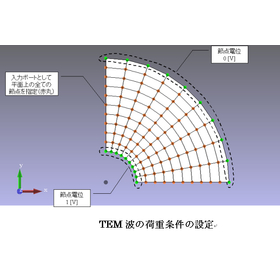
It was necessary to set an electric field (3 components) at the nodes or to set a current density (3 components) at the elements as load conditions. For example, as shown in Figure 1, when setting an electric field in a coaxial cable, it was necessary to set each electric field component based on the coordinate values of each node, which was a cumbersome task for the user. By adding a function to automatically set load conditions, users can specify a set of nodes that are on the same plane, and by simply inputting a few parameters, the program calculates the electric field at each node and sets it as the load condition.
Inquire About This Product
basic information
When using the automatic setting function for load conditions, you specify ports at the nodes on the plane where you want to set the load (electric field). Next, from the screen shown in Figure 2, you select TEM wave as the mode of the electromagnetic wave you are considering. In the case of inputting a TEM wave, in addition to setting the input port, it is necessary to specify the potential at some of the nodes on the input port. Figure 3 illustrates how to set the load conditions using the example of a coaxial cable. In Figure 3, all nodes on the cross-section of the coaxial cable are designated as the input port (red circle). Additionally, a potential of 1[V] is specified as the load condition at the nodes on the outer boundary, while 0[V] is specified at the nodes on the inner boundary. Thus, in the case of a TEM wave, at least two load conditions are required: one for the high-pressure side and one for the low-pressure side.
Price range
Delivery Time
Applications/Examples of results
For more details, please refer to the catalog or contact us.
catalog(3)
Download All Catalogs![[Case Study] Analysis using Automatic Load Condition Setting Function (TEM Wave)](https://image.mono.ipros.com/public/catalog/image/354241/IPROS11570274831499493000.jpeg?w=120&h=170)


Company information

At Photon, we are developing "electromagnetic field analysis software" that models and simulates products and components utilizing electromagnetic phenomena on a computer. In traditional design and development environments, the process has primarily revolved around trial and error through prototyping based on the experience of engineers and experiments with prototypes. However, conducting experiments using actual prototypes and analyzing the results requires significant time and cost. Moving forward, transitioning from an experimental and prototyping-based approach to an analysis-based design approach will be a crucial challenge for improving productivity, and establishing simulation technology as the core of analysis-based design techniques will be essential. In this context, Photon is developing and providing "analysis software" focusing on electromagnetic fields, as well as heat, vibration, and sound fields. By utilizing Photon's software, efficient development and design of various industrial products can be achieved. In this way, Photon aims to support users in reducing the number of prototypes, lowering development costs, and shortening development periods in their manufacturing environments, ultimately enhancing their competitiveness.
![[Case Study Presentation] Engineering Services for Automobile Development / Contract Development](https://image.mono.ipros.com/public/product/image/c1b/2000584650/IPROS51961039435465236003.jpeg?w=280&h=280)
![[Factory Efficiency Diagnosis] Affordable diagnosis of automation and labor-saving for bottleneck processes!](https://image.mono.ipros.com/public/product/image/cfa/2001286965/IPROS9832403072284091678.jpg?w=280&h=280)