Understand the factory's 'now' at a glance! Equipment monitoring and visualization plugin realized with kintone data.
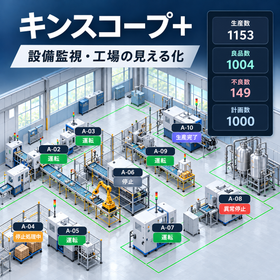
Kinscope+ is a SCADA-type visualization plugin that utilizes equipment information and production data accumulated in kintone to visually display the operational status of factories and equipment. You can use factory layout diagrams and equipment photos as background images and freely arrange components such as lamps, numerical displays, text displays, labels, and screen switch buttons on top of them. Each display component can be linked to fields in kintone apps, allowing for intuitive understanding of information such as equipment operating and stopping status, production quantities, and temperatures. It is also possible to create multiple screens and switch from an overview of the entire factory to individual equipment. Furthermore, by combining it with the kintone PLC connector 2, you can display equipment information obtained from PLCs via kintone, supporting the IoT transformation of existing equipment and the visualization of the entire factory. You can build equipment monitoring screens using kintone without the need to introduce dedicated SCADA software.
Inquire About This Product
basic information
【Product Form】 - kintone dedicated plugin - Displays monitoring screens in kintone's customized view - Equipped with a configuration function for screen editing and component placement 【Screen Creation Function】 - Background image display of factory layout diagrams, equipment photos, etc. - Free placement and resizing of display components - Customization of display colors, text, and placement positions - Creation and switching of multiple screens 【Standard Display Components】 - Circular and rectangular lamps - Circular and rectangular buttons - Numeric display and text display - Labels and text boxes - Straight line and rectangular drawing - Screen switching and link buttons 【Data Integration Function】 - References data from kintone applications - Association of display components with kintone fields - Display of equipment status, numeric, and text information - Visualization of PLC data in combination with kintone PLC connector 2 【Screen Operation】 - Switching between configuration mode and display mode - Page navigation using screen switch buttons - Setting to open links in the same screen or a new tab 【Main Uses】 Equipment operation monitoring, visualization of the entire factory, production line monitoring, equipment status display, environmental data monitoring, etc.
Price information
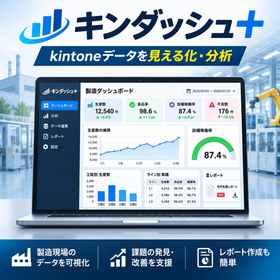
Sales Price: 30,000 yen / One-time purchase Kinscope+ is a one-time purchase kintone plugin that does not require a monthly fee. - No ongoing monthly or annual usage fees - Can be used independently without kintone PLC connector 2 - Compatible with kintone PLC connector 2 for combined use - Capable of building a data analysis environment in combination with Kindash+
Price range
P2
Delivery Time
Applications/Examples of results
【Visualization of the Entire Factory】 Using a factory layout diagram as the background, the operating and stopping status of each piece of equipment is displayed with lamps. You can grasp the arrangement and operational status of the equipment on a single screen. 【Monitoring the Production Line】 On photos or schematic diagrams of production equipment, numerical and textual information such as production numbers, equipment status, and temperature is placed. This can be used to check the situation on-site. 【Equipment-Specific Monitoring Screen】 Switch from the overall factory screen to detailed screens for each piece of equipment to check information specific to each one. 【Utilization of PLC Data】 By combining with the kintone PLC connector 2, information collected from the PLC can be displayed via kintone, facilitating the IoT transformation of existing equipment. This can be applied not only to manufacturing equipment but also to facility management and environmental monitoring.
Detailed information
-
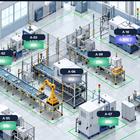
Set the factory layout diagram and equipment photos as background images. This allows you to use the actual equipment arrangement as the base for the monitoring screen, enabling an intuitive understanding of the overall situation in the factory. You can overlay the necessary display components for each piece of equipment on top of the background image.
-
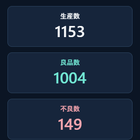
Place numerical display components for production quantity, good product quantity, defective quantity, planned quantity, etc., and display the data registered in kintone. This allows for checking the equipment status and production results of the factory on the same screen, which helps in understanding the situation on-site. The items and their positions to be displayed can be configured according to the purpose.
catalog(1)
Download All Catalogs
Company information

Our company provides a comprehensive range of services related to the development of automatic control systems for factory automation, including "assembly, precision adjustment, and installation of machinery," "design of control panel housings and electrical circuits," "creation of control panels and wiring work for equipment," and "program development and trial operation adjustments for PLCs and robots." We also manufacture and sell modular products. Modular products are those that have necessary functions pre-installed in control panels and control boxes, allowing customers to complete the control panels and control boxes by only designing and constructing the required functions. Additionally, we sell IoT application products and offer proposals for IoT and digital transformation (DX). Our electrical design CAD supports a wide range of software, including ECAD DCX/dio, EPLAN, and Unidraf2010LT.