We have compiled a list of manufacturers, distributors, product information, reference prices, and rankings for soft.
ipros is IPROS GMS IPROS One of the largest technical database sites in Japan that collects information on.

soft(Test) - List of Manufacturers, Suppliers, Companies and Products | IPROS GMS

Last Updated: Aggregation Period:Jan 21, 2026~Feb 17, 2026
This ranking is based on the number of page views on our site.

soft Product List

481~510 item / All 642 items

Displayed results

Fatigue Life Prediction Analysis Software 'FEMFAT'

Quickly identify fatigue locations to optimize the development process and reduce evaluation testing costs.

"FEMFAT" is a leading software for fatigue life prediction that performs fatigue analysis in combination with general finite element programs. With interfaces for multi-body simulation, optimization, and measurement systems, it allows for complete and convenient integration into the CAE process, providing optimal solutions for all customers through flexible licensing options. With over 30 years of continuous development, FEMFAT has refined fatigue analysis methods and gained a reputation for excellent fatigue evaluation, earning the trust of engineers worldwide. It contributes to improving the reliability of various industrial products, not only in the automotive industry but also in industrial machinery and plant equipment. Developed by engineers for engineers, FEMFAT offers advanced features and analysis options for predicting the fatigue life of metallic and non-metallic products, including seam welds and spot welds. It enables various analyses, such as those involving base materials with welds, spot welds, multi-axial analysis using road load data, and probabilistic loads based on PSD. *For more details, please download the PDF or contact us.*

Added to bookmarks

Bookmarks list

Bookmark has been removed

Bookmarks list

You can't add any more bookmarks

By registering as a member, you can increase the number of bookmarks you can save and organize them with labels.

Free membership registration

Feature: "Four Reasons Why BricsCAD is Chosen"

Here are four reasons why the DWG-compatible CAD "BricsCAD" is rapidly being adopted as a platform by large companies!

■High Compatibility Highly compatible with AutoCAD, making migration easy. You can inherit your existing AutoCAD assets (dwg, dxf data) directly in BricsCAD. As a compatible CAD, it also supports features such as external reference editing, automatic dimension adjustment, multi-text editing, quick selection, wipeout, layer state management, and CUI menu files. ■High Cost Performance A surprisingly low-priced perpetual license that also supports AI. It can handle 2D, 3D, and BIM at this low price! Additionally, it offers a variety of licensing options, including network licenses, and is available for international use, allowing for cost reduction. ■Operate 2D, 3D, and BIM with the Same Software Easily create 3D models from 2D drawings and unfold 3D data into 2D drawings. Since everything is within the same software, there’s no need to launch different software for each data set. Being able to generate 3D data from 2D drawings makes it the best choice if you are considering transitioning to 3D in the future. ■Optimal Customization Available You can create your own commands to use CAD in a more user-friendly way. BricsCAD provides development tools (LISP, SDS, COM, BRX, .Net) that are compatible with AutoCAD.

Added to bookmarks

Bookmarks list

Bookmark has been removed

Bookmarks list

You can't add any more bookmarks

By registering as a member, you can increase the number of bookmarks you can save and organize them with labels.

Free membership registration

2D CAD software "3D Gate Application"

Easy operation! Significantly reduce the effort required for 2D conversion by effectively utilizing 3D data!

The "3D Gate Application" is a product designed to effectively utilize 3D data operating on "HandyCAD MarkII." It significantly reduces the effort required to convert 3D data to 2D, allowing users to create side views and cross-sectional views on a 2D CAD screen, enabling even those unfamiliar with 3D data to operate without confusion. By incorporating the advantages of 3D data, which is widely used across various fields from design to manufacturing, into 2D CAD/CAM, it achieves a new perspective on reducing man-hours. 【Features】 ■ Adopts the highly reliable "Parasolid Engine" for 3D CAD ■ Supports various formats including "Parasolid, ACIS, IGES, STEP" ■ Simple operation by just switching between 3D and 2D screens ■ Direct measurement and printing of 3D data are possible ■ Creation of side views, isometric views, and cross-sectional views on the CAD screen is possible *For more details, please download the PDF or feel free to contact us.

  • Other CAD related software
  • Other CAM related software
  • Mold Design
  • soft

Added to bookmarks

Bookmarks list

Bookmark has been removed

Bookmarks list

You can't add any more bookmarks

By registering as a member, you can increase the number of bookmarks you can save and organize them with labels.

Free membership registration

Software "MockFlow"

As easy as a whiteboard! Enhance your design using coded components.

"MockFlow" is a tool for managing product design. It is as easy as a whiteboard, and its practical interface allows for UI brainstorming without training. You can choose a wireframe style. Build user UIs using customer journeys and user personas. Quickly create an overview of your website using a powerful sitemap tool. 【Features】 ■ UI brainstorming without training thanks to a practical interface ■ Immediate access to hundreds of UI kits created by design teams ■ Custom CSS capabilities ■ In-person collaboration available ■ Enhance designs using coded components *For more details, please refer to the related links or feel free to contact us.

  • Company:B7
  • Price:Other
  • Software (middle, driver, security, etc.)
  • soft

Added to bookmarks

Bookmarks list

Bookmark has been removed

Bookmarks list

You can't add any more bookmarks

By registering as a member, you can increase the number of bookmarks you can save and organize them with labels.

Free membership registration

CT scan data conversion software "TomoShop Viewer"

This is software that can convert CT scan data into 3D data. It offers high quality and fast processing features at a low price, along with a variety of analysis functions. *Demo available.

The "TomoShop Viewer" is software designed to convert CT scan data into 3D data for use in CAD and 3D printers. It combines a variety of measurement functions, high-speed processing, artifact reduction features, and a low price. [Features] ■ Convert and output CT scan data CT scan data from medical CTs and MRIs (in DICOM format) can be converted and output in formats such as STL, IGES, and VRML, making it usable in 3D CAD and 3D printers. ■ Reduce artifacts (noise) to obtain clear 3D data Reduces artifact noise that occurs in reconstructed images from CT scan data. It includes features to mitigate ring artifacts and vertical artifacts. ■ Display fine shapes in high quality Equipped with volume rendering capabilities that faithfully depict fine shapes of biological and natural objects in high quality. It is also possible to color the data and obtain it as a 3D model. ■ Diverse measurement and analysis Measurements such as distances and angles in 2D images, as well as inner diameter measurements in 3D images, are possible. *For more details, please request a catalog or view the PDF data from the download button below.

  • TomoShopViewer_gamen1.jpg
  • TomoShopViewer_gamen2.jpg
  • TomoShopViewer_gamen3.jpg
  • Data conversion software
  • 3D Printer
  • Other inspection equipment and devices
  • soft

Added to bookmarks

Bookmarks list

Bookmark has been removed

Bookmarks list

You can't add any more bookmarks

By registering as a member, you can increase the number of bookmarks you can save and organize them with labels.

Free membership registration

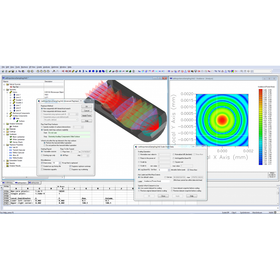
Lighting simulation CAD software "Lighting Simulator"

Recommended for addressing brightness unevenness in home appliances! It helps reduce design time.

Recommended for first-time lighting and optical analysis! This is a simulation software that is purely domestically produced and offered at a reasonable price. It features a Japanese interface, making it easy to use even for developers in non-optical fields. Leveraging the strengths of in-house development, it achieves low pricing while maintaining high computational accuracy and reliability based on optical theory, making it a cost-effective simulation software. 【Benefits of Implementation】 - Reduction in prototype costs - Validation of experimental results - Shortening of design time - Formation of analytical methods - Acquisition of design knowledge 【User Experience (Strengths)】 - The user interface is good, allowing for quick learning after implementation - Can operate and analyze immediately without special knowledge - After importing 3D CAD data, analysis models can be easily constructed - Ease of use and quick results enable early reflection in design - Short analysis time is convenient for considering multiple cases - Results are relatively consistent with experimental outcomes, facilitating smoother development - Predictions from results have reduced the number of sample productions - By handling light sources other than visible light, the analysis results are beneficial for design.

  • Company:Camerium
  • Price:500,000 yen-1 million yen
  • simulator
  • Other optical parts
  • switch
  • soft

Added to bookmarks

Bookmarks list

Bookmark has been removed

Bookmarks list

You can't add any more bookmarks

By registering as a member, you can increase the number of bookmarks you can save and organize them with labels.

Free membership registration

Beginner-friendly 3D features + AutoCAD compatible "BricsCAD"

[Free trial available] Regular technical training sessions are being held! Models can be created for improving the visibility of instruction manuals, assembly diagrams, and sales materials, as well as for interference checks.

- Since it is a non-history type, modeling can be done intuitively without clearly defined drawing rules. - You can access extensive email support and tutorial videos at the WEB support center. - It can handle 3D models in .dwg format while maintaining the familiar operability of AutoCAD. ==================== BricsCAD is an affordable and high-functionality CAD software that allows you to create 2D, 3D, and BIM in .dwg files. It has been adopted by over 190,000 companies and more than 450,000 users worldwide, including over 10,000 companies in Japan, and is praised for its reliability, scalability, and stability. - Models can be created in a way that suits the user's preferences through direct modeling and parametric modeling. - It covers the basic functions of 3D CAD, including model creation, bill of materials, and creation of orthographic views. - It is possible to import and edit models created in other companies' 3D CAD software. *Optional feature required. Please download the PDF below to check the details. Also, feel free to contact us. 【check】The trial version is available here: https://www.bj-soft.jp/support/flow/

  • 2D CAD machine
  • soft

Added to bookmarks

Bookmarks list

Bookmark has been removed

Bookmarks list

You can't add any more bookmarks

By registering as a member, you can increase the number of bookmarks you can save and organize them with labels.

Free membership registration

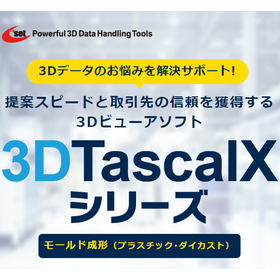
Viewer software for mold forming: "3DTascalX Series"

Instantly grasp shapes such as "clamping force, undercut, slope, and wall thickness"! Reducing man-hours for creating 2D drawings and estimating costs. Over 3,000 companies have adopted it in Japan.

The "3DTascalX series" is a 3D CAD viewer software that allows users to easily obtain the information needed on-site. It supports not only CAD data from CATIA, NX, Creo, SOLIDWORKS, and Inventor but also nearly all 3D data formats in circulation, including intermediate data such as IGES, STEP, Parasolid, ACIS, and JT. It also includes features useful for the "mold manufacturing" industry. It supports maximum outer dimensions, weight calculations, clamping force, slope, wall thickness, undercuts, color coding of design change areas, and the creation of 2D drawings such as three-view drawings, isometric drawings, and cross-sectional views. 【Features】 ■ Obtain necessary information on-site and simplify 2D drawings ■ Achieve high precision and quick estimate responses to prevent loss of opportunities ■ Reduce waste in operations such as waiting and rework ■ Optimize the running costs of 3D CAD *For more details, please refer to the materials. Feel free to contact us with any inquiries.

  • Data conversion software
  • plastic
  • Other polymer materials
  • soft

Added to bookmarks

Bookmarks list

Bookmark has been removed

Bookmarks list

You can't add any more bookmarks

By registering as a member, you can increase the number of bookmarks you can save and organize them with labels.

Free membership registration

ソフィックスの画像認識「SOFIXCAN Ω Eye」+見える化

古い機器のメーター等をカメラでデータ化し、稼働監視/操業監視/設備保全等の見える化

画像認識「ΩEye」× SCADA「AVEVA Edge」 株式会社ソフィックスの「ΩEye(オメガアイ)」は、古いアナログメーターや装置表示をカメラで撮影し、画像認識によりリアルタイムにデジタルデータへ変換するシステムです。高機能SCADA「AVEVA Edge」と連携することで、設備の稼働状況や操業状態を見える化し、効率的な監視と保全を実現します。 特長 ・アナログ針、7セグ数字、ランプ、QRコードなどを同時に最大20項目まで認識 ・AVEVA EdgeやMXT製アプリと連携し、ModbusTCPやCSVで簡単にデータ送信 ・初期費用を抑えたライセンス体系と豊富な導入実績 ・斜め撮影やカメラの揺れも自動補正し、設置や設定も容易

Added to bookmarks

Bookmarks list

Bookmark has been removed

Bookmarks list

You can't add any more bookmarks

By registering as a member, you can increase the number of bookmarks you can save and organize them with labels.

Free membership registration

AVEVA PI Server

The AVEVA PI Server is the core product of the AVEVA PI System, equipped with data storage, normalization, analysis, and notification functions.

The AVEVA PI Server includes Data Archive, Asset Framework, Asset Analytics, Event Frames, and Notifications. By combining these features, it enables the secure storage, organization, and contextualization of operational data. Raw data is structured by adding context and performing calculations, which provides insights into operations and business. Additionally, it ensures a reliable audit trail, making it easy to verify compliance with laws, regulations, and industry standards, while robust security covers every aspect to protect valuable data. 【Features】 ■ Safely stores time-series operational data for decades ■ Accessible to anyone within the organization who needs data, regardless of department or position ■ Creates a reliable single data source, regardless of source, format, or age ■ Obtains and compares summary data of events from specific processes ■ Automatically notifies alerts when changes occur in operations *For more details, please refer to the PDF document or feel free to contact us.

  • Company:AVEVA
  • Price:Other
  • Document and Data Management
  • soft

Added to bookmarks

Bookmarks list

Bookmark has been removed

Bookmarks list

You can't add any more bookmarks

By registering as a member, you can increase the number of bookmarks you can save and organize them with labels.

Free membership registration

[BIM Software Implementation Case Study] Tripla Project

Expanding the scope of BIM application and demonstrating its effectiveness in various processes! Case studies from large-scale construction sites.

The development project of Tripla, located in the center of Pasila, Helsinki, the capital of Finland, utilizes BIM tools for various design tasks. The project's procurement team efficiently calculates quantities of construction materials by leveraging the BIM model. "Tekla Structures" allows for the aggregation and classification of cost estimation information under various conditions, enabling the visualization of costs at detailed levels, such as by work process or contractor, which aids in accurately understanding estimated prices. Additionally, the Tekla model has achieved significant results in examining the feasibility of construction, such as investigating the delivery routes for escalators to be installed within the building. [Case Overview] ■ Implementation Site: Tripla Project (Helsinki, Finland) *For more details, please refer to the PDF materials or feel free to contact us. (If the PDF button is not displayed) ⇩The catalog can be downloaded from the special site below⇩

  • 3D CAD
  • 2D CAD Construction
  • antenna
  • soft

Added to bookmarks

Bookmarks list

Bookmark has been removed

Bookmarks list

You can't add any more bookmarks

By registering as a member, you can increase the number of bookmarks you can save and organize them with labels.

Free membership registration

Decarbonization: Risk Analysis of CO2 Leakage

Important for evaluating safety! Analysis of the risk of CO2 leakage to the ground.

The risk analysis of CO2 leakage to the surface after CO2 injection and upon completion of injection is important for evaluating safety. It is necessary to examine the presence of faults and abandoned wells, as well as the appropriate injection pressure, and to conduct simulations that consider the impact not only on the reservoir but also on the cap rock. By coupling rock mechanics models with reservoir simulators, it is possible to perform calculations that take into account the effects of pressure changes on the geomechanical properties of the reservoir. For example, in GEM, a modified Barton-Bandis model is applied to simulate the opening and closing of fractures and to calculate CO2 leakage from the cap rock. Our company primarily focuses on calculations using the reservoir simulator GEM and literature research to investigate and examine the following items: [Investigation and Examination Items] ■ Examination of the workflow for creating simulation input data from experimental, analytical, and literature data ■ Examination of the workflow for CO2 leakage risk analysis that reflects the uncertainty analysis of input data ■ Investigation of the workflow for CO2 leakage calculations in various reservoir simulators *For more details, please feel free to contact us.

  • Other contract services
  • soft

Added to bookmarks

Bookmarks list

Bookmark has been removed

Bookmarks list

You can't add any more bookmarks

By registering as a member, you can increase the number of bookmarks you can save and organize them with labels.

Free membership registration

3D Viewer Software for Mold Manufacturing: 3DTascalX Series

Quickly check necessary information for mold manufacturing such as "data conversion, undercut, processing/inspection dimensions"! To reduce the time spent waiting and rework in creating 2D drawings.

The "3DTascalX series" is a 3D CAD viewer software that allows easy access to the information needed during mold manufacturing. It supports not only CAD data from CATIA, NX, Creo, SOLIDWORKS, and Inventor, but also almost all 3D data available in the market, including intermediate data formats such as IGES, STEP, Parasolid, ACIS, and JT. There are many features available for "mold manufacturing": For design → data conversion, healing For processing → auxiliary coordinate setting, 3D sketch (material shape), high-precision measurement, 2D drawing For inspection → probe coordinate setting, actual measurement input, error determination 【Features】 ■ Suitable for mold drawing-less projects ■ Enables acquisition of necessary information on-site, simplifying 2D drawings ■ Reduces waiting and rework time with high-precision and quick checks ■ Additional functions for inspection departments ■ Can be distributed to clients with a free viewer *For more details, please refer to the materials. Feel free to contact us with any inquiries.

  • Data conversion software
  • Press Dies
  • Mold Design
  • soft

Added to bookmarks

Bookmarks list

Bookmark has been removed

Bookmarks list

You can't add any more bookmarks

By registering as a member, you can increase the number of bookmarks you can save and organize them with labels.

Free membership registration

Edge AI solution

As a demonstration of an AI integration solution for embedded devices, we built a Deep Learning application that runs on Raspberry Pi 3.

We have built an application system using Deep Learning that operates on a Raspberry Pi 3 as a proposal for AI solutions for edge devices. At Embedded Technology West 2017 / the Kansai Embedded Technology Exhibition, we conducted a technical demo of a celebrity look-alike judgment app using PiCamera. Anticipating various future needs and versatility, we created it from scratch on AWS using a Deep Learning framework without utilizing existing pre-trained models. We provide technologies and ideas that can flexibly adapt to and control the embedded devices envisioned by our customers. *For more details, please refer to the PDF document or feel free to contact us.

  • Company:Bee
  • Price:Other
  • Other embedded systems (software and hardware)
  • soft

Added to bookmarks

Bookmarks list

Bookmark has been removed

Bookmarks list

You can't add any more bookmarks

By registering as a member, you can increase the number of bookmarks you can save and organize them with labels.

Free membership registration

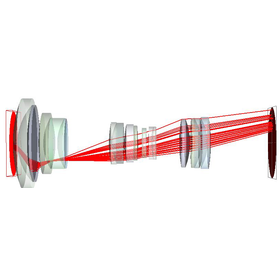
Optical analysis software FREDmpc (Fred)

The world's only optical engineering software that performs ultra-fast computational processing using GPUs.

FREDmpc was developed to provide developers with the most valuable resource, "time." Optical simulation tools play a crucial role in providing preliminary analysis results in the development of optical systems and products, as well as in forensic analysis used for evaluation in manufacturing and testing. Therefore, whether the software used can derive results more accurately in a shorter time is extremely important for developers. By being over 100 times faster and providing more accurate results than calculations using a CPU, FREDmpc allows developers to spend more time on design.

  • Other analyses
  • Analysis Services
  • simulator
  • soft

Added to bookmarks

Bookmarks list

Bookmark has been removed

Bookmarks list

You can't add any more bookmarks

By registering as a member, you can increase the number of bookmarks you can save and organize them with labels.

Free membership registration

NMR data processing software 'ALICE10bn' *Free trial version available

Adopts Windows UI. Simple operations for high and multi-faceted analysis. Database software is also available.

The NMR data processing software 'ALICE10bn' is a Windows 11 (32/64bit) compatible software that allows NMR users to quickly and easily perform data processing, printing, and saving as needed. It adopts a Windows UI, enabling users to check information such as data types and comments within folders with the same operational feel as the familiar Windows "Explorer." Additionally, since software management and the authentication of the protection key can be performed on a server PC, the installation effort when introducing it to multiple machines can be significantly reduced. ★Free trial software is currently available★ You can download it from the <Sample Software> section at the bottom of the page. A Quick Start Guide is also available for download for tutorial purposes, so please try it along with the operation guide. 【Features】 ■Visualizes NMR data in a more user-friendly and convenient manner ■Combines advanced and multifaceted NMR analysis functions with simple and easy-to-understand operability ■Equipped with a function to display the entire spectrum area on one-dimensional and two-dimensional processing screens 【ALICE Series】 We also offer database software to streamline the management of NMR analysis data.

  • Other operation management software
  • soft

Added to bookmarks

Bookmarks list

Bookmark has been removed

Bookmarks list

You can't add any more bookmarks

By registering as a member, you can increase the number of bookmarks you can save and organize them with labels.

Free membership registration

3D modeling software 'SketchUp Subscription'

SketchUp Pro, the world's most popular 3D modeling software developed as "Everyone's 3D."

The "SketchUp Pro Subscription" is a versatile 3D modeling software used worldwide with 33.5 million activations annually and over 1 billion projects. It is utilized across a wide range of fields including urban planning, architecture, commercial facilities, interior design, construction, civil engineering, marine engineering, landscaping, plants, food and beverage, education, manufacturing, film, and local governments. 【Features】 ■ You can create various shapes using the iconic "Push/Pull" tool. ■ 3D models can be easily created with intuitive operations using minimal commands. ■ Access to the world's largest 3D material download site, "3DWarehouse," is available for free. https://3dwarehouse.sketchup.com/?hl=en ■ It has been adopted by many companies through integration with BIM/CIM tools. ■ Users can add functionalities according to their preferences with over 800 plugin software options. https://extensions.sketchup.com/ *For more details, please refer to the PDF materials or feel free to contact us.

  • 3D CAD
  • Modeler
  • soft

Added to bookmarks

Bookmarks list

Bookmark has been removed

Bookmarks list

You can't add any more bookmarks

By registering as a member, you can increase the number of bookmarks you can save and organize them with labels.

Free membership registration

Optical analysis software FREDmpc (Fred)

FREDmpc is the world's only optical engineering software that performs full ray tracing using GPUs.

FREDmpc is software developed to provide developers with the most valuable resource for designers: "time." Optical simulation tools play a crucial role in providing preliminary analysis results in product development, such as the manufacturing and testing of optical systems. Therefore, whether the software used can derive results more accurately in a shorter time is extremely important for developers. FREDmpc delivers results that are more than 100 to 1000 times faster and more accurate than calculations using a CPU, allowing developers to reduce the time spent on analysis and dedicate more time to the details of design.

  • Company:CTflo
  • Price:1 million yen-5 million yen
  • simulator
  • Contract Analysis
  • Analysis Services
  • soft

Added to bookmarks

Bookmarks list

Bookmark has been removed

Bookmarks list

You can't add any more bookmarks

By registering as a member, you can increase the number of bookmarks you can save and organize them with labels.

Free membership registration

Crowd flow simulation software "MassMotion"

Recommended for safe building design and smooth facility operation. It predicts pedestrian movement routes and identifies conditions and density for congestion occurrence.

Software for simulating and analyzing how many pedestrians move within buildings, what routes each person chooses, and where congestion occurs as a result. By defining individual agendas and personalities for each pedestrian model moving within 2D/3D CAD models, it is possible to conduct very realistic pedestrian flow simulations, as each pedestrian model independently selects routes and behaves accordingly. This can be utilized in various architectural designs, disaster simulations, and redevelopment of existing facilities.

  • simulator
  • soft

Added to bookmarks

Bookmarks list

Bookmark has been removed

Bookmarks list

You can't add any more bookmarks

By registering as a member, you can increase the number of bookmarks you can save and organize them with labels.

Free membership registration

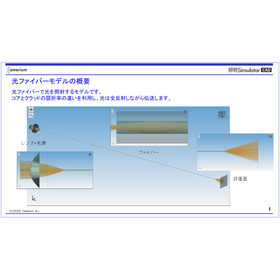
Optical evaluation software for optical fibers "Lighting Simulator CAD"

Recommended for performance evaluation of optical fiber optical systems! Aims to improve design efficiency.

Entry-level model for lighting and optical analysis! A simulation software that is purely domestically produced and offered at a reasonable price. This purely domestic lighting optical analysis software features a Japanese interface, making it easy for developers in non-optical fields to use. Leveraging the strengths of in-house development, it achieves low pricing while maintaining high computational accuracy and reliability based on optical theory, resulting in a cost-effective simulation software. 【Benefits of Implementation】 - Reduction in prototype costs - Validation of experimental results - Shortening of design time - Formation of analytical methods - Acquisition of design knowledge 【User Experience (Strengths)】 - The user interface is good, allowing for quick mastery after implementation - Operations and analyses can be performed immediately without special knowledge - After importing 3D CAD data, analysis models can be easily constructed - Ease of use and quick results enable early reflection in design - Short analysis time is convenient for considering multiple cases - Results are relatively consistent with experimental outcomes, smoothing the development process - Predictions from results have reduced the number of sample productions - By handling light sources other than visible light, the analysis results are beneficial for design.

  • Company:Camerium
  • Price:500,000 yen-1 million yen
  • simulator
  • Other optical parts
  • Endoscopes and fiberscopes
  • soft

Added to bookmarks

Bookmarks list

Bookmark has been removed

Bookmarks list

You can't add any more bookmarks

By registering as a member, you can increase the number of bookmarks you can save and organize them with labels.

Free membership registration

[BIM Software Implementation Case Study] Tampere Deck Arena

Utilizing BIM in all designs! A case of a unique activity complex located above the railway in the city center.

The Tampere Deck Arena project is part of a large-scale development taking place around the central station of Finland's third-largest city. The construction of a unique activity complex that has emerged above the railway tracks in downtown Tampere was a highly unusual and challenging project even on an international level. The scale of construction, the complexity arising from various design requirements, the number of stakeholders involved, and overlapping responsibilities were challenges for the project, but these issues were resolved by combining various BIM models. One of the challenges faced by the designers was the coordination of interference issues that would have been unmanageable without the use of BIM for a project of this scale. By utilizing BIM, adjustments to the structures around the railway tracks and the positioning of ceilings and equipment were carried out without any problems. A large number of engineers participated in this project, and advanced BIM software was helpful when explaining construction decisions. Additionally, the use of BIM software allowed designers and other project stakeholders to focus on key tasks such as design and project management.

  • 3D CAD
  • 2D CAD Construction
  • antenna
  • soft

Added to bookmarks

Bookmarks list

Bookmark has been removed

Bookmarks list

You can't add any more bookmarks

By registering as a member, you can increase the number of bookmarks you can save and organize them with labels.

Free membership registration

Simerics MP+ is also used for motor cooling analysis.

Not only applicable to hydraulic circuits such as engines and transmissions, but also has numerous applications in the analysis of oil cooling, water cooling, and air cooling circuits for motors and batteries!

PumpLinx is a fluid analysis software designed to calculate the transient characteristics of various volumetric pumps, compressors, and valves. It is developed based on the thermal fluid analysis software Simerics MP and utilizes all the features of Simerics MP. 【The following fluid analyses are possible】 ■ Free surface flow ■ Flow considering the compressibility of air contained in liquids ■ Pressure pulsation and water hammer effects ■ Coupling of pump flow with the rigid body motion of valves and cam rings ■ Flow in low to medium vacuum conditions ■ Compressible flow (subsonic) ■ Cavitation ■ Time variation of flow field (velocity vectors, pressure), flow rate, fluid forces, and torque Recently, there has been an increase in projects for oil cooling analysis of motors for automobiles, and when solving the VOF method with other CFD software, we have received inquiries such as: - Analysis time is too long - It is difficult to create fine calculation meshes - The solution diverges and does not converge Development source's SAE presentation paper on motor oil cooling: https://saemobilus.sae.org/content/2020-01-0168/

  • Thermo-fluid analysis
  • Contract Analysis
  • simulator
  • soft

Added to bookmarks

Bookmarks list

Bookmark has been removed

Bookmarks list

You can't add any more bookmarks

By registering as a member, you can increase the number of bookmarks you can save and organize them with labels.

Free membership registration

3D Virtual Meeting & 3D VR Review "iQ3 Dashboard"

3D data can be placed in a virtual conference space, allowing for the same realistic verification using VR or a mouse! Available for use in a browser.

The "iQ3 Dashboard" is a web-based 3D virtual meeting tool that utilizes the cloud for remote locations. Both administrators and participants do not need a dedicated environment and can join the virtual meeting space through a web browser. 3D data, including CAD models and point cloud data, can be simultaneously arranged in three dimensions within the virtual meeting space. Participants can log in without limits and freely navigate the virtual space, measuring dimensions, writing comments, filling out whiteboards, displaying videos and drawings, and engaging in two-way conversations and validations as needed. Administrators can notify the relevant personnel about the meeting via a scheduler or email, assemble the 3D data to be displayed internally, and register data with assembly information, including parts, all at once. There is no limit to the number of simultaneous participants who can register and join the virtual meeting. In the virtual meeting space, users with VR goggles can perform realistic operations in an actual three-dimensional space, while users without VR environments can operate similarly to a virtual reality space using a mouse. Participants with and without VR can directly discuss and validate within the same virtual space, making it easy to use regardless of the environment.

  • Image Transmission Equipment
  • soft

Added to bookmarks

Bookmarks list

Bookmark has been removed

Bookmarks list

You can't add any more bookmarks

By registering as a member, you can increase the number of bookmarks you can save and organize them with labels.

Free membership registration

SampleManager LIMS software

LIMS software that manages all lab data, equipment, and workflows.

LIMS, or Laboratory Information Management System, is a system that automatically collects and analyzes data related to samples, experimental results, workflows, and analytical instruments. By automatically collecting all data in the lab, it improves the productivity and efficiency of the lab, enhances compliance by preventing errors and tampering from manual input, and promotes data integrity for the company. Thermo Scientific SampleManager LIMS software is an all-in-one solution that encompasses not only LIMS but also electronic lab notebooks (ELN), lab execution systems (LES), and scientific data management systems (SDMS). It is used in a wide range of laboratories across various industries, including quality control departments in pharmaceuticals, chemicals, metals, oil, and food, as well as in research and development (R&D) fields.

  • Other information systems
  • Other core systems
  • Other operation management software
  • soft

Added to bookmarks

Bookmarks list

Bookmark has been removed

Bookmarks list

You can't add any more bookmarks

By registering as a member, you can increase the number of bookmarks you can save and organize them with labels.

Free membership registration

Modeling of Power Systems and B-EMS [Simulink Example]

Constructed a B-EMS model for PV and batteries in MATLAB/Simulink. Visualized the power reduction effects.

Utilizing the excellent modeling and simulation capabilities of MATLAB/Simulink, we will construct a B-EMS model that combines PV (photovoltaic) and batteries. By conducting modeling that includes the bench environment within the factory, PCS, and grid power, we support efficient power management by visualizing the power reduction effects. Flexible modeling is possible using Simscape and Simscape Electrical, and the simulation period can accommodate a wide range from one day to several decades. Various parameters can be customized with M scripts, and the simulation results are displayed in an easy-to-understand plot. In addition to developing and providing Simulink models tailored to customer needs, we also accept improvements, extensions, and parameter adjustments for existing models.

  • Secondary Cells/Batteries
  • Other energy equipment
  • Contract Analysis
  • soft

Added to bookmarks

Bookmarks list

Bookmark has been removed

Bookmarks list

You can't add any more bookmarks

By registering as a member, you can increase the number of bookmarks you can save and organize them with labels.

Free membership registration

Strong CAE software for oil pumps 'Simerics MP+'

Simulate the flow characteristics of volumetric pumps such as gear pumps and vane pumps! A CAE software specialized for pumps that other CAE software struggles with!

Simerics MP+ is a fluid simulation tool designed to calculate the transient characteristics of various volumetric pumps, compressors, and valves. It is developed based on the thermal fluid simulation tool Simerics MP and utilizes all the features of Simerics MP. 【The following fluid analyses are possible】 ■ Free surface flow ■ Flow considering the compressibility of air contained in liquids ■ Pressure pulsations and water hammer effects ■ Coupling of pump flow with the rigid body motion of valves and cam rings ■ Flow in low to medium vacuum conditions ■ Compressible flow (subsonic) ■ Cavitation ■ Time variations of flow fields (velocity vectors, pressure), flow rate, fluid forces, and torque The greatest strength is the ability to automatically create meshes even for clearances in the µm range, which is difficult with other general-purpose fluid analysis software!! Recently, there has been an increase in achievements with oil pumps for automotive and construction machinery applications, such as vane pumps for power steering and CVTs, and trochoidal pumps for engine lubrication. *There is a lot of information that cannot be posted online. In particular, please see the actual mesh creation and movement through a demo presentation!!

  • Thermo-fluid analysis
  • Contract Analysis
  • simulator
  • soft

Added to bookmarks

Bookmarks list

Bookmark has been removed

Bookmarks list

You can't add any more bookmarks

By registering as a member, you can increase the number of bookmarks you can save and organize them with labels.

Free membership registration

Fluid analysis software for valves, 'Simerics MP+'

Simulate the flow characteristics of valves and volumetric pumps! A CFD software specialized in valves and pumps, which other CFD software struggles with!

Simerics MP+ is a fluid simulation tool designed to calculate the transient characteristics of various valves, pumps, and compressors. It is developed based on the thermal fluid simulation tool Simerics MP and utilizes all the features of Simerics MP. 【The following fluid analyses are possible】 ■ Free surface flow ■ Flow considering the compressibility of air contained in liquids ■ Pressure pulsation and water hammer ■ Coupling of pump flow with the rigid body motion of valves and cam rings ■ Flow in low to medium vacuum conditions ■ Compressible flow (subsonic) ■ Cavitation ■ Time variation of flow field (velocity vectors, pressure), flow rate, fluid forces, and torque The greatest strength is the ability to automatically create meshes even for clearances in the µm range, which is difficult for other general-purpose fluid analysis software!! In addition to valve analysis, there has been an increase in achievements with oil pumps for automotive and construction machinery, such as vane pumps for power steering and CVTs, and trochoidal pumps for engine lubrication. *There is a lot of information that cannot be posted online. Especially, please see the demo for actual mesh creation and movement!!

  • Thermo-fluid analysis
  • Contract Analysis
  • simulator
  • soft

Added to bookmarks

Bookmarks list

Bookmark has been removed

Bookmarks list

You can't add any more bookmarks

By registering as a member, you can increase the number of bookmarks you can save and organize them with labels.

Free membership registration