226~270 item / All 570 items
Displayed results
Filter by category

Added to bookmarks
Bookmarks listBookmark has been removed
Bookmarks listYou can't add any more bookmarks
By registering as a member, you can increase the number of bookmarks you can save and organize them with labels.
Free membership registration
Contact this company
Inquiry Form226~270 item / All 570 items
Filter by category

"Mitarepo" is a series that introduces what can be done using various products with the concept of "I tried doing this!" We will deliver useful information each time from the wide range of product genres handled by System Create. In Vol. 78, we actually tested the new feature "minimization of laser seam lines" in modeling using the Form 3L. The Form 3L reproduces beautifully smooth surfaces even with conventional modeling settings, but during the modeling of large models, a seam line from the two lasers, known as the "laser seam line," occurs. While the line can be easily removed with sanding, if it appears on detailed areas, sanding can negatively impact the model, which is a process we want to avoid as much as possible. By using this new feature, it has become possible to model without the seam lines being printed on the model, prioritizing surface quality. In this article, we will actually try out the settings to prevent seam lines from occurring, and compare them with models created using conventional methods, along with explanations and images. You can download the materials from the button below.
Added to bookmarks
Bookmarks listBookmark has been removed
Bookmarks listYou can't add any more bookmarks
By registering as a member, you can increase the number of bookmarks you can save and organize them with labels.
Free membership registration
BobCAD-CAM," which has received positive feedback for being easy to introduce and operate at a low cost. Despite its overwhelming low price, it is a three-dimensional CAD/CAM system that is gaining inquiries for its diverse modules and rich features! One of its characteristics is that it can achieve a uniform cutting surface even when there are steep and gentle slopes or curves. In finishing processes, we all want to achieve a more beautiful tool mark. However, in the case of three-dimensional shapes with slopes and freeform surfaces, depending on the tool path used, the cutting surface may have uneven steps and quality on the slopes and curves. An effective feature for this is the "Scallop Machining" in 'BobCAD-CAM 3Axis PRO.' It calculates the intervals between paths uniformly regardless of the slope angle, allowing for a uniform cutting surface finish! The materials provide a detailed explanation of the actual tool paths and the benefits they offer, so please take a moment to read through them. *You can download the materials using the button below.
Added to bookmarks
Bookmarks listBookmark has been removed
Bookmarks listYou can't add any more bookmarks
By registering as a member, you can increase the number of bookmarks you can save and organize them with labels.
Free membership registration
Marsgo is a document that picks up the functions and features of various products and introduces the "amazing!" aspects. This time, we will introduce the "Modix BIG Series," a large-scale Fused Deposition Modeling (FDM) 3D printer assembly kit capable of producing large models. In recent years, there has been increasing attention on large 3D printers as more people want to create larger models in one go. In the process of creating such large models, material replacement is an inevitable occurrence. Most commercially available materials are typically 1 kg, and even the larger ones are usually up to 3 kg, which means that material replacement is needed about 2 to 3 days after starting the print. However, material replacement during the night or on holidays, as well as the need for regular checks for material replacement, are processes that we want to minimize as much as possible. Therefore, one of the features we are introducing this time is the "automatic filament switching" of the Modix BIG Series. If the material runs out during printing, it automatically switches to another print head to continue the process, which is an amazing feature! The document provides an overview of the automatic switching process of the print heads and how it works, so please take a look. *You can download the document using the button below.
Added to bookmarks
Bookmarks listBookmark has been removed
Bookmarks listYou can't add any more bookmarks
By registering as a member, you can increase the number of bookmarks you can save and organize them with labels.
Free membership registration
Marsugo is a document that picks up the functions and features of various products and introduces the "amazing!" aspects. This time, we will introduce the software "peel.CAD" for the 3D scanner "peel 3," which boasts intuitive operability and excellent versatility. The utilization scenes for 3D scanners are increasingly expanding, including creating drawings and archiving from scan data, as well as product inspection and measurement. However, some of you may think that specialized software is necessary for measurements... In fact, the software "peel.CAD" for the 3D scanner "peel 3" allows for "simple measurements" from scanned data without the need for expensive specialized software! It recognizes shapes from mesh data with a single click, immediately obtaining necessary information such as the model's diameter, center point, and distances, which can be used for simple measurements. The document introduces the flow of shape recognition from data and the operational procedures for measurement, so please take a look. *You can download the document using the button below.
Added to bookmarks
Bookmarks listBookmark has been removed
Bookmarks listYou can't add any more bookmarks
By registering as a member, you can increase the number of bookmarks you can save and organize them with labels.
Free membership registration
"Mitarepo" is a series that introduces what can be done using various products with the concept of "I tried doing this!" From the wide range of product genres handled by System Create, we deliver useful information each time. In Vol. 76, we will create screw holes in the newly introduced flame-retardant resin model of the Form 3 series, and verify how much torque it can withstand. The newly added flame-retardant resin in the Form 3 series has obtained the highest grade UL94V-0 among commonly available products. Not only is it highly safe due to its self-extinguishing properties, but it also features fine surface precision and hardness, allowing for screw fastening! Therefore, this time, we actually cut M6 female threads into the model and challenged the limits of screw tightening. We will explain points such as, "Can we create screw holes neatly?" and "Will it break under tightening?" along with images of the actual model surface and the measurement results of tightening torque for three types of female threads. You can download the materials from the button below.
Added to bookmarks
Bookmarks listBookmark has been removed
Bookmarks listYou can't add any more bookmarks
By registering as a member, you can increase the number of bookmarks you can save and organize them with labels.
Free membership registration
Marsgo is a document that highlights the functions and features of various products, showcasing the "amazing!" aspects. This time, we will introduce the "Modix BIG Series," a 3D printer assembly kit capable of large-scale modeling using the Fused Deposition Modeling (FDM) method. In recent years, there has been an increase in 3D printers that support large-scale modeling. Items that were previously printed in sections can now be printed in one go, reducing the hassle of assembly and improving efficiency. However, it is also true that as machines become larger, the setup before printing becomes more critical and time-consuming. That’s where the "Modix BIG Series" 3D printer assembly kit comes in, designed for large-scale modeling. It can automatically set the leveling of the table, which affects print quality! Whether you are a first-time user or someone experienced with 3D printers, you can achieve uniform leveling with just the push of a button. The document includes information on the operating procedures and the process for correcting table tilt, so please take a moment to read it. *You can download the document using the button below.
Added to bookmarks
Bookmarks listBookmark has been removed
Bookmarks listYou can't add any more bookmarks
By registering as a member, you can increase the number of bookmarks you can save and organize them with labels.
Free membership registration
The "Modix BIG Series" is an FDM (Fused Deposition Modeling) 3D printer assembly kit that allows anyone to easily start large-scale printing. It is equipped with various features, including an automatic correction function to ensure stable printing. [Features] ■ Automatic leveling correction The level of the table significantly affects the quality of the model, making leveling an important process. The "Modix BIG Series" can be set up completely automatically, allowing for proper preparation before printing. ■ Easy gap adjustment even for beginners Manual adjustments are no longer necessary. It eliminates discrepancies in settings caused by different operators, enabling anyone to easily and accurately adjust the gap. ■ Expanded operational range with dual extruders By adopting an IDEX (Independent Dual Extruder) print head, the two print heads operate independently. This allows for printing with two different materials simultaneously. Additionally, in the event of a material run-out, the print head can automatically switch to continue printing without interruption. *For more details, please request a catalog or view the PDF data from the download button below.
Added to bookmarks
Bookmarks listBookmark has been removed
Bookmarks listYou can't add any more bookmarks
By registering as a member, you can increase the number of bookmarks you can save and organize them with labels.
Free membership registration
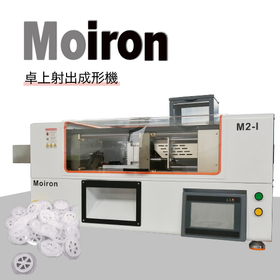
A compact injection molding machine capable of genuine molding has arrived! [Features] ■ Maximum clamping force of 150 kN The direct pressure clamping unit is driven by a servo motor, delivering a clamping force of 150 kN through belts and pulleys. ■ Stable molding performance Equipped with an injection mechanism that can be heated and maintained at temperatures up to 300°C. The injection speed can be set in three stages. ■ Simple operation controller The 7-inch touch panel has a simple layout, allowing for setting molding conditions according to each process in the molding flow. The home screen provides a quick overview of the execution status. *Please view the PDF data from the download button below.
Added to bookmarks
Bookmarks listBookmark has been removed
Bookmarks listYou can't add any more bookmarks
By registering as a member, you can increase the number of bookmarks you can save and organize them with labels.
Free membership registration
"Mitarepo" is a series that introduces what can be done using various products with the concept of "I tried doing this!" From the wide range of product genres handled by System Create, we deliver useful information each time. In Vol. 75, we will create a bottle-shaped model using PP filament and check the quality of the completed model. Various materials are available for use in Fused Deposition Modeling (FDM) 3D printers. In recent years, many filaments of "general-purpose resin" have been circulating in the market, used for various everyday applications. This time, we will use one such general-purpose resin, "Polypropylene (PP)," and create it with the smallest and most affordable model in our FDM 3D printer "CreatBot" series, the "F160-PEEK." PP material is known for being difficult to print due to its properties, but will it be able to be printed beautifully? In the document, we will actually print the bottle-shaped model and present the quality of the model along with actual photos. You can download the document from the button below.
Added to bookmarks
Bookmarks listBookmark has been removed
Bookmarks listYou can't add any more bookmarks
By registering as a member, you can increase the number of bookmarks you can save and organize them with labels.
Free membership registration
BobCAD-CAM," which is well-received for its ability to be introduced and operated at a low cost. Despite its overwhelmingly low price, it boasts a variety of modules and rich features, leading to an increase in inquiries about this 3D CAD/CAM system. One of its characteristics is that it allows for the easy creation of 2D machining drawings for turning processes from 3D models. With the increase in the transfer of 3D data, there are many situations where creating 2D drawings is necessary. In such cases, 3D models processed on a multi-tasking lathe reflect the shapes of milling operations, which can complicate the creation of 2D drawings for turning processes. In these situations, the "Rotational Profile" feature of 'BobCAD-CAM Mill-Turn' is incredibly useful. It can quickly calculate the outline of a model in a rotated state! The materials provide a detailed explanation of the flow of creating 2D drawings from actual 3D models and the editing process, so please take a look. *You can download the materials from the button below.
Added to bookmarks
Bookmarks listBookmark has been removed
Bookmarks listYou can't add any more bookmarks
By registering as a member, you can increase the number of bookmarks you can save and organize them with labels.
Free membership registration
"Mitarepo" is a series that introduces what can be done using various products with the concept of "I tried doing this!" From the wide range of product genres handled by System Create, we deliver useful information each time. In Vol. 74, we tested whether it is easy to remove models over a wide area using the build platform 2L, an option for the large 3D printer Form 3L. The light-curing 3D printer "Form 3 series" continues to evolve, becoming more systematized to allow for smarter and more efficient work processes. The "build platform 2L," a dedicated option table for Form 3L, allows for quick and safe removal of models with a large contact area without the need for tools, simply by pressing a lever. "Will the model break?" "How much time can be saved?" We will explain the differences between using a scraper and the build platform 2L, along with images for comparison. You can download the materials from the button below.
Added to bookmarks
Bookmarks listBookmark has been removed
Bookmarks listYou can't add any more bookmarks
By registering as a member, you can increase the number of bookmarks you can save and organize them with labels.
Free membership registration
Marsugo is a document that picks up the functions and features of various products and introduces the "amazing!" aspects. This time, we will introduce the software "peel.CAD" for the 3D scanner "peel 3," which has intuitive operability and excellent versatility. The use of 3D scanners is expanding rapidly, including applications such as creating drawings from physical objects and archiving. The data obtained during 3D scanning is composed of point cloud data, which is not numerically controlled, making it difficult to edit. By using "peel.CAD," you can easily modify mesh data and fill holes, and in no time at all, convert it into CAD data with simple operations! After conversion, you can freely edit it using your usual CAD system. The document introduces the workflow after 3D scanning and the operation steps for peel.CAD, so please take a look. *You can download the document using the button below.
Added to bookmarks
Bookmarks listBookmark has been removed
Bookmarks listYou can't add any more bookmarks
By registering as a member, you can increase the number of bookmarks you can save and organize them with labels.
Free membership registration
The "BobCAD-CAM," which has received positive feedback for being able to be introduced and operated at a low cost. Despite its overwhelmingly low price, the diverse modules and rich features are impressive! This is a three-dimensional CAD/CAM system that is seeing an increase in inquiries. One of its features is that it can perform "remainder machining," which reduces the burden of finishing processes. In today's world, where short delivery times are demanded, there is a desire to remove more excess material in a shorter time during the roughing process. To achieve this, it is likely that increasing the cutting volume by using large-diameter cutting tools is being employed to enhance efficiency. However, while using large-diameter tools allows for the removal of a lot of material at once, it also leaves a significant amount of excess material in areas such as inner corners where the tool cannot reach. To improve the quality of finishing processes, it is desirable to remove as much excess material as possible. In such cases, the "remainder machining" function of '3Axis Pro' is very useful. It is an amazing feature that can automatically generate paths to remove excess material! The materials provide a detailed explanation of the actual tool paths and the benefits they offer, so please take a moment to read through them. *You can download the materials from the button below.
Added to bookmarks
Bookmarks listBookmark has been removed
Bookmarks listYou can't add any more bookmarks
By registering as a member, you can increase the number of bookmarks you can save and organize them with labels.
Free membership registration
"Mitarepo" is a series that introduces what can be done using various products with the concept of "I tried doing this!" From the wide range of product categories handled by System Create, we deliver useful information each time. In Vol. 73, we challenged ourselves to multi-surface machining using the newly introduced compact 5-axis machining center "YORNEW MX220." There are often situations where it feels cumbersome to fix the workpiece with double-sided tape or readjust jigs and clamps every time the machining surface changes during setup. One way to shorten such processes is through machining with a "5-axis machining center." Equipped with tilting and rotating tables, it allows for machining from various directions, significantly reducing setup for each machining surface. However, many may think, "Setting up for indexed machining seems difficult," or "Doesn't setting up the machine and the process take more time?" Therefore, we will actually take on multi-surface machining and explain the flow of setup, settings, and the condition of the workpiece during indexed 5-axis machining, along with photos and comments. You can download the materials from the button below.
Added to bookmarks
Bookmarks listBookmark has been removed
Bookmarks listYou can't add any more bookmarks
By registering as a member, you can increase the number of bookmarks you can save and organize them with labels.
Free membership registration
Marsgo is a document that picks up the functions and features of various products and introduces the "amazing!" aspects. A large model created using a lot of time and materials. Isn't it nerve-wracking to remove it from the build table, no matter how many times you do it? It can be quite difficult to detach it even with a spatula or scraper... applying force and "whoosh!" You might accidentally damage the model due to overexcitement. That's a mistake you want to avoid in the final stages, right...? So, what we are introducing this time is the "Build Platform 2L," a dedicated build table for the Form 3L that allows for easy removal even with large models that have a wide contact surface with the table. By simply pressing a lever, the surface of the table moves and curves, allowing for instant model removal without the need for any tools! The document provides an introduction to the structure and usage procedures of the Build Platform 2L, so please take a moment to read it. *You can download the document using the button below.
Added to bookmarks
Bookmarks listBookmark has been removed
Bookmarks listYou can't add any more bookmarks
By registering as a member, you can increase the number of bookmarks you can save and organize them with labels.
Free membership registration
"Mitarepo" is a series that introduces what can be done using various products with the concept of "I tried doing this!" From the wide range of product genres handled by System Create, we deliver useful information each time. In Vol. 72, we investigated how a model would turn out when using ABS material and creating it with a 100% infill rate. Among the resins used in FDM 3D printers, "ABS" is particularly popular due to its excellent properties such as strength and durability. FDM printing allows for the adjustment of infill rates according to the intended use, but how much can the infill rate be increased for ABS, which is susceptible to temperature changes? In Mitarepo Vol. 60, we were able to print without warping even when increasing the infill rate to 30%! This time, we set the infill rate to 100% and created a model with ABS to see how it would turn out. The materials will include explanations along with the appearance of the printed model and measurement results. You can download the materials from the button below.
Added to bookmarks
Bookmarks listBookmark has been removed
Bookmarks listYou can't add any more bookmarks
By registering as a member, you can increase the number of bookmarks you can save and organize them with labels.
Free membership registration
The "BobCAD-CAM," which has received positive feedback for being easy to introduce and operate at a low cost. Despite its overwhelmingly low price, the diverse modules and rich features are impressive! This is a three-dimensional CAD/CAM system that is seeing an increase in inquiries. One of its features is the ability to "achieve both time reduction and quality through optimization of rough machining." In today's world, where short delivery times are demanded, it is natural to want to speed up the roughing process as much as possible. One method to achieve this is by using the "entire tool length" for machining. By increasing the amount of cut per pass, machining time can be reduced. However, the leftover material on gentle and steep slopes may become uneven. "The tool vibrates during finishing machining." "Additional machining is necessary..." In such cases, a useful feature is the "Add machining cycles and specify minimum wall thickness" function in the '3Axis Pro' under "Rough Machining Pro." The materials provide a detailed explanation of the actual tool paths and the benefits, so please take a look. *You can download the materials from the button below.
Added to bookmarks
Bookmarks listBookmark has been removed
Bookmarks listYou can't add any more bookmarks
By registering as a member, you can increase the number of bookmarks you can save and organize them with labels.
Free membership registration
"Mitarepo" is a series that introduces what can be done using various products with the concept of "I tried doing this!" We deliver useful information each time from the wide range of product categories handled by System Create. In Vol. 71, we used the newly launched "Form Auto" expansion unit for the Form 3/Form 3+ from Formlabs to remotely print two models in succession. In offices, the installation space for 3D printers tends to be limited, but when you are in a different location, preparation, post-processing, and moving or waiting for the next print can be necessary. "Form Auto" automates the manual tasks associated with printing on the Form 3+, allowing for continuous printing, monitoring of operational status, and job management even when you are not nearby! "Can I check the printing status from anywhere?" "Can I stop the print or change the job order remotely?" We will explain the flow of remote operation and the state of the models in the bucket after the continuous printing is completed, along with actual images and operation screens. You can download the materials from the button below.
Added to bookmarks
Bookmarks listBookmark has been removed
Bookmarks listYou can't add any more bookmarks
By registering as a member, you can increase the number of bookmarks you can save and organize them with labels.
Free membership registration
"BobCAD-CAM," which is well-received for its ability to be implemented and operated at a low cost. Despite its overwhelming low price, the diverse modules and rich features are impressive! This is a three-dimensional CAD/CAM system that is seeing an increase in inquiries. One of its features is the ability to easily create gear drawings. Gear drawing is done based on drawings and specifications, but it can take a lot of time to create in CAD. In such cases, the "GEAR+" add-on for BobCAD-CAM is a useful feature. By simply entering the values listed in the drawings and specifications, you can create gear drawings in a short amount of time. The materials explain the settings screen for gear drawing and the contents of the input items, so please take a look. *You can download the materials from the button below.
Added to bookmarks
Bookmarks listBookmark has been removed
Bookmarks listYou can't add any more bookmarks
By registering as a member, you can increase the number of bookmarks you can save and organize them with labels.
Free membership registration
"Mitarepo" is a series that introduces what can be done using various products with the concept of "I tried doing this!" We deliver useful information each time from the wide range of product genres handled by System Create. In Vol. 69, we prepared to spray the new product "AESUB yellow," a 3D scan-specific spray that "naturally disappears," and examined the spraying experience, the condition of the application surface, and the effectiveness of using an airbrush! The feature of the new product "yellow" is its remarkably thin coating! By using it in combination with an airbrush, it becomes possible to apply a thin and even layer to the targeted areas! In this document, we will explain the application to fine details and large surfaces, along with photos and comments on the unique condition of the application surface achieved with an airbrush. We hope this will be helpful for those who want to scan fine parts of black, transparent, and glossy works or those who are struggling with post-processing during scanning. *You can download the document from the button below.
Added to bookmarks
Bookmarks listBookmark has been removed
Bookmarks listYou can't add any more bookmarks
By registering as a member, you can increase the number of bookmarks you can save and organize them with labels.
Free membership registration
The "BobCAD-CAM," which has received positive feedback for being easy to introduce and operate at a low price. Despite its overwhelming low cost, it boasts a variety of modules and rich features! This is a three-dimensional CAD/CAM system that is seeing an increase in inquiries. One of its features is that it "automatically adjusts the pitch according to the shape." The tool paths "scanning lines" and "contour lines" are widely used in various scenes. They provide a clear machining path that cuts at a constant pitch. However, "There are areas that cannot be cut cleanly due to the angle of the slope..." "If I make the pitch finer, it will look nice, but the machining time..." In some cases, it was not possible to balance "finish quality" and "machining time" depending on the workpiece. In such situations, the '3Axis Pro' feature of "adaptive pitch & optimal trim" is helpful. The materials explain the situation when setting the adaptive pitch and what differences in paths can occur, so please take a look. *You can download the materials using the button below.
Added to bookmarks
Bookmarks listBookmark has been removed
Bookmarks listYou can't add any more bookmarks
By registering as a member, you can increase the number of bookmarks you can save and organize them with labels.
Free membership registration
A compact 5-axis machining center capable of genuine CNC processing has arrived! By adopting a machine base with excellent rigidity and a spindle that enables powerful and high-speed precise motion, it achieves true cutting capabilities. [Features] ■ Multi-surface machining with one chucking By simply adding a procedure to fix at any angle while utilizing existing know-how, 5-axis machining with indexing can be realized. ■ Compatible with light metals such as aluminum and brass, as well as resins Equipped with a high-output/high-speed spindle on a cast iron machine base, and compatible with coolant oil, it can handle materials ranging from light metals like aluminum and brass to resins. ■ Space-saving CNC processing The installation area is only 0.7m², and the main unit is fully covered, allowing for safe and space-efficient CNC processing. ■ Automation of tool length measurement and correction value input With a tool setter included, the measurement and registration of tool length correction is completed automatically. ■ High operability It supports manual indexing machining as well as automatic operation using CAM, and features a large panel with icons alongside various operation buttons. *Please view the PDF data from the download button below.
Added to bookmarks
Bookmarks listBookmark has been removed
Bookmarks listYou can't add any more bookmarks
By registering as a member, you can increase the number of bookmarks you can save and organize them with labels.
Free membership registration
Marsgo is a document that picks up the functions and features of various products and introduces the "amazing!" aspects. The preparatory and post-processing tasks that arise depending on the progress of 3D printing. It can be surprisingly challenging to have to be present in the moment while juggling work. "Going back and forth between the desk and the printer multiple times." "I can't respond immediately, so both the printer and the model are left unattended..." "I have to leave the spot just when the print is about to finish." Does this sound familiar? What we are introducing this time is a remote operation system centered around the "Form Auto," an extension hardware for the Form 3 series that enhances productivity while leveraging the printing capabilities of the "Form 3+." By simply mounting the printer, there is no need to remove the model, allowing you to continue printing one after another while being in a different location! Additionally, it is possible to check and manage the operational status online all at once. The document provides a detailed introduction to the series of mechanisms that enable continuous printing, so please take a moment to read it. *You can download the document using the button below.
Added to bookmarks
Bookmarks listBookmark has been removed
Bookmarks listYou can't add any more bookmarks
By registering as a member, you can increase the number of bookmarks you can save and organize them with labels.
Free membership registration
Marsugo is a document that picks up the functions and features of various products and introduces the "amazing!" aspects. This time, we will introduce the G-code simulation software "NC2Check." When processing complex shapes or using special jigs and clamps, there is a possibility of damaging the machine due to collisions or interference, making the verification process before actual machining a very important step. However, since the structure and operation differ depending on the machine, some may think, "I'm worried about the verification included with CAM..." or "Pre-verification on the actual machine takes time..." That's why we are introducing the simulation software "NC2Check," which adds on to Mastercam. It can simulate machine-specific operations that cannot be expressed in the simulation included with CAM, as it is based on the G-code calculated through post-processing, allowing for complete verification offline. The document provides detailed information about the simulation mechanism and usage procedures, so please take a look. *You can download the document using the button below.
Added to bookmarks
Bookmarks listBookmark has been removed
Bookmarks listYou can't add any more bookmarks
By registering as a member, you can increase the number of bookmarks you can save and organize them with labels.
Free membership registration
"BobCAD-CAM," which has received positive feedback for being easy to introduce and operate at a low price. Despite its overwhelmingly low cost, it boasts a wide variety of modules and rich features! This is a three-dimensional CAD/CAM system that is seeing an increase in inquiries. One of its features is that "it can easily create hole machining paths from 2D data such as DXF!" With the diverse range of hole machining options, it can be quite a task just to verify each type on the drawing, right? 'BobCAD-CAM' can automatically recognize and group hole shapes, even if the imported data is in 2D, just like it does with 3D! Moreover, it can automatically create machining paths suitable for each shape, and since it is organized by groups, it allows for efficient editing later on. The materials explain the actual flow of creating hole machining tool paths, as well as modifications due to changes that arise later and the editing of machining processes, so please take a look. *You can download the materials from the button below.
Added to bookmarks
Bookmarks listBookmark has been removed
Bookmarks listYou can't add any more bookmarks
By registering as a member, you can increase the number of bookmarks you can save and organize them with labels.
Free membership registration
"Mitarepo" is a series based on the concept of "I tried doing this!" where we introduce what can be done using various products. From the wide range of product categories handled by System Create, we deliver useful information each time. In Vol. 67, we investigated what changes occur when one of the materials for the Form 3+, "Rigid 10K Resin," is immersed in chemicals! The "Form 3+" has received positive feedback for allowing users to select materials according to their applications from a rich lineup. The "Rigid 10K Resin" featured this time is noted for having the highest rigidity among the Form 3+ resins, but it is also claimed to have excellent chemical resistance. However, there is little information related to chemical resistance for 3D printer models, leading to an increase in inquiries such as, "Will it dissolve or crack?" and "Will this chemical have any effect?" In the materials, we prepared three types of chemicals and immersed test pieces for 24 hours to explain what effects they experience, along with numerical data and images showing the changes. *You can download the materials from the button below.
Added to bookmarks
Bookmarks listBookmark has been removed
Bookmarks listYou can't add any more bookmarks
By registering as a member, you can increase the number of bookmarks you can save and organize them with labels.
Free membership registration
"Mitarepo" is a series that introduces what can be done using various products with the concept of "I tried doing this!" From the wide range of product genres handled by System Create, we deliver useful information each time. In Vol. 66, we investigated how thick acrylic can be cut using the low-cost CO2 laser cutter "Cut-Key"! The laser cutter "Cut-Key 900N" for acrylic processing that we handle. It has gained attention for being able to be introduced at a low price while having a high output of 130W. We receive inquiries about questions such as, "What thickness can it cut?" and "What does the cut surface look like?" Therefore, this time we prepared acrylic sheets of various thicknesses to check the maximum thickness of acrylic that can be cut and what the cut surface will look like. The materials will explain the actual cutting process of the acrylic along with images and comments of each cut surface. *You can download the materials from the button below.
Added to bookmarks
Bookmarks listBookmark has been removed
Bookmarks listYou can't add any more bookmarks
By registering as a member, you can increase the number of bookmarks you can save and organize them with labels.
Free membership registration
"Mitarepo" is a series that introduces what can be done using various products with the concept of "I tried doing this!" From the wide range of product genres handled by System Create, we deliver useful information each time. In Vol. 65, we tested the newly designed 3D scanner "peel 3" to see how well it can handle dark-colored and black workpieces! During the scanning process of dark-colored and black workpieces, we implemented measures against noise, dropouts, setting changes, and spraying, and after multiple scans, have you ever experienced, "It took more time than I expected..." or "Correcting the captured data is tough..."? This time, we used the newly introduced "peel 3," which is equipped with an IR-VCSEL (infrared vertical-cavity surface-emitting laser) light source, making it stronger for dark and black colors, to verify what types of workpieces it can actually handle! In the materials, we will explain various features of dark-colored and black workpieces and the data acquisition results that vary depending on texture, along with photos and comments. *You can download the materials from the button below.
Added to bookmarks
Bookmarks listBookmark has been removed
Bookmarks listYou can't add any more bookmarks
By registering as a member, you can increase the number of bookmarks you can save and organize them with labels.
Free membership registration
[Features] ■ Easy management and organization of Mazatrol programs It is possible to manage various types of Mazatrol programs, including those imported via Ethernet, those imported from USB memory or floppy disks, and programs captured with MazView. ■ Preview programs offline It supports the display of Mazatrol programs for all Mazak conversational controllers. You can preview Mazatrol programs with different formats from older generation controllers like T2/T3 and M32 to the latest Smooth, tailored to the corresponding controller. ■ Save and transfer old generation Mazatrol programs By establishing communication with old generation Mazatrol controllers using the PC's RS-232C serial port or a USB-to-serial adapter, you can save programs from the controller to the PC or transfer programs from the PC to the controller. *For more details, please request a catalog or view the PDF data from the download button above.
Added to bookmarks
Bookmarks listBookmark has been removed
Bookmarks listYou can't add any more bookmarks
By registering as a member, you can increase the number of bookmarks you can save and organize them with labels.
Free membership registration
"Mitarepo" is a series that introduces what can be done using various products with the concept of "I tried doing this!" We deliver useful information each time from the wide range of product genres handled by System Create. In Vol. 64, we used a type of material from the Form 3+, the Tough 2000 resin, to incorporate a helicoil and test its tightening. The Form 3+ is well-received because it allows users to choose materials from a diverse lineup according to their applications. This time, we are focusing on "Tough 2000 resin," which has properties similar to ABS and excels in strength and impact resistance. Common inquiries regarding this material include: "Can it be tapped?" "Can a helicoil be incorporated?" These are the two main questions. Therefore, this time we performed tapping on a workpiece made from Tough 2000 resin to verify how much tightening torque it can withstand. In the documentation, we created three types of female threads, tightened the screws, and explained the torque measurements with numerical data and images. *You can download the materials from the button below.
Added to bookmarks
Bookmarks listBookmark has been removed
Bookmarks listYou can't add any more bookmarks
By registering as a member, you can increase the number of bookmarks you can save and organize them with labels.
Free membership registration
"NC2Check" is a simulation that protects CNC machine tools from damage caused by interference and collisions during G-code NC program simulation. [Features] ■ Reproduces G-code NC programs It fully expresses machine-specific movements that could not be represented with CL data. Since the simulation is performed using G-code that actually moves the machine, accurate verification can be conducted. ■ Detects interference and collisions with jigs and clamps In addition to detecting collisions between the workpiece and tools, it also verifies all structures within the machine, detecting collisions with jigs and clamps. ■ High-fidelity machine simulation It allows for mapping the entire interior of the machine tool. It supports a variety of manufacturers' machine tools, enabling you to build a verification environment suited to your own equipment. *For more details, please request a catalog or view the PDF data from the download button above.
Added to bookmarks
Bookmarks listBookmark has been removed
Bookmarks listYou can't add any more bookmarks
By registering as a member, you can increase the number of bookmarks you can save and organize them with labels.
Free membership registration
"Mitarepo" is a series that introduces what can be done using various products with the concept of "I tried doing this!" From the wide range of product genres handled by System Create, we deliver useful information each time. In Vol. 63, we tested the new product "transparent" from the spray "AESUB," which "naturally disappears," by scanning colorful works to see how much shape and color information can be captured! The 3D scanning dedicated spray "AESUB" has been well-received for its ability to have the sprayed coating "naturally disappear." A new addition to its lineup is "transparent"! Since the coating layer, which was previously white, can now be transparent, it allows for scanning in a state where colors can be distinguished! In this document, we will explain the condition of the work surface when sprayed, the changes in scanning results due to the spray's effects, and the sublimation process after scanning, along with photos and comments. *You can download the materials from the button below.
Added to bookmarks
Bookmarks listBookmark has been removed
Bookmarks listYou can't add any more bookmarks
By registering as a member, you can increase the number of bookmarks you can save and organize them with labels.
Free membership registration
"Mitarepo" is a series that introduces what can be done using various products with the concept of "I tried doing this!" From the wide range of product genres handled by System Create, we deliver useful information each time. In Vol. 62, we tested whether we could create a film suitable for a workpiece with curves using "ExactFlat," which can unfold from 3D to 2D. There are various industries, such as automotive and interior design, that require patterns. To unfold from 3D to 2D, I believe you have been relying on the know-how that has been developed over time, but have you ever thought, "Isn't there a way to easily create patterns?" or "I want to unfold free shapes..."? Therefore, we challenged ourselves to directly unfold a workpiece with curves into 2D data and apply decorative film that fits the shape. By unfolding with ExactFlat, we can easily create data and also check for material distortion. In the materials, we will introduce the analysis of distortion and images of the film application. *You can download the materials from the button below.
Added to bookmarks
Bookmarks listBookmark has been removed
Bookmarks listYou can't add any more bookmarks
By registering as a member, you can increase the number of bookmarks you can save and organize them with labels.
Free membership registration
"Mitarepo" is a series that introduces what can be done using various products with the concept of "I tried doing this!" From the wide range of product genres handled by System Create, we deliver useful information each time. In Vol. 61, we examined how much the internal conditions differ with and without the dust collection unit, one of the options for the tabletop cutting machine "BANTAM TOOLS." Materials that generate "dust" during processing, such as composite materials, are often avoided because they can negatively impact the machine. Many people might be thinking, "I don't want to process with the machine I usually use" or "I don't want to lead to machine failure." What we would like to introduce is the "dust collection unit," which is an option for the tabletop cutting machine BANTAM TOOLS. In this document, we investigated how much the internal conditions after processing differ with and without the dust collection unit. The document will explain the conditions inside each setup during actual processing, along with photographs. *You can download the document from the button below.
Added to bookmarks
Bookmarks listBookmark has been removed
Bookmarks listYou can't add any more bookmarks
By registering as a member, you can increase the number of bookmarks you can save and organize them with labels.
Free membership registration
The "BobCAD-CAM," which has received positive feedback for being easy to introduce and operate at a low price. Despite its overwhelmingly low cost, the diverse modules and rich features are impressive! This is a three-dimensional CAD/CAM system that is seeing an increase in inquiries. One of its features is that it can determine the tool length limits from interference checks that include the holder. To achieve a better finish on products, we want to use the shortest tools possible. However, in cases of additional machining or deep areas, the holder might hit the wall and become unreachable... Is that not the case? In such situations, by using the "Dynamic Holder Check" of '3Axis Pro,' which can create interference avoidance paths considering the holder, you can test for avoidance and determine the safest and shortest tool length!! The materials explain the settings for interference checks and the process for determining the correct tool length, so please take a look. *You can download the materials from the button below.
Added to bookmarks
Bookmarks listBookmark has been removed
Bookmarks listYou can't add any more bookmarks
By registering as a member, you can increase the number of bookmarks you can save and organize them with labels.
Free membership registration
"Mitarepo" is a series that introduces what can be done using various products with the concept of "I tried doing this!" We deliver useful information each time from the wide range of product categories handled by System Create. In Vol. 60, we examined whether there are changes in warping of ABS models due to differences in infill density. When it comes to materials used in FDM 3D printers, PLA and ABS are common. Among them, ABS is a material with excellent mechanical properties, but many may be troubled by the "warping of models" that becomes apparent when trying it out. One method to counteract warping is to "lower the infill density." By reducing the infill density, you can decrease the impact of thermal stress and suppress warping; however, it is also true that this can make the model's strength somewhat unreliable. So, how much infill percentage can be used to create a model without warping? This time, we created flat models with varying infill densities and examined what changes occur in the models. *You can download the materials from the button below.
Added to bookmarks
Bookmarks listBookmark has been removed
Bookmarks listYou can't add any more bookmarks
By registering as a member, you can increase the number of bookmarks you can save and organize them with labels.
Free membership registration
"Mitarepo" is a series that introduces what can be done using various products with the concept of "I tried doing this!" We deliver useful information each time from the wide range of product genres handled by System Create. In Vol. 59, we tried creating a model by combining different metals using "2CREATE." The compact metal printer is easy to handle and allows for easy material changes, which is a great feature. With this, it might be possible to change materials midway! Aren't you interested in creating metals that are fused together from different types? So, in between prints, we changed materials and created a model made from two types of materials! This is the first attempt to utilize the flexibility of material selection in 2CREATE and the characteristics of a 3D printer that sinters metal powder with a laser. "Doesn't changing materials in a metal printer take a long time?" "Is it really possible to combine metals in 3D printing?" We will explain the flow of material changes and the finish of the model along with actual images. *You can download the materials from the button below.
Added to bookmarks
Bookmarks listBookmark has been removed
Bookmarks listYou can't add any more bookmarks
By registering as a member, you can increase the number of bookmarks you can save and organize them with labels.
Free membership registration
"Mitarepo" is a series that introduces what can be done using various products with the concept of "I tried doing this!" We deliver useful information each time from the wide range of product genres handled by System Create. In Vol. 58, we tested the ease of removing models using the Build Platform 2, an option for the Form 3+. The Form 3+ can create intricate models with simple operations. Once the model is finished, have you ever thought during post-processing, "There are some model shapes that are difficult to remove..." or "If only I could shorten the post-processing time..."? In this context, Formlabs has introduced the Build Platform 2, which can be used with the Form 3+! It has been announced that models can be removed more easily, but how much easier will it really be? Therefore, we investigated how easy it is to remove models. We will explain the tasks involved when using a scraper and when using the Build Platform 2, along with images. *You can download the materials from the button below.
Added to bookmarks
Bookmarks listBookmark has been removed
Bookmarks listYou can't add any more bookmarks
By registering as a member, you can increase the number of bookmarks you can save and organize them with labels.
Free membership registration
"Mitarepo" is a series that introduces what can be done using various products, based on the concept of "I tried doing this!" From the wide range of product categories handled by System Create, we deliver useful information each time. In Vol. 57, we used the SLS method 3D printer "Fuse 1+30W" to create a model with a complex internal shape and tested whether we could cleanly remove the powder left inside. The SLS method 3D printer has the advantage of being able to create support-free structures, unlike other printing methods. Therefore, it can produce complex shapes that are difficult to achieve with other methods. However, since the uncurled powder laid out functions as a substitute for support, hollow areas may remain filled with powder. Nevertheless, the powder left inside should be removable with the SLS method. In this document, we challenge the removal of powder remaining inside the model! We will thoroughly check the invisible interior using a CT scanner. We will explain whether it is truly possible to cleanly remove the powder material left inside, along with the removal process and CT scan images. *You can download the document using the button below.
Added to bookmarks
Bookmarks listBookmark has been removed
Bookmarks listYou can't add any more bookmarks
By registering as a member, you can increase the number of bookmarks you can save and organize them with labels.
Free membership registration
There are still very few 3D printers capable of large-scale modeling on the market, so the mainstream method is to create models in segments and assemble them later. It would be great if we could complete such models in a single print. However, the larger the model, the more concerns arise, such as "Will the quality decrease?" and "Will there be any misalignment?" That’s why we would like to introduce the "CreatBot D600 Pro," which can stably create large models. By implementing various innovations to prevent misalignment, which is one of the causes of printing defects, it can accurately and stably print over a wide area. The materials include information about the motor and XY axis drive belt structure, so please take a look. *You can download the materials from the button below.
Added to bookmarks
Bookmarks listBookmark has been removed
Bookmarks listYou can't add any more bookmarks
By registering as a member, you can increase the number of bookmarks you can save and organize them with labels.
Free membership registration
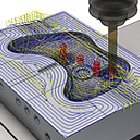
The "BobCAD-CAM," which has received positive feedback for being able to be introduced and operated at a low cost. Despite its overwhelming low price, it boasts a variety of modules and rich features! This is a three-dimensional CAD/CAM system that is seeing an increase in inquiries. One of its features is that it can automatically perform chamfering on slopes and curved surfaces. This time, we would like to introduce the "chamfering process" of 'BobCAD-CAM 3Axis Premium.' As the demand for efficiency drives the mechanization of chamfering processes, one of the most challenging aspects is chamfering edges on inclined and curved surfaces. Editing CAD data can be cumbersome, and calculating paths along curves with three-axis motion is quite difficult... In the end, many times, the quality of the machining is left to the skill of the craftsman. The "chamfering process" of '3Axis Premium' automatically recognizes specified edges, even if the workpiece shape includes slopes and curved surfaces. It is an amazing feature that can calculate uniform chamfering tool paths! The materials explain the flow of chamfering settings and the actual tool paths, so please take a look. *You can download the materials from the button below.
Added to bookmarks
Bookmarks listBookmark has been removed
Bookmarks listYou can't add any more bookmarks
By registering as a member, you can increase the number of bookmarks you can save and organize them with labels.
Free membership registration
"Mitarepo" is a series that introduces what can be done using various products with the concept of "I tried doing this!" From the wide range of product categories handled by System Create, we deliver useful information each time. In Vol. 56, we challenged ourselves to see how much we could reduce the printing time by changing the layer height for different parts of the model. While utilizing FDM 3D printers, "Everyone must have thought at least once, 'I want to reduce the printing time for 3D printing!'" However, the methods to shorten printing time are limited, and achieving this without compromising quality is quite challenging. This time, we attempted to see how much we could reduce printing time by using the "Anisoprint Composer," which allows for the use of multiple layer heights depending on the part being printed. We will explain the results of our actual printing, along with the printing conditions and photos, to see if we can reduce printing time while maintaining quality. *You can download the materials from the button below.
Added to bookmarks
Bookmarks listBookmark has been removed
Bookmarks listYou can't add any more bookmarks
By registering as a member, you can increase the number of bookmarks you can save and organize them with labels.
Free membership registration
"BobCAD-CAM" is a three-dimensional CAD/CAM system that is gaining popularity due to its overwhelmingly low price, diverse modules, and rich features! One of its characteristics is that it has many convenient functions. In this article, we will introduce the "Template Function" of 'BobCAD-CAM 3AXIS Pro.' CAD/CAM can complete the entire flow from design to machining program, leading to increased efficiency. Wouldn't you want to utilize and convey the machining procedures and techniques more easily than before? The "Template Function" of 'BobCAD-CAM 3AXIS Pro' allows you to save machining settings. It is also possible to register tool information and multiple machining processes as templates. The saved templates can be shared, making it easy to convey machining knowledge and techniques, and allowing machining settings to be performed with just a few operations. The materials include items that can be saved and ways to utilize them, and we also introduce how to read the functions, so please take a look. *You can download the materials from the button above.
Added to bookmarks
Bookmarks listBookmark has been removed
Bookmarks listYou can't add any more bookmarks
By registering as a member, you can increase the number of bookmarks you can save and organize them with labels.
Free membership registration
Marsugo is a document that picks up the functions and features of various products and introduces the "amazing!" aspects. As 3D scanning becomes more commonplace, various types of scanners are emerging, becoming increasingly high-performance and user-friendly! For those who want to make a smart choice based on the balance of price and performance, or for those who are thinking it’s about time to have at least one device…! What we are introducing is the handheld 3D scanner "peel 3 series." Despite being an entry-level model, it is equipped with professional-grade scanning performance. It features the latest functions such as an intuitive touchscreen and vibration notifications. In this document, we explain the amazing capabilities of being able to scan both wide areas and fine details with just one device, including the differences between the "High-Speed Wide-Range Scan" and "Detailed Scan" modes, as well as how data integration can be performed with just a few clicks. *You can download the document from the button above.
Added to bookmarks
Bookmarks listBookmark has been removed
Bookmarks listYou can't add any more bookmarks
By registering as a member, you can increase the number of bookmarks you can save and organize them with labels.
Free membership registration
"Mitarepo" is a series that introduces what can be done using various products with the concept of "I tried doing this!" From the wide range of product genres handled by System Create, we deliver useful information each time. In Vol. 54, we created test pieces using the new material "Nylon 11CF" for the SLS 3D printer "Fuse 1 +30W" and examined its dimensional reproducibility. Carbon fiber reinforced resin, which achieves excellent strength and heat resistance while being lightweight, is utilized in various applications across industries and is also expanding in the 3D printing industry. In this context, Formlabs announced the carbon fiber reinforced material "Nylon 11CF" as a new material for the SLS 3D printer "Fuse 1 +30W." Therefore, we quickly created test pieces used for inspection upon arrival. Are there differences compared to other materials? How accurately can dimensions be reproduced? We explain questions and points of interest regarding Nylon 11CF, along with images and measurement results. *You can download the materials from the button below.
Added to bookmarks
Bookmarks listBookmark has been removed
Bookmarks listYou can't add any more bookmarks
By registering as a member, you can increase the number of bookmarks you can save and organize them with labels.
Free membership registration