We have compiled a list of manufacturers, distributors, product information, reference prices, and rankings for CAD.
ipros is IPROS GMS IPROS One of the largest technical database sites in Japan that collects information on.

CAD Product List and Ranking from 150 Manufacturers, Suppliers and Companies

Last Updated: Aggregation Period:Jan 14, 2026~Feb 10, 2026
This ranking is based on the number of page views on our site.

CAD Manufacturer, Suppliers and Company Rankings

Last Updated: Aggregation Period:Jan 14, 2026~Feb 10, 2026
This ranking is based on the number of page views on our site.

  1. 進和電機 Aichi//Consumer Electronics
  2. i CAD - 機械設計向け3DCAD(3次元CAD)開発元 - Tokyo//CAD/CAM
  3. ECAD Solutions Co., Ltd. Saitama//CAD/CAM
  4. 4 Design Creation Inc. Tokyo//software
  5. 5 エーディーディー Kyoto//software

CAD Product ranking

Last Updated: Aggregation Period:Jan 14, 2026~Feb 10, 2026
This ranking is based on the number of page views on our site.

  1. Electrical design CAD 'Unidraf X / Unidraf G' 進和電機
  2. 2D3D Integrated CAD CADPAC-CREATOR [Free Trial Version] Design Creation Inc.
  3. 3D CAD for Aluminum Products 'apdX' SUS
  4. 4 [Mechanical Design] Free 3D CAD Seminar for Mechanical Devices and Production Equipment i CAD - 機械設計向け3DCAD(3次元CAD)開発元 -
  5. 5 Socia partition CAD data ソシアパーティション (旧 株式会社コマツパーティション)

CAD Product List

481~510 item / All 541 items

Displayed results

Aerospace Awareness Support CAD System

Support for lightweight design of aerospace components through automatic checking of design rules!

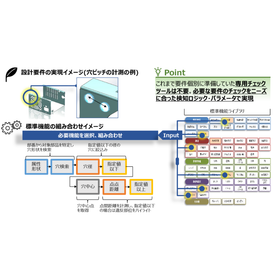
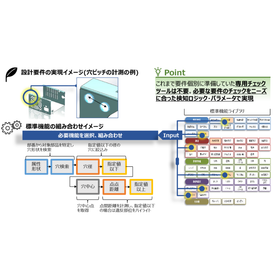
In the aerospace industry, reducing the weight of aircraft is essential for improving fuel efficiency and performance. Detailed reviews during the design phase significantly impact the quality and cost of the final product. In particular, designs that eliminate waste while maintaining strength are required. The awareness-support CAD system analyzes design data and operation history to detect potential design issues and inefficient processes in real-time. 【Usage Scenarios】 - Design of aircraft components - Design of spacecraft structures - Verification of lightweight designs 【Benefits of Implementation】 - Reduction of design lead time - Improvement of design quality - Reduction of rework

Added to bookmarks

Bookmarks list

Bookmark has been removed

Bookmarks list

You can't add any more bookmarks

By registering as a member, you can increase the number of bookmarks you can save and organize them with labels.

Free membership registration

Awareness Support CAD System for Medical Devices

Automated checks of design rules shorten the lead time for medical device design!

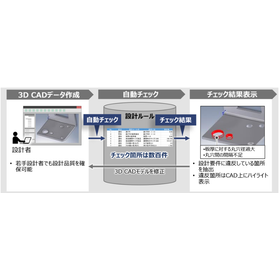
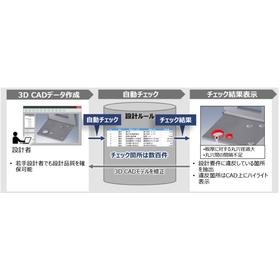
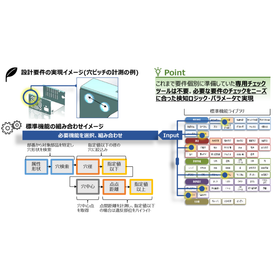
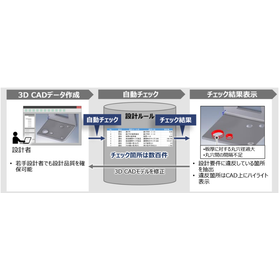
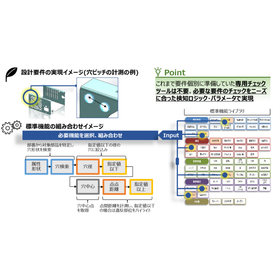
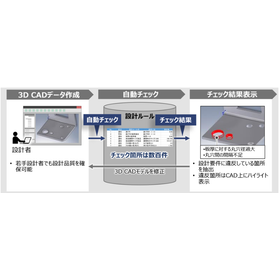
In the medical device industry, the precision and safety of products are of utmost importance. A slight mistake in design can have serious implications for product performance and patient safety, making thorough quality management during the design phase essential. Especially for medical devices that handle complex shapes and fine components, adherence to design rules and accurate design are required. The awareness-support CAD system analyzes design data and the designer's operation history to detect potential issues and inefficient processes in real-time during the design process. By utilizing past design data and best practices, it provides specific improvement suggestions to designers. By automatically checking 3D CAD models based on design requirements (design rules and manufacturability), it contributes to improving design quality and reducing lead time. 【Usage Scenarios】 - Design of precision medical devices - Design of components with complex shapes - Compliance with design rules 【Effects of Implementation】 - Reduction of design errors - Decrease in rework - Shortening of design periods

Added to bookmarks

Bookmarks list

Bookmark has been removed

Bookmarks list

You can't add any more bookmarks

By registering as a member, you can increase the number of bookmarks you can save and organize them with labels.

Free membership registration

Home Appliance Support CAD System

Automating design rule checks to streamline the design verification of home appliances!

In the home appliance industry, thorough checks during the design phase are essential to ensure product quality and safety. Particularly with the increasing complexity of designs, verifying compliance with design rules and ease of processing has become a significant challenge that requires time and effort. Visual inspections come with time constraints and the risk of oversight, often leading to rework. The awareness-support CAD system analyzes design data and the designer's operation history to detect potential issues and inefficient processes in real-time during the design process. By automatically checking 3D CAD models based on design requirements, it significantly reduces check time and rework, thereby enhancing the efficiency of design verification. 【Usage Scenarios】 - Design reviews of home appliance products - Verification of compliance with design rules - Validation of manufacturability 【Benefits of Implementation】 - Reduction of design lead time - Decrease in check workload - Reduction of rework

Added to bookmarks

Bookmarks list

Bookmark has been removed

Bookmarks list

You can't add any more bookmarks

By registering as a member, you can increase the number of bookmarks you can save and organize them with labels.

Free membership registration

Furniture-oriented awareness support CAD system

Automatic checking of design rules supports ergonomically based design!

In the furniture industry, ergonomic design is crucial for enhancing the comfort and safety of products. This is especially important for chairs and sofas intended for long-term use, where designs that reduce physical strain are required. Inadequate design can lead to health issues for users and product complaints. The awareness-support CAD system analyzes design data and the designer's operation history to detect potential issues from an ergonomic perspective in real-time. It utilizes past design data and best practices to provide designers with specific improvement suggestions. 【Usage Scenarios】 - Verification of ergonomic design - Improvement of product comfort and safety - Early detection of issues during the design phase 【Effects of Implementation】 - Improvement in design quality - Reduction of rework - Strengthening of product competitiveness

Added to bookmarks

Bookmarks list

Bookmark has been removed

Bookmarks list

You can't add any more bookmarks

By registering as a member, you can increase the number of bookmarks you can save and organize them with labels.

Free membership registration

Manage various design information in one folder! Integrated CAD for electrical and control design.

Developed for the purpose of labor-saving and speeding up in the field of electrical and control design!

"SchemELECT" is a high-performance CAD system for electrical design that is expanding its achievements in various fields such as industrial equipment and plant engineering. It integrates various design information from a single project and manages it in one folder. It enables real-time information sharing of various drawings and related data, ensuring the consistency of all data at all times. 【Features】 ■ Integrated management of project information ■ Guarantees complete consistency of project information ■ Effective utilization of design information in downstream processes ■ Achieves problem-solving for issues that arise between ancillary operations and departments *For more details, please refer to the catalog or feel free to contact us.

  • Other CAD related software
  • Other CAD
  • CAD

Added to bookmarks

Bookmarks list

Bookmark has been removed

Bookmarks list

You can't add any more bookmarks

By registering as a member, you can increase the number of bookmarks you can save and organize them with labels.

Free membership registration

Integrated CAD System 'SchemELECT' *for electrical control design

<CAD Systems Chosen by Professionals> Flexibly respond to tasks arising from frequent changes in electrical control system design and more! *Implemented in over 20 countries worldwide.

"SchemELECT" is a high-performance electrical design CAD system that has been expanding its achievements in various fields such as industrial equipment and plant engineering, and is also used by professional electrical designers. It has been implemented in over 20 countries worldwide. As basic functions, it includes 2D drawing capabilities, drawing management functions, circuit diagram drawing and editing functions, support for submitting overseas drawings, and IO diagram drawing functions. This time, we will introduce the <drawing management function>. 【Drawing Management Function】 By managing projects in a one-folder format, electrical control drawings and other data can be easily accessed. By utilizing drawing management support tools, such as flexible search condition settings and drawing previews, you can efficiently utilize design data accumulated throughout the product lifecycle. ■ Project drawing search ■ Project drawing explorer ■ Abundant project output *For more details, please refer to the PDF materials or feel free to contact us.

Added to bookmarks

Bookmarks list

Bookmark has been removed

Bookmarks list

You can't add any more bookmarks

By registering as a member, you can increase the number of bookmarks you can save and organize them with labels.

Free membership registration

[Water Master NX Application Introduction Case] Capable of creating more than 8 cases in a day.

A beautifully finished job has also improved the trust in the waterworks department! A case where work efficiency has dramatically improved.

A CAD system for water supply and drainage applications capable of creating water supply applications, drainage applications, and material summaries. We would like to introduce a case study of the implementation of 'ANDES Water Master for Applications, Main Pipe.' Before implementation, we were inputting drawings by hand and could only create about two application drawings per day. As the number of projects increased, it became impossible to handle office tasks manually, so we considered reducing the labor involved in drawing input and digitizing administrative processes. After implementation, we were able to create more than eight drawings per day, significantly improving work efficiency. Additionally, unlike handwritten drawings, CAD produces neat results, which enhanced the trust of the waterworks department. [Key Factors for Implementation] - Specializes in water supply and drainage application tasks - Allows for data exchange with clients due to its CAD format *For more details, please refer to the PDF materials or feel free to contact us. (This is a product of Systems Nakashima Co., Ltd.)

  • Other CAD
  • CAD

Added to bookmarks

Bookmarks list

Bookmark has been removed

Bookmarks list

You can't add any more bookmarks

By registering as a member, you can increase the number of bookmarks you can save and organize them with labels.

Free membership registration

<For Customers> Solving various issues with large-capacity CAD data!

Are you currently having trouble with large-capacity CAD data support?

Recently, the performance of CAD systems and software has improved significantly, greatly increasing their capabilities compared to the past. This has also led to larger file sizes for CAD data itself. Data that poses no issues within native systems can cause problems when used with other brand CAD systems or various CAE/CAM software, leading to inquiries from customers who are experiencing difficulties with loading and processing. Therefore, by using the Simplifier function of our core technology software "3D_Evolution," it is possible to quickly and easily create data containing only the necessary elements for each workflow. This has resulted in positive feedback from many customers. ~~~~~~~~~~~~~~~~ 1-Month Free Trial Available! ~~~~~~~~~~~~~~~~ Our software is not only appealing to end users but also to trading companies, so we would be grateful if you could contact us.

  • Other CAD
  • Data conversion software
  • CAD

Added to bookmarks

Bookmarks list

Bookmark has been removed

Bookmarks list

You can't add any more bookmarks

By registering as a member, you can increase the number of bookmarks you can save and organize them with labels.

Free membership registration

About the compatibility of architectural equipment CAD 'ARCADE NEO' with JWCAD.

Not only can you convert created drawings for JWCAD, but you can also import JWCAD data! Please try it out with the free trial version.

"ARCADE NEO" is a cost-effective ARES-based architectural equipment CAD. We have now made it compatible with ARES Commander 2024 SP2 (build 24.2.1.3136). This product eliminates complex operations and achieves a unified, easy operation, allowing for the creation of drawings and summary tables with minimal training. Additionally, it can convert created drawings into JWCAD format and read JWCAD data. We offer batch conversion features for individual sheets and folders. *For more details, please refer to the PDF materials. ★ A free trial version is available. Please feel free to contact us. ★

  • 2D CAD Construction
  • CAD

Added to bookmarks

Bookmarks list

Bookmark has been removed

Bookmarks list

You can't add any more bookmarks

By registering as a member, you can increase the number of bookmarks you can save and organize them with labels.

Free membership registration

Building Equipment CAD 'ARCADE NEO' Side Note Editing Function

It comes with a convenient piping drawing feature. Please try it out with the free trial version.

"ARCADE NEO" is a cost-effective ARES-based architectural equipment CAD. We have now made it compatible with ARES Commander 2024 SP2 (build 24.2.1.3136). This product eliminates complex operations and achieves a unified, easy operation, allowing for the creation of drawings and summary tables with minimal training. Below, we will introduce the wiring drawing function of "ARCADE NEO." Footnote Editing Function - You can edit footnote text replacement, footnote position, footnote size, and more. *For more details, please refer to the PDF document. ★ A free trial version is available. Please feel free to contact us! ★

  • 2D CAD Construction
  • CAD

Added to bookmarks

Bookmarks list

Bookmark has been removed

Bookmarks list

You can't add any more bookmarks

By registering as a member, you can increase the number of bookmarks you can save and organize them with labels.

Free membership registration

Building Equipment CAD 'ARCADE NEO' Sanitary Fixture Table Creation Function

It is equipped with a convenient piping drawing function. Please try it out with the free trial version.

"ARCADE NEO" is a cost-effective ARES-based architectural equipment CAD. We have now made it compatible with ARES Commander 2024 SP2 (build 24.2.1.3136). This product eliminates complex operations and achieves a unified, simple operation, allowing for the creation of drawings and summary tables with minimal training. Below, we will introduce the wiring drawing function of "ARCADE NEO." Sanitary Fixture Table Creation Function - You can create a list of sanitary fixtures within a specified range in the drawing. *For more details, please refer to the PDF materials. ★ A free trial version is available. Please feel free to contact us. ★

  • 2D CAD Construction
  • CAD

Added to bookmarks

Bookmarks list

Bookmark has been removed

Bookmarks list

You can't add any more bookmarks

By registering as a member, you can increase the number of bookmarks you can save and organize them with labels.

Free membership registration

Project Publishing Service

We guarantee publication from a major publisher and achieve corporate publishing with appropriate cost-effectiveness.

We propose a comprehensive publishing project that encompasses everything from production to promotion, in collaboration with your company and major publishers. We have established a unique corporate publishing partnership with a prestigious publisher known for its tradition and track record, utilizing the strong distribution network of our partner publisher to strategically distribute books primarily to large and mid-sized bookstores nationwide. Through book publishing backed by a strong brand power, we will support your company's branding and increase its recognition. **Features of Our Project Publishing:** - Created with top-class editors in the industry - Boldly executed in collaboration with major publishers - Thoroughly utilized *For more details, please download the PDF or feel free to contact us.*

  • Printing/Publishing
  • CAD

Added to bookmarks

Bookmarks list

Bookmark has been removed

Bookmarks list

You can't add any more bookmarks

By registering as a member, you can increase the number of bookmarks you can save and organize them with labels.

Free membership registration

[Permanent License + Usable Paper Drawings] Domestic General-purpose 2D Electrical CAD

[OCF Certification Passed] Speed up the creation of finished drawings from construction drawings with easy operations that feel like handwriting! *Demo available.

DynaCAD Electric is a system designed to shorten the working hours for creating drawings in electrical equipment construction and improve operational efficiency. It thoroughly addresses the confusion and hassle of traditional CAD operations, providing an easy-to-use environment that even beginners can quickly adapt to. *DynaCAD Electric is an enhancement to DynaCAD, a 2D general-purpose CAD application, which reduces the time required for drawing creation and application form preparation in electrical equipment construction, thereby improving operational efficiency.* <Features> - Creation of CALS/EC electronic delivery drawings - View drawings from the site or on business trips via a web browser - Real-time utilization of images from the site - Use of paper drawings provided by clients

  • Other CAD
  • CAD

Added to bookmarks

Bookmarks list

Bookmark has been removed

Bookmarks list

You can't add any more bookmarks

By registering as a member, you can increase the number of bookmarks you can save and organize them with labels.

Free membership registration

[DX Development Case] Improvement of BtoB Matching Platform

Introducing a case study of DX development where matching accuracy and contract rates improved, leading to an increase in usage rates!

To the manufacturing industry, we would like to introduce a case of improvements made to our BtoB matching platform. The matching platform resulted in a 45% increase in matching accuracy, a 30% increase in contract rate, and a 50% increase in usage rate. Please feel free to contact us if you have any inquiries. 【Effects】 ■ 45% increase in matching accuracy ■ 30% increase in contract rate ■ 50% increase in usage rate *For more details, please download the PDF or feel free to contact us.

  • Software (middle, driver, security, etc.)
  • Other services
  • CAD

Added to bookmarks

Bookmarks list

Bookmark has been removed

Bookmarks list

You can't add any more bookmarks

By registering as a member, you can increase the number of bookmarks you can save and organize them with labels.

Free membership registration

[DX Development Case] Implementation of a SaaS Platform

A case where the user registration rate improved, and the number of inquiries and system operation costs were reduced!

We would like to introduce a case study of the implementation of a SaaS platform in the education sector. The introduction of our platform resulted in a 35% increase in user registration rates, a 40% reduction in inquiry numbers, and a 20% reduction in system operation costs. Please feel free to contact us if you have any inquiries. 【Results】 ■ 35% increase in user registration rates ■ 40% reduction in inquiry numbers ■ 20% reduction in system operation costs *For more details, please download the PDF or feel free to contact us.

  • Software (middle, driver, security, etc.)
  • Other services
  • CAD

Added to bookmarks

Bookmarks list

Bookmark has been removed

Bookmarks list

You can't add any more bookmarks

By registering as a member, you can increase the number of bookmarks you can save and organize them with labels.

Free membership registration

Electric CAD "Tried ECAD DCX!" 8

Convenient for creating manuals! Easy to paste into Word or Excel.

*Production cooperation: Hokuryodenko Co., Ltd. https://www.hokuryodenko.co.jp/ This introduces the basic drawing operations of ECAD DCX, specifically regarding integration with Office products. You can perform operations between ECAD and Office products, and vice versa, via the clipboard. 0:15 - Quick Access Toolbar 0:56 - Copy 1:37 - Paste into Word 2:01 - Paste into Excel 2:19 - Copy/Paste from Excel to ECAD

  • 2D CAD Electrical
  • CAD

Added to bookmarks

Bookmarks list

Bookmark has been removed

Bookmarks list

You can't add any more bookmarks

By registering as a member, you can increase the number of bookmarks you can save and organize them with labels.

Free membership registration

AutoCAD: Customization Service

Streamlining business efficiency through AutoCAD customization!

AutoCAD is a general-purpose CAD developed by Autodesk and is widely used across various industries. At Madoc Co., Ltd., we assist in improving operational efficiency and automation by customizing AutoCAD. To develop customizations for AutoCAD, we use a specialized programming language called AutoLISP. Previously, it could only be used with the expensive version of AutoCAD, as AutoCAD LT did not support it. However, now the pricing structure has been revised, and AutoCAD LT (subscription) and AutoCAD (subscription) are available, allowing LISP development even in the low-cost version of AutoCAD (subscription), making it much easier to implement. If you are considering improving efficiency, automation, or CAD integration in your CAD operations, please feel free to consult us. Development Examples: - Parametric design system for cardboard cushioning material layout - Roof material layout system (with reuse functionality) - Exterior wall material estimation system - Underground electrical line layout creation system - Water supply piping diagram creation system

  • 2D CAD Construction
  • CAD

Added to bookmarks

Bookmarks list

Bookmark has been removed

Bookmarks list

You can't add any more bookmarks

By registering as a member, you can increase the number of bookmarks you can save and organize them with labels.

Free membership registration

3D CAD "SolidWorks Professional"

Estimates are welcome! Please feel free to consult with us. SolidWorks has a wide range of achievements in industries such as machinery, home appliances, precision equipment, industrial machinery, and machine tools.

The 3D CAD "SolidWorks Professional" is a bundled product that includes the 3D modeler "SolidWorks Standard" along with a total of 11 products, including design communication tools, CAD productivity tools, and data management tools. For more details, please contact us.

Added to bookmarks

Bookmarks list

Bookmark has been removed

Bookmarks list

You can't add any more bookmarks

By registering as a member, you can increase the number of bookmarks you can save and organize them with labels.

Free membership registration

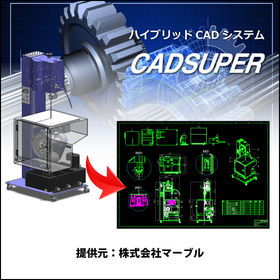
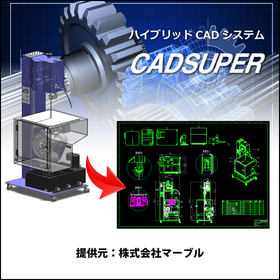
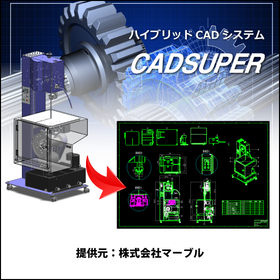
3D CAD/2D CAD CADSUPERWorks Pro

Feel free to request a quote! CADSUPERWorks is a 3D/2D CAD system that supports advanced three-dimensional design.

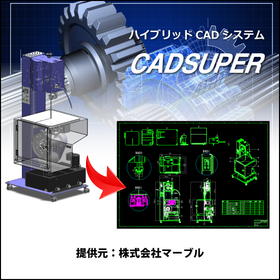
CADSUPERWorks is an integrated CAD system that has evolved alongside our customers for 22 years since its launch in 1985. It combines the domestically produced bestseller 2D CAD "CADSUPER" with the globally used 3D CAD "SolidWorks," providing an excellent 3D design environment. This system allows for the effective utilization of the unique features of both 2D and 3D design environments, coexisting as an "advanced 3D design environment" and a "flexible 2D design/drawing creation environment." CADSUPERWorks Pro includes the 2D CAD CADSUPER FX2 and features for 3D CAD SolidWorks such as part design/assembly design capabilities, rendering tools, animation tools, viewers, web publishing tools, a 3D standard parts library, model analysis tools, feature recognition tools, route shape design tools, and structural/mechanical analysis tools.

  • 3D CAD
  • 2D CAD machine
  • Other CAD
  • CAD

Added to bookmarks

Bookmarks list

Bookmark has been removed

Bookmarks list

You can't add any more bookmarks

By registering as a member, you can increase the number of bookmarks you can save and organize them with labels.

Free membership registration

3D/2D CAD CADSUPERWorks Premium

A model that adds analysis functions such as linear static analysis and mechanism analysis to the professional model features.

CADSUPERWorks is an integrated CAD system that has evolved alongside customers for 22 years since its launch in 1985. It combines the domestically produced bestselling 2D CAD "CADSUPER" with the globally used 3D CAD "SolidWorks," providing an excellent 3D design environment. This system allows for the effective utilization of the features of both 2D and 3D design environments, coexisting with "advanced 3D design capabilities" and "highly flexible 2D design/drawing creation capabilities." CADSUPERWorks Premium includes the 2D CAD CADSUPER FX2, as well as features for part design and assembly design in 3D CAD SolidWorks, drawing creation functions, rendering tools, animation tools, viewers, web publishing tools, a 3D standard parts library, model analysis tools, feature recognition tools, design rule check tools, route shape design tools, and structural and motion analysis tools.

  • 2D CAD machine
  • 3D CAD
  • Other CAD
  • CAD

Added to bookmarks

Bookmarks list

Bookmark has been removed

Bookmarks list

You can't add any more bookmarks

By registering as a member, you can increase the number of bookmarks you can save and organize them with labels.

Free membership registration

AutoCAD customization boasting one of the industry's top development achievements.

30 years of experience and know-how in AutoCAD customization! We will turn the requests of designers into reality and propose the optimal system implementation.

Our company has over 30 years of experience in AutoCAD customization. We have built various automated design and drafting systems based on AutoCAD, as well as converting from other CAD software to AutoCAD. We are capable of meeting the needs of clients in all industries, including construction, housing, and manufacturing, regardless of the scale, by not only developing commands for CAD alone but also integrating with web systems, databases, and other systems. We will assist you in creating a CAD system tailored to your needs. - Consulting on business analysis related to AutoCAD, including identifying issues - Development of convenient features such as various command functions - Development of advanced automated drafting/design systems - Effective utilization of design data and data integration - Management of design data, including development/support for drawing management and BOM management systems - Migration from other CAD systems to AutoCAD-based systems *For more details, please request a catalog or view the PDF data available for download.

Added to bookmarks

Bookmarks list

Bookmark has been removed

Bookmarks list

You can't add any more bookmarks

By registering as a member, you can increase the number of bookmarks you can save and organize them with labels.

Free membership registration

BIM-Compatible 3D CAD Seminar for the Construction, Equipment, and Plant Industry

With TopSolid'Design, your designs can be communicated effectively to construction engineers and customers. As a result, there are fewer returns, reduced man-hours, and shorter delivery times are possible.

"Don't you have such worries?" ■ Changes in the design plans not reflecting in the interior, forgetting to change equipment or recount parts, leading to a scare. ■ Subtle nuances like color tones and lighting adjustments, differences in image with the customer. ■ Minor differences appearing close to completion, causing delays in delivery. ⇒ With TopSolid’Design, you don't have to worry about that. Additionally: - After intuitively operating in 3D, you can directly output 2D design plans. - Changing a cross-section reflects in the 3D design as well. - Fully integrated built-in PDM, capable of handling large-scale designs with 300,000 parts. It may seem strange. In other words, it is a perfect CAD system. Some customers have even asked us not to sell to our rival companies. This could be the opportunity that changes your common sense. By participating in the seminar, you will get a glimpse of the smooth operability and the seamless progression of tasks from "planning and design to the creation of construction drawings." Feel free to join our free seminar.

Added to bookmarks

Bookmarks list

Bookmark has been removed

Bookmarks list

You can't add any more bookmarks

By registering as a member, you can increase the number of bookmarks you can save and organize them with labels.

Free membership registration

3D Design Support CAD System 'TopSolid'Design'

Transforming manufacturing with seamless data integration from design to production. No data conversion is needed, there are no reworks, and there is no waste.

"TopSolid'Design" is a three-dimensional design support system that integrates drafting, calculations, kinematic simulations, and realistic rendering. It enables ultra-fast processing for large-scale assembly design with tens of thousands of parts, rich surface modeling, powerful analysis, and a standard parts library with machining information, along with features for creating drawings compliant with JIS and ISO standards, achieving high-quality design. The integrated Product Data Management (PDM) system prevents assemblies from losing references even when users change part names. 【Features】 ■ Perfect CAD tool ■ Easy to use, easy to learn ■ Overwhelming processing speed ■ Built-in PDM ■ Support for various assembly designs ■ Simulation and analysis ■ High-quality and fast rendering ■ Accumulation and utilization of corporate know-how ■ Open platform ■ Seamless integration from design to manufacturing *For more details, please refer to the PDF materials or feel free to contact us.

Added to bookmarks

Bookmarks list

Bookmark has been removed

Bookmarks list

You can't add any more bookmarks

By registering as a member, you can increase the number of bookmarks you can save and organize them with labels.

Free membership registration

Until when will we differentiate between 2D CAD and 3D CAD?

Eliminate hassle with complete integration of 2D and 3D CAD 'TopSolid' *Free seminar available.

Do you have any frustrations with your 2D CAD or 3D CAD? ■ The endless cycle of 2D CAD and 3D CAD Fixing this, fixing that Design work isn’t progressing at all, is 3D CAD really that convenient? …With TopSolid, if you design in 3D, both the drawings and parts lists are "done!" So you don’t need to buy 2D CAD, learn it, or hire someone. It’s all good. ■ Data is too heavy and work isn’t progressing Opening assemblies may be quick, but processing takes time and it freezes. We don’t need unwanted break times anymore. …With TopSolid, it responds quickly not only for projecting large assemblies but also for modification tasks. ■ Usability of CAD What designers need is the realization of ideas. There’s no time to be tossed around by tools. …With intuitive operations, learning is a breeze. The operation is simple, but this is a seminar on 3D CAD that can also handle automotive, aerospace, marine, and medical applications. It might be the opportunity to change your common sense. We will introduce it in a free seminar. *Please check the basic information section below for registration to the free seminar.

Added to bookmarks

Bookmarks list

Bookmark has been removed

Bookmarks list

You can't add any more bookmarks

By registering as a member, you can increase the number of bookmarks you can save and organize them with labels.

Free membership registration

BIM compatible. Free 3D CAD seminar for the construction, equipment, and plant industries.

We introduced 3D CAD for efficiency, but the workload keeps increasing... Many companies share the same concern. Shall we uncover this contradiction?

Are you facing problems like these? - We introduced 2D CAD for drafting because we can't create drawings with 3D CAD. - Every time we modify the 3D model, we have to update the drawings, which is a hassle. We can't keep up with the revisions. - We're managing somehow with 'on-site adjustments' because we can't keep up with the drawing revisions. - There are many missed revisions and mistakes in the drawings, leading to numerous complaints from the site. TopSolid solves all these issues. You might find it strange, but for companies thinking this way, here's your chance for a solution. Experience a 3D CAD system that contributes to solving your company's challenges. In the seminar, you will get a glimpse of the smooth operability and the seamless workflow from 'planning and design to construction drawing creation.' Feel free to join our free seminar.

Added to bookmarks

Bookmarks list

Bookmark has been removed

Bookmarks list

You can't add any more bookmarks

By registering as a member, you can increase the number of bookmarks you can save and organize them with labels.

Free membership registration

[User Report] Architectural Design and Drafting CAD DRA-CAD 2

A CAD software with excellent response time, making a significant impact within the company!

Chiyoda Techno Ace Co., Ltd. specializes in the design and construction of buildings and building facilities, including clean rooms for pharmaceutical factories and general work equipment factories, and has gained significant support in this field due to its high level of specialized technical expertise. In project management, including the Equipment and Electrical Headquarters, DRA-CAD is used as the standard CAD software. "Originally, we were using CAD software from another company, but the time-consuming process of redrawing drawings was a problem, and we were struggling to find software with good operability. That’s when DRA-CAD provided a solution. In terms of operation, its fast response and customizable icon menus make it very user-friendly, which is a major attraction of DRA-CAD. For engineers involved in design, DRA-CAD allows for scaling the drawing frame in a way that feels close to hand-drawn drafting, making it easily accepted by engineers and a significant reason for its company-wide adoption." "DRA-CAD is reportedly working on enhancing its features for the future, so we expect it to become even more convenient and efficient software." For more details, please contact us or refer to the catalog.

Added to bookmarks

Bookmarks list

Bookmark has been removed

Bookmarks list

You can't add any more bookmarks

By registering as a member, you can increase the number of bookmarks you can save and organize them with labels.

Free membership registration

[User Report] Architectural Design and Drafting CAD DRA-CAD 3

The decision to introduce it 15 years ago was correct! DRA-CAD is a partner in design work.

Kataoka Design Co., Ltd. is an architectural design office established in 1982. Their design projects primarily focus on single-family homes, but they also handle multi-family residences, stores, factories, offices, and hot spring inns, covering a wide area throughout the Kanto region. "When I became independent, I strongly felt that the future of design was in the CAD era, so I introduced computers and CAD software. After consulting with industry professionals and visiting various places, I decided to adopt DRA-CAD, which was already being used by major design firms and general contractors, had a large user base, and was highly regarded for its ease of use. Since it was my first experience with computers, I took foundational courses to learn, but DRA-CAD's operation felt very close to hand-drawing, which was a great help. Purchasing a computer and starting CAD at the age of 45, and still actively drawing plans even after turning 60, makes me feel that my way of thinking and the choice of DRA-CAD were indeed the right decisions." For more details, please contact us or refer to our catalog.

Added to bookmarks

Bookmarks list

Bookmark has been removed

Bookmarks list

You can't add any more bookmarks

By registering as a member, you can increase the number of bookmarks you can save and organize them with labels.

Free membership registration

[User Report] Architectural Design and Drafting CAD DRA-CAD 4

From planning and design to detailed design, all drawings are created with DRA-CAD!

The staff of the Architectural Design Department at Daiho Construction Co., Ltd. handles a wide range of architectural design, primarily focusing on condominiums, as well as offices and factories. The design drawings created by the 20 engineers are all designed using DRA-CAD. "We introduced it around 1991-1992, when CAD was not yet widespread. At that time, I believe there were very few CAD software options available, but we decided to adopt DRA-CAD from Structural Systems, a leading manufacturer of architectural design drafting software, because we had confidence in it, and we have continued to use it to this day. There have been suggestions to switch to other companies' software several times, but each time, we concluded that we should maintain productivity with the user-friendly DRA-CAD, and we still use it now. Particularly, since DRA-CAD is a domestically produced CAD, I think it matches the drawing sensibilities of Japanese designers." "The drawings produced in-house range from general drawings to detailed drawings, all created using DRA-CAD. While it is mainly used for drafting tasks, I believe it is a CAD with very high expressive power. It is also very useful for creating planning drawings and is greatly utilized in planning and presentations." For more details, please contact us or refer to the catalog.

Added to bookmarks

Bookmarks list

Bookmark has been removed

Bookmarks list

You can't add any more bookmarks

By registering as a member, you can increase the number of bookmarks you can save and organize them with labels.

Free membership registration

[User Report] Architectural Design and Drafting CAD DRA-CAD 5

Full utilization of 3D for examining complex structural arrangements!

Kamikawa Structural Design Office Co., Ltd. is a structural design firm with one of the leading track records in the field of water supply and sewage system structural design in Japan. Since its establishment, it has efficiently carried out numerous structural designs utilizing BUS and DRA-CAD. "When the office was first established, we conducted structural calculations using BUS-1 and created drawings by hand. At that time, during a design project for a sewage treatment plant in Koto Ward, Tokyo, the design firm we were working with submitted drawings using DRA-CAD. Upon seeing those drawings, the convenience of making corrections stood out, leading us to the conclusion that we had to adopt DRA-CAD." "I appreciate that DRA-CAD is simple to operate, easy to remember, and easy to teach. Even when new staff join, with some guidance, they can start working with DRA-CAD. After that, they can use it independently while referring to the manual, which is very good. Above all, it is the easiest to handle compared to other products." For more details, please contact us or refer to our catalog.

Added to bookmarks

Bookmarks list

Bookmark has been removed

Bookmarks list

You can't add any more bookmarks

By registering as a member, you can increase the number of bookmarks you can save and organize them with labels.

Free membership registration