We have compiled a list of manufacturers, distributors, product information, reference prices, and rankings for soft.
ipros is IPROS GMS IPROS One of the largest technical database sites in Japan that collects information on.

soft(iPad) - List of Manufacturers, Suppliers, Companies and Products | IPROS GMS

Last Updated: Aggregation Period:Jul 29, 2026~Aug 25, 2026
This ranking is based on the number of page views on our site.

soft Product List

31~60 item / All 92 items

Displayed results

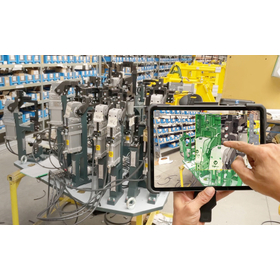
XRLite

Easily understandable in 3D! Bringing 3D closer to you! Using iPad to digitize the site.

We offer 'XRLite Editor', which allows for easy loading of 3D CAD data and data obtained from 3D scanners, enabling rapid construction of a Digital Twin environment. It is possible to effectively utilize 3D data to easily create work procedures for equipment maintenance, educational content, and maintenance records. Additionally, the animated display of 3D data makes instructions clearer and reduces the likelihood of operational errors. Furthermore, we support work efficiency through integration with electronic forms such as web pages, PDFs, and i-Reporter. Please feel free to contact us if you have any requests. 【Features】 ■ Annotation ■ Color change ■ Viewpoint movement and object movement ■ Integration with external applications and launching from QR codes Integration with IoT devices is also possible. It can be used similarly to SCADA, so please inquire (customization required).

  • 3D CAD
  • soft

Added to bookmarks

Bookmarks list

Bookmark has been removed

Bookmarks list

You can't add any more bookmarks

By registering as a member, you can increase the number of bookmarks you can save and organize them with labels.

Free membership registration

SII Layout Editor

Easily layout business labels with smart devices.

By installing an app on smart devices such as smartphones and tablets, you can easily create and print business labels. The application allows you to add text, images, barcodes, and QR codes according to your needs, and print the label image displayed on the device's screen directly.

Added to bookmarks

Bookmarks list

Bookmark has been removed

Bookmarks list

You can't add any more bookmarks

By registering as a member, you can increase the number of bookmarks you can save and organize them with labels.

Free membership registration

PDCA DanDolly

It's an era where manuals and reports are created on-site rather than in the office. Photos and videos can be registered immediately with a smartphone. Leave it to DanDolly!

DanDolly is, simply put, a tool that allows you to easily create manuals using information tools connected to the internet, such as smartphones, tablets, and computers. Manuals are essential when conducting work in companies, stores, offices, and various facilities. Companies with well-structured manuals can quickly onboard new employees and get them up to speed with their tasks. However, while manuals are important, there often isn't enough time to create them! That's right. I was one of those people too. I could explain the steps verbally, but creating a manual by taking photos and using software like Word or Excel was an incredibly challenging task. But in today's world, over 70% of Japanese people own smartphones, and many also have tablets. It's easy to create a Wi-Fi environment nowadays. So, if we use these smartphones and tablets to take photos and videos, and add simple supplementary explanations for the photos along with titles and descriptions, we can create manuals, right? That's the idea behind the product DanDolly.

  • Workflow System
  • soft

Added to bookmarks

Bookmarks list

Bookmark has been removed

Bookmarks list

You can't add any more bookmarks

By registering as a member, you can increase the number of bookmarks you can save and organize them with labels.

Free membership registration

ACLS Training App for Healthcare Professionals

Introducing a secondary life-saving procedure training app developed for healthcare professionals.

This app was developed for residents, nurses, paramedics, and other healthcare professionals. It covers algorithms for ventricular fibrillation, pulseless ventricular tachycardia, pulseless electrical activity, asystole, and bradycardia. By engaging in repeated training, you can thoroughly learn the accurate algorithms of ACLS. It also includes detailed explanations in Japanese, making it a highly efficient learning resource. 【Features】 ■ Compatible with iPhone and iPad ■ Level up through repeated learning ■ Thoroughly learn the accurate algorithms of ACLS ■ Includes detailed explanations in Japanese ■ A highly efficient learning resource *For more details, please refer to the PDF document or feel free to contact us.

  • Embedded system design service
  • soft

Added to bookmarks

Bookmarks list

Bookmark has been removed

Bookmarks list

You can't add any more bookmarks

By registering as a member, you can increase the number of bookmarks you can save and organize them with labels.

Free membership registration

MoreSon Japan Inc. Business Introduction

Our company is your strategic IT partner.

Moason Japan Co., Ltd. is engaged in software development, as well as the sale, education, and support of computer equipment and software. We respond to the diverse needs arising from changes in the times and the market with advanced software development technology and total solutions, so please feel free to contact us with your requests. 【Business Activities】 ■ Software Development - Business application software - Audio/image processing software - Embedded software for communication devices ■ Sale, education, and support of computer equipment and software *For more details, please download the PDF or contact us.

Added to bookmarks

Bookmarks list

Bookmark has been removed

Bookmarks list

You can't add any more bookmarks

By registering as a member, you can increase the number of bookmarks you can save and organize them with labels.

Free membership registration

Business support app "GEMBA Note for Business"

Reduce business hours and accelerate the efficiency of on-site operations! Share information in real-time anytime, anywhere.

"GEMBA Note for Business" is a management support app that allows you to immediately experience cost-effectiveness as a solution for transforming work styles. It significantly enhances the work-life balance of field workers, contributes to efforts in "work style reform," and improves productivity and efficiency. With a smartphone or iPad, you can utilize your free time anywhere to input data and check necessary electronic documents. 【Features】 ■ Ability to digitize currently used record forms ■ Ability to write handwritten notes and comments on the data entered in forms ■ Easily create and flexibly respond to different forms for each site ■ Share the same forms with multiple members for meetings ■ Prevent work omissions with TODO settings *For more details, please download the PDF or feel free to contact us.

Added to bookmarks

Bookmarks list

Bookmark has been removed

Bookmarks list

You can't add any more bookmarks

By registering as a member, you can increase the number of bookmarks you can save and organize them with labels.

Free membership registration

Paperless management of security operations 'Check+'

A cloud service that digitizes tasks from creating work procedures to progress management and reporting! It solves business challenges related to regular maintenance in plants and factories.

"Check+" is a cloud service that digitizes tasks from creating work procedures to progress management and reporting. It allows for the creation of work plans that integrate work procedures and checklists, recording inspections using mobile devices such as iPhones/iPads, and automatic output of work performance confirmations, electronic approvals, and reports. By transitioning the traditionally paper-based maintenance of plants and factories to a paperless system, it addresses various challenges such as preventing omissions in work and records, enhancing the immediate effectiveness of workers, and improving the speed of information sharing. 【Features】 ■ Create checklists integrated with work procedure manuals ■ Standardization of work and improvement of inspection quality ■ Visualization of work progress and management of actual vs. planned performance is also possible *For more details, please refer to the PDF materials or feel free to contact us.

  • Document and Data Management
  • soft

Added to bookmarks

Bookmarks list

Bookmark has been removed

Bookmarks list

You can't add any more bookmarks

By registering as a member, you can increase the number of bookmarks you can save and organize them with labels.

Free membership registration

Chikabane Net Factory Site Morning Meeting Signage

Two convenient modes that can be selected with a switch! Now you can use it in a way that was previously difficult.

The "Factory Site Morning Meeting Signage" utilizes the iPad's mirroring mode, allowing for convenient uses that were previously difficult, such as displaying the overall site layout, the day's construction locations, evacuation routes, and safety confirmations during morning meetings. Outside of morning meetings, it can loop videos of construction summaries, construction processes, and company promotional videos in signage mode for visitors to view. When explaining to visitors, it can play each piece of content individually in manual mode. 【Features】 ■ Standard app for event schedule updates ■ Internet connectivity powered solely by electricity ■ Automatic power on/off at specified times ■ Front reinforced glass, waterproof/dustproof, suitable for outdoor environments ■ Capable of playing radio calisthenics at set times each day (manual start also possible) *For more details, please refer to the PDF document or feel free to contact us.

  • LCD display
  • Other FPD related
  • soft

Added to bookmarks

Bookmarks list

Bookmark has been removed

Bookmarks list

You can't add any more bookmarks

By registering as a member, you can increase the number of bookmarks you can save and organize them with labels.

Free membership registration

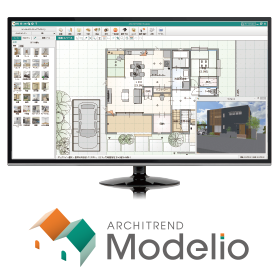
Residential presentation software "ARCHITREND Modelio"

Speed up the process until your contract! The ultimate presentation tool for proposals in the new era of housing.

ARCHITREND Modelio is a presentation software specifically designed for residential sales that allows for the speedy creation of initial proposal materials. It generates a three-dimensional model simultaneously with the floor plan input. You can quickly go through planning, creation, proposal, and specification review. At a reasonable price of 12,000 yen (excluding tax) per license, it enables efficient operation tailored to your company's style. ---------------------------------------------------------------- ◎ Catalog data can be downloaded from the product site below. ▼ For applications and details, click here.

  • 3D CAD
  • Other CAD related software
  • soft

Added to bookmarks

Bookmarks list

Bookmark has been removed

Bookmarks list

You can't add any more bookmarks

By registering as a member, you can increase the number of bookmarks you can save and organize them with labels.

Free membership registration

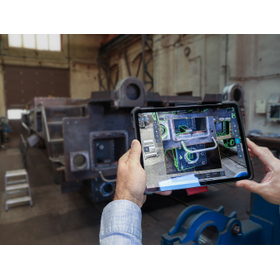
VISOMETRY Corporation AR Visual Inspection Support Software Twyn

Software that assists in the appearance inspection of large and complex shapes, also automatically generates inspection reports.

Software that displays 3D CAD data of products on an iPad and overlays it with the actual object captured by a camera, allowing for comparison and discovery of discrepancies between the data and the physical item. Discovered discrepancies can be recorded in terms of location and condition through freehand drawing, and a photo report can be automatically generated. Key inspection points and areas that require special attention can be set in advance, and by displaying caution instructions on the screen, work time can be reduced. Until now, even visual inspections that required skilled labor can be performed with high accuracy with only minimal training. Typical applications: ✓ Large sheet metal parts ✓ Canned structures ✓ Large jigs - Used for inspections during processes, before shipment, and upon receipt. It helps to identify mistakes arising from forgotten part installations, processing omissions, positional differences, and mix-ups of drawing versions, thereby improving the accuracy of visual inspections and promoting labor-saving measures.

  • 2021-02_SVK_Costumer_Slavia Productions_Jig and Fixture.jpg
  • 2023-10_CSZ_Customer_Loko_IMG-4973.jpg
  • 2024-01_SVK_Customer_SlaviaProductions_DSCF0082.jpg
  • Image Processing Software
  • soft

Added to bookmarks

Bookmarks list

Bookmark has been removed

Bookmarks list

You can't add any more bookmarks

By registering as a member, you can increase the number of bookmarks you can save and organize them with labels.

Free membership registration

Efficiency improvement through the paperless transformation of inspection reports.

Digitalization of equipment inspection operations to eliminate paper! Reduce entry time by 50%!

One of our customer's core businesses, electrical safety management, faced the challenge of "handwritten inspection reports." Additionally, there were the following requests to promote the implementation: <Requests> - To lower the hurdles for IT implementation, improve usability without changing the appearance of the current report. To address this challenge with IT, we focused on the ease of use for inspectors, prioritizing readability in terms of font size, color, and layout. Furthermore, we improved the input process by implementing a selection method for items. As a result, the ease of use reduced the effort required for report creation, and the digitization of inspection reports enabled real-time and smooth communication from inspection sites (business locations) to headquarters, also improving travel time. 【Case Overview】 ■Challenges - We want to reduce the burden on both managers and inspectors. - The project management side wants to quickly check the status of safety inspections. ■After Implementation - Stakeholders can now confirm report contents in real-time. - The time required to fill out inspection reports has been reduced by 50%. *For more details, please contact the following email address. Contact: si_sales@aisel.ne.jp

  • others
  • soft

Added to bookmarks

Bookmarks list

Bookmark has been removed

Bookmarks list

You can't add any more bookmarks

By registering as a member, you can increase the number of bookmarks you can save and organize them with labels.

Free membership registration

Graduating from paper records! Easy data digitization and utilization with 'DIG Tablet'

Software package that "excavates" and effectively utilizes information that is "buried" on-site.

The "DIG Tablet" is a package software that strongly supports the digitization of records in the pharmaceutical industry and backs up "quality assurance" in GMP from the perspective of record-keeping. Reflecting customer feedback, it has become compatible with multiple operating systems! This means that there are no hardware restrictions, allowing for data collection using Android smartphones and iPads! All records of "inspections," "calibrations," and "maintenance" are centrally managed. Inspection items can be created and edited in Excel, and frequency settings are possible, so the system will notify you when it's time to conduct inspections, preventing any oversight. Additionally, there are numerous successful implementations in pharmaceutical companies, and we can consistently handle everything from supporting the creation of the URS (User Requirement Specification) before system implementation to providing IQ and OQ support during the introduction. [Features] ■ Comprehensive deliverables and implementation support due to experience with pharmaceutical companies ■ Useful not only during inspection and maintenance tasks but also when performing calibration tasks ■ As soon as data is entered on the tablet, it is stored as "raw data" for performance records *For more details, please download the PDF or feel free to contact us.

  • Pharmaceutical and cosmetic factory software and systems
  • Other Software
  • soft

Added to bookmarks

Bookmarks list

Bookmark has been removed

Bookmarks list

You can't add any more bookmarks

By registering as a member, you can increase the number of bookmarks you can save and organize them with labels.

Free membership registration

[Video Education Introduction Case Study] Hibino Industrial Co., Ltd.

Standardizing the education of multinational staff through videos! Achieved a reduction in defect rate of approximately 35% and reduced training man-hours to one-fifth.

We would like to introduce a case study of the implementation of "VideoStep" at Hibino Industrial Co., Ltd. With a large number of foreign staff and a variety of languages used on-site, it was challenging to convey tips and key points through standard documents in paper or Excel format. Additionally, the storage locations of these standard documents were scattered, making it difficult to identify the latest versions. After implementation, the defect rate was reduced by 35%, and training time per person was cut down to about one-fifth. Customer evaluations improved from C rank to A rank, and high ratings were also achieved in the IATF16949 audit. [Case Overview] ■ Challenges - The use of various languages on-site made it difficult to rely solely on Japanese education. - Standard documents were scattered across various Excel files, making it hard to identify the latest versions. - A previously implemented one-time purchase video tool was difficult to operate and did not become established. ■ Effects - Defect rate reduced by 35% - Training time per person reduced from 20-30 hours to about one-fifth - Customer evaluation improved from C to A, maintaining an A rating thereafter - Received high praise in the IATF16949 audit for "providing education in multiple languages with clear standards" *For more details, please download the PDF or feel free to contact us.

  • Catalog and manual creation
  • soft

Added to bookmarks

Bookmarks list

Bookmark has been removed

Bookmarks list

You can't add any more bookmarks

By registering as a member, you can increase the number of bookmarks you can save and organize them with labels.

Free membership registration

3D modeling software 'SketchUp Subscription'

SketchUp Pro, the world's most popular 3D modeling software developed as "Everyone's 3D."

The "SketchUp Pro Subscription" is a versatile 3D modeling software used worldwide with 33.5 million activations annually and over 1 billion projects. It is utilized across a wide range of fields including urban planning, architecture, commercial facilities, interior design, construction, civil engineering, marine engineering, landscaping, plants, food and beverage, education, manufacturing, film, and local governments. 【Features】 ■ You can create various shapes using the iconic "Push/Pull" tool. ■ 3D models can be easily created with intuitive operations using minimal commands. ■ Access to the world's largest 3D material download site, "3DWarehouse," is available for free. https://3dwarehouse.sketchup.com/?hl=en ■ It has been adopted by many companies through integration with BIM/CIM tools. ■ Users can add functionalities according to their preferences with over 800 plugin software options. https://extensions.sketchup.com/ *For more details, please refer to the PDF materials or feel free to contact us.

  • 3D CAD
  • Modeler
  • soft

Added to bookmarks

Bookmarks list

Bookmark has been removed

Bookmarks list

You can't add any more bookmarks

By registering as a member, you can increase the number of bookmarks you can save and organize them with labels.

Free membership registration

mcframe RAKU-PAD

We will promote the utilization of manufacturing site information through [on-site improvement x technology inheritance] on the iPad!

The "mcframe RAKU-PAD" is a solution that utilizes a smart device with excellent mobility, operability, and expressiveness to support tasks such as "recording information" and "referencing reference information," which are often done on "paper" at many sites. It enables "easy data entry," "simple data analysis," and "quick information utilization," thereby improving operational efficiency, enhancing quality, and assisting with troubleshooting at the site. RAKU-PAD solves the following issues with on-site data: - Not organized - Not digitized - Not shared - Not utilized ➡ Recording … Easy data entry ➡ Analyzing … Simple data analysis ➡ Knowledge Utilizing … Quick information utilization You can input data on a tablet with a screen that resembles the original "paper" forms, and immediately graph and analyze the recorded data. Additionally, documents such as "drawings," "circuit diagrams," "work standards," and even "videos of work procedures" can be registered on a server and viewed on-site using the tablet.

  • Document and Data Management
  • Process Control System
  • Corporate information portal/groupware
  • soft

Added to bookmarks

Bookmarks list

Bookmark has been removed

Bookmarks list

You can't add any more bookmarks

By registering as a member, you can increase the number of bookmarks you can save and organize them with labels.

Free membership registration

[Video Instruction Manual Creation AI Tool] DIVE

Are you spending time and costs on technology transfer and standardization of work on-site?

✔ It takes time to train new employees ✔ Paper manuals are hard to understand ✔ Remote support and audit responses are inefficient Are you experiencing these challenges in your workplace as well? With DIVE, you can start technical succession and standardization of work "from today" using the free version. Moreover, by utilizing the employee training management features, you can smoothly implement audit measures for ISO9001 and ISO14001. The strength of DIVE lies in the fact that it is not just a "video manual creation tool." You can convert videos shot on-site directly into procedural documents, visualizing understanding at each step. Training records are automatically accumulated, allowing skills that tend to become personal to be preserved as "organizational assets." Additionally, since it can be accessed immediately from smartphones and tablets, workers can easily access the correct procedures without confusion, directly reducing variations in quality and human errors. It enhances on-site capabilities and allows for a comprehensive update of education, quality, and audits. That is the greatest value of DIVE.

  • Other services
  • ISO-related consultant
  • Technical Seminar
  • soft

Added to bookmarks

Bookmarks list

Bookmark has been removed

Bookmarks list

You can't add any more bookmarks

By registering as a member, you can increase the number of bookmarks you can save and organize them with labels.

Free membership registration

Deployment of Windows 10 IoT and the Hierarchical Structure of IoT for Multi-Point Monitoring

Apply Windows 10 IoT or Linux "IoT View" locally to enable the construction of low-cost multi-site monitoring!

1. It is possible to apply Windows 10 IoT or Linux "IoT View" locally and build it at a low cost. 2. Hierarchical HMI/SCADA/IoT enables a ubiquitous world where information can be accessed anytime and anywhere. 3. By sharing data with tags and databases, it makes development easier for users. Direct read and write to local tags from the cloud is also possible. 4. By sharing and reusing applications between local and cloud, duplication in development is reduced, increasing development productivity. 5. Integration of development tools makes maintenance and modification easier. 6. In addition to fixed terminals on-site, mobile terminals compatible with HTML5 (smartphones and tablets) are available, making operations easier for on-site personnel. 7. It is possible to integrate with various databases such as ORACLE, SQL Server, MySQL, PostgreSQL, and MDB. 8. The functionality for creating components is robust, allowing for the creation, reuse, and propagation of changes to components, which reduces construction costs during horizontal deployment. 9. The maximum number of thin clients (simultaneous connections) is 1000. The operating systems available are Windows, Android, and iOS. It is also possible to limit the number of simultaneous accesses per site.

  • Water treatment equipment
  • air conditioning
  • Food Processing Equipment
  • soft

Added to bookmarks

Bookmarks list

Bookmark has been removed

Bookmarks list

You can't add any more bookmarks

By registering as a member, you can increase the number of bookmarks you can save and organize them with labels.

Free membership registration

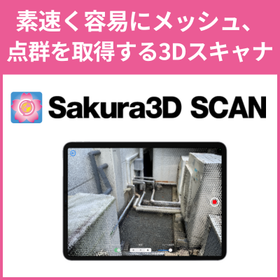
Sakura3D SCAN

Quickly and easily obtain 3D data of the target object (mesh, point cloud)!

Quickly and easily, with just an iPad Pro equipped with a LiDAR camera, you can obtain, preview, and output/share 3D scans of objects. Sakura3D SCAN allows you to quickly and easily capture point clouds (full color) and polygon meshes of objects. You can preview, share, and output the captured point clouds and meshes.

  • 3D measuring device
  • Other CAD related software
  • soft

Added to bookmarks

Bookmarks list

Bookmark has been removed

Bookmarks list

You can't add any more bookmarks

By registering as a member, you can increase the number of bookmarks you can save and organize them with labels.

Free membership registration

What is "BricsCAD Communicator"?

Introduction of optional software that adds file formats for importing/exporting when combined with BricsCAD.

"BricsCAD Communicator" is an optional software that adds file formats for importing/exporting when combined with BricsCAD itself. It allows for the import/export of native files and intermediate formats from other CAD systems. With a high-quality translator, it aids in the reuse of 3D CAD data, enhancing project productivity and reducing costs. 【Features】 ■ Adds file formats for importing/exporting when combined with BricsCAD ■ Aids in the reuse of 3D CAD data with a high-quality translator, enhancing project productivity and reducing costs ■ Operating environment: BricsCAD Pro or higher *For more details, please refer to the related links or feel free to contact us.

Added to bookmarks

Bookmarks list

Bookmark has been removed

Bookmarks list

You can't add any more bookmarks

By registering as a member, you can increase the number of bookmarks you can save and organize them with labels.

Free membership registration

Free trial now available! Solar power generation simulation 'i-Pals'

Simulate solar power generation, self-consumption, and battery storage with i-Pals! From estimates to proposals, achieve maximum performance with a smart tool!

We will be exhibiting at the exhibition at Makuhari Messe from October 2 (Wednesday) to October 4 (Friday). "i-Pals" is a Windows-compatible software that streamlines the simulation and proposal work for solar power generation systems. Whether for industrial or residential use, it allows for the creation of shadow diagrams and simulations of self-consumption and battery storage with just the push of a button. With easy operation, it efficiently enables the proposal of better plans. 【Do you have any of these concerns?】 ■ "The design work for solar power generation is time-consuming." ■ "I want to conduct simulations for battery storage." ■ "I want to accurately simulate power generation and self-consumption rates." With "i-Pals," we utilize a wealth of drawing tools to flexibly accommodate both ground-mounted and roof installations. With a variety of drawing tools and power generation simulation functions, we can quickly create the best plan by comparing and combining multiple patterns. We achieve efficient business execution and proposal work. If you are having trouble with estimates, design, or proposals for solar power generation or battery storage, please download our materials and take a look! ~ 【Free】 Trial Information ~ We have prepared sample simulations. Please experience it through the link below!

  • Other core systems
  • soft

Added to bookmarks

Bookmarks list

Bookmark has been removed

Bookmarks list

You can't add any more bookmarks

By registering as a member, you can increase the number of bookmarks you can save and organize them with labels.

Free membership registration

Data conversion software IRONCAD Translator

Editable CATIA data

"IronCAD Translator" and "A&V Translator" are data conversion software for IRONCAD. The former enables the import/export of CATIA native data and the import of other major 3D CAD formats within IRONCAD. The latter allows for the import/export of architectural data such as IFC and Revit, the import of SolidWorks Drawings, and the export of DLTF.

  • Data conversion software
  • soft

Added to bookmarks

Bookmarks list

Bookmark has been removed

Bookmarks list

You can't add any more bookmarks

By registering as a member, you can increase the number of bookmarks you can save and organize them with labels.

Free membership registration

CAD-KAS

There are various categories of software, such as PDF Editor and Barcode Creator!

"CAD-KAS" offers over 200 software products. There are various categories of software including PDF tools, CAD tools, printing & design, business & office, photo & image, video & DVD, XPS tools, hobbies & leisure, tools & utilities, internet & websites, sound & music, games, and developer tools. Please feel free to contact us if you have any inquiries. 【Partial Lineup】 ■PDF Editor ■PDF to DXF ■Font to DXF and G-Code ■Catalog Designer ■Scanned Text Editor *For more details, please refer to the related links or feel free to contact us.

  • Company:B7
  • Price:Other
  • Software (middle, driver, security, etc.)
  • soft

Added to bookmarks

Bookmarks list

Bookmark has been removed

Bookmarks list

You can't add any more bookmarks

By registering as a member, you can increase the number of bookmarks you can save and organize them with labels.

Free membership registration

Vector/Image Conv PloCompAuto

Overlap files, or find change areas and convert continuously.

PloCompAuto stacks multiple drawing files, such as those for printed boards, into one drawing and automatically converts it into files such as PDF and TIFF at high speed. It also compares the drawings of two drawing files and automatically and continuously determines the areas to be changed. PloCompAuto will be a very effective tool for electronic library, PDM system construction, or design change management.

  • Data conversion software
  • soft

Added to bookmarks

Bookmarks list

Bookmark has been removed

Bookmarks list

You can't add any more bookmarks

By registering as a member, you can increase the number of bookmarks you can save and organize them with labels.

Free membership registration

3D printer software 'VoxelDance Additive'

"VoxelDance Additive" is software that can maximize the productivity of industrial 3D printers. *Demo available.

[Features] ■ One-click automatic repair function During data conversion, if surfaces are inverted or triangular patch errors occur, the system can automatically identify and repair errors even in situations where repair is needed. VoxelDance can instantly repair even the smallest or most complex errors that are difficult to identify, resolving issues with just one click. ■ Rich editing capabilities When various edits are needed during modeling, such as splitting models, shelling, or creating labels, there is no need to return to the CAD system for re-editing if you have VoxelDance. You can utilize many editing functions for 3D modeling, such as support creation and lattice/honeycomb structuring. ■ Diverse formats without conversion work In addition to standard formats compatible with 3D printers like STL, OBJ, and 3MF, it can also read slice data formats such as CLI and SLC. Furthermore, it supports a variety of formats including native CAD data like CATpart, Prt, and sldprt. *For more details, please request a catalog or view the PDF data via the download button below.

  • 3D Printer
  • Data conversion software
  • Other CAD related software
  • soft

Added to bookmarks

Bookmarks list

Bookmark has been removed

Bookmarks list

You can't add any more bookmarks

By registering as a member, you can increase the number of bookmarks you can save and organize them with labels.

Free membership registration

Password recovery software "Passcovery"

Design equipped with high speed and flexibility! Significantly reduces the time required for brute force attacks.

"Passcovery" is software that recovers passwords for various popular file formats, including Microsoft Office, OpenOffice/LibreOffice, and Adobe PDF documents. Using optimized source code, it guarantees the highest level of speed for brute-force attacks on any modern Intel or AMD processor. It also offers effective range customization options to further reduce search time. Please feel free to contact us for inquiries. 【Product Lineup】 ■Passcovery Suite ■Accent OFFICE Password Recovery ■Accent PDF Password Recovery ■Accent RAR Password Recovery ■Accent ZIP Password Recovery *For more details, please refer to the PDF materials or feel free to contact us.

  • Company:B7
  • Price:Other
  • Software (middle, driver, security, etc.)
  • soft

Added to bookmarks

Bookmarks list

Bookmark has been removed

Bookmarks list

You can't add any more bookmarks

By registering as a member, you can increase the number of bookmarks you can save and organize them with labels.

Free membership registration

Easy operation that even children can do to quickly identify delayed SQL 'DPA'

- Centralized management of various database products is possible. - Even without database experience, it is easy to identify the presence of database performance bottlenecks and to pinpoint slow SQL queries.

The "Database Performance Analyzer (DPA)" is a monitoring product that performs operational monitoring of databases. DPA has two features that are not found in other monitoring products. Strength 1: It can monitor various database products and managed instances in the cloud with a single product module. Monitored database products: - Oracle Database - SQL Server - SAP ASE (Sybase) - DB2 - MySQL - MariaDB - Percona - PostgreSQL - EDB Postgres Strength 2: DPA detects and notifies about slow SQL queries. DPA learns the executed SQL using a machine learning feature called Anomaly Detection. Based on the learning results, DPA automatically detects performance degradation and notifies the user.

  • Other operation management software
  • soft

Added to bookmarks

Bookmarks list

Bookmark has been removed

Bookmarks list

You can't add any more bookmarks

By registering as a member, you can increase the number of bookmarks you can save and organize them with labels.

Free membership registration

HPGL/Vector/Image Viewer PloComp

PloComp is HPGL/Vector/Image viewer, converter and comparator.

PloComp is viewer for viewing drawing which works on Windows PC. PloComp reads plural HPGL/Vector/Image files and PloComp piles up or arranges drawing, and displays it. And, old and new drawing comparison can be performed by recognition of different colors and change area by cloud mark. PloComp has highly efficient drawing edit function like 2D-CAD, it diverts design drawing and can create drawing of another use easily. Drawing comparison video ... https://youtu.be/AunDSJ6xVvI

  • Other CAD related software
  • soft

Added to bookmarks

Bookmarks list

Bookmark has been removed

Bookmarks list

You can't add any more bookmarks

By registering as a member, you can increase the number of bookmarks you can save and organize them with labels.

Free membership registration

Griffas

Authentication Gateway 【Griffas】

"Griffas" is an authentication gateway product that manages network access permissions through user authentication using ID/password and device authentication via the web. It manages devices based on IP addresses. User accounts can be registered in Griffas, but it is also possible to integrate with external servers (RADIUS server, LDAP server).

  • Encryption and authentication
  • soft

Added to bookmarks

Bookmarks list

Bookmark has been removed

Bookmarks list

You can't add any more bookmarks

By registering as a member, you can increase the number of bookmarks you can save and organize them with labels.

Free membership registration

quadient Inspire Designer

The concept of functional modules makes it easier to understand data processing.

"Quadient Inspire Designer" is a layout application for variable printing used in countries around the world. It serves as an editing system application that enables personalized communication known as transpromo, in addition to general variable printing. Please feel free to contact us if you have any requests. 【Features】 ■ Supports Unicode variation selectors; IPAmj fonts are available. *Inspire R15 latest SP version is recommended. ■ Windows-based application ■ Editing software for variable printing ■ Provides an easy-to-understand graphical user interface *For more details, please download the PDF or feel free to contact us.

  • Other production and development software and systems
  • soft

Added to bookmarks

Bookmarks list

Bookmark has been removed

Bookmarks list

You can't add any more bookmarks

By registering as a member, you can increase the number of bookmarks you can save and organize them with labels.

Free membership registration