We have compiled a list of manufacturers, distributors, product information, reference prices, and rankings for Document Management System.
ipros is IPROS GMS ・ IPROS One of the largest technical database sites in Japan that collects information on.

Document Management System Product List and Ranking from 31 Manufacturers, Suppliers and Companies | IPROS GMS

Last Updated: Aggregation Period:Sep 09, 2026~Oct 06, 2026
This ranking is based on the number of page views on our site.

Document Management System Manufacturer, Suppliers and Company Rankings

Last Updated: Aggregation Period:Sep 09, 2026~Oct 06, 2026
This ranking is based on the number of page views on our site.

  1. 枚岡合金工具 IT事業部 Osaka//software
  2. ハイパーギア Saitama//IT/Telecommunications
  3. null/null
  4. 4 アイサイト 東京支店 Tokyo//software
  5. 5 三共精機 本社 Kyoto//Trading company/Wholesale

Document Management System Product ranking

Last Updated: Aggregation Period:Sep 09, 2026~Oct 06, 2026
This ranking is based on the number of page views on our site.

  1. Quality traceability management that does not scatter inspection reports and measurement records of precision machining. 枚岡合金工具 IT事業部
  2. Experimental Design Software "Design-Expert" ヒューリンクス
  3. Clinical Trial Document Management System: A Case Study of Nippon Medical School Educational Corporation Research Coordination Center
  4. 4 How to Create a Precision Machining Workplace That "Does Not Search" for NC Programs and Processing Conditions 枚岡合金工具 IT事業部
  5. 4 A method to document and share insights gained from remote monitoring. 枚岡合金工具 IT事業部

Document Management System Product List

121~150 item / All 184 items

Displayed results

Digital Dolphins Document and Drawing Management System for Plant Equipment Maintenance

A drawing and document management system that supports the field of plant equipment maintenance.

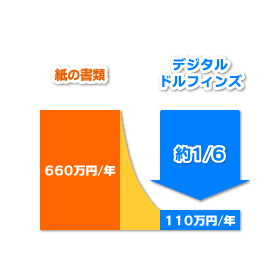
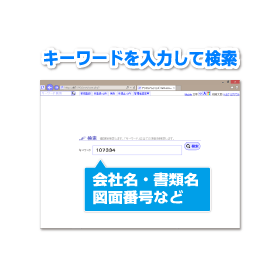
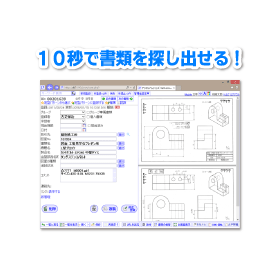
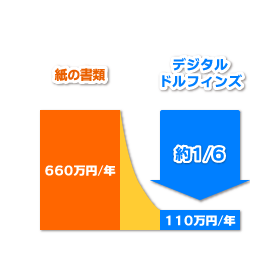
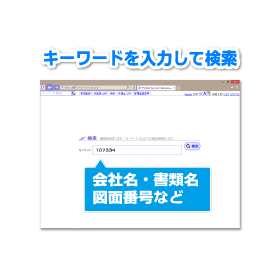
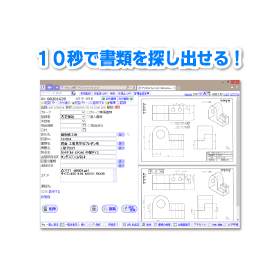
In the plant industry, rapid and accurate access to information is essential for equipment maintenance. Particularly, reliable access to the latest drawings and maintenance records is crucial for emergency response on-site and for planning regular maintenance. Old information or lost documents increase the risk of delays in work and incorrect judgments. Our system, "Digital Dolphins," provides an environment where necessary information can be accessed anytime and anywhere, supporting the efficiency and safety of equipment maintenance operations. 【Usage Scenarios】 - Checking drawings on-site - Referring to maintenance history - Sharing inspection records - Accessing information in emergencies - Promoting paperless operations 【Benefits of Implementation】 - Speeding up equipment maintenance work - Reducing time and costs spent searching for documents - Lowering risks based on incorrect information - Facilitating information sharing on-site - Reducing storage space through paperless operations

  • cost.png
  • keyword.png
  • result.png
  • detail.png
  • custom.png
  • flow.png
  • collaboration.png
  • Document and Data Management
  • Document Management System

Added to bookmarks

Bookmarks list

Bookmark has been removed

Bookmarks list

You can't add any more bookmarks

By registering as a member, you can increase the number of bookmarks you can save and organize them with labels.

Free membership registration

Digital Dolphins Document and Drawing Management System for Engineering

Quickly respond to design changes. Support the efficiency of drawing management.

In the engineering industry, managing drawings and related documents associated with design changes is crucial. Frequent tracking of change histories, ensuring the reliable sharing of the latest versions, and rapid information transmission among stakeholders are required. If these processes are delayed, it can lead to rework, mistakes, and project delays. Our system, "Digital Dolphins," addresses these challenges and provides a foundation for smoothly advancing the design change process. 【Usage Scenarios】 - Version management of drawings and related documents during design changes - Sharing design change information among relevant departments - Accessing design drawings from remote locations - Referring to past design change histories 【Benefits of Implementation】 - Speeding up design change tasks - Reducing time and costs associated with searching for drawings - Decreasing mistakes related to design changes - Facilitating information sharing among stakeholders

  • cost.png
  • keyword.png
  • result.png
  • detail.png
  • custom.png
  • flow.png
  • collaboration.png
  • Document and Data Management
  • Document Management System

Added to bookmarks

Bookmarks list

Bookmark has been removed

Bookmarks list

You can't add any more bookmarks

By registering as a member, you can increase the number of bookmarks you can save and organize them with labels.

Free membership registration

How to manage the delivery of the latest version of manufacturing procedure manuals and work standards to the site.

Is the procedure manual for the site really the latest version?

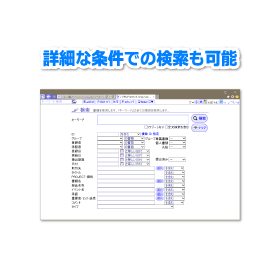
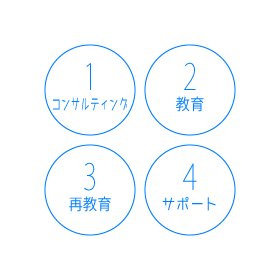
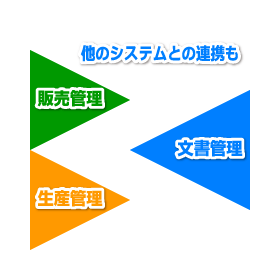
With the document management system "Digital Dolphins," you can store manufacturing procedure manuals and work standards under version control, making it easy to reference the latest version along with revision history. The viewing range can be adjusted through permission settings, helping to reduce rework caused by referencing old versions. It can store various file formats such as Word, Excel, PDF, CAD, and images, making it easy to retrieve necessary documents through full-text search, attribute search, and OCR. With permission and group settings, it can be expanded as a company-wide foundation that spans across departments. Integration with existing systems may be available as an optional or customized service. We provide operational consulting based on our 3S activities, which we have been engaged in for over 25 years since our establishment in 1949, and we support the establishment of the system on-site. Please feel free to contact us when you need our services.

  • デジタルドルフィンズロゴ_小.png
  • others
  • Document Management System

Added to bookmarks

Bookmarks list

Bookmark has been removed

Bookmarks list

You can't add any more bookmarks

By registering as a member, you can increase the number of bookmarks you can save and organize them with labels.

Free membership registration

Glossary of Terms for Drawing Management Systems in the Construction Industry

Resolving questions about drawing management and terminology in the construction industry.

In the construction industry, many specialized terms are used for managing drawings, approval processes, distribution to stakeholders, and tracking revision histories. Accurately understanding these terms is essential for smoothly implementing and operating a drawing management system, which is crucial for the smooth progress of projects. This glossary allows for quick confirmation of the meanings of necessary terms related to drawing management systems, contributing to improved accuracy in sharing drawings and information transmission on construction sites. 【Usage Scenarios】 - Sharing drawings on construction sites - Information transmission among stakeholders - Learning during the introduction of drawing management systems - Confirming terms during project progress 【Benefits of Implementation】 - Promoting understanding of specialized terms related to drawing management - Facilitating smooth information sharing - Increasing the utilization of drawing management systems - Improving operational efficiency

  • デジタルドルフィンズロゴ_大.png
  • Document and Data Management
  • Document Management System

Added to bookmarks

Bookmarks list

Bookmark has been removed

Bookmarks list

You can't add any more bookmarks

By registering as a member, you can increase the number of bookmarks you can save and organize them with labels.

Free membership registration

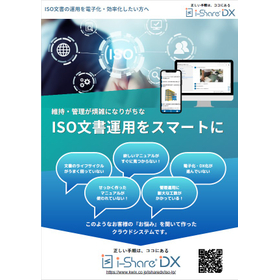
Smart Management of ISO Documents for the Manufacturing Industry

Contributing to ensuring traceability! Streamlining ISO document operations.

In ensuring traceability in the manufacturing industry, accurate management of ISO documents is essential. The traceability of documents is very important for product quality assurance and compliance with laws and regulations. However, traditional paper-based management and cumbersome file management can lead to delays in information sharing and decisions based on incorrect information, making it difficult to ensure traceability. This product realizes the digitization and efficient management of ISO documents, supporting the improvement of traceability. 【Usage Scenarios】 - Quality management in manufacturing processes - Product trace investigations - Compliance with laws and regulations 【Effects of Implementation】 - Reduction in document search time - Acceleration of information sharing - Strengthening of compliance

  • Catalog and manual creation
  • Document Management System

Added to bookmarks

Bookmarks list

Bookmark has been removed

Bookmarks list

You can't add any more bookmarks

By registering as a member, you can increase the number of bookmarks you can save and organize them with labels.

Free membership registration

Are you having trouble finding where the company regulations and application forms are?

A case where the implementation of document management and workflow functions created an environment where the information you want to find can be quickly located!

We would like to introduce a case where we supported K Group in the development and implementation of an "in-house portal site." Previously, internal document management was conducted using EXCEL, WORD, and handwritten methods, which posed challenges in the speed of information sharing. We implemented document management functions to share internal regulations and application forms, leading to progress in paperless operations through the digitization of various application processes. [Issues Before System Implementation] ■ There were multiple business systems and services used internally, each requiring separate logins, which created challenges in usability and password management burdens. ■ Due to the extensive use of paper documents, there was a need to promote paperless operations to save resources, as well as to centrally manage documents to improve information consistency and security. *For more details, please refer to the related links or feel free to contact us.

  • Corporate information portal/groupware
  • Document Management System

Added to bookmarks

Bookmarks list

Bookmark has been removed

Bookmarks list

You can't add any more bookmarks

By registering as a member, you can increase the number of bookmarks you can save and organize them with labels.

Free membership registration

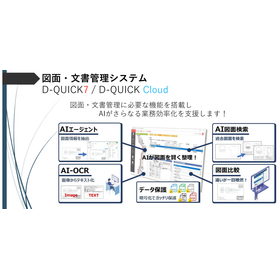
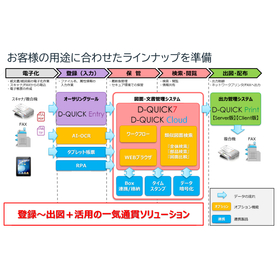
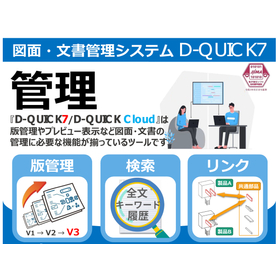
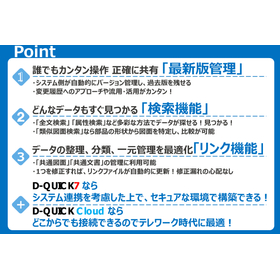
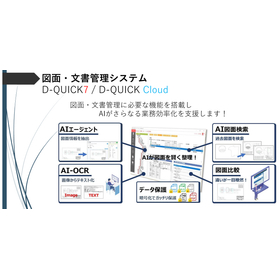
D-QUICK: Drawing and Document Management System for the Manufacturing Industry

Centralize the latest version of parts management to reduce search time and streamline information sharing and management tasks!

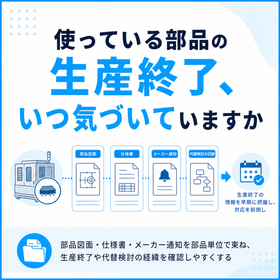
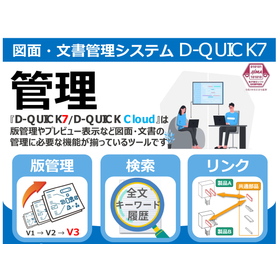
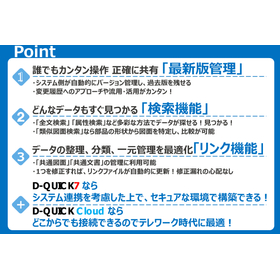
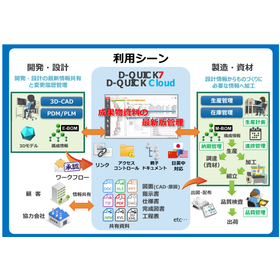
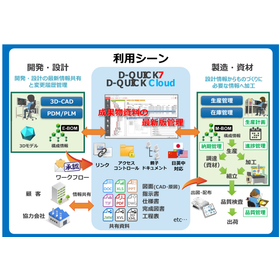
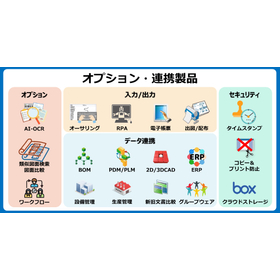
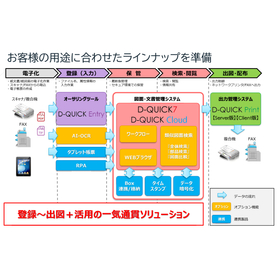
In the management of parts in the manufacturing industry, accurate management of drawings and documents associated with specification changes and revisions, as well as quick access to necessary information, is essential. In particular, maintaining the quality of parts and ensuring smooth operation of production lines requires an environment where the latest drawings and documents can always be referenced. Working based on outdated information increases the risk of rework and the occurrence of defective products. D-QUICK addresses these challenges by centrally managing technical documents such as drawings and specifications, streamlining the management, search, and sharing of the latest versions, thereby supporting parts management operations. 【Usage Scenarios】 - Management of the latest version of parts specifications - Review of historical parts drawing records - Management of links between related parts drawings - Sharing parts information with internal and external stakeholders 【Benefits of Implementation】 - Reduction in search time for parts information - Prevention of missed corrections and use of incorrect drawings - Reduction of workload in parts management operations - Strengthening of information collaboration from design to manufacturing

  • D-QUICK 画像?.jpg
  • D-QUICK 画像?.jpg
  • D-QUICK 画像?.jpg
  • D-QUICK 画像?.jpg
  • D-QUICK 画像?.jpg
  • Other CAD related software
  • Document and Data Management
  • Document Management System

Added to bookmarks

Bookmarks list

Bookmark has been removed

Bookmarks list

You can't add any more bookmarks

By registering as a member, you can increase the number of bookmarks you can save and organize them with labels.

Free membership registration

D-QUICK: Drawing and Document Management System for Engineering

Strong against design changes! Streamline information sharing and management tasks with centralized management of drawings and documents.

In the engineering industry, managing drawings and documents related to design changes can become complex, requiring quick access to the latest versions and rapid sharing with stakeholders. In particular, managing the history of design changes and identifying the scope of their impact are essential for preventing mistakes and improving development efficiency. Inadequate management can lead to rework and delays in delivery. D-QUICK addresses these challenges by centrally managing technical documents such as drawings and specifications, streamlining the management, search, and sharing of the latest versions. 【Usage Scenarios】 - Version management of drawings and documents during design changes - Confirmation and sharing of change history - Reference to past versions in reuse design - Sharing design information with related departments 【Benefits of Implementation】 - Reduction of mistakes and rework during design changes - Improved development efficiency through reduced information search time - Smoother information sharing among stakeholders

  • D-QUICK 画像?.jpg
  • D-QUICK 画像?.jpg
  • D-QUICK 画像?.jpg
  • D-QUICK 画像?.jpg
  • D-QUICK 画像?.jpg
  • Other CAD related software
  • Document and Data Management
  • Document Management System

Added to bookmarks

Bookmarks list

Bookmark has been removed

Bookmarks list

You can't add any more bookmarks

By registering as a member, you can increase the number of bookmarks you can save and organize them with labels.

Free membership registration

[Case Study] Database System

Seamlessly transition to the new system! Consolidate data that was individually managed in Excel into a database.

We would like to introduce a case study of building a database system for managing daily reports, order ledgers, parts lists, and cost management tables that were previously managed in separate files. Creating a cost management table required manually aggregating a large amount of diverse data, which took a significant amount of time. After building the database system, it became possible to create cost management tables instantly, eliminating the hassle of aggregation and allowing real-time visibility of results. [Case Overview] ■ Issues - Manual aggregation of a large amount of diverse data - Time-consuming aggregation process ■ Results - Elimination of aggregation hassle - Real-time visibility of results *For more details, please refer to the related links or feel free to contact us.

  • Database
  • Document Management System

Added to bookmarks

Bookmarks list

Bookmark has been removed

Bookmarks list

You can't add any more bookmarks

By registering as a member, you can increase the number of bookmarks you can save and organize them with labels.

Free membership registration

Unified Document Management with EasyBill for the Design Industry

Streamline documents in the design industry! Complete tasks on your smartphone, operating with the feel of existing documents.

In the design industry, various document formats such as estimates, invoices, and contracts tend to mix, making management complicated. Especially in projects involving multiple designers, the consistency of documents may not be maintained, potentially harming the brand image. EasyBill is a system that allows you to easily convert external documents created in Excel or Word into stamped PDFs for storage and reuse. It enables digitalization with the same user experience as existing documents and can be used directly on smartphones and tablets. 【Usage Scenarios】 - Issuing estimates and invoices at design offices - Creating contracts with clients - Approval workflows for internal documents 【Benefits of Implementation】 - Standardization of document formats - Cost reduction through improved operational efficiency - Enhancement of brand image

  • Document and Data Management
  • Document Management System

Added to bookmarks

Bookmarks list

Bookmark has been removed

Bookmarks list

You can't add any more bookmarks

By registering as a member, you can increase the number of bookmarks you can save and organize them with labels.

Free membership registration

EasyBill - Document Management System for Professionals

A document management system for professionals that enables accurate document creation and efficient management.

Professionals handle numerous important documents that require accuracy, such as contracts with clients and various application forms. The creation, approval, and management of these documents take time and effort, and mistakes are not allowed. EasyBill simplifies the process by easily converting externally-facing documents created in Excel or Word into PDFs and enabling electronic stamping, thereby reducing the hassle of paper exchanges and stamping. Additionally, centralized document management allows for quick searches of necessary documents, improving operational efficiency. 【Use Cases】 - Creation and management of contracts, invoices, reports, etc. - Rapid document submission to clients - Document approval in a remote work environment 【Benefits of Implementation】 - Reduction in time spent on document creation and management - Decrease in errors and improvement in accuracy - Cost savings through paperless operations

  • Document and Data Management
  • Document Management System

Added to bookmarks

Bookmarks list

Bookmark has been removed

Bookmarks list

You can't add any more bookmarks

By registering as a member, you can increase the number of bookmarks you can save and organize them with labels.

Free membership registration

EasyBill - Document Management System for the Real Estate Industry

Easily manage real estate contracts and documents on your smartphone! Achieve improved operational efficiency and cost reduction.

In the real estate industry, tracking and managing contracts and important documents is essential. Numerous documents, such as property sales contracts, rental agreements, and important explanatory documents, are exchanged, and it is necessary to accurately grasp their progress. Managing these on paper poses challenges such as the risk of loss, delays in the approval process, and difficulties in information sharing. EasyBill addresses these challenges and supports the streamlining of operations in the real estate industry. 【Usage Scenarios】 - Creation and approval of contracts - Tracking and management of important documents - Sending documents to clients - Internal information sharing 【Benefits of Implementation】 - Reduces the risk of document loss - Accelerates the approval process - Facilitates smooth information sharing - Cost reduction through paperless operations

  • Document and Data Management
  • Document Management System

Added to bookmarks

Bookmarks list

Bookmark has been removed

Bookmarks list

You can't add any more bookmarks

By registering as a member, you can increase the number of bookmarks you can save and organize them with labels.

Free membership registration

[necfru MAM/DAM case] Medical device manufacturer

Store design documents, procedures, and change histories with permissions/logs. Operate as an "official repository" with awareness of regulatory compliance.

We would like to introduce a case where our "necfru MAM/DAM" was implemented by a medical device manufacturer. In this company, managing document versions and audit trails was crucial for regulatory compliance, yet there were many related departments, making access rights management challenging. To address this, they standardized document types/products/versions/approval statuses with tags and finely configured viewing and download permissions by department and role. This reduced the man-hours required for audit preparation (data collection) and organized authority management, improving information control. [Case Summary (Partial)] ■Challenges - Difficult to cross-search necessary documents during audits - Recovery procedures for accidental deletion/overwriting were dependent on individuals ■Solution - Retained viewing/download history through operation logs - Standardized recovery flow with a 90-day recycle bin and versioning *For more details, please download the PDF or feel free to contact us.

  • Storage Backup
  • Document Management System

Added to bookmarks

Bookmarks list

Bookmark has been removed

Bookmarks list

You can't add any more bookmarks

By registering as a member, you can increase the number of bookmarks you can save and organize them with labels.

Free membership registration

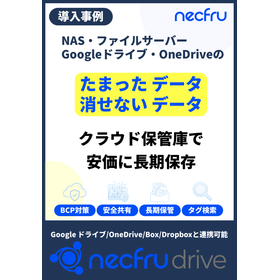
Easily share the latest data without mistakes: Examples of document management system utilization.

For the printing and packaging industry. Organize design data, proof PDFs, and video/image materials with tags to accelerate internal and external proofing and approval processes.

We would like to introduce a case study of our "necfru drive" implementation at Company E, which operates in the printing and packaging industry. The company faced the challenge of an increased risk of mistakenly printing with outdated data due to the rise in the number of versions. To address this, they standardized tags for each project, brand, product number, and version number, and consolidated approved data into an official storage area. As a result, the risk of printing errors due to mix-ups has been significantly reduced, and the exchange of proofing data has also been completed online. 【Case Overview (Partial)】 ■ Challenges - Unable to send large data via email, leading to complicated exchanges - Insufficient shared management with external designers and clients ■ Response - External parties can view data primarily through URL sharing, with downloads permitted only when necessary - Approval and viewing history are recorded through operation logs \Helpful materials are currently available/ *For more details, please download the PDF or feel free to contact us.

  • Storage Backup
  • Document Management System

Added to bookmarks

Bookmarks list

Bookmark has been removed

Bookmarks list

You can't add any more bookmarks

By registering as a member, you can increase the number of bookmarks you can save and organize them with labels.

Free membership registration

Training materials and document management tools

Maximize wisdom and experience for early empowerment. Achieve smooth training of new employees.

The training material and document management tool 'Confluence' allows for the creation, editing, and management of documents across internal and external boundaries. By utilizing the whiteboard feature, it enables real-time brainstorming, sharing of training content mind maps, and project plans in a remote environment, making it possible to effectively and efficiently enhance team power. You can also create storyboards for training materials on the whiteboard and share training schedules. 【Features】 ■ Real-time collaboration: Team members can share ideas and interact on the whiteboard in real-time, allowing for idea sharing and discussions even when not physically present. ■ Abundant tools and features: A variety of tools and features are available, including shape drawing tools, sticky notes, text boxes, and image insertion. ■ Flexible sharing options: It can be shared with both internal and external stakeholders and customers, and training content can also be exported as images or PDF files.

  • Document and Data Management
  • Document Management System

Added to bookmarks

Bookmarks list

Bookmark has been removed

Bookmarks list

You can't add any more bookmarks

By registering as a member, you can increase the number of bookmarks you can save and organize them with labels.

Free membership registration

[Case Study] Balancing Security Enhancement of Quality Documents and Inter-Location Sharing

Introducing a case study that successfully shared quality-related documents at domestic and international locations while maintaining security efficiently!

We would like to introduce a case study of a solution that combines our "PsafeVIEW," "HGPscanServPlus," and "HGQR Auto Generator" for our manufacturing customers. Designed for quality-related documents viewed at domestic and international locations, it enables secure sharing through integration with encrypted PDF groupware (cloud services) and efficient digitization tasks using QR code recognition. It has achieved the implementation of unified rules for quality-related documents, which was difficult with traditional manual methods, and has resolved issues of dependency on specific individuals, contributing to the overall efficiency of the quality assurance department and strengthening information security. 【Implementation Overview】 ■ Implementation Location: Manufacturing Industry (Utilized Department: Quality Assurance) ■ Implementation Effects: - Achieved secure document sharing at domestic and international locations through integration with encrypted PDF groupware - Dramatically improved the efficiency of digitization tasks for quality-related documents by utilizing QR codes - Increased productivity in information management through operation under unified rules without dependency on specific individuals *For more details, please download the catalog or feel free to contact us.

  • Document and Data Management
  • Encryption and authentication
  • Other security
  • Document Management System

Added to bookmarks

Bookmarks list

Bookmark has been removed

Bookmarks list

You can't add any more bookmarks

By registering as a member, you can increase the number of bookmarks you can save and organize them with labels.

Free membership registration

[Case Study] Achieving Efficiency through Certificate Digitization and Business Automation at a Certification Authority

Complete automation of processing 13,000 certificates per month! Introducing a case study of business efficiency achieved with OCR and QR codes!

To the certification organization, we would like to introduce a case study of our "PscanServePlus" implementation. By combining automatic sorting after scanning and OCR digitization for the mass processing of certification documents, we have successfully significantly improved the efficiency of processing 13,000 to 14,000 documents per month. We have completely automated the traditional manual tasks of renaming and folder sorting, establishing a reliable document management system utilizing QR codes. We have also achieved digitization through OCR simultaneously, balancing improved operational efficiency with enhanced document management accuracy. 【Implementation Overview】 ■ Implementation Location: Certification Organization (Utilizing Departments: General Affairs and Administrative Departments) Volume of Target Documents: 13,000 to 14,000 documents per month (during peak periods), mainly three types of certificate formats ■ Implementation Effects: - Complete automation of sorting tasks after scanning without changing current operational methods - Resolution of OCR misrecognition issues through reliable document identification using QR codes - Reduction of manual renaming and folder sorting time to zero - Increased allocation of time to other important tasks, significantly enhancing productivity *For more details, please download the catalog or feel free to contact us.

  • Document and Data Management
  • Other services
  • Document Management System

Added to bookmarks

Bookmarks list

Bookmark has been removed

Bookmarks list

You can't add any more bookmarks

By registering as a member, you can increase the number of bookmarks you can save and organize them with labels.

Free membership registration

A Must-See for the Manufacturing Industry: [Intellectual Property Archive] Achieving Long-Term Preservation of Technical Documents and Ensuring Authenticity

Long-term preservation of manufacturing design drawings, technical specifications, and quality records with timestamping and automatic extension, safely capitalizing on manufacturing know-how!

The "WWDS Intellectual Property Archive" is an archive system that allows for centralized management of technical documents, design drawings, inspection records, and other materials generated in the manufacturing field. It systematically manages materials related to the entire flow from research and development unique to the manufacturing industry to commercialization and improvement, achieving long-term storage with an automatic timestamp extension feature. CAD data and Microsoft Office files can also be saved in their original formats, efficiently converting the know-how of the manufacturing site into assets. 【Features】 ■ Automatic Timestamp Extension: Automatically extends the validity period of 10 years for long-term storage. ■ Systematic Folder Management: Clear identification of locations through hierarchical management by site, department, and project. ■ Search Function: Quickly search for necessary documents using full-text search, attribute search, and URL link search. ■ Proof of Prior Use Rights: Securely assert intellectual property rights through chronological proof of research and development. ■ Assurance of Authenticity: Ensure evidential capability in court and patent disputes through third-party certification. *For more details, please download the catalog or feel free to contact us.

  • Patents
  • Patent/Copyright related services
  • Document and Data Management
  • Document Management System

Added to bookmarks

Bookmarks list

Bookmark has been removed

Bookmarks list

You can't add any more bookmarks

By registering as a member, you can increase the number of bookmarks you can save and organize them with labels.

Free membership registration

Promotion of DX in Manufacturing Sites: "Intellectual Property Archive" Achieving Digitalization of Intellectual Property Document Management

Simultaneously achieve efficiency in intellectual property management and promote digital transformation through the digitization of "intellectual property documents" at manufacturing sites, management of video and audio data, and systematic folder management!

The "WWDS Intellectual Property Archive" is an archive system that realizes the efficiency of intellectual property document management in manufacturing sites. It digitizes paper documents such as work instructions, inspection records, and improvement reports used in factories into PDFs with timestamps, enabling digital preservation. It also supports a variety of file formats unique to manufacturing sites, allowing for the storage of video work procedure records and audio data in PDF format, thus simultaneously promoting digital transformation in manufacturing and protecting intellectual property. 【Features】 ■ Automatic Timestamp Extension: Automatically extends the validity period for 10 years, enabling long-term storage. ■ Systematic Folder Management: Hierarchical management by location, department, and project clarifies document location. ■ Search Functionality: Quickly search for necessary documents using full-text search, attribute search, and URL link search. ■ Proof of Prior Use Rights: Ensures the assertion of intellectual property rights priority through chronological proof of research and development. ■ Assurance of Authenticity: Secures evidentiary capability in court and patent disputes through third-party certification. *For more details, please download the catalog or feel free to contact us.

  • Patents
  • Patent/Copyright related services
  • Document and Data Management
  • Document Management System

Added to bookmarks

Bookmarks list

Bookmark has been removed

Bookmarks list

You can't add any more bookmarks

By registering as a member, you can increase the number of bookmarks you can save and organize them with labels.

Free membership registration

Are you struggling with automatic timestamp extensions? The Intellectual Property Archive has the solution!

Complete automation of the manual update process for timestamps every 10 years! Eliminating the risk of forgetting extensions and achieving long-term preservation of intellectual property documents!

Are you troubled by the expiration of the timestamp leading to the loss of the evidential power of intellectual property documents? With "WWDS Intellectual Property Archive," the automatic extension feature of timestamps with a validity period of about 10 years completely eliminates the hassle and risks of manual updates. By automatically extending the validity of files that have been around for 9 years, it reduces the effort and time needed to find files that require validity extensions, allowing for long-term and efficient preservation of intellectual property documents. 【Features】 ■ Automatic timestamp extension: Automatically extends the 10-year validity period for long-term storage ■ Systematic folder management: Clear location management through hierarchical organization by office, department, and project ■ Search function: Quickly search for necessary documents with full-text search, attribute search, and URL link search ■ Proof of prior use: Ensure the priority of intellectual property rights through chronological proof of research and development ■ Assurance of authenticity: Secure evidential power in court and patent disputes through third-party certification *For more details, please download the catalog or feel free to contact us.

  • Patents
  • Patent/Copyright related services
  • Document and Data Management
  • Document Management System

Added to bookmarks

Bookmarks list

Bookmark has been removed

Bookmarks list

You can't add any more bookmarks

By registering as a member, you can increase the number of bookmarks you can save and organize them with labels.

Free membership registration