We have compiled a list of manufacturers, distributors, product information, reference prices, and rankings for soft.
ipros is IPROS GMS IPROS One of the largest technical database sites in Japan that collects information on.

soft(3D CAD) - List of Manufacturers, Suppliers, Companies and Products | IPROS GMS

Last Updated: Aggregation Period:Jan 21, 2026~Feb 17, 2026
This ranking is based on the number of page views on our site.

soft Product List

91~120 item / All 698 items

Displayed results

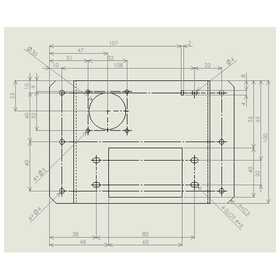
Smooth handling of large-capacity data! CAD/CAM 'CAMCORE EX'

A genuine tool with easy operation! A rich lineup of reliable tools that know processing!

"CAMCORE EX" creates tool paths from drawings with easy operation. 【Recommended for those with the following concerns】 ■ Want to introduce a user-friendly 2.5D CAM ■ Want to implement a CAD/CAM with rich CAD features ■ Want to smoothly import large volume data ■ Want to integrate unnecessary elements on the drawing and optimize the number of elements ■ Want to create tool paths not only from specified elements but also from arbitrary coordinates *For more details, please refer to the PDF materials or feel free to contact us.

  • Other CAD
  • Milling machine
  • 2D CAM
  • soft

Added to bookmarks

Bookmarks list

Bookmark has been removed

Bookmarks list

You can't add any more bookmarks

By registering as a member, you can increase the number of bookmarks you can save and organize them with labels.

Free membership registration

End-of-Year Limited SOLIDWORKS Permanent License Purchase Benefit Campaign

With the purchase of a SOLIDWORKS perpetual license, 2D CAD "DraftSight" and various manuals are provided free of charge.

We have prepared a special【Year-End Limited Campaign】suitable for customers considering the improvement and enhancement of their design environment as we approach the end of the fiscal year. This campaign offers complimentary benefits to customers who purchase a SOLIDWORKS perpetual license (PLC + ALC) to help streamline their design operations. ■ Campaign Details - 2 licenses of the DWG-compatible 2D CAD software "DraftSight" (valued at 127,900 yen) - 4 operation manuals - SOLIDWORKS Essential - Assembly Modeling - Drawings - DraftSight Essential Please take advantage of this year-end limited campaign to expand and standardize your CAD environment in preparation for the start of operations next fiscal year. Campaign Period: Until the end of March 2026 *For more details, please download the PDF document or feel free to contact us.

  • Other CAD
  • Other CAD related software
  • 3D CAD
  • soft

Added to bookmarks

Bookmarks list

Bookmark has been removed

Bookmarks list

You can't add any more bookmarks

By registering as a member, you can increase the number of bookmarks you can save and organize them with labels.

Free membership registration

[Case Study of 3D CAD Software for Mechanical Design] Tsukasa Electric Co., Ltd.

[Free Case Study Provided] Achieving Ultra-Short Delivery Times through Integration of BOM in the Configuration Model and Production Management System

To Tsukasa Electric Co., Ltd., a manufacturer of small gear motors, we would like to introduce a case study of the implementation of "iCAD SX." The company adopted 3D CAD to design high-value-added products quickly. The product was chosen due to its excellent operability, ease of understanding for designers familiar with 2D CAD, simple transition, and the ability to utilize existing assets in the form of 2D drawings. As a result of the implementation, they were able to reliably perform interference checks and speed up prototyping by providing 3D data. [Case Overview] ■ Reasons for Selection - Excellent operability - Easy transition for designers accustomed to 2D CAD - Ability to use existing assets in the form of 2D drawings - Good cost performance, achieving the ideal environment of one unit per person *For more details, please refer to the PDF document or feel free to contact us.

Added to bookmarks

Bookmarks list

Bookmark has been removed

Bookmarks list

You can't add any more bookmarks

By registering as a member, you can increase the number of bookmarks you can save and organize them with labels.

Free membership registration

3D modeling CAD software [Trimble SketchUp]

Bring your imagination to life with a fully equipped desktop modeler.

Skechup, unlike regular CAD, allows you to easily and efficiently create 3D data with somewhat complex shapes by pushing and pulling using the "Push/Pull" tool. You can rotate the model in 3D with the orbit tool, experiencing the 3D space that expands within your monitor. You can apply materials with a single click on a surface, and it is also possible to import original image data to use as materials. 3D Warehouse Access millions of free models. You can instantly add surrounding environments and context to your projects using free models from the 3D Warehouse, the largest and most popular 3D library in the world. Scan Essentials Import point cloud data into SketchUp, enabling the synthesis of models and point clouds, as well as modeling based on point clouds. You can import point clouds from 3D scans, drones, LIDAR sensors, and mobile mapping and display them in SketchUp. Supported file formats include E57, RWP, LAZ, TZF, LAS, and PLY.

Added to bookmarks

Bookmarks list

Bookmark has been removed

Bookmarks list

You can't add any more bookmarks

By registering as a member, you can increase the number of bookmarks you can save and organize them with labels.

Free membership registration

A must-see for CAD data users! 3D Similar Shape Search System 'SS4M'

[Free demo in progress] Search for similar past parts in 2 seconds! Significant cost reductions are possible with AI-powered 3D shape similarity search.

"SS4M" is a system designed for those who want to improve productivity in operations such as design, manufacturing, purchasing, and estimation by searching existing parts data filled with past design and manufacturing know-how based on shape! By simply preparing a 3D CAD file, it automatically builds a similar shape search database, allowing for immediate shape-based searches. It is also possible to search even without original data. You will be freed from the stress of searching for files. [Features] - Discover similar items with simple searches, promoting reuse design. - Group all data by shape, automatically extracting parts that can be standardized. - Accelerate estimation, improve estimation accuracy, and enhance quality. *For more details, please refer to the PDF materials or feel free to contact us.

  • Other CAD related software
  • 3D CAD
  • Data Search Software
  • soft

Added to bookmarks

Bookmarks list

Bookmark has been removed

Bookmarks list

You can't add any more bookmarks

By registering as a member, you can increase the number of bookmarks you can save and organize them with labels.

Free membership registration

Integrated Reverse Engineering Software PointMaster

Integrated Reverse Engineering Software PointMaster Shape Comparison 3D Measurement Internal Defect Detection Thickness Measurement

"Point Master 5.5" is a reverse engineering software that allows for the comparison of polygon data obtained from three-dimensional measurements with CAD data, outputs surfaces by applying faces, and achieves data integration with 3D CAD software. With simple operations, it enables the application of surfaces to the polygon data, approximates simple shapes such as planes and cylinders, and facilitates data transfer in IGES and STEP file formats, thereby achieving data integration with 3D CAD software. By utilizing Point Master, data obtained from 3D measurements can be used for shape comparison and in various scenarios such as CAD and CAE. [Features] ■ Comprehensive processing possible with a single software ■ Seamless handling of multiple functions ■ Additional features such as defect detection, thickness evaluation, and three-dimensional measurement *For more details, please refer to the catalog or feel free to contact us.

  • Contract Analysis
  • Image analysis software
  • Image Processing Software
  • soft

Added to bookmarks

Bookmarks list

Bookmark has been removed

Bookmarks list

You can't add any more bookmarks

By registering as a member, you can increase the number of bookmarks you can save and organize them with labels.

Free membership registration

Multi-data conversion software 'spGate' for utilizing STL data in CAD

Freely manipulate STL data with CAD!

The STL data obtained from 3D printers, 3D scanners, and CAE software poses a challenge as it is difficult to edit directly in CAD systems. CAD systems excel at handling surface data in formats like IGES and are not suited for direct processing of STL data. The solution to this challenge is the CAD data multi-conversion software "spGate." By converting STL data to IGES data, spGate enables free editing of STL data within existing CAD systems. This allows for processes that CAD systems excel at, such as creating cross-sectional shapes and extracting contours, to be performed on STL data. 【Features and Benefits】 - Converts STL data to IGES data, enabling editing in existing CAD environments. - Equipped with a rich set of STL editing functions, including polygon reduction, smoothing, hole filling, and partial deletion. *For more details, please visit the page below or feel free to contact us.

  • gat07_3.png
  • Data conversion software
  • soft

Added to bookmarks

Bookmarks list

Bookmark has been removed

Bookmarks list

You can't add any more bookmarks

By registering as a member, you can increase the number of bookmarks you can save and organize them with labels.

Free membership registration

Break away from 2D drawings! Transform design with MBD/MBE for digital transformation.

Information consolidated in 3D! MBD strategy transforming the entire manufacturing process.

In the digital transformation (DX) of design, the role of 3D CAD models is changing significantly. We are transitioning from the traditional state of "3D model + 2D drawings" to Model Based Definition (MBD), where annotated 3D CAD models serve as the master. MBD is the concept of directly adding all product information, such as tolerances and notes, to the 3D model, making it the master model. Furthermore, the activities that utilize this MBD model across the entire company are referred to as Model Based Enterprise (MBE). The information consolidated in the MBD model is utilized in various downstream processes such as analysis, NC program creation, manufacturing process planning, quality inspection, mold design, assembly instructions, and technical illustrations, achieving seamless collaboration from design to manufacturing. This is the core strategy for enhancing competitiveness in today's manufacturing industry. Please refer to the diagram in the materials for a detailed overview of how MBD/MBE can be integrated into your company processes. *For more details, please download the PDF or feel free to contact us.*

Added to bookmarks

Bookmarks list

Bookmark has been removed

Bookmarks list

You can't add any more bookmarks

By registering as a member, you can increase the number of bookmarks you can save and organize them with labels.

Free membership registration

3D scan data simple editing software 'Geomagic Wrap'

It is software that can quickly, accurately, and easily convert 3D scan data and mesh data. It can be smoothly utilized in subsequent processes. *Demo available.

Geomagic Wrap allows you to convert point cloud data obtained from 3D scans or input 3D formats (such as STL, OBJ) into 3D polygon meshes or surfaces. The converted data can be utilized in manufacturing, analysis, design, entertainment, archaeology, and more. It enables data modifications beyond the correction software included with 3D scanners. [Features] ■ Easy repair of noise and errors The automatic re-meshing tool searches for and automatically repairs irregularities and invalid polygon structures caused by noise. ■ Optimal repairs tailored to the situation With the hole-filling function, you can select the most suitable hole-filling options based on curvature, tangents, and plane settings. ■ Convert data into a format usable with existing CAD Automatic surface creation from polygon data is possible. The surfaced data can be output as an intermediate file, making it editable with your CAD software. ■ Convert data and use it immediately in the next process Supports various output formats, allowing for output suitable for CAD, 3D printing, and other processing. *For more details, please request a catalog or view the PDF data via the download button below.

  • wrap_2.jpg
  • wrap_3.jpg
  • Other CAD related software
  • Image analysis software
  • others
  • soft

Added to bookmarks

Bookmarks list

Bookmark has been removed

Bookmarks list

You can't add any more bookmarks

By registering as a member, you can increase the number of bookmarks you can save and organize them with labels.

Free membership registration

[Plant 3D Utilization Case] JEC Corporation

Realizing plant design that brings out potential! Sales have grown approximately 1.7 times compared to before implementation.

We would like to introduce a case where JECORP Co., Ltd., which specializes in the design of piping and structural components for various plants, implemented our software 'AutoCAD Plant 3D'. The company believes that it is essential to thoroughly utilize 3D design and communicate the benefits of 3D to customers in an easily understandable manner. To achieve this, it was necessary to switch to a more user-friendly 3D CAD. As a result of implementing our product, they optimized the plant piping layout by leveraging 3D design, realizing a plant design that maximizes potential. 【Case Overview】 <Challenges> ■ Even when proposing designs drawn in 3D voluntarily, there was little positive feedback. ■ There was a need to switch to a more user-friendly 3D CAD. <Result> ■ Optimized the plant piping layout by utilizing 3D design. ■ Sales grew approximately 1.7 times compared to before implementation. *For more details, please refer to the PDF document or feel free to contact us.

Added to bookmarks

Bookmarks list

Bookmark has been removed

Bookmarks list

You can't add any more bookmarks

By registering as a member, you can increase the number of bookmarks you can save and organize them with labels.

Free membership registration

CAD software [AutoCAD PLUS]

The synonym for 2D CAD, AutoCAD, further enhances productivity with industry-specific dedicated toolsets.

2D CAD has an overwhelming recognition that can be said to be synonymous with AutoCAD!! With a 40-year history, AutoCAD is a general-purpose CAD software that boasts a global market share and provides peace of mind as the developer of the DWG/DXF drawing formats, minimizing the risk of DWG drawing corruption. Since it is offered as a subscription, users do not face issues with version compatibility of DWG/DXF files. **Features of AUTOCAD PLUS** In addition to the revamped power of AutoCAD, it includes seven industry-specific tools tailored for various fields such as architecture, machinery, and electrical control. By utilizing the AutoCAD WEB/mobile app, users can work without being constrained by location or time, achieving significant improvements in workflow and productivity.

  • 2D CAD machine
  • 2D CAD Electrical
  • 2D CAD Construction
  • soft

Added to bookmarks

Bookmarks list

Bookmark has been removed

Bookmarks list

You can't add any more bookmarks

By registering as a member, you can increase the number of bookmarks you can save and organize them with labels.

Free membership registration

InfiPoints enhances features such as modeling from point clouds.

Streamlining construction management with automatic CAD modeling, data comparison, and annotation features - also compatible with Revit and Rebro.

Elizion Co., Ltd. (Headquarters: Hamamatsu City, Shizuoka Prefecture, President: Yuji Yano, hereinafter referred to as Elizion) has developed a function that allows for the CAD modeling of piping and steel materials based on point cloud data measured with a 3D laser scanner, which can be output as data for the architectural CAD "Autodesk Revit." This will be available starting with the new version "Ver. 6.0" of the point cloud data processing software InfiPoints, scheduled for release on September 30, 2019.

  • 3D measuring device
  • soft

Added to bookmarks

Bookmarks list

Bookmark has been removed

Bookmarks list

You can't add any more bookmarks

By registering as a member, you can increase the number of bookmarks you can save and organize them with labels.

Free membership registration

DATAKIT

Achieve interoperability between CAD systems! Easily convert and exchange CAD data.

DATAKIT provides software and libraries for 3D and 2D conversion, enabling users to import, export, read, and write almost any CAD format. It offers standalone software "CrossManager" for converting files from most CAD formats, as well as "CrossCad/Ware," a data exchange API and SDK set for software vendors. Designed to be user-friendly and efficient, it allows users to easily convert and exchange CAD data between different formats and software. 【Product Lineup】 ■CrossManager ■CrossCad/Ware *For more details, please refer to the related links or feel free to contact us.

  • Company:B7
  • Price:Other
  • Other CAD related software
  • soft

Added to bookmarks

Bookmarks list

Bookmark has been removed

Bookmarks list

You can't add any more bookmarks

By registering as a member, you can increase the number of bookmarks you can save and organize them with labels.

Free membership registration

VR interface "Mindesk"

Immerse yourself in VR and navigate 3D CAD models! Editing and building are possible.

"Mindesk" is a particularly advanced VR interface for Rhino6 & Grasshopper. You can immerse yourself in VR and navigate, edit, and build 3D CAD models without exporting your Rhino projects. This allows you to present projects more effectively, helping colleagues and clients to better understand and approve projects more quickly. 【Features】 ■ Enables visualization and editing of CAD data within VR ■ Collaborate with colleagues on the same CAD model ■ While editing the model in VR, teammates can follow your actions and collaborate from their desktops ■ Real-time collaboration accelerates brainstorming and decision-making *For more details, please refer to the related links or feel free to contact us.

  • Company:B7
  • Price:Other
  • Other CAD related software
  • soft

Added to bookmarks

Bookmarks list

Bookmark has been removed

Bookmarks list

You can't add any more bookmarks

By registering as a member, you can increase the number of bookmarks you can save and organize them with labels.

Free membership registration

[User Report] Architectural Design and Drafting CAD DRA-CAD 1

DRA-CAD all the way. The key points are its simple functionality and sense of speed!

The engineers at Nisso Ken Co., Ltd. have been involved in the design of many large projects such as government offices, commercial buildings, and communication facilities. Most of their drawings are created using DRA-CAD. "We have been using DRA-CAD since the Structural Systems Group developed it, and its user-friendliness and suitability for expressing our work have led us to use it for the past 20 years. One of the main reasons DRA-CAD has become so widespread is its 'simple fundamental concept.' There are also opinions that it is pleasant to use because it feels like drawing by hand." "Nowadays, CAD has become more common, and there are increasing cases where it can be shared across different software. In the future, we hope to see how it can be compatible with DWG, Jw_Cad, and others." For more details, please contact us or refer to our catalog.

Added to bookmarks

Bookmarks list

Bookmark has been removed

Bookmarks list

You can't add any more bookmarks

By registering as a member, you can increase the number of bookmarks you can save and organize them with labels.

Free membership registration

Integrated Reverse Engineering Software PointMaster

Integrated Reverse Engineering Software PointMaster Shape Comparison 3D Measurement Internal Defect Detection Thickness Measurement

By using PointMaster, you can utilize the data obtained from 3D measurements in various scenes such as shape comparison, CAD, and CAE. - Shape comparison of three-dimensional models - Detailed reporting features - Positioning function through point indication - Creation of surfaces from point clouds, polygons, and images - Handling of large volume data - Interactive and rapid operability - Interface with CAD data and CAD software

  • Contract Analysis
  • Image analysis software
  • Image Processing Software
  • soft

Added to bookmarks

Bookmarks list

Bookmark has been removed

Bookmarks list

You can't add any more bookmarks

By registering as a member, you can increase the number of bookmarks you can save and organize them with labels.

Free membership registration

3D modeling software 'QUICKSURFACE'

A 3D modeler for modeling using 3D scan data. It features excellent cost performance and simple operation. *Demo available.

"QUICKSURFACE" is a modeling software specialized in creating CAD data utilizing 3D scan data. With excellent cost performance and simple operation, it can be adapted to various operational styles. [Features] ■ Direct modeling from 3D scan data QUICKSURFACE allows you to directly load 3D scan data for modeling. By referencing the 3D scan data directly while creating the model, it is possible to express the shape of the scanned work more faithfully. ■ Equipped with functions for editing mesh data It comes with features for 3D scan modeling. By using functions such as creating 2D sketches from mesh cross-sections and mesh selection, you can perform modeling accurately and efficiently. ■ History-based hybrid modeling Based on 2D sketches or selected areas created from the mesh, hybrid modeling using both solids and surfaces is possible. You can choose modeling methods according to the application and shape, such as using solids for geometric shapes and surfaces for freeform shapes.

  • 3D measuring device
  • Other CAD related software
  • 3D CAD
  • soft

Added to bookmarks

Bookmarks list

Bookmark has been removed

Bookmarks list

You can't add any more bookmarks

By registering as a member, you can increase the number of bookmarks you can save and organize them with labels.

Free membership registration

Malsugo CT data conversion software "TomoShopViewer"

Easily convert CT images to 3D data! Explaining the greatness of TomoShop Viewer.

Marsugo is a document that picks up the functions and features of various products and introduces the "amazing" aspects of them. This time, we will explain "TomoShop Viewer," which allows you to easily convert CT scan data into 3D data! At first glance, CT scan data looks like 3D data, but in reality, it is a 2D image data made up of hundreds or thousands of overlapping cross-sectional images that appear three-dimensional. Therefore, it cannot be used directly for 3D printing or as CAD data. "TomoShop Viewer" is an amazing software that can easily convert such 2D image data of CT scans into a single 3D data. Moreover, it can be introduced at a "low cost," allowing you to easily expand the use of CT scan data! In Volume 39 of our helpful content "Mitarepo," we provide a detailed explanation of TomoShop Viewer using the "CT scan data of a Rubik's Cube" as an example, so we would be grateful if you could take a look. *You can download the document from the button below.

  • Data conversion software
  • Other CAD related software
  • 3D Printer
  • soft

Added to bookmarks

Bookmarks list

Bookmark has been removed

Bookmarks list

You can't add any more bookmarks

By registering as a member, you can increase the number of bookmarks you can save and organize them with labels.

Free membership registration

Point cloud processing software [Elizion Infipoints]

Measure the current situation with a 3D laser scanner and create a CAD model with Infipoints!

InfiPoints is point cloud data utilization software that merges the real conditions of the field with virtual spaces on a computer. It offers stress-free operability even with point cloud data measured by 3D scanners, consisting of billions of points and tens of gigabytes. InfiPoints automatically extracts cylinders and planes from point clouds, enabling modeling of piping, ducts, and steel materials. It also features the ability to automatically extract shapes such as planes and cylinders from point cloud data measured by mobile 3D laser scanners, including MMS, push-type, handheld, and backpack types, and is compatible with point cloud data created from images captured by drones using SfM (Structure from Motion) technology.

Added to bookmarks

Bookmarks list

Bookmark has been removed

Bookmarks list

You can't add any more bookmarks

By registering as a member, you can increase the number of bookmarks you can save and organize them with labels.

Free membership registration

Setting bulk hole attributes to 3D models in 【iCAD×meviy】.

No need for 2D disassembly! By linking the 3D model and hole attribute information of iCAD to meviy, it is possible to estimate machine parts in just one minute.

Are you creating 2D drawings for processing instructions even though you are designing in 3D CAD? By using the 3D CAD specialized for mechanical design, "COLMINA Design and Manufacturing Support iCAD SX (hereafter referred to as iCAD)," along with the online mechanical parts procurement service "meviy," you can easily arrange for parts. When you upload a 3D model created in iCAD, you can automatically link and reflect hole attribute information to meviy, allowing you to obtain quotes for mechanical parts in just one minute. This significantly reduces the time-consuming tasks of creating 2D drawings and obtaining quotes, improving both design quality and work efficiency, and greatly enhancing the customer’s parts procurement process. → For more details, please refer to the link at the end of the text. Additionally, iCAD has developed a function that allows you to set hole attributes in bulk, which can be lost when going through intermediate files, thanks to its shape recognition technology specialized for mechanical design. It can derive candidates for hole attributes from the shape of the 3D model, making it easy to set hole attributes. For actual operation methods, please refer to the related videos. Collaboration videos of iCAD × Meviy are currently available on the official Misumi YouTube channel.

Added to bookmarks

Bookmarks list

Bookmark has been removed

Bookmarks list

You can't add any more bookmarks

By registering as a member, you can increase the number of bookmarks you can save and organize them with labels.

Free membership registration

3D CAD data conversion software "spGate"

This is a 3D CAD data conversion software equipped with features such as data conversion, bug fixes, simplification, and lightweighting, which strongly supports manufacturing sites.

\Equipped with diverse CAD data conversion and defect correction features/ spGate supports all standard formats of 3D CAD data. Since all necessary formats are included, there are no additional costs. It is a cost-effective data conversion tool. ■ 3D Multi-Data Translator ■ PDQ Verification Function ■ Correction (Healing) Function

  • Other CAD related software
  • soft

Added to bookmarks

Bookmarks list

Bookmark has been removed

Bookmarks list

You can't add any more bookmarks

By registering as a member, you can increase the number of bookmarks you can save and organize them with labels.

Free membership registration

IT Machine Work Co., Ltd. Business Introduction

We have specialized manufacturing knowledge that brokers and trading companies do not possess!

Aitimachine Work Co., Ltd. is a company specializing in machining and technical services. Our representatives, who are well-versed in various manufacturing methods, accurately arrange and manage the manufacturing process from parts production through machining to secondary processing such as painting and plating, surface treatment, and finishing, ensuring that the completed parts are delivered on time. Customers only need to conduct the initial meeting with the drawings, and we will handle all the tedious progress management during the process. Please feel free to contact us with any requests. 【Business Activities】 ■ Support for purchasing and arranging management of machined parts ■ Sales and support for CAD/CAM software Mastercam 2017 ■ Sales and support for 3D CAD solid modeling software SpaceClaim ■ Sales and support for in-house production management and process management system TECHS-BK/S ■ Proposals for process management advice using Gantt chart software, etc. *For more details, please download the PDF or feel free to contact us.

  • Other services
  • Other CAD
  • Other machine tools
  • soft

Added to bookmarks

Bookmarks list

Bookmark has been removed

Bookmarks list

You can't add any more bookmarks

By registering as a member, you can increase the number of bookmarks you can save and organize them with labels.

Free membership registration

Domestic 2D CAD "CADSUPER 2023"

Excellent data compatibility that serves as the core of the drawing environment! Achieving drawings that meet the demands of professional designers.

"CADSUPER 2023" is a domestically produced 2D CAD with excellent drafting capabilities. It features intuitive commands and usability that prevent confusion during drawing, allowing for the creation of a design environment tailored to the designer's needs. It enables professional drafting that meets the demands of conceptual design, parts design, large assembly drawings, and detailed part drawings. Additionally, it includes a function that utilizes 3D data to create projection drawings. The unique correction function during the acquisition of projection drawings resolves issues that arise when creating projection drawings. 【Recommended for those with the following concerns】 ■ I want to introduce an easy-to-use 2D CAD for anyone. ■ I want to implement a customizable 2D CAD. ■ I want to use a 2D CAD that can read various data formats. 【Features】 ■ Excellent data compatibility that serves as the core of the drafting environment. ■ Quickly create drawings using group shape functions and standard component mechanical element functions. ■ Equipped with a function to utilize 3D data and create projection drawings. ■ It is also possible to quickly finish drawings from data converted from other 2D CADs. *For more details, please refer to the PDF materials or feel free to contact us.

  • Other CAD
  • 2D CAD Construction
  • 2D CAD machine
  • soft

Added to bookmarks

Bookmarks list

Bookmark has been removed

Bookmarks list

You can't add any more bookmarks

By registering as a member, you can increase the number of bookmarks you can save and organize them with labels.

Free membership registration

Achieving optimization of 3D printer data '4D ADDITIVE'

3D printer data output software with data correction functionality. Directly reads 3D data and outputs optimized 3D printer data.

4D_ADDITIVE allows for the direct loading of various formats of 3D data in a seamless process, making data modification and direct modeling easy to execute. The imported data automatically fills gaps using a healing function and corrects duplicate elements, twisted surfaces, and shape errors. The optimized data can be saved in AMF, 3MF, or STL formats compatible with various software, and based on user-defined parameters, it can predict the roughness of all areas of the parts and visualize it using a color scale. Additionally, measurement functions, wall thickness checks, and clearance checks can be used to analyze critical areas for the manufacturing process.

  • others
  • soft

Added to bookmarks

Bookmarks list

Bookmark has been removed

Bookmarks list

You can't add any more bookmarks

By registering as a member, you can increase the number of bookmarks you can save and organize them with labels.

Free membership registration

Case Study of 3D Similar Shape Search System Implementation at Toray Engineering Co., Ltd.

Accelerating "DX in Manufacturing" through the utilization of 3D similar shape search! Achieving improvements in QCD for manufacturing processes.

At Toray Engineering Co., Ltd., we have been promoting DX (Digital Transformation) across the company since October 2018 with the aim of consistent business reform! However, even after unifying our 3D CAD software, challenges remained, such as "the inability to easily search for data of similar shapes created in the past." This led to the perception that "it's faster to create new designs," resulting in a decline in QCD (Quality, Cost, Delivery). The similar shape search system "SS4M" allows not only for attribute value searches but also for searches based on shape features, enabling the reuse of parts and the development of design reuse, which has been evaluated as contributing to the improvement of QCD, leading to its adoption. [Case Overview] ■ Purpose of Implementation: Aiming to achieve both QCD improvement and business efficiency through design reuse. ■ Key Factors for Decision - Attribute information from CAD is carried over. - There is no need to create models for searching similar shapes. - Strengthening compatibility with other systems. *For more details, please refer to the PDF materials or feel free to contact us.

  • 3D CAD
  • Other CAD related software
  • Data Search Software
  • soft

Added to bookmarks

Bookmarks list

Bookmark has been removed

Bookmarks list

You can't add any more bookmarks

By registering as a member, you can increase the number of bookmarks you can save and organize them with labels.

Free membership registration

[Data] The Power of Engineering SDKs That Accelerate CAE Application Development

Accelerating CAE application development: The capabilities of a suite of SDKs that cover the entire workflow.

There are various challenges that exist between the development and release of CAE products such as structural analysis and fluid analysis. For example, even if a company has already developed its own solver, providing it as a packaged product that includes pre- and post-processing requires a wide range of technologies beyond just the solver, such as importing CAD data, achieving visualization, and generating high-quality meshes. By utilizing Spatial's SDK, we can address a variety of challenges in a one-stop solution, accelerating development and enabling early product release. Challenges that can be solved with Spatial's SDK: - There are issues with the quality of shape data import. - Unable to import the latest version of CAD data. - Want to streamline the editing process of CAD data before converting it to analysis mesh. - High development effort required to create a UI. - Want to improve mesh generation quality. For more details, visit: https://www.spatial.com/ja/node/1527 Contact: jp.spatial.admin@3ds.com

  • simulator
  • soft

Added to bookmarks

Bookmarks list

Bookmark has been removed

Bookmarks list

You can't add any more bookmarks

By registering as a member, you can increase the number of bookmarks you can save and organize them with labels.

Free membership registration

The latest version of the 3D CAD/CAM software "Mastercam" has arrived.

The latest version has been released with many new features that achieve improved productivity and reduced processing time‼ [Examples of high-efficiency processing are available]

The world’s number one in installation achievements, 'Mastercam', is an all-around 3D CAD/CAM software that can be used in various machining and industries. By combining modules, it supports various industries and machining processes such as mold making, prototyping, and parts processing, achieving high-efficiency machining through its unique cutting theory. Additionally, it boasts excellent compatibility with various CAD software and has a wealth of experience in supporting machine tools. In September 2020, the long-awaited new version of 'Mastercam' was released! The new features in the latest version, "Mastercam 2021," streamline the entire process of toolpath creation, reducing the burden on operators. For more details, please download the PDF or contact us. *Survey by CIM data in 2020 ☆We also introduce convenient ways to use Mastercam and new features in online seminars. Please join us through the link below for more details.

  • 3D CAM
  • soft

Added to bookmarks

Bookmarks list

Bookmark has been removed

Bookmarks list

You can't add any more bookmarks

By registering as a member, you can increase the number of bookmarks you can save and organize them with labels.

Free membership registration