We have compiled a list of manufacturers, distributors, product information, reference prices, and rankings for Document management system.
ipros is IPROS GMS IPROS One of the largest technical database sites in Japan that collects information on.

Document management system Product List and Ranking from 30 Manufacturers, Suppliers and Companies | IPROS GMS

Last Updated: Aggregation Period:Apr 08, 2026~May 05, 2026
This ranking is based on the number of page views on our site.

Document management system Manufacturer, Suppliers and Company Rankings

Last Updated: Aggregation Period:Apr 08, 2026~May 05, 2026
This ranking is based on the number of page views on our site.

  1. null/null
  2. アガサ Tokyo//IT/Telecommunications
  3. 株式会社クイックス Aichi//software
  4. 4 Sartorius Stedim Japan K.K. Tokyo//Pharmaceuticals and Biotechnology
  5. 5 マーケン・ジャパン Tokyo//Pharmaceuticals and Biotechnology

Document management system Product ranking

Last Updated: Aggregation Period:Apr 08, 2026~May 05, 2026
This ranking is based on the number of page views on our site.

  1. GxP Quality Document 9: I want to manage the training of procedures.
  2. [Information] Streamlining the management and maintenance of ISO documents that tend to become complicated. 株式会社クイックス
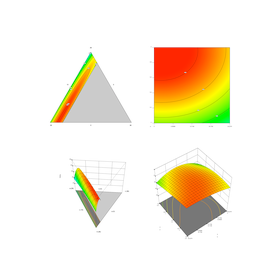
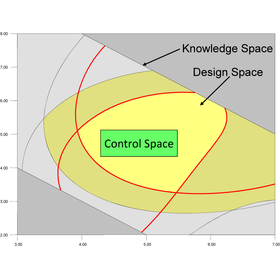
  3. MODDE Experimental Design Method Solution Sartorius Stedim Japan K.K.
  4. 4 Test sample transportation service マーケン・ジャパン
  5. 5 Experimental Design Software "Design-Expert" ヒューリンクス

Document management system Product List

91~115 item / All 115 items

Displayed results

For the Intellectual Property Department! An intellectual property document management system with evidential validity recognized in court.

Guaranteeing document authenticity with third-party certified timestamps, contributing to risk avoidance in patent disputes and intellectual property litigation! 【Intellectual Property Archive】

The "WWDS Intellectual Property Archive" is an intellectual property document archive system based on a file server that allows for efficient and long-term management of documents related to intellectual property. With the timestamp feature, it ensures the proof of existence and authenticity of documents, and clarifies the location of intellectual property documents through systematic folder management. 【Features】 ■ Automatic Timestamp Extension: Automatically extends the validity period for 10 years to achieve long-term storage ■ Systematic Folder Management: Clarifies location through hierarchical management by location, department, and project ■ Search Function: Quickly searches for necessary documents with full-text search, attribute search, and URL link search ■ Proof of Prior Use: Ensures the assertion of priority rights for intellectual property through chronological proof of research and development ■ Assurance of Authenticity: Secures evidential capability in court and patent disputes through third-party certification *For more details, please download the catalog or feel free to contact us.

  • Patents
  • Patent/Copyright related services
  • Document and Data Management
  • Document management system

Added to bookmarks

Bookmarks list

Bookmark has been removed

Bookmarks list

You can't add any more bookmarks

By registering as a member, you can increase the number of bookmarks you can save and organize them with labels.

Free membership registration

For the Legal and Compliance Department! Intellectual Property Archive to Ensure the Authenticity of Intellectual Property Contracts and Other Documents.

A document management system for intellectual property that guarantees the authenticity of contracts and license documents over the long term with timestamps, strongly supporting audit compliance and dispute resolution.

The "WWDS Intellectual Property Archive" is an intellectual property document archive system based on a file server that allows for efficient and long-term management of documents related to intellectual property. With the timestamping feature, it ensures the proof of existence and authenticity of documents, and systematic folder management clarifies the location of intellectual property documents. 【Features】 ■ Automatic Timestamp Extension: Automatically extends the validity period for 10 years, enabling long-term storage. ■ Systematic Folder Management: Hierarchical management by location, department, and project clarifies document location. ■ Search Function: Quickly search for necessary documents using full-text search, attribute search, and URL link search. ■ Proof of Prior Use: Certainty in asserting intellectual property rights through chronological proof of research and development. ■ Assurance of Authenticity: Ensures evidential capability in court and patent disputes through third-party certification. *For more details, please download the catalog or feel free to contact us.

  • Patents
  • Patent/Copyright related services
  • Document and Data Management
  • Document management system

Added to bookmarks

Bookmarks list

Bookmark has been removed

Bookmarks list

You can't add any more bookmarks

By registering as a member, you can increase the number of bookmarks you can save and organize them with labels.

Free membership registration

Document management and information sharing system *Over 1,000 companies have implemented it!

A document management and information sharing system that addresses the challenges of "quality," "storage," and "utilization" in managing electronic documents with a file server.

In order to promote DX (digital transformation) in back offices aimed at cost reduction and productivity improvement, many companies are reviewing their document storage handling methods to comply with the Electronic Bookkeeping Act. There has been an increase in inquiries about how to handle internal documents, including the relaxation of requirements for scanner storage and the obligation for electronic storage. Therefore, we would like to introduce the document management system 'Rakuraku Document Plus,' which safely manages and utilizes information within companies and promotes paperless operations! 【Features】 ■ A reliable document management system used by over 1,000 companies ■ Rich support functions for managing contracts and ISO documents ■ Strict security management possible with access control ■ No restrictions on file formats such as Word, Excel, PPT, PDF, etc. We offer introductory materials that can be used for a wide range of purposes, including general office documents, contract management, ISO document management, paperless operations, and compliance with the Electronic Bookkeeping Act! *For more details, please download the PDF or feel free to contact us.

  • Document and Data Management
  • Document management system

Added to bookmarks

Bookmarks list

Bookmark has been removed

Bookmarks list

You can't add any more bookmarks

By registering as a member, you can increase the number of bookmarks you can save and organize them with labels.

Free membership registration

Enterprise Search / Document Management System – FileBlog

Find It Instantly. Turn Your File Server into a Powerful Document Management System. Boost file server utilization and knowledge sharing with full-text search and document management.

FileBlog is an enterprise search system that enables fast and secure full-text search across multiple file servers—covering more than 100 million files—through a unified interface. Users can view all pages of files directly in a web browser. In addition, FileBlog provides file metadata management, version control, and recycle bin functionality, allowing organizations to add document management capabilities to their existing file servers without the need to migrate file data. With a wide range of productivity-enhancing features, FileBlog promotes more effective use of file servers and contributes to improved operational efficiency. ◆Solve Your File Management Challenges ・Unable to locate files scattered across file servers ・Need to search across multiple file servers through a unified interface ・Want to manage file metadata and versions on file servers ・Looking to migrate from a document management system integrated with multifunction devices ・Need to share file servers securely on mobile devices ・Want to securely publish files to selected external users ・Need to share files in a network-segregated environment ・Want to search files stored in SharePoint Online

  • Data Search Software
  • Document and Data Management
  • Other information systems
  • Document management system

Added to bookmarks

Bookmarks list

Bookmark has been removed

Bookmarks list

You can't add any more bookmarks

By registering as a member, you can increase the number of bookmarks you can save and organize them with labels.

Free membership registration

Local Document Management AI System Galaxy-Eye Episode

On-premises × RAG × specialized for specific business operations: Internalizing document search and document generation with NLP and generative AI.

Do you have any of the following issues? "When searching for technical documents, there are many similar titles, and I can't immediately recall which one it is." "I don't know which page and line of the document contains the necessary information." "I can't find the storage location of the related documents for the construction carried out in Year X, Month Y." "I want to implement a document management system, but I'm worried about whether it can be built in a company with strict security." Galaxy-Eye Episode solves these challenges! Galaxy-Eye Episode is a semi-custom digital data search system that builds a database aggregating various documents scattered throughout the company, enabling internal document searches, automatic document generation, and utilization as a chatbot. Since the system is developed exclusively for your company, it can accommodate highly specialized terms such as internal jargon and technical terminology.

  • スライド2.JPG
  • Data Search Software
  • Document management system

Added to bookmarks

Bookmarks list

Bookmark has been removed

Bookmarks list

You can't add any more bookmarks

By registering as a member, you can increase the number of bookmarks you can save and organize them with labels.

Free membership registration

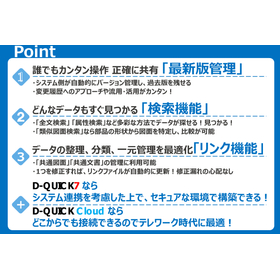
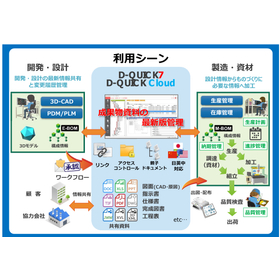
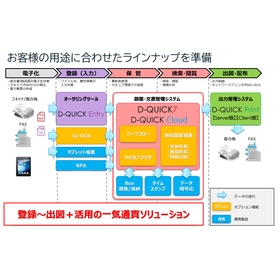
[D-QUICK7 Case Study] EDI Integration (Automation of Ordering Operations)

Achieving large-scale data management! A case where integration with the EDI system has been automated, significantly reducing human errors.

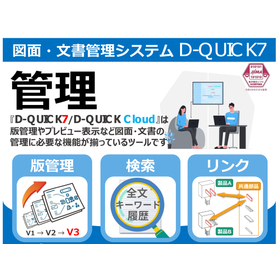
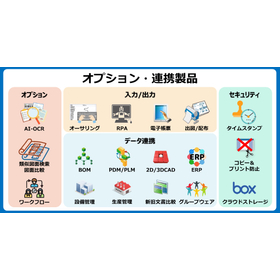
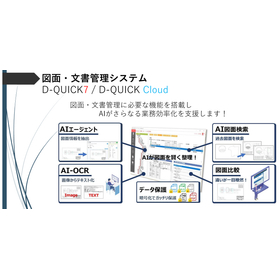
We would like to introduce a case study of system integration for the manufacturing industry using our drawing and document management system, 'D-QUICK7'. During the estimation request and ordering process, attached documents were searched from the drawing management system and sent as needed, which led to issues such as the distribution of incorrect specifications due to search errors and information leaks. To address this, we implemented the drawing and document management system 'D-QUICK7'. The requirements for the system included building a mechanism to receive information from the EDI system, automatically search for it, and output result reports. After implementation, we achieved management of large volumes of data (over 2 million customer-owned drawings), automated integration with the EDI system, and significantly reduced human errors. [Requirements for the system] ■ Build a mechanism to receive information from the EDI system, automatically search for it, and output result reports. *For more details, please refer to the PDF document or feel free to contact us.

  • Document and Data Management
  • Other operation management software
  • Document management system

Added to bookmarks

Bookmarks list

Bookmark has been removed

Bookmarks list

You can't add any more bookmarks

By registering as a member, you can increase the number of bookmarks you can save and organize them with labels.

Free membership registration

[For Medical Institutions] EasyBill - Document Management System

Streamlining document management in medical institutions! Promoting paperless operations.

In the management department of the healthcare industry, it is necessary to accurately manage a large number of documents, such as medical fee statements and various application forms. In particular, from the perspective of personal information protection, strict management of documents and quick retrieval are required. EasyBill enables centralized management of digitized documents and contributes to reducing storage space for paper documents. It also complies with the Electronic Bookkeeping Preservation Act, leading to enhanced compliance. [Usage Scenarios] - Issuance and management of medical fee statements - Digitization and approval of various application forms - Strict management of documents containing personal information [Effects of Implementation] - Improved document searchability - Cost reduction through the reduction of paper documents - Enhanced compliance - Promotion of telework

  • Document and Data Management
  • Document management system

Added to bookmarks

Bookmarks list

Bookmark has been removed

Bookmarks list

You can't add any more bookmarks

By registering as a member, you can increase the number of bookmarks you can save and organize them with labels.

Free membership registration

Centralize Document Management with EasyBill for the Event Industry

Easily manage event-related documents on your smartphone! Achieve improved work efficiency and cost reduction.

In the event industry, it is important to efficiently manage many documents such as estimates, invoices, and purchase orders. Especially from the preparation of events to their execution and post-event processing, quick and accurate information sharing among various stakeholders is required. Paper documents and complicated file management can increase the risk of delays and loss of information sharing, potentially reducing operational efficiency. EasyBill is a system that allows you to easily convert externally-facing documents created in Excel or Word into PDF files with stamps, which can be saved and reused. The types of documents that can be created include estimates, invoices, purchase orders, as well as offer letters and employment certificates, among others. It allows for digitization with the same user experience as existing documents and can be used directly on smartphones and tablets. 【Usage Scenarios】 - Issuing estimates and invoices at event planning companies - Creating contracts and purchase orders at event venues - Managing various application documents related to events 【Benefits of Implementation】 - Reducing paper documents and cutting costs - Improving document searchability and speeding up information sharing - Enabling approval processes anywhere, regardless of location

  • Document and Data Management
  • Document management system

Added to bookmarks

Bookmarks list

Bookmark has been removed

Bookmarks list

You can't add any more bookmarks

By registering as a member, you can increase the number of bookmarks you can save and organize them with labels.

Free membership registration

Reduction in search time for inspection and construction documents: Example of utilizing a document management system.

For environmental plants. Centralized management of equipment ledgers, inspection records, construction photos, and drawings by equipment ID. A case where access to necessary information remotely became possible even during disasters.

We would like to introduce a case study of our "necfru drive" implementation at K Company in the environmental plant sector. The company faced challenges with inspection records being dispersed between the field and headquarters, making them difficult to reference, and the inability to access materials during disasters when on-site visits were not possible. To address this, tagging was implemented based on equipment ID, location, year, and type of inspection, allowing the field to focus on viewing while restricting downloads to administrators only. As a result, the time taken to search for inspection and construction materials was reduced, and reporting speed improved. Additionally, remote access became possible, contributing to the strengthening of business continuity planning (BCP) during disasters. 【Case Overview (Partial)】 ■Challenges - Photo sharing with partner companies was cumbersome and primarily done via email. - Risks of accidental deletion and device loss were present. ■Response - Partner companies can view only the necessary scope through URL sharing. - A 90-day retention policy and log management simplify responses during troubles. \Helpful materials are currently available/ *For more details, please download the PDF or feel free to contact us.

  • Storage Backup
  • Document management system

Added to bookmarks

Bookmarks list

Bookmark has been removed

Bookmarks list

You can't add any more bookmarks

By registering as a member, you can increase the number of bookmarks you can save and organize them with labels.

Free membership registration

Improved response speed during malfunction occurrences: Examples of document management system utilization.

For resin parts manufacturers. Management of mold drawings, molding conditions, inspection results, and defect reports linked by part number/lot. An example of improved customer response speed.

We would like to introduce a case study of our "necfru drive" implementation at J Company, a resin parts manufacturer. The company faced challenges with the time it took to collect related documents when issues occurred. To address this, they standardized tags by part number, mold, lot, and revision date, allowing related documents to be bundled for easy reference and sharing. As a result, the initial response time during complaint handling (document submission) has been expedited, leading to increased trust from clients. 【Case Overview (Partial)】 ■Challenges - Difficulties in tracking the history of part number revisions, hindering recurrence prevention. - Dependence on specific personnel for submitting evidence to clients. ■Response Measures - Only necessary documents are provided to clients through URL sharing. - Past projects are managed as COLD, while current projects are handled as HOT for organization. \Free Helpful Materials Available/ *For more details, please download the PDF or feel free to contact us.

  • Storage Backup
  • Document management system

Added to bookmarks

Bookmarks list

Bookmark has been removed

Bookmarks list

You can't add any more bookmarks

By registering as a member, you can increase the number of bookmarks you can save and organize them with labels.

Free membership registration

Quality Document Management (ISO Document Management) Tool

Make quality assurance smarter. Ensure compliance with ISO and seamlessly manage all documents in a centralized manner to guarantee quality.

The quality document management tool "Confluence" allows for the creation, editing, and management of documents that transcend the boundaries of internal and external environments. With a user-friendly interface, it enables easy creation and editing of quality management documents that include text, images, tables, and more. Additionally, it is possible to check the version history of documents as needed and impose viewing and editing restrictions on content. 【Features】 ■ Automatically saves different versions of documents, making version referencing or restoration easy ■ Records change history, clearly tracking which user made what changes and when ■ Documents containing confidential information can be restricted to approved members only for disclosure and editing ■ Specific content within documents can be quickly understood through advanced search ■ Promotes data-driven decision-making with a variety of reporting and analysis tools ■ External materials can be easily imported for review

  • Document and Data Management
  • Document management system

Added to bookmarks

Bookmarks list

Bookmark has been removed

Bookmarks list

You can't add any more bookmarks

By registering as a member, you can increase the number of bookmarks you can save and organize them with labels.

Free membership registration

Template function

Rapidly and efficiently manage documents. Improve quality and productivity through real-time collaborative editing.

The document management tool "Confluence" allows you to create, edit, and manage documents across internal and external boundaries. By utilizing the template feature (Best practice templates), you can easily standardize and create various documents such as meeting minutes and project plans. Start using Confluence's template feature now to quickly create consistent documents across your team and improve operational efficiency. 【Features】 ■ Smooth setup: Creating new projects or pages can be done quickly and easily. ■ Versatile: A variety of templates are already available, allowing for immediate creation. ■ Customizability: Templates can be customized to adjust to the needs of your project or team.

  • Document and Data Management
  • Document management system

Added to bookmarks

Bookmarks list

Bookmark has been removed

Bookmarks list

You can't add any more bookmarks

By registering as a member, you can increase the number of bookmarks you can save and organize them with labels.

Free membership registration

Confluence search function

Instant access to the information you want. Quickly find it and improve work efficiency.

The document management tool "Confluence" allows you to create, edit, and manage documents across internal and external boundaries. By utilizing the search function, you can quickly and accurately search for content such as documents, pages, and attachments. Start using Confluence's search function now to instantly find the information you need using filters and tags, enhancing your work efficiency. 【Features】 ■ Advanced Search Function: Users can combine various conditions and operators in their search queries, making it easier to find more specific information. ■ Search and Tagging Function: By tagging proposals, you can quickly search for and access necessary information, easily referencing past proposals and related materials. ■ Filtering and Sorting: You can filter search results or sort them by update time or relevance, making it easier to narrow down and find information.

  • Document and Data Management
  • Document management system

Added to bookmarks

Bookmarks list

Bookmark has been removed

Bookmarks list

You can't add any more bookmarks

By registering as a member, you can increase the number of bookmarks you can save and organize them with labels.

Free membership registration

Page creation automation feature

Streamline efforts and optimize work processes. Create consistent content quickly.

The document management tool 'Confluence' allows you to create, edit, and manage documents across internal and external boundaries. By utilizing the page creation automation feature, you can automatically generate documents based on templates and rules, allowing for the rapid creation of consistent pages. Start using Confluence's page creation automation feature now to efficiently manage regular reports and project status updates, enhancing your team's productivity. 【Features】 ■ Utilizing Blueprints: Blueprints for starting new projects, tracking issues, and collecting user feedback improve work efficiency when creating specific types of content. ■ Creating Custom Templates: Users can create their own templates, allowing them to create pages that adhere to specific formats and requirements, making it easy to follow standardized formats and processes for each organization or team. ■ Efficient Work Processes: By eliminating repetitive tasks and streamlining work processes, you can save time and effort while creating consistent content.

  • Document and Data Management
  • Document management system

Added to bookmarks

Bookmarks list

Bookmark has been removed

Bookmarks list

You can't add any more bookmarks

By registering as a member, you can increase the number of bookmarks you can save and organize them with labels.

Free membership registration

Clinical Trial Document Management System_CRO (Contract Research Organization) Case Study

Agatha enhances its services as a CRO with eTMF! Improving daily TMF management.

We would like to introduce a case study on the implementation of "Agatha eTMF" at DZS Clinical Services, a full-service CRO. The company faced challenges related to document quality management and collaboration among various stakeholders, including facilities, sponsors, different personnel, and management. After the implementation, we received feedback that the initiation of trials, registration of facilities and users, and document registration have become significantly more efficient than before. 【Case Overview】 ■Challenges - Managing the process of quality checks for clinical trial-related documents - Verifying that all necessary documents are complete ■Benefits - Document naming and management are consistent with standard methods, making it user-friendly for CRAs - Quality management of documents can be conducted within the system, allowing for easy report generation *For more details, please download the PDF or feel free to contact us.

  • Document and Data Management
  • Document management system

Added to bookmarks

Bookmarks list

Bookmark has been removed

Bookmarks list

You can't add any more bookmarks

By registering as a member, you can increase the number of bookmarks you can save and organize them with labels.

Free membership registration

Clinical Trial Document Management System: A Case Study at Nagoya Medical Center, National Hospital Organization

Never go back to paper even once! How we overcame the system transition in about two months.

We would like to introduce the case study of the implementation of "Agatha Facility Document Storage + IRB" at the Independent Administrative Institution National Hospital Organization Nagoya Medical Center. Due to the discontinuation of the clinical trial support system "Cut Do Square" that was previously in use, the hospital needed to contract a successor system as quickly as possible, begin actual operations, and start preparations such as examining operational methods and creating SOPs. After implementation, we received feedback that the system offers high flexibility and allows for customization of display methods to fit the hospital's operational practices. 【Key Factors for Adoption】 - The time from contract to start of use is extremely fast. - A free trial plan is available before contracting, allowing users to confirm the actual operation feel. - There is ample support for system operation and management. *For more details, please download the PDF or feel free to contact us.

  • Document and Data Management
  • Document management system

Added to bookmarks

Bookmarks list

Bookmark has been removed

Bookmarks list

You can't add any more bookmarks

By registering as a member, you can increase the number of bookmarks you can save and organize them with labels.

Free membership registration

[Case Study] Strengthening Security and Improving Operational Efficiency with In-House Document Management System

We will introduce a successful case of efficiently sharing technical documents at domestic and international locations while maintaining security!

We would like to introduce a case study of the solution that combines our "PsafeVIEW" and "HGPscanServPlus" implemented at Company A in the manufacturing industry. Targeting technical confidential documents such as drawings and specifications shared across domestic and international locations, we achieved secure sharing through encrypted PDFs and improved operational efficiency by eliminating the need for a dedicated client-side application. We successfully balanced advanced security requirements and support for a large number of users, which was challenging with the document management system previously operated in-house, contributing to the overall operational efficiency of the technical management department and strengthening information security. 【Implementation Overview】 ■ Implementation Location: Manufacturing Industry (Utilizing Department: Technical Management) ■ Implementation Effects: - Prevented the secondary use of technical documents such as drawings and specifications, enabling secure file sharing both domestically and internationally. - Eliminated the need for a dedicated client-side application, making it easier to guide and manage users. - Achieved implementation that meets security requirements even during the replacement of existing systems. *For more details, please download the catalog or feel free to contact us.

  • Document and Data Management
  • Encryption and authentication
  • Other security
  • Document management system

Added to bookmarks

Bookmarks list

Bookmark has been removed

Bookmarks list

You can't add any more bookmarks

By registering as a member, you can increase the number of bookmarks you can save and organize them with labels.

Free membership registration

Are you struggling with the scattered management of intellectual property documents? Solve it with centralized management!

Unify the storage of intellectual property documents from different departments through systematic folder management and improve search efficiency with access control!

Are you facing the challenge of having intellectual property documents scattered across departments, making them hard to find when needed? The "WWDS Intellectual Property Archive" systematically centralizes intellectual property documents through a hierarchical structure based on locations, departments, projects, and document types, solving issues like "not knowing where any files are located." By integrating with Active Directory, it is also possible to hide files that should not be visible, enabling efficient management of intellectual property documents while maintaining security. 【Features】 ■ Automatic Timestamp Extension: Automatically extends the 10-year validity period for long-term storage. ■ Systematic Folder Management: Clarifies the location of documents through hierarchical management by location, department, and project. ■ Search Functionality: Quickly search for necessary documents using full-text search, attribute search, and URL link search. ■ Proof of Prior Use Rights: Ensures the priority of intellectual property rights through chronological proof of research and development. ■ Assurance of Authenticity: Secures evidential capability in court and patent disputes through third-party certification. *For more details, please download the catalog or feel free to contact us.

  • Patents
  • Patent/Copyright related services
  • Document and Data Management
  • Document management system

Added to bookmarks

Bookmarks list

Bookmark has been removed

Bookmarks list

You can't add any more bookmarks

By registering as a member, you can increase the number of bookmarks you can save and organize them with labels.

Free membership registration

Are you having trouble with managing intellectual property documents in various file formats?

An intellectual property document archive system that allows you to consolidate and save various files such as office documents, CAD files, videos, and audio data into a PDF.

Are you having trouble managing the various file formats included in intellectual property documents? With "WWDS Intellectual Property Archive," you can consolidate different types of files and folder structures into a single PDF and attach it with a timestamp. It is also possible to attach files created in other applications, such as Microsoft Office data and CAD data, eliminating the need for duplicate file management. Additionally, you can open files in their original formats, ensuring reproducibility. 【Features】 ■ Automatic Timestamp Extension: Automatically extends the validity period for 10 years, enabling long-term storage. ■ Systematic Folder Management: Clarifies the location through hierarchical management by site, department, and project. ■ Search Functionality: Quickly search for necessary documents with full-text search, attribute search, and URL link search. ■ Proof of Prior Use: Securely assert intellectual property rights through chronological proof of research and development. ■ Assurance of Authenticity: Ensures evidentiary capability in court and patent disputes through third-party certification. *For more details, please download the catalog or feel free to contact us.

  • Patents
  • Patent/Copyright related services
  • Document and Data Management
  • Document management system

Added to bookmarks

Bookmarks list

Bookmark has been removed

Bookmarks list

You can't add any more bookmarks

By registering as a member, you can increase the number of bookmarks you can save and organize them with labels.

Free membership registration

A must-see for the Intellectual Property Department! Document management system to avoid patent dispute risks by securing prior use rights.

Effectively realize the assertion of intellectual property rights through document preservation with timestamp functionality from research and development to commercialization! 【IP Archive】

The "WWDS Intellectual Property Archive" is an intellectual property document archive system based on a file server that allows for efficient and long-term management of documents related to intellectual property. The timestamping feature ensures proof of existence and authenticity of documents, while systematic folder management clarifies the location of intellectual property documents. 【Features】 ■ Automatic Timestamp Extension: Automatically extends the validity period for 10 years, enabling long-term storage. ■ Systematic Folder Management: Hierarchical management by location, department, and project clarifies document locations. ■ Search Function: Quickly search for necessary documents using full-text search, attribute search, and URL link search. ■ Proof of Prior Use: Ensures priority of intellectual property rights through chronological proof of research and development. ■ Assurance of Authenticity: Secures evidentiary value in court and patent disputes through third-party certification. *For more details, please download the catalog or feel free to contact us.

  • Patents
  • Patent/Copyright related services
  • Document and Data Management
  • Document management system

Added to bookmarks

Bookmarks list

Bookmark has been removed

Bookmarks list

You can't add any more bookmarks

By registering as a member, you can increase the number of bookmarks you can save and organize them with labels.

Free membership registration

Essential intellectual property document management system for research and development departments / Securing prior use rights for research data.

Supports the proof of prior use rights to counter third-party patents with timestamps, contributing to the maintenance of research and development investment and technological superiority【Intellectual Property Archive】.

The "WWDS Intellectual Property Archive" is an intellectual property document archive system based on a file server that allows for efficient and long-term management of documents related to intellectual property. The timestamping feature ensures the proof of existence and authenticity of documents, while systematic folder management clarifies the location of intellectual property documents. 【Features】 ■ Automatic Timestamp Extension: Automatically extends the validity period for 10 years, enabling long-term storage. ■ Systematic Folder Management: Hierarchical management by location, department, and project clarifies document locations. ■ Search Functionality: Quickly search for necessary documents using full-text search, attribute search, and URL link search. ■ Proof of Prior Use: Establishes priority of intellectual property rights through chronological proof of research and development. ■ Assurance of Authenticity: Secures evidential capability in court and patent disputes through third-party certification. *For more details, please download the catalog or feel free to contact us.

  • Patents
  • Patent/Copyright related services
  • Document and Data Management
  • Document management system

Added to bookmarks

Bookmarks list

Bookmark has been removed

Bookmarks list

You can't add any more bookmarks

By registering as a member, you can increase the number of bookmarks you can save and organize them with labels.

Free membership registration