We have compiled a list of manufacturers, distributors, product information, reference prices, and rankings for 3D Printer.
ipros is IPROS GMS ・ IPROS One of the largest technical database sites in Japan that collects information on.

3D Printer Product List and Ranking from 282 Manufacturers, Suppliers and Companies | IPROS GMS

Last Updated: Aggregation Period:Oct 07, 2026~Nov 03, 2026
This ranking is based on the number of page views on our site.

3D Printer Manufacturer, Suppliers and Company Rankings

Last Updated: Aggregation Period:Oct 07, 2026~Nov 03, 2026
This ranking is based on the number of page views on our site.

  1. システムクリエイト Osaka//Industrial Machinery
  2. ホッティーポリマー Tokyo//Resin/Plastic
  3. 岡本化学工業株式会社 Saitama//Resin/Plastic
  4. 4 null/null
  5. 5 フュージョンテクノロジー 本社 Tokyo//Industrial Electrical Equipment

3D Printer Product ranking

Last Updated: Aggregation Period:Oct 07, 2026~Nov 03, 2026
This ranking is based on the number of page views on our site.

  1. Stable extrusion of soft materials! Pellet head structure Tumaker システムクリエイト
  2. Metal 3D printer "XactMetal" システムクリエイト
  3. Pellet + FDM Hybrid 3D Printer 'Tumaker' システムクリエイト
  4. 3D Printer for Manufacturing Sites 'GX-1000 Series'
  5. 4 FDM method large 3D printer D600 Pro2 HS システムクリエイト

3D Printer Product List

421~450 item / All 830 items

Displayed results

Dictop 3D Printer Value3DMagix MF-900

Equipped with an independent dual head. A standard model that can also use carbon fiber-infused filament.

【Features】 1. Dual Head: Equipped with dual heads that operate independently. Can be used according to purpose. 2. Compatible with carbon fiber-infused filament. 3. High-resolution print head with a nozzle diameter of 0.2mm. 4. Easy operation with a touch panel. 5. Calibration to correct table distortion. ■ For inquiries Marble Co., Ltd. Embedded Products Division, Product Business Department Phone: (03) 3419-6011

Added to bookmarks

Bookmarks list

Bookmark has been removed

Bookmarks list

You can't add any more bookmarks

By registering as a member, you can increase the number of bookmarks you can save and organize them with labels.

Free membership registration

A small high-resolution high-speed edible printer that can print on sweets and cakes.

High-quality, high-speed full-color compact edible ink food printer NE-200H, ideal for small businesses due to its easy operation and minimal size.

The maximum print area is A4 size, 210X297mm. It is possible to print on food items ranging from cookies to macarons with a thickness of 90mm. By printing on edible sheets and placing them on cakes, photo cakes can also be created. The electric actuator drive system allows for more stable printing. It comes standard with "Label Mighty," which makes layout easy for anyone. The ink is the industry's first cartridge type, ensuring that no bacteria or viruses can enter, making it very hygienic. Ink refilling is unnecessary, and it can be easily replaced without getting hands dirty. There is also less nozzle clogging, significantly reducing consumption during cleaning.

  • Food Processing Equipment
  • 3D Printer

Added to bookmarks

Bookmarks list

Bookmark has been removed

Bookmarks list

You can't add any more bookmarks

By registering as a member, you can increase the number of bookmarks you can save and organize them with labels.

Free membership registration

High-quality, high-speed edible printer for medium-sized stores that can print on sweets and cakes.

High-quality, high-speed full-color compact edible ink food printer NE-420F, capable of printing one tray in one minute. Perfect for medium-sized stores!

The maximum print area is 420X420mm. Equipped with a dedicated large head, it achieves high-speed printing at maximum size in the standard mode, which is most commonly used by users, in about one minute. It supports a wide variety of small to large lots, with processing capabilities 2 to 3 times greater than competing products in the same class. Its easy operation allows for high-speed production, making it ideal for medium-sized stores. The operation screen features a 7-inch LCD touch panel, enabling easy operation for checking ink levels, cleaning, and ink flushing without the need for a computer. With an easy-to-understand button layout, even beginners can use it easily from the first day of introduction. Users can check ink usage, allowing for management of ink costs. The often-forgotten waste liquid can also be displayed on the screen, eliminating concerns about ink leakage. The new mode CR Maintenance is equipped, allowing the head to automatically move to a designated position during maintenance, making it easy for anyone to perform maintenance. A dedicated driver is included, allowing settings such as ink volume tailored to specific candies to be saved as "favorites," with easy adjustments of ink volume from 1% to 100%. A dedicated mode suitable for printing on uneven-surfaced candies is also set within the driver. The ink comes in large-capacity 200ml cartridges, preventing the entry of bacteria and viruses, ensuring high hygiene standards.

  • Food Processing Equipment
  • 3D Printer

Added to bookmarks

Bookmarks list

Bookmark has been removed

Bookmarks list

You can't add any more bookmarks

By registering as a member, you can increase the number of bookmarks you can save and organize them with labels.

Free membership registration

High-quality, high-speed edible printer for small to medium-sized stores that can print on sweets and cakes.

Ideal for small to medium-sized stores! High-quality, high-speed full-color compact edible food printer NE-300H that can print one side of an A3 size tray in 48 seconds.

The maximum print area is 297X420mm. It can print A3 size in just 48 seconds. It supports a wide variety of small to large lots, with processing capabilities 2 to 3 times that of competitors in the same class. Its easy operation allows for high-speed production, making it ideal for medium to small-sized stores. The operation screen uses a liquid crystal touch panel, allowing for easy management of ink levels, cleaning, and ink washing without the need for a computer. The user-friendly button layout makes it easy for beginners to use from the first day of introduction. You can check ink usage, enabling management of ink costs. The often-forgotten waste liquid can also be displayed on the screen, eliminating concerns about ink leakage. It features a new mode called CR Maintenance, which automatically moves the head to a fixed position during maintenance, making it easy for anyone to perform maintenance. It comes with a dedicated driver that allows settings such as ink quantity tailored to specific candies to be saved as "favorites," with easy adjustments from 1% to 100%. There is also a dedicated mode within the driver suitable for printing on uneven candy surfaces. The ink comes in large-capacity 200ml cartridges, preventing the entry of bacteria and viruses, ensuring high hygiene standards.

  • Food Processing Equipment
  • 3D Printer

Added to bookmarks

Bookmarks list

Bookmark has been removed

Bookmarks list

You can't add any more bookmarks

By registering as a member, you can increase the number of bookmarks you can save and organize them with labels.

Free membership registration

2D imager scanner "MS282e"

Diverse scanning modes! A two-dimensional barcode scanner that can be used in a wide range of markets and applications.

The MS282e is a compact, stylish, and robust entry-level 2D imager scanner designed for long-term use. It features IP42 protection against moisture and dust, and can withstand drops from 1.5 meters, making it suitable for industrial applications. It can be used across a wide range of markets and applications, from POS systems, point cards, and mobile coupons in retail stores to hospitals and pharmacies. 【Features】 - Compact and lightweight - Reads most 1D and 2D barcodes - Reads barcodes from mobile device LCD screens - Durable and sturdy scanner: IP42, drop resistance: 1.5m - Long-lasting trigger switch: 10 million activations - Various scanning modes *For more details, please refer to the related link page or feel free to contact us.

  • image_07.png
  • image_08.png
  • image_09.png
  • MS282e_1.jpg
  • MS282e_3.jpg
  • retail application.png
  • Handheld barcode reader
  • Scanner
  • 2D Code Reader
  • 3D Printer

Added to bookmarks

Bookmarks list

Bookmark has been removed

Bookmarks list

You can't add any more bookmarks

By registering as a member, you can increase the number of bookmarks you can save and organize them with labels.

Free membership registration

Super Economy 2D Imager Scanner 'MS838'

Convenient plug-and-play design! An ideal scanning tool suitable for a wide range of applications such as POS, membership card reading, and inventory management.

The MS838 is a 2D imager scanner capable of reading damaged or poorly printed barcodes. It can be easily connected to a computer via a USB cable. There is no need for additional installation or training, allowing for immediate use. It has the capability to read barcodes as small as 3 mil (0.0762 mm), making it ideal for various industrial applications in retail stores, supermarkets, pharmacies, and hotels. 【Features】 - Highly reliable, high performance, and affordable - Quickly reads 1D and 2D barcodes printed on paper or displayed on LCD screens - Supports trigger mode and presentation mode - Durable design: withstands drops from 1.5 meters and has IP52 dust and water resistance *For more details, please refer to the related link page or feel free to contact us.

  • image_12.png
  • image_13.png
  • image_14.png
  • image_15.png
  • image_16.png
  • MS838_s_01.png
  • Handheld barcode reader
  • PDAs and handheld terminals
  • Other packaging materials
  • 3D Printer

Added to bookmarks

Bookmarks list

Bookmark has been removed

Bookmarks list

You can't add any more bookmarks

By registering as a member, you can increase the number of bookmarks you can save and organize them with labels.

Free membership registration

Metal and ceramics 3D printer, topology optimization, BIM/CIM

Provision of information on cutting-edge technology

We will provide a detailed explanation of the latest trends and innovative application technologies and examples related to metal 3D printers, ceramics 3D printers, topology optimization, generative design, DfAM, BIM/CIM, i-Construction, and more.

  • Technical Seminar
  • 3D Printer

Added to bookmarks

Bookmarks list

Bookmark has been removed

Bookmarks list

You can't add any more bookmarks

By registering as a member, you can increase the number of bookmarks you can save and organize them with labels.

Free membership registration

On-site partial plating repair, on-site plating repair.

More about changing clothes than replacing! Cost-cutting with partial plating repairs.

In metal wear and scratch repairs, methods such as welding and thermal spraying are used. While the speed of buildup is fast, there is a possibility of distortion due to heat. Our partial plating does not involve heat, so there is no occurrence of distortion from heat. However, since the buildup speed is faster with welding and thermal spraying, in cases of deep scratches, buildup can be done with plating, but it may take longer than welding. Additionally, there are various applications, such as wanting to plate only a specific area (for example, the handrail of a hotel staircase where the plating has worn off, and only that part needs to be plated).

  • Printing Machinery
  • Other services
  • 3D Printer

Added to bookmarks

Bookmarks list

Bookmark has been removed

Bookmarks list

You can't add any more bookmarks

By registering as a member, you can increase the number of bookmarks you can save and organize them with labels.

Free membership registration

On-site plating construction "Repair Top Process"

Various metals such as copper, nickel, zinc, and cobalt can be built up! A process that allows plating over chrome plating.

The "Repair Top Process" is a method that allows for partial plating repairs on-site without the use of a plating bath. It can be applied without disassembling or removing machine parts. Additionally, compared to bath plating, the electrodeposition speed is faster, and thermal distortion does not occur. The metals that can be built up include copper, nickel, zinc, cobalt, gold, and silver, with applicable examples such as the repair of sliding scratches on hydraulic cylinder rods. 【Features】 ■ No thermal distortion occurs ■ Faster electrodeposition speed compared to bath plating ■ The electrodeposited film is amorphous ■ Plating can be done over chrome plating ■ Can be applied without disassembling or removing machine parts *For more details, please refer to the PDF materials or feel free to contact us.

  • Surface treatment contract service
  • 3D Printer

Added to bookmarks

Bookmarks list

Bookmark has been removed

Bookmarks list

You can't add any more bookmarks

By registering as a member, you can increase the number of bookmarks you can save and organize them with labels.

Free membership registration

3D printer slicing software 'Simplify3D'

This is slicing software for melt-deposition 3D printers. With high-speed calculations and high-performance path functions, you can quickly start high-quality modeling. *Demo available.

"Simplify3D" is a cost-effective software that incorporates many features necessary for Fused Deposition Modeling (FDM) 3D printers. You can start 3D printing in just a few minutes, from import to operation, modification, slicing, and preview. [Features] ■ Achieves high-quality modeling High-performance path functions enable precise modeling. The support surfaces securely hold the model while being easy to remove, and the removed surfaces have a smooth finish, reducing the need for post-processing. ■ Reduces wasted time in conversion with high-speed calculations The slicing calculation speed is top-level, allowing for the creation of high-quality slice data in just a few seconds, even for what typically takes several minutes. ■ Usable with any FDM 3D printer You can freely set the build area and nozzle temperature, so it is not limited to specific models as long as it is an FDM 3D printer. If you are not satisfied with the build quality from the included software, please consider this option. *For more details, please request a catalog or view the PDF data from the download button below.

  • 3D Printer
  • Modeler
  • simulator
  • 3D Printer

Added to bookmarks

Bookmarks list

Bookmark has been removed

Bookmarks list

You can't add any more bookmarks

By registering as a member, you can increase the number of bookmarks you can save and organize them with labels.

Free membership registration

Problem-Solving Materials: Utilizing 3D Data Edition 1-2-1 | Pre-Deformation of Print Data

What are the tips for successfully achieving "pre-deformation" to eliminate distortion in metal 3D printing? A resource for discovering and solving challenges in the production field.

This document is a series that proposes solutions to various challenges faced in production sites, from identifying issues to finding solutions. In the "3D Data Utilization Edition," we will introduce various solutions to manufacturing challenges through the use of 3D data. This document specifically focuses on the theme of "pre-deformation of print data," detailing methods to eliminate deformation in metal 3D printing. [Document Overview] Metal 3D printing is still a relatively new manufacturing technology compared to traditional manufacturing methods, and as such, the know-how has not yet been established. One of the challenges that frequently arises in metal 3D printing is "model deformation," and a method currently gaining attention for addressing this issue is "pre-deformation." Pre-deformation involves anticipating model deformation and designing the model based on analysis results to be "pre-deformed." As the use of metal 3D printers expands, this method is expected to gain even more attention in the future. This document explains the concept of introducing pre-deformation and provides easy-to-implement methods for anyone. *You can download the document using the button below.

  • simulator
  • Stress Analysis
  • 3D Printer
  • 3D Printer

Added to bookmarks

Bookmarks list

Bookmark has been removed

Bookmarks list

You can't add any more bookmarks

By registering as a member, you can increase the number of bookmarks you can save and organize them with labels.

Free membership registration

Problem-Solving Materials: Utilizing 3D Data 14 | Lightweighting of 3D Printed Models

Challenges of large-scale 3D printers: How to achieve both lightweight design models and model strength? A resource for identifying and solving issues in production sites.

This document is a series that proposes solutions to various challenges faced in production sites, from identifying issues to finding resolutions. In the "3D Data Utilization Edition," we will introduce various solutions to manufacturing challenges through the use of 3D data. [Document Overview] In recent years, the proliferation of 3D printers has advanced explosively. In particular, FDM (Fused Deposition Modeling) 3D printers have become more affordable and capable of producing larger models, leading to widespread use among many companies. The introduction of large machines has made it possible to produce models that were previously made in parts all at once, thereby reducing labor hours. However, the increase in production time and weight has become a challenge for large-scale printing, and as the size of printed objects increases, it is necessary to adjust the data to achieve a balance between lightweight design and strength. In this document, we will specifically introduce methods to achieve both lightweighting and strength maintenance, which are challenges in large-scale printing. *You can download the document using the button below.*

  • 3D Printer
  • Other consumables
  • plastic
  • 3D Printer

Added to bookmarks

Bookmarks list

Bookmark has been removed

Bookmarks list

You can't add any more bookmarks

By registering as a member, you can increase the number of bookmarks you can save and organize them with labels.

Free membership registration

I tried out the expression of fine details in Form3!

How beautiful can a light curing 3D printer get? We tested its ability to express fine details!

"Mitarepo" is a series based on the concept of "I tried doing this!" where we introduce what can be done using various products. Each time, we deliver useful information from the wide range of product genres handled by System Create. The theme of Vol. 3 is "Trying the expressive power of fine details with Form3 Model Resin!" This time, we tested how beautifully the Form3 dedicated resin "Model Resin," which can reproduce fine details, can create shapes. In the materials, we compared the reproducibility of details and the workability of finishing processes by creating the same data under the same conditions using the widely used "Standard Resin." - Even if it can be beautifully shaped, does the finishing process become even more troublesome? - Does beautiful shaping mean higher costs? We explain these concerns with comments from technical staff and actual screens. *You can download the materials from the button below.

  • Other CAD related software
  • Data conversion software
  • Document and Data Management
  • 3D Printer

Added to bookmarks

Bookmarks list

Bookmark has been removed

Bookmarks list

You can't add any more bookmarks

By registering as a member, you can increase the number of bookmarks you can save and organize them with labels.

Free membership registration

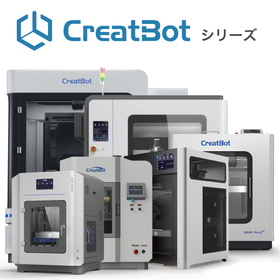
FDM method 3D printer "CreatBot" series

A 3D printer with ideal specifications required for stable modeling. It achieves reliable modeling with comprehensive standard equipment. *Demonstration available.

The CreatBot series includes six models: the "D1000 HS" and "D600 Pro2 HS," which have large build areas, and the "F430," "PEEK-250," "PEEK-300," and "F160-PEEK," which can use special materials and super engineering plastics. You can choose the optimal 3D printer according to your purpose and needs. [Features] ■ Equipped with a high-temperature nozzle that can handle up to 420℃ With dual nozzles of 420℃ and 260℃, it is possible to combine prints. (PEEK-300 can reach up to 480℃) ■ Table & chamber heater to manage internal temperature By thoroughly controlling the internal temperature, it maintains a uniform temperature throughout the entire model. It can also prevent the effects of changes in indoor temperature, which are easily influenced. ■ Auto-leveling function that keeps the distance between the table and nozzle constant By maintaining a constant distance between the nozzle and the build table, it enables uniform layering and achieves stable printing. You can feel secure even with large prints that take a long time. *The features vary by model. *For more details, please refer to the PDF data available via the download button below.

  • 3D Printer
  • 3D Printer

Added to bookmarks

Bookmarks list

Bookmark has been removed

Bookmarks list

You can't add any more bookmarks

By registering as a member, you can increase the number of bookmarks you can save and organize them with labels.

Free membership registration

I tried making a wrist rest with a 3D scanner and printer!

I tried making a wrist rest with a 3D scanner and 3D printer!

"Mitarepo" is a series based on the concept of "I tried doing this!" that introduces what can be done using various products. From the wide range of product categories handled by System Create, we deliver useful information each time. The theme of Vol. 13 is "I tried making a wrist rest with a 3D scanner and 3D printer!" This time, we used an affordable 3D scanner and 3D printer to create a wrist rest that fits perfectly on the wrist for PC work. We 3D scanned our wrist to digitize it, modeled the wrist rest according to that shape, and then 3D printed it. By utilizing 3D data to create objects for the "human body," which has significantly varying characteristics from person to person, we are examining how "perfectly" such items can be made. "What can 3D data be used for?" "How accurately can we replicate the human body?" We will explain the "process and effectiveness" of utilizing 3D data, along with comments from technical staff and the actual models created! *You can download the materials from the button below.

  • 3D measuring device
  • 3D Printer
  • 3D CAD
  • 3D Printer

Added to bookmarks

Bookmarks list

Bookmark has been removed

Bookmarks list

You can't add any more bookmarks

By registering as a member, you can increase the number of bookmarks you can save and organize them with labels.

Free membership registration

Mita Repo: How much high temperature can heat-resistant materials for 3D printers withstand?

【Mitarepo】How high a temperature can 3D printer materials withstand? We tested it with the 'Form 3'!

"Mitarepo" is a series that introduces what can be done using various products with the concept of "I tried doing this!" We deliver useful information each time from the wide range of product categories handled by System Create. The theme of Vol. 21 is "How high of a temperature can heat-resistant materials for 3D printers withstand?" This time, we used the heat-resistant material HTM from the light-curing 3D printer "Form 3" to create a plate and tested how much high temperature it can endure. The materials will examine differences in deformation due to thickness, how soft it becomes after being heated for a certain period, and whether deformation occurs when actually bent. "Even though it's called heat-resistant, isn't the temperature not that high since it's a 3D printer material?" "The load deflection temperature in the material property table makes it hard to understand the actual heat resistance!" We will explain the "usable temperature" concerning heat-resistant model production, along with photos of the work process and results, as well as comments from the technical staff! *You can download the materials from the button below.

  • 3D Printer
  • Resin processing machine
  • plastic
  • 3D Printer

Added to bookmarks

Bookmarks list

Bookmark has been removed

Bookmarks list

You can't add any more bookmarks

By registering as a member, you can increase the number of bookmarks you can save and organize them with labels.

Free membership registration

I tried investigating Form3 high-speed material draft resin!

【Mitarepo】Form 3 / Dramatic reduction in modeling time! We thoroughly investigated whether it really becomes one-third!

"Mitarepo" is a series that introduces what can be done using various products with the concept of "I tried doing this!" We will deliver useful information each time from the wide range of product genres handled by System Create. The theme of Vol. 22 is "Thorough Investigation of the High-Speed Draft Resin for Form 3!" This time, we used the high-speed draft resin capable of rapid printing with the light-curing 3D printer "Form 3" to investigate how much time can actually be saved. We printed both the high-speed draft resin (layer pitch 200/100μm) and the standard resin (gray/layer pitch 100μm) and compared the required printing times. We will examine and explain the two features that enable high-speed printing: "large layer pitch" and "short curing time." "How fast can high-speed materials be printed?" "Why is it faster than other materials?" We will provide explanations along with actual model images of the draft resin and verification data on printing times. *You can download the materials from the button below.

  • 3D Printer
  • plastic
  • Prototype Services
  • 3D Printer

Added to bookmarks

Bookmarks list

Bookmark has been removed

Bookmarks list

You can't add any more bookmarks

By registering as a member, you can increase the number of bookmarks you can save and organize them with labels.

Free membership registration

Powder Sintering Method 3D Printer 'Fuse 1+ 30W'

A highly versatile SLS (Selective Laser Sintering) system that balances ease of use and quality. Anyone can achieve high-quality modeling. *Demonstrations available.

The "Fuse 1+ 30W" is a powder sintering (SLS) 3D printer from Formlabs (powder 3D printer). It condenses a technology that was mainly high-end and expensive into a compact size, achieving both ease of use and quality. [Features] ■ Packaged Forming System The packaged forming system, enabled by the collaborative operation of the Fuse 1+ 30W and Fuse Sift, allows for efficient and clean operation. ■ Easy Operation for Anyone By loading data into the included software "PreForm," you can simply select the material and determine the model's layout to prepare for printing. ■ New Design Material That Does Not Require Nitrogen The specially designed powder material achieves high quality while maintaining material properties without the need for nitrogen. ■ No Support Needed, Reducing Costs and Time Un-sintered powder supports the model, eliminating the need for support material that would otherwise have to be discarded. ■ An Ecosystem with Virtually Zero Waste By mixing approximately 30% of new powder with un-sintered powder, it can be used as recycled powder. *Please view the PDF data from the download button below.

  • fuse1_detail.jpg
  • fuse1_sagyo1.jpg
  • fuse1_sagyo2.jpg
  • fuse1_sagyo3.jpg
  • fuse1_sagyo4.jpg
  • fuse1_sagyo5.jpg
  • fuse1_sagyo6.jpg
  • 3D Printer
  • 3D Printer

Added to bookmarks

Bookmarks list

Bookmark has been removed

Bookmarks list

You can't add any more bookmarks

By registering as a member, you can increase the number of bookmarks you can save and organize them with labels.

Free membership registration

How much can we reduce the weight just by changing the materials?

[Mitarepo] Challenging lightweight 3D printing! We tested how much we could reduce weight just by changing the materials!

"Mitarepo" is a series that introduces what can be done using various products with the concept of "I tried doing this!" From the wide range of product genres handled by System Create, we deliver useful information each time. The theme of Vol. 37 is "How much can we reduce weight just by changing materials?" Various types of materials for FDM 3D printers have started to be sold and utilized. Our company also handles a number of materials, but at one point, while going through the TDS, I noticed the "specific gravity" section and suddenly thought, "Wouldn't the weight change if we change the material for the same model?" In this document, we created the same flat model using PLA, which is commonly used in FDM 3D printing, and carbon fiber reinforced nylon material PA12-CF, which has a lower specific gravity than PLA according to the TDS. *You can download the document from the button below.

  • 3D Printer
  • plastic
  • Other polymer materials
  • 3D Printer

Added to bookmarks

Bookmarks list

Bookmark has been removed

Bookmarks list

You can't add any more bookmarks

By registering as a member, you can increase the number of bookmarks you can save and organize them with labels.

Free membership registration

I tried creating a new material with Fuse 1 +30W!

[Mita Repo] Tried 3D printing the new powdered material 'Nylon 11CF' blended with carbon fiber using Fuse 1+ 30W! | System Create

"Mitarepo" is a series that introduces what can be done using various products with the concept of "I tried doing this!" From the wide range of product genres handled by System Create, we deliver useful information each time. In Vol. 54, we created test pieces using the new material "Nylon 11CF" for the SLS 3D printer "Fuse 1 +30W" and examined its dimensional reproducibility. Carbon fiber reinforced resin, which achieves excellent strength and heat resistance while being lightweight, is utilized in various applications across industries and is also expanding in the 3D printing industry. In this context, Formlabs announced the carbon fiber reinforced material "Nylon 11CF" as a new material for the SLS 3D printer "Fuse 1 +30W." Therefore, we quickly created test pieces used for inspection upon arrival. Are there differences compared to other materials? How accurately can dimensions be reproduced? We explain questions and points of interest regarding Nylon 11CF, along with images and measurement results. *You can download the materials from the button below.

  • 3D Printer
  • plastic
  • Composite Materials
  • 3D Printer

Added to bookmarks

Bookmarks list

Bookmark has been removed

Bookmarks list

You can't add any more bookmarks

By registering as a member, you can increase the number of bookmarks you can save and organize them with labels.

Free membership registration

Mitarepo [64] Tough 2000 Checking the tightening torque of the resin!

【Mitarepo】How much torque can it withstand with the work created in Form 3+!? I tried tightening it with a Helicoil!

"Mitarepo" is a series that introduces what can be done using various products with the concept of "I tried doing this!" We deliver useful information each time from the wide range of product genres handled by System Create. In Vol. 64, we used a type of material from the Form 3+, the Tough 2000 resin, to incorporate a helicoil and test its tightening. The Form 3+ is well-received because it allows users to choose materials from a diverse lineup according to their applications. This time, we are focusing on "Tough 2000 resin," which has properties similar to ABS and excels in strength and impact resistance. Common inquiries regarding this material include: "Can it be tapped?" "Can a helicoil be incorporated?" These are the two main questions. Therefore, this time we performed tapping on a workpiece made from Tough 2000 resin to verify how much tightening torque it can withstand. In the documentation, we created three types of female threads, tightened the screws, and explained the torque measurements with numerical data and images. *You can download the materials from the button below.

  • 3D Printer
  • plastic
  • Other polymer materials
  • 3D Printer

Added to bookmarks

Bookmarks list

Bookmark has been removed

Bookmarks list

You can't add any more bookmarks

By registering as a member, you can increase the number of bookmarks you can save and organize them with labels.

Free membership registration

I soaked the Mita Repo [67] Rigid 10K in a chemical solution and examined the changes!

[Mitarepo] Can the model withstand chemicals? We immersed the Form 3+ rigid 10K in chemicals to investigate the changes! | System Create

"Mitarepo" is a series based on the concept of "I tried doing this!" where we introduce what can be done using various products. From the wide range of product categories handled by System Create, we deliver useful information each time. In Vol. 67, we investigated what changes occur when one of the materials for the Form 3+, "Rigid 10K Resin," is immersed in chemicals! The "Form 3+" has received positive feedback for allowing users to select materials according to their applications from a rich lineup. The "Rigid 10K Resin" featured this time is noted for having the highest rigidity among the Form 3+ resins, but it is also claimed to have excellent chemical resistance. However, there is little information related to chemical resistance for 3D printer models, leading to an increase in inquiries such as, "Will it dissolve or crack?" and "Will this chemical have any effect?" In the materials, we prepared three types of chemicals and immersed test pieces for 24 hours to explain what effects they experience, along with numerical data and images showing the changes. *You can download the materials from the button below.

  • 3D Printer
  • plastic
  • Chemicals
  • 3D Printer

Added to bookmarks

Bookmarks list

Bookmark has been removed

Bookmarks list

You can't add any more bookmarks

By registering as a member, you can increase the number of bookmarks you can save and organize them with labels.

Free membership registration

I tried remote control and continuous modeling with Mita Repo [71] Form Auto!

【Mitarepo】Remote control of Form 3+!! Tried continuous molding with "Form Auto"!

"Mitarepo" is a series that introduces what can be done using various products with the concept of "I tried doing this!" We deliver useful information each time from the wide range of product categories handled by System Create. In Vol. 71, we used the newly launched "Form Auto" expansion unit for the Form 3/Form 3+ from Formlabs to remotely print two models in succession. In offices, the installation space for 3D printers tends to be limited, but when you are in a different location, preparation, post-processing, and moving or waiting for the next print can be necessary. "Form Auto" automates the manual tasks associated with printing on the Form 3+, allowing for continuous printing, monitoring of operational status, and job management even when you are not nearby! "Can I check the printing status from anywhere?" "Can I stop the print or change the job order remotely?" We will explain the flow of remote operation and the state of the models in the bucket after the continuous printing is completed, along with actual images and operation screens. You can download the materials from the button below.

  • 3D Printer
  • plastic
  • Other CAD
  • 3D Printer

Added to bookmarks

Bookmarks list

Bookmark has been removed

Bookmarks list

You can't add any more bookmarks

By registering as a member, you can increase the number of bookmarks you can save and organize them with labels.

Free membership registration

Large FDM 3D Printer "Modix BIG Series"

This is an FDM (Fused Deposition Modeling) 3D printer assembly kit that allows anyone to easily start large-scale modeling. *Demonstrations available.

The "Modix BIG Series" is an FDM (Fused Deposition Modeling) 3D printer assembly kit that allows anyone to easily start large-scale printing. It is equipped with various features, including an automatic correction function to ensure stable printing. [Features] ■ Automatic leveling correction The level of the table significantly affects the quality of the model, making leveling an important process. The "Modix BIG Series" can be set up completely automatically, allowing for proper preparation before printing. ■ Easy gap adjustment even for beginners Manual adjustments are no longer necessary. It eliminates discrepancies in settings caused by different operators, enabling anyone to easily and accurately adjust the gap. ■ Expanded operational range with dual extruders By adopting an IDEX (Independent Dual Extruder) print head, the two print heads operate independently. This allows for printing with two different materials simultaneously. Additionally, in the event of a material run-out, the print head can automatically switch to continue printing without interruption. *For more details, please request a catalog or view the PDF data from the download button below.

  • 3D Printer
  • 3D Printer

Added to bookmarks

Bookmarks list

Bookmark has been removed

Bookmarks list

You can't add any more bookmarks

By registering as a member, you can increase the number of bookmarks you can save and organize them with labels.

Free membership registration

[Marsgo] Automatic nozzle gap adjustment is complete! Modix

Automatic nozzle gap adjustment is completed!! We will explain the amazing features of the 3D printer assembly kit "Modix BIG Series"!

Marsugo is a document that picks up the functions and features of various products and introduces the "amazing!" aspects. This time, we will introduce the "Modix BIG Series," a 3D printer assembly kit capable of large-scale modeling using the Fused Deposition Modeling (FDM) method. Recently, FDM 3D printers have been utilized in a wide range of fields, and the sizes and shapes of the models being created have become increasingly diverse. One of the key points for successfully creating such various models is the adjustment of the gap between the nozzle and the table. Gap adjustment is often done by relying on human tactile sensation using a gap gauge, making it a challenging task to maintain uniform quality. However, with the large-format 3D printer "Modix," this can be done easily! By simply installing a dedicated tool, the system automatically measures the values, ensuring optimal gap adjustment regardless of who performs it. The document provides an introduction to the method of gap adjustment and its mechanism, so please take a look. *You can download the document using the button below.

  • 3D Printer
  • plastic
  • Engineering Plastics
  • 3D Printer

Added to bookmarks

Bookmarks list

Bookmark has been removed

Bookmarks list

You can't add any more bookmarks

By registering as a member, you can increase the number of bookmarks you can save and organize them with labels.

Free membership registration

I checked the shaping and finishing with a high-flow nozzle!

[Mitarepo] I tried using a high-flow nozzle for high-speed 3D printing! | System Create

"Mitarepo" is a series that introduces what can be done using various products with the concept of "I tried doing this!" We deliver useful information each time from the wide range of product genres handled by System Create. In Vol. 80, we actually created a large model using one of the abundant option parts of the large 3D printer "Modix" series, the Super Volcano Nozzle. The modular large FDM 3D printer "Modix" series is equipped with option parts that can meet various user demands. One of these, the high-flow hot end "Super Volcano Nozzle," has a large melting area, allowing for high-speed printing. In the previous Mitarepo "Super Volcano Nozzle Speed Test," we exceeded the typical speed of 60mm/s and were able to print without issues at 100mm/s. This time, we explain whether it is possible to create a three-dimensional sample at a feed rate of 100mm/s, along with images and comments on the results. You can download the materials from the button below.

  • 3D Printer
  • plastic
  • Prototype Services
  • 3D Printer

Added to bookmarks

Bookmarks list

Bookmark has been removed

Bookmarks list

You can't add any more bookmarks

By registering as a member, you can increase the number of bookmarks you can save and organize them with labels.

Free membership registration

Modular 3D printer "Lynxter S600D"

The "Lynxter S600D" is a modular 3D printer that achieves three functions in one device.

[Features] ■ Modular Print Heads With a total of four interchangeable print heads—one for filament, two for liquids, and one for paste—this system can accommodate a wide range of materials. ■ FDM Head Compatible with a Wide Variety of Materials It can handle everything from engineering plastics like PC and PETG to specialized materials such as TPU and carbon composites. ■ Abundant Liquid Materials It can utilize two-component pure silicone materials, one-component curing materials, and even viscous ceramic and clay paste materials. ■ Vertical Housing with Delta Configuration The delta-style housing enables stable and high-speed printing, equipped with parts that excel in rigidity, ensuring stable precision even for large-scale prints. *For more details, please request a catalog or view the PDF data from the download button below.

  • 3D Printer
  • Composite Materials
  • 3D Printer

Added to bookmarks

Bookmarks list

Bookmark has been removed

Bookmarks list

You can't add any more bookmarks

By registering as a member, you can increase the number of bookmarks you can save and organize them with labels.

Free membership registration

I tried investigating the strength of 3 types of materials × SETFIL!

[Mitarepo] 3 types of materials × Carbon 3D printing! We investigated how much the strength changes with different materials! | System Create

"Mitarepo" is a series that introduces what can be done using various products with the concept of "I tried doing this!" From the wide range of product genres handled by System Create, we deliver useful information each time. In Vol. 101, we used the carbon composite 3D printer "Composer" to create strength test specimens made from three types of materials: "ABS," "ASA," and "PLA-CF" combined with carbon. We investigated the changes in strength due to the differences in materials. In Mitarepo Vol. 93, we introduced the results of strength tests on models created by blending long fiber carbon material "SETFIL" with PETG. After publication, we received requests from customers who viewed the materials, saying, "I want to see the verification results with other materials!" So, we created test specimens using three types of materials: "ABS," "ASA," and "PLA-CF." We conducted "tensile tests," "bending tests," and "Charpy impact tests" to examine the changes in strength due to the differences in materials! In this document, we will present these test results categorized by material all at once! *You can download the materials using the button below.

  • 3D measuring device
  • 3D CAD
  • Analytical Equipment and Devices
  • 3D Printer

Added to bookmarks

Bookmarks list

Bookmark has been removed

Bookmarks list

You can't add any more bookmarks

By registering as a member, you can increase the number of bookmarks you can save and organize them with labels.

Free membership registration

Mitarepo [102] Verification of how far powder removal and polishing can be achieved through automatic processing.

[Mitarepo] 3 types of materials × Carbon 3D printing! I investigated how much the strength changes with different materials! | System Create

"Mitarepo" is a series that introduces what can be done using various products with the concept of "I tried doing this!" From the wide range of product genres handled by System Create, we deliver useful information each time. The new add-on module "Polishing System" for the powder-based 3D printer "Fuse 1+ 30W" automates post-processing with "Fuse Blast"! Not only does it automatically remove powder through blasting, but it also allows for polishing using specialized polishing media and solvents. It is said that polishing results in a semi-gloss finish for the models! In this edition, we created two types of hollow-shaped models using the powder-based 3D printer "Fuse 1+ 30W." After that, we incorporated the Polishing System into the "Fuse Blast," and investigated how well material removal and polishing could be achieved. "Can the powder be removed cleanly automatically?" "What about the surface?" We focus on these points of interest in the work process and quality, along with images. *You can download the materials from the button below.

  • 3D Printer
  • Composite Materials
  • 3D Printer

Added to bookmarks

Bookmarks list

Bookmark has been removed

Bookmarks list

You can't add any more bookmarks

By registering as a member, you can increase the number of bookmarks you can save and organize them with labels.

Free membership registration

Problem-Solving Materials Productivity Improvement Edition 10 | Thin-Walled Models for 3D Printers

Achieving the creation of a thin meat model!? What is the method for creating shapes that were difficult to produce with a 3D printer? Information on useful materials.

This document is a series that proposes solutions to various challenges faced in production environments, from identifying issues to finding resolutions. We will introduce the challenges and solutions related to creating thin-walled models using 3D printers. [Document Overview] 3D printers used in research and development, with an increasing lineup ranging from low-cost to high-end models, have become more widespread. There are various printing methods such as FDM and SLA, which are operated according to their applications. However, regardless of the printing method, creating "thin-walled models" is considered difficult. You may encounter issues like, "The printing itself is challenging..." or "The quality is not what I expected..." Therefore, this time, we will introduce a method to easily create thin-walled models by utilizing two products: a 3D printer and a vacuum forming machine. While unraveling the factors that make thin-walled models difficult, we will explain how combining multiple products can achieve thin-walled models. *You can download the document using the button below.

  • 3D Printer
  • 3D Printer

Added to bookmarks

Bookmarks list

Bookmark has been removed

Bookmarks list

You can't add any more bookmarks

By registering as a member, you can increase the number of bookmarks you can save and organize them with labels.

Free membership registration