We have compiled a list of manufacturers, distributors, product information, reference prices, and rankings for Printer.
ipros is IPROS GMS IPROS One of the largest technical database sites in Japan that collects information on.

Printer Product List and Ranking from 630 Manufacturers, Suppliers and Companies | IPROS GMS

Last Updated: Aggregation Period:May 20, 2026~Jun 16, 2026
This ranking is based on the number of page views on our site.

Printer Manufacturer, Suppliers and Company Rankings

Last Updated: Aggregation Period:May 20, 2026~Jun 16, 2026
This ranking is based on the number of page views on our site.

  1. null/null
  2. null/null
  3. 沖電気工業 産業営業本部 産業営業統括室 Tokyo//Information and Communications
  4. 4 システムクリエイト Osaka//Industrial Machinery
  5. 5 マックス Tokyo//Other manufacturing

Printer Product ranking

Last Updated: Aggregation Period:May 20, 2026~Jun 16, 2026
This ranking is based on the number of page views on our site.

  1. Direct Address Printer DA1500+
  2. Raw Material Date Management Label - Small Label Printer 新盛インダストリーズ
  3. Efforts of Light Stereolithography 3D Printers, Resin, and AMX AMX
  4. 4 Industrial Inkjet Printer MK-G Series
  5. 5 3D Printer for Manufacturing Sites 'GX-1000 Series'

Printer Product List

1591~1620 item / All 2906 items

Displayed results

Ultra-compact thermal printer CT-S280

High-performance design with high-speed printing even in a mini size.

The ultra-compact thermal printer CT-S280 features a line thermal head system, providing quiet and high-quality printing. With a paper drop-in mechanism, loading paper is easy. Paper jam release and head cleaning are straightforward, and the adoption of universal design further enhances usability. Additionally, the interface supports bidirectional parallel (IEEE1284/Centronics compliant), serial (RS-232C), and USB, allowing for smooth data transfer with a 4k byte input buffer. For more details, please contact us or download the catalog.

Added to bookmarks

Bookmarks list

Bookmark has been removed

Bookmarks list

You can't add any more bookmarks

By registering as a member, you can increase the number of bookmarks you can save and organize them with labels.

Free membership registration

Compact Label Printer CL-S630/620/530/520

Adoption of a top cover that opens up and down! A compact label printer with a space-saving design that doesn't take up much room on your desk.

The compact label printer CL-S630/620/530/520 is a standard model of barcode/label printer that excels in cost performance. With the adoption of an upper opening top cover, it features a space-saving design that does not take up much room on your desk, and high-speed, high-quality printing is made possible by the 32-bit RISC CPU control. Additionally, the full open mechanism allows for easy paper loading, maintenance, and cleaning. For more details, please contact us or download the catalog.

  • Commercial printers
  • Printer

Added to bookmarks

Bookmarks list

Bookmark has been removed

Bookmarks list

You can't add any more bookmarks

By registering as a member, you can increase the number of bookmarks you can save and organize them with labels.

Free membership registration

Small Impact Dot Printer CBM-910 Type II

Compact (2-inch: 58mm paper width) impact dot printer

The compact impact dot printer CBM-910 Type II is a small (2-inch: 58mm paper width) impact dot printer that is palm-sized, making it easy to find a suitable installation location. The printer cover can be easily removed and attached, allowing for simple replacement of paper and the dedicated ribbon cartridge. Additionally, it has a built-in paper near-end sensor that alerts you with a lamp when the paper is running low and stops printing. For more details, please contact us or download the catalog.

  • Commercial printers
  • Printer

Added to bookmarks

Bookmarks list

Bookmark has been removed

Bookmarks list

You can't add any more bookmarks

By registering as a member, you can increase the number of bookmarks you can save and organize them with labels.

Free membership registration

Small Impact Dot Printer CBM-920 Type II

A dot printer that supports panel integration, making it easy to install in devices and on walls!

The compact impact dot printer CBM-920 Type II is compatible with panel integration, making it easy to install in equipment and on walls. The front panel can be opened and closed, allowing for easy replacement of the paper and ribbon cassette. Additionally, it features an auto-loading function that automatically pulls in a set amount of paper simply by placing it in the machine's insertion slot. For more details, please contact us or download the catalog.

  • Commercial printers
  • Printer

Added to bookmarks

Bookmarks list

Bookmark has been removed

Bookmarks list

You can't add any more bookmarks

By registering as a member, you can increase the number of bookmarks you can save and organize them with labels.

Free membership registration

Barcode Label Printer CL-S400DT

A label printer that perfectly fits the needs of transportation, retail, distribution, and logistics! It is a label printer that can also print on folded paper.

The Line Thermal Label Printer CL-S400DT is an energy-efficient and eco-friendly model that meets Energy Star standards. It features a built-in power supply while being compact and space-saving, allowing for the preservation of workspace. The adoption of an LCD display panel significantly improves visibility and operability. With the implementation of a 'full open mechanism' where the head and control panel (printer cover) open completely, it makes setting and positioning the paper easier, as well as cleaning and maintenance to prevent common issues such as paper jams, head contamination, and paper dust blockages during high-volume printing. For more details, please contact us or download the catalog.

  • Commercial printers
  • Printer

Added to bookmarks

Bookmarks list

Bookmark has been removed

Bookmarks list

You can't add any more bookmarks

By registering as a member, you can increase the number of bookmarks you can save and organize them with labels.

Free membership registration

Barcode Label Printer CL-S700

Achieve space-saving with front operations! This is a robust and authentic label printer.

The Line Thermal Label Printer CL-S700 is equipped with an ARC mechanism that maintains a constant ribbon tension unaffected by changes in ribbon diameter, improving print positioning and reducing ribbon slippage and wrinkling. It achieves high-speed printing of up to 250mm/second. It comes standard with serial, parallel, and USB interfaces, and built-in LAN and wireless LAN can also be added as options. For more details, please contact us or download the catalog.

  • Commercial printers
  • Printer

Added to bookmarks

Bookmarks list

Bookmark has been removed

Bookmarks list

You can't add any more bookmarks

By registering as a member, you can increase the number of bookmarks you can save and organize them with labels.

Free membership registration

High-speed printing is possible! Line thermal printer 'CT-S251'

Direct printing from smart devices and tablet POS is OK! Stylish and compact!

Revamping the design of conventional business printers! A 58mm dedicated receipt printer suitable for the Japanese market has arrived!! A line thermal printer that can print directly from smart devices and tablet POS. It has a high design quality and excellent compatibility with tablet PCs and smartphones. As a dedicated model for 58mm paper width, its compact size makes it perfect for cash register areas where space-saving is required. Additionally, being made in Japan and backed by a 2-year warranty ensures peace of mind in use. 【Features】 ■ Capable of high-speed printing up to 300mm/second ■ Equipped with paper save mode + can print JIS Level 3 and 4 kanji ■ Standard auto-cutter included ■ Various interfaces available (Serial/USB/Ethernet/Bluetooth/Wi-Fi, etc.) ■ Supports various barcode types

  • Printing Machinery
  • Commercial printers
  • Printer
  • Printer

Added to bookmarks

Bookmarks list

Bookmark has been removed

Bookmarks list

You can't add any more bookmarks

By registering as a member, you can increase the number of bookmarks you can save and organize them with labels.

Free membership registration

Budget Line Thermal Printer CT-S401

A model that pursues ease of use and cost performance, ideal for kitchen printers.

Achieves high cost performance with performance that is not inferior to the existing CT-S series, suitable for a wide range of applications from restaurant kitchens to retail store receipts and coupons.

  • Commercial printers
  • Printer

Added to bookmarks

Bookmarks list

Bookmark has been removed

Bookmarks list

You can't add any more bookmarks

By registering as a member, you can increase the number of bookmarks you can save and organize them with labels.

Free membership registration

CT-S255

Height and width - industry smallest

Compact and stylish New feature: multilingual printing Paper-saving function included

  • Commercial printers
  • Printer

Added to bookmarks

Bookmarks list

Bookmark has been removed

Bookmarks list

You can't add any more bookmarks

By registering as a member, you can increase the number of bookmarks you can save and organize them with labels.

Free membership registration

Receipt Printer CT-E601

Achieves high-speed printing of up to 350mm/second. Uses antibacterial materials for the plastic exterior, focusing on hygiene with a top discharge model that can be operated with one hand.

○Antibacterial Treatment Uses a material infused with silver ions in the plastic exterior. It can suppress the growth of attached bacteria. ○Chemical Resistance Can be wiped with disinfectants such as alcohol. ○One-Motion Button By adopting a handle-type opening and closing lever, the cover can be operated with one hand, allowing for smooth paper replacement. ○Anti-Curl Function Reduces curling of the paper when printing receipts. ○Compact Design Can be installed in narrow spaces, with a height and width (108mm, 125mm) among the smallest in the industry. ○Paper Jam Sensor Detects distortion of the paper at the printing exit. It suppresses paper jams and prevents paper breakage and cutter lock. ○Embedded Compatibility Can be integrated into KIOSK terminals using the included wall-mount kit.

  • Commercial printers
  • Printer

Added to bookmarks

Bookmarks list

Bookmark has been removed

Bookmarks list

You can't add any more bookmarks

By registering as a member, you can increase the number of bookmarks you can save and organize them with labels.

Free membership registration

Receipt printer CT-S257

The fastest printing model at 350mm/second, achieving front access with the industry's smallest class size.

Front Access Paper exchange, power ON/OFF, and various operations can be performed from the front. Ideal for installation under shelves. Supports Bluetooth for printing from smartphones and tablets By supporting Bluetooth, direct printing from smartphones and tablets is possible. Supports XML/Web application printing Printing is possible by sending XML data directly to the printer without installing a device driver (standard for LAN models). Supports multilingual printing Simultaneous printing in multiple languages is possible with printer fonts. <Supported languages: Japanese, Simplified Chinese, Traditional Chinese, Korean> Supports USB power supply Standard equipped with a dedicated USB power supply port. Can supply power to tablets, etc. (up to 2.1A). Supports multi-tone printing Supports multi-tone (16 tones) printing, allowing for more realistic printing of images and photos. Apple MFi certified Lightning compatible interface Connects to iOS devices such as iPads and iPhones via cable. An interface is provided for charging, printing, and peripheral control. (Factory option)

  • Commercial printers
  • Printer

Added to bookmarks

Bookmarks list

Bookmark has been removed

Bookmarks list

You can't add any more bookmarks

By registering as a member, you can increase the number of bookmarks you can save and organize them with labels.

Free membership registration

3D printer slicing software 'Simplify3D'

This is slicing software for melt-deposition 3D printers. With high-speed calculations and high-performance path functions, you can quickly start high-quality modeling. *Demo available.

"Simplify3D" is a cost-effective software that incorporates many features necessary for Fused Deposition Modeling (FDM) 3D printers. You can start 3D printing in just a few minutes, from import to operation, modification, slicing, and preview. [Features] ■ Achieves high-quality modeling High-performance path functions enable precise modeling. The support surfaces securely hold the model while being easy to remove, and the removed surfaces have a smooth finish, reducing the need for post-processing. ■ Reduces wasted time in conversion with high-speed calculations The slicing calculation speed is top-level, allowing for the creation of high-quality slice data in just a few seconds, even for what typically takes several minutes. ■ Usable with any FDM 3D printer You can freely set the build area and nozzle temperature, so it is not limited to specific models as long as it is an FDM 3D printer. If you are not satisfied with the build quality from the included software, please consider this option. *For more details, please request a catalog or view the PDF data from the download button below.

  • 3D Printer
  • Modeler
  • simulator
  • Printer

Added to bookmarks

Bookmarks list

Bookmark has been removed

Bookmarks list

You can't add any more bookmarks

By registering as a member, you can increase the number of bookmarks you can save and organize them with labels.

Free membership registration

In-house Implementation Case Study Book for [Cutting, Shaping, UV Printing]

A booklet of success stories from 10 companies that achieved in-house production of prototype creation, jig manufacturing, and decorative printing on products.

This is a booklet of success stories featuring 10 companies that have implemented the "MDX Series," "SRM-20," "ARM-10," and "LEF Series," achieving in-house production of cutting, shaping, and UV printing.

  • Other machine tools
  • Other processing machines
  • Other CAD related software
  • Printer

Added to bookmarks

Bookmarks list

Bookmark has been removed

Bookmarks list

You can't add any more bookmarks

By registering as a member, you can increase the number of bookmarks you can save and organize them with labels.

Free membership registration

Problem-Solving Materials: Utilizing 3D Data Edition 1-2-1 | Pre-Deformation of Print Data

What are the tips for successfully achieving "pre-deformation" to eliminate distortion in metal 3D printing? A resource for discovering and solving challenges in the production field.

This document is a series that proposes solutions to various challenges faced in production sites, from identifying issues to finding solutions. In the "3D Data Utilization Edition," we will introduce various solutions to manufacturing challenges through the use of 3D data. This document specifically focuses on the theme of "pre-deformation of print data," detailing methods to eliminate deformation in metal 3D printing. [Document Overview] Metal 3D printing is still a relatively new manufacturing technology compared to traditional manufacturing methods, and as such, the know-how has not yet been established. One of the challenges that frequently arises in metal 3D printing is "model deformation," and a method currently gaining attention for addressing this issue is "pre-deformation." Pre-deformation involves anticipating model deformation and designing the model based on analysis results to be "pre-deformed." As the use of metal 3D printers expands, this method is expected to gain even more attention in the future. This document explains the concept of introducing pre-deformation and provides easy-to-implement methods for anyone. *You can download the document using the button below.

  • simulator
  • Stress Analysis
  • 3D Printer
  • Printer

Added to bookmarks

Bookmarks list

Bookmark has been removed

Bookmarks list

You can't add any more bookmarks

By registering as a member, you can increase the number of bookmarks you can save and organize them with labels.

Free membership registration

Problem-Solving Materials: Productivity Improvement Edition 5 | Challenges and Solutions for Small-Batch, Multi-Variety Processing

What are the key points and effective methods to improve productivity in low-volume, multi-variety production? A resource for identifying and solving issues in the production site.

This document is a series that proposes solutions to various challenges faced in production sites, from identifying issues to finding resolutions. In the "Productivity Improvement Edition," we offer solutions aimed at enhancing productivity by streamlining various manufacturing processes and reducing man-hours and costs. In this document, we will introduce key points and effective methods for improving productivity, focusing on the theme of "Enhancing Productivity in Low-Volume, High-Variety Production." [Document Overview] In order to enhance corporate value and differentiate from competitors, it is becoming increasingly difficult to simply implement CAD/CAM and aim for quality improvement. More customers are responding to customer needs by accommodating low-volume production, but many are facing various challenges such as shortening delivery times and reviewing costs. This document summarizes the challenges and factors associated with low-volume processing and presents methods for improving setup processes. *You can download the document using the button below.*

  • Milling machine
  • Other machine tools
  • Milling
  • Printer

Added to bookmarks

Bookmarks list

Bookmark has been removed

Bookmarks list

You can't add any more bookmarks

By registering as a member, you can increase the number of bookmarks you can save and organize them with labels.

Free membership registration

Problem-Solving Materials: Utilizing 3D Data 14 | Lightweighting of 3D Printed Models

Challenges of large-scale 3D printers: How to achieve both lightweight design models and model strength? A resource for identifying and solving issues in production sites.

This document is a series that proposes solutions to various challenges faced in production sites, from identifying issues to finding resolutions. In the "3D Data Utilization Edition," we will introduce various solutions to manufacturing challenges through the use of 3D data. [Document Overview] In recent years, the proliferation of 3D printers has advanced explosively. In particular, FDM (Fused Deposition Modeling) 3D printers have become more affordable and capable of producing larger models, leading to widespread use among many companies. The introduction of large machines has made it possible to produce models that were previously made in parts all at once, thereby reducing labor hours. However, the increase in production time and weight has become a challenge for large-scale printing, and as the size of printed objects increases, it is necessary to adjust the data to achieve a balance between lightweight design and strength. In this document, we will specifically introduce methods to achieve both lightweighting and strength maintenance, which are challenges in large-scale printing. *You can download the document using the button below.*

  • 3D Printer
  • Other consumables
  • plastic
  • Printer

Added to bookmarks

Bookmarks list

Bookmark has been removed

Bookmarks list

You can't add any more bookmarks

By registering as a member, you can increase the number of bookmarks you can save and organize them with labels.

Free membership registration

I tried out the expression of fine details in Form3!

How beautiful can a light curing 3D printer get? We tested its ability to express fine details!

"Mitarepo" is a series based on the concept of "I tried doing this!" where we introduce what can be done using various products. Each time, we deliver useful information from the wide range of product genres handled by System Create. The theme of Vol. 3 is "Trying the expressive power of fine details with Form3 Model Resin!" This time, we tested how beautifully the Form3 dedicated resin "Model Resin," which can reproduce fine details, can create shapes. In the materials, we compared the reproducibility of details and the workability of finishing processes by creating the same data under the same conditions using the widely used "Standard Resin." - Even if it can be beautifully shaped, does the finishing process become even more troublesome? - Does beautiful shaping mean higher costs? We explain these concerns with comments from technical staff and actual screens. *You can download the materials from the button below.

  • Other CAD related software
  • Data conversion software
  • Document and Data Management
  • Printer

Added to bookmarks

Bookmarks list

Bookmark has been removed

Bookmarks list

You can't add any more bookmarks

By registering as a member, you can increase the number of bookmarks you can save and organize them with labels.

Free membership registration

Problem-Solving Materials: Utilizing 3D Data 16 | Strength of FDM Printed Models

How to incorporate "carbon materials" to solve the strength issues of 3D printers? A resource for identifying and solving challenges in the production field.

This document is a series that proposes solutions to various challenges faced in production sites, from identifying issues to finding solutions. In the "3D Data Utilization Edition," we will introduce various solutions to manufacturing challenges through the use of 3D data. [Document Overview] Among 3D printers, FDM (Fused Deposition Modeling) machines are easy to use and implement, and they have become widespread in many production sites. In recent years, elements that were considered weaknesses of FDM, such as the variety of materials and improvements in model quality, have gradually been addressed. However, the challenge posed by FDM technology is the "insufficient strength of printed models." This document compiles the issue of strength deficiency that most FDM 3D printers face and explains the advantages of carbon materials with "continuous fibers." Additionally, we will introduce 3D printers that adopt a unique printing method based on FDM. *You can download the document using the button below.

  • 3D Printer
  • fiber
  • Composite Materials
  • Printer

Added to bookmarks

Bookmarks list

Bookmark has been removed

Bookmarks list

You can't add any more bookmarks

By registering as a member, you can increase the number of bookmarks you can save and organize them with labels.

Free membership registration

I tried creating a small model with a large 3D printer!

[Mitarepo] I tried creating a small model with a large 3D printer!

"Mitarepo" is a series based on the concept of "I tried doing this!" where we introduce what can be done using various products. We deliver useful information each time from the wide range of product categories handled by System Create. The theme of Vol. 10 is "We tried creating small models with a large 3D printer." We used a large FDM-type 3D printer to create small models. While handling large printers, we receive a lot of feedback, and among them, many people ask, "Can I create both large and small items with just one machine? Is it really possible?" Therefore, we will explain the "finish" that you might be curious about when creating small models with a large machine, along with actual images and comments from our technical staff! *You can download the materials from the button below.

  • 3D Printer
  • Prototype Services
  • Processing Jig
  • Printer

Added to bookmarks

Bookmarks list

Bookmark has been removed

Bookmarks list

You can't add any more bookmarks

By registering as a member, you can increase the number of bookmarks you can save and organize them with labels.

Free membership registration

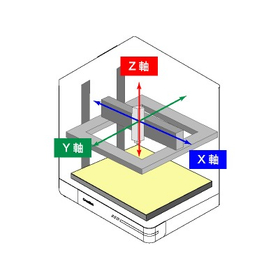
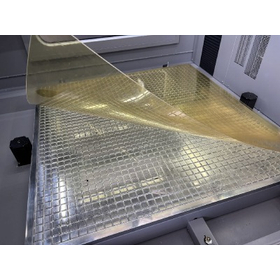
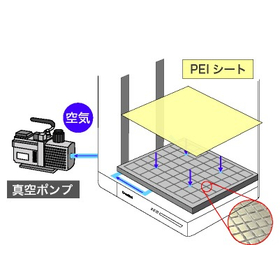
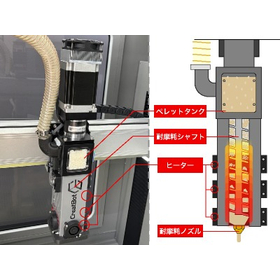
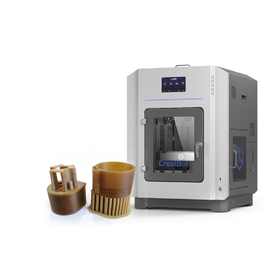
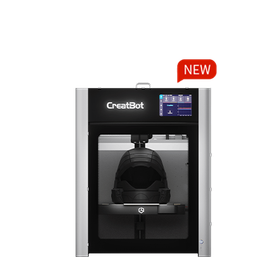
FDM method 3D printer "CreatBot" series

A 3D printer with ideal specifications required for stable modeling. It achieves reliable modeling with comprehensive standard equipment. *Demonstration available.

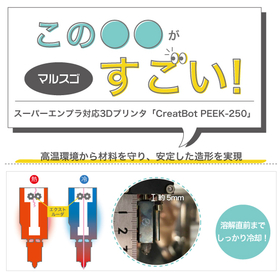
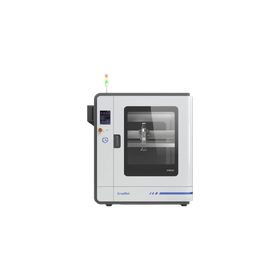
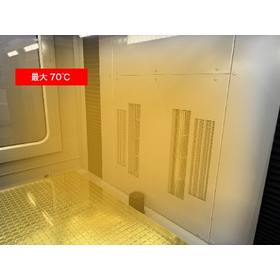
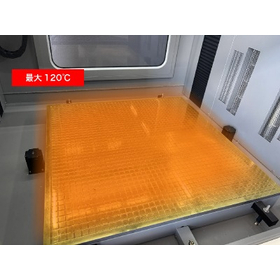
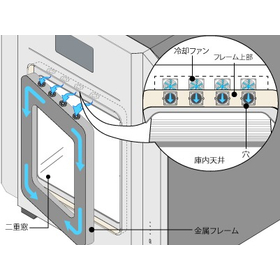
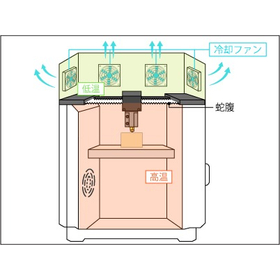
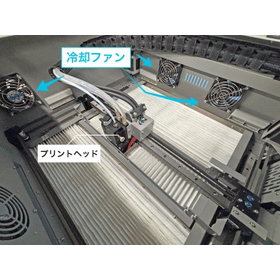
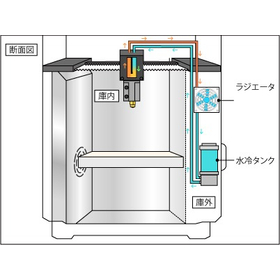
The CreatBot series includes six models: the "D1000 HS" and "D600 Pro2 HS," which have large build areas, and the "F430," "PEEK-250," "PEEK-300," and "F160-PEEK," which can use special materials and super engineering plastics. You can choose the optimal 3D printer according to your purpose and needs. [Features] ■ Equipped with a high-temperature nozzle that can handle up to 420℃ With dual nozzles of 420℃ and 260℃, it is possible to combine prints. (PEEK-300 can reach up to 480℃) ■ Table & chamber heater to manage internal temperature By thoroughly controlling the internal temperature, it maintains a uniform temperature throughout the entire model. It can also prevent the effects of changes in indoor temperature, which are easily influenced. ■ Auto-leveling function that keeps the distance between the table and nozzle constant By maintaining a constant distance between the nozzle and the build table, it enables uniform layering and achieves stable printing. You can feel secure even with large prints that take a long time. *The features vary by model. *For more details, please refer to the PDF data available via the download button below.

Added to bookmarks

Bookmarks list

Bookmark has been removed

Bookmarks list

You can't add any more bookmarks

By registering as a member, you can increase the number of bookmarks you can save and organize them with labels.

Free membership registration

I tried out the cost reduction effects of supportless modeling!

[Mitarepo] Tried the cost reduction effects of support-free powder molding! [Low-cost powder molding 3D printer LISA-PRO]

"Mitarepo" is a series that introduces what can be done using various products with the concept of "I tried doing this!" From the wide range of product categories handled by System Create, we deliver useful information each time. The theme of Vol. 11 is "We examined the operational effects of support-free 3D printing using powder 3D printers!" It has become common knowledge that "support is necessary" for 3D printing. But don't you think that if 3D printing could be done without support, it could reduce costs? This time, we actually performed support-free printing with a powder sintering 3D printer and carried out post-processing, examining the advantages of support-free printing, such as "ease of post-processing," "cost reduction," and "print quality." "After all, doesn't surface treatment take a lot of effort?" "Isn't the cost difference between having support and not having it negligible?" "Will the roughness of the powder compromise quality?" We will explain these concerns regarding "operational effects" along with actual images and comments from our technical staff! *You can download the materials from the button below.

  • 3D Printer
  • Contract manufacturing
  • Prototype Services
  • Printer

Added to bookmarks

Bookmarks list

Bookmark has been removed

Bookmarks list

You can't add any more bookmarks

By registering as a member, you can increase the number of bookmarks you can save and organize them with labels.

Free membership registration

Mita Repo: How much high temperature can heat-resistant materials for 3D printers withstand?

【Mitarepo】How high a temperature can 3D printer materials withstand? We tested it with the 'Form 3'!

"Mitarepo" is a series that introduces what can be done using various products with the concept of "I tried doing this!" We deliver useful information each time from the wide range of product categories handled by System Create. The theme of Vol. 21 is "How high of a temperature can heat-resistant materials for 3D printers withstand?" This time, we used the heat-resistant material HTM from the light-curing 3D printer "Form 3" to create a plate and tested how much high temperature it can endure. The materials will examine differences in deformation due to thickness, how soft it becomes after being heated for a certain period, and whether deformation occurs when actually bent. "Even though it's called heat-resistant, isn't the temperature not that high since it's a 3D printer material?" "The load deflection temperature in the material property table makes it hard to understand the actual heat resistance!" We will explain the "usable temperature" concerning heat-resistant model production, along with photos of the work process and results, as well as comments from the technical staff! *You can download the materials from the button below.

  • 3D Printer
  • Resin processing machine
  • plastic
  • Printer

Added to bookmarks

Bookmarks list

Bookmark has been removed

Bookmarks list

You can't add any more bookmarks

By registering as a member, you can increase the number of bookmarks you can save and organize them with labels.

Free membership registration

I tried investigating Form3 high-speed material draft resin!

【Mitarepo】Form 3 / Dramatic reduction in modeling time! We thoroughly investigated whether it really becomes one-third!

"Mitarepo" is a series that introduces what can be done using various products with the concept of "I tried doing this!" We will deliver useful information each time from the wide range of product genres handled by System Create. The theme of Vol. 22 is "Thorough Investigation of the High-Speed Draft Resin for Form 3!" This time, we used the high-speed draft resin capable of rapid printing with the light-curing 3D printer "Form 3" to investigate how much time can actually be saved. We printed both the high-speed draft resin (layer pitch 200/100μm) and the standard resin (gray/layer pitch 100μm) and compared the required printing times. We will examine and explain the two features that enable high-speed printing: "large layer pitch" and "short curing time." "How fast can high-speed materials be printed?" "Why is it faster than other materials?" We will provide explanations along with actual model images of the draft resin and verification data on printing times. *You can download the materials from the button below.

  • 3D Printer
  • plastic
  • Prototype Services
  • Printer

Added to bookmarks

Bookmarks list

Bookmark has been removed

Bookmarks list

You can't add any more bookmarks

By registering as a member, you can increase the number of bookmarks you can save and organize them with labels.

Free membership registration

Powder Sintering Method 3D Printer 'Fuse 1+ 30W'

A highly versatile SLS (Selective Laser Sintering) system that balances ease of use and quality. Anyone can achieve high-quality modeling. *Demonstrations available.

The "Fuse 1+ 30W" is a powder sintering (SLS) 3D printer from Formlabs (powder 3D printer). It condenses a technology that was mainly high-end and expensive into a compact size, achieving both ease of use and quality. [Features] ■ Packaged Forming System The packaged forming system, enabled by the collaborative operation of the Fuse 1+ 30W and Fuse Sift, allows for efficient and clean operation. ■ Easy Operation for Anyone By loading data into the included software "PreForm," you can simply select the material and determine the model's layout to prepare for printing. ■ New Design Material That Does Not Require Nitrogen The specially designed powder material achieves high quality while maintaining material properties without the need for nitrogen. ■ No Support Needed, Reducing Costs and Time Un-sintered powder supports the model, eliminating the need for support material that would otherwise have to be discarded. ■ An Ecosystem with Virtually Zero Waste By mixing approximately 30% of new powder with un-sintered powder, it can be used as recycled powder. *Please view the PDF data from the download button below.

  • fuse1_detail.jpg
  • fuse1_sagyo1.jpg
  • fuse1_sagyo2.jpg
  • fuse1_sagyo3.jpg
  • fuse1_sagyo4.jpg
  • fuse1_sagyo5.jpg
  • fuse1_sagyo6.jpg
  • 3D Printer
  • Printer

Added to bookmarks

Bookmarks list

Bookmark has been removed

Bookmarks list

You can't add any more bookmarks

By registering as a member, you can increase the number of bookmarks you can save and organize them with labels.

Free membership registration

I tried making a lightweight and strong model with Form 3/3L!

【Mitarepo】Model weight reduction and strength enhancement with Form 3L × Form 3! We tried improving it into a more functional model!

"Mitarepo" is a series that introduces what can be done using various products with the concept of "I tried doing this!" From the wide range of product categories handled by System Create, we deliver useful information each time. The theme of Vol.36 is "We tried enhancing the functionality of the model using a combination of Form 3 and 3L!" In the previously introduced Vol.33, we created a model of a magic hand using Form 3L. However, when we actually assembled the model, we discovered issues such as "the main body is heavy" and "the parts lack strength." Therefore, this time we challenged ourselves to improve functionality through weight reduction and strength enhancement. For the magic hand data, we made two changes: - Main body: Weight reduction through hollowing - Parts: Increased toughness using Tough 2000 resin We printed each using Form 3L and Form 3. "Is it possible to create hollow models with the light curing method?" "What does it look like to combine two models?" We will explain the actual verification process along with comments from our technical staff. *You can download the materials from the button below.

  • 3D Printer
  • 3D CAD
  • plastic
  • Printer

Added to bookmarks

Bookmarks list

Bookmark has been removed

Bookmarks list

You can't add any more bookmarks

By registering as a member, you can increase the number of bookmarks you can save and organize them with labels.

Free membership registration

How much can we reduce the weight just by changing the materials?

[Mitarepo] Challenging lightweight 3D printing! We tested how much we could reduce weight just by changing the materials!

"Mitarepo" is a series that introduces what can be done using various products with the concept of "I tried doing this!" From the wide range of product genres handled by System Create, we deliver useful information each time. The theme of Vol. 37 is "How much can we reduce weight just by changing materials?" Various types of materials for FDM 3D printers have started to be sold and utilized. Our company also handles a number of materials, but at one point, while going through the TDS, I noticed the "specific gravity" section and suddenly thought, "Wouldn't the weight change if we change the material for the same model?" In this document, we created the same flat model using PLA, which is commonly used in FDM 3D printing, and carbon fiber reinforced nylon material PA12-CF, which has a lower specific gravity than PLA according to the TDS. *You can download the document from the button below.

  • 3D Printer
  • plastic
  • Other polymer materials
  • Printer

Added to bookmarks

Bookmarks list

Bookmark has been removed

Bookmarks list

You can't add any more bookmarks

By registering as a member, you can increase the number of bookmarks you can save and organize them with labels.

Free membership registration

Mitarepo[38] How far can powder 3D printers go in fine expression?

[Review] How capable is the powder sintering 3D printer "Fuse1" in expressing fine details? We tried creating a dinosaur skull!

"Mitarepo" is a series that introduces what can be done using various products with the concept of "I tried doing this!" We deliver helpful information each time from the wide range of product categories handled by System Create. The theme of Vol. 38 is "How finely can powder sintering 3D printers express shapes?" In the materials, we create a detailed model of a Tyrannosaurus skull using the powder material "Nylon 12" from the powder sintering 3D printer "Fuse 1," based on CT scan data. We are testing how finely detailed shapes can be reproduced, including the fine surface textures, small protrusions like teeth, and the complex arrangement of small bones inside the skull. Additionally, we are challenging the expression of raised and recessed lettering as one aspect of detail representation. "Isn't it impossible to achieve fine expressions because the powder is sintered and solidified?" "Even if fine shapes can be reproduced, won't they break?" We will explain these points of concern and verification regarding the use of 3D printers, along with comments from our technical staff. *You can download the materials from the button below.

  • 3D Printer
  • Resin processing machine
  • plastic
  • Printer

Added to bookmarks

Bookmarks list

Bookmark has been removed

Bookmarks list

You can't add any more bookmarks

By registering as a member, you can increase the number of bookmarks you can save and organize them with labels.

Free membership registration

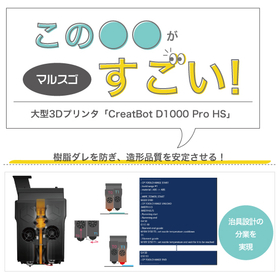
Form3+ adaptable layer pitch that changes the layer thickness of Marsugo.

Malsugo: Speedy printing on gentle slopes with Form 3+! Explaining the amazing changes in "layer pitch."

Marsgo is a document that picks up the functions and features of various products and introduces the "amazing" aspects of them. This time, we will introduce the "Adaptive Layer Height" of the Form 3+, which changes the layer thickness of 3D printing and optimizes it according to the model shape. The biggest feature of the light-curing method "Form 3+" is that the layering marks that shape the three-dimensional object are hardly noticeable! The model is so intricate that it does not give a sense of layer overlap, earning a solid reputation. However, with the "Form 3+", depending on the shape of the model, layering may be noticeable, especially for models with gentle slopes, which can be affected by the layer thickness. Therefore, what we are introducing this time is the "Adaptive Layer Height" of the Form 3+, which changes the layer thickness according to the model shape. It is an amazing feature that places fine layers only where necessary. You do not need to set the layer thickness distribution yourself; it automatically optimizes according to the model shape. With just a simple setting, you won't have to spend a long printing time, and it is a feature that allows you to pursue the smoothness of the model, so please take a look. *You can download the document from the button below.

  • 3D Printer
  • Other CAD
  • plastic
  • Printer

Added to bookmarks

Bookmarks list

Bookmark has been removed

Bookmarks list

You can't add any more bookmarks

By registering as a member, you can increase the number of bookmarks you can save and organize them with labels.

Free membership registration

I tried creating a test piece with Fuse1+30W!

【Mitarepo】I tried creating a test piece with Fuse 1 + 30W!

"Mitarepo" is a series that introduces what can be done using various products with the concept of "I tried doing this!" We will deliver useful information each time from the wide range of product genres handled by System Create. The theme of Vol. 49 is "We tried creating a test piece with Fuse 1 + 30W!" In July, the "Fuse 1 + 30W," equipped with high-output laser and nitrogen filling capabilities, and capable of using high-performance materials with excellent rigidity and strength, was announced as a new addition to the Fuse 1 series. Since then, we have received many inquiries. The first unit of the "Fuse 1 + 30W" has arrived at our company. This time, we will conduct setup, various operation checks, test piece creation, and dimensional reproducibility verification in accordance with the inspection process we carry out for each "Fuse 1" upon arrival. We will explain questions and concerns about the new product, such as "What is different from Fuse 1?" and "Are there differences in operation and print quality?" along with images and measurement results. *You can download the materials from the button below.

  • 3D Printer
  • plastic
  • Prototype Services
  • Printer

Added to bookmarks

Bookmarks list

Bookmark has been removed

Bookmarks list

You can't add any more bookmarks

By registering as a member, you can increase the number of bookmarks you can save and organize them with labels.

Free membership registration

I tried painting a model made with Nylon 12!

"Can beautiful painting be done on sculptures?! We tried painting on 'Fuse1' nylon 12!" | System Create

"Mitarepo" is a series that introduces what can be done using various products with the concept of "I tried doing this!" From the wide range of product genres handled by System Create, we deliver useful information each time. In Vol. 52, we painted a model made of nylon 12 using the powder sintering layered 3D printer "Fuse 1." The "Fuse 1," a powder sintering 3D printer, is highly functional and can be utilized in various scenes. It seems that there are increasing cases where prototypes are not only created for shape confirmation but are also actually incorporated as parts, leveraging their characteristics. In this context, we have received requests to paint models used in proposals and presentations to clarify the feel and completion image. Therefore, this time, we painted a sample of nylon 12 printed with the Fuse 1. "Can I paint it as I imagined?" "What will the texture be like?" We will explain the painting process and the product's texture along with images, addressing any questions or concerns. *You can download the materials from the button below.

  • 3D Printer
  • plastic
  • Prototype Services
  • Printer

Added to bookmarks

Bookmarks list

Bookmark has been removed

Bookmarks list

You can't add any more bookmarks

By registering as a member, you can increase the number of bookmarks you can save and organize them with labels.

Free membership registration