We have compiled a list of manufacturers, distributors, product information, reference prices, and rankings for soft.
ipros is IPROS GMS ・ IPROS One of the largest technical database sites in Japan that collects information on.

soft Product List and Ranking from 2413 Manufacturers, Suppliers and Companies | IPROS GMS

Last Updated: Aggregation Period:Sep 23, 2026~Oct 20, 2026
This ranking is based on the number of page views on our site.

soft Manufacturer, Suppliers and Company Rankings

Last Updated: Aggregation Period:Sep 23, 2026~Oct 20, 2026
This ranking is based on the number of page views on our site.

  1. B7 Tokyo//software
  2. スカイロジック Shizuoka//software
  3. ヒューリンクス Tokyo//software
  4. 4 ウェーブフロント 本社 Kanagawa//software
  5. 5 null/null

soft Product ranking

Last Updated: Aggregation Period:Sep 23, 2026~Oct 20, 2026
This ranking is based on the number of page views on our site.

  1. AI/Navi-equipped Business Automation RPA 'RK Series'
  2. Patsnap Synapse | Pharmaceutical R&D Intelligence パトコア
  3. [マルスゴ]自由なカーブをメッシュ表面に直接作図 システムクリエイト
  4. 4 Aspen Plus process simulation software アスペンテックジャパン/AspenTech
  5. 5 FMEA creation support software "AI-FMEA" ウェーブフロント 本社

soft Product List

7351~7380 item / All 11218 items

Displayed results

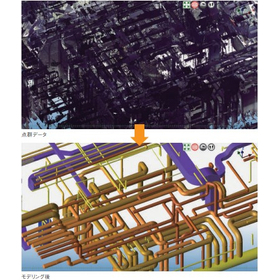
大規模点群モデリングソフト『ClassNK-PEERLESS』

必要な精度で短時間に簡単操作で!機器や、構造物の3次元モデルを作成できる

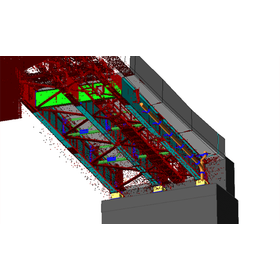
『ClassNK-PEERLESS』は、3次元レーザースキャナで取得した測定点群から 必要な精度で、短時間に3次元モデルを作成します。 規格化された部品、各分野に特化したルールや知識を集約したデータ ベースを利用し、専門知識がなくても、かんたん操作でモデリング可能。 点群では表現できない箇所を3次元モデルで表現することで、造船・工場・ プラントといった大規模構造物の改造およびメンテナンス作業や、設備の レイアウト検討作業の効率化を支援します。 【特長】 ■現状の3次元モデルを作成 ■新設配管のルートを検討 ■機器の3次元モデルを作成 ■構造物の3次元モデルを作成 ※詳しくはPDFをダウンロードしていただくか、お気軽にお問い合わせください。

Added to bookmarks

Bookmarks list

Bookmark has been removed

Bookmarks list

You can't add any more bookmarks

By registering as a member, you can increase the number of bookmarks you can save and organize them with labels.

Free membership registration

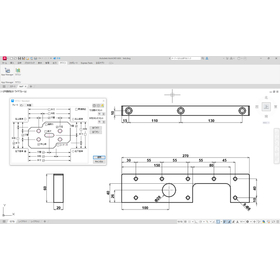
[Free trial version available] Software 'Raksun' that assists in dimension creation.

Easy dimension layout as intended by the designer. Simply select a shape and press a button to automatically arrange necessary dimensions such as outer dimensions and hole spacing!

"Raksun" is an add-in software developed with the concept of "easy dimension creation." It assists in dimension creation within your current CAD environment. This time, we are releasing a trial version of the AutoCAD-specific add-in software in advance! It will be available for free until August 31. ✓ Automatic dimension creation    → Reduction of human errors ✓ Standardization of in-house creation rules    → Reduction of variations ✓ Time-saving in drawing tasks Try it out first and experience the changes in your work. ▼ Download the free trial version from the URL below ▼

  • ラクスン操作画面.jpg
  • 2D CAD machine
  • soft

Added to bookmarks

Bookmarks list

Bookmark has been removed

Bookmarks list

You can't add any more bookmarks

By registering as a member, you can increase the number of bookmarks you can save and organize them with labels.

Free membership registration

Reverse engineering software 'spScan' for repairing damaged molds.

Rapid response to mold damage through digitization.

Damage to molds in mass production can disrupt production plans, making prompt action essential. spScan can perform non-contact measurements of the current shape of damaged molds and compare the obtained point cloud data with the CAD data from the initial design stage, allowing for "partial reverse" corrections only in areas where discrepancies exist. This enables the rapid preparation of CAD data necessary for repairs, preventing production line stoppages. - Identification and correction of discrepancies through comparison of measurement data and design CAD data - Efficient repair work using partial reverse methods - Reduction of re-damage risk and improvement of mold strength - Enables rapid repair of mass production molds, preventing production interruptions *For more details, please visit the page below or feel free to contact us.

  • Other CAD related software
  • soft

Added to bookmarks

Bookmarks list

Bookmark has been removed

Bookmarks list

You can't add any more bookmarks

By registering as a member, you can increase the number of bookmarks you can save and organize them with labels.

Free membership registration

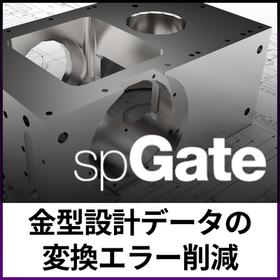
Multi-data conversion software 'spGate' for utilizing STL data in CAD

Freely manipulate STL data with CAD!

The STL data obtained from 3D printers, 3D scanners, and CAE software poses a challenge as it is difficult to edit directly in CAD systems. CAD systems excel at handling surface data in formats like IGES and are not suited for direct processing of STL data. The solution to this challenge is the CAD data multi-conversion software "spGate." By converting STL data to IGES data, spGate enables free editing of STL data within existing CAD systems. This allows for processes that CAD systems excel at, such as creating cross-sectional shapes and extracting contours, to be performed on STL data. 【Features and Benefits】 - Converts STL data to IGES data, enabling editing in existing CAD environments. - Equipped with a rich set of STL editing functions, including polygon reduction, smoothing, hole filling, and partial deletion. *For more details, please visit the page below or feel free to contact us.

  • gat07_3.png
  • Data conversion software
  • soft

Added to bookmarks

Bookmarks list

Bookmark has been removed

Bookmarks list

You can't add any more bookmarks

By registering as a member, you can increase the number of bookmarks you can save and organize them with labels.

Free membership registration

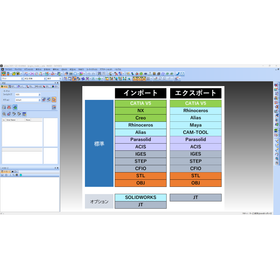
Multi-data conversion software 'spGate' achieves cost reduction and efficiency!

Consolidate maintenance and operational costs of multiple CAD systems with spGate! 85% reduction in annual costs!

When a company introduces multiple CAD software, there is the challenge of increasing maintenance costs and the complexity of operational management for each software. Expensive maintenance contracts and software update costs can become a financial burden. "spGate" addresses this issue by supporting various CAD formats with a single software, significantly reducing these costs and efforts. For example, there have been cases where the maintenance cost for multiple CAD systems, which was 2.71 million yen annually, was reduced to 380,000 yen per year with just one spGate, achieving a reduction of about 85%. 【Features and Benefits】 - Consolidation of maintenance costs: Aggregating the maintenance costs of multiple CAD licenses into spGate. - Simplification of operational management: Addressing various CAD formats with just one spGate, reducing the effort required for managing and operating multiple software. - Wide format support: Standard support for major 3D CAD data formats such as CATIA, NX, Creo, ALIAS, Rhinoceros, Maya, CAM-TOOL, IGES, STEP, STL, etc. *For more details, please download the PDF or feel free to contact us.

  • spGate2.png
  • Data conversion software
  • soft

Added to bookmarks

Bookmarks list

Bookmark has been removed

Bookmarks list

You can't add any more bookmarks

By registering as a member, you can increase the number of bookmarks you can save and organize them with labels.

Free membership registration

Product inspection using point cloud 'spGauge' AI improves welding quality.

Significantly improving inspection accuracy and efficiency with AI welding spot inspection.

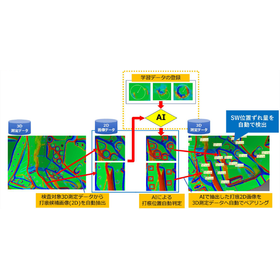
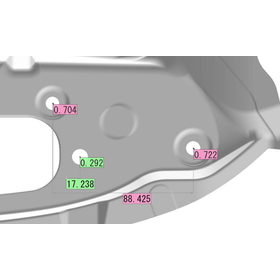
Conventional welding spot inspections have been conducted using visual confirmation, distance measurements, and contact measuring devices. However, these methods have faced challenges such as long measurement times, variability in results due to the operator, and low detection rates when the indentations are small. Particularly, when the shape reproducibility of 3D scanners is low, automatic detection can become difficult. The "AI Welding Spot Inspection" feature addresses these challenges, enabling simpler and more precise welding spot inspections. By analyzing the curvature gradient images projected onto the weld marks, AI reduces measurement time, improves detection accuracy, and eliminates variability in results caused by human operators, significantly contributing to the efficiency and reliability of welding quality management. **Features of spGauge AI Welding Spot Inspection:** - Achieves a high automatic detection rate even when the indentations of the weld marks are small or when the shape reproducibility of the 3D scanner is low. - Significantly reduces false detections compared to conventional inspection functions. - Supports a series of tasks including automatic pairing with 3D measurement data, automatic detection of positional deviations, and report generation. *For more details, please refer to the page below or feel free to contact us.*

  • spg14_10.png
  • Other CAD related software
  • soft

Added to bookmarks

Bookmarks list

Bookmark has been removed

Bookmarks list

You can't add any more bookmarks

By registering as a member, you can increase the number of bookmarks you can save and organize them with labels.

Free membership registration

Deformation software for analysis mesh data 'AE-Deform'

Equipped with the ability to fit and deform mesh data for analysis to non-contact measurement data of real shapes! Enables analysis that reflects real shapes.

The shapes obtained from non-contact measurement of molds and products are deformed to create mesh shape data for analysis based on the STL. This allows for the integration of the "real" shape of the physical object into "virtual" analysis technology, making it possible to apply digital twin technology that reproduces the real world digitally. [Application as Real CAE Analysis in Press Panel Forming Analysis] By utilizing the mesh deformation technology of AE-Deform, it becomes possible to compare the virtual data of press panel products with the actual data based on the deformed mold shape that reflects the deformation and know-how. This enables optimization of modification plans and reduction of man-hours. [Application as Real FEM Analysis in Collision Analysis and Prototyping] With AE-Deform, it is possible to deform the mesh data for FEM analysis based on the product CAD data from the design phase to fit the actual shape of the press panel. By conducting FEM analysis using the deformed mesh data, realistic collision and safety performance analysis can be performed before actual collision tests. This can reduce the trial and error man-hours in testing through prior verification and improve development efficiency.

  • 02-2.png
  • Other CAD related software
  • soft

Added to bookmarks

Bookmarks list

Bookmark has been removed

Bookmarks list

You can't add any more bookmarks

By registering as a member, you can increase the number of bookmarks you can save and organize them with labels.

Free membership registration

Field DX with point cloud modeling software ClassNK-PEERLESS!

Modeling point clouds into digital transformation assets. Utilized for current situation assessment, measurement, and interference verification!

"Point cloud data" obtained from 3D laser scanning and other methods is a "copy of the site" that records spatial information with a large number of points. However, as it is, the data volume is large, making it difficult to utilize. Therefore, modeling from point clouds becomes important. This allows for the transformation of mere measurement results into "digital information that can be utilized in business." By modeling point cloud data, the convenience in various situations such as data sharing, measurement, interference confirmation, utilization of existing 3D systems, and client reports is greatly enhanced. For those concerned about costs, we encourage you to experience ClassNK-PEERLESS modeling. With intuitive and easy-to-use functionality, you can model according to standards even without design knowledge, which is expected to reduce time and labor costs.

Added to bookmarks

Bookmarks list

Bookmark has been removed

Bookmarks list

You can't add any more bookmarks

By registering as a member, you can increase the number of bookmarks you can save and organize them with labels.

Free membership registration

Utilization of the multi-data conversion software 'spGate' in packaging design.

Roughly simplify the shape. Support data lightweighting, confidentiality measures, and packaging design through voxelization.

The voxelization feature of spGate converts complex and heavy CAD data into rough cube (voxel) models, serving as a useful function for confidentiality and data lightweighting. However, its applications do not stop there. By applying this method of intentionally simplifying shapes, it is possible to grasp the general form of the contents and develop packaging material designs accordingly.

  • spGate説明資料.png
  • Data conversion software
  • soft

Added to bookmarks

Bookmarks list

Bookmark has been removed

Bookmarks list

You can't add any more bookmarks

By registering as a member, you can increase the number of bookmarks you can save and organize them with labels.

Free membership registration

Product inspection using point cloud technology: 'spGauge' for detecting defects in resin products.

From detecting defects in resin products to issuing countermeasures.

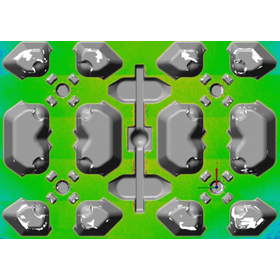
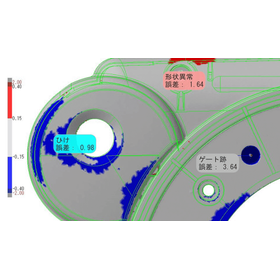
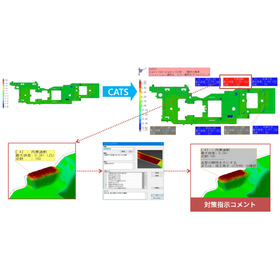
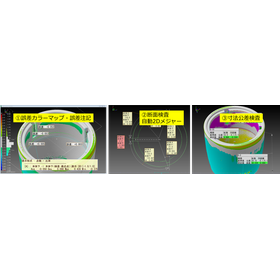
The optional feature "CATS_Mold" of spGauge automatically detects defective areas based on the shape inspection results (color map) of resin molded products and displays notes according to the phenomena. The detectable phenomena include a wide range such as "sink marks," "insufficient filling," "abnormalities in ejector pin marks," "dimensional abnormalities," and "warping/twisting," with different optimal countermeasures for each phenomenon. In CATS_Mold, countermeasures corresponding to the defect phenomena are selected from a database, integrating the phenomenon and countermeasure for note display. This allows for consistent inspection and countermeasure instructions by anyone, without relying on the judgment of experienced personnel. Additionally, in molds with multiple cavities, variations in products can occur even with the same processing data (CAM) due to the influence of gate positions and cooling channels, making it time-consuming to align everything to the same shape or make adjustments to fit combinations. By using spGauge, it is possible to understand the deformation trends of each part from the shape inspection data and find the optimal combination pattern that minimizes reprocessing.

  • Other CAD related software
  • soft

Added to bookmarks

Bookmarks list

Bookmark has been removed

Bookmarks list

You can't add any more bookmarks

By registering as a member, you can increase the number of bookmarks you can save and organize them with labels.

Free membership registration

Support for creating drawings from point cloud data through 3D modeling! [Case study link available]

Anyone can easily create 3D models! A modeling software that makes drafting even easier.

Creating architectural drawings requires specialized knowledge, which often leads to a concentration of work among veteran employees, making the development of younger staff a challenge. While utilizing 3D data can streamline the work process, point cloud data alone may not always provide an accurate understanding of detailed situations. The solution to this problem is modeling point cloud data. By modeling the point cloud, unnecessary noise can be clearly distinguished from necessary information, allowing everyone to accurately understand the situation. ClassNK-PEERLESS is software that enables this modeling process intuitively. With simple operations that involve just tracing the point cloud, even less experienced young employees can quickly master it. Furthermore, by using a free viewer, veteran employees can easily check the models and provide efficient feedback. By leveraging ClassNK-PEERLESS in this way, all processes from understanding the situation and sharing information to creating drawings are streamlined, leading to an increase in overall team productivity. We have examples of actual cases where ClassNK-PEERLESS has been implemented and utilized for drawing creation on the following page. Please take a look.

  • others
  • Modeler
  • soft

Added to bookmarks

Bookmarks list

Bookmark has been removed

Bookmarks list

You can't add any more bookmarks

By registering as a member, you can increase the number of bookmarks you can save and organize them with labels.

Free membership registration

[Case Study of Large-Scale Point Cloud Modeling Software] Keiwan Office

Case Study of Modeling Focused on Bridges: Expanding the World of Bridges with a Dual Approach of Point Clouds and Modeling

At Office K1 Co., Ltd., which is working on promoting DX for bridges, point cloud data is utilized to confirm the current state of existing bridges. To address structures like old bridges that do not have drawings, they have begun creating 2D drawings through modeling. However, conventional software struggled to balance accuracy and usability, and processing speed was also an issue. In response, they introduced "ClassNK-PEERLESS," which allows for easy operation and high-precision modeling. For the modeling of drainage system piping, they applied piping functions to steel members such as main girders and cross girders, creating an environment that can flexibly accommodate bridge structures. After the introduction, the time for a series of tasks from field measurement to modeling was significantly reduced from about one week to approximately 10 hours (per span). Additionally, they built an in-house simulator based on the simple models created with PEERLESS, allowing for pre-checking of scan positions and blind spots, further expanding the range of applications for point cloud data. 【Results of Implementation】 - The work time from field measurement to modeling was significantly reduced from about one week to 10 hours. - An in-house simulator was built based on simple models to pre-check scan positions and blind spots, expanding the scope of point cloud utilization.

Added to bookmarks

Bookmarks list

Bookmark has been removed

Bookmarks list

You can't add any more bookmarks

By registering as a member, you can increase the number of bookmarks you can save and organize them with labels.

Free membership registration

Product inspection software 'spGauge' <I want to detect distortion in the product appearance>

A function to detect distorted areas using the "grinding stone" and "three-point gauge" methods on measurement point group data!

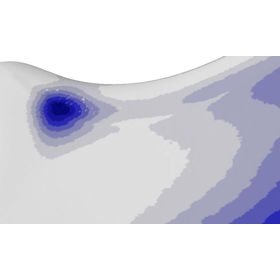
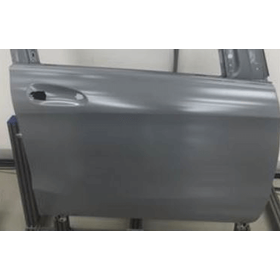
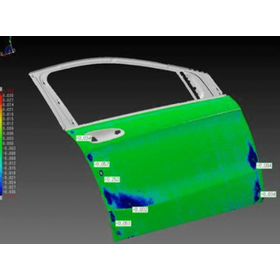
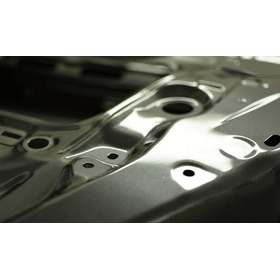
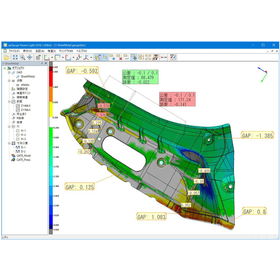
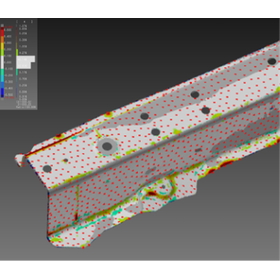
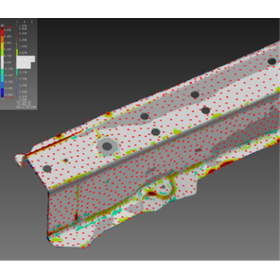
The product inspection software 'spGauge' can be utilized for detecting distortion in the appearance of products in press and resin manufacturing. When light is shone on the molded parts, the distorted areas appear refracted, making it quite difficult and time-consuming to detect distortions that are several tens of microns deep on free-form surfaces. This product allows for the detection of distorted areas by displaying them as a color map from the point cloud data. 【Product Features】 ■ Ability to display and identify distorted areas as a color map from point cloud data ■ Functionality to detect distorted areas using the "grinding stone" and "three-point gauge" methods on point cloud data *For more details, please download the PDF or feel free to contact us.

  • 1-2.png
  • 1-3.png
  • Other CAD related software
  • soft

Added to bookmarks

Bookmarks list

Bookmark has been removed

Bookmarks list

You can't add any more bookmarks

By registering as a member, you can increase the number of bookmarks you can save and organize them with labels.

Free membership registration

Product inspection software 'spGauge' <Reduction of modification time for multi-cavity molds>

Finding combinations that require minimal mold modifications is crucial for reducing labor hours!

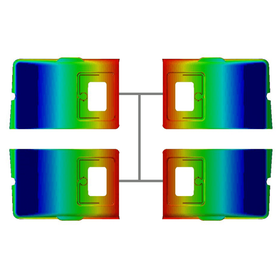
The product inspection software 'spGauge' can be utilized to shorten the modification time of multi-cavity molds in resin manufacturing. When combining molds for multi-cavity parts with molds that accommodate multiple cavities, it is important to find combinations that minimize gaps and interference, thereby reducing the need for mold modifications, which is crucial for labor-saving. By using this product, you can verify the deformation of each part's data from the shape inspection results and find combinations that require minimal reprocessing. 【Product Features】 ■ It is possible to verify the deformation of each part's data from the shape inspection results and find combinations that require minimal reprocessing. *For more details, please download the PDF or feel free to contact us.

  • 2-2.png
  • Other CAD related software
  • soft

Added to bookmarks

Bookmarks list

Bookmark has been removed

Bookmarks list

You can't add any more bookmarks

By registering as a member, you can increase the number of bookmarks you can save and organize them with labels.

Free membership registration

Product inspection software 'spGauge' <Design and manufacturing business support functions>

From detecting defects in resin products to issuing countermeasure instructions! Building a user-specific database for countermeasure instructions.

The product inspection software 'spGauge' can be utilized to support the design and manufacturing operations of resin manufacturers. With shape inspection (error color map), it is easy to identify the locations and phenomena of defects; however, simply displaying the defective areas can lead to human errors such as oversight or misjudgment in countermeasures. This product not only detects defective areas that differ from CAD data without omission and displays the number of defective locations, but it can also annotate phenomena and causes inferred from the characteristics of the CAD data shape. 【Product Features】 ■ The optional feature CATS_Mold includes a function that displays phenomenon annotations for defective areas based on shape inspection results. ■ A user-specific database for countermeasure instructions can be built, allowing for easy instruction of countermeasures for the phenomena of defective areas. *For more details, please download the PDF or feel free to contact us.

  • 3-2.png
  • Other CAD related software
  • soft

Added to bookmarks

Bookmarks list

Bookmark has been removed

Bookmarks list

You can't add any more bookmarks

By registering as a member, you can increase the number of bookmarks you can save and organize them with labels.

Free membership registration

Product inspection software 'spGauge' <Verification of phenomena between processes of press molds>

Can be utilized in Yachin! It is possible to use it for comparison between press mold processes.

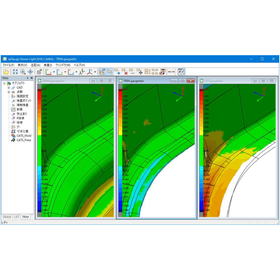
The "spGauge Viewer Light" is a tool that allows for easy verification of areas that have changed between the processes of press forming. During the prototype stage of mold development, it is necessary to confirm whether the problematic areas have been properly corrected between processes and whether any new issues have arisen as a result of the corrections. This tool can display error color maps of the same areas (coordinate positions) of measurement data for press products formed in each process side by side. 【Product Features】 ■ It can display error color maps of the same areas (coordinate positions) of measurement data for press products formed in each process side by side. ■ It allows for easy confirmation that areas where springback occurred in the previous process are being formed correctly in the next process, and that abnormalities have arisen in areas that had no issues in the previous process. *For more details, please download the PDF or feel free to contact us.

  • 4-2.png
  • Other CAD related software
  • soft

Added to bookmarks

Bookmarks list

Bookmark has been removed

Bookmarks list

You can't add any more bookmarks

By registering as a member, you can increase the number of bookmarks you can save and organize them with labels.

Free membership registration

Product inspection software 'spGauge' <Share inspection results in 3D data>

By conveying inspection results that include 3D data, there is no need to create a report, and information can be communicated without any omissions!

The "spGauge Viewer Light" is a free license software that allows you to check the inspection results of "spGauge." When transmitting inspection results from the inspection department to various departments such as design, analysis, processing, and molding, a tremendous amount of time is spent creating images and tables. The data from this product (data that can be created with the spGauge main unit) can be pasted into Microsoft Office, allowing for three-dimensional movement and rotation view operations within Office software. 【Product Features】 ■ Free license software that allows you to check the inspection results of spGauge ■ Data created with the spGauge main unit can be pasted into Microsoft Office (Excel, Word, PowerPoint), enabling three-dimensional movement and rotation view operations within Office software. *For more details, please download the PDF or feel free to contact us.

  • 5-2.png
  • Other CAD related software
  • soft

Added to bookmarks

Bookmarks list

Bookmark has been removed

Bookmarks list

You can't add any more bookmarks

By registering as a member, you can increase the number of bookmarks you can save and organize them with labels.

Free membership registration

Research Utilization of Inspection Software "spGauge" in the Dental, Oral, and Maxillofacial Fields

spGauge supports a new evaluation method for dental and oral research by visualizing the accuracy of dental models and CT models in 3D.

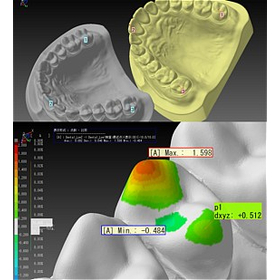
The 3D measurement software "spGauge" from Armonicos was originally developed for the purpose of inspecting the shapes of industrial products, but in recent years it has also been used in research to examine the shapes of teeth and jaws. In the fields of dentistry and oral health, it is important to accurately measure the size, angle, and asymmetry of teeth using 3D data obtained from dental impressions and CT images. spGauge can compare and evaluate complex shapes with micron-level precision, allowing for the objective quantification of differences in models and scan data. In practice, universities and research institutions have utilized it in experiments to investigate changes in jaw shape and dental alignment, and its application in medical 3D analysis is advancing. The "precision measurement" technology honed in the manufacturing industry is now also contributing to research aimed at understanding the shapes of the human body.

  • Reip_Gauge2.jpg
  • Other CAD related software
  • soft

Added to bookmarks

Bookmarks list

Bookmark has been removed

Bookmarks list

You can't add any more bookmarks

By registering as a member, you can increase the number of bookmarks you can save and organize them with labels.

Free membership registration

Streamlining Supply Production: Mold Restoration with Reverse Engineering Software

Significantly reduce the man-hours for automobile development! A reverse engineering tool dedicated to accurately CAD modeling complex freeform surfaces, "spScan."

This is a dedicated tool for creating high-quality NURBS surfaces from 3D point cloud and polygon data obtained by non-contact scanners, making it easy to utilize in design and analysis. It excels in modeling complex freeform surfaces, such as automotive bodies and interior components, achieving smooth surface compositions with fewer control points in a short amount of time. 【Use Cases】 - CAD conversion of design clay models In the early stages of development, where shape changes are frequent, it quickly creates high-precision surface data from actual clay models, streamlining design considerations and component layout evaluations. - Feedback of hand-finished mold shapes to design The "partial reverse" function allows for the extraction of only the areas adjusted or modified by craftsmen on-site, enabling minimal effort to reflect these changes in existing CAD data. - Restoration of molds for spare parts and competitive analysis Scanning actual parts from discontinued vehicles or products from other companies and converting them to CAD data for use in remaking spare parts or benchmark analysis. 【Benefits of Implementation】 By allowing modeling while checking for discrepancies with design data, it reduces rework. The created data can be output in common formats such as IGES and STEP, making it usable in subsequent CAD/CAM/CAE systems.

  • Other CAD related software
  • soft

Added to bookmarks

Bookmarks list

Bookmark has been removed

Bookmarks list

You can't add any more bookmarks

By registering as a member, you can increase the number of bookmarks you can save and organize them with labels.

Free membership registration

AE-Deform for Automotive Collision Analysis

Achieving improved accuracy and efficiency in collision analysis through mesh data deformation tailored to the actual shape.

In the automotive industry, collision analysis requires simulations that accurately reflect the actual vehicle shape. There can be discrepancies between the CAD data from the design phase and the actual vehicle shape, which may affect the accuracy of the analysis results. AE-Deform enables analysis under more realistic conditions by deforming the mesh data for analysis to match the actual vehicle shape obtained from non-contact measurement data. This enhances the accuracy of simulations prior to crash tests, contributing to reduced development time and cost savings. 【Usage Scenarios】 - Collision analysis reflecting the actual vehicle shape - Shape verification after design changes - Pre-evaluation of collision safety performance 【Benefits of Implementation】 - Improved analysis accuracy - Reduction in the number of tests - Shortened development period - Cost savings

  • 02-2.png
  • Other CAD related software
  • soft

Added to bookmarks

Bookmarks list

Bookmark has been removed

Bookmarks list

You can't add any more bookmarks

By registering as a member, you can increase the number of bookmarks you can save and organize them with labels.

Free membership registration

Innovating molding simulation with AE-Deform for molds.

Optimize mold design and molding simulation with analysis reflecting real shapes.

In the mold industry, the accuracy of molding simulation greatly influences product quality and manufacturing efficiency. It is important to accurately predict the actual molding process and identify potential issues during the mold design phase. AE-Deform achieves high-precision simulations by reflecting realistic mold shapes obtained from non-contact measurement data into the analysis mesh. This contributes to a reduction in the number of prototypes, an improvement in product quality, and a shortening of development time. 【Application Scenarios】 - Molding simulation based on mold shape - Press panel molding analysis - Application to digital twin technology 【Effects of Implementation】 - Optimization of modification plans and reduction of man-hours - Realistic collision and safety performance analysis - Reduction of trial-and-error man-hours in testing and increased development efficiency

  • 02-2.png
  • Other CAD related software
  • soft

Added to bookmarks

Bookmarks list

Bookmark has been removed

Bookmarks list

You can't add any more bookmarks

By registering as a member, you can increase the number of bookmarks you can save and organize them with labels.

Free membership registration

[For the Machinery Industry] Raksun: Dimension Creation Assistance Software

Dimension layout as intended by the designer! Streamlining dimension notation in 2D drawings.

In the machinery industry, accurate verification of the range of motion is required during the product design stage. Dimensioning in 2D drawings is essential for confirming the arrangement of parts and checking for interference, but manual dimension placement is time-consuming and prone to errors. Raksun addresses this challenge by analyzing the shape information of 2D drawings and supporting dimension placement that aligns with the designer's intent. 【Usage Scenarios】 - Dimensioning for part drawings with complex shapes and numerous holes - Efficient dimension addition to 2D drawings - Systematizing the know-how of experienced designers to support younger designers in drafting 【Benefits of Implementation】 - Labor reduction: Significantly reduces the effort required for manual dimension input. - Quality stabilization: Reduces human error and minimizes variation among different designers. - Smooth collaboration: Prevents discrepancies in interpretation in later processes through common rules for drafting. "Raksun" offers flexible customization tailored to the specific design environment of each customer. By incorporating unique dimension creation rules established by the company into the system, a more practical environment can be built. Please feel free to consult us.

  • ラクスン操作画面.jpg
  • 2D CAD machine
  • soft

Added to bookmarks

Bookmarks list

Bookmark has been removed

Bookmarks list

You can't add any more bookmarks

By registering as a member, you can increase the number of bookmarks you can save and organize them with labels.

Free membership registration

Easy Dimension Layout Software for Furniture Design

Dimension arrangement as intended by the designer! Significant reduction in design man-hours.

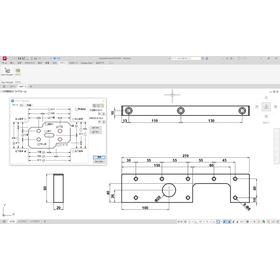
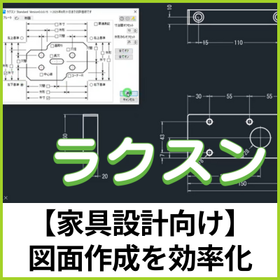
In the furniture industry, accuracy and efficiency in design drawings are essential. Furniture design, which combines complex shapes and diverse parts, often requires significant time for dimension notation and is prone to manual errors. "Raksun" is software that analyzes the shape information of 2D drawings and assists in dimension placement according to the designer's intent. By simply selecting the target rectangle, it automatically generates dimensions based on rules. It achieves a "visually appealing arrangement" that was difficult with the automatic functions of general-purpose CAD, dramatically reducing manual labor. 【Usage Scenarios】 - Dimension notation for part drawings - Efficient dimension addition to 2D drawings - Systematizing the know-how of experienced designers to support younger designers in drafting 【Benefits of Implementation】 - Labor reduction: Significantly reduces the effort required for manual dimension input. - Quality stabilization: Reduces human errors and minimizes variations among designers. - Smoother collaboration: Prevents discrepancies in interpretation during later processes through common rules for drafting. In addition to standalone use, "Raksun" can be flexibly customized to fit the specific design environment of customers. By incorporating unique dimension creation rules into the system, a more practical environment can be established. Please feel free to consult us.

  • ラクスン操作画面.jpg
  • 2D CAD machine
  • soft

Added to bookmarks

Bookmarks list

Bookmark has been removed

Bookmarks list

You can't add any more bookmarks

By registering as a member, you can increase the number of bookmarks you can save and organize them with labels.

Free membership registration

CAD data conversion software for molds 'spGate'

Supporting the improvement of precision in mold design and manufacturing! Solving the challenges of data conversion.

In the mold industry, the accuracy of design data significantly affects product quality. Particularly for molds that require complex shapes or high precision, errors and inconsistencies during data conversion can adversely impact the entire design and manufacturing process. Issues with CAD data compatibility can lead to delays in design changes and increased costs. The CAD data conversion software 'spGate' supports a wide range of file formats, enabling smooth collaboration from design to manufacturing. [Usage Scenarios] - Conversion of mold design data - Data collaboration between different CAD systems - Data modifications due to design changes [Benefits of Implementation] - Reduction of data conversion errors - Streamlining of design and manufacturing processes - Improvement in product quality

  • spgate_ad1.png
  • Other CAD related software
  • soft

Added to bookmarks

Bookmarks list

Bookmark has been removed

Bookmarks list

You can't add any more bookmarks

By registering as a member, you can increase the number of bookmarks you can save and organize them with labels.

Free membership registration

[Case Study] Cosmo Engineering Co., Ltd.

The reality of plant DX challenged by point clouds × PEERLESS! Smart utilization of point clouds to achieve cost reduction.

We spoke with Cosmo Engineering Co., Ltd. about their utilization of "ClassNK-PEERLESS." The company was using a different point cloud processing software, but they decided to implement "ClassNK-PEERLESS" because it can reproduce point cloud data into highly accurate models, which became necessary as the number of modeling projects increased. They measure point cloud data using a 3D laser scanner, perform processing such as synthesis and weight reduction, and then incorporate it into "ClassNK-PEERLESS" for modeling and interference checks. [Case Overview] ■ Reason for Implementation: The ability to reproduce point cloud data into highly accurate models ■ Business Activities: Interference checks for existing modifications, changes to piping routes, and consideration of new equipment to be installed within buildings ■ Implementation Effects - Increased utilization of point clouds - Cost reduction in operations - Ability to indicate that a reproduction of approximately LOD300 is possible at the proposal stage *For more details, please download the PDF or feel free to contact us.

Added to bookmarks

Bookmarks list

Bookmark has been removed

Bookmarks list

You can't add any more bookmarks

By registering as a member, you can increase the number of bookmarks you can save and organize them with labels.

Free membership registration

[spGauge Use Case] Takagi Corporation

Streamline product inspection with spGauge! Utilize it as a standard tool for inspecting non-contact measurement data.

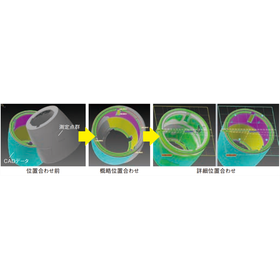
We spoke with Takagi Corporation about how our inspection software "spGauge" is utilized in their inspection operations during product development. To improve the efficiency of inspection operations, "spGauge" was introduced in 2013 along with an arm-type non-contact laser scanner. Since then, additional licenses have been added to strengthen inspection operations, and it has been continuously used for many years. The alignment of product CAD data and measurement point cloud data is crucial, and the presence of a specified alignment function led to the decision to implement "spGauge." 【Case Summary】 ■ Implementation Period: Introduced in 2013 along with the arm-type non-contact laser scanner ■ Reason for Implementation: The presence of a specified alignment function ■ Utilization Content: Product inspection using detailed alignment functions ■ Example of Use: Inspection of resin parts for watering products *For more details, please download the PDF or feel free to contact us.

Added to bookmarks

Bookmarks list

Bookmark has been removed

Bookmarks list

You can't add any more bookmarks

By registering as a member, you can increase the number of bookmarks you can save and organize them with labels.

Free membership registration

DX Promotion Solution for Manufacturing Industry (Virtual Integrated BI)

We strongly support the realization of factor analysis and process optimization with a DX promotion solution centered on virtual integrated BI!

We will centrally visualize all data through three pillars: virtual integrated BI, content creation (digitization of paper documents), and data preparation/data cleansing. By virtually integrating various data sources from the manufacturing department in their raw form, we can quickly achieve cause analysis and process optimization. <Three Menus for Visualizing Data> 1. Provision of BI tools using virtual integration technology The BI provided by J.I.M adopts virtual integration technology. This technology allows for direct data acquisition from different data sources. Unlike traditional BI tools, there is no need to build a data warehouse, enabling the establishment of infrastructure in a short period, at low cost, and with low risk. 2. Conversion of paper documents related to analytical data into electronic data We scan paper documents to create image data such as PDFs. We also input data to create text data. This allows for advanced analysis that takes into account the background of the data, as it can be linked with the data to be analyzed. 3. Normalization and cleansing of data with inconsistent formats or representations If you are struggling with data types that are inconsistent, have different formats, or different representations that you want to utilize in BI, we will perform data preparation and cleansing as a preprocessing step before implementation.

  • Business Intelligence and Data Analysis
  • Document and Data Management
  • Other contract services
  • soft

Added to bookmarks

Bookmarks list

Bookmark has been removed

Bookmarks list

You can't add any more bookmarks

By registering as a member, you can increase the number of bookmarks you can save and organize them with labels.

Free membership registration

DX Promotion Solution for the Quality Assurance Department (Virtual Integrated BI)

We strongly support the early detection of issues in quality assurance with a DX promotion solution centered around virtual integrated BI!

Data integration is easy, allowing for smooth "5 Whys Analysis." It enables quick identification of the root causes of problems and facilitates prompt responses. This is widely used by quality assurance departments that possess a diverse range of vast data, including design quality, manufacturing quality, and market quality. <Three Menus for Data Visualization> 1. Provision of BI tools using virtual integration technology The BI offered by JIM employs virtual integration technology. This technology allows for direct data retrieval from different data sources. Unlike traditional BI tools, there is no need to build a data warehouse, enabling the establishment of infrastructure in a short time, at low cost, and with low risk. 2. Conversion of paper documents related to analysis data into electronic data Paper documents are scanned to create image data such as PDFs. Additionally, data entry is performed to create text data. This allows for advanced analysis that takes into account the background of the data, as it can be linked with the data to be analyzed. 3. Normalization and cleansing of data with inconsistent formats or representations If you are struggling with data types that are inconsistent, have different formats, or different representations that you want to utilize in BI, we will perform data preparation and cleansing as a preprocessing step before implementation.

  • Business Intelligence and Data Analysis
  • Document and Data Management
  • Other contract services
  • soft

Added to bookmarks

Bookmarks list

Bookmark has been removed

Bookmarks list

You can't add any more bookmarks

By registering as a member, you can increase the number of bookmarks you can save and organize them with labels.

Free membership registration

Software "eGrabber"

Supports Windows, Linux, and macOS! It supports platforms such as ARM 64-bit.

"eGrabber" is an image capture software equipped with a rich set of tools for image capturing and recording. It supports GigE Vision cameras and CoaXPress cameras. Additionally, it allows recording to a hard drive. Furthermore, we offer various products such as "eGrabber Gigelink," which enables image capture from GigE Vision cameras within the software, and "eGrabber Recorder," a high-performance video recording library. 【Features】 ■ A rich set of tools for image capturing and recording ■ Supports GigE Vision cameras (optional Gigelink library required) ■ Supports CoaXPress cameras (Coaxlink card required) ■ Compatible with Windows, Linux, and macOS ■ Recording to hard drive (optional Recorder library required) *For more details, please refer to the PDF document or feel free to contact us.

  • Image Processing Software
  • soft

Added to bookmarks

Bookmarks list

Bookmark has been removed

Bookmarks list

You can't add any more bookmarks

By registering as a member, you can increase the number of bookmarks you can save and organize them with labels.

Free membership registration